How to render below-fold sections later
Turbo Render lets the browser paint the top of the page first and bring the lower sections in as visitors scroll — the same content, delivered in a smarter order.
A browser lays out and paints the whole page before it shows anything — including the sections nobody has scrolled to yet. On a long page-builder layout that is most of the work, done for content the visitor may never see. Turbo Render tells the browser to skip that work until each lower section is about to come into view.
Where to find it
- In your WordPress admin, click xSpeed Cache in the left menu.
- In the xSpeed Cache sidebar, open the Optimization group.
- Click the Turbo Render card.
Shortcut: open
wp-admin/admin.php?page=xspeed#/performance/turbo-renderdirectly.✅ This panel is part of xSpeed Cache (Free).
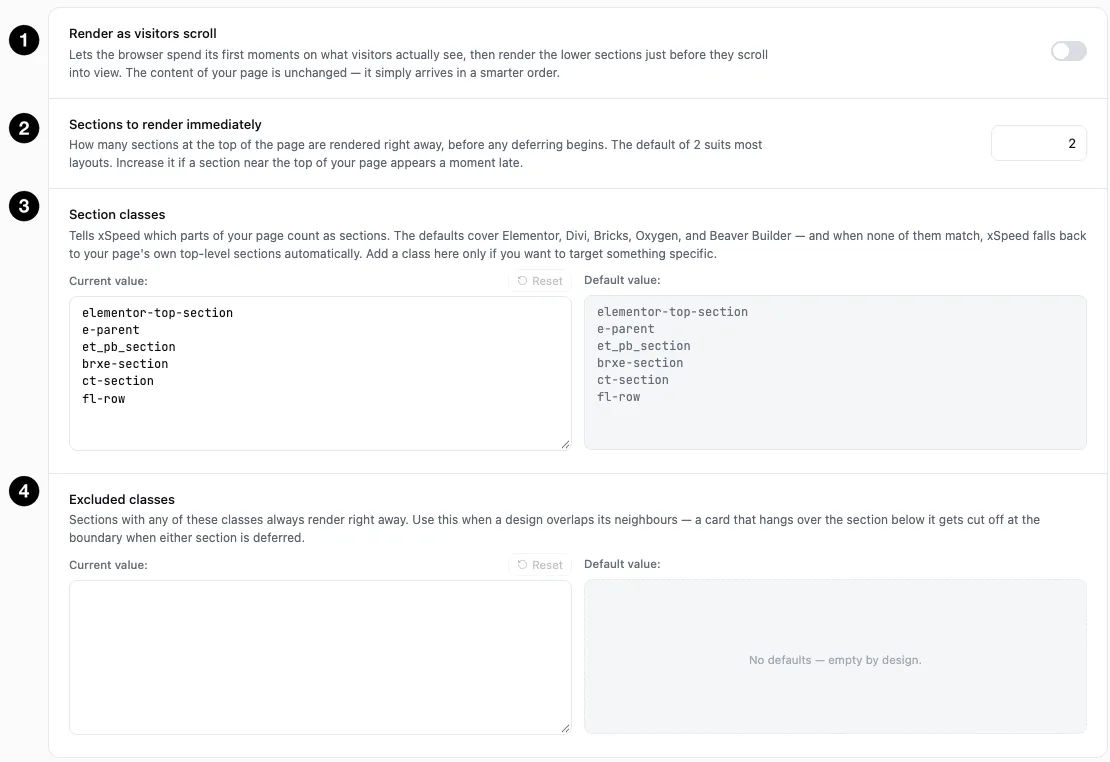
- Render as visitors scroll — the master switch.
- Sections to render immediately — how many top sections are never deferred.
- Section classes — what counts as a section on your site.
- Excluded classes — sections that must always render straight away.
Settings at a glance
| Setting | Default | What it does |
|---|---|---|
| Render as visitors scroll | Off | Defer rendering of below-fold sections until they approach the viewport. |
| Sections to render immediately | 2 | How many sections at the top are rendered right away. Range 1–10. |
| Section classes | Elementor, Divi, Bricks, Oxygen and Beaver Builder classes | Which elements count as a section. |
| Excluded classes | Empty | Sections that always render immediately. |
How it works
Turbo Render marks each below-fold section so the browser can skip its layout and paint work until it is needed, then renders it just before it scrolls into view. Nothing is removed and nothing loads later — the HTML is all there, and the text is still in the page for search engines and screen readers. Only the moment the browser draws each lower section changes.
That makes it different from the rest of this group. Minification changes what is sent, lazy-loading changes when media is fetched; Turbo Render changes only how the browser spends its first few hundred milliseconds.
It works on most themes. The defaults recognise Elementor, Divi, Bricks, Oxygen and Beaver Builder sections directly. When none of those match, xSpeed falls back to the top-level sections inside your page’s <main> element, so a block theme or a hand-built template that uses one gets the same treatment without configuration.
Sections to render immediately
Default 2, range 1–10. These top sections are never deferred, because they are what the visitor sees first — deferring them would delay the very thing the setting exists to speed up.
Raise it if a section near the top of your page appears a moment late. That usually means your layout puts more than two sections above the fold, or your hero is built from several stacked sections.
Section classes
This is the list of classes that tell xSpeed “this element is a section”. The shipped defaults cover the major builders:
| Class | Builder |
|---|---|
elementor-top-section, e-parent | Elementor |
et_pb_section | Divi |
brxe-section | Bricks |
ct-section | Oxygen |
fl-row | Beaver Builder |
You only need to add to this list to target something specific — a custom wrapper your theme uses for its content rows, for instance. Leaving it alone is right for most sites, since the automatic fallback already handles themes none of these classes match.
Excluded classes
The escape hatch, and the setting to reach for when a page looks wrong.
Sections with any of these classes always render immediately. Use it when a design overlaps its neighbours. A deferred section clips anything hanging over its boundary, so a card that deliberately overlaps the section below it gets cut off at the edge until that section renders. Excluding the deferred section fixes it — often both sections, since the clipping happens when either one is deferred.
Two things are handled for you, so they need no exclusion:
- Sections containing an iframe are never deferred. Deferring a map or a video holder gained nothing, and could paint it over content it overlaps by design.
- The first sections are never deferred, per the setting above.
⚠️ Check a long page after switching this on, and scroll it slowly — in a private window. Turbo Render skips logged-in visitors, so your admin view never changes. The failure mode is visual rather than functional: an overlapping card clipped at a section boundary, or a sticky element that unsticks. Both are fixed by excluding the class, not by turning the feature off.