How to stop fonts blocking text
Web fonts can leave your text invisible while they download. Add font-display: swap so text renders immediately, and preload the faces that appear above the fold.
A web font is downloaded after the browser parses the CSS that references it — and by default the browser will hide the text that font applies to while it waits. Visitors get a blank space where your heading should be. This panel fixes both halves of that: text renders immediately in a fallback, and the fonts that matter start downloading sooner.
Where to find it
- In your WordPress admin, click xSpeed Cache in the left menu.
- In the xSpeed Cache sidebar, open the Optimization group.
- Click the Fonts card.
Shortcut: open
wp-admin/admin.php?page=xspeed#/performance/fontsdirectly.✅ This panel is part of xSpeed Cache (Free).
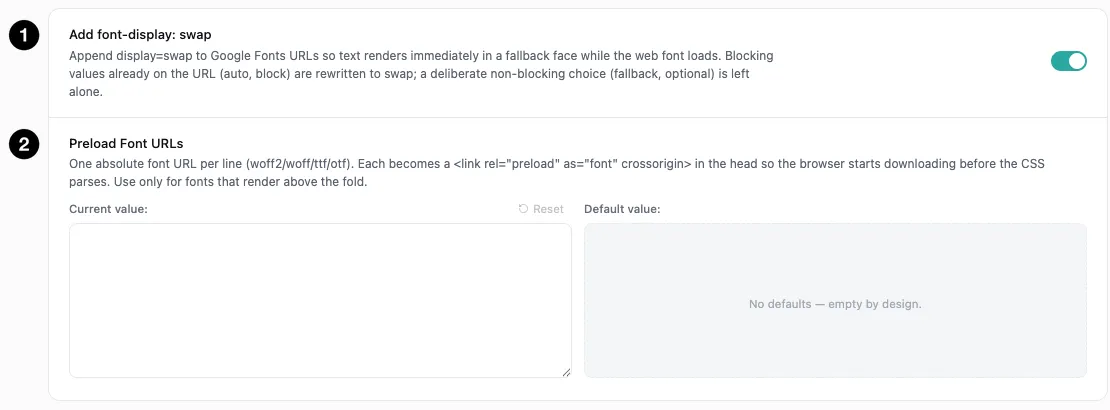
- Add font-display: swap — render text immediately in a fallback face.
- Preload Font URLs — start downloading critical fonts before CSS parses.
Settings at a glance
| Setting | Default | What it does |
|---|---|---|
| Add font-display: swap | On | Append display=swap to Google Fonts URLs, or replace a blocking auto/block. |
| Preload Font URLs | Empty | Absolute font URLs to preload, one per line. |
How it works
The problem has a name: flash of invisible text. The browser knows a heading should use your web font, doesn’t have the font yet, and rather than showing the wrong typeface it shows nothing at all — sometimes for seconds on a slow connection.
font-display: swap changes that behaviour. Text renders immediately in a fallback face, then swaps to the web font when it arrives. The visitor sees a brief typeface change instead of a blank space, which is almost always the better trade.
The second half is preloading. Fonts are discovered late — the browser must parse CSS before it knows which font files it needs — so telling it up front removes that delay for the faces that appear first.
Add font-display: swap
On by default. It appends display=swap to your Google Fonts URLs, so text renders in a fallback while the real font downloads.
Two details worth knowing:
- A blocking value already on the URL is replaced.
display=autoanddisplay=blockstill hide text while the font loads, so xSpeed rewrites them toswap. A deliberate non-blocking choice —display=fallbackordisplay=optional— is left alone. - It applies to Google Fonts URLs. Self-hosted fonts declare
font-displayin their own@font-facerules, which is where you’d set it for those.
There’s essentially no downside. The alternative — the browser’s default — is hidden text, and a momentary typeface shift is preferable to a visitor staring at nothing.
💡 This fixes how the font renders, not how its stylesheet loads. The Google Fonts stylesheet link is itself render-blocking. Turn on Load CSS Asynchronously in CSS & JavaScript and xSpeed makes those links non-blocking too — including the ones your theme prints straight into the page, from Google Fonts, Bunny Fonts, Typekit and CDNFonts.
Preload Font URLs
Empty by default, and this one needs care rather than enthusiasm.
Each line takes one absolute font URL (.woff2, .woff, .ttf, .otf). Each becomes a <link rel="preload" as="font" crossorigin> in the head, so the browser starts downloading before the CSS parses.
⚠️ Only preload fonts that render above the fold. The panel says this explicitly, and it matters. A preloaded font is fetched with high priority whether or not the page needs it early — so preloading your whole font stack means competing with your hero image and your critical CSS for bandwidth, to fetch a font used in the footer. One or two faces is usually right: the one your headings use, and perhaps your body text.
Finding the URL is a matter of loading your site, opening dev tools, and looking at the network tab filtered to fonts — the .woff2 files your first screen actually requests are the candidates.
The crossorigin attribute is added automatically. Without it a preloaded font is fetched twice, which is a classic way to make preloading actively harmful; xSpeed handles it for you.
How this fits with the rest
Font loading touches three panels, and it’s worth knowing which does what:
| Panel | What it handles |
|---|---|
| Fonts (this one) | Whether text waits for the font, and which fonts load early. |
| Resource Hints | Preconnect to fonts.googleapis.com and fonts.gstatic.com — opening the connection ahead of the request. |
| Critical CSS | Whether the stylesheet that references your fonts blocks rendering at all. |
Preconnect and preload are complementary: preconnect warms the connection to the host, preload fetches a specific file. For Google Fonts you generally want both, and both default to on.