How to schedule cache prewarming
Warm specific URLs ahead of a known moment — a post going live, a sale, a campaign launch — so the traffic spike lands on a warm cache instead of building pages under load.
Crawl Now crawls your whole sitemap on a repeating schedule. Scheduled Prewarming is the sharper instrument: it warms specific URLs at specific times you choose. Use it when you know traffic is coming — a post going live at 9am, a sale page at midnight, a campaign landing page the moment the newsletter goes out — so the spike arrives to a warm cache instead of forcing your server to build pages under load.
Where to find it
- In your WordPress admin, click xSpeed Cache in the left menu.
- In the xSpeed Cache sidebar, open the Cache group.
- Click the Preloader card, then the Scheduled Prewarming tab.
Shortcut: open
wp-admin/admin.php?page=xspeed#/cache/preloader/scheduleddirectly.⭐ This tab is part of xSpeed Pro.

- Enable scheduled prewarming — the master switch for this tab.
- Warm scheduled posts when they publish — with the Max URLs per run cap beside it.
Settings at a glance
| Setting | Default | What it does |
|---|---|---|
| Enable scheduled prewarming | Off | Runs your schedules and warms scheduled posts on publish. |
| Warm scheduled posts on publish | On | Fetches a future-dated post the moment it goes live. |
| Max URLs per run | 50 | Caps how many URLs one run warms. Range 1–500. |
How it works
They solve related problems from opposite directions:
| Crawl Now | Scheduled Prewarming | |
|---|---|---|
| What it warms | Everything in your sitemap | URLs you name |
| When | On a repeating interval | At moments you choose |
| Good for | Keeping the whole site warm | A known traffic spike |
| Tier | Free | ⭐ Pro |
You can run both. Sitemap crawling keeps a general baseline of warmth; Scheduled Prewarming makes sure the pages that matter at a particular moment are definitely ready.
Warm scheduled posts on publish
On by default, and the single most useful thing here.
If you write posts in advance and schedule them, WordPress publishes them while you’re asleep — and the first person to read your new post is the one who pays to build it. With this on, xSpeed fetches the post once the instant it goes live, so that first reader gets a cache HIT.
This is different from Crawl Now’s Warm new content immediately, which fires when you press Publish yourself. This one covers future-dated posts that publish without you present.
Schedules
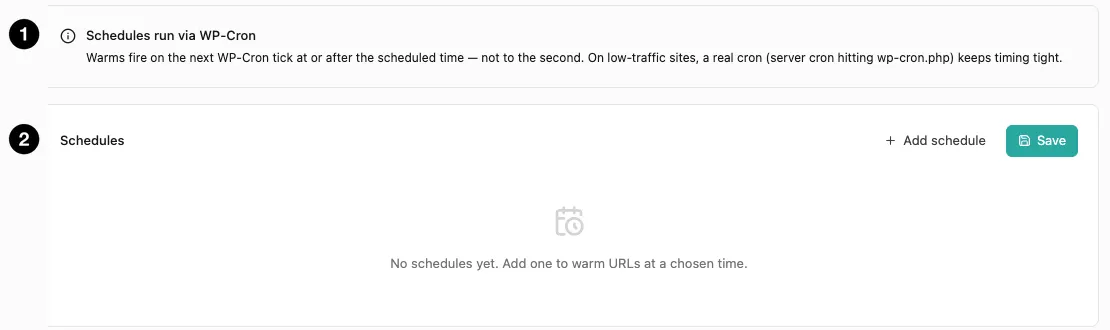
- Timing note — warms fire on a WP-Cron tick, not to the second.
- Schedules list — Add schedule to create one, Save to persist.
A schedule is a set of URLs plus a time. Each entry is either:
- One-off — fires once at a specific date and time. For a product launch, a sale opening, an announcement.
- Recurring — fires on an interval. For pages that reliably get busy, like a homepage before a weekly newsletter.
Each entry takes an optional label, which is worth filling in — it shows up in the purge log as the reason a warm happened, so a month later you’ll know what “scheduled prewarm: Black Friday” was about.
Max URLs per run (default 50, range 1–500) caps how many URLs a single run will fetch. It exists so a long list can’t hammer your origin in one cron tick. If you’re warming a large set, raise it cautiously and watch your server.
⏱ Timing is approximate, and you should plan for it. Schedules fire on the next WP-Cron tick at or after the target time — not to the second. WP-Cron only runs when someone visits your site, so on a quiet site a schedule can drift by minutes. If precise timing matters, set up a real server cron hitting
wp-cron.php. The panel says this too, and it’s worth heeding: schedule your warm a little before the moment you actually need it.