How to prefetch the next page
Learn where visitors go next and prefetch it through Chrome's Speculation Rules API — so the next navigation is already loaded when they click.
Every other setting in this group makes the current page faster. SmartPredict goes further: it watches where visitors actually go next, works out which link they’re most likely to click, and fetches that page in advance through Chrome’s Speculation Rules API. When they click, the page is already there.
Where to find it
- In your WordPress admin, click xSpeed Cache in the left menu.
- In the xSpeed Cache sidebar, open the Optimization group.
- Click the Resource Hints card, then the SmartPredict tab.
Shortcut: open
wp-admin/admin.php?page=xspeed#/performance/resource-hints/speculationdirectly.⭐ This tab is part of xSpeed Pro.
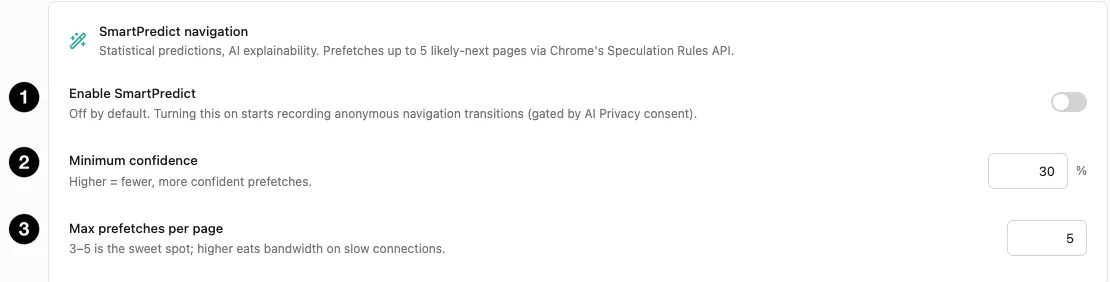
- Enable SmartPredict — the master switch.
- Minimum confidence — how sure it must be before prefetching.
- Max prefetches per page — the bandwidth cap.
Settings at a glance
| Setting | Default | What it does |
|---|---|---|
| Enable SmartPredict | Off | Record navigation transitions and prefetch likely next pages. |
| Minimum confidence | 30% | Confidence threshold before a page is prefetched. Range 0–100. |
| Max prefetches per page | 5 | Cap on prefetches per page view. Range 1–10. |
| Mode | WordPress default | Prefetch the next page, or prerender it as well. |
| When to start loading | WordPress default | On click, on hover, or as soon as a link looks likely. |
| Always prefetch | Empty | Pages loaded in the background on every page view. |
| Never prefetch | Empty | Paths the browser must never load early. |
How it works
SmartPredict records anonymous navigation transitions — that visitors who read page A commonly go to page B next. It doesn’t record who, just the shape of the journeys. From that it builds predictions, and emits Speculation Rules telling the browser to prefetch the most likely destinations.
💡 It only takes effect in Chromium-based browsers, since the Speculation Rules API is what does the prefetching. Everywhere else the rules are simply ignored — those visitors get no benefit, but no harm either, so there’s nothing to configure per browser.
It is off by default, and gated by consent. Turning it on starts recording transitions, and that recording is governed by your AI Privacy setting. This is the one feature in the Optimization group with a privacy dimension, because it’s the only one that observes visitor behaviour rather than page content.
The predictions come from statistics, with AI used only for explainability — the same advisor-not-driver split as Adaptive Cache and Smart Image. No AI provider is required for it to work.
The two dials
Minimum confidence defaults to 30%, range 0–100. It’s the threshold a prediction must clear before the browser is told to prefetch.
Read it as a bandwidth-versus-hit-rate trade:
| Confidence | Effect |
|---|---|
| Low (0–20%) | Prefetches speculatively. More pages feel instant; more bandwidth spent on pages nobody visits. |
| 30% (default) | Prefetches only where there’s a real pattern. |
| High (60%+) | Prefetches rarely, and only near-certainties. Little waste, little benefit. |
Max prefetches per page defaults to 5, range 1–10, and the panel is unusually direct about it: “3–5 is the sweet spot; higher eats bandwidth on slow connections.”
That caveat is the important half. Prefetching costs the visitor’s bandwidth, not yours — and on a phone with a weak signal, aggressively fetching ten pages they may never open makes their experience worse, not better. The default is deliberately conservative.
⚠️ This is the one setting here that spends someone else’s resources. Everything else in this group makes the current page cheaper. Prefetching bets bandwidth on a page that might never be opened. On a site with predictable journeys — documentation, a linear funnel — that bet pays. On a site where visitors scatter, it mostly wastes data.
Speculative loading
WordPress 6.8 and newer print a speculation-rules tag of their own, and this card is where you configure it. It works with or without SmartPredict’s traffic history — with no predictions yet, the browser still uses WordPress’s own rules.
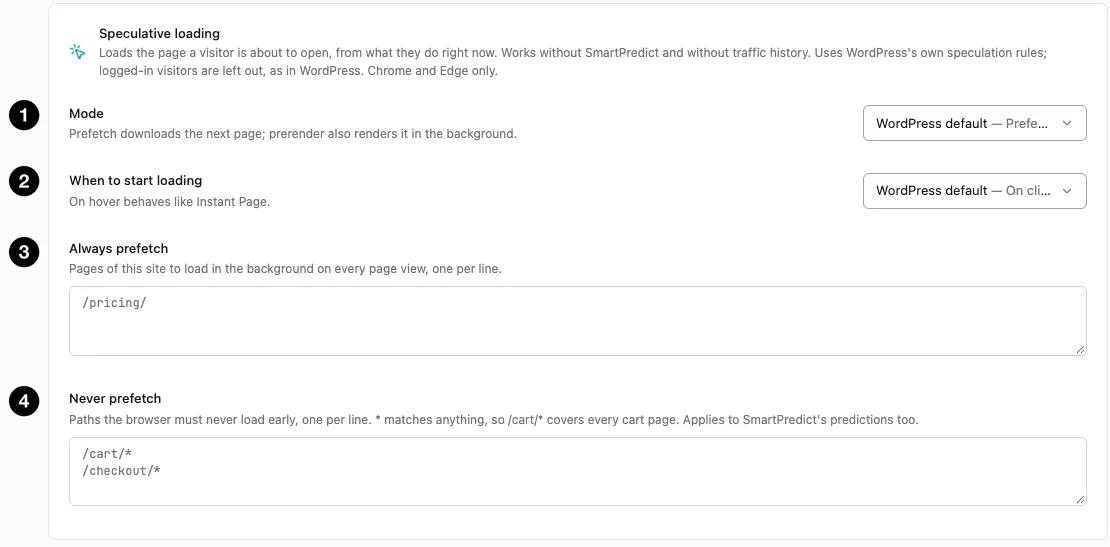
- Mode — what the browser does with a likely next page.
- When to start loading — how eagerly it acts.
- Always prefetch — pages loaded in the background on every page view.
- Never prefetch — paths that must never be loaded early.
Mode decides how far the browser goes:
| Mode | What happens | Cost |
|---|---|---|
| WordPress default | Whatever WordPress is configured to do | — |
| Prefetch | Downloads the next page’s HTML | Bandwidth only |
| Prerender | Downloads and renders it in the background | Opens instantly, costs the most |
When to start loading decides when that begins: On click (the moment a visitor presses a link), On hover (when the pointer rests on one — the behaviour Instant Page made familiar), or Eager (as soon as a link looks likely to be used). Later triggers waste less; earlier ones feel faster. Over WP-CLI and REST those four choices are default, conservative, moderate and eager, and the mode is default, prefetch or prerender.
Always prefetch takes one path per line, such as /pricing/, and loads those in the background on every page view regardless of predictions. Reserve it for the one or two pages nearly everyone opens next.
Never prefetch is the important one. One path per line, * matches anything, so /cart/* covers every cart page. It applies to SmartPredict’s own predictions too, so it’s the single place to keep the browser away from pages that shouldn’t be loaded speculatively.
⚠️ Exclude anything that acts when it is merely opened. Logout links, one-click actions, add-to-cart URLs, anything with a token in the query string. Prerender in particular runs the page — scripts and all — so a page that does something on load will do it whether or not the visitor ever arrives. Logged-in visitors are left out automatically, as in WordPress, and speculation rules are a Chrome and Edge feature; other browsers ignore them.
Observed activity

- Observed activity — what SmartPredict has learned so far.
Three readings tell you whether it has enough data to be useful:
| Metric | Meaning |
|---|---|
| Transitions tracked | How many navigation transitions are in the buffer. |
| Sources indexed | How many distinct source pages have predictions. |
| Last analyzed | When predictions were last recomputed. |
Analysis normally runs on cron. Re-analyze recomputes immediately from the same buffer — useful right after enabling, when you don’t want to wait. Clear wipes the buffer and predictions, which is what you want after restructuring your site, since old transitions describe a navigation that no longer exists.
Expect all three to read zero at first. Predictions need traffic before they mean anything, and on a quiet site that takes a while.