How to enable Brotli compression
Brotli compresses text 15–20% smaller than GZIP. Pre-compress your cached files once so the server serves them with no per-request cost.
Brotli is a newer compression algorithm that produces smaller files than GZIP — typically 15–20% smaller on text. Every modern browser supports it. The catch is that it needs a module on your server, and it doesn’t replace GZIP so much as sit alongside it as the preferred option when both ends support it.
Where to find it
- In your WordPress admin, click xSpeed Cache in the left menu.
- In the xSpeed Cache sidebar, open the Optimization group.
- Click the Compression card, then the Brotli Compression tab.
Shortcut: open
wp-admin/admin.php?page=xspeed#/performance/gzip/brotlidirectly.⭐ This tab is part of xSpeed Pro.
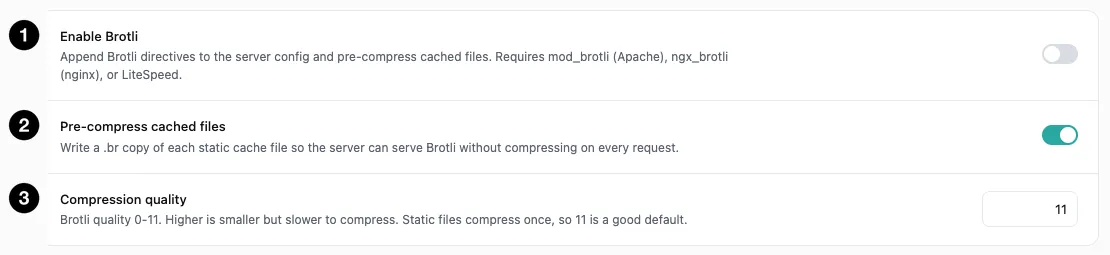
- Enable Brotli — the master switch.
- Pre-compress cached files — write
.brcopies ahead of time. - Compression quality — the size/CPU trade-off, 0–11.
Settings at a glance
| Setting | Default | What it does |
|---|---|---|
| Enable Brotli | Off | Append Brotli directives and pre-compress cached files. |
| Pre-compress cached files | On | Write a .br copy of each static cache file. |
| Compression quality | 11 | Brotli quality level. Range 0–11. |
How it works
Brotli requires a server module — mod_brotli on Apache, ngx_brotli on nginx, or built-in support on LiteSpeed. Without one of those, enabling this achieves nothing, so check the panel’s status before relying on it.
When enabled, xSpeed appends the Brotli directives to your server configuration and pre-compresses your cached files. Browsers that support Brotli receive it; browsers that don’t fall back to GZIP. That’s why you run both — Brotli alone would leave older clients uncompressed.
Pre-compress cached files
On by default, and the setting that makes Brotli cheap.
Compressing a response on the fly costs CPU on every single request — and Brotli at high quality is noticeably more expensive than GZIP. Pre-compressing removes that cost entirely: xSpeed writes a .br copy of each static cache file once, and the server serves the already-compressed file directly.
This is the pairing that makes the quality setting below safe to leave at maximum.
Compression quality
Brotli’s quality scale runs 0 to 11, and the default is 11 — the maximum.
That would be reckless for on-the-fly compression, because quality 11 is slow. It’s the right default here precisely because static files are compressed once. You pay the cost a single time when the cache file is written, then every visitor gets the smallest possible file for free.
| Quality | Trade-off | Use when |
|---|---|---|
| 11 (default) | Smallest output, slowest to compress | Pre-compressing static files — the normal case |
| 5–9 | Balanced | Compressing dynamic responses on the fly |
| 0–4 | Fast, larger output | Rarely useful for text assets |
💡 Leave quality at 11 while pre-compression is on. The cost is paid once per cache file, not per visitor. Lower it only if you’ve turned pre-compression off and are compressing dynamically.