How to cache feeds and the REST API
Feed readers and API clients poll on a schedule whether or not anything changed. Cache RSS, Atom and comment feeds, plus anonymous read-only REST responses.
Not every request to your site comes from a browser. Feed readers poll for new posts on a fixed schedule, and JavaScript front ends, mobile apps and headless sites call the REST API constantly. Both rebuild the same output over and over, usually to report that nothing has changed. This tab caches both.
Where to find it
- In your WordPress admin, click xSpeed Cache in the left menu.
- In the xSpeed Cache sidebar, open the Cache group.
- Click the Advanced Cache card, then the Feeds & API tab.
Shortcut: open
wp-admin/admin.php?page=xspeed#/cache/cache-coverage/beyonddirectly.⭐ The features on this tab are part of xSpeed Pro.

- Cache feeds — the master switch for feed caching.
- Feed cache lifetime — how long a cached feed lives before regenerating.
Settings at a glance
| Setting | Default | What it does |
|---|---|---|
| Cache feeds | Off | Serve RSS / Atom / comment feeds from cache. |
| Feed cache lifetime | 12 hours | How long before a cached feed regenerates. Range 1–168. |
| REST API caching | Off | Cache anonymous GET responses. |
| Default TTL | 5 minutes | Lifetime for routes with no explicit rule. 0 = rule-only. Range 0–1440. |
| Route rules | None | Per-route patterns with their own lifetimes. |
How it works
Both features cache a response rather than a page: the first request builds it, later matching requests get the saved copy. Both store into the Page Cache, so it must be on.
The two differ sharply in how safe they are by default. Feeds are public and identical for everyone, so caching them is uncomplicated. REST responses can be personalised, which is why that half of the tab carries guards and a warning.
Cache feeds
Building a feed is not cheap — WordPress queries your recent posts, formats each into XML, and assembles the document. That’s comparable to rendering a page, and it happens on every poll. Ten feed readers polling hourly is 240 feed builds a day, essentially all returning identical content.
With this on, the first poll builds the feed and saves it; later polls get the saved copy. It covers your main post feed, Atom, and comment feeds.
💡 “Nobody reads my feed” is worth checking before you skip this. Grep your access logs for hits on
/feed/first — news aggregators, podcast clients and some social platforms poll feeds on a schedule whether or not you have human subscribers, and those polls cost a full feed build each.
Why the feed lifetime can be long
The default is 12 hours — far longer than the minutes used for 404s and searches, and that’s intentional.
Feeds purge immediately when a post or comment changes. The lifetime is only a backstop for when nothing has changed at all — and if nothing changed, a stale feed is indistinguishable from a fresh one. Range is 1 to 168 hours (7 days); the 12-hour default is already generous.
💡 Publishing updates your feed, not the clock. Because a new post purges the cached feed instantly, subscribers see new content as fast as they would with no caching. The lifetime governs only how long an unchanged feed is reused.
REST API caching
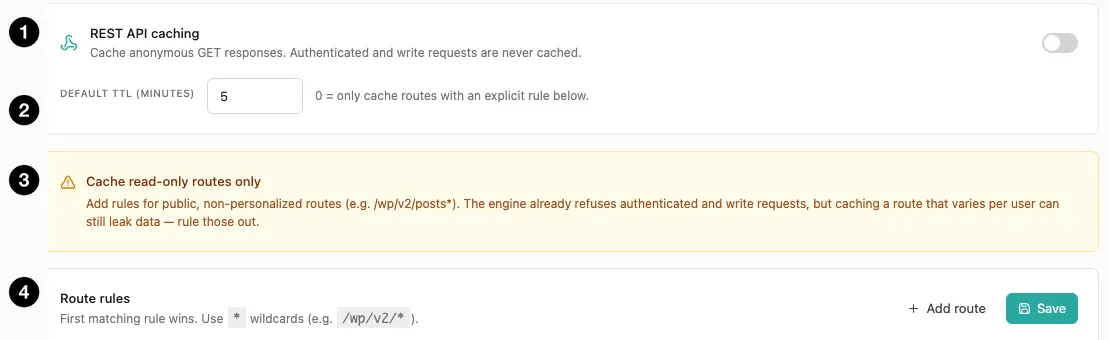
- REST API caching — the master switch.
- Default TTL — lifetime for routes without an explicit rule.
- Safety warning — cache read-only, non-personalised routes only.
- Route rules — per-route patterns and lifetimes.
When an anonymous GET hits a cacheable route, xSpeed stores the JSON response and serves it to matching later calls. The cache key is the route plus its sorted query parameters, so the same call with parameters in a different order shares one entry.
Three hard guards decide what may be stored, and no setting overrides them:
- Authenticated requests — anything carrying a logged-in session or auth token bypasses the cache entirely.
- Write requests —
POST,PUT,PATCH,DELETEare never cached.GETonly. - xSpeed’s own admin routes — anything under
/xspeed/is privileged and always excluded.
⚠️ That still isn’t the whole story, and the panel says so. The engine refuses authenticated and write requests, but a route that varies per user can leak data even on an anonymous GET. If a public endpoint returns different content depending on who’s asking — geography, A/B bucket, session hints — caching it means one caller’s response can be served to another. Add rules only for routes genuinely identical for everyone.
Default TTL, and the 0 mode
Default TTL applies to cacheable routes with no explicit rule. Default 5 minutes, range 0–1440.
Setting it to 0 changes the model entirely: nothing is cached except routes you explicitly rule in. That’s the conservative, opt-in posture, and it’s right on any site where you’re not certain every public route is safe. With a non-zero default, every anonymous GET becomes cacheable and you’re relying on yourself to have ruled out the risky ones.
| Default TTL | Behaviour | Use when |
|---|---|---|
0 | Only routes with an explicit rule are cached | You want opt-in control — safest |
| Non-zero | All cacheable routes use this lifetime unless a rule overrides | You’ve verified your public routes are uniform |
Route rules
Not all data ages the same way — a posts listing can be stale for minutes; a settings endpoint probably shouldn’t be cached at all.
- First matching rule wins, so order matters — specific patterns above general ones.
*is a wildcard:/wp/v2/*matches the whole v2 namespace,/wp/v2/posts*just the posts routes.
Rules save with their own Save button, separately from the toggle above. A reasonable starting point for a content site:
| Pattern | Lifetime | Why |
|---|---|---|
/wp/v2/posts* | 10–30 min | Public content, changes when you publish |
/wp/v2/pages* | 60 min | Rarely changes |
/wp/v2/media* | 60 min | Effectively static |
| (everything else) | Default 0 | Not cached unless ruled in |