How to auto-warm your hottest pages
Let xSpeed Cache Pro rank your URLs by real traffic, recency and content, then warm the top ones on a schedule — so your most popular pages are never cold.
Warming every page is wasteful — most sites have a handful of pages doing most of the work, and a long tail nobody reads. Predictive Warming spends your crawl budget where it counts: it ranks your URLs by real traffic, recency, and content, then keeps the top ones warm on a schedule. Your popular pages stay fast; the forgotten ones don’t burn resources.
Where to find it
- In your WordPress admin, click xSpeed Cache in the left menu.
- In the xSpeed Cache sidebar, open the Cache group.
- Click the Preloader card, then the Predictive Warming tab.
Shortcut: open
wp-admin/admin.php?page=xspeed#/cache/preloader/predictivedirectly.⭐ This tab is part of xSpeed Pro.

- Enable predictive warming — the master switch for this tab.
- Crawl budget and How often — how many URLs per run, and how frequently.
- Skip already-warm pages — spend the budget on cold pages only.
Settings at a glance
| Setting | Default | What it does |
|---|---|---|
| Enable predictive warming | Off | Ranks your URLs and warms the top ones on a schedule. |
| Crawl budget (URLs per run) | 25 | How many top-ranked URLs each run warms. Range 1–500. |
| How often to warm | Hourly | How frequently the warmer runs — Hourly, Daily or Weekly. |
| Skip already-warm pages | On | Don’t re-fetch URLs that are already cached and fresh. |
How it works
Each URL gets a score, and the highest scores get warmed first. Three signals feed it:
| Signal | What it favours |
|---|---|
| Traffic | Pages people actually request. Popularity is the strongest predictor of future popularity. |
| Recency | Recently published or updated content, which tends to spike then settle. |
| Content | Page type and substance, so a real article outranks a thin utility page. |
The scoring is why this differs from Crawl Now, which treats every sitemap URL equally and works through them; Predictive Warming decides what deserves the budget and spends it there. On a large site that’s the difference between warming 25 pages that matter and 25 pages nobody will visit today.
Next to warm
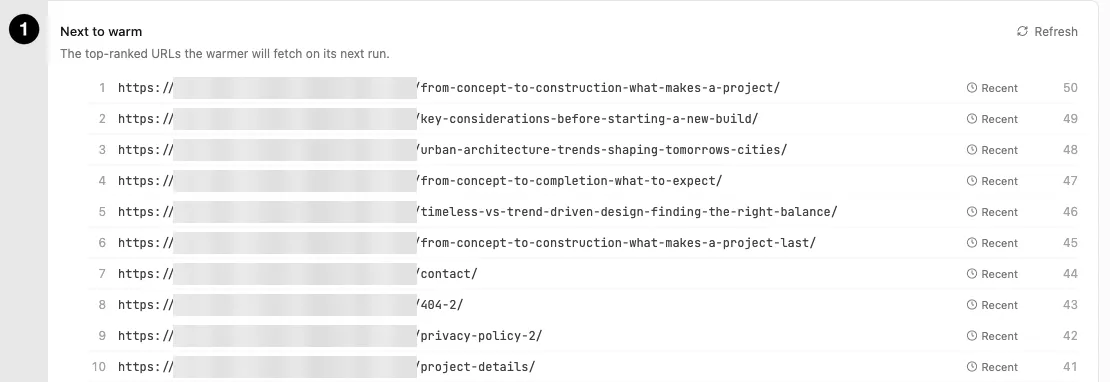
- Next to warm — the ranked list, refreshable on demand.
This is the panel’s most useful feature and worth checking before you enable anything: it shows exactly which URLs the warmer will fetch on its next run, in rank order, with each one’s score and why it ranked (a Recent badge, for instance).
Treat it as a preview. If the list is full of pages you’d expect to be popular, your budget is well spent. If it’s dominated by things like /404-2/ or /privacy-policy/, your budget is probably too high for the amount of content you have — those low-value pages are only in range because the genuinely popular ones ran out.
Warm now runs a job immediately rather than waiting for the schedule, which is the fastest way to see whether this does anything for you.
Tuning the budget
Crawl budget (default 25, range 1–500) is how many URLs each run fetches. The right number depends on how much content you have and how much of it is genuinely popular:
- Small site (under 50 pages) — a low budget is plenty. Warming 25 of 40 pages means you’re warming almost everything, which defeats the purpose of ranking.
- Large site — a higher budget covers more of the popular tail, but each run costs more origin requests.
How often offers Hourly, Daily and Weekly, and defaults to hourly. Pair it sensibly with the budget: a large budget running hourly is a lot of sustained background traffic. Frequent-and-small beats occasional-and-huge, because it spreads the load.
Skip already-warm pages is on by default and should stay on. Without it you’d spend budget re-fetching pages that are already cached and fresh, which is pure waste — the whole point is to spend it on cold pages.
⏱ Runs fire on WP-Cron, so on a low-traffic site they can drift or stall, since cron only fires when someone visits. A real server cron hitting
wp-cron.phpkeeps timing reliable.