How to throttle the Heartbeat API
WordPress polls your server every 15–60 seconds through admin-ajax. Slow that down or switch it off per context, without losing autosave where you need it.
WordPress’s Heartbeat API keeps browser and server in sync — autosaving drafts, warning when someone else is editing, refreshing notifications. It does that by polling admin-ajax.php every 15 to 60 seconds, for every open tab. On a busy site with several editors, that’s a lot of requests for something most visitors never benefit from. This panel controls it per context, so you can slow it where it’s wasteful and keep it where it’s useful.
Where to find it
- In your WordPress admin, click xSpeed Cache in the left menu.
- In the xSpeed Cache sidebar, open the Optimization group.
- Click the Heartbeat card.
Shortcut: open
wp-admin/admin.php?page=xspeed#/performance/heartbeatdirectly.✅ This panel is part of xSpeed Cache (Free).
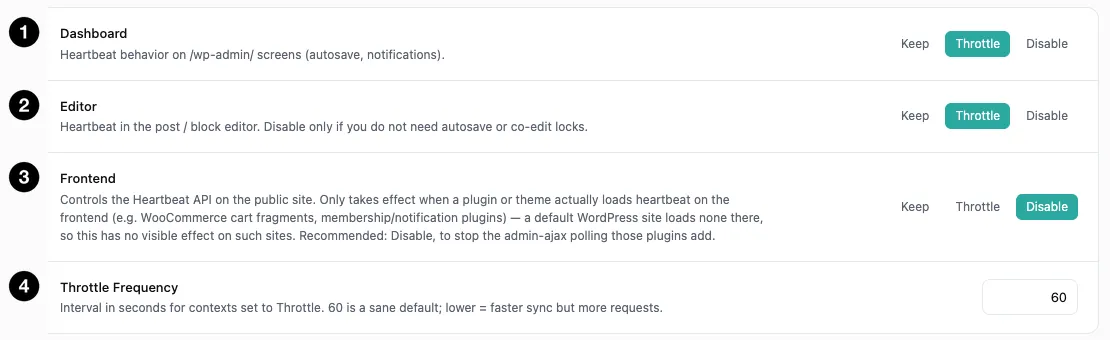
- Dashboard — heartbeat on
/wp-admin/screens. - Editor — heartbeat in the post and block editor.
- Frontend — heartbeat on your public site.
- Throttle Frequency — the interval used by throttled contexts.
Settings at a glance
| Setting | Default | What it does |
|---|---|---|
| Dashboard | Throttle | Heartbeat on /wp-admin/ screens. |
| Editor | Throttle | Heartbeat in the post / block editor. |
| Frontend | Disable | Heartbeat on the public site. |
| Throttle Frequency | 60 s | Interval for throttled contexts. Range 15–300. |
How it works
Each of the three contexts takes one of three behaviours:
| Behaviour | Effect |
|---|---|
| Keep | Leave WordPress’s default polling alone. |
| Throttle | Poll at the interval you set below, instead of the default. |
| Disable | No polling in that context at all. |
The defaults are already the sensible configuration — Throttle for Dashboard and Editor, Disable for Frontend — so this panel usually needs no changes. What it gives you is per-context control, which matters because the three contexts have genuinely different requirements.
The three contexts
Dashboard (default: Throttle) covers /wp-admin/ screens — notifications and general syncing. Throttling is a safe default: nothing here needs second-by-second accuracy.
Editor (default: Throttle) covers the post and block editor, and this is the one to think about before changing. Heartbeat is what powers autosave and co-editing locks — the warning that someone else is already editing a post. The panel’s guidance is exact: “Disable only if you do not need autosave or co-edit locks.”
Throttling is fine. Disabling means no autosave — if a browser crashes mid-draft, the work is gone. On a multi-author site it also means two people can edit the same post without either being warned. Only disable this if you’re the sole author and you save deliberately.
Frontend (default: Disable) is the interesting one, and the panel explains why in unusual detail.
A default WordPress site doesn’t load heartbeat on the front end at all — so on such a site this setting has no visible effect either way. It only matters when a plugin or theme loads heartbeat publicly. WooCommerce cart fragments do; membership and notification plugins often do too.
When that happens, every visitor’s browser starts polling admin-ajax.php on a timer. That’s real load generated by ordinary visitors, and it bypasses your Page Cache entirely because admin-ajax.php is never cached. Disable is recommended precisely to stop that polling, and it’s the default for that reason.
Throttle Frequency
The interval, in seconds, used by any context set to Throttle. Default 60, range 15–300.
The panel puts it plainly: “60 is a sane default; lower = faster sync but more requests.”
| Interval | Trade-off |
|---|---|
| 15–30 s | Near-default responsiveness, modest saving. |
| 60 s (default) | Autosave still frequent enough to be useful; requests cut substantially. |
| 120–300 s | Big reduction, but autosave gaps get long enough to lose real work. |
Sixty seconds is a good balance for editing: you’d lose at most a minute of work, while roughly quartering the request volume against WordPress’s 15-second editor default.
⚠️ A long interval is a data-loss risk, not just a slower sync. At 300 seconds you could lose five minutes of writing to a crashed tab. If you push the interval up, do it for Dashboard rather than Editor.