How to strip WordPress bloat
Thirteen switches for WordPress defaults your site may not use — emojis, dashicons, oEmbed, feeds, XML-RPC, head tags and more — with what each one costs you if you're wrong.
WordPress ships features every site pays for and most sites don’t use — an icon font for the admin bar, embed handlers for pasted URLs, a legacy XML-RPC endpoint. Bloat Control turns them off individually. Every setting here is off by default, because each one removes something, and whether that something matters depends entirely on your site.
Where to find it
- In your WordPress admin, click xSpeed Cache in the left menu.
- In the xSpeed Cache sidebar, open the Optimization group.
- Click the Bloat Control card.
Shortcut: open
wp-admin/admin.php?page=xspeed#/performance/bloatdirectly.✅ This panel is part of xSpeed Cache (Free).
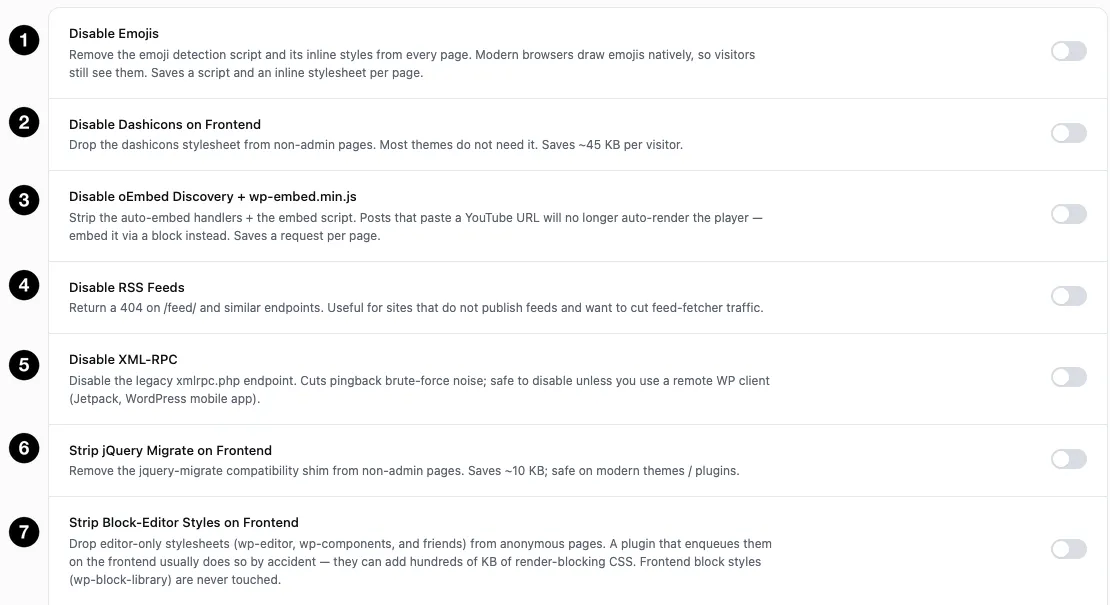
- Disable Emojis — drop the emoji script and its inline styles.
- Disable Dashicons on Frontend — drop the admin icon font.
- Disable oEmbed Discovery + wp-embed.min.js — stop auto-embedding pasted URLs.
- Disable RSS Feeds — 404 your feed endpoints.
- Disable XML-RPC — close the legacy remote endpoint.
- Strip jQuery Migrate on Frontend — remove the compatibility shim.
- Strip Block-Editor Styles on Frontend — drop editor-only CSS from anonymous pages.
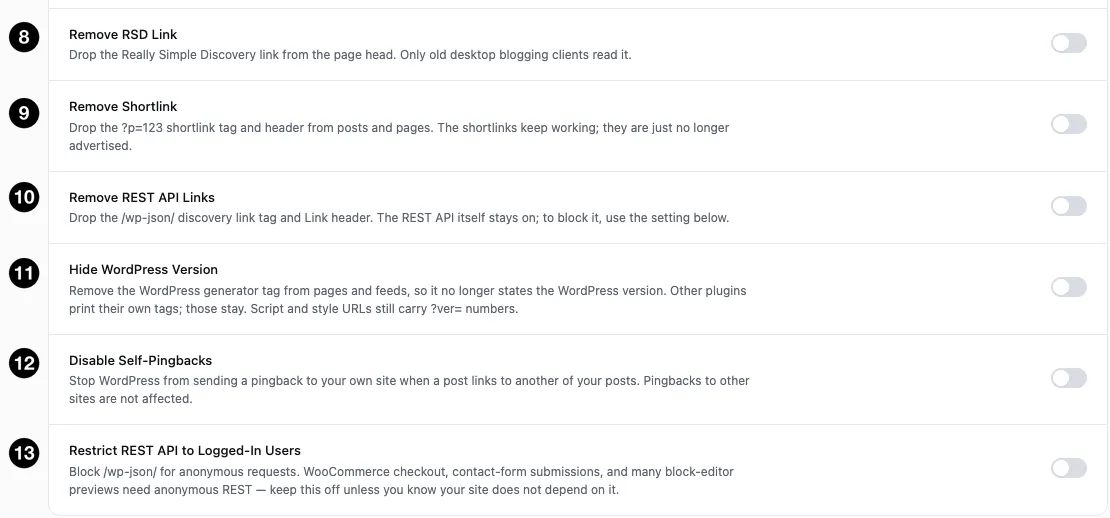
- Remove RSD Link — drop the Really Simple Discovery tag.
- Remove Shortlink — stop advertising
?p=123links. - Remove REST API Links — drop the
/wp-json/discovery tag and header. - Hide WordPress Version — remove the generator tag.
- Disable Self-Pingbacks — stop pinging your own posts.
- Restrict REST API to Logged-In Users — block anonymous API access.
Settings at a glance
| Setting | Default | Saves | Risk if wrong |
|---|---|---|---|
| Disable Emojis | Off | A script + an inline stylesheet per page | Low — browsers draw emojis natively |
| Disable Dashicons on Frontend | Off | ~45 KB per visitor | Low |
| Disable oEmbed Discovery + wp-embed.min.js | Off | A request per page | Low — pasted URLs stop auto-embedding |
| Disable RSS Feeds | Off | Feed-fetcher traffic | Moderate — breaks subscribers |
| Disable XML-RPC | Off | Brute-force noise | Moderate — breaks remote clients |
| Strip jQuery Migrate on Frontend | Off | ~10 KB | Low on modern themes |
| Strip Block-Editor Styles on Frontend | Off | Up to hundreds of KB of render-blocking CSS | Low — front-end block styles are untouched |
| Remove RSD Link | Off | One head tag | None in practice |
| Remove Shortlink | Off | One head tag and header | None — the shortlinks still work |
| Remove REST API Links | Off | One head tag and header | Low — the API itself stays on |
| Hide WordPress Version | Off | One head tag | None — cosmetic only |
| Disable Self-Pingbacks | Off | A request per internal link on publish | None — pingbacks to other sites still send |
| Restrict REST API to Logged-In Users | Off | Anonymous API traffic | High — see below |
How it works
Each toggle removes one WordPress behaviour from the front end. There’s no analysis and no automatic detection — you’re telling xSpeed that your site doesn’t need something, and it takes you at your word.
That’s why everything is off by default. Unlike caching, which is safe to enable blindly, these settings are only correct if the assumption behind them holds for your site.
💡 Work through these one at a time, and know what each one does before you flip it. The savings are real but modest — tens of kilobytes. Breaking your feed or your checkout to save 45 KB is a bad trade.
The low-risk ones
Disable Dashicons on Frontend drops the dashicons stylesheet from non-admin pages — about 45 KB per visitor, the biggest saving here. Dashicons is WordPress’s admin icon font; most themes don’t use it on the front end. Some do, for social icons or menu arrows, so check a page after enabling.
Strip jQuery Migrate on Frontend removes the compatibility shim that patches old jQuery APIs — about 10 KB, and safe on modern themes and plugins. Older code that relies on removed jQuery methods will break, which shows up as JavaScript console errors.
Disable oEmbed Discovery + wp-embed.min.js strips the auto-embed handlers and the embed script. The consequence is specific: pasting a YouTube URL into a post stops auto-rendering the player — you’d embed via a block instead. If your authors rely on paste-to-embed, leave this off.
Disable Emojis removes WordPress’s emoji detection script and the inline styles that come with it — a script and a stylesheet on every page, for a feature modern browsers handle themselves. Your emojis still render; only WordPress’s polyfill goes.
Strip Block-Editor Styles on Frontend drops editor-only stylesheets — wp-editor, wp-components and friends — from pages served to anonymous visitors. A plugin that enqueues those on the front end is almost always doing it by accident, and they can add hundreds of kilobytes of render-blocking CSS. Front-end block styles (wp-block-library) are never touched, so a block theme keeps its layout.
The head-tag group
Four switches remove tags WordPress prints into every page’s <head>. Each saves a line rather than a request, so treat them as tidying rather than performance:
| Setting | What it removes | Anything to lose? |
|---|---|---|
| Remove RSD Link | The Really Simple Discovery tag | Only old desktop blogging clients read it |
| Remove Shortlink | The ?p=123 tag and Link header | The shortlinks keep working, they’re just not advertised |
| Remove REST API Links | The /wp-json/ discovery tag and header | The REST API stays on — this hides the pointer, it doesn’t block anything |
| Hide WordPress Version | The generator tag | Nothing. Note other plugins print their own tags, and asset URLs still carry ?ver= numbers |
Disable Self-Pingbacks belongs with them in spirit: it stops WordPress pinging your own site when one of your posts links to another, which saves a loopback request per internal link at publish time. Pingbacks to other sites are unaffected.
💡 Hiding the version number is not a security measure. It removes one hint, while your asset URLs still carry
?ver=query strings that say the same thing. Turn it on if you like a tidy head; don’t count it as hardening.
The ones with real consequences
Disable RSS Feeds returns a 404 on /feed/ and similar endpoints. Useful for sites that don’t publish feeds and want to cut feed-fetcher traffic.
Be sure first, though. Feeds are consumed by more than people: podcast clients, news aggregators, some social platforms, and third-party services that syndicate your content. If any of that matters, consider caching your feeds instead of disabling them — you get the traffic reduction without breaking anyone.
Disable XML-RPC closes the legacy xmlrpc.php endpoint. This is a genuine security win — XML-RPC is a favourite brute-force target and generates constant background noise in your logs.
Safe to disable unless you use a remote WordPress client: Jetpack, the WordPress mobile app, or anything posting to your site remotely all use it. If you publish from your phone, this will stop that working.
Restrict REST API — read before enabling
This one deserves more caution than the rest, and the panel’s own description is unusually emphatic.
It blocks /wp-json/ for anonymous requests. That sounds like a straightforward hardening measure, and on a genuinely closed site it is. But the REST API is used far more widely than people expect:
- WooCommerce checkout
- Contact-form submissions
- Block-editor previews
- Many themes and plugins for ordinary front-end behaviour
All of those make anonymous REST requests during normal use — which is exactly what this blocks.
⚠️ The panel’s own advice is “keep this off unless you know your site does not depend on it.” That’s the right framing. The failure mode is nasty: your site looks fine, and a form or a checkout silently stops working for logged-out visitors — the people you least want to break things for, and the ones least likely to tell you.
If you enable it, test checkout and every form while logged out.