How to minify CSS and JavaScript
Compress your HTML, CSS and JavaScript, then control when scripts load — defer, delay until interaction, async CSS — with exclusions for the scripts that can't take it.
This tab does two different jobs. The first is compression — stripping whitespace and comments so files are smaller. The second, and far more consequential, is loading behaviour — deciding when scripts execute and whether stylesheets block rendering. Compression is nearly risk-free. Loading behaviour is where the real speed gains are, and where things break.
Where to find it
- In your WordPress admin, click xSpeed Cache in the left menu.
- In the xSpeed Cache sidebar, open the Optimization group.
- Click the CSS & JavaScript card, then the Minify tab.
Shortcut: open
wp-admin/admin.php?page=xspeed#/performance/minifydirectly.✅ This tab is part of xSpeed Cache (Free).
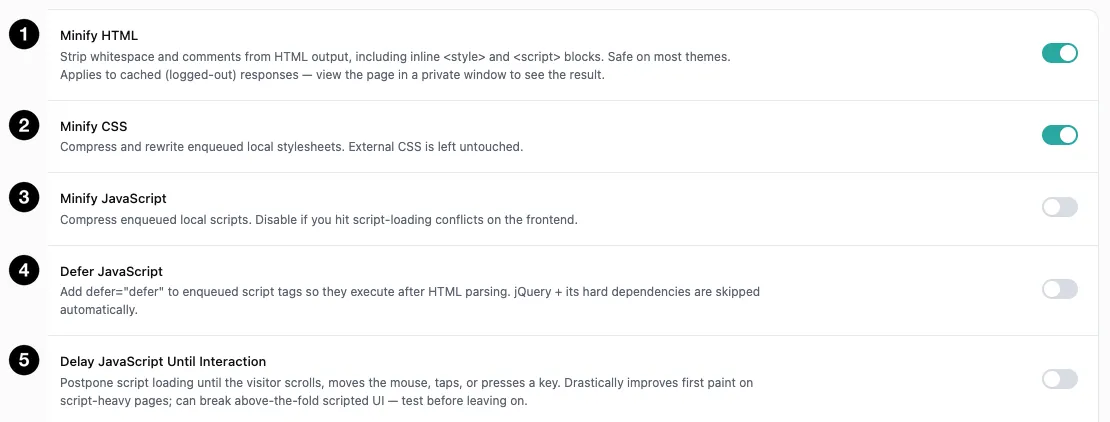
- Minify HTML — strip whitespace from the page itself.
- Minify CSS — compress enqueued local stylesheets.
- Minify JavaScript — compress enqueued local scripts.
- Defer JavaScript — run scripts after HTML parsing.
- Delay JavaScript Until Interaction — wait for the visitor to do something.
Settings at a glance
| Setting | Default | What it does |
|---|---|---|
| Minify HTML | Off | Strip whitespace and comments from HTML output. |
| Minify CSS | Off | Compress enqueued local stylesheets. |
| Minify JavaScript | Off | Compress enqueued local scripts. |
| Defer JavaScript | Off | Add defer so scripts run after HTML parsing. |
| Delay JavaScript Until Interaction | Off | Postpone scripts until the visitor interacts. |
| Load CSS Asynchronously | Off | Make stylesheets non-blocking. |
| Remove Asset Query Strings | Off | Strip ?ver=X.Y from plugin, theme and core asset URLs. |
| Combine CSS Files | Off | Concatenate stylesheets into one file. |
| Combine JavaScript Files | Off | Concatenate scripts into one file. |
| Defer / Delay Exclusions | jQuery + migrate | Handles or URLs that skip defer and delay. |
| Delay Only These Scripts | Empty | When set, these plus known third-party tags are delayed. |
| Delay Failsafe Timeout (ms) | 8000 | Loads delayed scripts anyway after this long if the visitor never interacts. 0 = interaction-only. Range 0–60000. |
How it works
xSpeed rewrites your enqueued assets — compressing them, and optionally changing the tags that load them — then caches the rewritten files and serves those instead of the originals. Only local assets are touched; anything loaded from another domain is left alone, because xSpeed can’t rewrite a file it doesn’t host.
Everything here is off by default, deliberately. These settings change what the browser receives, so the plugin makes you opt in rather than assuming your theme tolerates it.
💡 Test in a private window. HTML minification applies to cached, logged-out responses — while you’re logged in you’re served uncached pages and won’t see any difference at all.
The three compression settings
These are the safe ones, and where to start.
Minify HTML strips whitespace and comments from your page output, including inline <style> and <script> blocks. Safe on most themes.
Minify CSS compresses and rewrites enqueued local stylesheets. External CSS is left untouched.
Minify JavaScript compresses enqueued local scripts. This is the most likely of the three to cause trouble — if you hit script-loading conflicts on the front end, turn this one off first.
The loading-behaviour settings
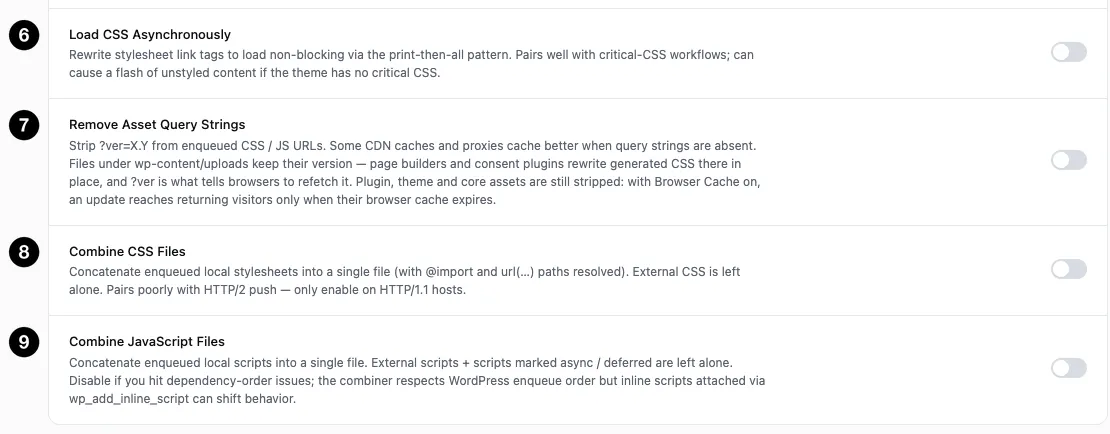
- Load CSS Asynchronously — non-blocking stylesheets.
- Remove Asset Query Strings — strip
?ver=for better proxy caching. - Combine CSS Files — concatenate stylesheets.
- Combine JavaScript Files — concatenate scripts.
These change when things happen, and each has a specific failure mode worth knowing before you enable it.
Defer JavaScript adds defer to script tags so they execute after HTML parsing rather than blocking it. jQuery and its hard dependencies are skipped automatically, because most themes assume jQuery is available synchronously — that exclusion is why this is safer than it sounds.
Delay JavaScript Until Interaction postpones script loading entirely until the visitor scrolls, moves the mouse, taps, or presses a key. This is the single most dramatic setting on the panel for first paint on script-heavy pages — and the most likely to break something, because any above-the-fold UI that needs JavaScript won’t work until the visitor interacts. A slider that should auto-play, a menu that opens on load, a cookie banner: all suspect. Test before leaving it on.
It also reaches scripts that never pass through WordPress’s script queue — the analytics, pixel and chat-widget tags themes and plugins print straight into the page, including the inline install snippets vendors ask you to paste into your header — when they belong to a third-party service xSpeed recognises.
Load CSS Asynchronously rewrites stylesheet links to load non-blocking, via the print-then-all pattern. It also covers the font stylesheets themes print straight into the page — Google Fonts, Bunny Fonts, Typekit and CDNFonts links that never pass through WordPress’s style queue and would otherwise stay render-blocking. It pairs naturally with Critical CSS — and without critical CSS it can cause a flash of unstyled content, because the page renders before your stylesheet arrives. Enable these two together, not separately.
Remove Asset Query Strings strips ?ver=X.Y from plugin, theme and core asset URLs. Some CDNs and proxies cache more effectively without query strings. Files under wp-content/uploads keep their version: page builders and consent plugins rewrite generated CSS there in place, and ?ver is the only thing that tells a browser to fetch the new copy.
⚠️ Stripped versions and long browser caching don’t mix. With Browser Cache on, an updated plugin or theme file reaches returning visitors only when their browser’s copy expires — a year, by default — because there’s no version change to prompt a refetch. Know that trade before combining the two.
Combining files: probably not
Combine CSS Files and Combine JavaScript Files concatenate your assets into single files. This was standard advice under HTTP/1.1, where each request was expensive.
Under HTTP/2 it usually makes things worse. Requests are multiplexed over one connection, so many small files download in parallel — while a single combined file means changing one line invalidates the whole bundle for every returning visitor. The panel says as much: combining “pairs poorly with HTTP/2 push — only enable on HTTP/1.1 hosts.”
Almost every host has supported HTTP/2 for years. Leave both off unless you know yours doesn’t.
Note also that CSS combining resolves @import and url(...) paths as it goes, and external CSS is left alone.
Exclusions: the escape hatch
When defer or delay breaks something, you don’t have to abandon the setting — exclude the offending script.
Defer / Delay Exclusions takes script handles or URL substrings, one per line. It ships with jquery-core and jquery-migrate already excluded.
Delay Only These Scripts narrows the scope. Leave it empty and all scripts are delayed (minus exclusions). Put anything in it and only those scripts, plus the known third-party tags xSpeed recognises on its own — analytics, tag managers, chat widgets, review embeds and error trackers — are delayed; everything else loads normally. That’s the surgical option: postpone the heavy vendor scripts without touching your own, and without having to list every tag by hand.
⚠️ Prefer handles over URL substrings. A handle is stable. A URL substring has to match the script’s original URL — and once minification rewrites that to a hashed cache path, a URL-based rule can silently stop matching. Handles are the reliable selector.