The Cache Clears Itself Within Minutes: Ten Minutes Is a Shipped Default
 M Asif Rahman 7 min read
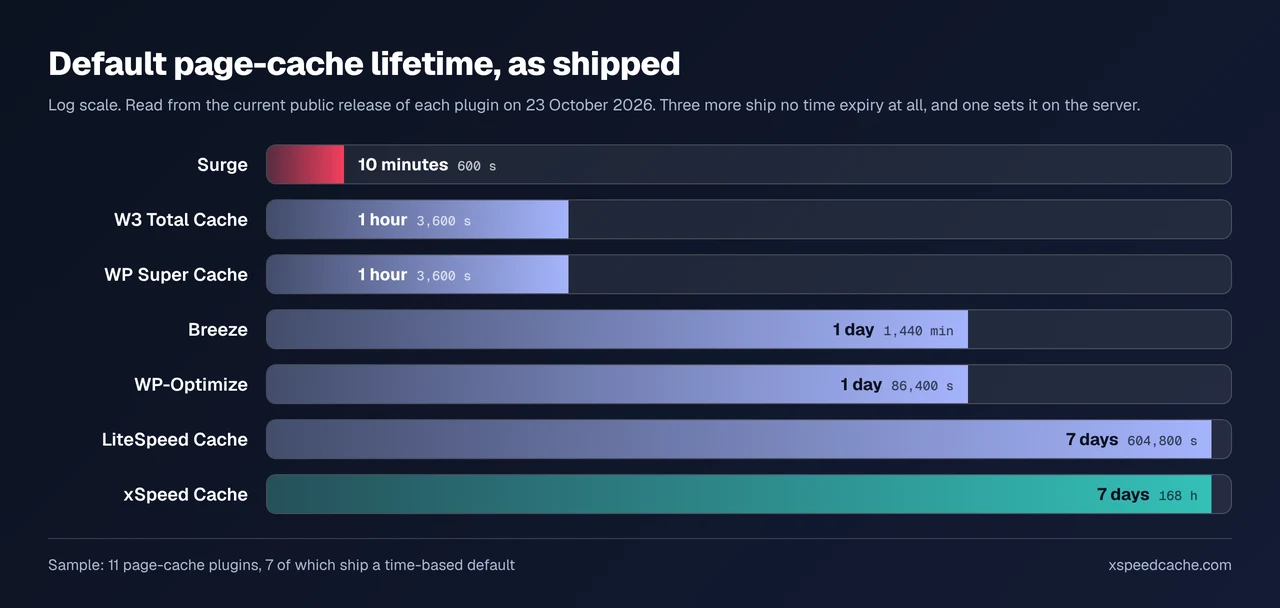
A cached page can leave for three separate reasons, and they are not interchangeable. We read the shipped source of 11 WordPress caching plugins on 23 October 2026: the default page lifetime runs from 600 seconds in one to 604,800 in another, a span of 1,008 times. Find out which of the three took yours before changing a setting.
| What removed it | The evidence on disk | What fixes it |
|---|---|---|
| Expiry. The entry reached its lifetime | Files go at one uniform age, no edit nearby | Raise the lifetime |
| A purge. An event told the plugin to clear | Whole directories go at once, seconds after a save | Narrow the trigger |
| A sweep. Scheduled collection ran | Entries past the lifetime go in a batch, at odd times | Nothing, unless the lifetime is wrong |
Three readings separate them: the age of the newest surviving file, whether one path or the whole store went, and whether the timing matches an edit.
Confirm the page was stored before chasing what removed it
“Nothing stays cached” and “nothing was ever cached” look identical in a browser and share no fix. Start with the scan: run it and read check D2, the cache-evidence row. It reports a hit, a caching layer whose response was not a hit, or no evidence at all.
Of the 1,998 WordPress sites in our public scan archive with a cache plugin detected, read on 23 October 2026, 416 answered with a miss: one in five did not serve the page from cache. Two caveats. The archive over-samples xSpeed Cache users, and a plugin that stores a page without saying so in a header reads as a miss, the no-header case.
By hand: request the same URL twice and read the cache header each time, per our guide to checking whether caching works. A second miss on an unchanged page means storage is failing, not expiry, and the usual cause is an exclusion matching more than you meant or a query string, hence only the homepage ends up cached.
Ten minutes to seven days: what these plugins ship
A cache that empties every few minutes is often a plugin doing what it shipped to do. We downloaded the current release of 11 page-cache plugins on 23 October 2026, read the default lifetime out of the files, then counted how many of 30 WordPress events each registers a purge for, counting a direct add_action and a config-array hook alike.
| Plugin | Version | Default page lifetime | Purge events, of 30 |
|---|---|---|---|
| Surge | 1.2.1 | 600 seconds | 1 |
| W3 Total Cache | 2.11.0 | 3,600 seconds | 10 |
| WP Super Cache | 3.1.4 | 3,600 seconds | 7 |
| Breeze | 3.9.3 | 1,440 minutes | 15 |
| WP-Optimize | 4.7.0 | 86,400 seconds | 5 |
| LiteSpeed Cache | 7.9.2 | 604,800 seconds | 7 |
| xSpeed Cache | 1.4.4 | 168 hours | 14 |
| Cache Enabler | 1.8.17 | no time expiry | 12 |
| Hummingbird | 3.21.2 | no time expiry | 12 |
| WP Fastest Cache | 1.5.3 | no time expiry | 7 |
| Speed Optimizer | 7.8.5 | set on the server | 8 |
Sample: 11 plugins, each the current public release that day, read from the extracted zip. Surge’s include/common.php records 'ttl' => 600, and Breeze’s settings screen states “1440 minutes (1 day)”. A wordpress.org API query returned xSpeed Cache 1.4.4, released 19 October 2026. Both ends are deliberate, and anyone moving between the two will swear one is broken.
Thirty events, and the hook that surprises people
Expiry is the boring cause. The interesting one is a purge firing more often than intended. Our own plugin sits second at 14, and publishing a figure that does not flatter us is the point of measuring: more triggers buy fewer stale pages and pay in rebuilds.
Four of the eleven hook an option write, the event most likely to produce “it clears itself”, because WordPress writes options constantly and a transient with no expiry is stored as one. Only three of those four can clear a page, and all three read the option name first: Cache Enabler matches an explicit list of core settings, Speed Optimizer checks whether the write touched its own config, and our handler requires the plugin’s settings prefix. W3 Total Cache’s hook does something else, deleting the object cache’s alloptions entry rather than a page.
The trigger that surprises people is comment_post, which the hook reference states “fires immediately after a comment is inserted into the database” and hands the plugin an approval flag of 1, 0 or spam. Ten of the eleven register a comment event, so a spam wave is a purge wave unless the plugin reads that flag.
The sweep runs on traffic, not on a clock
Scheduled collection behaves unlike the other two, because WordPress has no real scheduler. Per the plugin handbook’s page on WP-Cron, tasks are checked on page loads rather than a fixed time, so a quiet site sweeps late and a busy one constantly. WP Super Cache registers wp_cache_gc with an hourly watcher, and Surge schedules surge_delete_expired.
Our own expiry setting says so for the web-server fast path: “an hourly sweep deletes expired pages, so one is usually served for up to an hour past this time.” Expiring a page and deleting its file are two jobs, the subject of why a cache folder keeps growing.
- One uniform maximum age across the store points at expiry or its sweep.
- A directory emptied in a second points at a purge.
- A rate that recovers then collapses on a cycle means a preloader racing a sweep, as in preloading the cache.
Checking this across a fleet
On one site the diagnosis is a file listing. On 25 sites it is a day, unless something reads four values everywhere: lifetime, triggers, sweep schedule and entry count. xSpeed Hub was built for that, and an agent reads the same four over our MCP connection, free on every tier per free versus Pro.
Run the free scan on your own site: xspeedcache.com/scan/
Fix it by cause, then prove the page survived
| Cause confirmed | Change this | Leave this alone |
|---|---|---|
| Expiry too short | Raise the lifetime toward days | Purge triggers |
| Comment or option storm | Narrow the trigger, stop spam earlier | Lifetime |
| Sweep deleting early | The cron schedule and server clock | Exclusion rules |
| Nothing was stored | Exclusions, cookies, query strings | Lifetime, which never applied |
Then prove it: note the time, request a page twice, and leave it longer than the suspected interval. A page that survives an hour when it previously survived ten has settled it. If the rate still refuses to climb, the number may be the problem, the case when the hit rate drops and the cache never changed. Our troubleshooting docs list the paths.
Frequently asked questions
My cache empties every time I save a draft. Is that expected?
Largely, yes. All eleven register a post event, and several treat an autosave as a post write. Narrow the trigger, not the lifetime.
I set the lifetime to 30 days and pages still vanish overnight.
A lifetime is a ceiling, not a guarantee. A purge ignores it, and a nightly backup or migration plugin that writes posts fires one. Check what ran at that hour.
My hit rate climbs all day and resets at the same time each night.
That is a scheduled job, not expiry. Look for a sweep, a preloader restart or a nightly import. The homepage and listings go first, because more triggers reach them.
Does one comment really clear the whole site?
It depends on the plugin’s scope, not the comment. Some clear the commented post, some every listing it appears on too. Ten of the eleven register a comment hook.
Should I turn expiry off entirely?
Three of the eleven ship that way and rely on purges alone. Surge’s ten minutes is the other extreme, and right on a site whose body changes that often. Both are defensible, but no expiry makes a failed purge permanent rather than temporary.
Conclusion: read the age before changing the setting
The most common mistake is raising a lifetime that was never the cause. A file listing takes a minute and says whether entries are aging out, being purged, or never arriving. Run the scan’s D2 check, read the ages, change one thing.