Clearing Every WordPress Cache in 2026: Your Database Is Holding One of Them

Updated September 2026
One line sits behind wp cache flush in WordPress 7.1.2, released 22 September 2026: $this->cache = array();. On a site with no object-cache drop-in, that array is built and thrown away inside a single request, so the command clears nothing that outlives the page load it ran on. The transients WordPress keeps in its wp_options table are a second store, and no purge button in any caching plugin empties them.
The order most guides give is plugin cache, then CDN, then browser. That order is right and it stops three stores short. Six places can hold a copy of your page or of the data behind it. Below is the sweep that reaches all six, and the rule that decides which one goes first.
Quick Summary: Which Store to Clear and What Each Command Misses
| Store | What clears it | What it leaves behind |
|---|---|---|
| Object cache | wp cache flush | nothing, with no drop-in installed |
Transients in wp_options | wp transient delete --all | --expired misses every no-expiry row |
| Page cache on disk | Purge All, or wp xspeed purge | every store in front of it |
| Full-page cache in the web server | its own control | the plugin’s files, not its own |
| CDN edge | a purge by URL at the provider | HTML it never cached |
| Visitor browsers | nothing reaches them | assets under a long immutable header |
Two of those six take no instruction from you at all, and one of the two is inside your own database.
The Rule That Sets the Order: Clean a Store Before Whatever Reads From It
A page cache stores HTML that PHP built from options, post rows and object-cache entries. An edge stores what the page cache handed it. So each store is a copy of the one behind it, and clearing them in the wrong direction refills the one you just emptied.
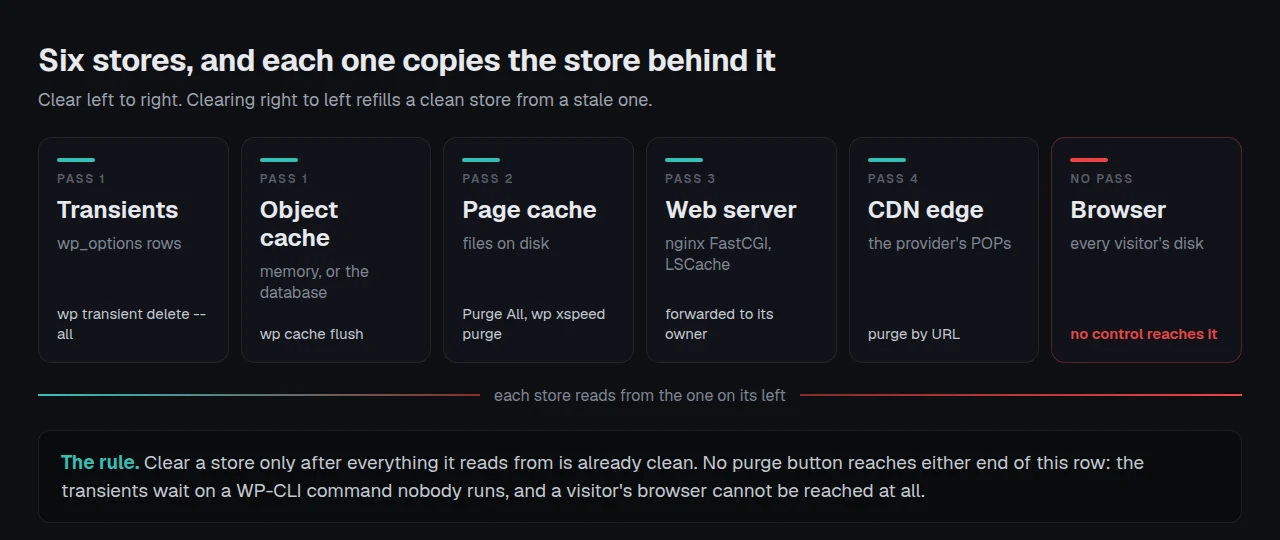
That gives one rule, and it is the whole framework: clear a store only after everything it reads from is already clean. Work from the database outwards, never from the edge inwards. Diagnosing a purge that missed is a separate job, covered in the guide to a purge that clears the wrong layer; this page is the ordered sweep, not the fault-finding.
The Object Cache Flush That Empties a Request-Scoped Array
wp cache flush is documented as “Flushes the object cache”, and its WP-CLI reference page warns about “the performance impact when flushing the object cache in production”. Both are accurate, and neither tells you the part that matters: what the object cache is depends on one file.
WordPress ships WP_Object_Cache, whose own class docblock records that it “can be replaced by other caching mechanisms by placing files in the wp-content folder”, and that when such a file exists “then this file will not be included”. Without that drop-in, wp_cache_flush() reaches a PHP array that dies with the request. With Redis or Memcached behind a drop-in, the same call empties a server that persists between requests.
Does wp cache flush clear it? | No drop-in installed | Redis or Memcached drop-in |
|---|---|---|
| Data cached within the current request | ✅ | ✅ |
| Anything surviving to the next request | ❌ | ✅ |
| A transient set with an expiry | ❌ | ✅ |
| A transient set with no expiry | ❌ | ✅ |
The right-hand column is why setting up a Redis object cache changes the meaning of every cache-clearing instruction you have followed before. Read the object cache documentation before assuming which column you are in.
Your Database Is Holding a Cache and the Sweep Cannot See Half of It
The Transients API documentation describes “storing cached data in the database temporarily”, and states plainly that transients “should also never be assumed to be in the database, since they may not be stored there at all”. That sentence is the inversion above, written by core.
On a site without a drop-in, every transient is two rows: _transient_yourkey and _transient_timeout_yourkey. Core’s cleanup function deletes a value row only where a matching timeout row exists and holds a time already past. Read from the WordPress 7.1.2 source on 26 September 2026, its docblock also records that the function “won’t do anything if an external object cache is in use”.
The consequence is measurable on any site. A transient set with no expiry is given no timeout row at all, and core marks it autoload = true.
| Transient shape | Timeout row written | Removed by the expired sweep | Autoloaded on every request |
|---|---|---|---|
| Expiry set, still fresh | ✅ | ❌ | ❌ |
| Expiry set, now past | ✅ | ✅ | ❌ |
| No expiry at all | ❌ | ❌ never | ✅ |
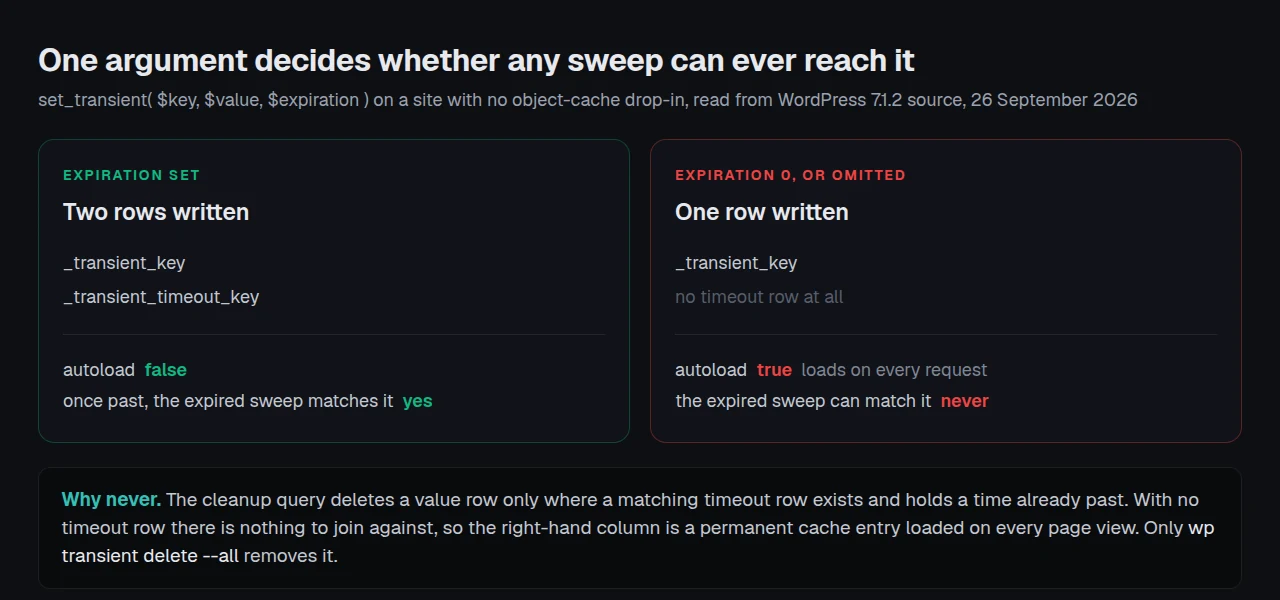
So the bottom row is a permanent cache entry, loaded on every page view, that the expired-transient sweep can never match. An expired one is barely better: core deletes it lazily, when something reads it, so a value nobody asks for can sit there for months. The only command that clears both is wp transient delete --all, whose own documented output is Success: 14 transients deleted from the database. The --expired variant leaves the bottom row where it is.
The Full-Page Cache Living Inside Your Web Server
A caching plugin sweeps the directory it owns under wp-content/cache/. Where the host runs its own nginx FastCGI full-page cache in front of PHP, that sweep reaches none of it: nginx keeps answering from its own store until fastcgi_cache_valid expires, which on a stock managed host is an hour. This fourth store sits ahead of PHP, so no plugin can clear it by deleting files. The purge has to be forwarded to whoever owns it, usually Nginx Helper, the plugin such hosts install alongside the cache, which exposes an action for exactly this.
The forwarding is worth doing narrowly. Our own source comments that LiteSpeed 7.9’s broad purge-all API “also deletes LiteSpeed CSS/JS, local-resource, object and opcode caches”, so xSpeed Cache calls only the response-invalidation seam rather than the whole thing, and LiteSpeed’s Toolbox documentation says which button does which by hand. Where the origin is the slow part rather than the cache, our sister company Startise builds xCloud, and it is ours.
The fifth store is the edge, and the one most people over-clear: Cloudflare caches 56 file extensions by default and HTML is not among them, so a full edge purge after every post is usually work for nothing, as connecting Cloudflare to a page cache sets out.
The Page Builder Kept Its Own Copy of the Rendered Page
The sixth store belongs to whatever built your layout. Elementor writes the buffered output of a whole document into _elementor_element_cache post meta on any front-end render, with a 24-hour lifetime, and element caching is on by default on a stock install. It also writes background-image URLs into uploads/elementor/css/post-<id>.css, and our own integration source records that those files carry no expiry at all: they are rebuilt only on a post save, a “Regenerate Files & Data” run, or a version bump.
xSpeed Cache reaches both, narrowly on purpose: a scoped purge and the purge firing on every publish both skip them, because rebuilding every generated CSS file each time would be its own regression. Only a full Purge All sweeps them, so the button pressed most often leaves it alone.
The Inside-Out Sweep, in Four Passes
| Pass | Run this | Why it sits here |
|---|---|---|
| 1 | wp transient delete --all, then wp cache flush | the data the others copied |
| 2 | Purge All, or wp xspeed purge | rebuilds HTML from clean inputs |
| 3 | the server cache, via its own control | it answers before PHP ever runs |
| 4 | the edge, by URL | it refills from pass 3 |
What this sweep cannot tell you. A store you do not have and one that silently failed report the same nothing: pass 3 on a host with no server cache looks exactly like pass 3 on a host whose purge hook was never wired up.
Confirming the Sweep Reached Everything
Check it as a stranger would, from outside your network. Run the free xSpeed Scan on the page you cleared, at xspeedcache.com/scan/: it fetches the URL from outside, reports whether the response came from a cache and how old that copy is, and needs no account.
By hand, request the page twice with curl -sI and read the cache header and the age value; which headers prove nothing is covered in checking whether caching really works. A sweep leaves the cache cold, so pointing the preloader at your sitemap keeps the rebuild off a reader.
Clearing Caches Across Twenty-Five Client Sites
Four passes by hand takes a minute. On twenty-five sites after a theme update people skip passes, and pass 1 is the one they skip, because it is the least visible. xSpeed Hub runs the sweep across a fleet and records which store each site reported clearing, so a site whose server purge was never wired up stops looking like one that has none. Every pass sits in the free plugin, per the Free vs Pro split.
Common Mistakes When Clearing a WordPress Cache
- 🔁 Starting at the edge. Purging Cloudflare first refills it from a page cache you have not emptied.
- 🗃️ Treating
wp cache flushas a database cleanup. Without a drop-in it touches nowp_optionsrow. - 🧹 Running
wp transient delete --expiredand stopping. The rows with no expiry never leave. - 🛒 Clearing cart and checkout pages as though they were cached. They must never be stored at all, a different setting, covered on the WooCommerce use-case page.
Frequently Asked Questions
I ran wp cache flush, it reported success, and nothing changed. Did it fail?
Probably not. With no persistent drop-in it empties an array belonging to its own request, so success with no visible change is expected.
My wp_options table has thousands of _transient_ rows. Is that a problem?
Worth clearing. The rows to watch have no matching _transient_timeout_ row: they autoload on every request and no sweep removes them.
I deleted every transient and the site was slow for a minute. Is that expected?
Yes. Transients hold work already paid for, such as remote API responses, so the next views rebuild it.
Should the object cache be cleared before the page cache?
Where it persists, yes. Purging HTML first stores the same stale values again under a fresh timestamp.
My theme change shows for me as an administrator but not for logged-out visitors. Which store holds it?
Almost certainly the page cache or something in front of it: logged-in requests usually bypass page caching. Verify from outside.
I cannot clear my visitors’ browsers. What is the alternative?
Change the filename. A cached asset is retired with a new URL, not a shorter lifetime; the xSpeed browser cache documentation covers the directives.
My host says it runs its own cache. Do I still need the plugin’s purge?
Yes, and in that order. Neither sweep reaches the other unless the forwarding is wired up.
Does clearing everything hurt performance while it refills?
Briefly, and measurably on a large site. Clear by URL where one page changed; sweep only for changes touching every page.
Can I run all four passes without a caching plugin?
Passes 1 and 4 need none: WP-CLI ships with WordPress and the edge purge belongs to your provider. Passes 2 and 3 need whatever owns each store, and xSpeed Cache is one of several plugins that will forward one.
How often should this sweep run?
Rarely. Publishing already triggers a scoped purge, the right response to a changed post.
Conclusion: One Sweep, Inside Out, Then Check From Outside
A cleared cache still serving an old page is almost never a failed purge button. It is an order that let a clean store refill from a dirty one, or a store nobody counted.
What to do this week:
- Run
wp transient delete --all, then look for_transient_rows with no timeout partner. - Run the four passes in order on a page you know changed, noting which stores you have.
- Verify from outside with the free scan, not your own browser.
- Wire the server and edge purges into the plugin so publishing keeps them in sequence. Every pass stays in free xSpeed Cache; paid plans start at $29 a year with a 14-day money-back guarantee, on the pricing page.