Only the Homepage Caches: A Question Mark in the URL Is Enough to Stop the Rest
Updated October 2026
One of the six permalink structures on WordPress’s Settings → Permalinks screen puts a question mark in every post URL, and WordPress’s own documentation records that a new install comes preinstalled with it. WP Super Cache 3.1.4’s readme, fetched 3 October 2026, states what a page cache does with URLs like that in one line: a query string “stops pages being supercached”.
Put those two together and a site can be almost entirely uncacheable out of the box while its homepage caches perfectly. So a HIT on the front page and a MISS on everything else is sometimes a broken rule and sometimes the cache obeying its own documentation. One response header separates them, and the fix is different in each direction.
Quick Summary: Read the Header Before You Change a Setting
| If you want… | Do this | Why |
|---|---|---|
| To know whether anything is wrong at all | Request one inner page and read its cache status header | A bypass and a miss have different causes and different fixes |
| To fix every inner page at once | Settings → Permalinks, pick any structure other than Plain, save | A question mark is what the gate is refusing, so removing it clears the whole site |
| To know which pages are stored right now | List the cache inventory rather than spot-checking URLs | A page nobody has requested is cold, not excluded |
A Miss and a Bypass Are Two Different Answers
The first thing to establish is whether the cache declined the page or never saw a request for it. Reading the cache headers on one URL is the whole diagnostic, and the vocabulary matters.
Our own source records the values. Cache::mark() in includes/class-cache.php, read on 3 October 2026, writes X-XSpeed-Cache on every request rather than only on the serve paths, and its docblock names the reason: a miss and a deliberate bypass both came back with no header at all, “indistinguishable from a curl -I, the first thing anyone reaches for when a site isn’t caching”.
| Header value | What happened | What to do |
|---|---|---|
HIT (php) | Served from cache by PHP | Nothing |
HIT (nginx) or HIT (static) | Served from a file before PHP started | Nothing |
MISS | Cacheable, nothing stored yet | Request it again, or warm it |
BYPASS | A gate refused this page | Find the gate |
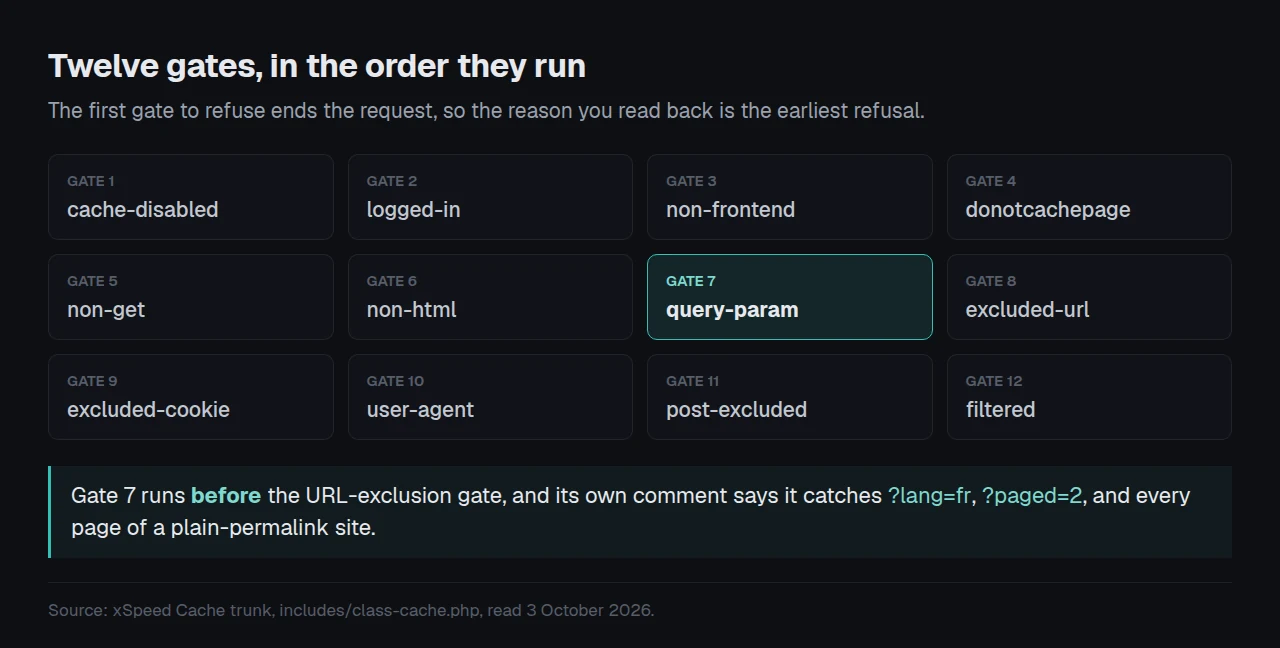
Twelve gates run in a fixed order and the first one to refuse ends the request, so the slug you get back names the earliest refusal rather than the only one.
The Cause That Produces Exactly This Pattern
The seventh gate is the query-string gate, and it runs before the URL-exclusion gate. Its comment in our trunk source is specific about what it catches: ?lang=fr, ?paged=2, “and every page of a plain-permalink site”.
That gate is not comparing against nothing. A fresh install ships 44 ignored parameters, counted by parsing CacheModule::default_ignored_query_params() on 3 October 2026, and every one of them is a tracking or session key: fbclid, gclid, the utm_* pattern, the thirteen added in 1.3.6. None of them is p, page_id, cat or paged. A parameter outside that list means a unique request, so the gate skips the page rather than filing two different pages under one key.
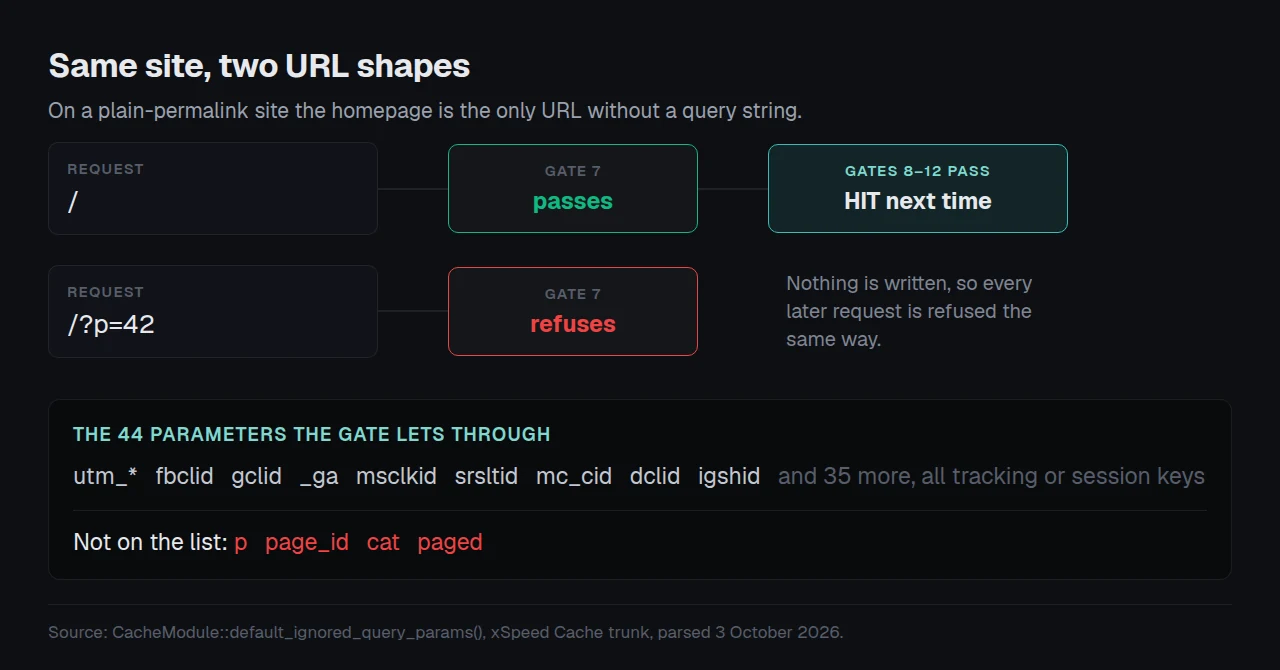
On a plain-permalink site that is every post, every page and every archive. The homepage alone is a bare /, which is why it is the one URL that caches. Changing Settings → Permalinks to any other structure fixes every URL in one action and costs nothing.
When Nothing Is Broken and the Site Is Only Cold
A page cache fills on the first anonymous request, not on install. Our own default lifetime is seven days, set by DEFAULT_EXPIRY_HOURS in the same module, so a page visited less often than that expires before its second visitor and reports MISS forever while the homepage stays warm on constant traffic.
That reads identically to a broken rule from a browser and it is the opposite problem. The fix is to warm the pages rather than to change a setting, and a 200 response is not a stored page is the trap to know before trusting a preloader’s own progress bar.
Four Causes, and the Check That Separates Them
| Cause | Header on an inner page | The check |
|---|---|---|
| Plain permalinks | BYPASS | Does the URL contain ? |
| An over-broad exclusion rule | BYPASS | Read the exclusion list against the path |
| Nothing requested the page yet | MISS | Request the same URL twice |
A server rule that only matches / | HIT (php), not HIT (nginx) | Compare the HIT flavour across pages |
The last row is worth stating because it is the cause people reach for first and it cannot produce this symptom. Server_Rules exists to let nginx or Apache answer a warm page without starting PHP, and its docblock is explicit about the failure mode: “a missing, stale, or hand-broken server config can only ever cost speed, never correctness”, because anything the server declines falls through to PHP, which re-applies the full rule list. A broken rewrite makes inner pages slower. It does not make them uncached.
If the header says BYPASS and the URL is clean, the list to read next is the exclusion list, where one asterisk makes a rule match less and a single over-broad entry can take out everything below the root.
Checking Every URL Instead of One at a Time
Spot-checking URLs with curl answers for the URL you chose. Two first-party reads answer for the site.
wp xspeed cache-coverage lists which page types this install can store at all, and the command’s own AI hint describes its job as answering “why a particular kind of URL is never cached”. The cache inventory answers the other half: the dashboard’s stat cards report how much is stored, and the inventory reports which pages, naming each one or reporting a null URL rather than a guess.
Run the free scan on your own site: xspeedcache.com/scan/
Cost, plainly. Everything in this guide works on the free tier of xSpeed Cache, which is ours, from WPDeveloper. The permalink change is a WordPress setting and costs nothing at all. The Free vs Pro page shows which of the coverage settings sit behind Pro, and our rules and bypass documentation carries the precedence order for anyone writing custom rules.
Frequently Asked Questions
My homepage says HIT and every other page says MISS. Is the cache broken?
Not necessarily. Read whether the inner pages say MISS or BYPASS. A miss means nothing is stored yet and a request will store it. A bypass means a gate refused, and on a plain-permalink site the gate is almost always the query-string one.
I changed my permalinks and the inner pages still report BYPASS. What else is there?
Purge the cache after the change, then re-request. If the header still says BYPASS with a clean URL, read the exclusion list and the cookie list next. Our common problems guide carries the order to work through.
Why does my X-XSpeed-Reason header not appear?
It is sent only when WP_DEBUG is on. That is deliberate, so production responses stay clean. Turn it on, make one request, read the slug, turn it off.
Can I just add p to the ignored parameters list and keep plain permalinks?
It would let the pages cache, and it is the wrong trade. Plain permalinks also cost you readable URLs. Changing the structure fixes caching, and an ignore entry treats a page identifier as noise.
My inner pages cache on desktop but miss on mobile. Same cause?
No. Separate desktop and mobile caches store a page twice, so each device shape warms on its own first request. That is coldness, not a bypass, and a stale purge is the other thing worth ruling out.
Do This Before You Change Another Setting
Do these in order:
- Request one inner page and read its cache status header. Note whether it says
MISSorBYPASS. - If it says
BYPASS, look for a question mark in the URL before touching any setting. - Switch Settings → Permalinks off Plain, save, purge, and re-request the same page.
- Run the free scan to confirm the result from outside the site. xSpeed Cache is free on the directory, and Pro is $29 a year at the founding price with a 14-day money-back guarantee.