WordPress Cache Exclusions in 2026: Adding an Asterisk Makes the Rule Match Less

Updated October 2026
WooCommerce’s own caching documentation, read on 2 October 2026, names exactly three pages that must stay dynamic: Cart, My Account, Checkout. LiteSpeed’s documentation warns on the same day that excluding one cookie which appears site-wide “effectively excludes your entire site from caching”. So the list of paths is the easy half.
The hard half is that the four exclusion fields do not match the same way, and nothing on the settings screen says so. A list of paths to paste is the guide you expect. Which field matches what string is the guide that decides whether your rule catches nothing or un-caches everything.
Quick Summary: Which Field Catches What
| If you want to… | Use this field | Why |
|---|---|---|
| Keep one page always dynamic | Excluded URLs | Matched against the path only, never the query string |
| Keep one visitor dynamic | Excluded Cookies | Matched against the cookie name only, never its value |
| Keep a bot or monitor dynamic | Bypass User Agents | Case-insensitive substring, no wildcards at all |
| Stop campaign tags duplicating a page | Ignored Query Parameters | An allow-list, matched on whole names |
One rule governs the first three: a plain entry means “contains”, and adding *, ? or [ switches it to anchored whole-value matching. The fourth field inverts the logic entirely.
Four Fields, Three Matching Rules
Every field takes one pattern per line, and our Page Cache documentation lists 16 shipped URL exclusions covering /wp-admin/, /wp-json/, /feed/, sitemaps, /wp-login and the standard store pages. Three different matching rules are in play, and the differences are deliberate.
| Pattern style | Behaviour | Example |
|---|---|---|
| Plain text | Matches anywhere in the value | /cart also catches /cart/items and /foo/cart/bar |
Glob (*, ?, [abc]) | Anchored, the whole value must match | /cart/* catches /cart/items but not /foo/cart/bar |
~ prefix | Raw regular expression, unanchored | ~wp-.*\.php |
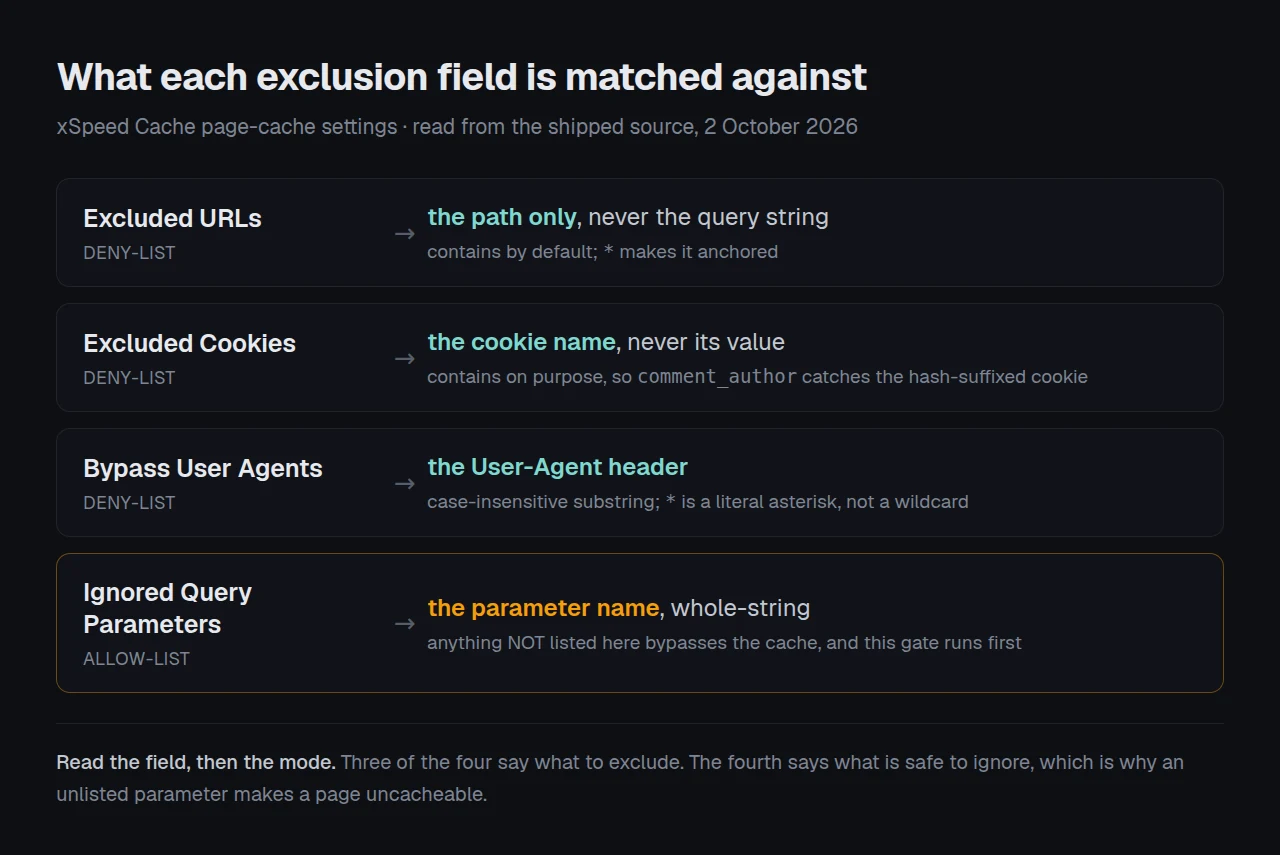
Excluded URLs and Excluded Cookies use that glob matcher. Bypass User Agents does not: it is a plain case-insensitive substring test, and class-glob-matcher.php in our published source gives the reason, that user-agent strings vary so wildly that anchoring them “rarely helps and confuses users”. Ignored Query Parameters goes the other way and matches whole names.
Why the Cart Default Has No Trailing Slash
Our shipped default is /cart, not /cart/ and not /cart/*. That is deliberate, and the reason is the contains rule above.
A bare /cart catches /cart, /cart/ and /cart/items together. Write /cart/ instead and a visitor landing on /cart with no slash gets a cached page. Write /cart/* and the pattern becomes anchored, so it no longer catches /cart itself, which is the page holding the basket.
An asterisk narrows an exclusion, it does not widen one. Everyone reads
*as “and everything under here”. Here it means “and nothing outside here”.
Cookie matching keeps contains semantics for a separate reason, stated in the same file: the shipped defaults are prefixes of hash-suffixed real cookies, so comment_author has to catch comment_author_<hash>. Tightening that to an exact match would serve shared cached pages to commenters, and cached pages showing logged-in content is the fix guide for that symptom.
The Query Field Is an Allow-List, and It Runs First
The other three fields are deny-lists: an entry means “do not cache this”. Ignored Query Parameters is the opposite. It lists the keys that are safe to strip before the cache key is computed, so /post?utm_source=x and /post share one entry. The defaults cover utm_*, fbclid, gclid and friends.
The consequence catches people out. Any parameter not on that allow-list makes the request uncacheable. Reading Cache::should_cache() on 2 October 2026, the query gate runs before the URL gate, so /cart/?add-to-cart=12 is reported as a query-param bypass and never reaches the URL rule at all.
WooCommerce’s documentation recommends a Varnish rule matching ?add-to-cart=. You do not need its equivalent here, and could not write it in the URL field anyway: that field sees the path only. The source says why, that a visitor writes the query string, so /cart/?utm_source=/feed/ must not be able to talk a cart out of its hold. Two more properties:
- Matching is whole-name, so an entry of
refmatchesrefand will not swallowpreference. xspeed_cssandxspeed_nccan never be ignored by any entry, because our own measurement requests use them to ask for the page as it is before optimisation.
Where Your Rule Actually Runs: The Three-Layer Test
Here is the framework this article is for. Before trusting any exclusion, ask where it is enforced, because a cached page can be served by three different layers and only one of them runs your full rule list.
| Layer | Runs | Reads your settings from |
|---|---|---|
| Web server (nginx or Apache) | Before PHP starts | A generated config block |
The advanced-cache.php drop-in | Before WordPress loads | Regexes baked in at save time |
PHP Cache::should_cache() | Full WordPress context | The live settings |
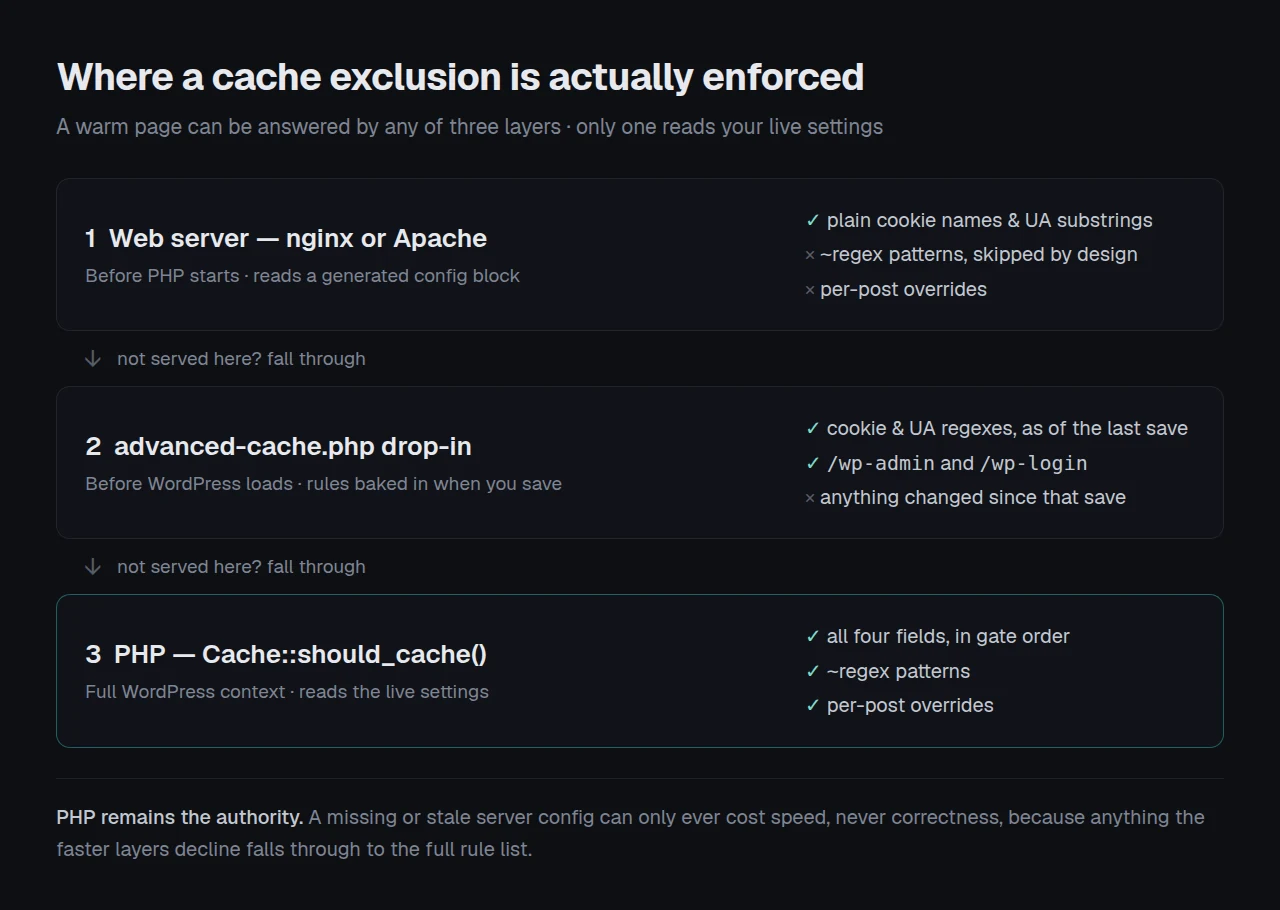
The drop-in cannot read your settings, because WordPress is not loaded yet. So the cookie and user-agent lists are compiled into it when you save, and class-server-rules.php is explicit about why: before it existed, every cookie and user-agent entry “applied only while a page was cold”, meaning the settings screen said the rule was active and on a warm page it was not.
The limitation, stated plainly: this test tells you where a rule is enforced, not whether the pattern is right. A pattern matching nothing is enforced perfectly at all three layers.
Two things fall out of it. Raw ~ regex patterns are deliberately skipped at the web-server layer, because arbitrary user regex inside an nginx config is how you take down every site on the box, so those patterns are enforced by PHP only. And the arrangement is safe by design: xSpeed caps a generated server rule at 100 patterns and merges three session cookie names in as a floor, so that as the same file puts it, PHP remains the authority and a stale server config “can only ever cost speed, never correctness”.
Four Mistakes That Un-Cache More Than You Meant
- Excluding a cookie that exists on every page. LiteSpeed’s own documentation warns that this “effectively excludes your entire site from caching”, and it is just as true here.
woocommerce_recently_viewedis the trap: it sounds cart-related and it is set almost everywhere. - Writing
*Googlebot*in the user-agent field. That field is a substring test, so the asterisks are literal characters and the entry matches nothing. WriteGooglebot. - Pasting a LiteSpeed list unchanged. Per its documentation, LiteSpeed compares URI rules against
REQUEST_URIand narrows them with^and$. Ours see the path and use glob syntax, so a pasted^/cartis a literal caret. Prefix it with~to keep it a regex. - Excluding a page that is merely stale. Our own docs are blunt about this one: exclusions are “a safety tool, not a tuning knob”, and adding
/blogbecause one post looked stale un-caches your entire blog. Purge first.
Confirming the Rule Fired
Start with the free xSpeed Scan. It needs no account and no plugin, and the check to read is D2, “Page served from cache”, confirmed against a live scan on rubric 2026.10.1 on 2 October 2026. Point it at the page you excluded and a failing D2 is the correct result: nothing is serving that page from a cache. Point it at an ordinary post and D2 should pass. Two scans settle it.
Run the free scan on your own site: xspeedcache.com/scan/
If you would rather check by hand, read the x-xspeed-cache response header. BYPASS means the request was deliberately never cached, HIT (nginx) means the server answered without starting PHP, and MISS means WordPress built the page and saved it.
One trap our documentation names. Only GET requests are served from cache, so curl -I sends a HEAD and reports BYPASS every time, whatever your settings say. Send a real GET instead.
curl -s -o /dev/null -D - https://example.com/cart/ | grep -i x-xspeed-cacheUnderstanding cache HITs and MISSes covers every value, and checking whether caching is actually working covers the wider question of proving a cache is live.
Running Exclusions Across Twenty-Five Client Sites
One store is four fields on one screen. Twenty-five stores is the per-site drift: one has an old ^/cart pasted from a previous plugin, another excluded /blog during an incident two years ago and nobody removed it.
xSpeed Cache is ours, built by WPDeveloper, and every exclusion field above is in the free tier, confirmed against Free vs Pro. A direct wordpress.org Plugin API query on 2 October 2026 returned xSpeed 1.3.7, rated 5.0 from 16 ratings.
For fleets, xSpeed Hub audits one exclusion list across sites instead of four fields twenty-five times. For one store, start with the WooCommerce setup and caching WooCommerce without breaking checkout.
Frequently Asked Questions
I added /cart/* and my cart page is still being cached. Why?
Because * anchors the pattern. /cart/* requires something after /cart/, so /cart itself no longer matches. Use the bare /cart.
I pasted an exclusion list from another plugin and nothing changed. What went wrong?
Those boxes commonly take regular expressions or their own anchors, as LiteSpeed’s documented ^ and $ do. Here a plain line is a literal substring, so prefix anything meant as a regex with ~.
I excluded a cookie and now my entire site is uncached. How?
The cookie you chose is set on every page. Check it in your browser’s developer tools against a page that should be cacheable, and pick a cookie that only appears for the visitors you meant.
My rule works on a cold page and not on a warm one. Is that a bug?
That was a real bug, and it is fixed. The fast path answers before WordPress loads, so cookie and user-agent rules are compiled into the drop-in when you save your settings. Re-save the panel to force that rebuild.
curl -I reports BYPASS on every page, even ones I did not exclude. What am I missing?
curl -I sends a HEAD request, and only GET requests are served from cache. Use curl -s -o /dev/null -D - instead.
Which other plugins handle exclusions well?
LiteSpeed Cache has the most granular controls, including exclusion by role and by category, and W3 Total Cache exposes more of the underlying rules. WP Fastest Cache is the simplest if you only need a path list. All three are reasonable choices; xSpeed is ours and our 80-capability comparison sets them side by side.
Do I need to exclude the WordPress login or admin pages?
No. Those are in the shipped defaults, and the drop-in also skips any request whose path contains /wp-admin or /wp-login before it looks at your settings.
Should I exclude logged-in users?
They are already excluded. xSpeed serves cached pages to logged-out visitors only, and three session cookie names are a permanent floor that an empty or broken setting cannot weaken.
Can I exclude a single product without a site-wide pattern?
Yes, from that product’s own editor screen. It applies to singular requests only, so archives and taxonomy pages keep the global policy.
Is there a limit to how many patterns I can add?
The server layer takes 100, and anything longer than 120 characters is left to PHP. PHP has no practical limit, but every pattern is a page rebuilt on each visit.
Conclusion: Your Exclusion Checklist
| Your goal | Field | Entry to write |
|---|---|---|
| One dynamic page | Excluded URLs | /cart |
| One dynamic section, nothing else | Excluded URLs | /private/* |
| One dynamic visitor type | Excluded Cookies | the cookie name, no wildcards |
| One dynamic bot | Bypass User Agents | a plain substring |
| A regex from another plugin | any of the first three | prefix it with ~ |
What to do this week: scan the page you believe is excluded and read D2. Re-save the Page Cache panel so the drop-in is rebuilt. Delete any pattern you cannot explain. Replace pasted ^ and $ patterns with a ~ prefix or plain text. If you are running more than five sites, xSpeed Cache is free to start and Pro is $29/yr at the founding price with a 14-day money-back guarantee.
Got an exclusion that behaves in a way this article does not explain? The troubleshooting guide is the next place to look.