Preloading the WordPress Cache in 2026: A 200 Response Is Not a Stored Page

Updated October 2026
WordPress core splits its own sitemap at 2,000 URLs per page, the documented default read from wp-includes/sitemaps.php on 3 October 2026. WP Super Cache, at over a million installs and shipped as v3.1.4 on 30 September 2026, describes warming as visiting “each page of your site generating a cached page as it goes along, just like any other visitor to the site”. Both are accurate, and together they frame the problem. The comparison people expect is which warmer crawls fastest. The more useful question is narrower: of the pages a warmer counts as done, how many are actually stored? What follows is the setup, the rate arithmetic, and the check that tells you.
Quick Summary: Set These Four Things, Then Verify
| If you want… | Do this | Why |
|---|---|---|
| Any warming at all | Switch the preloader on, then pick a schedule | Both ship off and manual |
| The right page list | Read your own robots.txt for the sitemap you actually publish | An SEO plugin rarely uses core’s path |
| A finishing crawl | Raise the batch size deliberately, not hopefully | The rate has a hard ceiling |
| Proof it worked | Read a cache header on one warmed URL | The counter measures fetches, not stored pages |
A 200 Response and a Cached Page Are Not the Same Thing
Every vendor describes warming the same way. WP-Optimize’s readme, v4.7.0 of 21 September 2026, says cache preloading “emulates a visit to your site”. WP Super Cache calls it a visit “just like any other visitor”. The framing is correct, and it carries a consequence nobody prints: if the warmer is an ordinary visitor, everything that stops a visitor’s page from being cached also stops the warm, and the warmer gets a 200 either way.
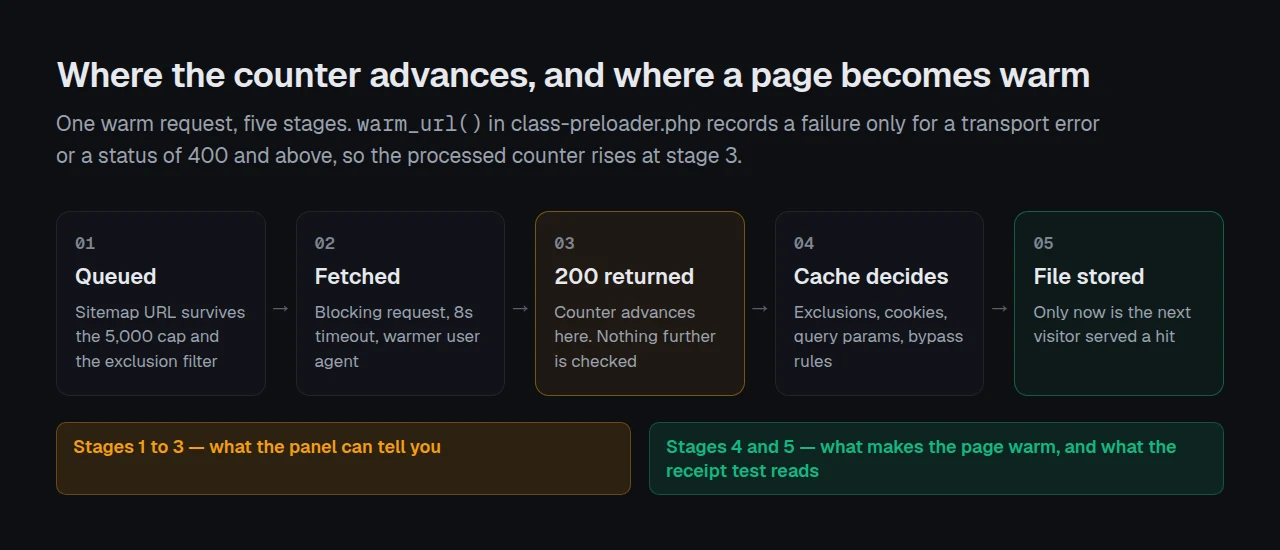
Our own code is explicit about where it stops looking. In class-preloader.php, fetched on 3 October 2026, warm_url() records an error for exactly two outcomes: a transport failure, and a status of 400 or above. A 200 falls through, the counter rises, and nothing asks whether a cache file appeared. This is our own gap to name: the panel can tell you a crawl finished, not that the pages are warm.
Point It at the Sitemap You Actually Publish
The sitemap field is blank by default, which means core’s /wp-sitemap.xml. That is the right default and the wrong setting for most sites running an SEO plugin.
Do not guess the path. Fetch your own robots.txt and read the line. A direct fetch of yoast.com/robots.txt on 3 October 2026 returned Sitemap: https://yoast.com/sitemap_index.xml, and yoast.com/sitemap.xml answered with a 301. Yoast’s help page gives the test from the other direction: “If you have a sitemap that is located on example.com/sitemap.xml, your sitemap is not generated by Yoast SEO.”
curl -s https://example.com/robots.txt | grep -i sitemap
curl -s -o /dev/null -w '%{http_code}\n' https://example.com/wp-sitemap.xml
Two limits apply once the list is found, both read from the source today. Nested sitemap indexes are followed recursively to a depth of three, so a core index and its child pages resolve normally. The URLs are then deduplicated and truncated: array_slice( $urls, 0, 5000 ). A site with more than 5,000 published URLs never queues the remainder, and because sitemap order is stable it is the same 5,000 every lap. The separate cap on remote image dimensions deliberately remembers its progress so nothing is stranded; the URL queue carries no equivalent.
Set the Rate: Batch Size Is the Only Dial, and It Has a Ceiling
Batch size defaults to 5 and the field accepts 1 to 50, as How to crawl your sitemap states. The source clamps it to the same range, then sets the part no documentation covers: after each batch, tick() reschedules itself with wp_schedule_single_event( time() + 10, … ). Ten seconds, fixed. The ceiling is therefore arithmetic, not a measurement.
| Batch size | URLs per 10s cycle | Ceiling per hour | 5,000-URL list |
|---|---|---|---|
| 1 | 1 | 360 | 13h 53m |
| 5 (default) | 5 | 1,800 | 2h 47m |
| 20 | 20 | 7,200 | 42m |
| 50 (maximum) | 50 | 18,000 | 17m |
Those are ceilings and real crawls sit below them. Each URL is fetched one at a time with a blocking request and an eight-second timeout, so a slow origin stretches the cycle past ten seconds. Two other things pull the number down, both covered elsewhere: a quiet site runs WP-Cron on page loads rather than a clock, and a crawl longer than your cache lifetime restarts a race it cannot win. Our guide to a preload that never ends and a preload that never started measures both.
Raising the batch size does not make the server faster. On shared hosting, leave it at 5 and let the crawl take an afternoon.
The Receipt Test: Four Questions, and the Panel Answers One
For any URL you believe is warm, four things must be true in order, and a dashboard shows you one of them.
| Question | What settles it | Panel shows it |
|---|---|---|
| Is the URL in the queue? | Sitemap contents, the 5,000 cap, the exclusion filter | ❌ |
| Did the fetch return 200? | The crawl’s own error list | ✅ |
| Did a cache file appear? | A cache header on a fresh request | ❌ |
| Does a second request report a hit? | The same header, read twice | ❌ |
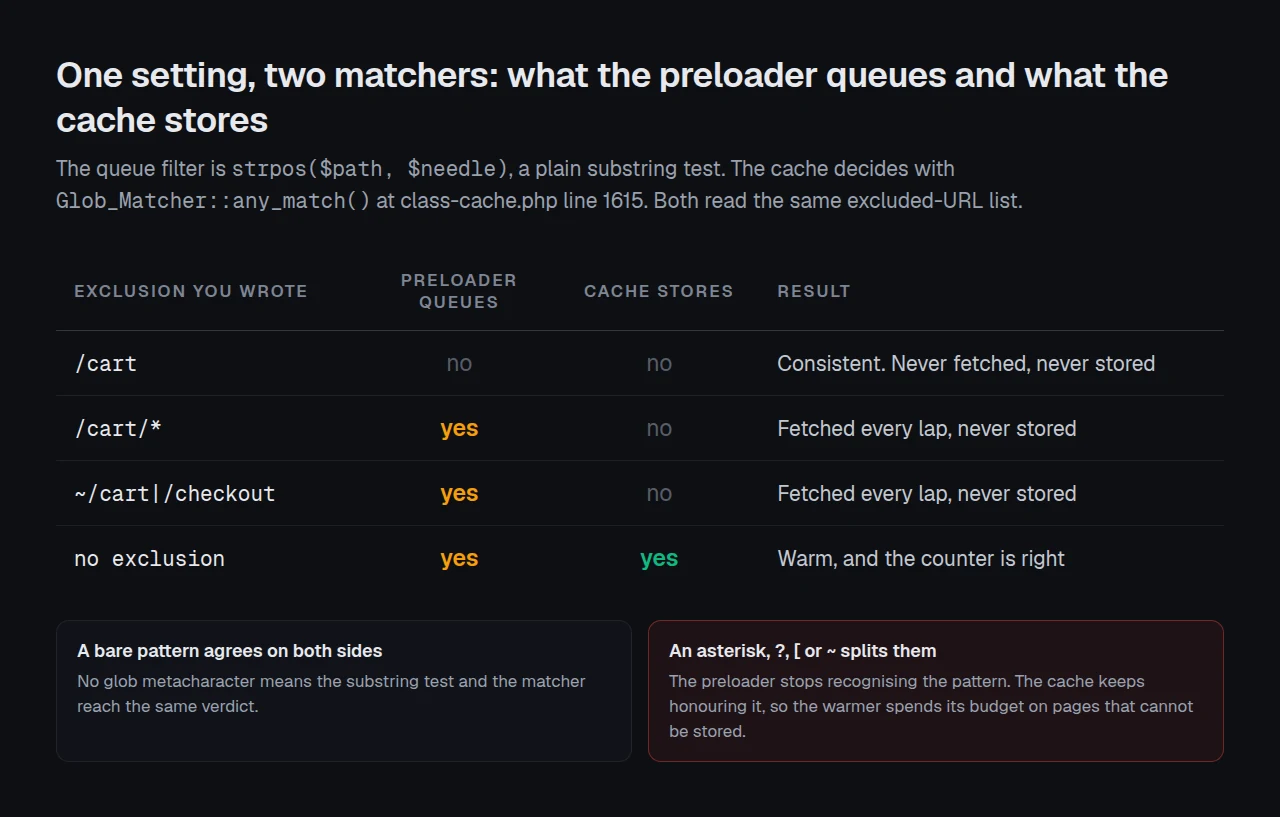
Question one is where the surprises live, and the reason is a matcher mismatch inside xSpeed Cache, our WordPress caching plugin at WPDeveloper. The preloader filters its queue with a plain substring test, false !== strpos( $path, $needle ). The cache decides with Glob_Matcher::any_match(), line 1615 of class-cache.php. Two different contracts applied to one setting.
| Exclusion you wrote | Preloader queues it? | Cache stores it? |
|---|---|---|
/cart | ❌ | ❌ |
/cart/* | ✅ | ❌ |
~/cart|/checkout | ✅ | ❌ |
A bare pattern behaves identically on both sides. Add an asterisk, a question mark, a bracket or a ~ regex marker and the preloader stops recognising it while the cache keeps honouring it, so the warmer spends its budget on pages that can never be stored, and every one returns 200. Our guide to writing cache exclusions covers that syntax in full, including why an asterisk narrows a rule rather than widening it.
The limitation, stated plainly: this proves one URL was stored at one moment. It says nothing about whether the list finishes a lap inside your cache lifetime, or whether a cold cache is your real constraint. For the latter, caching did not fix slow WordPress has the field data.
Confirming a Page Is Really Stored
Run the free xSpeed Scan on the warmed URL: xspeedcache.com/scan/
It needs no account and reports the delivery evidence a visitor would see, which is the outside view the panel cannot give you. If you would rather check by hand, request the page twice and compare the cache header on each response.
curl -sI https://example.com/your-page/ | grep -i 'x-xspeed\|cache-control\|age'Our guide on how to check whether WordPress caching is actually working explains which of those headers are evidence and which are noise, because several are sent on a page that was just rebuilt. Confirm Page Cache is on at all: warming fills a cache, and with none there is nothing to fill.
Warm traffic is identifiable in your access logs: every warmer request carries the agent xSpeed-Warmer/1.0 (+cache warmer; admin-initiated) and the header X-XSpeed-Self: 1. The header exists because the agent is filterable and the documented firewall remedy is to change it, so a request is recognised by what it is rather than what it calls itself.
Warming a Fleet Without Opening Twenty-Five Dashboards
At one site the receipt test takes two minutes. Across a portfolio it is the site nobody checked that goes cold. xSpeed Hub reads preloader state across every connected site at once, and wp xspeed preloader status answers a script or an AI assistant over MCP. WooCommerce stores need the exclusion check most, because cart and checkout paths are exactly the ones written as glob patterns.
When the host caps the rate rather than the plugin, the constraint is origin speed, and we recommend xCloud there. It is ours: xCloud and WPDeveloper are both Startise companies.
Common Mistakes When Setting Up Cache Warming
- 🔌 Leaving the master switch off. The preloader ships off and the schedule ships manual, so a configured panel warms nothing until both move.
- 🔥 Blaming the settings when a firewall is blaming the warmer. Status 403 and 406 are read in code as a rule set judging the agent, not as a missing page.
- 📈 Raising the batch size to rescue a crawl. It adds load to the origin the crawl already waits on.
- 🧾 Trusting the counter. It counts fetches that returned 200, which is question two of four.
Frequently Asked Questions
My crawl says it finished but visitors still get slow first loads.
Run the receipt test on one of those URLs. A finished crawl means every queued page returned 200, and an excluded page returns 200 cheerfully.
I set my cache exclusions with asterisks and now nothing seems to warm properly.
That is the matcher mismatch above. The preloader queues those URLs, the cache refuses to store them, and both behaviours are correct in isolation.
My preloader queued 500 URLs and my site has 4,000 pages.
That is the database fallback, not the sitemap. It runs only when the sitemap fetch genuinely fails, enumerates the most recently modified content, and caps at 500. Fix the path and the full list returns.
I pointed it at /wp-sitemap.xml and got nothing.
Check whether an SEO plugin disabled core’s sitemap. Read your robots.txt for the path you actually publish, then put that URL in the field.
Which free plugins have a warmer?
LiteSpeed Cache ships a preload crawler, though its own FAQ notes the crawler must be enabled server-side first. WP-Optimize and WP Super Cache both include preloading. Ours is the Crawl Now tab, and it is free.
Is the preloader a paid feature?
Crawl Now is free. Scheduled Prewarming and Predictive Warming are Pro, as Free vs Pro sets out. Everything in this guide uses the free tab.
Does a bigger batch size finish the crawl sooner?
Up to a point. The ten-second gap between batches is fixed, so the ceiling is the batch size multiplied by 360 per hour, and a slow origin keeps you under it.
How long does a 2,000-page crawl take at the default?
Roughly an hour and seven minutes at the ceiling, longer in practice. Core splits sitemaps at 2,000 URLs per page, so that is also where your sitemap becomes an index.
My warmed pages go cold again before the crawl ends.
The lap is outrunning the cache lifetime. That is a different problem with its own arithmetic, covered in the preload guide linked above.
Can I warm pages without any plugin?
Yes. A shell loop over your sitemap URLs with curl warms a page cache exactly as a visitor would, which is what every warmer does underneath.
Your Preload Setup, in Order
| Your situation | Start here |
|---|---|
| Small site, core sitemap | Switch on, schedule daily, leave the batch at 5 |
| SEO plugin installed | Set the sitemap URL from robots.txt first |
| Over 5,000 URLs | Decide which 5,000 matter before raising anything |
| Glob or regex exclusions | Run the receipt test on an excluded path |
What to do this week: read your robots.txt and put the real sitemap path in the field; switch the preloader on and pick a schedule; leave the batch size at 5 and watch the origin; run the receipt test on three URLs, one of them excluded; then run the free scan for the outside view. If Crawl Now is doing its job and you want scheduled or predictive warming, xSpeed Cache is $29 a year at the founding price with a 14-day money-back guarantee, and it is ours.
If the receipt test surprises you on a path you excluded, that is the finding.