No Cache Header at All From LiteSpeed Cache, and Why a MISS Would Be Good News

Updated October 2026
LiteSpeed Cache is active on 7,000,000+ WordPress sites, a figure a direct wordpress.org Plugin API query returned on 4 October 2026. LiteSpeed servers answer 14.3% of the web, per W3Techs the same day. Those two numbers count different populations, and the gap is where this symptom lives: the plugin installs anywhere, and the thing that does the caching does not.
The response header is the only honest witness, and it is read wrong in two directions: miss reads as a failure when it is not, and a blank reads as a broken plugin. This guide is about the blank, which has five causes, and only one of them is the server you are on.
Quick Summary: Read the Header, Then Pick the Row
| What the response shows | What it means | Do this |
|---|---|---|
x-litespeed-cache: hit | Served from cache | Nothing |
x-litespeed-cache: miss | The engine is there and has now stored the page | Reload once. Still miss every time? Check your cache exclusion rules |
x-qc-cache or x-lsadc-cache | Cached, at QUIC.cloud or Web ADC | Nothing. You were reading the wrong header name |
| No cache header of any kind | The engine is not answering | Work the five causes below |
A MISS Is Not the Failure. The Blank Is
LiteSpeed’s installation guide walks through reading the header in developer tools and shows X-LiteSpeed-Cache: miss as the expected first result. Its own words: those headings mean “the page had not yet been cached, but that LiteSpeed has now stored it, and it will be served from cache with the next request.”
A miss is therefore the best news in this article. Something answered: the engine is present, licensed and listening, and you were simply the first visitor to that URL.
The same document draws the line: “If you don’t see X-LiteSpeed-Cache: hit or X-LiteSpeed-Cache: miss (or any of the alternative headers), then there is a problem with the LSCache configuration.”
The alternative headers, where most false alarms start
Three header names mean the cache is working, and a reader grepping for one of them will miss the other two. Per LiteSpeed’s installation guide, X-LSADC-Cache appears when LiteSpeed Web ADC serves the site, and X-QC-Cache plus X-QC-Pop appear when QUIC.cloud CDN does. The guide calls all of these “an indication that LSCache is working properly on your site.”
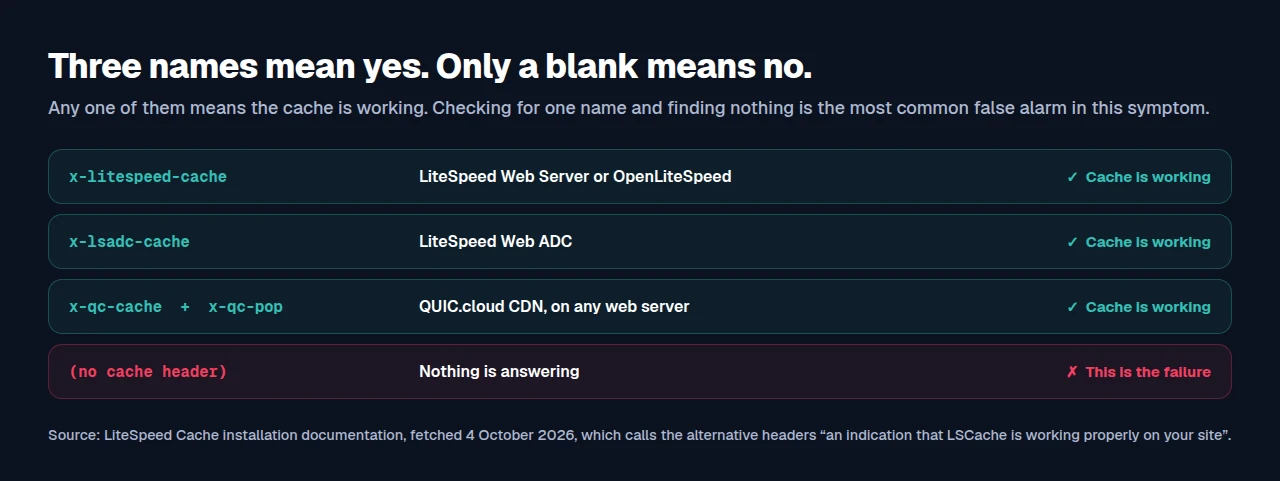
It matters most on the stack people assume is broken: a site on nginx with QUIC.cloud is fully cached and never emits x-litespeed-cache. Our guide to reading cache headers on any WordPress host covers the others.
No Header at All: Five Causes, and What Each One Costs to Fix
| Cause | How to confirm it | Fixable where you are |
|---|---|---|
| Not a LiteSpeed server, no QUIC.cloud | SERVER_SOFTWARE names Apache, nginx or IIS | ✅ |
| LSCache module not licensed on the server | LiteSpeed in the signature, still no header | ❌ |
| Server below the version floor | Ask the host for the build number | ❌ |
| Enable Cache was never switched on | LiteSpeed Cache → Cache → Cache | ✅ |
| A third-party load balancer in front | Rewrite rules absent at the balancer | ✅ |
The plugin is an interface. The engine is the server
One sentence explains four of those five rows. LiteSpeed’s own FAQ, dated 24 July 2026, states that “the actual caching is handled by LiteSpeed’s server-level cache engine, not the plugin itself. The plugin acts as a bridge between WordPress and that engine.”
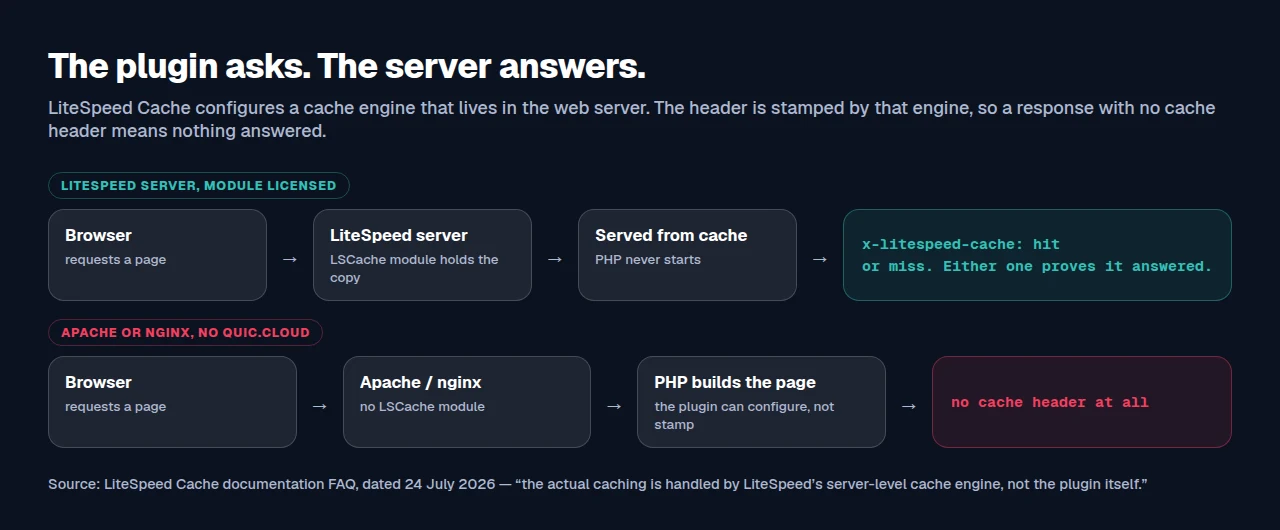
It goes further, and this is the cause almost nobody checks. The same FAQ says a licensed LSCache Module is needed for the free plugin to work at all: “Without the Module, the Plugin could not function.” You can be on LiteSpeed Web Server, plugin active and every toggle saved, and get no header, because the module behind it was never licensed.
That FAQ also publishes version floors a host upgrade can leave behind: LiteSpeed Web Server Enterprise with LSCache Module v5.0.10+, LiteSpeed WebADC v2.0+, OpenLiteSpeed v1.4.17+, or QUIC.cloud CDN. Below those, the plugin loads and the engine does not answer.
Your rewrite block does not prove your server
A LiteSpeed rewrite block in .htaccess looks like proof and is not. We hit this in our own code, and the reasoning is in the shipped source: Server::detect() in class-server.php reads SERVER_SOFTWARE rather than looking for the file, and its docblock says why: “We DO NOT fall back to ‘if .htaccess exists assume Apache’ here”, because our own cache writes rewrite rules itself and a presence check would then misread every nginx host.
Trust the signature, which Site Health shows you.
Running a Page Cache Where the Server Declines To
If the header is absent because the server will not serve a LiteSpeed cache, there are three honest routes, and two of them cost nothing.
| Route | What it costs | Best when |
|---|---|---|
| Connect QUIC.cloud CDN | A Free Plan, then a monthly quota | Keeping the plugin you configured. It is in LiteSpeed Cache’s General Features, so it works on any server |
| Move to LiteSpeed hosting | A migration | The server-level engine is what you are buying. What the split actually gives you |
| Cache without the server’s help | Free to start | The engine is not for sale on your host |
The third route is ours. xSpeed Cache is built by WPDeveloper, and it serves cached pages as static files before PHP starts, so it does not depend on what the server supports. That is a different trade from LiteSpeed’s: a server-level engine is faster at the hit, and a server-independent one works where the engine is not available. The 80-capability comparison sets them side by side and Free vs Pro shows what the free tier covers. Running two page caches at once needs care: see what happens when two cache plugins own one URL.
Run the free scan on your own site and read the cache headers it found: xspeedcache.com/scan/
Frequently Asked Questions
My header says x-litespeed-cache: miss on every single reload. Is the cache working or not?
The engine is working and something is refusing that URL. Check Do Not Cache URIs, cookie and user-agent exclusions, and whether you are logged in. A permanent miss is an exclusion.
I am on nginx and there is no header, but my host says caching is enabled. Who is right?
Both, possibly. Ask whether they mean QUIC.cloud or a server-side nginx FastCGI cache. The first shows x-qc-cache, the second shows nothing LiteSpeed-shaped, and neither emits x-litespeed-cache.
My site is on LiteSpeed Web Server and I still get no cache header. What is left?
The module. LiteSpeed’s FAQ is explicit that a licensed LSCache Module is required for the free plugin to function, and the plugin cannot tell you it is absent. Ask the host to confirm the module is licensed and the build is v5.0.10 or later.
Does OpenLiteSpeed need anything extra after I change a setting?
Yes. Per LiteSpeed’s FAQ, any setting change that modifies .htaccess needs a server restart on OpenLiteSpeed. A setting that saves and has no effect is usually this.
Can I install a different caching plugin instead and ignore the missing header?
Yes, and it is a reasonable fix when the engine is not available. Switch off the caching side of the first plugin rather than leaving two caching one URL, and check the server compatibility notes for your stack first.
The Half Hour That Settles It
Check logged out, in a private window: logged-in views are served dynamically and prove nothing. That trap is the usual one on WooCommerce stores, where cart and checkout are excluded by default. If anything answered, including a miss, the engine is present and the question is an exclusion rather than a server. If nothing answered, the server signature and the module’s licence state resolve four of the five causes.
What to do this week: check the header on three URLs, not the homepage alone. Ask your host both questions. Connect QUIC.cloud’s free plan if the engine is not available. Run the free xSpeed Scan and compare it against what you read. If you would rather cache regardless of the server, xSpeed Cache is free to start, and paid tiers open at $29/yr with a 14-day money-back guarantee on pricing.