You Purged the Cache and the Page Is Still Old
Updated September 2026
WP Super Cache shipped a fix on 19 August 2026 for a delete-cache button that could not clear archive pages whose slug held a non-ASCII character, per its own changelog on the WordPress.org Plugin API. A Cloudflare Free zone allows five purge requests a minute, according to Cloudflare’s purge cache documentation, last updated 14 August 2026.
So the button probably worked. It cleared a cache. The question is which one, because a WordPress site in 2026 stacks three or four caches in front of one URL, and emptying the wrong one changes nothing a visitor sees. Two commands name the layer holding the old copy.
Start here: name the layer before clearing anything else
| What you see | Stale copy is in | Jump to |
|---|---|---|
| A query string returns the new page, the plain URL does not | A page cache or CDN edge | Test one |
| Both return the old page, private window too | Nothing; the page never changed | The causes |
| Only your browser is stale, a phone is fine | Your browser | Layer 4 |
| Text updated, styling did not | A separately purged asset | Cause 5 |
On this page: Four layers · Test one · Test two · Seven causes · Clearing in order · Confirming it stuck · FAQ
The four places an old page can hide
Four stores can answer a request for a WordPress URL, each with its own purge control. A plugin’s button reaches one, sometimes two, never the last.
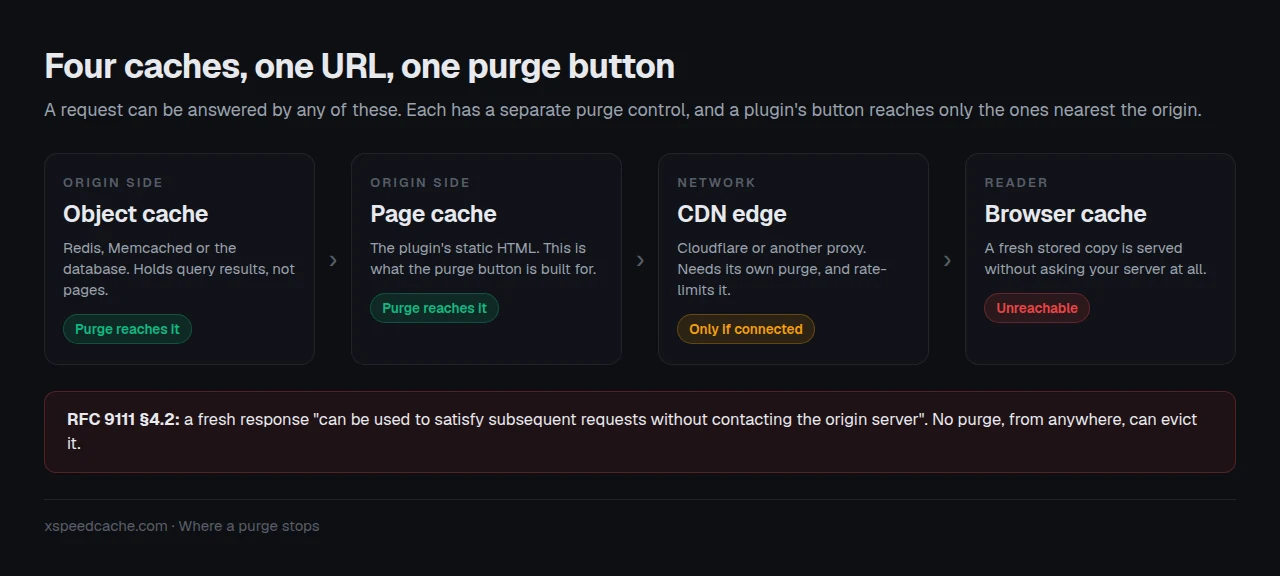
The fourth is the one people forget. RFC 9111, the HTTP caching specification, states that a fresh response “can be used to satisfy subsequent requests without contacting the origin server”. A browser holding a fresh copy asks your server nothing, and there is no message you can send it.
Test one: does a query string return the new page?
Request it twice, once plain and once with a parameter nothing has cached:
curl -s https://example.com/your-page/ | grep -c "the new text"
curl -s "https://example.com/your-page/?cachebust=$(date +%s)" | grep -c "the new text"
Read the pair, not either line alone:
| Plain | Cachebust | What it means |
|---|---|---|
| 0 | 1 | WordPress has the new page. Something in front serves the old one. |
| 0 | 0 | Nothing is caching. The page itself never changed. |
| 1 | 1 | The server is current. The staleness is in your browser or a nearby proxy. |
The middle row saves the most time. It sends you to the post, the environment and the object cache rather than the plugin.
Test two: which cache says it answered?
Ask for the headers and read who claims credit:
curl -sI https://example.com/your-page/ | grep -Ei \
'cf-cache-status|x-cache|x-litespeed-cache|age|cache-control'| Header | Who answered | Its purge control |
|---|---|---|
cf-cache-status: HIT | A Cloudflare edge node | The zone’s purge, not the plugin’s |
age: 3271 | A shared cache, 54 minutes old | Whichever proxy set it |
x-litespeed-cache: hit | The LiteSpeed server module | Purge All in the plugin |
A non-zero age on a page you just purged means a shared cache kept its copy, so the purge never reached it. For a fuller reading of these headers, see how to check whether caching is actually working.
Why a purge misses: seven causes, in order
| # | Cause | Where it is documented |
|---|---|---|
| 1 | You purged a plugin that is not serving the page | Two page caches on one site, per the 1.2.3 changelog, 2 Sep 2026 |
| 2 | What you edited has no page of its own | Templates, styles, menus, synced patterns, per the 1.2.2 changelog, 31 Aug 2026 |
| 3 | That URL sat outside the purge’s reach | WP Super Cache 3.1.2, 19 Aug 2026: archives with non-ASCII slugs |
| 4 | The purge was refused before it ran | W3 Total Cache 2.10.4 lists “Restore filterable capabilities for purge-all and purge-post” |
| 5 | The page cleared, a derived asset did not | LiteSpeed Cache’s readme: a correct CSS change “can still look stale… if you purge the page cache without also purging Unique CSS” |
| 6 | The CDN throttled the purge it accepted | Cloudflare token buckets: five a minute on Free, bucket of 25 |
| 7 | Your browser never asked | RFC 9111 §4.2, above |
Cause 6 catches busy sites hardest: an edge purge on every post save, comment and stock change exhausts a Free bucket, and dropped requests fail quietly.
Rule out cause 1 first. It is why xSpeed Cache, our own plugin at WPDeveloper, refuses to switch page caching on when another plugin owns it, and why its 1.2.2 release names each purge trigger as Cache purged (hook:wp_update_nav_menu). A purge log turns cause 2 into a readable line.
Clearing the layers in the right order
Order matters: clearing the CDN before the page cache refills it with the stale page. Work outwards.
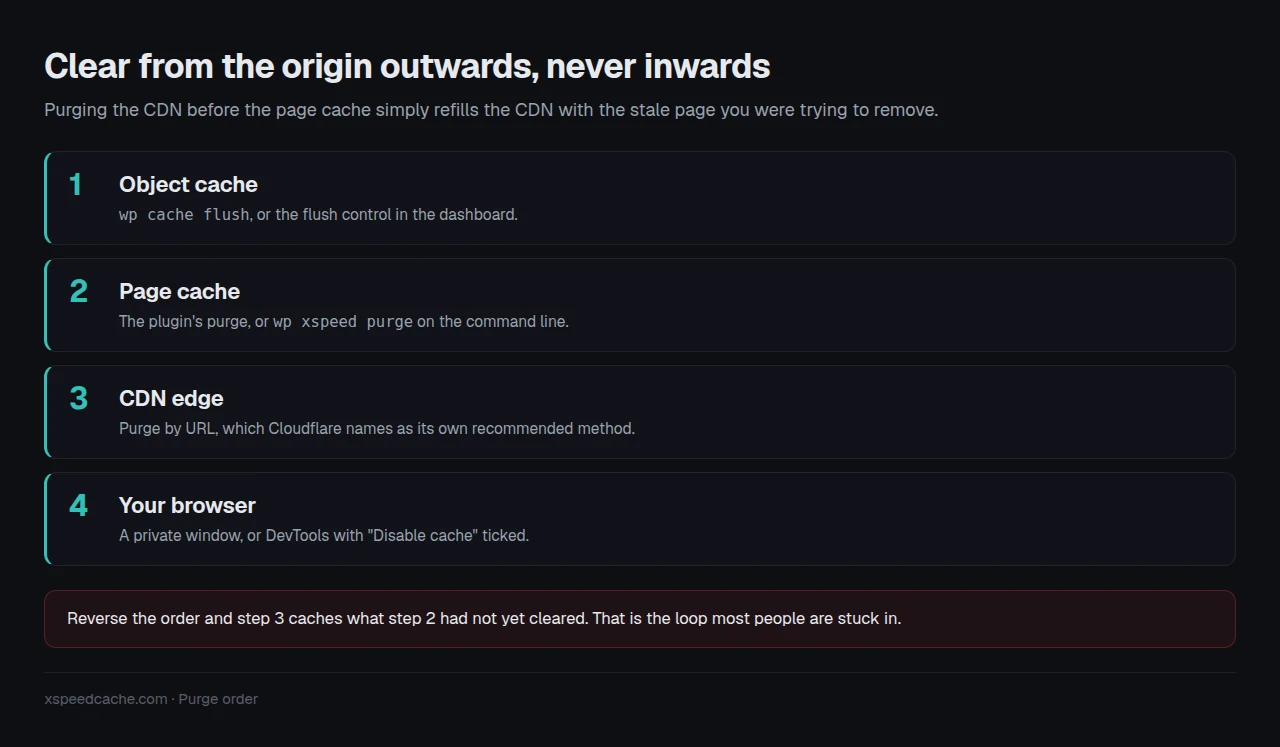
- Object cache with
wp cache flush, or the dashboard flush control. - Page cache with the plugin’s purge, or
wp xspeed purge. - CDN edge by URL, which is Cloudflare’s own recommended method.
- Your browser, with a private window or DevTools.
Where a CDN sits in front, connect it to the plugin rather than clearing by hand. The Cloudflare integration in xSpeed Cache, which ships in the free plugin, does this on publish, keeping steps 2 and 3 in sequence.
If step 2 refills with a slow page rather than a fast one, the layer underneath is the server. Our sister company Startise builds xCloud for that, and every xSpeed Scan report recommends it while disclosing it is ours.
Confirming the fix actually stuck
Refreshing your browser is the mistake that restarts the loop. Check it as a stranger would.
Run the free scan on your own site: xspeedcache.com/scan/. It requests the page from outside your network and reports whether it came from a cache. No account needed.
By hand:
- 🔁 Run the
curl -sIline twice. The first may be a MISS; the second should be a HIT with a smallage. - 📱 Load it on a phone on mobile data, sharing neither your browser cache nor network.
- 🔍 Repeat the query-string test. Both columns should return 1.
Stores carry an extra rule: cart, checkout and account pages must never be cached at all, covered in optimizing a WooCommerce checkout and on the WooCommerce use-case page.
Frequently asked questions
I clicked purge, it said success, and nothing changed. Did it lie? It told the truth about the cache it controls. Run test one: if the query-string version returns the new page, another layer holds the old one.
I purged everything in Cloudflare and the page is still old. What now? If the origin still serves the old page, the edge refilled from a stale page cache. Clear layer 2 first, then the edge.
My colleague sees the new page and I do not. Why? Your browser, per cause 7. If a private window is correct, your stored copy is still inside its freshness lifetime and nothing on the server can evict it.
I updated a template in the Site Editor and no pages changed. Cause 2. Those have no URL of their own, so a plugin listening only for post saves has nothing to hook. xSpeed Cache added them as triggers in 1.2.2.
I have two cache plugins active. Which do I press? Neither reliably. Two page caches competing is the fault itself. The route out is migrating to a single cache plugin.
Conclusion: one cache, one purge control
What to do this week:
- Run test one on the stuck page and note the row you got.
- Run test two and note the layer that claimed the response.
- Clear from the origin outwards: object cache, page cache, CDN, browser.
- Confirm from outside your network: a free scan, or a phone on mobile data.
If the answer is two page caches fighting, pick one and migrate. xSpeed Cache is free and detects a competing plugin before touching anything, with paid tiers from $29 a year on the pricing page. Keeping the plugin you have is a fine answer too. What matters is the same either way: one page cache, one purge control, and a log that says when it fired.