Ten of Fourteen Cache Plugins Write the Same File: The WordPress Conflict Nobody Documents in 2026
Updated September 2026
WordPress core defines exactly eight drop-in files, and wp-content/advanced-cache.php is one of them, according to the _get_dropins() reference on developer.wordpress.org, read on 24 September 2026. Ten of the fourteen free caching plugins we downloaded from wordpress.org the same day write to that single file. The comparison people expect is which cache plugin is fastest. The more useful one is which plugin holds the file, because the plugin that lost it still shows a green dashboard, still reports its cache as enabled, and caches nothing. This article reads the shipped source of all fourteen, publishes what each does when it finds the file occupied, and gives you a five-minute audit to run before installing anything.
Quick Summary: Which Conflict Do You Actually Have?
| If you want… | Do this | Why |
|---|---|---|
| Know which plugin owns page caching | Read the top of wp-content/advanced-cache.php | The file names its owner, and that owner is caching your pages |
| Know whether the second plugin does anything | Deactivate it, compare response headers | A plugin that lost the drop-in changes nothing on the way out |
| Stop two minifiers fighting over one stylesheet | Turn off CSS and JS optimisation in all but one | Minification is additive, so the second processes the first’s output |
| Migrate off an old cache plugin | Deactivate, confirm the drop-in is gone, then activate | Four of ten writers overwrite the file without checking |
| Audit a site you did not build | Run the free xSpeed Scan, read the delivery section | It reports what the server sends, settling it without a login |
The File WordPress Hands Every Caching Plugin
Page caching has to start before WordPress does, because a cache that runs after the theme has loaded has already paid for what it was meant to avoid. So core hooks in at the earliest moment: if WP_CACHE is true, wp-settings.php includes wp-content/advanced-cache.php before almost anything else exists. From _get_dropins(), fetched from developer.wordpress.org on 24 September 2026:
$dropins = array(
    'advanced-cache.php' => array( __( 'Advanced caching plugin.' ), 'WP_CACHE' ),
    'object-cache.php'   => array( __( 'External object cache.' ), true ),
    // …six more
);
Three properties of that array decide everything that follows.
- The filename is fixed. There is no
advanced-cache-2.php. Core looks for one name in one directory. - There is no registry. Nothing in core records which plugin put the file there, and nothing stops a second plugin replacing it.
object-cache.phpworks the same way. Redis Object Cache, W3 Total Cache and LiteSpeed Cache all want that slot, with the same one-owner problem. We measured what happens inside it in the Redis and memcached comparison.
The conflict is structural rather than a bug in one plugin. Every vendor writes to the same address because core offers one.
Ten of Fourteen: Where Each Plugin Intercepts a Request
We downloaded the current stable release of fourteen free caching and optimisation plugins from downloads.wordpress.org on 24 September 2026, unpacked them and read the PHP, asking one question of each: at which layer does it intercept a page request, and does it write wp-content/advanced-cache.php to do it?
| Plugin | Page cache intercepted at | Writes the drop-in |
|---|---|---|
| Autoptimize | No page cache | ❌ |
| Breeze | PHP drop-in | ✅ |
| Cache Enabler | PHP drop-in | ✅ |
| Comet Cache | PHP drop-in | ✅ |
| LiteSpeed Cache | LiteSpeed server module | ❌ |
| Redis Object Cache | Object cache only | ❌ |
| SiteGround Optimizer | PHP drop-in | ✅ |
| Surge | PHP drop-in | ✅ |
| W3 Total Cache | PHP drop-in | ✅ |
| WP Cloudflare Page Cache | PHP drop-in (fallback cache) | ✅ |
| WP Fastest Cache | .htaccess rewrite plus output buffer | ❌ |
| WP-Optimize | PHP drop-in | ✅ |
| WP Super Cache | PHP drop-in | ✅ |
| xSpeed Cache (ours) | PHP drop-in | ✅ |
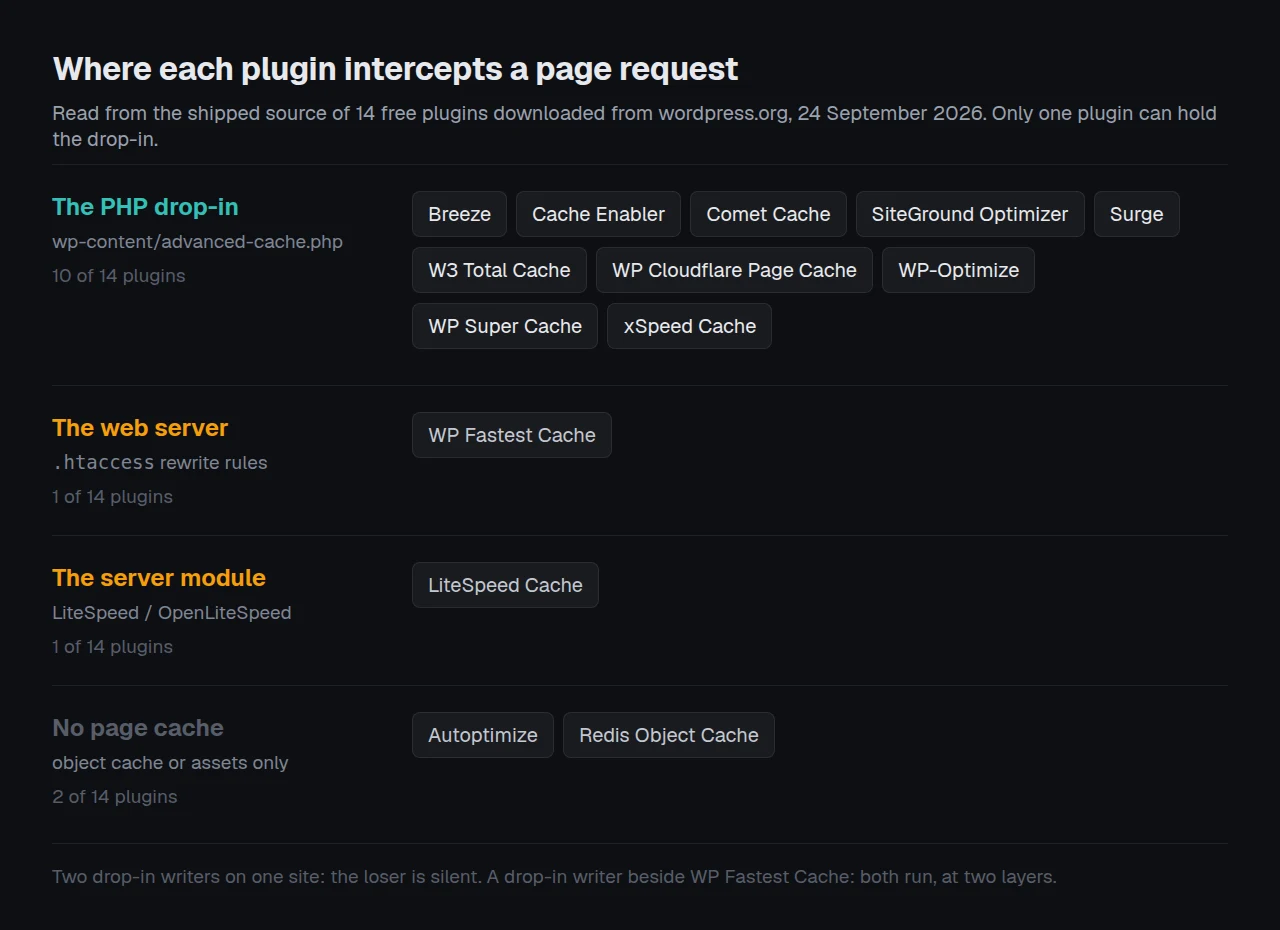
Four plugins stay out of the file, each for a different reason.
- Autoptimize does not page-cache. Its readme tells the reader to add “one of the many free page caching plugins … to complement Autoptimize”, making it the one plugin here designed to sit beside a page cache.
- LiteSpeed Cache caches at the server. Page caching sits in its LiteSpeed Exclusive column, needing OpenLiteSpeed, a commercial LiteSpeed product, LiteSpeed hosting or QUIC.cloud. On Nginx or Apache it is absent, as covered in LiteSpeed Cache on Nginx or Apache.
- WP Fastest Cache serves from
.htaccess. Its rewrite rules answer a cached request before PHP starts, and the cache is written by an output buffer inside WordPress. Searching its source foradvanced-cachereturns nothing, and the one place it touchesWP_CACHEis a compatibility path for WP-PostViews ininc/admin.php. - Redis Object Cache wants the other slot. It writes
object-cache.phpand never touches the page-cache drop-in.
The split matters because the conflicts differ. Two drop-in writers cannot both work and the loser is silent. A drop-in writer beside WP Fastest Cache is worse: both caches work, at two layers, and a visitor can be served a page one of them believes it purged.
What the Second Plugin Does to the First One’s File
No vendor documents this, so we read it. For each of the ten writers: what happens on install when advanced-cache.php already belongs to someone else?
| Plugin | Behaviour when the file is already occupied | Where in the source |
|---|---|---|
| Surge | Unlinks it, copies its own over the gap | include/install.php |
| SiteGround Optimizer | Deletes it, copies its own template | core/File_Cacher/File_Cacher.php |
| Cache Enabler | Overwrites with file_put_contents, no prior read | inc/cache_enabler_disk.class.php |
| Comet Cache | Truncates it to zero bytes, then writes its own | src/includes/traits/Plugin/InstallUtils.php |
| WP Cloudflare Page Cache | Renames a staged temp file over it, keyed on its own version constant | src/Modules/Fallback_Cache.php |
| Breeze | Writes its own generated file. No ownership check found in the write path | inc/cache/config-cache.php |
| WP-Optimize | Writes its own. On disable, touches it only if it carries the marker WP-Optimize advanced-cache.php | cache/class-wpo-page-cache.php |
| W3 Total Cache | Warns that the file “is not a W3 Total Cache drop-in. It should be removed.” | Generic_Environment.php |
| WP Super Cache | Ships a dist copy, warns when the file cannot be updated | inc/lifecycle.php |
| xSpeed Cache (ours) | Classifies the owner and refuses the write when it is foreign or unreadable | includes/class-cache.php |
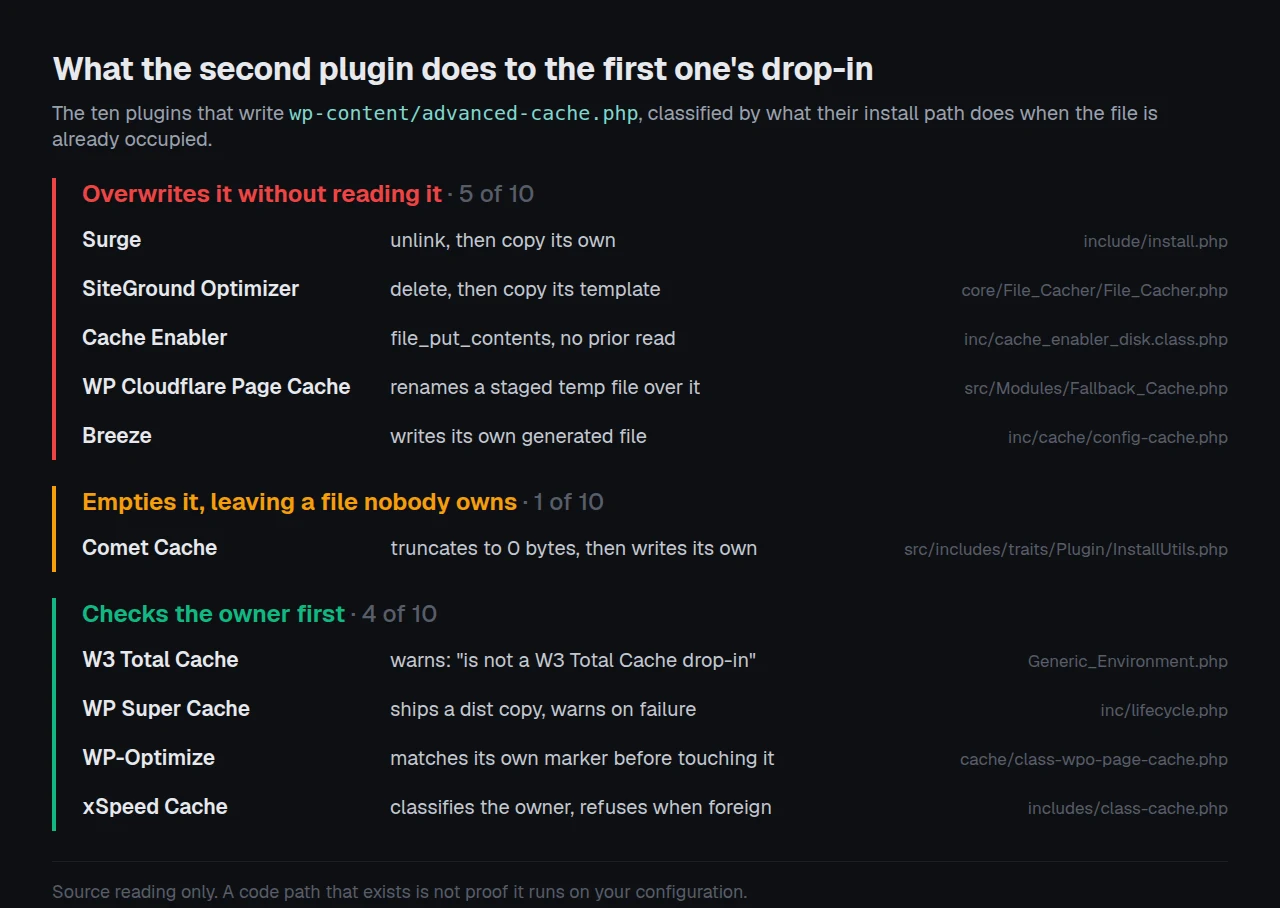
Three rows deserve the detail.
Comet Cache empties the file rather than deleting it
removeAdvancedCache() does not check whose file it is. It checks that the file exists, is readable and is writable, then writes an empty string into it. The code comment gives a sound reason: “Empty the file only. This way permissions are NOT lost in cases where a site owner makes this specific file writable for Comet Cache.”
The side effect is the interesting part. A zero-byte advanced-cache.php is still a file. file_exists() returns true, WordPress includes it, and including it does nothing. Any plugin that decides whether it holds the drop-in by asking whether the file exists now gets the wrong answer, permanently.
We met this from the other direction in production. WP Rocket truncates advanced-cache.php to zero bytes on deactivation, and our own detector first called that file foreign, making it a permanent blocker with no owner left to ask. The fix was a fifth state, DROPIN_ABANDONED, for a file present and holding nothing.
Comet Cache also puts the file back on its own
checkAdvancedCache() is attached to the init hook. If its marker file or the drop-in is missing, it calls addAdvancedCache() and writes WP_CACHE back into wp-config.php. The documented purpose is deployment resilience, for hosts like AWS Elastic Beanstalk that wipe site files on every push. Beside a second cache plugin the same code produces a loop: plugin B takes the drop-in, Comet Cache notices on the next admin page load and takes it back. Nobody is doing anything wrong and the file changes owner several times an hour.
SiteGround Optimizer edits WP Rocket’s .htaccess block
.htaccess is shared differently: plugins write marker-delimited blocks, so several coexist. Ownership is by marker, which works until a regex reaches past its own. SiteGround Optimizer’s disable_all pattern for gzip, in core/Htaccess/Htaccess.php:
'disable_all' => '/\#\s+GZIP enabled by SG-Optimizer(.+?)\#\s+END\s+GZIP\n|<IfModule mod_deflate\.c>(.*?\n)<\/IfModule>|# BEGIN WP Rocket(.*)# END WP Rocket/ims',Turning gzip off in SiteGround Optimizer removes WP Rocket’s entire .htaccess block with it. That is deliberate, it is in shipped code anyone can read, and a site owner flipping one toggle cannot predict it.
The Single-Owner Audit
Here is the framework, and its limitations come first because they decide when you should not trust it.
What this audit cannot tell you.
- It reads source, not behaviour. A plugin can ship a code path it never runs on your configuration. The tables describe what the code does when reached, not what your site did last Tuesday.
- It predicts ownership conflicts only. Two minifiers claim no single-owner resource. Both register output filters and both run, so this audit calls them compatible when the real question is which runs second.
- It covers the free directory on one date. WP Rocket, FlyingPress and NitroPack are not distributed through wordpress.org, so their source is absent. Where they appear below, the source is our own catalogue rather than their code.
- It cannot see a switch. A plugin capable of page caching may have page caching turned off. Capability is not possession, and conflating the two is the most common way a conflict detector gets it wrong.
The five steps.
- List the jobs, not the plugins. Page cache, object cache, HTML minification, CSS and JS optimisation, lazy loading, CDN rewriting, browser-cache headers, preloading. Most plugins claim four or more.
- Name the resource each job must own. Page cache owns
advanced-cache.phpandWP_CACHE, object cache ownsobject-cache.php, browser-cache headers own an.htaccessblock. Minification owns nothing; it filters. - Ask who holds each single-owner resource now. Read the first twenty lines of each drop-in for the name, then read
.htaccessand list the marker blocks. - A single-owner resource claimed twice is a conflict before you test anything. No benchmark, no symptom needed first. Two plugins wanting one file is a fact about the filesystem.
- Everything left over is an ordering problem. Additive jobs need a different fix: pick one owner per job in the settings, rather than deactivating anything.
Step four saves the most time. The usual response to a suspected conflict is to measure, and a measurement across two configurations carries a noise floor that swallows most of what you are looking for, as our benchmark protocol post sets out. An ownership collision needs no measurement at all.
The Jobs That Are Not Single-Owner, and Why They Are Worse
A page-cache conflict is at least decisive: whoever lost the drop-in stops entirely, which is easy to diagnose once you know to read the file. Minification conflicts have no such tell. Both plugins run. The first concatenates twelve stylesheets into one and writes it to its own cache directory. The second sees one stylesheet, minifies it again into a different directory, and a purge in plugin A now leaves plugin B serving a file built from content that no longer exists. The reported symptoms are the same three every time:
- Styling breaks after a deploy and fixes itself after two purges in the right order.
- A JavaScript error appears only for logged-out visitors, who are the only ones served the double-processed bundle.
- One page in twenty loads unstyled, a different page each time.
| Job | Resource | Shape of the conflict | How it shows up |
|---|---|---|---|
| Page cache | advanced-cache.php | Exclusive | The loser silently does nothing |
| Object cache | object-cache.php | Exclusive | The loser silently does nothing |
| Browser-cache headers | .htaccess blocks | Shared by marker | Duplicate or contradictory Cache-Control headers |
| HTML, CSS and JS optimisation | Output filters | Additive | Broken layout, stale bundles, purges that do not clear |
| Lazy loading | the_content filters | Additive | Images that never load, or loading="lazy" on the hero image |
| CDN rewriting | URL rewrite filters | Additive | URLs rewritten twice, producing a broken host |
Ordering problems are why the rule is “one owner per job” rather than “one plugin per site”. Two plugins coexist while no job has two owners.
What the Field Knows About Itself
A plugin can only avoid a conflict it knows about. For each plugin in the corpus we counted how many other named optimisation plugins appear anywhere in its own PHP source, counting detection code, migration importers and compatibility shims together, and excluding readme and changelog files.
| Plugin | Rivals named in its PHP source |
|---|---|
| xSpeed Cache (ours) | 15 |
| LiteSpeed Cache | 14 |
| WP-Optimize | 11 |
| WP Cloudflare Page Cache | 10 |
| Breeze | 8 |
| SiteGround Optimizer | 8 |
| Autoptimize | 7 |
| Comet Cache | 4 |
| WP Fastest Cache | 2 |
| Cache Enabler | 1 |
| W3 Total Cache | 1 |
| Redis Object Cache | 0 |
| Surge | 0 |
| WP Super Cache | 0 |
The median is 5.5 and the distribution is bimodal. Three plugins name nobody, and two of those write the drop-in without a word. W3 Total Cache is the instructive middle case: it names only WP Super Cache in code, yet carries the clearest foreign-drop-in warning in the corpus, which points to detection by file content rather than plugin name. Autoptimize’s seven is the most interesting entry: it has no page cache to defend, so every reference exists to work beside somebody rather than block them.
Auditing a Portfolio You Did Not Build
An agency inherits sites it did not build, and five minutes per site by hand does not survive a portfolio. That is the problem our own conflict handling was built for, and the code sits in the free plugin where you can read it.
xSpeed Cache is ours. We build it at WPDeveloper, a Startise company, and it is at version 1.3.5 with 6,000+ active installs and a 5.0 rating from 13 reviews, per the wordpress.org Plugin API queried on 24 September 2026. Two files carry the model: class-cache-plugin-catalog.php describes 24 optimisation plugins by capability and detection signal, and class-conflict-registry.php projects that catalogue into a per-feature decision. Twenty-one of the 24 carry a strategy, producing 95 feature-level decisions.
| Feature | Refuse | Warn | Total |
|---|---|---|---|
cache.page | 14 | 2 | 16 |
minify.css | 12 | 3 | 15 |
minify.js | 12 | 3 | 15 |
minify.html | 12 | 1 | 13 |
preload.crawler | 12 | 1 | 13 |
images.lazyload | 8 | 3 | 11 |
cdn.rewrite | 3 | 6 | 9 |
images.optimize | 3 | 0 | 3 |
| All features | 76 | 19 | 95 |
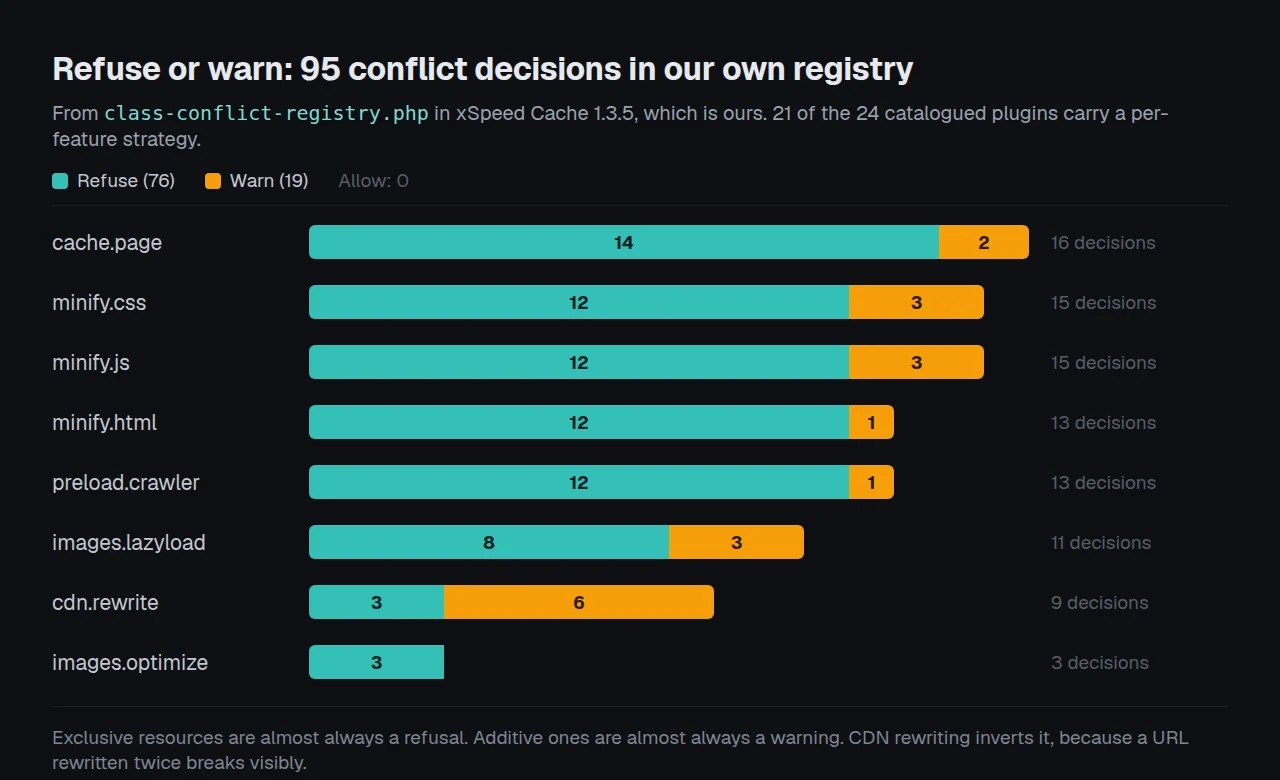
The split is the part worth arguing with. Exclusive resources are almost always a refusal and additive ones almost always a warning. CDN rewriting inverts that, six warnings against three refusals, because a URL rewritten twice breaks visibly rather than silently, and plenty of sites legitimately run a CDN plugin beside a cache plugin.
Run the free scan on your own site and read what your server actually sends: xspeedcache.com/scan/
The gate that took longest to get right distinguishes capability from possession, and we got it wrong first. The comment now in class-cache.php states the rule:
“WordPress gives every caching plugin the same single file to live in, so ‘is there a drop-in’ and ‘is it ours’ are completely different questions, and only the second one licenses a write.”
Our earlier version refused to enable page caching whenever any page-cache-capable plugin was active. QA found the failure on a live OpenLiteSpeed site keeping LiteSpeed Cache for images and CDN with its page cache switched off, while xSpeed served the pages. One click of the off switch and it could not be turned back on: the only way out was deactivating LiteSpeed entirely, and the error told the user to deactivate a page cache they had already deactivated. Detection cannot prove a competitor’s page cache is off, so counting it is right as a warning and wrong as a gate.
Migration is the other half and it is a free module, importing settings from WP Rocket, W3 Total Cache, WP Super Cache and LiteSpeed Cache, the four plugin paths named in class-migration.php. The steps are in the migration documentation. Across a portfolio, xSpeed Hub runs the same detection on every connected install, and our agency use case covers the fleet workflow.
One limitation on all of it: a catalogue of 24 plugins is a catalogue of the 24 we knew about when we shipped. A plugin we have never seen takes the drop-in and we call the file unreadable rather than naming an owner, which is a refusal with no useful message attached.
Common Mistakes Site Owners Make
- Judging by the dashboard. A plugin that lost the drop-in still shows its cache as enabled, because it reports its own setting rather than the file. Read the file.
- Deactivating in the wrong order. Activate the new plugin first and the old one’s deactivation routine may empty a drop-in that now belongs to it.
- Treating a zero-byte drop-in as no drop-in. It exists, it loads, it does nothing. Check the size as well as the presence.
- Assuming a purge clears everything. With two layers active, a purge in one clears one. Cached HTML survives in the other for the full expiry.
- Blaming the cache for an origin problem. Caching acts on server response time, a small share of what a visitor waits for, as measured across a thousand sites in why caching did not fix your slow site.
Frequently Asked Questions
Can I run two caching plugins at once?
For page caching, no. Both try to own wp-content/advanced-cache.php, WordPress loads one file, and whichever wrote it last does the work. For separate jobs it is workable, and Autoptimize beside a page cache is the common example its own readme suggests.
I installed a second cache plugin and my site got slower, not faster. Why?
Most likely both process every request while only one serves from cache. The plugin that lost the drop-in still runs its output filters, purge hooks and admin work on every page load: overhead with no cache hit at the end of it.
I deactivated my old cache plugin and now every page is a 500 error. What happened?
The old plugin left advanced-cache.php behind and the file references classes that no longer exist, because the plugin directory is gone. Delete wp-content/advanced-cache.php over SFTP and the site comes back. Set WP_CACHE to false in wp-config.php if it persists.
My cache plugin says caching is enabled, but no page is ever cached. What should I check?
Check the owner first: open wp-content/advanced-cache.php and read the top of the file. If another plugin’s name is there, your plugin’s setting is true and its code never runs. Then confirm WP_CACHE is true in wp-config.php, because without it core never includes the file.
I purged the cache and the old page is still showing. Where is it coming from?
Either a second caching layer is holding it or a CDN is. Purge each in turn and check the response headers after each. A copy cached at the edge survives every plugin-level purge that does not call out to the CDN.
How do I know which plugin wrote my advanced-cache.php?
Every drop-in here identifies itself in its first few lines by comment, constant or class name. Look for WP_ROCKET_ADVANCED_CACHE, Cache_Enabler_Engine, WPHB_ADVANCED_CACHE or wp-cache-phase1. An empty file means a plugin truncated it and nobody owns it.
Will a conflict show up in a speed test?
Rarely as a conflict. It shows as a site slower than it should be, with no cache evidence in the response headers. A scan that reports server-side cache state tells you the cache is not working, but not which plugin is at fault. The file does.
Is object-cache.php the same problem?
Structurally yes, one file and one owner, but calmer because fewer plugins want the slot. Four of the 24 plugins in our catalogue claim object caching, against 17 that claim page caching.
My host installed a caching plugin and I installed another one. Which wins?
Whichever wrote the drop-in most recently, and on managed hosting that is often the host’s, reinstated after every update. Ask what your host runs at the server level before adding a page cache above it.
Two minifiers are active and the site looks fine. Should I still turn one off?
Yes. It works until a purge lands in the wrong order, then breaks on a page you are not looking at. The second pass buys nothing and the failure is intermittent enough to cost hours of debugging.
Conclusion: Find the Owner Before You Find the Culprit
Two cache plugins on one site is a question about one file rather than a performance question, and five minutes answers it.
| Your goal | What to do | Why this one |
|---|---|---|
| Diagnose a slow site with caching on | Read advanced-cache.php and identify the owner | Settles in one step whether your plugin runs |
| Move between cache plugins | Deactivate, verify the drop-in is gone, activate | Four of ten writers overwrite without checking |
| Keep two plugins for two jobs | Assign one owner per job, in writing | Additive jobs break quietly, exclusive ones loudly |
| Audit a portfolio | Automate the drop-in read and the header check | Five minutes per site does not survive twenty-five |
What to do this week:
- Open
wp-content/advanced-cache.phpon your busiest site and note who owns it. - Compare it against the plugin whose dashboard you trust. If they differ, you have been running an uncached site behind a green checkmark.
- List your eight jobs and assign exactly one owner to each.
- Run the free xSpeed Scan and confirm the server is sending cache evidence, the one check that does not depend on a dashboard.
- If you are consolidating, xSpeed Cache does the detection and the import, and refuses to overwrite a drop-in it did not write. It is ours, built at WPDeveloper, a Startise company. The free tier covers page caching and migration, Pro is $29 a year at the founding price with a 14-day money-back guarantee, and the 80-capability comparison shows where it sits against the field, including the rows where it loses.
If the origin is the bottleneck rather than the plugin, no cache fixes it. We recommend xCloud there, and it is ours too, from Startise, the group WPDeveloper belongs to.
Found a conflict pattern missing from the tables above? The catalogue ships in the free plugin and grows from reports. Tell us what you found and which two plugins produced it.