Caching WordPress on Nginx: Your Bypass Rule Serves the Shopper and Still Stores Their Cart
 M Asif Rahman 10 min read
Updated October 2026
A cached page left our test server in a median of 0.4 ms. The same page, rebuilt by PHP, took 151.3 ms, measured on nginx 1.24.0 over 30 requests each on 26 October 2026. That saving is why people put a FastCGI cache in front of WordPress. The reason they rip it out again is a shopper’s cart on a stranger’s screen, from a config that looks correct in every guide publishing it. The response even reports BYPASS for the shopper, the signal that convinces people they are safe.
Quick Summary: What to Change Before You Go Live
| If you want… | Do this | Why |
|---|---|---|
| A page cache on nginx, safely | fastcgi_no_cache beside fastcgi_cache_bypass, same variable | Bypass governs reading, no_cache writing |
| WordPress to see the cache | Name the header X-Cache-Status, not X-FastCGI-Cache | Core’s Site Health knows the first name, not the second |
| To keep your plugin | Plugin owns optimization, nginx owns the page cache | Two page caches on one request is where stale HTML starts |
| To know it is working | Read the status word on a second request | A 200 is not evidence of storage |
| To skip all of this | Leave the page cache in PHP | Nginx cannot read a plugin’s exclusions |
Where a FastCGI Cache Sits, and Why That Changes the Rules
A caching plugin runs inside WordPress: it writes HTML to wp-content/cache/ and serves it early, but PHP still starts. A FastCGI cache runs in nginx, in front of PHP, so on a hit nothing in your install executes. That is where the 150 ms goes. “Micro-cache” means a short time to live, so a burst to one URL costs one PHP render.
That position is both the benefit and the problem. Your plugin knows who is logged in and which pages you excluded. Nginx knows a URL, a method and some request headers, so every rule you depend on must be restated in nginx.conf or sent in a response header.
The Two Directives Are Not Synonyms, and That Is the Whole Bug
Per nginx’s own FastCGI module documentation, read on 26 October 2026, the two directives everyone treats as a pair do different jobs:
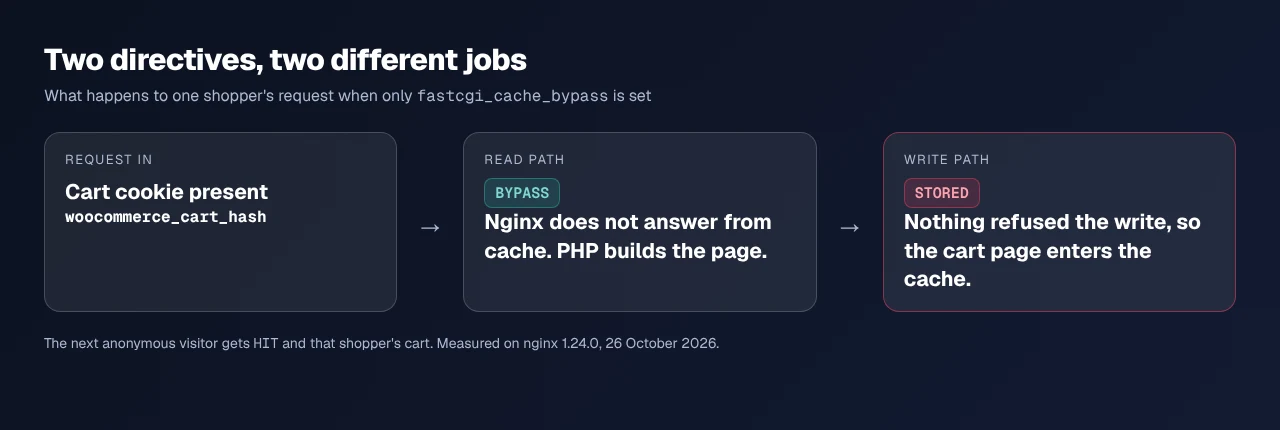
fastcgi_cache_bypass“defines conditions under which the response will not be taken from a cache.”fastcgi_no_cache“defines conditions under which the response will not be saved to a cache.”
One is about reading. One is about writing. The reference says of each that it “can be used along with” the other, which is as close as a manual comes to saying one alone is half a rule.
So a config carrying only fastcgi_cache_bypass $skip does this. A shopper arrives with a cart cookie, $skip is 1, nginx refuses to answer from cache, passes the request to PHP, gets a page with that cart in it, and stores it, because nothing told it not to.
What We Measured: Six Configurations, One Cart
We built the leak rather than assuming it. A PHP page returns a personalised body when a woocommerce_cart_hash cookie arrives, with core’s own no-cache headers. Six configurations, each from an empty cache: one request as the shopper, one as an anonymous visitor.
| Config | no_cache | ignore_headers | Stored | Anonymous visitor got |
|---|---|---|---|---|
| A | ❌ | Cache-Control Expires Set-Cookie | 1 file | HIT, the shopper’s cart |
| B | ❌ | none | 0 | MISS, empty cart |
| C | ✅ | none | 0 | MISS, empty cart |
| D | ❌ | Cache-Control Expires | 0 | MISS, empty cart |
| E | ❌ | Set-Cookie | 0 | MISS, empty cart |
| F | ✅ | Cache-Control Expires Set-Cookie | 0 | MISS, empty cart |
Sample: nginx 1.24.0 and PHP 8.3.6, six configurations, two requests each, 26 October 2026. The shopper’s response read BYPASS in all six.
Config A leaked on the first anonymous request. Configs D and E each switched off one safety net and stayed clean, so the two header vetoes are redundant with each other and either alone is enough. Config F wrote the correct directive and stayed clean with all three headers ignored, which makes it the recommendation. The leak is not a hair trigger: it needs no fastcgi_no_cache plus all three vetoes off at once.
The Three Vetoes: One Framework for This Whole Problem
Nginx gets three independent chances to refuse to store a personalised page. WordPress already triggers two. The third is yours.
| # | The veto | Who sends it | Switched off by |
|---|---|---|---|
| 1 | Set-Cookie on the response | WordPress and WooCommerce | ignore_headers Set-Cookie |
| 2 | Cache-Control or Expires | Core, on any page that must not be cached | ignore_headers Cache-Control Expires |
| 3 | fastcgi_no_cache | You, in nginx.conf | Nothing |
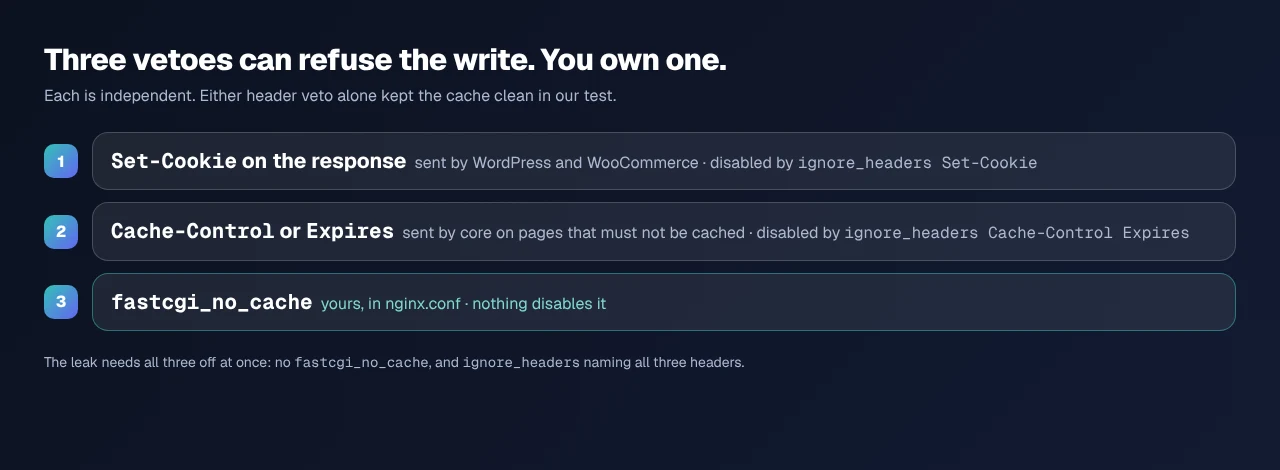
Nginx documents the first two: a response carrying Set-Cookie “will not be cached”, and absent X-Accel-Expires, “parameters of caching may be set in the header fields Expires or Cache-Control”. WordPress holds up its end: wp_get_nocache_headers() sends Cache-Control: no-cache, must-revalidate, max-age=0, no-store, private plus an Expires date in 1984, on admin, account and checkout views.
Veto 3 is the only one fastcgi_ignore_headers cannot reach. So you need not mirror your plugin’s exclusion list in nginx: WordPress already vetoes those pages. The danger is switching that veto off, and the most-copied line in nginx recipes does exactly that to all three at once, because ignoring Cache-Control is what makes caching appear to work.
Build It: The Config, Line by Line
The cache path goes at http level, in /etc/nginx/nginx.conf or /etc/nginx/conf.d/:
fastcgi_cache_path /var/cache/nginx/wp levels=1:2
                   keys_zone=WP:100m inactive=60m max_size=1g;
The rest goes in the site’s server block, usually /etc/nginx/sites-available/your-site:
set $skip 0;
if ($request_uri ~* "/(cart|checkout|my-account)/") { set $skip 1; }
if ($http_cookie ~* "wordpress_logged_in|woocommerce_cart_hash|comment_author") { set $skip 1; }
if ($arg_add-to-cart != "") { set $skip 1; }

location ~ \.php$ {
  include fastcgi.conf;
  fastcgi_pass unix:/run/php/php8.3-fpm.sock;

  fastcgi_cache WP;
  fastcgi_cache_key "$scheme$request_method$host$request_uri";
  fastcgi_cache_valid 200 10m;
  fastcgi_cache_bypass $skip;
  fastcgi_no_cache    $skip;
  fastcgi_cache_lock on;
  add_header X-Cache-Status $upstream_cache_status always;
}
Three lines carry a trap, each checked against the nginx reference today:
fastcgi_cache_valid 200 10mnames the code deliberately. Given only a time, nginx documents that “then only 200, 301, and 302 responses are cached”, so a barefastcgi_cache_valid 10mquietly caches redirects.fastcgi_cache_keyneeds$host, or two sites on one server share an entry.fastcgi_cache_lockdefaults tooff. On, “only one request at a time will be allowed to populate a new cache element”, so a cold URL cannot spawn a hundred workers.
One directive is missing on purpose: fastcgi_ignore_headers is in most recipes and none of ours.
Name the Header WordPress Already Looks For
Core’s Site Health page-cache test recognises a fixed header list. Counted from WP_Site_Health::get_page_cache_headers() today, it holds 16 headers, and the two its comments label as nginx are x-cache-status and x-proxy-cache.
x-fastcgi-cache is not among them. The header name almost every FastCGI tutorial tells you to add is the one name core cannot read, so Site Health reports no page cache on a server that has one. The fix is a rename, and we checked it rather than asserting it: with add_header X-Cache-Status $upstream_cache_status, a second request emitted X-Cache-Status: HIT, and core’s own callback returned true against that value. The test wants the word HIT, which is what $upstream_cache_status gives you.
Confirming It Is Actually Caching
Start with the free xSpeed Scan. It needs no account, and check D1 grades time to first byte from outside your origin against a 200 ms target, the number this cache should move. Run it before you change anything, then after.
If you would rather check by hand, request the same URL twice and read the status word. The first is MISS, the second should be HIT. One request tells you nothing, the trap our guide to checking whether caching is working covers for every layer.
| Status word | What it means | Is that good |
|---|---|---|
MISS | Not cached, PHP answered, response stored | ✅ first request |
HIT | Served by nginx, PHP never started | ✅ |
BYPASS | A bypass condition matched, PHP answered | ✅ on cart and account |
EXPIRED | Cached, past its time to live, rebuilt | ✅ |
Running This Across Client Sites
Two page caches on one request is the failure mode to plan for. If nginx holds the page cache, switch the plugin’s page-cache module off and let it keep what nginx cannot do: minification, lazy loading, object cache, preloading. That is the reasoning behind LiteSpeed Cache’s feature divide on Nginx and Apache, where a plugin’s page cache is off by design on the wrong server.
- Who owns what. xSpeed Cache is ours, built by WPDeveloper, and serves cached pages as static files before PHP starts, so it needs no FastCGI cache at all. On version 1.4.4, released 19 October 2026, which modules are free is in Free vs Pro, and server compatibility records what changes per server.
- For stores. The exclusions that matter are in our WooCommerce exclusion guide and the WooCommerce use case.
- Purging. No plugin deleting files sweeps a store in front of PHP. The route is in clearing every WordPress cache.
Run the free scan on your own site: xspeedcache.com/scan/
Where the origin is slow, hosting is the other half. Our sister company Startise builds xCloud, tuned for this, and it is ours.
Common Mistakes People Make on Nginx
fastcgi_cache_bypasswithoutfastcgi_no_cache. Config A. One request leaks.- Matching the cart by path only. A cart fragment can appear on any page, so match the cookie.
- Testing while logged in. Your own cookie sets
$skip, so you seeBYPASSforever and conclude nothing works.
Frequently Asked Questions
My bypass rules are right and the cart still leaked. What did I miss?
Almost certainly fastcgi_no_cache. Bypass stops nginx reading from cache, not writing to it, so the page is stored for the next visitor.
My response says BYPASS and I thought that meant excluded. Is it broken?
BYPASS on a cart or account page is correct. It says nginx did not answer from cache, nothing about whether it stored the response.
My Site Health still reports no page cache though nginx is caching. Why?
The header name. Core recognises x-cache-status and x-proxy-cache for nginx, not x-fastcgi-cache.
I cleared the cache in my plugin and the old page is still live. What now?
The plugin cannot reach the nginx store. A purge must be forwarded to whoever owns that cache, or you wait out the TTL.
My staging site cached a 301 I did not expect. Where did that come from?
A bare fastcgi_cache_valid 10m. Nginx documents that form as caching 200, 301 and 302.
Should I run this instead of my plugin, or as well?
As well, with the page-cache module off in the plugin. Nginx cannot minify, lazy-load or run an object cache, most of what a plugin does.
My logged-in dashboard got cached once and I cannot reproduce it. How?
Look for fastcgi_ignore_headers. With all three vetoes off and no fastcgi_no_cache, whichever personalised response hits a cold key first is stored.
My TTFB barely moved after enabling this. Why?
Measure what changed. Our scan corpus showed a median first byte of 274 ms across 3,786 graded sites on 26 October 2026, so if your origin was already fast the saving is small. Distance and redirects dominate elsewhere, as the host-change guide shows.
Can my plugin’s exclusion list be the only list?
Partly, and that is the useful finding. WordPress sends a no-cache header on the pages that matter and nginx honours it unless told not to. Write fastcgi_no_cache anyway: nothing can disarm it.
A logged-out visitor saw another user’s name once. Is that this bug?
One cause of several. A cache ignoring logged-in state has the same signature whichever layer holds it, which this diagnosis covers.
Conclusion: Your Nginx Caching Checklist
The configuration that leaks is not exotic. It is the common recipe with one directive missing and one added, reporting BYPASS to whoever tests it while filling the cache.
What to do this week:
- Check every variable in
fastcgi_cache_bypassalso appears infastcgi_no_cache. - Delete
fastcgi_ignore_headersunless you can say what each header was stopping. - Rename your status header to
X-Cache-Statusso core sees the cache. - Add a product to a cart, load that URL in a private window, confirm it is empty.
- Run the free scan, read check D1 before and after, keep the number.
- To maintain none of this, xSpeed Cache serves static pages before PHP on any server, free, with Pro from $29 a year at the founding price and a 14-day money-back guarantee.
If you run nginx across a fleet, script the cart test. Two requests, one second, and it separates a working cache from one publishing your customers’ baskets.