WooCommerce Cache Exclusions Decide What Gets Stored, Not What Gets Served
Updated September 2026
Our page cache ships seventeen default excluded URL patterns and twenty default excluded cookies, read from CacheModule.php on 23 September 2026, and it keeps a stored page for 168 hours unless you change that. Those two numbers decide what a mistake costs. A cart page written to disk before you set your exclusions is served to strangers for a week.
The order people expect is: turn caching on, load the shop, see what breaks, add exclusions. The order that works is the reverse, and the reason is mechanical rather than cautious. An exclusion rule governs what gets stored, and almost nothing in the serving path re-reads it. This guide sets a WooCommerce store up in the order that cannot leak a basket, with real menu paths and shipped defaults. Every step works on the free tier.
Quick Summary: What to Do Before the Master Switch
| If you want… | Do this | Why |
|---|---|---|
| A store that never leaks a cart | Set exclusions, then enable caching | Stored pages are never re-checked against later rules |
| Custom or renamed checkout pages covered | Add their paths to the URL exclusion list | WooCommerce’s flag reads three page IDs, not URLs |
| The header cart total to stay correct | Keep the cart cookie in the cookie list | Cookie rules reach the web server; URL rules do not |
| To undo a bad cache | Purge, fix the rule, purge again | Editing a rule leaves pages already on disk in place |
| Geolocated prices and caching together | Use Geolocate (with page caching support) | Plain geolocation varies on what the key cannot see |
Three Layers Answer a Cart Request, and They Know Different Things
A file-based page cache is not one decision. It is three, taken at different distances from WordPress, and each layer knows less than the one behind it. This shape is common to every page cache that writes HTML to disk, and it is why exclusion rules behave as they do.
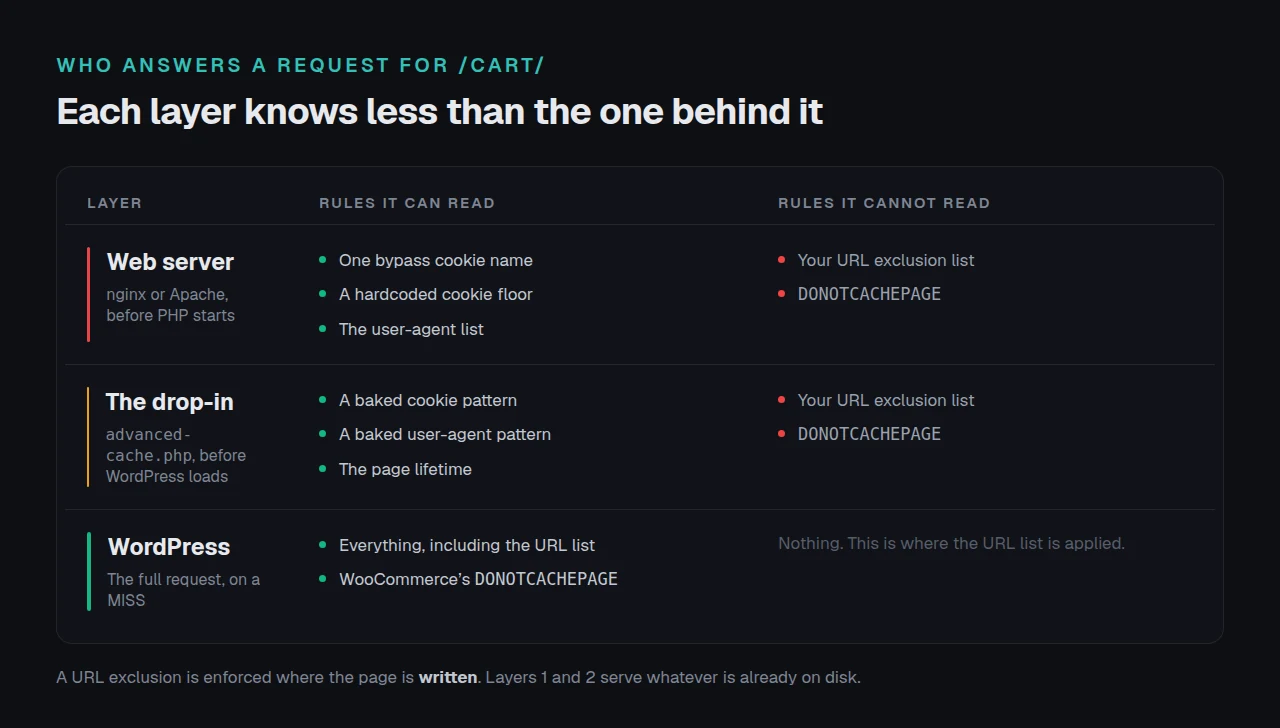
| Layer | When it answers | What it can read | What it cannot read |
|---|---|---|---|
| Web server | Before PHP starts | One bypass cookie name, a hardcoded cookie floor, the user-agent list | Your URL exclusions |
| Drop-in | Before WordPress loads | A baked cookie pattern, a baked user-agent pattern, the lifetime | Your URL exclusions |
| WordPress | The full request | Everything, including DONOTCACHEPAGE and the URL list | — |
Our advanced-cache.php carries exactly five baked-in values: a cookie pattern, a user-agent pattern, the default lifetime, the edge headers and the hit log path, verified from source on 23 September 2026. No URL list is among them, because there was never meant to be one. A URL exclusion stops the page being written, and if the write never happens no serving layer needs the rule.
That design has one consequence worth planning around. Add /checkout-2 to your exclusions today and every copy stored yesterday stays on disk, served by a layer that has no idea the rule exists, until it expires or you purge.
Cookies work the other way. When PHP decides a visitor must not be served from cache it sets a
wordpress_no_cachecookie, so the web server can enforce the whole rule list by testing one name. Our source states the limit plainly: that only covers visitors PHP has seen at least once.
What WooCommerce Already Does, and Where It Stops
WooCommerce defends itself. WC_Cache_Helper::set_nocache_constants() defines DONOTCACHEPAGE, DONOTCACHEOBJECT and DONOTCACHEDB, and prevent_caching() merges no-store headers onto the cart, checkout and account pages, per the class source fetched on 23 September 2026. It reads those three pages from the woocommerce_cart_page_id, woocommerce_checkout_page_id and woocommerce_myaccount_page_id options.
Our comparison of twelve caching plugins and what each does about a cart covers which honour that flag. Two gaps survive whichever you pick:
- A second checkout, a one-page checkout plugin or a custom thank-you route is not one of the three pages, and gets nothing.
- The flag fires during a WordPress request. A page already on disk is served without one.
The geolocation setting that changes the answer
WooCommerce’s Default customer location control offers Geolocate and Geolocate (with page caching support), per class-wc-settings-general.php read the same day. Plain geolocation varies the page by visitor country while the cache stores one copy under one key, so the first shopper’s country is served to everyone.
The page-caching variant avoids that with a redirect. geolocation_ajax_redirect() issues a 307 to the same URL carrying a ?v= hash of the location, so each country lands on a distinct cache key, and update_geolocation_hash() stores a matching woocommerce_geo_hash cookie for an hour. If your store prices or ships by country, pick that mode before enabling caching.
The Default /cart Rule Matches More Than Carts
A bare pattern with no glob characters is a substring test against the path, so /cart matches /cart, /cart/items and anything else containing those five characters. That is deliberate: the source comment says the entry carries no trailing slash precisely so it catches both forms, which WooCommerce serves.
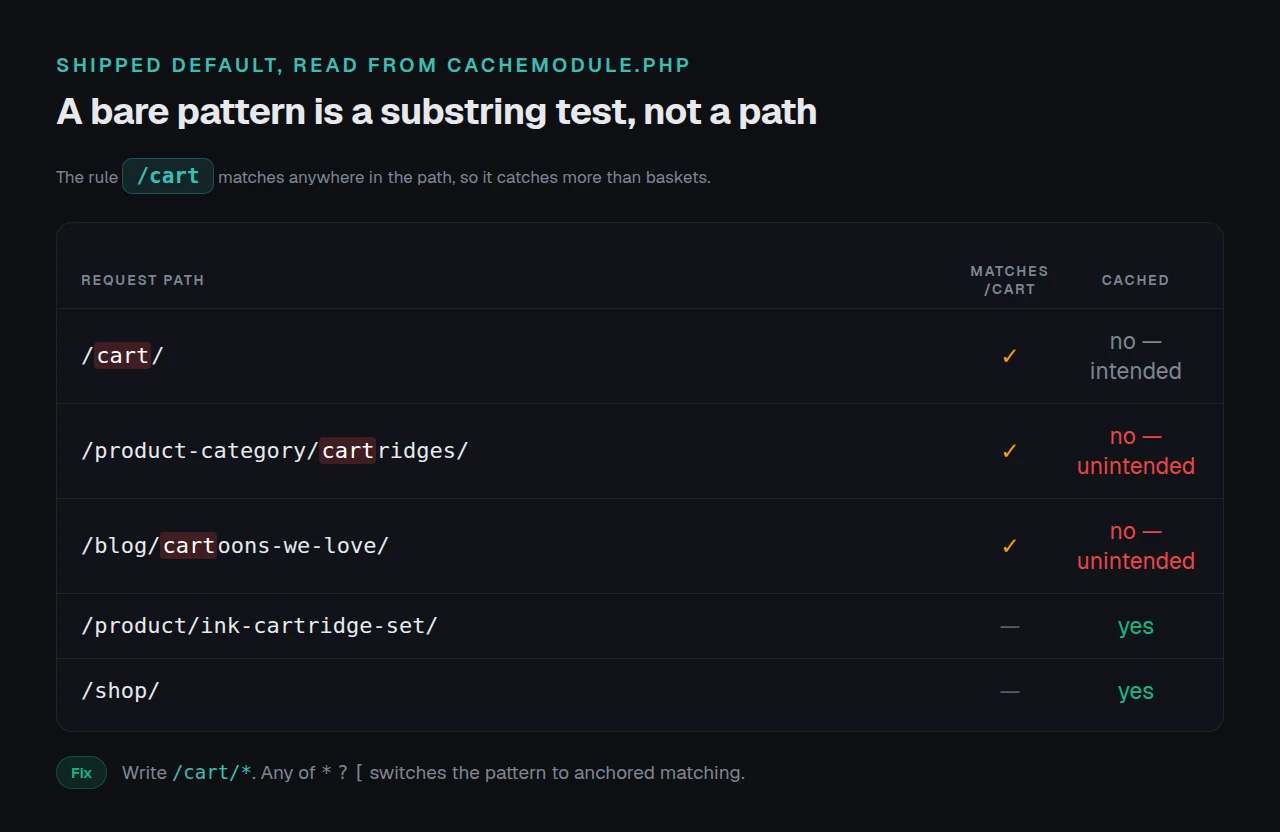
It also catches paths nobody meant to exclude:
| Path | Matched by /cart | Cached? |
|---|---|---|
/cart/ | ✅ | ❌ |
/product-category/cartridges/ | ✅ | ❌ |
/blog/cartoons-we-love/ | ✅ | ❌ |
/product/ink-cartridge-set/ | ❌ | ✅ |
/shop/ | ❌ | ✅ |
An ink store loses its cartridge category to a rule written for baskets, and nothing reports an error. The fix is an anchored glob: /cart/* matches /cart/items and not /product-category/cartridges/. Adding any of *, ? or [ switches a pattern to anchored mode.
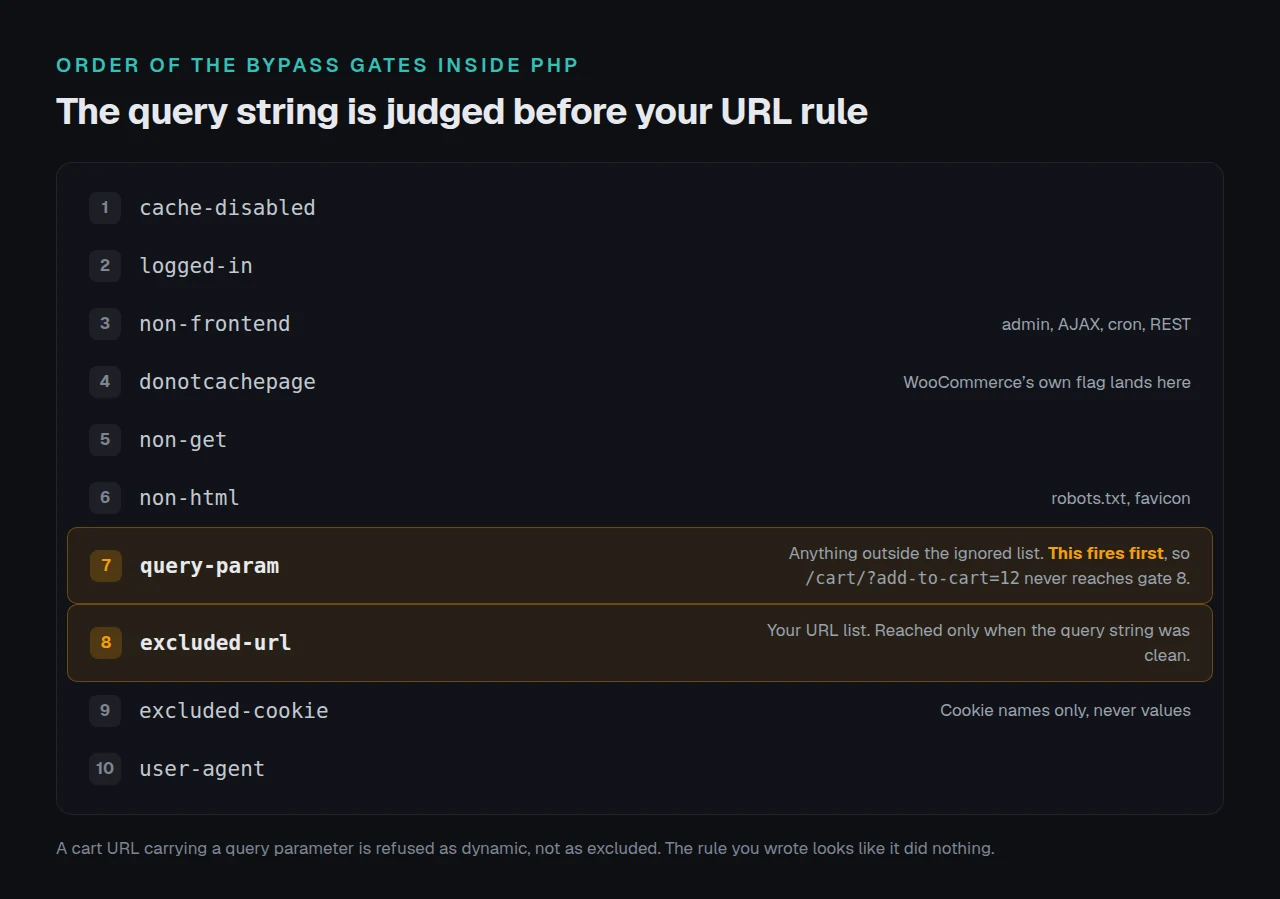
Inside a WordPress request the gates run in a fixed order, and that order explains a confusing symptom. Query-string rejection happens before URL exclusion, so /cart/?add-to-cart=12 is refused as a dynamic query rather than as an excluded URL, and your rule looks like it did nothing.
Set the Exclusions First
Open xSpeed Cache → Cache → Page Cache in your WordPress admin, or go straight to wp-admin/admin.php?page=xspeed#/cache/cache. Our page cache is free, built by WPDeveloper, our own company. Work top to bottom and leave the master switch until last.
- Read the shipped exclusions before adding any. Ours already carry
/cart,/checkout,/my-account,/wc-api,/edd-apiand/wp-login, so most stores add nothing here. - Add every non-standard transactional path: a renamed checkout, a booking route, a custom account area. One pattern per line.
- Check the cookie list still keeps
woocommerce_. That one prefix covers the cart, session and geolocation cookies. - Set Cache Expiry deliberately. The default is 168 hours, and a shorter lifetime limits the blast radius of a rule you get wrong.
- Now turn the master switch on. That installs the drop-in and writes
WP_CACHEintowp-config.php. - Purge once, then shop your own store in a private window, with a real basket.
For a single page the free escape hatch is the editor sidebar: it writes an _xspeed_no_cache postmeta that beats every global rule, registered with the REST API so a script can set it too. The pattern-based rules and bypass engine matching by post type, category or author is Pro. A standard store does not need it, and the ordering rule applies whichever route you take.
Checking It Actually Worked
Start with the free xSpeed Scan. It needs no account, fetches your store from outside, and reports which cache answered and what the response headers said, which is the question this setup turns on.
If you would rather check by hand, request a page and read one header:
curl -s -o /dev/null -D - 'https://example.com/cart/' | grep -i x-xspeed-cacheBYPASS on the cart is what you want. HIT (nginx) or HIT (static) means the web server answered from disk without PHP, and on a cart page that is the leak. HIT (php) means the drop-in answered. Cache hits and misses lists every value.
One trap costs people an afternoon.
curl -Isends aHEAD, and onlyGETrequests are served from cache, so aHEADreportsBYPASSon every URL on the site. Send a realGET, as above. Our guide to confirming a cache is working covers the headers other plugins emit.
Then log out, add an item and load a cached page. If someone else’s basket appears, the diagnosis is in a logged-out visitor seeing someone else’s name.
Running This Across Stores You Did Not Build
Agency work inverts the problem. You inherit a store with caching on, an unknown rule list and pages of unknown age on disk. Purge first: that makes the rules you read the rules that apply.
wp xspeed purge clears every cache we own in one call, and wp xspeed cache inventory prints which pages are cached and how old, which finds a transactional page nobody excluded. xSpeed Hub runs both across a fleet. Our WooCommerce store notes list what differs from a content site; Free vs Pro shows where the free tier stops.
Where Stores Get the Order Wrong
- Enabling the cache first and fixing it after. The pages stored in that window outlive the fix.
- Editing a rule without purging. A rule change is never retroactive.
- Testing while logged in. Logged-in visitors are never served cached pages, so the store looks right to you and broken to shoppers.
- Leaving plain Geolocate on. It varies the page on something the cache key never carries.
Frequently Asked Questions
I added /checkout-2 to the exclusions and it is still served from cache. What went wrong?
The copies stored before the rule existed are still on disk, and the layer serving them never reads your URL list. Purge, load the page once, confirm BYPASS.
My printer-ink category stopped being cached and I never excluded it.
Check it against the default /cart pattern: /product-category/cartridges/ contains /cart, and a bare pattern is a substring test. Change it to /cart/*.
Do I still need exclusions if WooCommerce sets DONOTCACHEPAGE itself?
Yes. It fires during a WordPress request, and a page already on disk is served without one. It also covers only the three pages named in your settings.
My cart total in the header is wrong for logged-out shoppers.
That is the cookie rule, not the URL rule. Confirm woocommerce_ is still in the excluded cookie list, then check the web server layer, which only learns of visitors PHP has seen.
I purged, and the old page came back within a minute.
Something re-warmed it: a preloader, a crawler or your own visit rebuilds the page the moment it is purged. Fix the rule first, then purge.
Can I do this without xSpeed Cache?
Yes. Every page cache that writes HTML to disk has this three-layer shape, and WP Rocket, LiteSpeed Cache, WP Fastest Cache and WP Super Cache all ship WooCommerce exclusions in their free or bundled builds. Set them before enabling the cache, whichever you use.
Should I cache product pages?
Cache them. They are the pages a page cache helps most. Prices varying by customer group are the exception, and belong on the per-page override.
Does the block-based checkout change any of this?
The ordering rule does not change. The page IDs can, because a block checkout may sit on a different page from the shortcode one. Confirm which your store assigns.
Is the cookie list safe to shorten?
Treat it as the last thing you touch. The shipped entries are prefixes of hash-suffixed real cookies, so tightening them serves shared pages to visitors who must never get one.
My staging site is fine and production leaks.
Compare the drop-in, not the settings screen. The cookie and user-agent rules compile into advanced-cache.php when caching is enabled and re-bake on each save, so a site whose switch was never re-flipped after a file restore holds an older pattern.
Conclusion: Order First, Speed Second
| Your store | Start with |
|---|---|
| Standard WooCommerce pages | The shipped defaults, unchanged |
| A renamed or second checkout | Its path, before the master switch |
| Prices by country | Geolocate (with page caching support) |
What to do this week: purge the page cache, read the exclusion list you actually have, add any missing transactional path, switch a bare /cart to /cart/* if your catalogue has words containing it, then run the free scan.
Our page cache is free. Pro adds the pattern rules engine at $29 a year on the founding price, with a fourteen-day money-back guarantee and a lifetime option; our pricing page carries every tier. If checkout is slow rather than stale, optimising it is next.