Same Site, New Host, Worse TTFB: What Silently Changed
Updated September 2026
Good Time to First Byte is 0.8 seconds or less, and poor is above 1.8 seconds, per web.dev’s Time to First Byte guide read on 9 September 2026. LiteSpeed Cache has 7,000,000+ active installs, per the wordpress.org Plugin API the same day, and page caching is not among the things it does on a non-LiteSpeed server. Those two facts meet on the day you migrate.
The comparison people expect is old server against new. The more useful one is which half of your TTFB got worse: the network half, or the server half.
- What to check first
- Split the TTFB
- Seven silent changes
- What stays behind
- Caches the old host owned
- Confirming the fix
- Your first hour
Quick summary: what to check, in order
| If the slow part is | Do this first | Why |
|---|---|---|
| Name lookup and connect | Check DNS, and how far the origin now sits | Distance is paid before any code runs |
| The wait after connect | Check whether a page cache serves at all | A cache hit skips PHP entirely |
| Everything, evenly | Compare PHP and OPcache on both hosts | A new build changes every cache miss |
| Only the first hit per URL | Wait, then preload | A new server starts empty |
Split the TTFB before you change anything
TTFB is not one number. web.dev’s guide states it is the sum of redirect time, service worker startup, DNS lookup, connection and TLS negotiation, and the request up to the first byte. Four of those five finish before your server reaches WordPress.
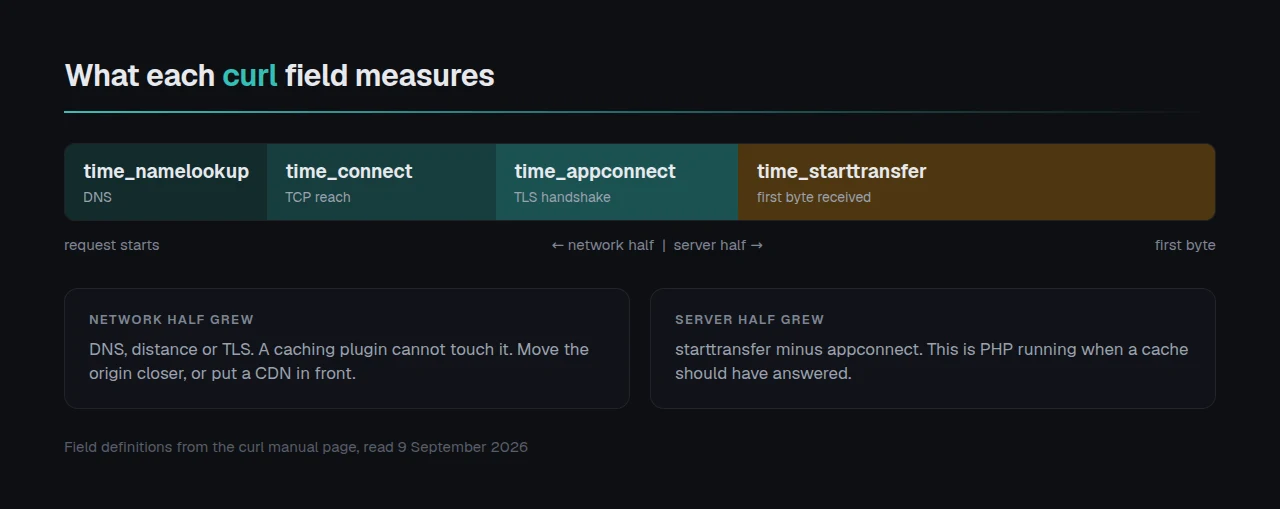
curl reports each phase separately, using the field names in its manual page:
curl -o /dev/null -s -w \
"dns %{time_namelookup}\ntcp %{time_connect}\ntls %{time_appconnect}\nbyte1 %{time_starttransfer}\n" \
https://example.com/| Field | Time from the start until | A jump here points at |
|---|---|---|
time_namelookup | name resolution finished | DNS, or a stale record |
time_connect | the TCP connect completed | distance to the origin |
time_appconnect | the TLS handshake completed | certificate chain, or distance again |
time_starttransfer | the first byte arrived | the above, plus server think time |
Subtract time_appconnect from time_starttransfer. What remains is server think time, the only part a caching plugin changes. Run it three times so one cold connection is not your baseline.
Seven things a host move changes that you did not
| Cause | How it shows | Confirm it |
|---|---|---|
| Server software changed | think time up, cache headers gone | read the server response header |
| Rewrite rules did not travel | cached files exist, PHP still runs | look for the cache block in the config |
| Redis or Memcached absent | slow on complex pages only | ask if the service runs |
| PHP or OPcache differs | every uncached request costs more | compare phpinfo() on both |
| Origin moved continents | connect and TLS up, think time flat | the curl split |
| No CDN in front any more | worse for distant visitors only | test from two countries |
| The cache is simply cold | slow once per URL, fast after | request the same URL twice |
Rule out the last row first, because it fixes itself. A new server stores nothing until a preloader or traffic fills it, so every URL pays once.
Page caching is four artifacts, and one stays behind
A page cache is not a setting. Our own changelog for xSpeed Cache 1.2.3, dated 2 September 2026, lists what must be in place at once: “The drop-in, the wp-config.php line, the rewrite rules and the settings are written as one step and rolled back together if any part fails.”
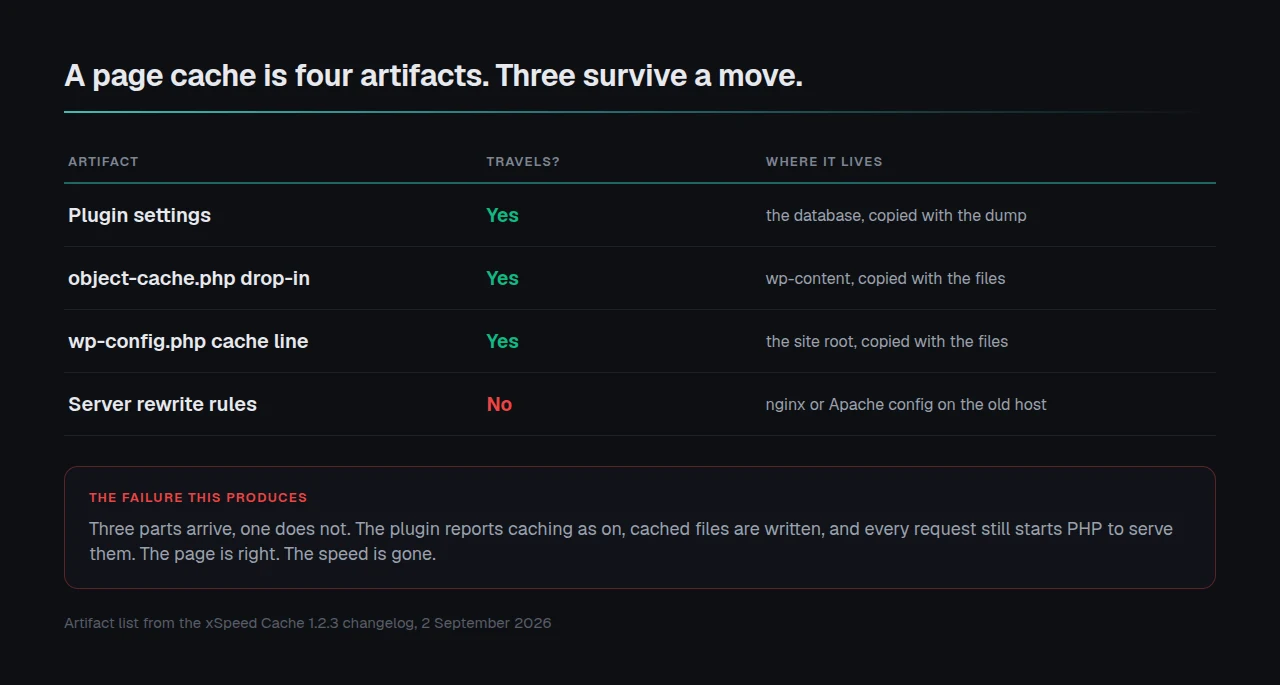
Copy that site and the settings travel in the database, the drop-in and the wp-config line travel with the files, and the rewrite rules stay behind in the old server’s configuration. Without them the server hands every request to PHP, which loads WordPress, which then serves a cached file nobody should have asked it for. The page is right and the speed is gone.
xSpeed Cache is ours, built by WPDeveloper, and version 1.2.4 on 6 September 2026 added a command for this moment: wp xspeed cache nginx-config prints the server-block config without a dashboard. Find the cache block in the new configuration and put it back, whatever plugin you run. Our guide on checking whether WordPress caching is working reads the headers that prove it returned.
Two plugins whose page cache belonged to the old host
Some page caches are a server feature, not a plugin feature. Move away and the feature goes, leaving the plugin installed, active and reporting itself configured.
| Plugin | Its page cache runs on | From its readme, fetched 9 September 2026 |
|---|---|---|
| LiteSpeed Cache | OpenLiteSpeed, commercial LiteSpeed, LiteSpeed hosting or QUIC.cloud | page caching sits under “LiteSpeed Exclusive Features”, which “require one of the following” |
| SiteGround Optimizer | SiteGround servers | ”This default feature is available exclusively for SiteGround servers” |
SiteGround’s wording names the metric: Dynamic Caching exists for “enhancing page loading speed and TTFB”. Leave the platform and that is the number you lose. We covered the LiteSpeed half in what LiteSpeed Cache gives you on Nginx or Apache.
The object cache has the same shape. Its object-cache.php drop-in sits in wp-content and moves with your files. Redis does not, and a drop-in aimed at an absent Redis turns every memory read back into a database query. Our Redis setup guide covers the two defaults worth changing, and the object cache documentation covers Memcached.
PHP is the quieter version. The PHP manual documents opcache.enable defaulting to 1 and opcache.max_accelerated_files to 10000. A large install passes ten thousand files, and hosts change these freely, so compare both. Our server compatibility documentation lists what a cache plugin needs.
Confirming the fix worked
Run the free xSpeed Scan on the new URL. It needs no account, and it reports TTFB beside the cache evidence, so one result covers both halves.
Run the free scan on your own site: xspeedcache.com/scan/
- Repeat the
curlsplit. Server think time should fall to the low tens of milliseconds on a cache hit. - Our plugin serves cached pages in 5 to 15 ms, and any good cache lands near that.
If connect and TLS got worse, no plugin will fix it. That is distance. The answer is a CDN in front of the origin, or an origin closer to your visitors. We recommend xCloud for the second, and it is ours: xCloud and WPDeveloper are both Startise companies. Any host near your traffic works.
Frequently asked questions
I moved to a faster server and my TTFB went up. How? A faster CPU does not shorten the distance a packet travels, and it does not restore a page cache that stopped working. Split the number first.
My host says the server is fine and it looks bad from here. Who is right? Both, usually. Hosts measure from inside their own network, where DNS, distance and TLS cost almost nothing. Ask for a reading from your visitors’ region.
I copied everything across, so why would the cache behave differently? Part of it was never in the copy. The rewrite rules that serve a cached file without starting PHP live in the server configuration.
My site is fast for me and slow for customers. What changed? Your browser and DNS resolver hold warm entries a first-time visitor does not. Test from a second network before calling it fixed.
Do I need to buy anything to fix this?
No. Every check here runs with curl and a text editor, and free page caching plugins cover the fix. Our free tier includes page caching for that reason.
Your first hour on the new host
What to do this week:
- Run the
curltiming split three times from outside your host’s network, and subtract TLS time from first-byte time. That remainder is server think time. - Request one URL twice before changing anything, ruling out a cold cache.
- Check the new configuration for the rewrite rules your cache needs, and read the
serverheader. - If the plugin that cached the old site was tied to the old platform, replace it. xSpeed Cache caches on any server, starting free, with paid plans from $29 a year and a 14-day money-back guarantee. WooCommerce stores need care, and agencies can run these checks fleet-wide from xSpeed Hub.
A migration that looks like a regression is usually four small changes you did not make, stacked. Measure the two halves and each one names itself.