WooCommerce Caching in 2026: Three Plugins Stop a Shopper From Writing Your Public Cache
Updated September 2026
WooCommerce sets its own do-not-cache flag on exactly three pages, read from the store’s settings rather than from the URL, verified in class-wc-cache-helper.php on 23 September 2026. WP Rocket’s documentation, last updated 18 September 2026, describes what happens everywhere else: a shopper with a full basket loads an uncached page, and their cart goes into the file every later visitor receives.
The comparison people expect is a feature grid: which plugin caches more things, faster. The more useful comparison is narrower and harder to fake. A cart leak runs in two directions, and almost every plugin here guards only one of them. This article ranks twelve plugins on the second one, using what their shipped code does rather than what their feature pages claim. We build one of the twelve, and it is the third of only three that close that second direction without being configured.
Quick Summary: What Your Store Actually Needs
| If your store… | The behaviour you need | Shipped on by default in |
|---|---|---|
| Uses the standard cart, checkout and account pages | Exclusions driven by WooCommerce’s own page IDs | Every plugin in this comparison |
| Has a custom or renamed checkout page | URL pattern matching, not page-ID matching | WP Fastest Cache, xSpeed Cache |
| Shows a cart total in the header on every page | A cache bypass for visitors holding a cart cookie | WP-Optimize, Hummingbird, xSpeed Cache |
| Runs on LiteSpeed or OpenLiteSpeed | Cart fragments served as an edge-side include | LiteSpeed Cache, after two settings changes |
| Wants the cache to keep working for shoppers mid-basket | A cart-aware cache variant rather than a bypass | NitroPack |
| Runs on a plain PHP host and wants no paid licence | Any of the nine free page caches, plus the cookie rule above | WP-Optimize, Hummingbird |
The Cart Leak Runs in Two Directions
Direction one is the one everybody handles. A visitor requests /cart/, the cache has a copy stored from someone else’s session, and it serves it. The fix is old and universal: never store the cart, checkout or account page. Every plugin below does this for the pages WooCommerce has assigned, and the differences between them show up only on a store whose checkout is somewhere else.
Direction two is the expensive one. A visitor who already has three items in their basket requests an ordinary product page that happens not to be cached yet. The page renders, their header shows “3 items”, and the cache stores that HTML as the public copy of that URL. Everyone who lands on it next sees a basket they never filled.
That second direction is not a bug in any of these plugins. It is a consequence of the cache storing whatever the page produced, and the page producing something visitor-specific because the theme put it there. WP Rocket’s own support documentation states it plainly:
“Some themes add the visitor’s cart directly to the page HTML. If that user visits a page that has not been cached yet, their cart information could be included in the cache file and shown to other visitors.”
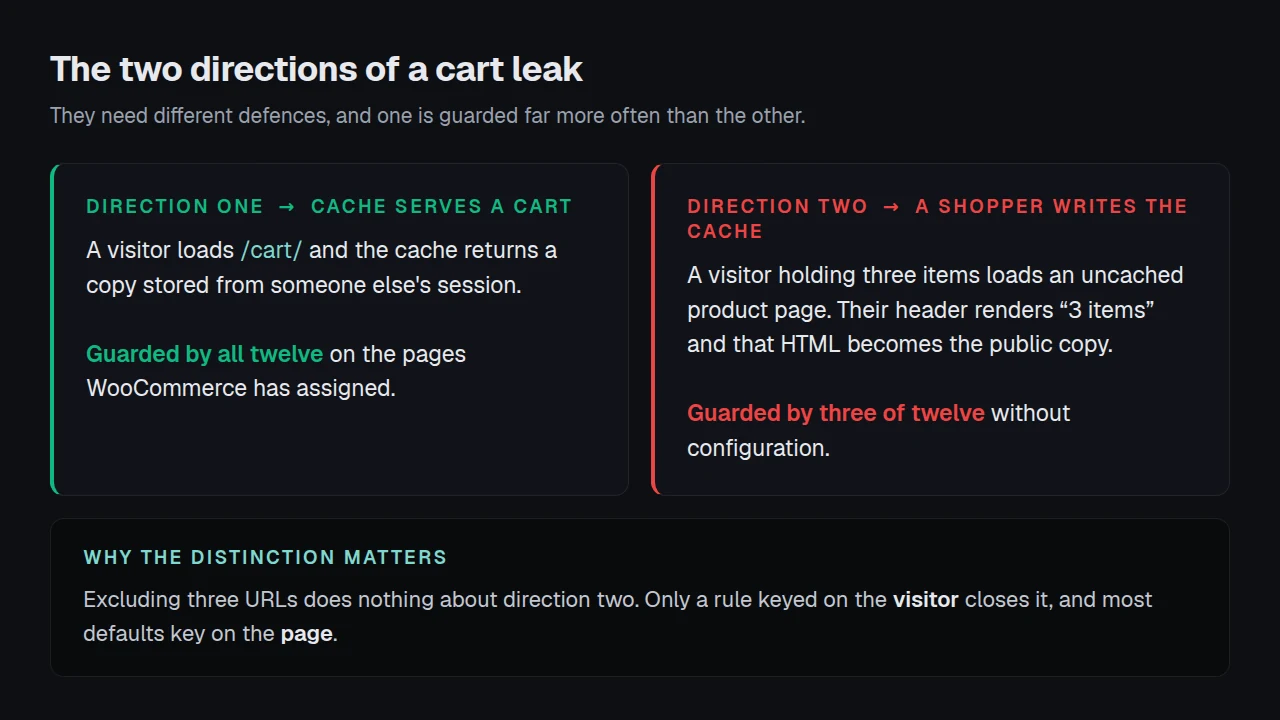
The distinction matters because the two directions need completely different defences. Excluding three URLs does nothing about direction two. Only a rule keyed on the visitor rather than the page closes it, and most of these plugins do not ship one.
What WooCommerce Itself Does, and the Assumption Underneath It
Before comparing plugins, it is worth knowing how much of this WooCommerce handles on its own, because several plugins do nothing more than inherit it.
WooCommerce’s WC_Cache_Helper::prevent_caching() collects three page IDs and checks whether the current request is one of them:
$page_ids = array_filter( array(
    $woocommerce_page_ids['cart'],
    $woocommerce_page_ids['checkout'],
    $woocommerce_page_ids['myaccount'],
) );
if ( ! is_page( $page_ids ) ) {
    return $headers;
}
self::set_nocache_constants();
set_nocache_constants() defines DONOTCACHEPAGE, DONOTCACHEOBJECT and DONOTCACHEDB. Ten of the plugins below were read from source on 23 September 2026. Eight of them check the first of those three, four as their entire WooCommerce handling. LiteSpeed Cache checks it only on a legacy WooCommerce branch and does its own page lookup on current versions, and Breeze’s WooCommerce files do not reference it at all. That flag is why a store running default settings is usually safe on direction one whatever plugin it has.
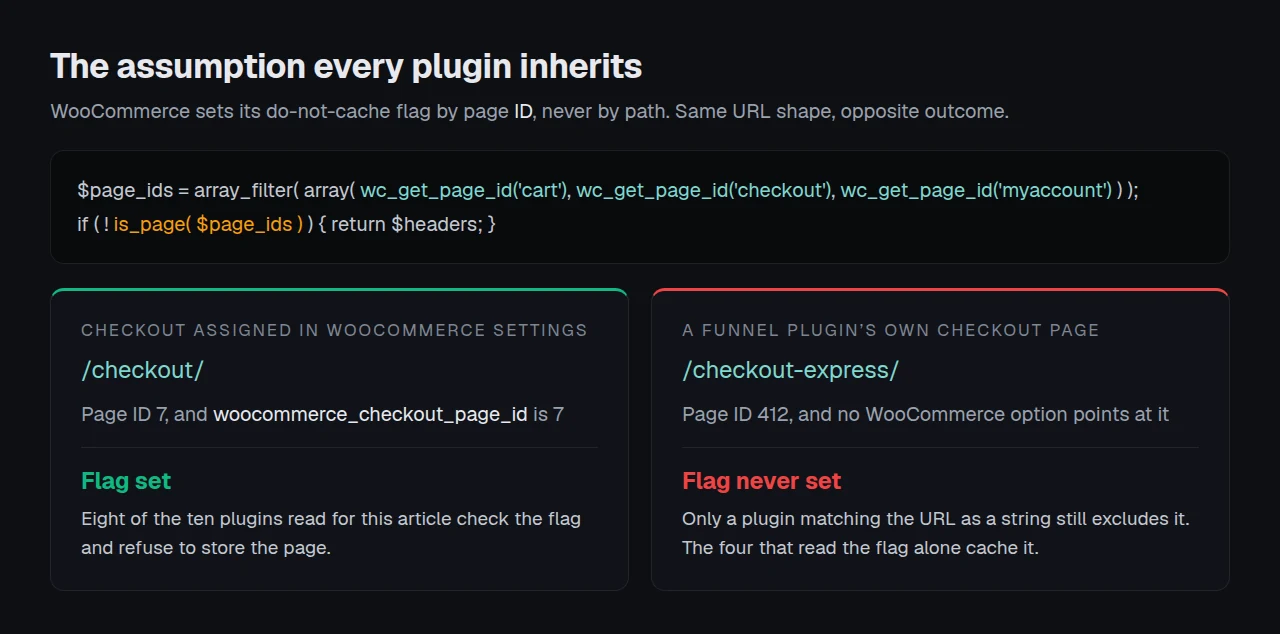
The assumption is in is_page( $page_ids ). Those IDs come from the woocommerce_cart_page_id, woocommerce_checkout_page_id and woocommerce_myaccount_page_id options. They are whichever pages the store has assigned in WooCommerce settings. A checkout built as a separate page by a funnel plugin, a duplicated checkout used for one campaign, or a block-based checkout living somewhere else is not that page ID, so the flag is never set and the page is a candidate for caching like any other.
Two more details are worth carrying out of that function:
- The shop page is deliberately absent. A product listing is not personalised, so caching it is correct. Six page names are primed for the lookup and only three reach the exclusion.
- The check runs on page IDs, never on paths. A cart page reachable at a translated URL is still protected, because the ID has not changed. A cart-like page that was never assigned in settings gets nothing, whatever it is called.
- All three constants are set together.
DONOTCACHEOBJECTandDONOTCACHEDBgo up alongsideDONOTCACHEPAGE, which is why an object cache on a store behaves differently on those three pages too.
What Each Plugin Does About a Cart
Everything in this table was read from each plugin’s shipped source or its own readme on 23 September 2026, not from a feature page. Install counts come from a direct wordpress.org Plugin API query the same day.
| Plugin | Installs | Excludes cart pages by | Extra request-shape rules | Blocks a cart-holder writing public cache |
|---|---|---|---|---|
| LiteSpeed Cache | 7,000,000+ | WooCommerce’s three page IDs, reimplemented | add-to-cart, download_file, any page with a WooCommerce notice | ❌ |
| WP Fastest Cache | 1,000,000+ | Five page IDs plus URL regex | /wc-api/, receipt and confirmation paths | ❌ |
| WP-Optimize | 1,000,000+ | The do-not-cache flag alone | — | ✅ |
| WP Super Cache | 1,000,000+ | The do-not-cache flag alone | — | ❌ |
| W3 Total Cache | 900,000+ | The do-not-cache flag alone | — | ❌ |
| Breeze | 300,000+ | Page IDs converted into URL rules | Covers nine other ecommerce plugins | ❌ |
| Cache Enabler | 100,000+ | The do-not-cache flag alone | — | ❌ |
| NitroPack | 90,000+ | Its own service rules | Cart Cache keeps optimising mid-basket | ❌ by design |
| Hummingbird | 70,000+ | The do-not-cache flag alone | — | ✅ |
| xSpeed Cache | 6,000+ | Four URL patterns, matched on the path | /wc-api, removed_item, query-string gate | ✅ |
| Surge | 4,000+ | The do-not-cache flag alone | — | ❌ |
| WP Rocket | not in the directory | Page IDs as set in WooCommerce settings | Optimises the cart-fragments request | ❌ without a helper plugin |
Four groups fall out of that table, and they are four different bets about where the knowledge should live.
Strategy one: inherit it from WooCommerce
WP Super Cache, W3 Total Cache, Cache Enabler and Surge carry no WooCommerce code at all. Their entire store protection is the do-not-cache flag. W3 Total Cache’s shipped pgcache.reject.uri default is wp-.*\.php and index\.php, and its cookie rejection default is the single entry wptouch_switch_toggle. That is a defensible design: WooCommerce knows which pages are its own, so let it say so. It also means these four inherit WooCommerce’s page-ID assumption whole, with nothing behind it.
Strategy two: name the pages yourself
LiteSpeed Cache reimplements WooCommerce’s three-page check in its own third-party integration, with a source comment pointing at the core file it copies, and then goes further than anyone else on request shape: a URL carrying add-to-cart= or download_file= is excluded, and so is any response where wc_notice_count() is above zero, which catches the “Product added to your cart” page state. WP Fastest Cache checks five page IDs rather than three, adding receipt and confirmation, and backs them with a URL regex list. Breeze converts the same three page IDs into URL rules and repeats the exercise for Easy Digital Downloads, Ecwid, CartFlows, BigCommerce, WP EasyCart and four more.
Strategy three: bail out on the shopper
This is direction two, and three plugins do it without being asked. WP-Optimize tests two cookies directly:
function wpo_restricted_cache_page_with_cart_items(): bool {
    return !empty($_COOKIE['woocommerce_items_in_cart'])
        || !empty($_COOKIE['woocommerce_cart_hash']);
}
Any page, anywhere on the site, is served uncached to a visitor whose basket is not empty. Hummingbird reaches the same place with a different key: its default cookie exclusion list is wp_woocommerce_session_ and wpdef_lockout_, so a visitor holding a WooCommerce session bypasses the cache site-wide. Our own default excluded-cookie list includes woocommerce_items_in_cart and a woocommerce_ prefix rule, which does the same job and also covers the session cookie.
Strategy four: cache through the cart
NitroPack is the only entry whose default posture treats a full basket as something to keep caching for rather than bail out of. NitroPack’s readme describes its Cart Cache feature as one that “ensures page optimization persists even when items are added to the cart.” LiteSpeed Cache can reach the same outcome with its cart-hash vary, and that option ships switched off. This is the opposite trade from the group above, and on a busy store it is the more valuable one if the implementation holds.
Direction Two Is Where the Field Separates
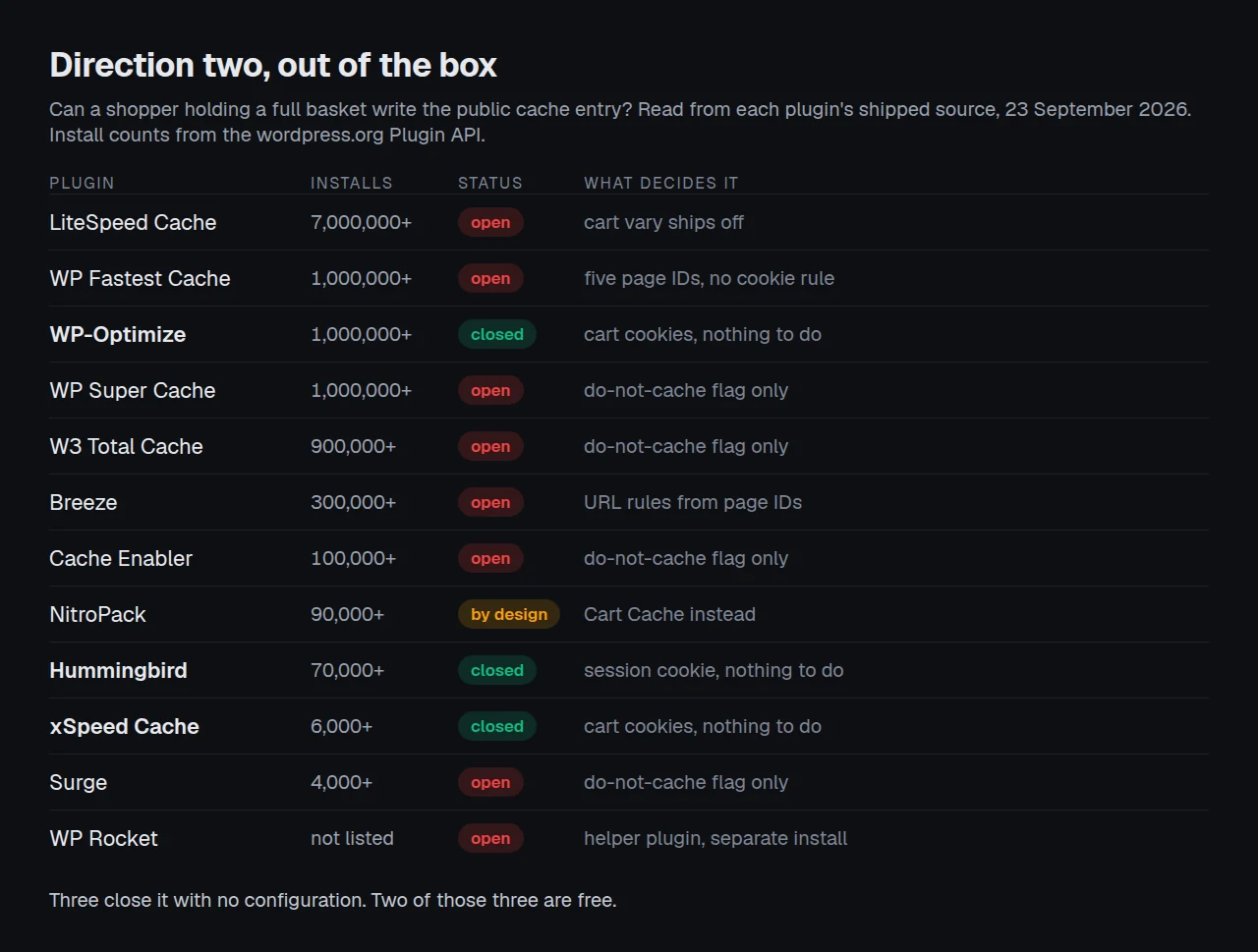
Of twelve plugins, three close direction two out of the box. Eight of the rest can be made to, NitroPack answers it a different way, and the difference is in how much you have to know first.
WP Rocket ships the fix as a separate download
WP Rocket has the fix and does not ship it as a default. Its documentation offers a downloadable helper plugin called “Prevent Cache Generation for Active Carts”, described as preventing exactly the leak quoted at the top of this article. It works, it is written by the vendor, and it is a separate installation that a store owner only finds after somebody reports seeing a stranger’s basket.
LiteSpeed has the better design, switched off
LiteSpeed Cache has the best-designed answer to direction two, and both halves of it are switched off when you install it. Its WooCommerce integration can add woocommerce_cart_hash to the cache vary list, so a shopper with a basket gets a separate cache entry rather than no cache at all. That is better than a bypass, because the shopper still gets a cached page. The option is wc_cart_vary, and the plugin registers it with a default of false. Its cart-fragment edge-side include is gated twice over: $this->esi_enabled = (bool) apply_filters('litespeed_esi_status', false); defaults to off, and edge-side includes are a LiteSpeed Exclusive feature, so they need OpenLiteSpeed, a commercial LiteSpeed server, LiteSpeed hosting or QUIC.cloud underneath. On Apache or Nginx that route does not exist at all, which is the same server split that governs LiteSpeed Cache’s page caching on Nginx and Apache.
The four that inherit, and stop there
For the four inherit-it plugins, closing direction two means typing a cookie name into a settings box. W3 Total Cache, WP Super Cache, Cache Enabler and Surge all have a cookie rejection field, and none of them has woocommerce_cart_hash in it when you install.
That is a one-field change with a large effect, and it is worth being precise about what it costs. A cookie rule of this kind does not make the shopper’s page uncacheable for everybody. It stops that visitor both reading and writing the shared entry, so the stored copy stays anonymous and the shopper pays a full server render on every page. On a store where most sessions never add to a basket the cost is small. On one where the header cart is the main navigation, it is the difference between a cache that serves most traffic and one that serves the half that is only browsing.
Why so many ship it off
The reason the default is absent in so many plugins is worth naming too: a page cache cannot know whether your theme puts the cart in the HTML. If it does not, bypassing cart-holders buys nothing and loses hit rate. Shipping the rule off is a defensible choice, and shipping it on is a different defensible choice. What none of these plugins does is tell you which case you are in, which is what the test below is for.
| Plugin | Direction two, out of the box | What closes it |
|---|---|---|
| WP-Optimize | ✅ | Nothing to do |
| Hummingbird | ✅ | Nothing to do |
| xSpeed Cache | ✅ | Nothing to do |
| WP Rocket | ❌ | Install the vendor’s Active Carts helper plugin |
| LiteSpeed Cache | ❌ | Switch on cart vary, or edge-side includes on a LiteSpeed server |
| W3 Total Cache | ❌ | Add a cart cookie to the page-cache cookie rejection list |
| WP Super Cache | ❌ | Add a cart cookie to the rejected-cookies list |
| Cache Enabler | ❌ | Add a cart cookie to the exclusion settings |
| Surge | ❌ | Filter the cache configuration in code |
| WP Fastest Cache | ❌ | Add a cookie rule in the exclusion tab |
| Breeze | ❌ | Add a cookie to the never-cache list |
| NitroPack | ❌ by design | Cart Cache, which is the intended answer instead |
Cart Fragments: The Request Every Store Pays For
There is a third thing going on, and it is the reason the header cart total exists at all. WooCommerce updates the mini-cart after the page loads, with a request to ?wc-ajax=get_refreshed_fragments. That request is what lets a cached page show a live basket count.
It is also slow. Perfmatters’ documentation reports that on their own small test store this request “took longer than any other request” and that on large sites they have “seen this account for up to 10-second delays.” Their fix is conditional rather than blunt: the Disable Cart Fragmentation toggle checks whether the woocommerce_cart_hash cookie exists, and only disables the fragments script when the basket is empty. Perfmatters is $29.95 a year for one site, verified on its pricing page on 23 September 2026, and it caches nothing at all, which is covered in our Perfmatters comparison.
WP Rocket optimises the same request automatically and documents the side effect in the same breath, advising that if you “notice any issue with your cart widget being pre-filled or showing the wrong number of products, try deactivating this feature.” That warning and the Active Carts helper plugin describe the same symptom from two directions, which is a fair sign of how common it is.
Run the free scan on your own store: xspeedcache.com/scan/
The decision here is independent of your cache plugin, and it turns on one question about your theme.
| How your theme renders the cart count | Disabling fragments on an empty basket | Disabling them always |
|---|---|---|
| From the fragments response, after load | Costs nothing, saves a request per page view | Breaks the live count |
| In PHP, into the page HTML | Freezes a stale count into the cached page | Freezes a stale count into the cached page |
| Not at all, no cart in the header | Costs nothing | Costs nothing |
A theme in the second row is also the theme that creates direction two in the first place, which makes that row the single most useful thing to establish about a store before touching any cache setting.
The Two-Direction Cart Test
This is a protocol rather than a feature grid, and it takes about ten minutes on a staging copy. Nobody publishes results for it, which is why the table above had to be read out of source code.
- Set up two browsers. One ordinary window, one private window. The private window is your innocent visitor.
- Warm nothing. Purge the cache completely, then leave it alone.
- Direction one. In the ordinary window, add a product to the basket. Load the cart page. Then load the cart page in the private window. A basket with items in it is a direction-one failure, and it should never happen with any plugin here.
- Direction two. Purge again. In the ordinary window, with items still in the basket, load a product page you have not visited since the purge. Then load that same product page in the private window. A header showing items is a direction-two failure.
- Check the stored copy, not the screen. Read the page source in the private window and search it for the cart count. A count that appears in the HTML came from the cache. A count that appears only after a moment came from the fragments request and is correct behaviour.
- Score the time, not just the result. Record how many settings you changed to pass step 4. Zero is the number three plugins achieve.
Its limitations, stated plainly. This test depends on your theme rendering the cart in PHP, and a theme that renders it entirely through the fragments request will pass step 4 no matter which plugin is installed. It tells you nothing about hit rate, and the plugins that pass step 4 by bypassing the cache pass it by not caching, which has a cost the test does not measure. It also cannot see server-level caches, so run it with any host page cache and any CDN HTML caching switched off first, or you will be testing them instead.
Running This Across a Store You Did Not Build
Agencies inherit stores. The theme is somebody else’s, the checkout may or may not be the assigned checkout page, and the person who chose the cache plugin left in 2023.
We build xSpeed Cache, and its defaults are deliberately broad for that reason. Any cookie name containing woocommerce_ puts the visitor on the uncached path, alongside edd_items_in_cart, yith_wcwl_session_ and seventeen other cookie patterns. The default URL list carries /cart, /checkout, /my-account, /wc-api and /wp-login, matched against the request path rather than the whole URL so that a query string cannot disguise one page as another. The do-not-cache flag is honoured as well, so an assigned checkout page is covered twice over.
That breadth is a real cost and it belongs on the record:
- It bypasses more than it needs to. A
woocommerce_prefix rule catches any visitor carrying any WooCommerce cookie, and on a store that opens a session early that is a large share of shoppers getting uncached pages for a whole visit. It is the same trade WP-Optimize and Hummingbird make, and the same criticism applies to all three of us. - A vary would be better than a bypass. LiteSpeed’s cart-hash vary is the better idea in principle, because a shopper still gets a cached page rather than being stood aside. A future version of xSpeed Cache should do that instead, and until it does, LiteSpeed has the stronger design on a LiteSpeed server.
- We are the newest entry here. xSpeed Cache has 6,000 active installs against LiteSpeed Cache’s 7,000,000, per a direct wordpress.org Plugin API query on 23 September 2026, and it is too new to appear in the field datasets the older plugins are ranked on.
- WP Fastest Cache covers two page IDs we do not. Receipt and confirmation are in its list and not in ours, and on a store using those endpoints that is a gap in our defaults, not in theirs.
What the breadth buys is the inherited-store case. A cache whose defaults assume nothing about the theme is the one that behaves on a store you have not read, and that is the bet xSpeed Cache makes. Anyone running more than a handful of stores can check them together from xSpeed Hub, and the line between the free and paid tiers is set out on Free vs Pro. The cart defaults described above are in the free tier.
Common Mistakes Store Owners Make
- Trusting a compatibility claim. WP Fastest Cache’s readme says it is “compatible with WooCommerce Themes 100%”. Hummingbird’s says it “will exclude the cart, my account and checkout pages”. Hummingbird’s shipped default URL exclusion list contains no cart entry at all, and the protection actually comes from its session-cookie rule and the do-not-cache flag. The outcome is fine. The stated mechanism is not the one doing the work.
- Excluding the shop page. It is not personalised, caching it is correct, and WooCommerce deliberately leaves it out of its own exclusions.
- Testing while logged in. Almost every plugin here bypasses the cache for logged-in users by default, so an admin sees correct behaviour on a store that is leaking to everybody else. Use a private window.
- Assuming a purge fixed it. A leaked cart is stored in a file keyed to a URL. Purging clears it, and the next shopper with a basket writes it again.
- Reading the rendered page instead of the source. A correct fragments request produces the same visible result as a leaked cache entry, a fraction of a second later. Only the HTML tells you which happened. There is more on this in our guide to checking whether caching is actually working.
- Forgetting the layers above the plugin. Host page caches and CDN HTML caching both store the same file and neither reads
DONOTCACHEPAGE.
Frequently Asked Questions
I set up caching and now customers say the cart shows items they did not add. What happened?
A page was cached while somebody had a basket, and their HTML is now the public copy of that URL. Purge the cache, then close direction two before it refills: add a cart cookie to your plugin’s cookie exclusion list, or install WP Rocket’s Active Carts helper if that is your plugin.
My mini-cart is empty for the first second and then fills in. Is that broken?
No, that is the fragments request working as designed. The cached page ships with no cart, and ?wc-ajax=get_refreshed_fragments fills it in afterwards. A cart that is wrong and stays wrong is the problem case.
Do I still need cache exclusions if WooCommerce sets DONOTCACHEPAGE anyway?
Yes, for two reasons. The flag only fires on the three pages assigned in WooCommerce settings, so a custom checkout page gets nothing. And it says nothing about direction two.
I added /cart to my exclusions and the cart page is still being served from cache. Why?
Check whether the rule is matched against the path or the whole URL, and whether it is a substring or an anchored pattern. Then check the layer above: a host page cache or a CDN caching HTML will serve a stored copy without consulting the plugin at all.
Is LiteSpeed Cache the best choice for WooCommerce because of its cart ESI?
Only if you run a LiteSpeed server. Edge-side includes are in its LiteSpeed Exclusive feature set, and the plugin also defaults the filter that enables them to off. On Apache or Nginx you get its exclusion logic, which reads more request shapes than anything else here, and none of the fragment handling.
I switched plugins and the leak came back. What did I miss?
Exclusion lists do not travel between plugins. Each one stores its own, and a new plugin starts from its own defaults, which for most of the field means no cart cookie rule. Our migration guide covers what does and does not import.
Does a free plugin handle carts as well as a paid one?
On direction one, yes. On direction two the two plugins that handle it without configuration, WP-Optimize and Hummingbird, are both free. Paid does not predict this behaviour, which was also true of the wider free-tier field in our survey of free caching plugins.
My checkout is slow and it is excluded from the cache. What is left to do?
Everything below the page cache. WP Rocket’s documentation gives the standard list for excluded pages: object caching at the server level, a light database, fewer plugins loading on those pages, better hosting. Our checkout optimisation guide goes through it for WooCommerce specifically.
Can I cache the cart page if I use a fully AJAX cart?
If nothing visitor-specific reaches the HTML, then yes in principle, and it is still a bad trade. The cart page is one request per session and the risk of getting it wrong is somebody else’s order.
Should I disable cart fragments?
If your theme renders the cart count from the fragments response, disabling it only while the basket is empty costs nothing. If your theme renders the count in PHP, disabling fragments leaves a stale number on a cached page.
Does any of this change with the block-based checkout?
The mechanism does not, but the page identity can. What matters is whether the page carrying your checkout is the one assigned in WooCommerce settings, because that is what the do-not-cache flag is keyed on.
How do I tell whether my host is caching HTML as well?
Load a page twice in a private window and read the response headers for a cache status. Our server compatibility notes list what the common stacks send, and the xSpeed Scan reports the cache evidence it can see from outside without needing an account.
Conclusion: Which One for Your Store?
The feature grids are not wrong, they are answering a different question. On cart correctness the field is tighter than it looks on direction one and much wider than anyone advertises on direction two.
| If you want… | Pick | Why |
|---|---|---|
| Correct cart behaviour with zero configuration, free | WP-Optimize | Bypasses the cache for any visitor with a basket, out of the box, on 1,000,000+ installs |
| The same, with a lighter settings surface | Hummingbird | Session-cookie exclusion shipped on, though its readme describes a different mechanism |
| The most request shapes covered, on a LiteSpeed server | LiteSpeed Cache | Page IDs, add-to-cart requests and notice state, plus cart vary and ESI once enabled |
| The widest page coverage | WP Fastest Cache | Five page IDs including receipt and confirmation, backed by URL patterns |
| Caching that keeps working mid-basket | NitroPack | The only entry that caches through a full cart by default rather than around it |
| Support you can escalate to, on any server | WP Rocket | Automatic page exclusions and fragment optimisation, plus a vendor helper for direction two |
| Both axes covered by default, with fleet control | xSpeed Cache | Path-matched URL rules and cart-cookie bypass on by default, and it is ours |
| To stay on a plugin you already have | Whichever it is | Add one cart cookie to its exclusion list and re-run the test above |
What to do this week:
- Run the two-direction test on a staging copy of your store. Step 4 is the one that finds something.
- Read the page source, not the screen. If a cart count is in the HTML of a private-window request, you have a live leak today.
- If you are on W3 Total Cache, WP Super Cache, Cache Enabler, Surge, Breeze or WP Fastest Cache, add
woocommerce_cart_hashto the cookie exclusion list. It is one field and it closes direction two. - If you are on WP Rocket, install the vendor’s Prevent Cache Generation for Active Carts helper plugin.
- If you would rather not configure any of it, WP-Optimize is free and ships the behaviour on. So does xSpeed Cache, which is ours, from $29 a year with a 14-day money-back guarantee and a free tier that carries the same cart defaults.
- Either way, check the result from outside with the free xSpeed Scan and against our WooCommerce notes.
If you run the test and your store behaves differently from the table above, we would rather know. Source reading tells you what a plugin intends. Your theme gets the final say, and store owners who report the mismatch are how tables like this one stay honest.