A Logged-Out Visitor Is Seeing Someone Else's Name
Updated September 2026
WP Super Cache fixed a bug on 26 August 2026 in which a cookie named 0 made a logged-in visitor look anonymous to the cache, per its own changelog, so that visitor’s page was served to everyone. Our own changelog records the mirror image on 9 August 2026: excluded cookies were enforced only while a page was cold, so a warm page handed the shared anonymous copy to carts and members.
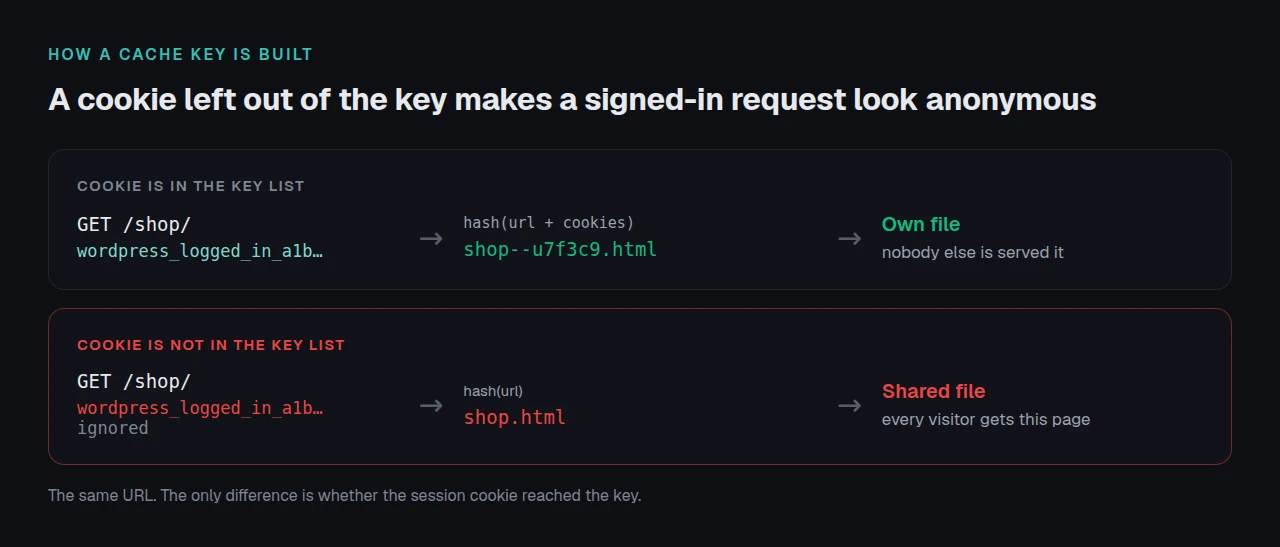
One symptom, two directions. A page cache stores one copy per cache key, and every version of this bug is the same mistake about what belongs in that key.
On this page
Which layer is holding the private copy
| What you are seeing | Likely layer | Check first |
|---|---|---|
| A name or cart on a page anyone can load | Page cache | Is the login cookie in the key |
| The admin bar in a browser that never logged in | Page cache | The logged-in-users setting |
| Wrong sometimes, or only from one region | CDN or edge | Does the CDN store HTML |
| Right logged in, wrong in a private window | Page cache | Which request wrote the file |
| Only on cart, checkout or account pages | Server fast path | Do rules apply to warm pages |
The next section tells you which row you are in.
Confirm it in two requests
Run these from a terminal, or any machine that has never logged into the site.
curl -sI https://example.com/ | grep -iE 'x-xspeed-cache|x-cache|cf-cache-status|age:'
curl -s  https://example.com/ | grep -coE 'wp-admin-bar|woocommerce-mini-cart|Howdy,'
The first line names the cache that answered. The second counts markup only a signed-in session should produce, so any count above zero means a private page is in a shared cache right now.
A plugin hit header with a count above zero puts the copy in the page cache. A cf-cache-status: HIT with no plugin header puts it at the edge, on a copy the origin may already have fixed. Our guide to reading cache headers correctly covers the six that prove nothing.
How a private page reaches a public cache
Seven documented routes, each from a primary source:
| Route | Documented in |
|---|---|
| The key ignored the login cookie | WP Super Cache 3.1.3, 26 Aug 2026 |
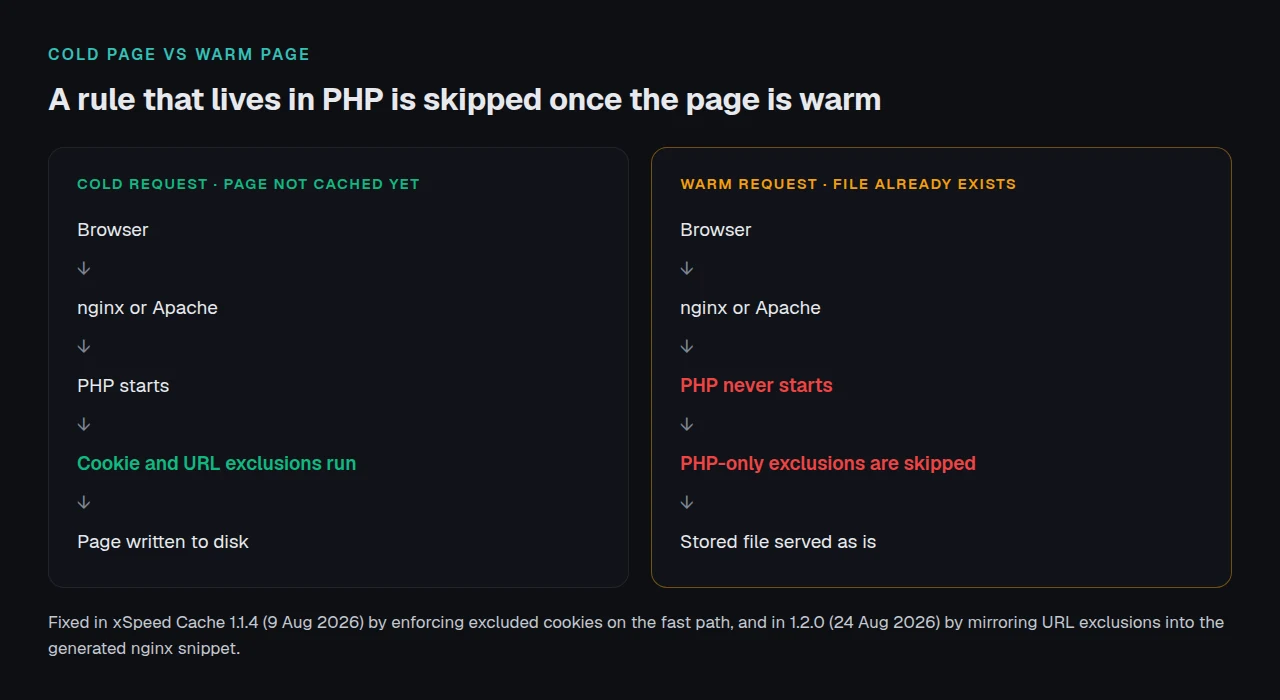
| The rule ran in PHP; the server served the file first | our 1.1.4 and 1.2.0, Aug 2026 |
| A setting enables shared caching deliberately | WP-Optimize, WP Fastest Cache readmes |
| The admin bar was stored with the page | WP-Optimize 3.3.2, 16 Apr 2024 |
| Per-user caching is a server feature this host lacks | LiteSpeed Cache readme |
| WooCommerce set no-cache constants, nothing read them | class-wc-cache-helper.php |
| A third-party cookie changed the key | Breeze changelog |
Rows two and six share one cause. WooCommerce defines DONOTCACHEPAGE, DONOTCACHEOBJECT and DONOTCACHEDB in PHP, and its session cookie is wp_woocommerce_session_ plus the site’s cookie hash, according to its own session handler. A PHP constant is invisible to nginx or Apache serving a static file directly, which is the fast path every page cache uses once a page is warm. That is the failure we fixed in 1.1.4, and why 1.2.0 mirrors URL exclusions into the generated nginx snippet.
Row five is a different question, answered in what LiteSpeed Cache does on a non-LiteSpeed server: private caching sits in its Exclusive column, so on Nginx or Apache there is no per-user cache at all.
RFC 9111 section 5.2.2.7 states that the unqualified private directive means a shared cache “MUST NOT store the response (i.e., the response is intended for a single user)”. A page carrying a session is a response for a single user, whether or not anything labelled it one.
The fix, fastest path first
| # | Do this | Why this order |
|---|---|---|
| 1 | Purge every layer, plugin and CDN | A stored copy leaks while you work |
| 2 | Turn off shared caching for logged-in users | Safe only if signed-in pages are identical |
| 3 | Exclude wordpress_logged_in_, wp_woocommerce_session_, comment_author_ | These belonged in the key |
| 4 | Exclude /cart/, /checkout/, /my-account/ | Cookie rules miss pages personalised without one |
| 5 | Confirm rules reach the server fast path | A settings screen is not a web server |
| 6 | Bypass HTML carrying those cookies at the CDN | Provider defaults vary |
Every step works on any caching plugin and none of it needs buying. If purging changes nothing, start with why a purge can appear to do nothing. Step 5 is the one people skip; our server compatibility notes list what each server needs. The WooCommerce use-case page has the exclusions xSpeed Cache ships by default, optimizing checkout covers the pages around an excluded cart, and migration docs cover what a plugin switch loses.
Verify the leak is closed
Purge once more, load the page as a signed-in user, then run the same two commands from a session-free terminal.
curl -sI https://example.com/cart/ | grep -iE 'x-xspeed-cache|cf-cache-status'
curl -s  https://example.com/     | grep -coE 'wp-admin-bar|woocommerce-mini-cart|Howdy,'
You want a bypass or a miss on the account URL, and a zero on the second command after the anonymous page has been requested twice. One request proves nothing, because the first may simply have rewritten the file correctly.
Then check from outside your own network. The free xSpeed Scan grades cache evidence, needs no account, and reads what a visitor’s browser receives rather than what a settings screen claims.
Running this across more than one site
One site is a settings screen. Twenty is a policy question, because the cookie that leaks on a membership site is not the one that leaks on a store, and a single wrong exclusion list goes unnoticed for weeks.
xSpeed Cache is ours, built by WPDeveloper, and it ships exclusion defaults rather than an empty box: sixteen URLs, twenty cookies and twenty-eight query parameters on a fresh install. Since 1.1.1 xSpeed Cache also names the third-party plugin whose cookie would poison the page cache. Those exclusions are free, listed on Free vs Pro; xSpeed Hub applies one policy across a fleet, and pricing starts at $29 a year with a 14-day money-back guarantee. If you are installing it for the first time, setting up xSpeed Cache on WordPress covers activation and the settings worth touching first. LiteSpeed Cache on LiteSpeed hardware and WP Rocket both handle this well, and the six steps above are unchanged on either.
Frequently asked questions
I purged everything and a logged-out browser still shows the admin bar
Check the browser, then the edge: a stale copy in either survives an origin purge. Load the URL with a cache-busting query string; a clean page there means the origin is fixed and something in front is not.
My cache plugin says logged-in users are never cached, so why did this happen?
Usually because the rule ran in PHP and the web server served the page before PHP started. That is the bug xSpeed Cache fixed in 1.1.4 on 9 August 2026, and it is invisible from a settings screen.
I found another customer’s cart on my storefront. Is this a security incident?
Treat it as one. Session markup reaching an unauthenticated visitor is a disclosure: purge first, record which URLs were affected and for how long, then fix the key.
I only see this on one page, not across the whole site
That points at a missing URL exclusion rather than a cookie rule. One page that greets a person by name and is not on the list will leak while every other page behaves.
Everything looks correct when I test while logged in
Testing while logged in hides this bug completely, because your own request is bypassed. With debug mode on, xSpeed Cache names which rule skipped a response, so a bypass can be told apart from a miss.
Conclusion: the cache key is the whole bug
What to do this week:
- Run the two-command check on your busiest page today.
- Add the three session cookies to the exclusion list.
- Confirm the exclusions apply to warm pages, not only cold ones.
- Re-run the check twice, not once.
- Scan the URL with xSpeed Scan and read the cache-evidence check.
If those commands come back clean twice in a row, the private copy is gone and the cache key is right.