LiteSpeed Cache on Nginx or Apache: What You Actually Get in 2026
Updated September 2026.
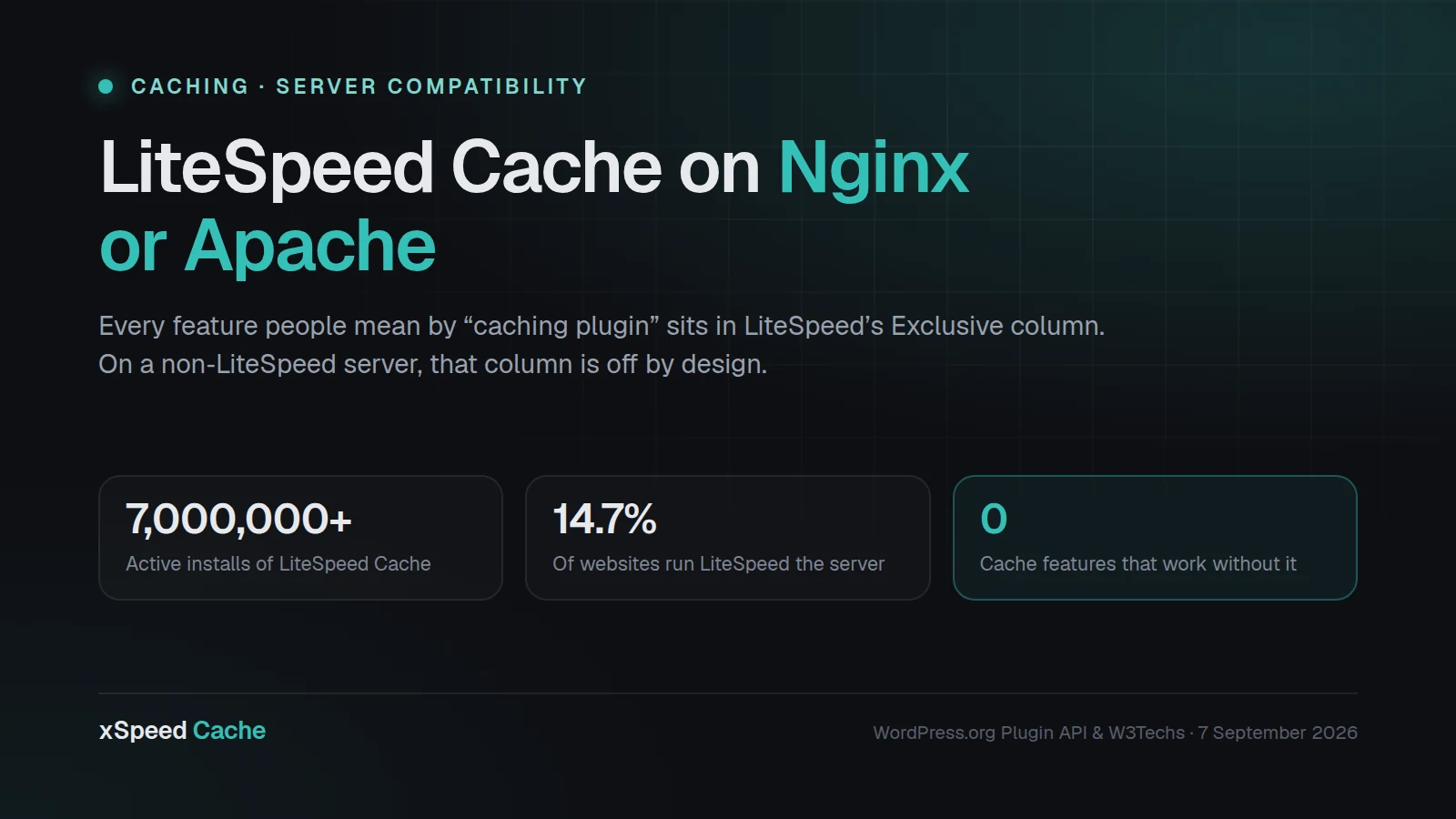
LiteSpeed Cache is installed on more than 7,000,000 WordPress sites, according to the WordPress.org Plugin API as of 7 September 2026, which makes it the most-installed caching plugin in the directory by a wide margin. LiteSpeed the web server runs 14.7% of all websites whose server is known, per W3Techs’ web server survey on the same date, behind Nginx at 31.3%, Cloudflare Server at 30.0% and Apache at 22.4%.
Those two numbers do not describe the same population, and the gap between them is the subject of this guide.
The question people expect is “is LiteSpeed Cache good?” The more useful question is which half of it your server is actually running. On Apache and Nginx, the plugin’s optimization features work exactly as documented. Its cache does not. That is not a bug, a misconfiguration, or something a settings page can fix. It is the documented design, stated by LiteSpeed in its own readme, and this guide covers how to check which side of the line you are on and what to do about it.
Quick Summary / TL;DR
| If your server is… | LiteSpeed Cache gives you | What is missing | What to do |
|---|---|---|---|
| LiteSpeed Enterprise or OpenLiteSpeed | Everything, including server-level page cache | Nothing | Keep it. It is the right plugin for that stack. |
| Apache | Minify, combine, lazy load, critical CSS, image optimization, database cleanup | Page caching, auto-purge, private cache, mobile cache, cache exclusions, the preload crawler | Add a PHP-level page cache, or move to a LiteSpeed host |
| Nginx | Same optimization set as Apache | Same list as Apache | Same two options |
| Cloudflare in front of Apache/Nginx | Optimization set, plus edge caching of static assets | Full-page HTML caching still needs configuration you do separately | Pair a page cache with your existing Cloudflare setup |
| Any non-LiteSpeed server + QUIC.cloud CDN | Most exclusive features, served from the CDN edge rather than your server | Nothing, but the cache now lives at a third party | Viable. Read the QUIC.cloud terms first. |
The one-line version: every feature a person means when they say “caching plugin” sits in LiteSpeed’s Exclusive column, and that column is switched off unless your server is LiteSpeed or you route through QUIC.cloud.
Not sure which you have? Run the free xSpeed Scan on your own URL. It reports your server, whether a page cache is responding, and your TTFB, in about 40 seconds, with no signup.
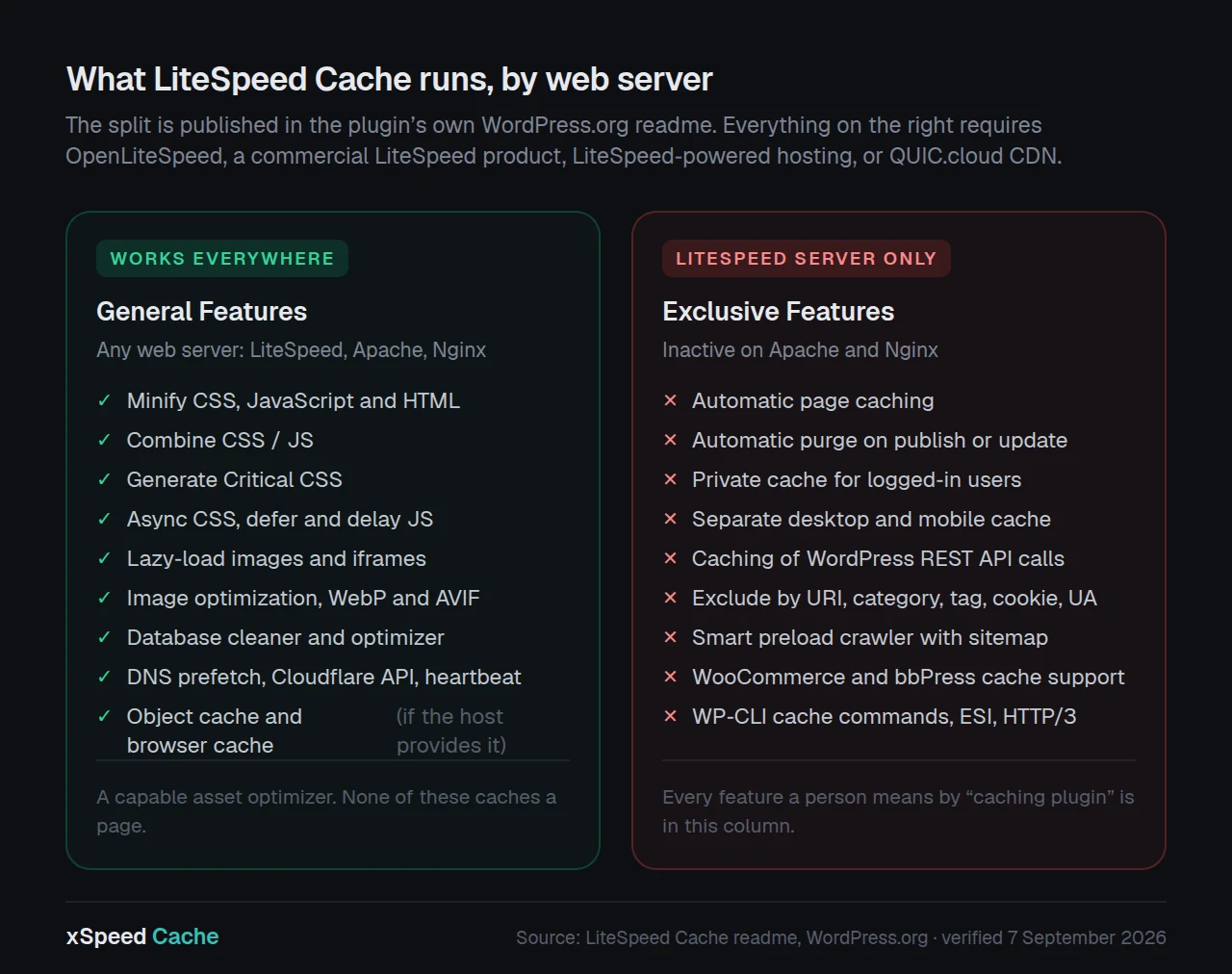
The split LiteSpeed publishes, in its own words
This is not an inference drawn from testing. It is written in the plugin’s readme on WordPress.org, verbatim:
“General Features may be used by anyone with any web server (LiteSpeed, Apache, NGINX, etc.). LiteSpeed Exclusive Features require one of the following: OpenLiteSpeed, commercial LiteSpeed products, LiteSpeed-powered hosting, or QUIC.cloud CDN.”
The same readme describes the plugin as featuring “an exclusive server-level cache and a collection of optimization features.” The word doing the work there is server-level. The cache is not written by PHP inside WordPress. It is handled by the LiteSpeed web server itself, which is why it cannot exist on a server that is not LiteSpeed. The plugin’s own privacy notice puts it plainly: the cached pages “are stored locally on the system where LiteSpeed server software is installed.”
Here is the full split, taken from the readme and reorganised into a single table. Read down the first column: everything that answers ❌ there is a feature you do not have.
| Capability | On Apache or Nginx | On a LiteSpeed server |
|---|---|---|
| Automatic page caching | ❌ | ✅ |
| Automatic purge of related pages on publish or update | ❌ | ✅ |
| Private cache for logged-in users | ❌ | ✅ |
| Caching of WordPress REST API calls | ❌ | ✅ |
| Separate cache for desktop and mobile | ❌ | ✅ |
| Scheduled purge for specified URLs | ❌ | ✅ |
| Exclude from cache by URI, category, tag, cookie, user agent | ❌ | ✅ |
| Smart preload crawler with sitemap support | ❌ | ✅ |
| WooCommerce and bbPress cache support | ❌ | ✅ |
| WP-CLI cache commands | ❌ | ✅ |
| ESI (Edge Side Includes) † | ❌ | ✅ |
| HTTP/3 and QUIC support | ❌ | ✅ |
| Minify CSS, JavaScript and HTML | ✅ | ✅ |
| Combine CSS/JS | ✅ | ✅ |
| Automatically generate Critical CSS | ✅ | ✅ |
| Load CSS asynchronously, defer and delay JS | ✅ | ✅ |
| Lazy-load images and iframes | ✅ | ✅ |
| Image optimization, AVIF and WebP | ✅ | ✅ |
| Database cleaner and optimizer | ✅ | ✅ |
| DNS prefetch, Cloudflare API, heartbeat control | ✅ | ✅ |
| Object cache, Redis or Memcached ‡ | ✅ | ✅ |
| Browser cache ‡ | ✅ | ✅ |
† Not available on OpenLiteSpeed. ‡ Works on any server, but only if your host actually provides the service.
Read the bottom half again. It is a good asset-optimization plugin. It is not a cache.
Why this is easy to miss
Three things make the situation genuinely confusing, and none of them are anyone acting in bad faith.
The settings all appear. Install LiteSpeed Cache on an Nginx box and the Cache tab is there, the toggles move, the settings save. Nothing warns you at the moment you turn page caching on. The plugin cannot know what it will be running under until it runs.
The optimization features are real and they show up in scores. Minification, critical CSS and lazy loading move a Lighthouse number. A site can go from 45 to 75 on PageSpeed after installing LiteSpeed Cache on Nginx, and the owner reasonably concludes the plugin is working. It is. The half that is working is the half that does not include caching.
The plugin is genuinely excellent on the right server. LiteSpeed Cache holds a 4.8 out of 5 rating from 2,770 reviewers on WordPress.org as of 7 September 2026, and version 7.9.1 shipped on 1 September 2026. Those reviews are not wrong. They are largely written by people on LiteSpeed hosting, where the plugin does everything it says.
The result is a plugin whose reputation is earned on one stack and whose install base extends well past it.
How many sites are affected? Nobody can say precisely, and here is why
It is tempting to multiply 7,000,000 installs by the share of servers that are not LiteSpeed and publish the product as a headline. That number would be wrong, and the reason is worth stating rather than hiding.
W3Techs measures websites, not WordPress installs, and its 14.7% LiteSpeed figure covers the whole web. WordPress.org publishes active installs in buckets, not exact counts, and does not break them down by server. LiteSpeed hosting is over-represented among budget shared hosts, which is exactly the population most likely to install a free caching plugin, so the overlap is probably higher than the web-wide average. No public dataset joins the two.
What can be said with confidence: the plugin’s install base is larger than the server’s total footprint would comfortably support, and a meaningful share of those installations are running with the cache layer inert. The exact share is not publicly measurable, and anyone quoting a precise figure has estimated it.
That is unsatisfying, so here is something better than an estimate: a way to check your own site in about a minute.
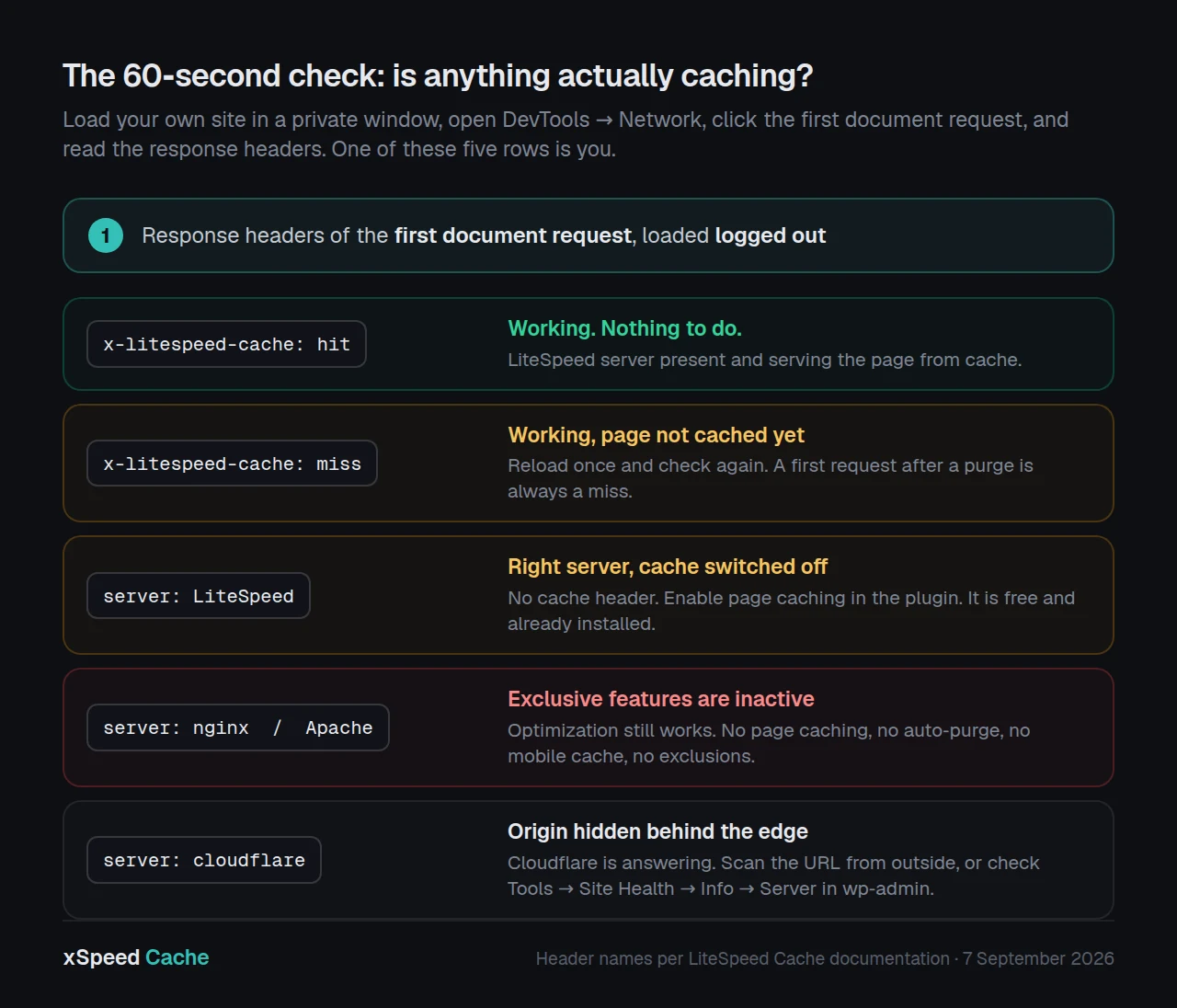
The 60-second check: is anything actually caching?
Four checks, in order of effort. Stop at the first one that answers your question.
1. Read your response headers. In your browser, open DevTools, go to the Network tab, reload the page while logged out, and click the first document request. Look at the response headers.
| What you see | What it means |
|---|---|
x-litespeed-cache: hit | The LiteSpeed cache is working. You are on a LiteSpeed server. Stop reading. |
x-litespeed-cache: miss | LiteSpeed server present, page not yet cached. Reload once and check again. |
server: LiteSpeed but no cache header | LiteSpeed server, cache not enabled in the plugin |
server: nginx or server: Apache | The exclusive features are off. This guide is about you. |
server: cloudflare | Cloudflare is answering. Your origin server is hidden. Use check 3. |
2. Ask WordPress. In wp-admin, go to Tools → Site Health → Info → Server. The “Web server” row names your server software directly.
3. Ask a scanner. xSpeed Scan probes your URL from outside, reports the server it detects, whether cache evidence is present, your TTFB and your compression, and grades the result out of 100. It works on any site, needs no plugin and no account, and it sees through the Cloudflare case because it reads what your origin actually returns. Every report gets a permanent shareable URL, which is useful if you are checking a client’s site and need to send them the evidence.
4. Time it. Load a page twice, logged out, and compare Time To First Byte in DevTools. A working page cache typically answers in tens of milliseconds. A WordPress page assembled by PHP on every request typically takes several hundred. If your second load is as slow as your first, nothing is caching the HTML.
The header check is the one that settles it. Everything else is corroboration.
If you are on Apache or Nginx: the four honest options
Option A: Move to LiteSpeed hosting
The plugin becomes complete, and it is a very good plugin. Many shared hosts run LiteSpeed or OpenLiteSpeed, and a migration to one is usually a normal host migration rather than a rebuild.
Cost: whatever a host change costs you, plus the migration. Best for sites already planning to move, and for anyone who wants one vendor answering for both server and plugin.
Option B: Add QUIC.cloud
LiteSpeed’s own readme names QUIC.cloud CDN as one of the four routes to the exclusive features, and it is the option that requires no server change. Your pages get cached at the CDN edge instead of on your origin.
The trade is real in both directions. You gain page caching and a global edge without touching your host. You also move your HTML cache to a third-party network, add a dependency, and take on quota management. For a content site this is often a good deal. For a WooCommerce store with per-user carts it needs care. Check the current terms and quotas at quic.cloud rather than trusting any figure quoted in an article.
Option C: Add a PHP-level page cache alongside it
Keep LiteSpeed Cache for its optimization features and add a plugin that caches pages in PHP, which works on any server. This is the option most people land on, and it is also the one that goes wrong most often, because two plugins both trying to minify the same CSS will fight.
If you take this route, turn off every overlapping feature in one of the two. Pick one plugin to own minification, one to own lazy loading, one to own database cleanup. Running two of anything is how a site ends up with broken layout and an owner who concludes that caching plugins are dangerous.
Option D: Replace it with a plugin that caches on any server
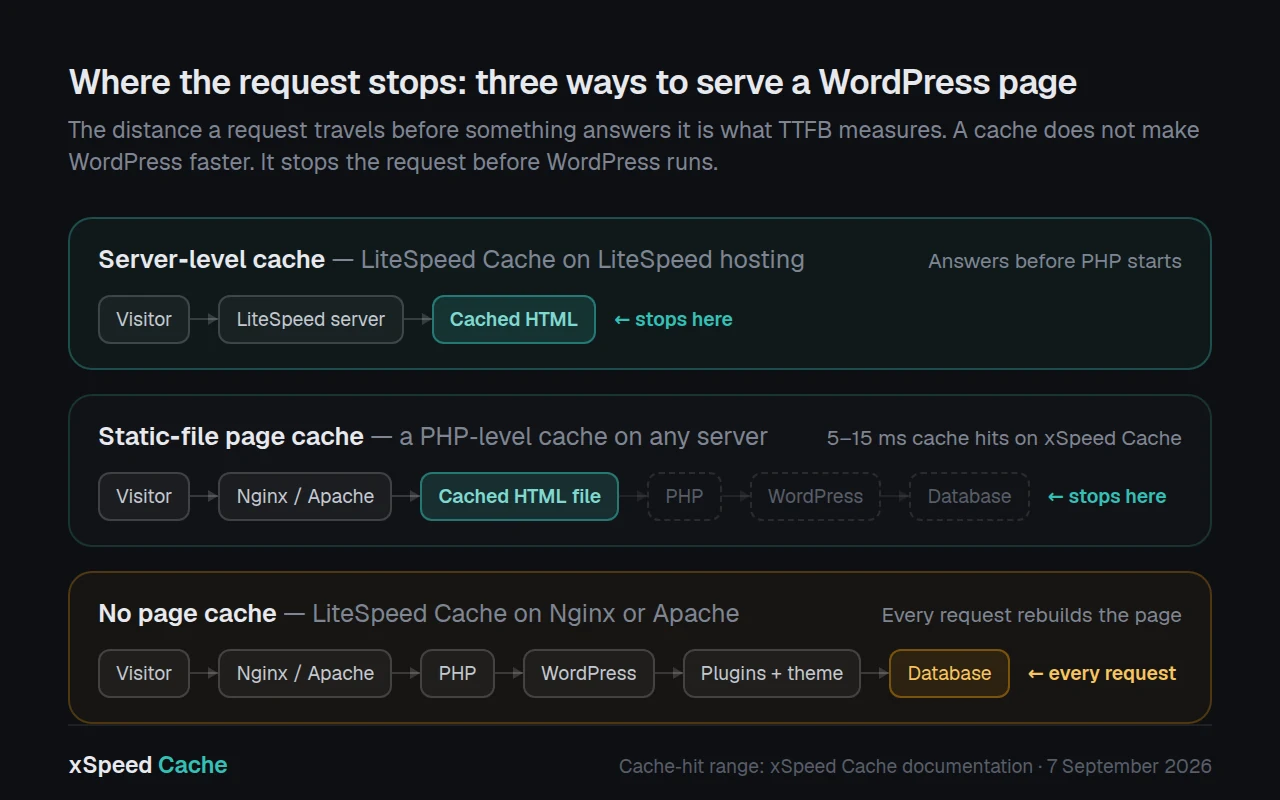
A page cache written in PHP does not need a particular web server. It writes static HTML to disk and serves it before WordPress loads. That is slower than a true server-level cache and considerably faster than assembling a page from the database on every request.
The candidates, with what each actually is:
| Plugin | Free? | Page cache on any server | Notes |
|---|---|---|---|
| WP Super Cache | ✅ | ✅ | 1,000,000+ installs, 4.3★ from 1,345 ratings. Simple, old, dependable. Little else in the box. |
| W3 Total Cache | Free + paid | ✅ | 900,000+ installs, 4.4★ from 5,420 ratings. Very configurable, which is both the appeal and the complaint. |
| WP Fastest Cache | Free + paid | ✅ | 1,000,000+ installs, 4.9★ from 4,224 ratings. Straightforward. Several features are paid. |
| WP Rocket | ❌ paid only | ✅ | No free version, no directory listing. Widely regarded as the easiest premium option. |
| xSpeed Cache | Free + paid | ✅ | 2,000+ installs, 5.0★ from 10 ratings. New. See the disclosure below. |
Install counts and ratings pulled from the WordPress.org Plugin API on 7 September 2026. WP Rocket is not in the directory, so no equivalent figures exist for it.
For a full feature-by-feature view of this field, the xSpeed comparison page records 80 capabilities across 19 areas for eight of these plugins, and it marks which tier each feature ships in rather than only whether it exists. That distinction matters more than it sounds: a feature that exists behind a paywall is not the same as a feature you have.
Running a page cache on a server that is not LiteSpeed
Disclosure: this section is about the plugin published by the company that publishes this blog. It is the shortest section on this page for that reason, and the comparison table above lists four alternatives that solve the same problem.
xSpeed Cache serves cached pages as static files before PHP starts, which is a design that does not depend on the web server. It runs on Apache, Nginx and LiteSpeed alike, and the server compatibility documentation covers each. Cache hits answer in 5 to 15 milliseconds. The free tier includes page caching, browser caching, object caching via Redis or Memcached, minification, GZIP, lazy loading and database cleanup, with no time limit.
Two details are relevant specifically to this article. First, the plugin detects a LiteSpeed server module and steps back rather than competing with it, so installing it on LiteSpeed hosting does not create the Option C conflict described above. Second, there is a migration tool that imports settings from WP Rocket, W3 Total Cache and WP Super Cache, which removes most of the reconfiguration work if you switch.
Where it loses, honestly: 2,000 installs against LiteSpeed Cache’s 7,000,000, a first release in May 2026, and ten reviews. It is too new to appear in the field datasets that longer-established plugins are judged on. If your priority is a decade of production history on millions of sites, LiteSpeed Cache on LiteSpeed hosting or WP Rocket are the safer picks, and this guide would rather say so than pretend otherwise.
Free plans start at $0 for one site and paid plans at $29 a year with a 14-day money-back guarantee. The Free vs Pro matrix shows the exact split, and pricing lists the tiers.
Common mistakes when you discover the cache was off
Installing a second caching plugin without disabling the first one’s overlapping features. Two minifiers on the same stylesheet produce broken CSS. Decide which plugin owns each job before you activate anything.
Judging the change on a logged-in page load. Almost every page cache deliberately skips logged-in users, because a cached page with someone else’s account name in the header is worse than a slow one. Test in a private window.
Testing without purging first. After a settings change, purge, then load once to warm the cache, then measure the second load. The first request after a purge is always a miss.
Assuming the PageSpeed score will move. A page cache mainly improves TTFB and server response time. Lighthouse weights render metrics far more heavily, so a large TTFB improvement can produce a small score change while the site is genuinely faster for every visitor. Measure TTFB directly.
Caching WooCommerce cart and checkout. These pages hold per-user session data and must stay dynamic. Any page cache worth running excludes them by default, and the WooCommerce checkout guide covers what to do instead for those routes.
Blaming the host. Sometimes it is the host. Often it is that the HTML is being rebuilt on every request. Establish which before you migrate, using the header check above.
Frequently Asked Questions
Does LiteSpeed Cache work on Nginx? Partly. Its optimization features work on any web server. Its page caching, auto-purge, private cache, mobile cache, cache exclusions and preload crawler are listed by LiteSpeed as Exclusive Features requiring OpenLiteSpeed, a commercial LiteSpeed product, LiteSpeed-powered hosting, or QUIC.cloud CDN.
Does LiteSpeed Cache work on Apache? The same answer as Nginx. Apache is named in LiteSpeed’s own readme alongside Nginx as a server where only the General Features apply.
I installed LiteSpeed Cache and my PageSpeed score went up. Doesn’t that mean caching is working? Not necessarily. Minification, critical CSS and lazy loading are General Features that work on any server, and they move Lighthouse scores. Page caching mainly improves TTFB, which Lighthouse weights lightly. A score improvement is consistent with the cache being entirely inactive.
My cache settings save fine and the toggles stay on. Why would you say it is not caching?
The plugin cannot detect what server it will run under from the settings page, so it stores your preference either way. The cache itself is executed by the LiteSpeed web server. With no LiteSpeed server present, there is nothing to act on the setting. Check your response headers for x-litespeed-cache rather than the settings screen.
I moved my site to a new host and it suddenly got slower with no plugin changes. What happened?
A likely cause is moving from LiteSpeed hosting to an Apache or Nginx host. The plugin keeps working, the settings look identical, and the entire cache layer stops. Check the server response header on the new host.
Purging the cache does nothing on my site. Is it broken? If your server is not LiteSpeed, there is no cache to purge, so the button correctly reports success and changes nothing observable. Confirm with the header check first.
Is QUIC.cloud required to use LiteSpeed Cache? No. The plugin’s General Features work without it. QUIC.cloud is one of the four routes LiteSpeed names for reaching the Exclusive Features, and the only one that does not require changing your web server.
Can I run LiteSpeed Cache and another caching plugin together? Technically yes, and it frequently causes problems. If you do, disable every overlapping feature in one of them so that exactly one plugin owns minification, one owns lazy loading and one owns page caching.
Which is faster, a server-level cache or a PHP-level one? A server-level cache, because it answers before PHP starts at all. A well-built PHP-level static-file cache is close, and both are far faster than rendering a page from the database on every request. The gap between “some page cache” and “no page cache” is much larger than the gap between the two types.
How do I know if my host runs LiteSpeed before I buy?
Ask support directly, or load any site already hosted there and read the server response header. Hosts that run LiteSpeed usually advertise it, because it is a selling point.
Will switching caching plugins lose my settings? Not always. Several plugins import settings from the common alternatives, which removes most of the manual reconfiguration. Export or note your exclusion rules before switching either way, since those are the settings most specific to your site.
I am on Cloudflare. Doesn’t that cache my pages already? By default Cloudflare caches static assets and not HTML. Full-page HTML caching at the Cloudflare edge requires separate configuration, and dynamic pages such as cart and checkout must be excluded. A Cloudflare setup and an origin page cache solve overlapping but different problems.
Conclusion: which half are you running?
LiteSpeed Cache is not the problem in this story. It is a strong plugin doing exactly what its documentation says, on the server it was built for. The problem is a documented requirement that is easy to install past, and an install base that has grown well beyond the server that requirement names.
| Your situation | Best next step |
|---|---|
Headers show x-litespeed-cache: hit | Nothing. You are on the right stack. |
| On LiteSpeed hosting, cache disabled | Enable it in the plugin. It is free and it is already there. |
| On Apache or Nginx, want to keep the plugin | Add QUIC.cloud, or add a PHP-level page cache and disable the overlaps |
| On Apache or Nginx, want one plugin | Replace it with a cache that runs on any server |
| Not sure what you are on | Run the header check, or scan the site |
| Managing many client sites | Check them in a batch before recommending anything, and see the agency guide |
What to do this week: open DevTools on your own site, logged out, and read the server and x-litespeed-cache response headers. That single check tells you whether you have been running a caching plugin or an asset optimizer for however long the plugin has been installed. If you would rather not read headers by hand, xSpeed Scan reports the same thing plus your TTFB and a graded score in about 40 seconds, free and without an account, and gives you a permanent link you can send to a client or a host.
If you are weighing replacements after that check, the 9 best WP Rocket alternatives comparison ranks the field on real Core Web Vitals field data, and getting started with xSpeed Cache covers installation and first configuration in a few minutes.