We Scored 11 WordPress Cache Plugins Twice in 2026, and One Criterion Moved Us From First to Fourth
Updated September 2026
A direct wordpress.org Plugin API query on 28 September 2026 returned 7,000,000+ active installs for LiteSpeed Cache and 8,000+ for xSpeed Cache, which is ours. Both figures are buckets rather than measurements, and the gap between them is the whole subject of this page. The roundup you expect ranks caching plugins by how many boxes each one ticks. The more useful one scores the same field twice, once on features and once with a decade of other people’s installs counted as a criterion of its own, because the order changes and the second order is the honest one.
We build xSpeed Cache, so this is a roundup written by an entry in it. Every figure below came from each plugin’s shipped source, its readme in the plugin directory, or its own pricing page, read on 28 September 2026.
Quick Summary: The Winner Changes When Track Record Counts
Eleven plugins, seven criteria, scored twice. Competitors take the first four rows because that is where the scoring puts them.
| If your situation is… | Install this | Why it wins here |
|---|---|---|
| You are on LiteSpeed or OpenLiteSpeed hosting | LiteSpeed Cache | Free, a server-level page cache, an object cache in the free tier, and ten years in the directory behind it |
| You want the deepest free feature set with a long record | W3 Total Cache | Disk, Redis, Memcached and APCu object caching at no cost, 900,000+ installs, in the directory since 2009 |
| You run WooCommerce and want the cart handled with no configuration | WP-Optimize | The only 1,000,000+ install plugin that stops a shopper holding a basket from writing your public cache out of the box |
| You never want to pay again, at any point | WP Super Cache, Cache Enabler, Breeze or Surge | None of the four has a paid tier of any kind |
| You want one answer across Apache, nginx and LiteSpeed, with a readable hit header and agent control | xSpeed Cache, which we build and which is new | Highest unweighted score of the eleven, and fourth once track record is weighted. The table below shows both numbers |
| You are shopping purely on price and want a paid plugin | WP Fastest Cache at $49 once, or WP Rocket at $59.95 a year | One of the two never expires. Prices verified on both vendors’ pages on 28 September 2026 |
| You are on SiteGround | SiteGround Optimizer | Its dynamic cache and Memcached run on SiteGround’s own stack and cost nothing, and they do not travel |
Start with the free tier of whichever row matches you. All eleven plugins scored here have one, because being in the wordpress.org directory is what put them on this page, so the cost of being wrong is an afternoon rather than a licence. If you are already running a cache and only want to know whether it is working, the four checks that prove a hit is the shorter read.
How We Scored: Seven Things a Buyer Can Check Before Paying
Every criterion below is readable by someone who has not installed the plugin yet. That rules out speed claims, which need a benchmark harness nobody agrees on, and it rules out support quality, which is a story rather than a fact.
Three things were considered and left out, and the reasons are worth stating because their absence changes the ranking. Speed is missing because a caching benchmark that is not run on identical hardware with identical content measures the harness. Interface quality is missing because the same settings screen reads as clean to one person and as missing half the controls to another, and W3 Total Cache and Surge sit at opposite ends of that judgement while both caching correctly. Support responsiveness is missing because it cannot be checked before purchase, and the one pricing table in this field that quantifies support at all lists it as unlimited rather than as a response time.
What is left is seven questions with a documented answer. Six of them come from reading each plugin’s shipped code, readme or pricing page. The seventh comes from the plugin directory, which is the only column in this table that nobody selling a caching plugin can influence this quarter.
| # | Criterion | 2 points | 1 point | 0 points |
|---|---|---|---|---|
| 1 | Page cache runs on your server | Any web server | Only with the vendor’s CDN or server | Only on one host’s stack |
| 2 | Cache receipt readable from outside | A response header | An HTML comment or a dashboard tool | Nothing established |
| 3 | Cart holder blocked from writing public cache | Shipped on by default | Different design, documented | Needs configuration |
| 4 | What you keep when you stop paying | Free forever, or a one-time fee | A metered free tier | Nothing |
| 5 | Object cache in the free tier | Redis or Memcached, no payment | Host-locked | Absent or deprecated |
| 6 | An agent can drive it over MCP | In the free plugin | In the paid licence | No MCP server |
| 7 | Directory track record | 500,000+ installs and 5+ years | 70,000+ installs | Under 70,000 installs |
Criterion 6 is the one only we score on, and that is a problem worth naming early. No other plugin in this field ships an MCP server, so including it hands us two points nobody can contest. A reader who does not connect an agent to their site should set its weight to zero, and the sensitivity note further down works out what that costs us.
The field is the eleven caching plugins that ship their cache in the wordpress.org directory, so the source can be read rather than taken on trust. WP Rocket, FlyingPress and Perfmatters are not in the directory at all, and NitroPack’s optimization runs on its own servers rather than in the file you can download, so those four get their own section and no score.
Criterion 1: Does the Page Cache Run on Your Server at All?
This is the criterion that decides whether the rest of the comparison applies to you, and two of the eleven do not pass it.
LiteSpeed Cache’s own readme draws the line in its Requirements section: “General Features may be used by anyone with any web server (LiteSpeed, Apache, NGINX, etc.)”, while “LiteSpeed Exclusive Features require one of the following: OpenLiteSpeed, commercial LiteSpeed products, LiteSpeed-powered hosting, or QUIC.cloud CDN.” Automatic page caching sits in the Exclusive list. On Apache or nginx you either connect QUIC.cloud, whose free tier is real, or you have an optimization plugin rather than a cache. We covered the branch in detail in LiteSpeed Cache on Nginx or Apache.
SiteGround Optimizer states the same kind of boundary twice in its readme. Of dynamic caching: “This default feature is available exclusively for SiteGround servers, ensuring optimal performance.” Of Memcached: “This powerful feature is exclusively available in the SiteGround environment.” Neither sentence is a criticism. Both are a vendor being clear that the plugin is part of a hosting product.
| Plugin | Page cache on any web server | Scored |
|---|---|---|
| W3 Total Cache | ✅ | 2 |
| WP-Optimize | ✅ | 2 |
| WP Fastest Cache | ✅ | 2 |
| WP Super Cache | ✅ | 2 |
| Hummingbird | ✅ | 2 |
| Breeze | ✅ | 2 |
| Cache Enabler | ✅ | 2 |
| Surge | ✅ | 2 |
| xSpeed Cache | ✅ | 2 |
| LiteSpeed Cache | ❌ without a LiteSpeed server or QUIC.cloud | 1 |
| SiteGround Optimizer | ❌ off SiteGround | 0 |
Read your own server header before you read any feature grid. W3Techs put LiteSpeed at 14.4% of websites on 26 September 2026, against Apache at 22.0% and nginx at 30.9%, so most readers are in the branch where LiteSpeed Cache needs help. One request answers the question:
curl -sI https://example.com/ | grep -i '^server:'If that line says LiteSpeed, the top row of the summary table is your answer and you can stop reading at criterion 5. If it says Apache, nginx, or Cloudflare in front of something you cannot see, you are in the nine-plugin branch and the rest of this page applies. Note the Cloudflare case carefully: a Cloudflare server header tells you about the proxy rather than about your origin, so ask your host what runs behind it before you conclude anything.
A scored zero on this criterion is not a verdict on the plugin. SiteGround Optimizer is very good at the job it was built for, which is making SiteGround sites fast for people who are staying on SiteGround. The score of 0 records portability, and portability only becomes a cost on the day you migrate. That day is also the day it becomes an expensive cost, because the site that was fast on the old host is now the same site without a cache.
Criterion 2: Can You Prove a Cache Hit From Outside the Site?
A cache you cannot verify is a setting you believe in. There are two shapes of evidence in this field and they are not equally good.
A response header survives a proxy, can be read with one curl command, and can be read by a monitoring service that has no login to your site. An HTML comment at the foot of the page source does none of those reliably, and the plugins that use one say so themselves. WP-Optimize’s own FAQ warns: “Cloudflare will strip out the special HTML comment at the bottom of the source of a page that is helpful to confirm that page caching is working, so, don’t be confused by that.”
W3 Total Cache’s receipt was the one open question in our own earlier audit, and it is resolved here. Our free caching plugin comparison recorded it as undetermined in September. Reading Generic_Plugin.php and PgCache_ContentGrabber.php from the plugin’s trunk on 28 September 2026 settles it: the plugin appends Performance optimized by W3 Total Cache and a Page Caching using {engine} line through a w3tc_footer_comment filter, gated by Util_Content::can_print_comment(). It is an HTML comment. There is no cache header anywhere in the page-cache path, so W3 Total Cache scores 1 rather than 2, and 900,000+ installs sit on evidence Cloudflare can remove.
| Plugin | Evidence of a hit | Type | Verified from |
|---|---|---|---|
| LiteSpeed Cache | x-litespeed-cache | Response header | Readme and plugin source |
| Surge | X-Cache | Response header | Readme, which names the header directly |
| Cache Enabler | X-Cache-Handler | Response header | Changelog, “Added X-Cache-Handler to indicate if loaded through PHP” |
| Breeze | X-Breeze-Cache, X-Breeze-Cache-Write | Response header | Source, inc/cache/execute-cache.php |
| Hummingbird | Hummingbird-Cache: Served | Response header | Source, core/modules/class-page-cache.php |
| xSpeed Cache | X-XSpeed-Cache, valued HIT (nginx) or HIT (php) | Response header | Our own changelog, and it is ours |
| W3 Total Cache | Page Caching using {engine} | HTML comment | Source, resolved today |
| WP Super Cache | Cached page generated by WP-Super-Cache on YYYY-MM-DD HH:MM:SS | HTML comment, behind a debug setting | Readme |
| WP-Optimize | Comment at the foot of the page source | HTML comment | Plugin FAQ, which names Cloudflare |
| WP Fastest Cache | WPFC_FOOTER_START and related markers | HTML comment | Source, inc/cache.php |
| SiteGround Optimizer | Its own Test URL Caching Status tool | Dashboard tool | Readme |
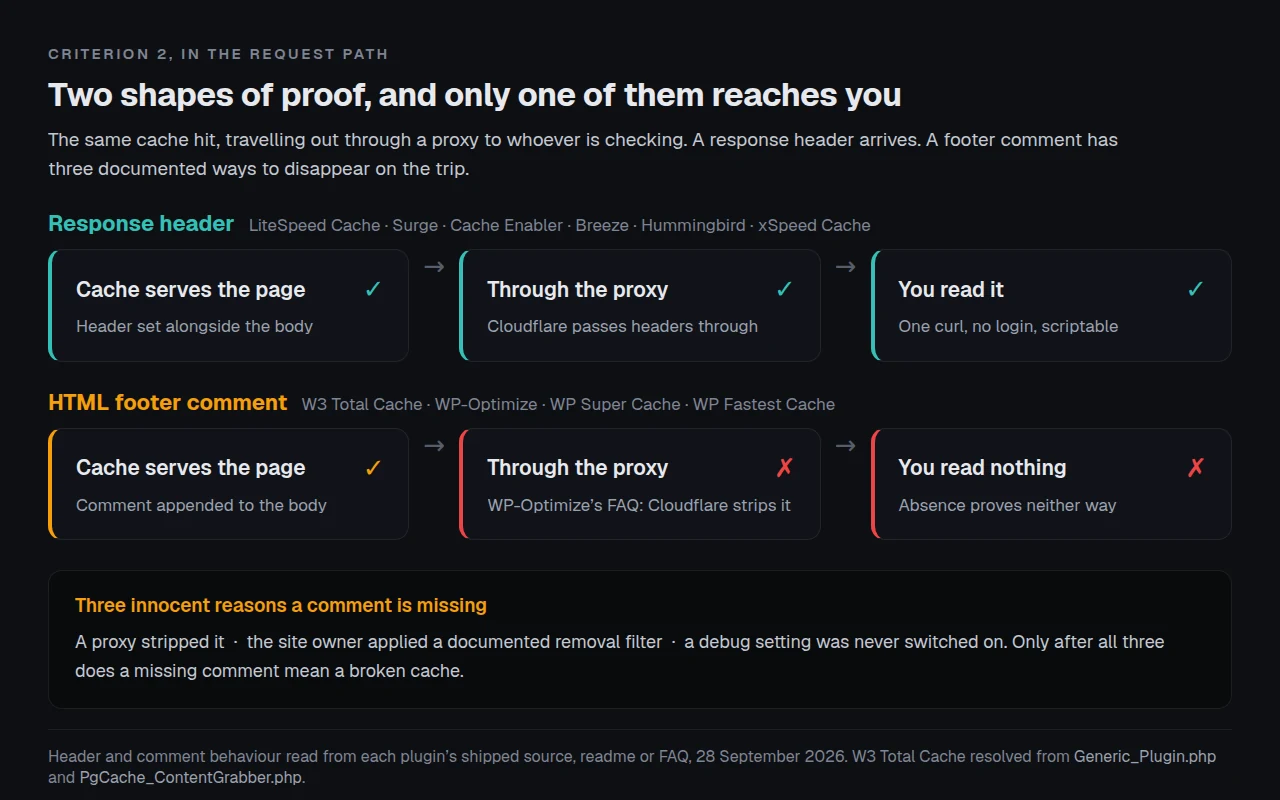
An absent comment proves nothing, and that is now doubly true. WP Fastest Cache’s inc/cache.php also carries a wpfc_remove_footer_comment filter, and its changelog records adding a filter so users can remove the cache creation comment from the footer. So a missing footprint has two innocent explanations before you reach a third that says the cache is broken.
The practical cost of the difference shows up in three places. Debugging a single page is roughly equal either way, because viewing source and reading a header are both one step. Monitoring is not equal: a header can be watched by an uptime service, a cron job or a scripted check with no credentials on the site, while a footer comment requires fetching and parsing the whole HTML document and then trusting that no proxy touched it. Proving a cache to somebody else is where the gap is widest, because a client or a host’s support desk will accept a response header and will reasonably ask questions about a comment you say used to be there.
WordPress core itself leans on headers for this. Its own Site Health page-cache test reads a list of sixteen response headers by default in WordPress 7.1.2, released on 22 September 2026, and none of the entries on that list is an HTML comment. A plugin whose only evidence is a comment is therefore invisible to the check that WordPress runs on itself, which is a strange position for five plugins of that size to be in, four of them sitting in the 900,000-and-above install buckets.
Criterion 3: Can a Shopper With a Full Basket Write Your Public Cache?
WooCommerce protects the cart, checkout and account pages by page ID. That covers a visitor sitting on /cart/. It does nothing about the other direction, which is a shopper with items in the basket loading an ordinary product page and that page being stored for everyone.
We tested both directions across twelve plugins for our WooCommerce caching comparison, and three plugins close the second direction with no configuration at all.
| Plugin | Blocks a cart holder writing public cache, out of the box | What closes it otherwise | Scored |
|---|---|---|---|
| WP-Optimize | ✅ | Nothing to do | 2 |
| Hummingbird | ✅ | Nothing to do | 2 |
| xSpeed Cache | ✅ | Nothing to do | 2 |
| LiteSpeed Cache | ❌ | Switch on cart vary, or edge-side includes on a LiteSpeed server | 0 |
| W3 Total Cache | ❌ | Add a cart cookie to the page-cache cookie rejection list | 0 |
| WP Super Cache | ❌ | Add a cart cookie to the rejected-cookies list | 0 |
| WP Fastest Cache | ❌ | Add a cookie rule in the exclusion tab | 0 |
| Breeze | ❌ | Add a cookie to the never-cache list | 0 |
| Cache Enabler | ❌ | Add a cart cookie to the exclusion settings | 0 |
| Surge | ❌ | Filter the cache configuration in code | 0 |
| SiteGround Optimizer | ❌ | Add the cookie rule in its exclusion settings | 0 |
Eight of eleven need one line of configuration, and the line is the same line every time. That is worth putting plainly: this criterion separates plugins by default, not by capability, and a store owner who adds one cart cookie to an exclusion list erases the difference in a couple of minutes.
The reason it still earns two points is that defaults are what actually runs. A setting nobody changed is the setting on the site, and a store owner who has never heard of the second direction will never go looking for the exclusion box. Three plugins decided that for their users, and eight left it as an option.
Criterion 4: What Do You Keep When You Stop Paying?
All eleven plugins here have a free tier that keeps caching forever, which makes this criterion look easy until you notice how differently the paid tiers behave at the end of a term.
WP Fastest Cache Premium is the outlier worth studying. Its homepage prices Bronze at $49, Silver at $125, Gold at $175 and Platinum at $300, every one of them labelled /lifetime and carrying a 1 year licence transfer right and a 30-day money-back guarantee, verified on 28 September 2026. You buy it once. It is also the shape that makes a three-year comparison against an annual licence look very different from a first-year one, which we worked through in our WP Fastest Cache and WP Rocket comparison.
| Plugin | Paid tier | Price, verified 28 September 2026 | Model | Scored |
|---|---|---|---|---|
| WP Super Cache | None | — | Free, permanently | 2 |
| Cache Enabler | None | — | Free, permanently | 2 |
| Breeze | None | — | Free, permanently | 2 |
| Surge | None | — | Free, permanently | 2 |
| LiteSpeed Cache | The plugin stays free | Costs sit in LiteSpeed server licences and QUIC.cloud usage above the free levels | Server or CDN | 2 |
| SiteGround Optimizer | The plugin stays free | Cost is the SiteGround hosting plan | Hosting | 2 |
| WP Fastest Cache | Premium | $49 / $125 / $175 / $300 for 1 / 3 / 5 / 10 licences | One-time, never expires | 2 |
| W3 Total Cache | Pro | $99 / $350 / $500 a year for 1 / 5 / 10 sites | Annual, free tier keeps working | 2 |
| WP-Optimize | Premium | $49 / $99 / $194 a year for 2 / 5 / unlimited sites | Annual, free tier keeps working | 2 |
| Hummingbird | Pro | Sold inside a WPMU DEV membership, no standalone price published | Membership | 2 |
| xSpeed Cache | Pro | $29 a year or $79 once for 1 site, up to $199 a year or $399 once for unlimited | Annual or lifetime, free tier keeps working | 2 |
Every plugin in the directory scores 2 here, which makes the criterion useless inside this field and decisive outside it. The four plugins in the section below have no free tier at all, and one of them takes six features back when a licence lapses. Keep that in view when the scorecard appears to say the paid plugins lose.
There is a second, quieter question hiding inside this criterion, and it is the one agencies ask: what happens to the client’s site when your card expires. With a free tier the answer is that the site keeps being cached and you stop getting updates, which is recoverable at leisure. With an annual licence and no free tier the answer depends entirely on what the vendor chose to switch off, and the only way to know is to read the vendor’s own lapse documentation before you buy rather than after. Three of the eleven plugins here publish nothing on the subject because they have nothing to publish.
One thing this criterion deliberately does not do is compare total cost over three years. A one-time fee and an annual licence cross over at some point, that point depends on how many sites you run, and reducing it to a single figure hides the variable that matters. The licence shape is the decision; the arithmetic follows from it once you know your own site count.
Criterion 5: Is the Object Cache in the Free Tier?
Page caching skips PHP for anonymous visitors. It does nothing for a logged-in editor, a WooCommerce customer, or the admin screens, because those requests run the whole of WordPress and hit the database every time. An object cache is the layer that helps there, and it is the layer most free tiers leave out.
Three plugins put it in the free tier. LiteSpeed Cache lists “Object Cache (Memcached/LSMCD/Redis) Support” under General Features, with a footnote that matters: “This service is not provided by the LSCache plugin, nor is it guaranteed to be installed by your service provider.” That caveat applies to every entry in this table. The plugin drives Redis or Memcached; somebody still has to run one.
Hummingbird moved the other way, and the changelog is explicit about it. Version 3.9.3, dated 12 August 2024, records “Redis Object Caching integration deprecated.” So a plugin that scores 2 on cart safety and 2 on its cache header scores 0 here, and a reader who needs object caching should read that row rather than the total.
| Plugin | Object cache in the free tier | Backends | Scored |
|---|---|---|---|
| LiteSpeed Cache | ✅ | Memcached, LSMCD, Redis | 2 |
| W3 Total Cache | ✅ | Disk, Redis, Memcached, APC, APCu and more | 2 |
| xSpeed Cache | ✅ | Redis, Memcached | 2 |
| SiteGround Optimizer | ✅ on SiteGround only | Memcached | 1 |
| Hummingbird | ❌ deprecated in 3.9.3 | — | 0 |
| WP-Optimize | ❌ | — | 0 |
| WP Fastest Cache | ❌ | — | 0 |
| WP Super Cache | ❌ | — | 0 |
| Breeze | ❌ | — | 0 |
| Cache Enabler | ❌ | — | 0 |
| Surge | ❌ | — | 0 |
Object caching also needs a host that offers Redis or Memcached, which plenty of shared plans do not. That is the same constraint the free tier hides, and it is the one worth checking first. Our object cache documentation covers the setup, and xCloud, which is our own managed hosting and a Startise company like WPDeveloper, ships Redis on every plan.
Criterion 6: Can an Agent Drive the Plugin?
One plugin in this field ships an MCP server, and it is ours. That makes this the weakest criterion on the page by the standard the rest of them meet, and the fair thing is to say so rather than to bank the points quietly.
xSpeed Cache’s MCP server is in the free plugin, not behind the licence. Our free versus Pro page lists token and OAuth authentication, read and write scopes, the tool catalog and the audit log as free features, with bring-your-own-key AI providers as the Pro addition. Outside the directory, WP Rocket introduced an MCP server in version 3.23 and states that each website must be connected individually, which we compared in xSpeed Cache MCP versus WP Rocket MCP.
| Plugin | MCP server | Tier | Scored |
|---|---|---|---|
| xSpeed Cache | ✅ | Free plugin | 2 |
| LiteSpeed Cache | ❌ | — | 0 |
| W3 Total Cache | ❌ | — | 0 |
| WP-Optimize | ❌ | — | 0 |
| WP Fastest Cache | ❌ | — | 0 |
| WP Super Cache | ❌ | — | 0 |
| SiteGround Optimizer | ❌ | — | 0 |
| Hummingbird | ❌ | — | 0 |
| Breeze | ❌ | — | 0 |
| Cache Enabler | ❌ | — | 0 |
| Surge | ❌ | — | 0 |
If you have never wanted to ask Claude to purge a cache, this row is worth nothing to you and the sensitivity note below prices it at zero.
Criterion 7: How Many People Have Run It, and For How Long?
The six criteria above are all things a vendor controls. This one is not, which is what makes it the most useful criterion on the page and the one most vendor roundups leave out.
Every figure here came from one Plugin API query per plugin on 28 September 2026. Two cautions travel with them. Installs arrive in buckets, so four plugins share “1,000,000+” and no percentage can honestly be computed from any of them. Ratings arrive on a 100-point scale and are divided by 20 here.
| Plugin | Active installs | In the directory since | Years | Rating | Ratings | Scored |
|---|---|---|---|---|---|---|
| LiteSpeed Cache | 7,000,000+ | 29 January 2016 | 10 | 4.8★ | 2,774 | 2 |
| WP-Optimize | 1,000,000+ | 21 January 2009 | 17 | 4.8★ | 2,614 | 2 |
| WP Fastest Cache | 1,000,000+ | 4 August 2013 | 13 | 4.9★ | 4,225 | 2 |
| WP Super Cache | 1,000,000+ | 5 November 2007 | 18 | 4.3★ | 1,346 | 2 |
| SiteGround Optimizer | 1,000,000+ | 25 November 2014 | 11 | 4.2★ | 640 | 2 |
| W3 Total Cache | 900,000+ | 29 July 2009 | 17 | 4.4★ | 5,420 | 2 |
| Breeze | 300,000+ | 22 July 2017 | 9 | 3.6★ | 126 | 1 |
| Cache Enabler | 100,000+ | 21 October 2015 | 10 | 4.3★ | 139 | 1 |
| Hummingbird | 70,000+ | 9 June 2017 | 9 | 4.7★ | 1,487 | 1 |
| xSpeed Cache | 8,000+ | 27 May 2026 | 0 | 5.0★ | 15 | 0 |
| Surge | 4,000+ | 3 December 2021 | 4 | 4.9★ | 31 | 0 |
Our own row is the one to read twice. xSpeed Cache entered the plugin directory on 27 May 2026, four months ago. Fifteen people have rated it. W3 Total Cache has 5,420 ratings and has been shipping since the year WordPress 2.8 came out. A five-star average from fifteen ratings and a 4.4-star average from 5,420 are not the same kind of fact, and treating them as interchangeable is the single easiest way for a new plugin to flatter itself.
The Scorecard, Unweighted: The Version Every Vendor Publishes
Add the seven criteria up with equal weight and the field falls into this order. Maximum is 14.
| Plugin | 1 Server | 2 Receipt | 3 Cart | 4 Non-payment | 5 Object | 6 Agent | 7 Record | Total |
|---|---|---|---|---|---|---|---|---|
| xSpeed Cache | 2 | 2 | 2 | 2 | 2 | 2 | 0 | 12 |
| LiteSpeed Cache | 1 | 2 | 0 | 2 | 2 | 0 | 2 | 9 |
| W3 Total Cache | 2 | 1 | 0 | 2 | 2 | 0 | 2 | 9 |
| WP-Optimize | 2 | 1 | 2 | 2 | 0 | 0 | 2 | 9 |
| Hummingbird | 2 | 2 | 2 | 2 | 0 | 0 | 1 | 9 |
| WP Fastest Cache | 2 | 1 | 0 | 2 | 0 | 0 | 2 | 7 |
| WP Super Cache | 2 | 1 | 0 | 2 | 0 | 0 | 2 | 7 |
| Breeze | 2 | 2 | 0 | 2 | 0 | 0 | 1 | 7 |
| Cache Enabler | 2 | 2 | 0 | 2 | 0 | 0 | 1 | 7 |
| SiteGround Optimizer | 0 | 1 | 0 | 2 | 1 | 0 | 2 | 6 |
| Surge | 2 | 2 | 0 | 2 | 0 | 0 | 0 | 6 |
We come first by three points, and you should distrust that result. Six of the seven criteria describe design decisions a plugin author makes in an afternoon, and we made all six of them recently, with the previous ten years of this field’s mistakes available to read. The seventh criterion is the only one that cannot be designed in, and it is the one we score zero on.
That is how a vendor roundup normally works. The criteria are chosen by somebody with a product in the field, each one is genuinely defensible on its own, and the aggregate quietly encodes the author’s roadmap. Nothing in the table above is false. The order it produces is still not the order a buyer should act on.
Score It Twice: The Weight That Moves Us Off the Top
Here is the original framework, and it fits in one sentence: score the field twice, and let the reader see which criterion moved the ranking.
Six of our criteria are features. One is evidence that the features work for people who are not us. Weight that seventh criterion at three times the others, on the argument that a decade of installs and thousands of ratings tell you more about your next twelve months than any single feature does, and the maximum becomes 18.
| Plugin | Features (1 to 6) | Record ×3 | Weighted total | Unweighted rank | Weighted rank |
|---|---|---|---|---|---|
| LiteSpeed Cache | 7 | 6 | 13 | 2 | 🥇 1 |
| W3 Total Cache | 7 | 6 | 13 | 2 | 🥇 1 |
| WP-Optimize | 7 | 6 | 13 | 2 | 🥇 1 |
| xSpeed Cache | 12 | 0 | 12 | 1 | 4 |
| WP Fastest Cache | 5 | 6 | 11 | 6 | 5 |
| WP Super Cache | 5 | 6 | 11 | 6 | 5 |
| Hummingbird | 8 | 3 | 11 | 2 | 5 |
| SiteGround Optimizer | 4 | 6 | 10 | 10 | 8 |
| Breeze | 6 | 3 | 9 | 6 | 9 |
| Cache Enabler | 6 | 3 | 9 | 6 | 9 |
| Surge | 6 | 0 | 6 | 10 | 11 |
Three plugins tie at the top and we are fourth. LiteSpeed Cache, W3 Total Cache and WP-Optimize get there by three different routes, which is worth noticing: LiteSpeed by being free and fast where the hardware suits it, W3 Total Cache by having the deepest free feature set in the field, and WP-Optimize by being the only plugin at that scale that handles the WooCommerce cart correctly without being told to.
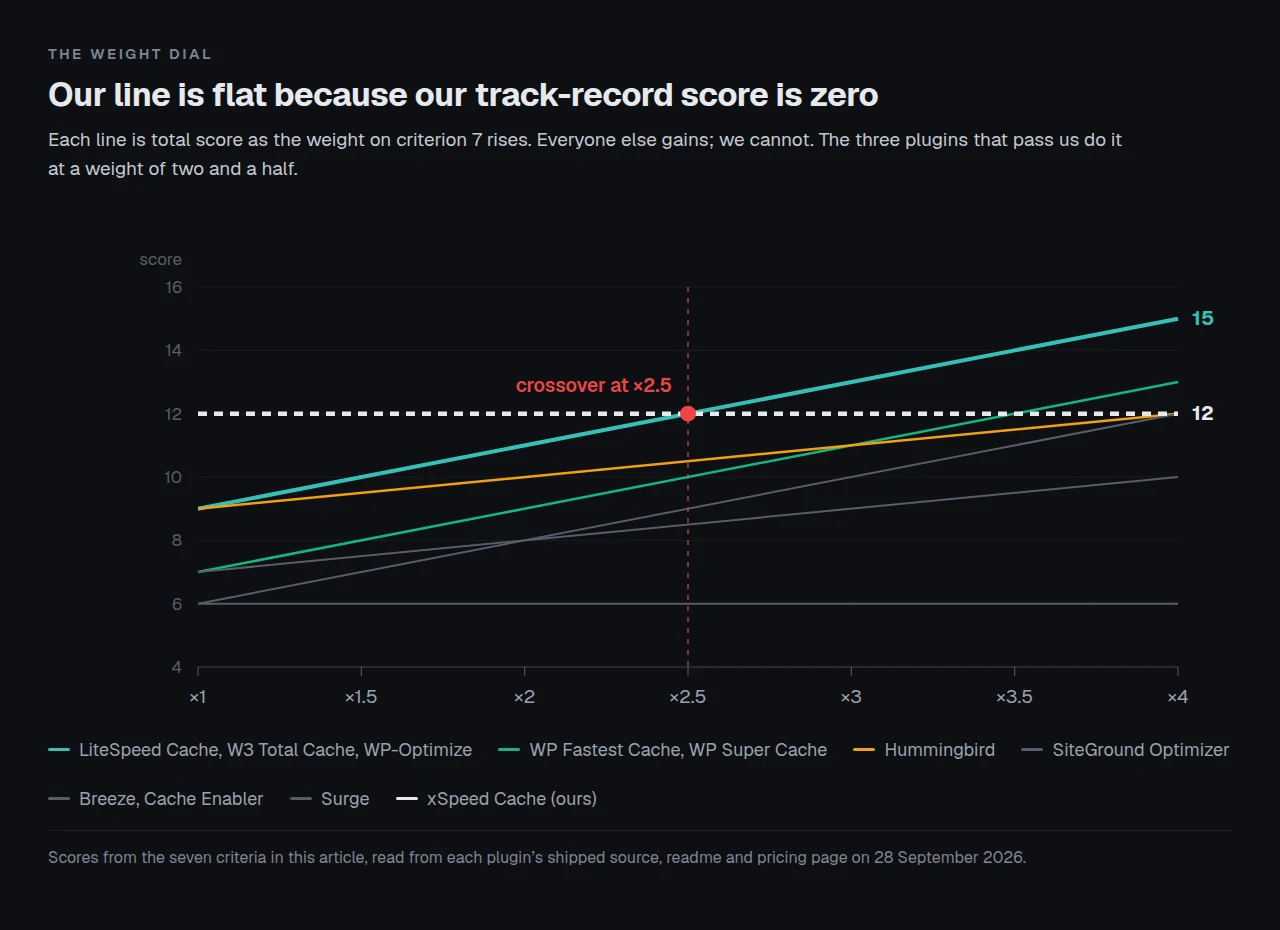
The weight of three is a choice, not a measurement, and here is the full sensitivity. Our own total never moves, because our track record score is zero at any weight, so every crossover below is somebody else catching up.
| Weight on criterion 7 | Our total | Top of the table | Our rank |
|---|---|---|---|
| 1 (unweighted) | 12 | xSpeed Cache, 12 | 1 |
| 2 | 12 | xSpeed Cache, 12, one point clear | 1 |
| 2.5 | 12 | four-way tie at 12 | 1 equal |
| 3 | 12 | LiteSpeed Cache, W3 Total Cache, WP-Optimize, 13 | 4 |
| 4 | 12 | the same three, 15 | 6 equal |
There is no objectively correct figure. A reader choosing a plugin for a client site should use a higher weight than a reader who enjoys being early to things, and the crossover sits at about two and a half.
Zero out criterion 6 as well and we drop further. Removing the MCP row costs us two points and costs nobody else anything, so at a track-record weight of three we score 10 and rank seventh, level with SiteGround Optimizer and now behind Hummingbird, WP Fastest Cache and WP Super Cache too. Both of those results are on this page because leaving them out would have been the more comfortable choice.
Run the free scan on your own site before you change anything: https://xspeedcache.com/scan/
Four Kinds of Reader, Four Different Winners
A single ranking is a convenience. The seven criteria do not carry equal weight for everybody, and for four common situations the top of the table changes completely.
The blog or brochure site on shared hosting. Criterion 3 is worth nothing, because there is no cart. Criterion 5 is usually worth nothing either, because shared plans frequently offer neither Redis nor Memcached. That leaves server compatibility, a readable receipt and track record, and the winner is whichever free plugin your host suits: LiteSpeed Cache on LiteSpeed, and on anything else a plugin with a real cache header such as Surge for the reader who wants no settings, or W3 Total Cache for the reader who wants all of them.
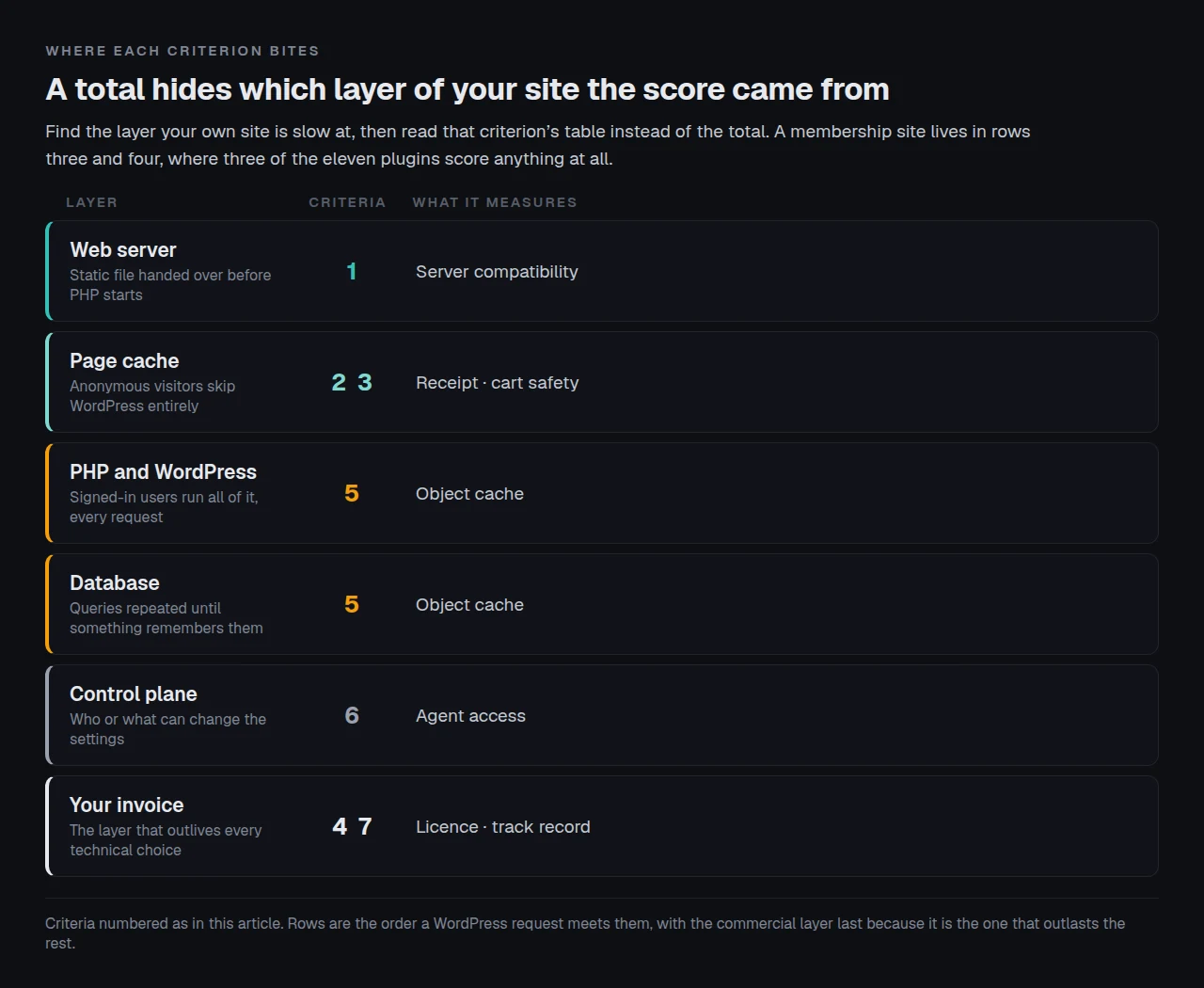
The WooCommerce store. Criterion 3 becomes the only criterion that can cost money, because a cached page showing the wrong basket is a support ticket and sometimes a lost order. Three plugins handle it by default and one of them has 1,000,000+ installs, which makes WP-Optimize the straightforward answer for a store owner who does not want to configure anything. Criterion 5 rises in importance too, because signed-in customers bypass the page cache entirely and every one of their requests runs the whole of WordPress.
The agency with a mixed book of client sites. Criterion 1 turns from a question into an inventory, criterion 2 turns from a convenience into a monitoring requirement, and criterion 7 gets more weight rather than less, because the cost of being wrong is multiplied by the number of clients who notice. This is the segment where recommending a four-month-old plugin needs the most justification, and the honest justification is a staged rollout on your own sites first.
The membership, LMS or forum site. Almost every page view is signed in, so the page cache barely applies and criterion 5 becomes the whole comparison. Three plugins have an object cache in the free tier. Everything else in the table is close to irrelevant, and a plugin scoring 9 overall with a zero in that column will disappoint you.
| Situation | Criteria that actually decide it | Where the field lands |
|---|---|---|
| Blog or brochure, shared hosting | 1, 2, 7 | LiteSpeed Cache on LiteSpeed hosting, otherwise Surge or W3 Total Cache |
| WooCommerce store | 3, 5, 7 | WP-Optimize, or LiteSpeed Cache with cart vary enabled |
| Agency, mixed hosting | 1, 2, 7 | One plugin that behaves the same everywhere, rolled out on your own sites first |
| Membership, LMS or forum | 5, 4 | W3 Total Cache or LiteSpeed Cache, whichever your host’s object cache suits |
Notice that we are not the answer in any of the four rows. That is the weighted scoring being applied honestly rather than a gesture: in three of the four situations the deciding criterion is track record or object caching on a host you already have, and in the fourth the deciding criterion is a default that two free plugins also ship.
Running This Scoring Across a Fleet of Client Sites
The arithmetic above assumes one site. Agencies have a different problem, and it is the problem we built for.
On a fleet, criterion 1 stops being a yes-or-no question and becomes an inventory question. A twenty-site book of business on four hosts will have LiteSpeed under some of it and nginx under the rest, which means LiteSpeed Cache is the right answer on part of the fleet and a partial answer on the remainder. Running two plugins is a legitimate choice and plenty of agencies make it. Running one that behaves identically everywhere is the other legitimate choice, and it is what xSpeed Cache is for: the cache writes static files that the web server hands over before PHP starts, on Apache, nginx, LiteSpeed and IIS, which is documented in our server compatibility notes.
Criterion 2 changes shape at fleet scale too. One site’s cache is something you check by eye. Twenty sites need a header a script can read, which is why X-XSpeed-Cache carries HIT (nginx) or HIT (php) rather than a bare yes, and why five of the plugins scored here are hard to monitor centrally at all.
What we do not claim, and the scorecard already said it. xSpeed Cache has 8,000+ installs and fifteen ratings against LiteSpeed Cache’s 7,000,000+ and 2,774. It has been in the plugin directory for four months. It does not appear in the Chrome User Experience Report field dataset that our own WP Rocket alternatives roundup ranks other plugins on, because there are not enough origins running it yet. And LiteSpeed Cache’s free exclusion vocabulary is broader than ours: its readme lists exclude by URI, Category, Tag, Cookie and User Agent, and a site with an unusual taxonomy will find that useful.
If you want the full feature-by-feature position rather than seven criteria, the 80-capability comparison puts us against eight competitors, and Free vs Pro shows where our own paid line falls. For a mixed fleet managed as one thing, xSpeed Hub connects every site to a single dashboard, and it is ours, the same way xCloud is.
What This Method Cannot Tell You
Four limits, stated rather than buried.
It measures nothing about speed. Not one criterion here is a performance number, because a fair caching benchmark needs identical hardware, identical content and a run count nobody publishes. We wrote up how unstable those numbers are after our own scanner graded the same unchanged page 70 and then 61 two minutes later. If speed is your only question, run a benchmark rather than reading a scorecard.
A default is not a ceiling. Criterion 3 splits the field by what ships switched on, and eight of eleven plugins close the same gap with one cookie rule. A reader willing to configure carefully can make most of these plugins behave the same way, and the scorecard cannot see that willingness.
Buckets are not measurements. Four plugins share the 1,000,000+ install bucket and score identically on criterion 7 despite real differences between them. Nothing in the Plugin API can separate 1.0 million from 1.9 million, so criterion 7 is coarse by construction. The vendors know it too: WP Fastest Cache’s own homepage says it is trusted by over 1,500,000 websites, which is a vendor self-report rather than a directory figure, and both numbers can be true at once because they count different things. Quote whichever one you like, and say which.
Track record is a lagging indicator and this method treats it as a leading one. A plugin abandoned last year still carries its decade of installs into criterion 7. Comet Cache is the cautionary case: 20,000+ installs and a last update dated 2 July 2025, which is fifteen months of nothing. It is not scored above because it no longer belongs in a buying shortlist, and the criterion that would have caught it is recency rather than history. If you extend this scoring yourself, add a last-updated column before you add anything else.
A score is not a recommendation for your specific site. Every criterion here is a property of a plugin. None of them is a property of your theme, your plugin count, your host’s PHP worker limit or the 2 megabyte image on your home page, and those four things decide more about your page speed than the gap between a 13 and a 12.
Caching may not be your problem at all. We measured 886 WordPress sites from our own scan archive and found that nearly half had under 100 milliseconds of server time available for a page cache to remove, which is covered in when not to use a caching plugin. A plugin that scores 13 here will still do very little on a site whose problem is a 2 megabyte hero image.
The Four Plugins This Method Cannot Score
Three of the strongest paid plugins in this field are not in the wordpress.org directory, so there is no install count for any of them and no source to read. NitroPack is in the directory, but the plugin is a client for optimization that runs on NitroPack’s servers, so the downloadable file does not describe the product. Scoring the four on the same seven criteria would mean guessing, so here is what their own pages say instead, all read on 28 September 2026.
| Product | Price | Model | Documented on its own pages |
|---|---|---|---|
| WP Rocket | $59.95 (1 site) · $119.95 (3) · $299.95 (50), all with Rocket Insights included | Annual | Nothing between 3 sites and 50. An MCP server since 3.23, one connection per site |
| FlyingPress | $59 (1) · $109 (3) · $229 (25) · $279 (unlimited) | Annual, with a 14-day free trial | The only free trial in this group. Staging and development sites do not count against the licence |
| Perfmatters | $29.95 (1) · $59.95 (3) · $124.95 (unlimited) | Annual, 30-day money-back | A script manager rather than a cache. Its own docs advise turning the cache plugin’s optimization off |
| NitroPack | Free $0 · Starter $8.00/mo · Plus $22.00 · Pro $99.99 · Agency from $229/mo | Metered monthly, cheaper annually | Meters sites, pageviews, CDN bandwidth and team members. Its page states “No vendor lock-in” and “Downgrades are not available” |
Two of those entries deserve a sentence more, because the licence shape matters as much as the figure.
WP Rocket is the incumbent and a lapse is not neutral. Its documentation lists six features that stop when a licence expires, three of them fifteen days later, which we went through in detail against WP Fastest Cache’s one-time fee. That is not a reason to avoid it. It is a reason to diary the renewal.
NitroPack’s meter needs both halves of its own sentence. Its FAQ says “If you exceed your plan’s limits, NitroPack will stop optimizing your site until the next billing cycle”, and the same answer continues that you can set a budget for additional resources instead. With no overage budget the cap is a silent performance cliff; with one, the invoice moves rather than the performance. We put both halves side by side in our NitroPack and WP Rocket comparison.
For a reader on a WooCommerce store, none of the four changes the cart finding above, and our WooCommerce use-case page covers the stack-level version of that question.
Common Mistakes Buyers Make Reading a Roundup Like This One
Reading the total instead of the row that matters to you. Hummingbird scores 9 unweighted and has no object cache at all. If your site is slow for logged-in users, that single zero matters more than the nine, and no aggregate will tell you so. Find your own binding constraint first, then read that criterion’s table on its own.
Assuming the biggest install count means the best fit. LiteSpeed Cache has 7,000,000+ installs and its page cache does not work on the web server that 30.9% of websites run. Popularity is evidence that a plugin works for the people who chose it, and most of them chose it because their host already suited it.
Treating a free tier as a trial. Every plugin on this page caches permanently at no cost, with no clock and no card. A reader who installs one, measures, and stops there has not done anything incomplete.
Trusting a missing footer comment. Three separate innocent explanations exist for an absent HTML comment before you reach a broken cache: a proxy stripped it, a filter removed it, or a debug setting was never switched on. Check a response header instead where the plugin offers one.
Running two page caches at once. Ten of fourteen free caching plugins write the same wp-content/advanced-cache.php file, which we established by reading the shipped source in our cache plugin conflict audit. Installing a second one does not double anything. It either silently wins or silently fails, and either way you now have two dashboards disagreeing about the same site.
Buying an object cache your host cannot run. Redis and Memcached have to exist on the server. The plugin only drives them, as LiteSpeed’s own footnote says plainly, and on shared hosting the answer is frequently that neither is available.
Frequently Asked Questions
Which is the best WordPress caching plugin in 2026?
On the weighted scoring above, three tie: LiteSpeed Cache if you are on LiteSpeed hosting, W3 Total Cache if you want the deepest free feature set, and WP-Optimize if you run WooCommerce and would rather not configure a cookie rule. xSpeed Cache, which we build, comes fourth weighted and first unweighted, and the gap between those two positions is four months of install history.
Is a free caching plugin good enough, or do I need to pay?
All eleven plugins scored here cache permanently for free with no time limit, and all three of the weighted winners do their winning in their free tier. Paying buys depth rather than the basics: heavier optimization such as critical CSS and unused-CSS removal, image conversion, and the measurement layer that tells you whether any of it worked.
I installed a caching plugin and my site is not faster. What did I do wrong?
Possibly nothing. Across 886 sites in our own scan archive, nearly half had under 100 milliseconds of server response time for a page cache to remove, so the ceiling on the improvement was already low. Check whether your slow number is server time or page weight before you change plugins.
My cache plugin says caching is on but I cannot see a header. Is it broken?
Not necessarily. Five of the eleven plugins here prove a hit with an HTML comment rather than a response header, and a proxy such as Cloudflare strips that comment, as WP-Optimize’s own FAQ warns. WP Fastest Cache also ships a filter that removes its footer comment deliberately.
Can I run two caching plugins at once?
Do not run two page caches. Ten of fourteen free caching plugins write the same wp-content/advanced-cache.php file, so the second one installed either silently wins or silently fails. A page cache plus a separate script manager such as Perfmatters is a different arrangement and works fine.
Why is my WooCommerce cart total wrong on a cached page?
A shopper with items in the basket loaded an ordinary page and your cache stored that page for everyone, or stored an empty-basket version and served it to them. Three of the eleven plugins here block that by default. The rest need one cart cookie added to their exclusion list.
Do I need an object cache as well as a page cache?
Only if requests that bypass the page cache are slow, which means logged-in users, WooCommerce customers, and the admin screens. Three of the eleven plugins put Redis or Memcached support in the free tier, and all three still need your host to provide the server.
Why is xSpeed Cache not ranked first if you wrote this page?
It is ranked first on the unweighted table and fourth on the weighted one, and the weighted table is the one we recommend acting on. Eight thousand installs and fifteen ratings cannot be argued into a decade of field evidence, and a roundup that tried would be worth less to you than one that says so.
My host says it already caches. Should I still install a plugin?
Check what layer the host caches at first. Host page caching often covers anonymous page delivery and rarely covers the asset layer, minification or object caching, so the useful plugin on a fast managed host is frequently the one doing everything except page cache.
How often do these figures change?
Two of the eleven moved between 26 and 28 September 2026: Cache Enabler shipped 1.8.17, and our own install bucket went from 7,000+ to 8,000+ with a fifteenth rating. Every price was identical on both dates. Re-check any install count before you quote it, and treat every figure here as read on 28 September 2026.
Can I move my settings from another caching plugin?
Sometimes. Settings live in different places per plugin and some of them are destroyed when you delete the plugin rather than exported, so export or screenshot the configuration before uninstalling anything. Our own migration guide covers importing from a competing plugin.
Conclusion: Which One Should You Install This Week?
The honest summary of all that scoring is that this field has no single winner, and the criterion that decides it is the one you choose to weight.
| Your goal | Install | Why |
|---|---|---|
| Fastest on LiteSpeed or OpenLiteSpeed hosting | LiteSpeed Cache | A server-level cache, free, ten years of record |
| Deepest free feature set, any server | W3 Total Cache | Object caching across five backends at no cost |
| WooCommerce, correct by default, free | WP-Optimize | Blocks the cart-holder write with no configuration |
| Pay once and never again | WP Fastest Cache | $49 for one licence, labelled lifetime |
| No paid tier to think about, ever | WP Super Cache, Cache Enabler, Breeze or Surge | None of the four sells anything |
| Zero settings to decide | Surge | No configuration screen, and an X-Cache header |
| One behaviour across a mixed fleet, with a readable hit header and agent control | xSpeed Cache, which is ours and which is new | Highest feature score here, and no track record yet |
What to do this week:
- Read your server header, then pick from the row above that matches it rather than from any total.
- Install the free tier and measure before you buy anything. Run the free xSpeed Scan on the page you care about, then again after.
- If you run WooCommerce, add a cart cookie to your plugin’s exclusion list today unless it is one of the three that already handles it.
- Check whether your host runs Redis or Memcached before you count an object cache as a feature you have.
- If you want what the top of the unweighted table describes and you are comfortable with a plugin that is four months old, xSpeed Cache Pro is $29 a year or $79 once for one site, with a 14-day money-back guarantee, and the free tier caches permanently with no clock. If you would rather have the decade of evidence, install WP-Optimize or LiteSpeed Cache instead, and we would still rather you were fast.
Every number on this page can be checked. The Plugin API query, the readme lines, the source files and the pricing pages are all public, and the scoring is seven columns you can re-weight yourself. If you re-weight them and get a different order, that is the tool working.
We build xSpeed Cache for the reader in the last row of that table: someone running WordPress on more than one kind of server who wants one cache that behaves the same on all of them, a hit header a script can read, and the option of handing the whole thing to an agent. If that is you, the free plugin is the entire trial and it never expires. If it is not you, three plugins above us in the weighted table are waiting, and a fast site is the point either way.