NitroPack vs WP Rocket: Four Metered Limits, One Flat Licence, and Three Cloud Jobs Inside the Plugin in 2026
Updated September 2026
NitroPack’s Plus plan includes 40,000 pageviews a month, and the tooltip on that row of its own pricing table defines them as the traffic you can generate before optimizations stop, fetched on 27 September 2026. WP Rocket’s Single licence is $59.95 a year, covers one website, and meters nothing else at all. Both figures come from each vendor’s public pricing page, read on the same morning.
The comparison people expect is a cloud service against a local plugin. The more useful comparison is which optimizations need a server you do not own before they reach a visitor, because three of WP Rocket’s feature families do, by its own documentation. This piece compares the two products as they shipped on 27 September 2026, on where the work runs and what each side counts.
Quick Summary / TL;DR
| If you want… | Do this | Why |
|---|---|---|
| Zero configuration and no interest in how it works | NitroPack Starter or Plus | Optimization runs on NitroPack’s servers, so nothing is tuned and nothing taxes your host |
| A price that does not move when traffic does | WP Rocket Single | One flat annual fee, one metered dimension, no pageview ceiling |
| To try before paying anything | NitroPack Free | A free tier on 1 site with no card required, which WP Rocket does not offer at any price |
| Cache files that stay on your own disk | WP Rocket | Page caching writes HTML into wp-content/cache/wp-rocket/ and serves it from there |
| A global CDN included in the price | NitroPack | 310 CDN locations on every paid tier, against RocketCDN’s 10 edge locations free for 3 pages |
| Three to twenty-five sites on one bill | Neither cleanly | WP Rocket jumps from 3 sites to 50, NitroPack’s Pro covers 3 |
Where the Work Runs, and Why It Is the Only Difference That Changes the Bill
Both vendors describe the same architectural split, and they agree on what it is.
NitroPack’s plugin readme, read on 27 September 2026, says the product “handles all resource-intensive performance optimization tasks, including caching, image optimization, and file minification, on its own servers”, and that it does so “working on copies of your files, meaning your original content stays unchanged”. Its own comparison page puts the same claim in a table row: the database runs on NitroPack servers with no hosting resources lost, against WP Rocket using your website’s servers.
That claim is accurate, and it is the reason the pricing models differ. If the expensive work happens on the vendor’s hardware, the vendor has to count how much of it you consume, so NitroPack counts four things. If the work happens on your hardware, there is nothing to count except the licence, so WP Rocket counts one.
The split is not clean, and neither pricing page says so. WP Rocket’s own documentation lists three feature families applied asynchronously, which means the plugin sends a page to an external service and waits for an answer before the optimization reaches a visitor. That service has a published address, and the section below works through what it does.
The two products side by side, every figure fetched on 27 September 2026
| Dimension | NitroPack | WP Rocket |
|---|---|---|
| Model | Metered monthly or annual subscription | Annual licence, auto-renewing |
| Entry price | $0 free tier, then $8.00/mo ($7.00 billed annually) | $59.95/yr, no free tier |
| Mid tier | Plus $22.00/mo ($18.00 annually), 40,000 pageviews | Plus $119.95/yr, 3 websites |
| Top published tier | Pro $99.99/mo ($83.01 annually), 3 sites, 540,000 pageviews | Multi $299.95/yr, 50 websites, with 100 and 500 above |
| Metered dimensions | 4: sites, pageviews, CDN bandwidth, team members | 1: websites |
| Traffic ceiling | Yes, per plan | None |
| CDN included | 310 locations on every paid tier | RocketCDN free for 3 key pages, 10 edge locations |
| Trial | Free tier, no card | None. 14-day refund only |
| Money back | 14 days | 14 days |
| Free plan | ✅ | ❌ |
| In the wordpress.org directory | ✅ 90,000+ installs, 4.3★ from 311 ratings | ❌ not listed, so no install count exists |
| Page cache stored | On NitroPack’s infrastructure | wp-content/cache/wp-rocket/, on your server |
| Server requirements | PHP 7.4, WordPress 4.7 | PHP 7, and Apache with mod_rewrite, mod_expires and mod_deflate, or NGINX, LiteSpeed or Windows |
| Downgrade a plan | ❌ “Downgrades are not available” | Not addressed on the page. Upgrades pay the difference |
Install counts and ratings come from a direct query to the wordpress.org Plugin API on 27 September 2026, which returned NitroPack at version 1.20.3, updated two days earlier. WP Rocket is sold off-directory, so no install figure exists and any number quoted elsewhere is an estimate. Our survey of free WordPress caching plugins covers the same gap across this field.
The Four Limits NitroPack Meters, and What Crossing Each One Does
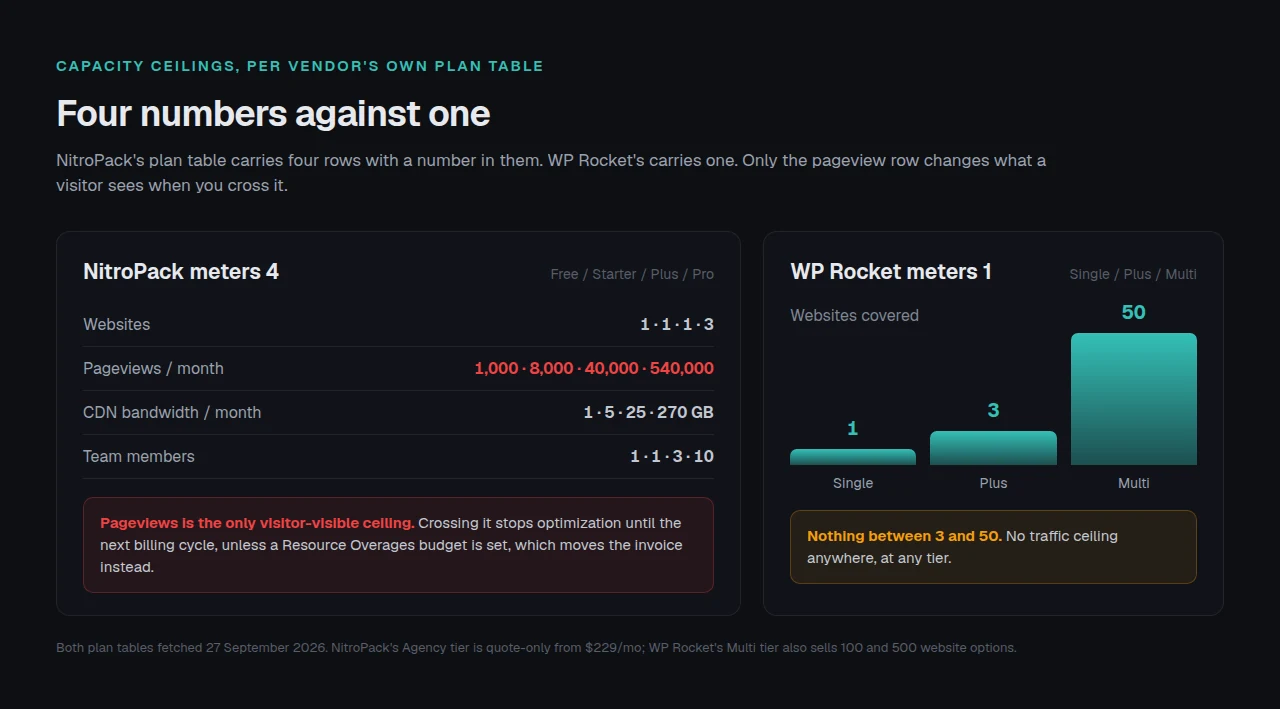
NitroPack’s plan table carries four rows with a number in them, and each is a ceiling: sites, pageviews per month, CDN bandwidth per month, team members. Reading them together tells you more than the price does, because only one is visible to a visitor when you cross it.
The pageview row is the one that matters. NitroPack’s own tooltip on that row describes the figure as the amount of traffic you can generate before optimizations stop, and the FAQ on the same page says it plainly: “If you exceed your plan’s limits, NitroPack will stop optimizing your site until the next billing cycle.”
That sentence has a second half. Quoting the first without the second is how a comparison earns a correction, and the same answer continues by pointing the reader at Resource Overages, a setting where you name a budget for additional resources so optimization continues without interruption. So the ceiling has two behaviours and a switch decides which you get. With no overage budget, crossing the line is a silent performance cliff your visitors experience and your invoice does not record. With one, performance holds and the invoice moves instead. Our NitroPack alternatives piece works the same meter across four traffic levels.
Two smaller details on the same page are worth carrying into a buying decision:
- “Downgrades are not available.” Upgrading is a click in the dashboard. Moving back down is not offered, so a seasonal store that buys Pro for November is buying Pro for December too.
- Uninstalling is clean but it is not cancelling. The FAQ states that uninstalling “removes all related code from your site, leaving no traces behind”, and then that it “doesn’t cancel your subscription”. Removal and billing are two separate actions.
The team-member ceiling is the quietest of the four and the easiest for an agency to hit: 1 seat on Starter, 3 on Plus, 10 on Pro. It has nothing to do with performance and everything to do with who can log in at 2am.
WP Rocket Meters One Thing, and the Gap Between Three Sites and Fifty
WP Rocket’s pricing page lists three tiers and one variable: how many websites the licence covers. One, three, or fifty, with 100 and 500 options selectable on the top tier. There is no traffic ceiling anywhere on the page, which is the strongest thing about the model. A post that goes viral on a WP Rocket site costs exactly $59.95 a year, the same as a post nobody reads.
The weakness is the shape of the ladder. A studio with eight client sites pays for fifty, which is the finding our WP Rocket pricing breakdown recorded and which the page still shows today. NitroPack’s Pro tier covers three sites and its Agency tier is quote-only from $229 a month, so neither vendor prices the eight-site studio well.
Three details verified on the page this morning. All three tiers now bundle Rocket Insights, the built-in performance hub, at no extra cost. The refund window is 14 days and there is no trial, which the FAQ states outright. The licence renews automatically unless you turn that off in your account’s billing section.
The requirements list is the one place where WP Rocket asks more of you than NitroPack does. It needs PHP 7 or newer, one of four server families, and on Apache three named modules. NitroPack’s readme asks for PHP 7.4 and WordPress 4.7 and nothing about your web server, because your web server is not doing the work. On unusual hosting, read our note on server compatibility before buying either one.
The Three WP Rocket Features That Wait for Somebody Else’s Server
This part is missing from every comparison of these two, including both vendors’ own.
WP Rocket’s documentation has a page titled Asynchronous optimizations, and it opens by saying that while these optimizations are applied automatically, “they are not instantaneous, and they require a series of steps (and time) before they’re applied to a site”. It then names three feature families: Priority Elements, which covers critical images, automatic lazy rendering, font preloading and preconnects; Remove Unused CSS; and Load CSS asynchronously, which generates critical path CSS.
The mechanism is documented in detail, and the detail is what makes it comparable to a metered service:
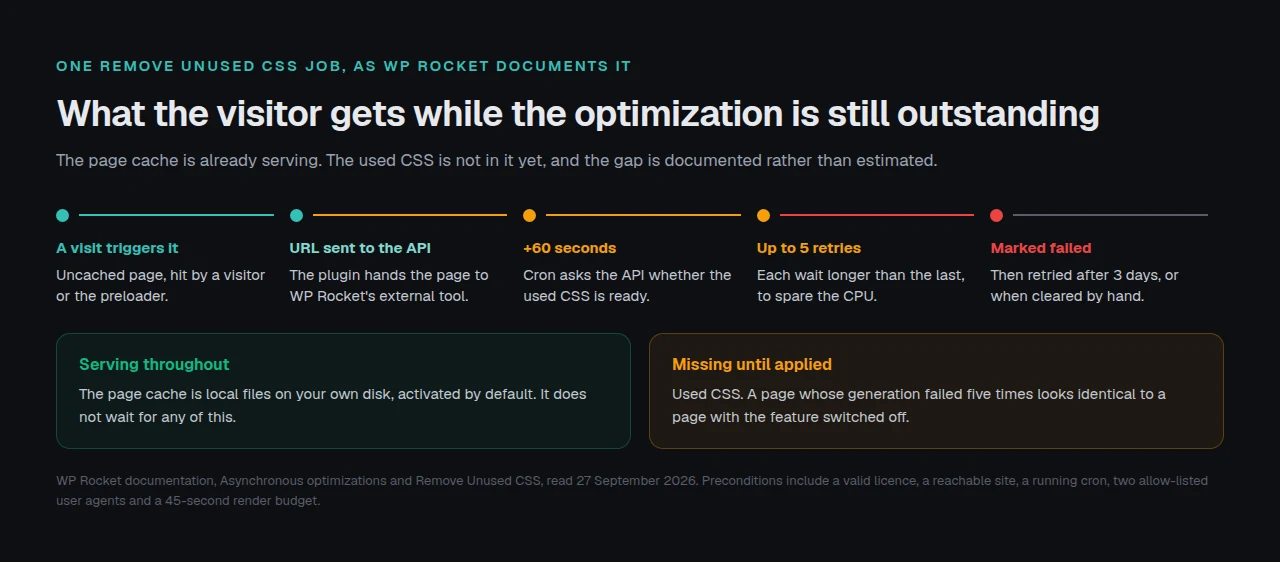
- A visit to an uncached page triggers the job, whether that visit comes from a real person or from the preloader.
- The plugin sends the page URL to WP Rocket’s external tool, which the documentation names as an endpoint on its own
saassubdomain. - WP Rocket’s cron calls that API after 60 seconds to ask whether the result is ready.
- If generation fails, the plugin retries up to five more times, with a longer wait between each attempt.
- After the fifth failure the URL is marked failed in the
wpr_rucss_used_csstable, and WP Rocket tries again three days later or when you clear it by hand.
The Remove Unused CSS page adds the preconditions, and they are substantial. The feature needs a valid licence. The site has to be publicly reachable, so it does not run behind HTTP authentication or a maintenance-mode plugin, and it switches itself off when WP_ENVIRONMENT_TYPE is set to local. WP Rocket fetches the uncached page with a query string appended, and that page has to render in under 45 seconds “or it will time out in WP Rocket’s Cloud”. Your firewall and security plugin have to allow two named user agents and a published list of IP addresses. WP-CRON or a real server cron has to run. Cloudflare’s Bot Fight Mode has to be off.
None of that makes WP Rocket a cloud service. Its page caching is genuinely local: the documentation says it is “activated automatically by default”, writes up to six named HTML variants per page, and serves them through rewrite rules in .htaccess or the NGINX config, or through PHP when those rules are absent. That floor holds with the vendor unreachable.
So the honest sentence is narrower than the marketing on either side. WP Rocket caches locally and optimizes partly remotely. NitroPack does both remotely. Neither product does all of its work on your server, and a reader choosing between them should know which half is which.
The Dependency Split: A Test You Can Run Before You Buy Either One
Every comparison in this field scores features, and scoring cannot answer the question these two products pose: what your visitors get when the vendor is not there. So sort instead of score. The test has four steps and works on any performance product.
Step 1. Take the vendor’s own feature list, not a review’s. A third-party grid merges features that behave differently.
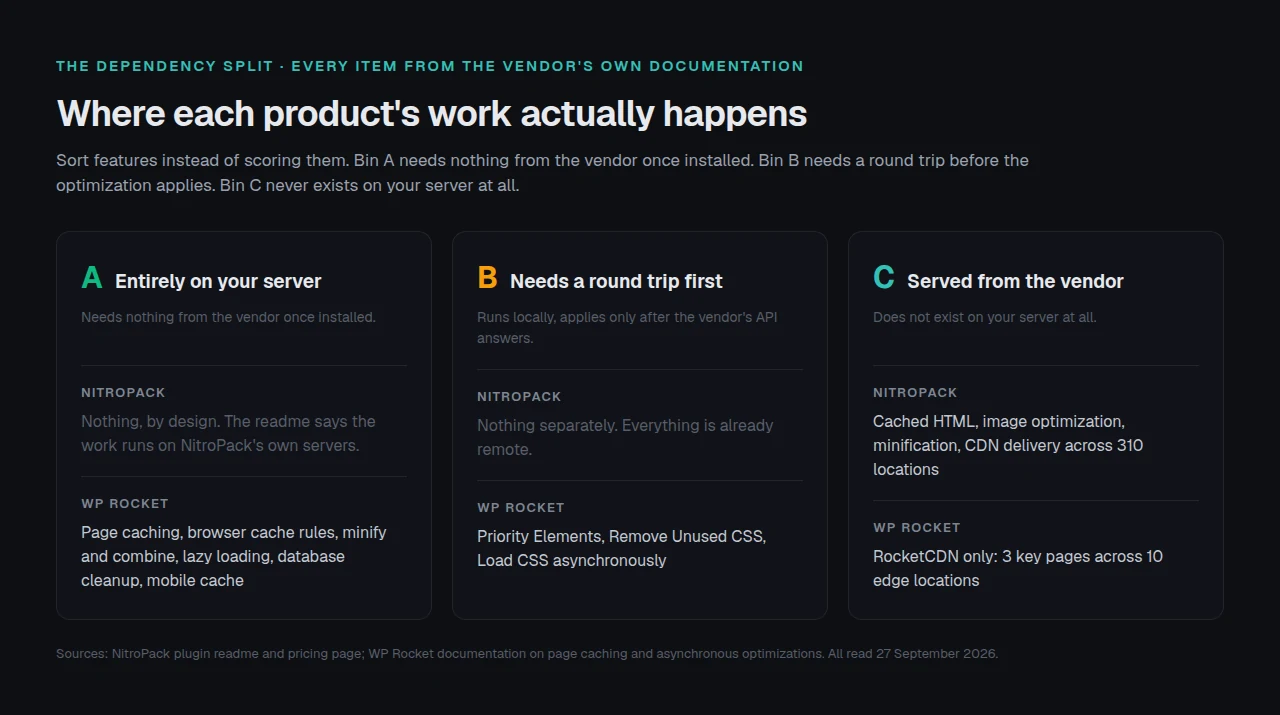
Step 2. Put every feature in one of three bins. Bin A runs entirely on your server and needs nothing from the vendor once installed. Bin B runs on your server but needs a round trip to the vendor’s API before it applies. Bin C is served from the vendor’s infrastructure and does not exist locally.
Step 3. For each bin, write down what a visitor sees in the gap. Bin A has no gap. Bin B has a documented one: for Remove Unused CSS, at least 60 seconds, and up to three days plus five retries when generation fails. Bin C has no gap inside the plan’s limits and a cliff at the ceiling, unless you funded an overage budget.
Step 4. Write down what is left if you stop paying. For WP Rocket, bin A survives as files on your disk and bin B stops. For NitroPack, bin C is the whole product, so cancelling ends it. That is not a criticism of either model. It is the trade you are buying.
Applied to these two on 27 September 2026, the split lands like this:
| Bin | NitroPack | WP Rocket |
|---|---|---|
| A: entirely local | Nothing, by design | Page caching, browser cache rules, minification and combine, lazy loading, database cleanup, mobile cache |
| B: needs a vendor round trip | Nothing separately, because everything is already remote | Priority Elements, Remove Unused CSS, Load CSS asynchronously |
| C: served from the vendor | Cached HTML, image optimization, minification, CDN delivery across 310 locations | RocketCDN for 3 key pages across 10 edge locations |
The test applies to whatever you are holding, including ours. xSpeed Cache serves cached pages as static files before PHP starts, so our page cache is bin A, while our adaptive cache TTL and fleet dashboard are bin B because they use a service we run.
Four limits of this test, stated out loud. It reads documentation rather than a running install, so a vendor whose docs lag its code will be scored on the docs. It cannot tell you how often bin B actually fails on a real host, only what the vendor says happens when it does. It says nothing about output quality, so a product that optimizes remotely and does it well beats a local one that does it badly. And it takes each vendor’s description of its own architecture at face value, because neither NitroPack’s servers nor WP Rocket’s SaaS can be inspected from outside.
Checking NitroPack’s Own Comparison Page, Line by Line
NitroPack publishes its own NitroPack versus WP Rocket page, which is more than most vendors here do. Two of its claims were checked against WP Rocket’s live pages this morning.
The claim that holds: WP Rocket has no free plan and takes annual payments only. Both are true on its pricing page today, and NitroPack’s free tier with no card required is a real advantage no paid plugin here matches.
The claim that needs a correction is the price. NitroPack’s table puts WP Rocket at $275 a year for a single site, built as $59 for the licence plus $9.99 a month for Imagify plus $7.99 a month for RocketCDN. Every part of that stack was checked on 27 September 2026:
| Line in NitroPack’s table | What we found today |
|---|---|
| $59/year licence | $59.95, and it now bundles Rocket Insights at no extra cost |
| Imagify at $9.99/mo | That is the top Infinite tier billed annually. Imagify also publishes a free 20MB tier and Growth at $4.99 billed annually |
| RocketCDN at $7.99/mo | RocketCDN is $8.99 monthly or $89.99 a year today, and WP Rocket’s own pricing page includes RocketCDN for 3 key pages across 10 edge locations at no extra cost |
| Implied total $275/yr | Defensible as a worst case on the top image tier. A reader using the free image tier and the bundled CDN pages pays $59.95 |
The performance figures on that page could not be verified either way. NitroPack reports a 57% Core Web Vitals pass rate against WP Rocket’s 53%, a Lighthouse score of 82 against 70, and page weight of 1,782.6 KB against 2,460.5 KB. The dataset those figures are normally drawn from, the HTTP Archive Core Web Vitals Technology Report, has answered 404 on both known endpoints for us since 8 September 2026, so we cannot reproduce them and will not publish a number we cannot check. Treat them as the vendor’s claim, dated.
For context from a dataset we can still read, our own scan archive found that nearly half of WordPress sites have under 100ms of cache headroom, which is worth knowing before paying either vendor for a faster first byte.
What Twenty-Five Sites Do to Either Model
Multiply either model by twenty-five and the problem changes shape.
On WP Rocket the Multi tier answers the licence question at $299.95 a year and answers nothing else. Twenty-five sites each carrying bin B means twenty-five cron jobs, twenty-five firewalls allowing the same two user agents, and twenty-five wpr_rucss_used_css tables with their own failure rows. A site whose used CSS failed five times looks identical from outside to one that never had the feature on. On NitroPack the licence is a quote from $229 a month, and the operational question becomes four meters per site, each with its own pageview cliff.
We build xSpeed Cache, and it is ours: WPDeveloper builds it, and WPDeveloper is a Startise company. It is the third option in this decision and it is the smallest one on the page. A direct wordpress.org API query on 27 September 2026 returned 8,000+ active installs for us, rated 5.0 from 14 ratings at version 1.3.5, against NitroPack’s 90,000+ installs and 311 ratings and a decade of WP Rocket compatibility work no young plugin can claim. Those are real reasons to pick either of them over us.
Where we differ is the fleet and the licence. One connection reaches every site rather than one per site, which is the idea behind xSpeed Hub, and the cache and its controls are readable by an AI agent through an MCP server WP Rocket charges for. Cache hits serve in 5 to 15 ms. The 80-capability comparison and the Free vs Pro split are both on the site.
The Cons entry we owe you is the one NitroPack argues best. Their FAQ says they do not offer a lifetime licence “because site optimization isn’t a one-time task”. We do offer one, at $79 once for a single site, and their objection is fair: a product bought once has to keep earning its updates without new revenue, and a subscription funds that automatically. The counter is that plenty of owners have been caught by a renewal they forgot. Both things are true.
Run the free scan on your own site before you pay anyone: xspeedcache.com/scan/
WooCommerce changes the calculation again, because a cart is a per-visitor object and a page cache has to be told to leave it alone. If that is your stack, read the WooCommerce use case and our comparison of WP Fastest Cache and WP Rocket, which covers what a lapsed licence takes back from a store.
Common Mistakes Buyers Make Choosing Between These Two
- Comparing the monthly price to the annual one. NitroPack Plus is $18 a month billed annually, or $216 a year against WP Rocket’s $59.95. Comparing $18 to $59.95 makes the wrong product look cheap by more than three times.
- Assuming the pageview ceiling is a billing event. Without an overage budget it is a performance event, and nothing in your inbox tells you it happened.
- Buying Pro for a seasonal peak. Downgrades are not available, so the peak tier becomes the base tier.
- Reading “no vendor lock-in” as “nothing stops if I leave”. NitroPack’s removal really is clean, and the optimization it was doing was never on your disk to keep. Both statements are accurate.
- Expecting Remove Unused CSS to apply on the first page load. It is asynchronous by design, needs a visit and at least 60 seconds, and can fail five times before waiting three days.
- Ignoring the server requirements. WP Rocket names three Apache modules, and a locked-down host missing
mod_expiresis a problem to find before the refund window closes.
Frequently Asked Questions
I hit my NitroPack pageview limit and my pages suddenly got slower. Is that a bug?
No, and it is documented. NitroPack’s pricing FAQ says exceeding the plan’s limits stops optimization until the next billing cycle. Resource Overages prevents it: name a budget in advance and the service keeps optimizing and bills the extra. Set it before a traffic spike, not during one.
I cancelled NitroPack and my site got slow immediately. Why did nothing stay behind?
Because nothing was on your server to stay. NitroPack’s own readme says the work happens on its servers, on copies of your files, which is also why your original content was never modified. A local caching plugin leaves HTML on disk that keeps serving until it expires. That is the opposite trade.
I turned on Remove Unused CSS in WP Rocket and nothing changed. What did I miss?
Probably nothing yet. WP Rocket’s documentation describes the feature as asynchronous: a page has to be visited, the URL goes to WP Rocket’s external tool, and the plugin checks back after 60 seconds. If it still has not applied, check that a cron is running, that the page renders in under 45 seconds, and that your firewall allows WP Rocket’s two published user agents and IP list.
I deleted WP Rocket and my cache folder was already empty. Was it working at all?
Possibly, and not necessarily through WP Rocket. Its documentation notes that on hosts running their own page caching, WP Rocket’s cache folder is empty by design. Check whether your host advertises server-level caching before concluding the plugin failed.
I pay for both a caching plugin and a CDN. Am I paying twice?
Check what is bundled first. WP Rocket’s pricing page includes RocketCDN for three key pages across 10 edge locations at no extra cost, and NitroPack includes 310 CDN locations on every paid tier. Pay for a third-party CDN only once you know what your subscription already covers.
Which one is faster?
Nobody can answer that from public data right now, and a comparison claiming to is guessing. NitroPack publishes a 57% Core Web Vitals pass rate against WP Rocket’s 53% on its own page, and the independent dataset that figure comes from has been unreachable for us since 8 September 2026. Test both inside the refund windows, which are 14 days on each side.
Can I run NitroPack and WP Rocket together?
There is no good reason to. Both take ownership of the HTML a visitor receives, and two products rewriting the same output is how a layout breaks. If you are switching, remove the first completely before installing the second. Our migration guide covers what travels.
Does either one work on WordPress multisite or a locked-down host?
WP Rocket states its requirements plainly: PHP 7 or newer, and Apache with mod_rewrite, mod_expires and mod_deflate, or NGINX, LiteSpeed or Windows. NitroPack asks for PHP 7.4 and WordPress 4.7 and nothing about the web server, which makes it the more portable of the two on unusual hosting.
I have eight client sites. Which tier do I buy?
Neither vendor prices that number well. WP Rocket’s ladder goes from three websites to fifty with nothing in between, so eight sites costs $299.95 a year. NitroPack’s Pro covers three sites and its Agency tier is a quote from $229 a month. For fleets in that range, look at per-site pricing across the field, including ours at 5 and 25 sites on the pricing page.
Is a free plan enough for a small blog?
NitroPack’s free tier covers one site, 1,000 pageviews a month and 1GB of CDN traffic with no card required, which is enough to test and rarely enough to run on. WP Rocket has no free tier. Several free plugins page-cache properly on any host, and FlyingPress and WP Rocket sit closer on price than buyers expect.
What happens to my WP Rocket site if the licence lapses?
Page caching keeps working, because those are files on your own disk. The asynchronous features stop, because Remove Unused CSS requires a valid licence by WP Rocket’s own documentation, and so do support and updates. A lapse is a partial loss rather than a total one, which is the practical argument for a local cache.
Does xSpeed Cache belong on this list?
It is one option among several, and this comparison is about two other products. We build it, and 8,000+ installs against NitroPack’s 90,000 means a reader who wants the largest install base should pick one of the two above. The reasons to look at ours are a lifetime licence, one connection per fleet, and an MCP server in the free tier.
Conclusion: NitroPack or WP Rocket?
These two compete less on speed than on where the work happens, and that decides what you are billed for and what survives you leaving.
| Your goal | Pick | Why |
|---|---|---|
| Fastest result with no configuration, one site, predictable traffic | NitroPack Plus | Everything runs on their hardware, and 40,000 pageviews is a generous ceiling for one small site |
| One flat fee, unpredictable traffic, files you keep | WP Rocket Single | No traffic meter anywhere, and page cache files stay on your disk |
| Testing before spending | NitroPack Free | One site, 1,000 pageviews, no card |
| A host that is already CPU-bound | NitroPack | Optimization tasks leave your server entirely, which is its clearest advantage |
| Up to 25 sites under one agent connection, bought once | xSpeed Cache, which is ours | Lifetime licence, one connection per fleet, MCP in the free tier |
What to do this week:
- Read your own numbers first. Pull last month’s pageviews and check them against NitroPack’s tiers before pricing anything, because that one figure decides whether the metered model is cheap or expensive for you.
- If your host runs its own page cache, test whether you need a caching plugin at all before you buy one.
- If you want zero configuration and your traffic is steady, buy NitroPack and set a Resource Overages budget on day one. That is the honest recommendation for that reader, and it is not us.
- If you want a flat fee and local files, buy WP Rocket Single and turn on Remove Unused CSS the same day, so the asynchronous work starts before you judge the result.
- Run the free xSpeed Scan on the site you are deciding about, then look at xSpeed Cache if $29 a year, or $79 once for a lifetime licence, with a 14-day money-back guarantee, fits better than a renewal you have to remember.
If you have run both on the same site, the comparison worth having is what happened the month your traffic tripled. Tell us, because no vendor publishes that number.