Free WordPress Caching Plugins in 2026: Which Ones Actually Cache

Updated September 2026
SiteGround Optimizer has 1,000,000+ active installs according to a direct wordpress.org Plugin API query on 9 September 2026, and its own readme states that dynamic caching is “available exclusively for SiteGround servers.” Autoptimize has 800,000+ installs, and its readme tells you to install a page caching plugin alongside it. The comparison people expect here is a feature grid of free tiers. The more useful comparison is three questions: does the free tier write a page cache at all, does it do so on the server you are actually running, and can you prove it worked from outside the site. This article puts twelve free tiers through those three questions, with every install figure, price and quotation verified on the day of writing.
Quick Summary: Which Free Cache Plugin Fits Your Situation
| If your situation is… | Start with | Why |
|---|---|---|
| LiteSpeed or OpenLiteSpeed hosting | LiteSpeed Cache | The cache runs in the web server, which is faster than any PHP-level cache, and the plugin is free |
| SiteGround hosting | SiteGround Optimizer | Its dynamic cache and Memcached run on SiteGround’s own stack and cost nothing |
| You want zero settings and zero decisions | Surge | No configuration screen at all, and it emits an X-Cache header so you can check it |
| You want the deepest free feature set | W3 Total Cache or WP-Optimize | Object cache, database work and CDN wiring are all in the free tier |
| You never want an upsell | WP Super Cache, Cache Enabler or Breeze | None of the three has a paid tier of any kind |
| Apache, nginx and LiteSpeed in the same fleet, managed together | xSpeed Cache, which we build | One free static-file path across all three, with a machine-readable hit header. We are new, and the table below says so |
| You are already running Autoptimize | Add any plugin from the first group | Autoptimize’s own readme says it does not page-cache |
| You want a paid plugin and are only here for the price | WP Rocket, priced in our WP Rocket comparison | It has no free tier and is not in the plugin directory at all |
”Free Caching Plugin” Hides Three Different Products
The phrase covers three categories that behave nothing alike once installed.
The first category writes HTML files and serves them on any standard PHP host. The second writes a page cache only when the site sits on one particular company’s servers, and does very little otherwise. The third never page-caches at all, and optimizes CSS, JavaScript and images instead, which is useful and is not the same job.
Add up the second and third categories from the Plugin API figures pulled on 9 September 2026 and you get at least 8.8 million active installs where the free page cache either depends on the host or does not exist. That is not a criticism of any of those plugins. Every one of them is honest about it in its own documentation. It is a criticism of every roundup that lists them side by side in a single “free caching plugins” table.
The Three Questions, Before Any Product Is Named
These are the criteria the rest of the article scores against, and they were chosen before any plugin was looked at.
- 🧱 Does the free tier write a page cache? Not minification, not lazy loading, not a database cleaner. A stored HTML response that a later visitor receives without WordPress rebuilding it.
- 🖥️ Does it work on your server? Apache, nginx and LiteSpeed behave differently, and two plugins in this field cache only inside one hosting company’s environment.
- 🧾 Can you prove it from outside? If the only evidence of a cache hit is an HTML comment buried in the page source, you cannot check it with
curl -I, a monitoring tool cannot check it, WordPress Site Health cannot check it, and an AI agent reading response headers cannot check it either.
The third question is the one nobody scores, and it is the one that separates this field most sharply. It gets its own section below.
Group One: Free Tiers That Page-Cache on Any Standard Host
Nine plugins here write a page cache in their free version and do not care who your host is.
| Plugin | Active installs | Rating | Version | Free page cache | Paid tier exists |
|---|---|---|---|---|---|
| WP Fastest Cache | 1,000,000+ | 4.9★ from 4,224 | 1.5.1 | ✅ | ✅ |
| WP-Optimize | 1,000,000+ | 4.8★ from 2,608 | 4.6.1 | ✅ | ✅ |
| WP Super Cache | 1,000,000+ | 4.3★ from 1,345 | 3.1.3 | ✅ | ❌ |
| W3 Total Cache | 900,000+ | 4.4★ from 5,420 | 2.10.6 | ✅ | ✅ |
| Breeze | 300,000+ | 3.6★ from 126 | 2.5.14 | ✅ | ❌ |
| Cache Enabler | 100,000+ | 4.3★ from 139 | 1.8.16 | ✅ | ❌ |
| Hummingbird | 70,000+ | 4.7★ from 1,487 | 3.21.2 | ✅ | ✅ |
| Surge | 4,000+ | 4.9★ from 31 | 1.2.1 | ✅ | ❌ |
| xSpeed Cache | 2,000+ | 5.0★ from 10 | 1.2.4 | ✅ | ✅ |
All figures from a direct wordpress.org Plugin API query on 9 September 2026. Ratings are reported by the API on a 100-point scale and converted to stars here.
Two details inside this group matter more than the feature counts.
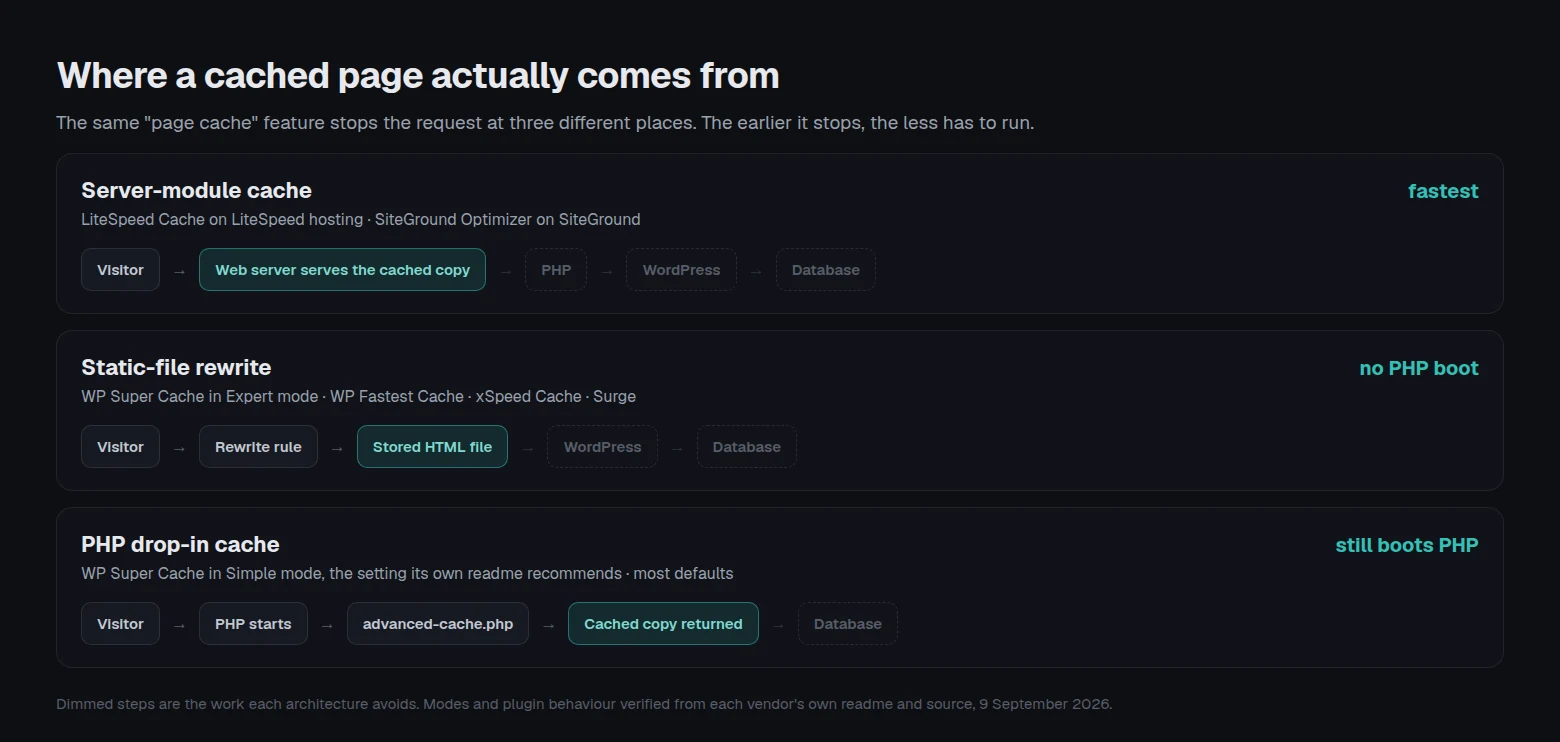
WP Super Cache ships two delivery modes and the faster one is not the default. Per the plugin’s own readme: “The fastest method is by using Apache mod_rewrite … to serve supercached static html files. This completely bypasses PHP and is extremely quick.” The readme then recommends the other one: “Supercached static files can be served by PHP and this is the recommended way of using the plugin … It’s easier to configure as the .htaccess file doesn’t need to be changed.” A site running the recommended setting is still booting PHP on every cache hit. That is a considered tradeoff on the vendor’s part, and it is invisible from the plugin list.
Serving a cached file without PHP is an Apache trick unless someone edits the server config. WP Fastest Cache states in its own FAQ that on nginx “you need to enable the Gzip compression and Browser Caching features manually.” W3 Total Cache’s FAQ says it is “aware of no incompatibilities with apache 1.3+, nginx 0.7+, IIS 5+ or litespeed 4.0.2+,” which is a compatibility statement rather than a claim that the static path configures itself. Our own plugin is in the same position and our readme says so: GZIP auto-configures on Apache and LiteSpeed, and nginx and IIS get “a ready-to-paste config snippet.” Anyone telling you their free plugin bypasses PHP on nginx without a server-block edit is describing a manual step they have decided not to mention.
Group Two: Free Tiers That Cache Only Where You Host
This is the group that breaks the roundups, and it is 8,000,000+ installs.
LiteSpeed Cache, at 7,000,000+ active installs, splits its own feature list in two. The readme is explicit: “General Features may be used by anyone with any web server (LiteSpeed, Apache, NGINX, etc.)” while “LiteSpeed Exclusive Features require one of the following: OpenLiteSpeed, commercial LiteSpeed products, LiteSpeed-powered hosting, or QUIC.cloud CDN.” Page caching sits in the Exclusive column. On Apache or nginx the plugin is a very capable asset optimizer with the cache switched off by design, and connecting the free tier of QUIC.cloud restores it. We took this apart in detail in what LiteSpeed Cache actually gives you on Nginx or Apache, including how to read your own server header first.
SiteGround Optimizer, at 1,000,000+ installs, says it even more directly. From its readme, on Dynamic Caching: “This default feature is available exclusively for SiteGround servers.” On Memcached: “This powerful feature is exclusively available in the SiteGround environment.” On image compression: “exclusive to the SiteGround Environment.” Its changelog records “Added alert and check if you’re running SiteGround Optimizer on a host different than SiteGround,” which tells you how often this happens.
Neither plugin is doing anything wrong. Both are the correct answer on their own platform, and on LiteSpeed hosting a server-level cache beats a PHP-level one on architecture alone. The problem is a listicle that ranks them against host-agnostic plugins without mentioning the condition.
Group Three: The Free Tier That Does Not Page-Cache
Autoptimize has 800,000+ active installs and it is frequently installed as a caching plugin. It is not one, and the readme is unusually clear about it: “If you think performance indeed is important, you should at least consider one of the many free page caching plugins (e.g. Speed Booster pack or KeyCDN’s Cache Enabler) to complement Autoptimize.” Page caching is listed as a feature of the paid Autoptimize Pro, which is sold off-directory and whose price we could not verify on a public page, so none is quoted here.
There is a fourth situation worth one line. Comet Cache has 20,000+ installs and its last release, version 170220, is dated 2 July 2025 according to the Plugin API on 9 September 2026. A cache plugin sits between every visitor and your site. Fourteen months without a release is a reason to look elsewhere.
The Receipt Test: Can You Prove the Cache Is Working?
Here is the framework, and as far as we can tell nobody else publishes it. Install a free cache plugin, then try to prove from outside the site that a page was served from cache. What each plugin leaves behind is not the same kind of evidence, and the difference is decisive.
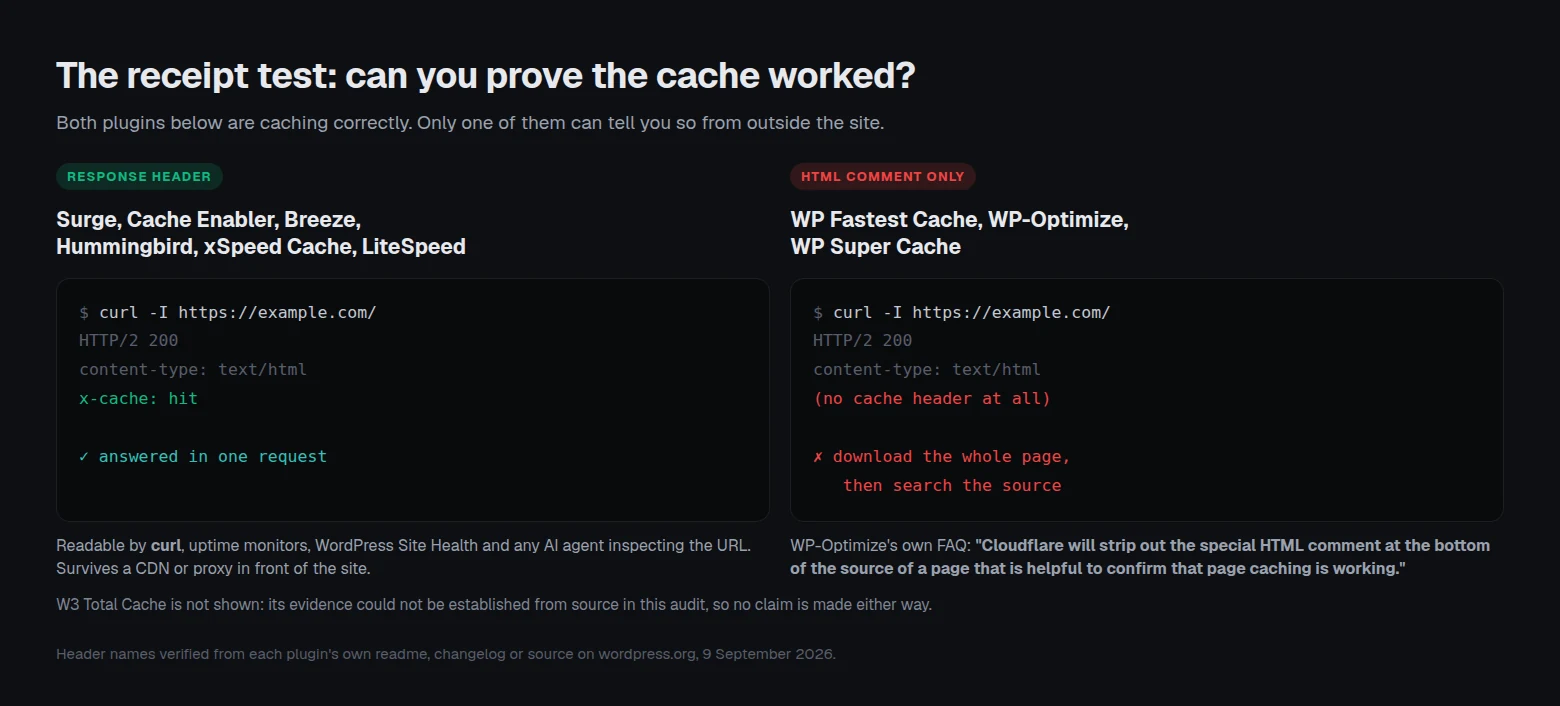
Some plugins answer in a response header. Some answer in an HTML comment near the bottom of the page source. Those two look equivalent in a feature grid and are not equivalent in practice. A response header survives curl -I, appears in monitoring tools, is what WordPress core’s own Site Health check reads, and is what an AI agent sees when it inspects a URL. An HTML comment requires downloading and reading the full body, and it does not always survive the trip.
WP-Optimize documents the failure case in its own FAQ, and the sentence is worth quoting in full: “Cloudflare will strip out the special HTML comment at the bottom of the source of a page that is helpful to confirm that page caching is working, so, don’t be confused by that.” A working cache, correctly configured, with its only evidence removed in transit.
| Plugin | Evidence of a cache hit | Type | Survives a proxy | Verified from |
|---|---|---|---|---|
| Surge | X-Cache | Response header | ✅ | Plugin readme FAQ |
| Cache Enabler | X-Cache-Handler | Response header | ✅ | Plugin changelog |
| Breeze | X-Breeze-Cache, X-Breeze-Cache-Write | Response header | ✅ | Source, inc/cache/execute-cache.php |
| Hummingbird | Hummingbird-Cache: Served | Response header | ✅ | Source, core/modules/class-page-cache.php |
| xSpeed Cache | X-XSpeed-Cache | Response header | ✅ | Plugin changelog, v1.0.5 |
| LiteSpeed Cache | x-litespeed-cache | Response header, emitted by the web server | ✅ | Plugin source and readme |
| WP Fastest Cache | <!--WPFC_FOOTER_START--> and related markers | HTML comment | ❌ | Source, inc/cache.php |
| WP-Optimize | Comment at the foot of the page source | HTML comment | ❌ | Plugin FAQ, which names Cloudflare |
| WP Super Cache | Debug comments in the page footer | HTML comment | ❌ | Plugin changelog |
| W3 Total Cache | Not established in this audit | Undetermined | — | See the note below this table |
| SiteGround Optimizer | Its own “Test URL Caching Status” tool | Dashboard tool | — | Plugin readme |
| Autoptimize | None, because it does not page-cache | Not applicable | — | Plugin readme |
W3 Total Cache is the one row this audit could not settle. Its page-cache code exposes a w3tc_header filter over response headers, and the only HTML comments in PgCache_ContentGrabber.php are mfunc and mclude markers for dynamic fragments, which are not evidence of a cache hit. Rather than guess in either direction, the row stays open. Check your own response.
Three consequences follow from that table.
- 🔧 Practical. If you chose a comment-only plugin and you also run Cloudflare or any other proxy, your quickest verification method is gone, and the plugin still works fine. Our guide to checking whether WordPress caching is actually working covers what to do instead, including which of the fourteen headers WordPress core accepts as proof are not proof of a hit at all.
- 🤖 Machine-readable. AI assistants, uptime monitors and rank trackers read headers. A cache that only writes a comment is invisible to all of them, which is a growing cost as more of your site’s assessment is done by software rather than by you refreshing a page.
- 🐛 Debugging. When a purge appears to do nothing, a header tells you in one request which of the layers in front of your site served the stale copy. Without one you are guessing, which is the situation we walk through in what to do when purging the cache changes nothing.
How This Was Verified, and What It Cannot Tell You
Every figure above came from one of three places on 9 September 2026: a direct query to the wordpress.org Plugin API, the plugin’s own readme.txt fetched from the WordPress plugin repository, or the plugin’s own source code fetched from the same repository. Where a claim is about behaviour rather than a number, the evidence is the vendor describing their own product. That is deliberate. A competitor stating their own limitation is stronger evidence than any criticism we could write, and it is checkable by you in about a minute.
Four limitations, stated plainly, because a framework that does not name its own gaps is not a framework.
- 🔢 Install counts are buckets, not measurements. The Plugin API reports “1,000,000+” for four different plugins in this field. One of them could have twice the installs of another and you would not see it. Never treat two plugins in the same bucket as equally popular, and never compute a percentage from these numbers.
- 🧪 This is a documentation and source audit, not a benchmark. Nothing here measures how fast each plugin is on a live site. Speed depends on your host, your theme and your plugin load far more than on which of two competent page caches you picked, and a benchmark run on our hardware would tell you about our hardware.
- 🔍 The receipt table records the default behaviour we could find evidence for. Several of these plugins have debug modes, filters or settings that change what they emit.
w3tc_headeris one such filter, sitting right there in the source. Your install may differ from the default, which is a reason to check your own response rather than trust this table. - 📅 Free tiers move. Features cross the free-to-paid line in both directions, and nothing stops a plugin narrowing its free tier in the next release. Every claim above carries the date it was checked for exactly this reason.
None of these gaps affects the three-question framework itself, which is about what a plugin does rather than how fast it does it. They do mean this article is a starting shortlist rather than a verdict.
What the Upgrade Costs If You Outgrow the Free Tier
Four of these plugins have no paid tier, which means the free tier is the whole product and it will not be narrowed later to sell you something. That is a genuine advantage and it belongs in the decision.
| Plugin | Paid tier | Price, verified 9 September 2026 | Model |
|---|---|---|---|
| WP Super Cache | None | — | Free, permanently |
| Cache Enabler | None | — | Free, permanently |
| Breeze | None | — | Free, permanently |
| Surge | None | — | Free, permanently |
| W3 Total Cache | W3 Total Cache Pro | $99/yr for 1 site, $350/yr for 5, $500/yr for 10 | Annual, 30-day money-back |
| WP-Optimize | WP-Optimize Premium | $49/yr for 2 sites, $99/yr for 5, $194/yr unlimited | Annual |
| WP Fastest Cache | Premium | $49 for 1 licence, $125 for 3, $175 for 5, $300 for 10 | One-time fee, 30-day money-back |
| Hummingbird | Hummingbird Pro | Sold inside a WPMU DEV membership, no standalone price published | Membership |
| LiteSpeed Cache | The plugin stays free | Costs sit in LiteSpeed server licences and QUIC.cloud usage above the free levels | Server or CDN |
| SiteGround Optimizer | The plugin stays free | Cost is the SiteGround hosting plan | Hosting |
| Autoptimize | Autoptimize Pro | Not published on a public page we could verify | Subscription |
| xSpeed Cache | xSpeed Pro | $29/yr or $79 lifetime for 1 site, $49/yr or $149 lifetime for 5, $99/yr or $249 lifetime for 25 | Annual or lifetime, 14-day money-back |
Two patterns are worth naming. WP Fastest Cache is the only one selling a one-time licence in the conventional annual field, and its own page describes the package as carrying a “1 year license transfer right,” so read that before treating it as permanent. And on the paid side of this table, three different billing shapes are in play, which is why per-site cost is worth working out on your own site count rather than comparing headline prices. We ran that arithmetic against a metered competitor in the NitroPack alternatives comparison, which prices the same site at four traffic levels.
Running This Across Twenty Client Sites
Everything above is a single-site decision. At twenty sites the calculation changes, because the constraint stops being which plugin is best and becomes how many different plugins you are willing to know well.
A mixed fleet on Apache, nginx and LiteSpeed hosting can end up with LiteSpeed Cache on the LiteSpeed boxes, SiteGround Optimizer on the SiteGround ones, and something host-agnostic everywhere else. Three dashboards, three purge behaviours, three sets of exclusions, and no single answer to “is the cache on across the fleet.”
One answer across three server types
This is the problem we built xSpeed Cache to solve, and it is ours: xSpeed Cache, xSpeed Scan and xSpeed Hub are WPDeveloper products, and WPDeveloper is a Startise company. The free tier writes a static-file path on Apache, nginx and LiteSpeed, emits X-XSpeed-Cache so every site in a fleet can be checked with one request each, and includes one-click migration that imports exclusions and settings from LiteSpeed Cache, WP Rocket and W3 Total Cache rather than making you rebuild them. Object caching, CDN support and database cleanup sit in the free tier too, which is the part of our free versus Pro breakdown that most affects a fleet. On a LiteSpeed server the plugin tells LSCache to stand down and takes ownership of the cache, so the hit is tagged and counted consistently across every host in the fleet.
Free scan of any URL, no account needed: xspeedcache.com/scan/
Where that argument is weak
Four honest counts against us, and they are the reason this article does not rank us first.
- 📉 2,000+ active installs against LiteSpeed Cache’s 7,000,000+, WP Fastest Cache’s 1,000,000+ and W3 Total Cache’s 900,000+. Those figures are from the same API query on the same day. A cache plugin sits in the request path of every visitor, and years of field exposure across millions of sites is evidence we do not have yet.
- 🧩 On nginx our static path needs a pasted server-block snippet. Our own readme says a “ready-to-paste config snippet is provided for nginx and IIS.” That is the same manual step WP Fastest Cache and WP Super Cache’s expert mode require, so we do not get to claim it away.
- 🏢 On LiteSpeed hosting, LSCache is the better architecture and it is free. A cache running inside the web server beats one running in PHP. Our plugin deliberately tells it to stand down for consistency across a fleet, and if you run one site on LiteSpeed hosting, leaving LSCache in charge is a defensible choice we would not argue you out of. The same holds on SiteGround.
- 💸 We sell a Pro tier and four plugins in this comparison do not. WP Super Cache, Cache Enabler, Breeze and Surge have no paid version at all. If never being upsold is what you want from a free plugin, those four beat us on that criterion outright.
Common Mistakes People Make Choosing a Free Cache Plugin
- ⚠️ Installing two page caches. WP-Optimize’s FAQ explains why this fails: both plugins need the same
advanced-cache.phpdrop-in, so the second one to write it wins and the first one silently stops. Migrate rather than stack, using our guide to moving between cache plugins. - ⚠️ Assuming a green dashboard means a cache hit. The plugin is reporting on its own intent. Read the response, not the settings screen.
- ⚠️ Judging the plugin by a PageSpeed score. Our own 958-site study found that caching cut median TTFB by 73% and did not move LCP. A page cache fixes server response time. Asset weight is a different job.
- ⚠️ Picking on install count alone. Two of the three most-installed plugins in this field are conditional on hosting, which the install count does not tell you.
- ⚠️ Forgetting the cart. Caching a WooCommerce cart or checkout page shows one customer another shopper’s basket. Check the exclusion defaults before anything else on a store, starting with the WooCommerce use case.
Frequently Asked Questions
I installed a free caching plugin and my PageSpeed score did not change. What went wrong?
Probably nothing. A page cache reduces the time the server takes to send the first byte. PageSpeed’s mobile score is dominated by how much CSS, JavaScript and image weight arrives afterwards. Our 958-site scan study measured exactly this split. Check your TTFB before and after, and treat the score as a separate project.
I turned on caching but curl -I shows no cache header. Is it broken?
Not necessarily. Four of the plugins in the table above leave an HTML comment rather than a header, so a HEAD request shows nothing even on a perfect cache hit. Fetch the full page and search the source for the plugin’s footer comment, or switch to a plugin that emits a header.
My cache worked until I put Cloudflare in front of the site, and now I cannot tell. Why?
WP-Optimize’s own FAQ names this: Cloudflare strips the HTML comment that confirms the cache is working. The cache is very likely fine, and your evidence was removed in transit. This is the strongest practical argument for choosing a plugin that emits a response header.
Is LiteSpeed Cache free on any server?
The plugin is free everywhere and always has been. Its page caching requires OpenLiteSpeed, a commercial LiteSpeed product, LiteSpeed-powered hosting or QUIC.cloud CDN, per the plugin’s own readme. QUIC.cloud has free service levels, so restoring the cache on Apache or nginx without paying is possible.
I moved my site off SiteGround and everything got slower. Did I break something?
Very likely you moved away from SiteGround Optimizer’s dynamic cache, which its readme states is “available exclusively for SiteGround servers.” The plugin will keep running and keep optimizing assets. The page cache will not be there. Install a host-agnostic page cache from group one.
Does Autoptimize cache my pages?
No. Its readme recommends adding a free page caching plugin alongside it and names two. Page caching is a feature of the paid Autoptimize Pro. Autoptimize is a good asset optimizer and is not a cache.
Can I run Autoptimize with a caching plugin at the same time?
Yes, and that is the intended arrangement. Its readme warns against running two minification plugins at once, so if your cache plugin also minifies, switch minification off in one of them.
Which free plugin is fastest?
On LiteSpeed hosting, a server-level cache is the fastest architecture available, which means LiteSpeed Cache. Elsewhere, any plugin serving a static file through a rewrite rule without booting PHP will land in a similar range, and the difference between them will usually be smaller than the difference your host makes. Measure your own site rather than trusting a benchmark run on someone else’s.
I have five sites on three different hosts. Should I standardise on one plugin?
Standardising reduces what you have to remember and usually loses a little peak performance on the hosts with a server-level cache. If the LiteSpeed and SiteGround sites are a minority, standardise. If they are most of the fleet, keep the native cache on those and standardise on the rest.
Do I need to remove the old plugin before installing a new one?
Yes, and deactivating is not always enough. A cache plugin leaves an advanced-cache.php drop-in behind, and WordPress core treats that file merely existing as evidence of a working page cache. Delete the plugin properly and check the drop-in is gone.
Is a free plugin enough, or do I eventually have to pay?
For a content site on decent hosting, a free page cache plus sensible exclusions is often the end of it. Paid tiers mostly buy asset-level work such as critical CSS, delayed JavaScript and image conversion, plus support. Reach for one when your measurements say assets are the problem, not before.
Which free plugin should an agency pick?
The one that answers the same way on every host you manage. That means a host-agnostic page cache with a response header you can check across the fleet in one pass. Ours is one option in that shape, with the install-base caveat stated above. WP Fastest Cache and W3 Total Cache are the two most-installed alternatives with the same property.
Conclusion: Your 2026 Free Caching Shortlist
The three-question framework does most of the work here. At least 8.8 million installs sit on free tiers that either page-cache only on one company’s servers or do not page-cache at all, and the plugin directory does not flag either condition. Once you have separated those out, the field is smaller and the remaining decision is mostly about evidence: whether the plugin can prove it is working in a way a machine can read.
| Your goal | Pick |
|---|---|
| Fastest on LiteSpeed hosting | LiteSpeed Cache |
| Fastest on SiteGround | SiteGround Optimizer |
| Simplest possible setup | Surge |
| Deepest free feature set | W3 Total Cache |
| Free with no paid tier, ever | WP Super Cache or Cache Enabler |
| Running on Cloudways | Breeze, which Cloudways builds |
| One answer across a mixed fleet, with a hit header | xSpeed Cache |
What to do this week:
- Run
curl -I https://yourdomain.com/and look for a cache header. If there is none, fetch the full page and search the source for a footer comment. - Check your server. If the header says LiteSpeed, install LiteSpeed Cache and stop reading. If your host is SiteGround, install SiteGround Optimizer and stop reading.
- If neither applies and you want a free page cache with nothing held back, install WP Super Cache, Cache Enabler or Surge. All three are complete products with no paid tier.
- If you manage several sites across different hosts and want one answer everywhere, try the free tier of xSpeed Cache, which we build. It costs nothing, imports your existing exclusions, and emits
X-XSpeed-Cacheso you can verify every site with one request each. Paid plans start at $29/yr with a 14-day money-back guarantee, and the 80-capability comparison shows what each tier includes. - Whichever you choose, verify from outside the site rather than from the dashboard. The free xSpeed Scan reads the response for you and needs no account, and
curl -Iis free forever.
If you run one site on LiteSpeed or SiteGround hosting, your host already ships a free cache that is hard to beat, and you should use it. If you run a mixed fleet, or a site on Apache or nginx where no server-level cache exists, that gap is what we built xSpeed Cache for: one free page cache that behaves the same way on every host and says so in a header you can read. Whichever you choose, the tie-breaker does not change. Pick the one that can prove it is working.