48% of WordPress Sites Have Under 100ms of Cache Headroom: When Not to Use a Caching Plugin in 2026
Updated September 2026
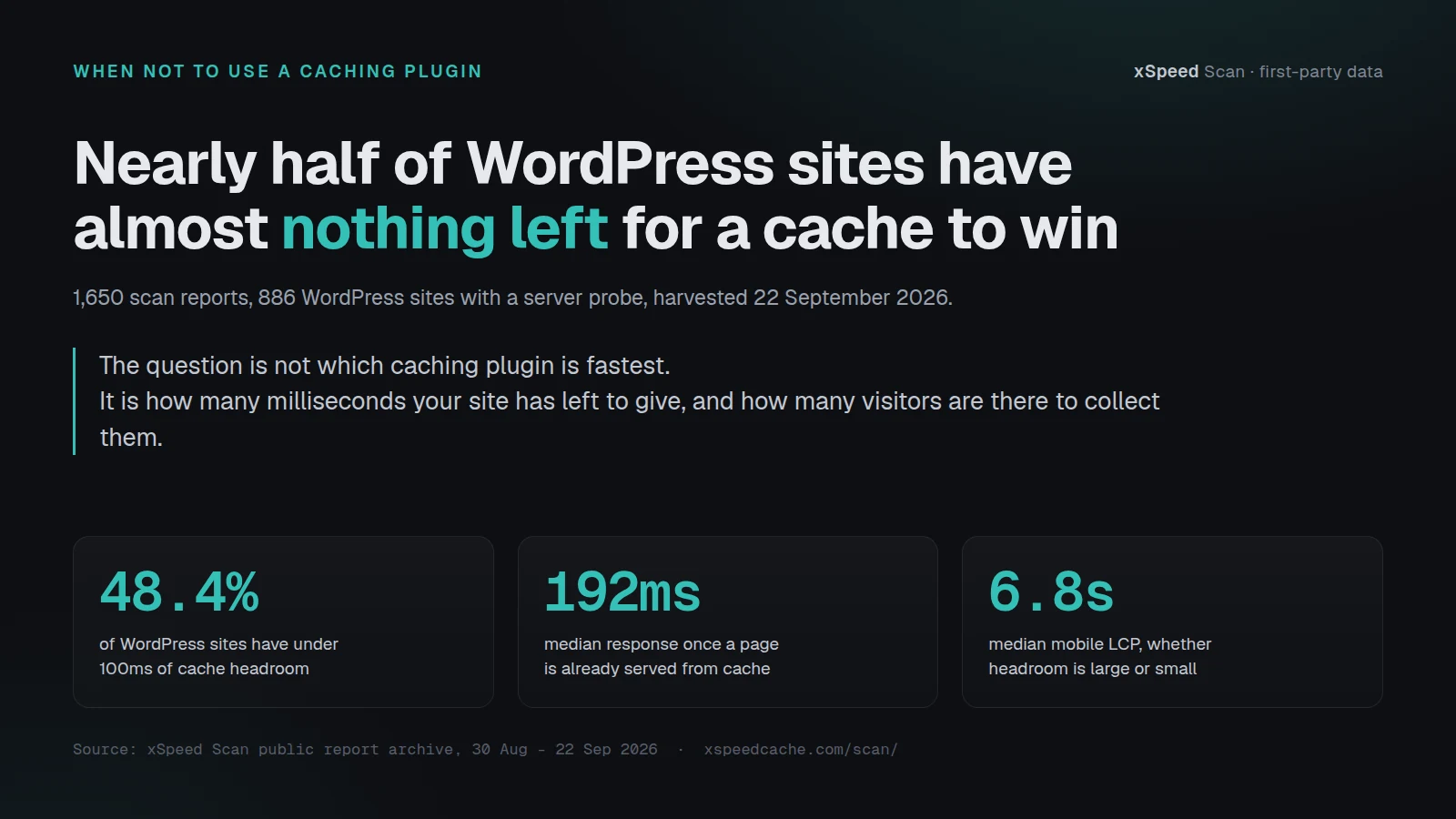
Of the 886 WordPress sites carrying a server probe in the xSpeed Scan public archive on 22 September 2026, 429 of them have under 100 milliseconds of server response left for a page cache to take away. Their median mobile Largest Contentful Paint is 6.8 seconds, against the 2.5-second threshold web.dev publishes as a good LCP. The comparison people expect here is one caching plugin against another. The more useful comparison is the time your own site has left to give against the number of visitors who are there to collect it. This article is about the sites where that arithmetic says do nothing, and it is written by the team that sells a caching plugin.
Quick Summary: When the Honest Answer Is to Skip It
| If your site… | Do this | Why |
|---|---|---|
| Already answers in under 200ms | Measure the headroom, then stop | Half the WordPress sites we scan are here, and a cache cannot remove time the server is not spending |
| Serves mostly logged-in or per-user pages | Exclude them and optimise the assets | A page cache is only allowed to reuse an identical response, so these routes never enter it |
| Sits behind a full-page edge cache | Check for a cache hit before adding a second layer | 192 sites in this archive already get a hit at the edge, and a second cache mostly adds purge bugs |
| Answers slowly even on a cache hit | Fix the origin or move it closer | 199 sites here hold a cache hit and still take over 400ms |
| Gets a few hundred visits a month | Spend the hour on the images instead | At 500 visits a month a cache repays 40 minutes of setup in about 14 months |
| Answers in 500ms or worse with no cache hit | Install one, this is the case it was built for | 268 sites here have 400ms or more of real server time to recover |
Every number above comes from the same harvest, described in full below. The measurement takes two minutes on your own site and it is the only part of this article you should trust more than your own result.
What a Page Cache Is Allowed to Take
A page cache stores the finished HTML of a request and replays it to the next visitor who asks for the same thing. That is the whole mechanism, and two limits fall straight out of it.
| What a page cache can remove | What it cannot touch |
|---|---|
| The time your server spends building the HTML | Everything that loads after the first byte |
| Repeat work for identical anonymous requests | Anything that differs per visitor |
The first limit is that it can only remove the time your server spends building a page. On a scan report that time is Time to First Byte. Everything after the first byte, the stylesheets, the fonts, the hero image, the third-party tags, is untouched by a page cache, which is the finding our September study of the cache ceiling measured across 1,074 reports and does not need re-deriving here.
The second limit is that it can only replay a response that is identical for everyone. A cart, a member dashboard and an account page are different for every visitor, so a correct cache refuses them. WooCommerce says so in its own documentation, which instructs you to exclude Cart, My Account and Checkout because they “need to stay dynamic since they display information specific to the current customer and their cart”, per WooCommerce’s caching-plugin guidance for developers.
Put together, the value of a page cache on any given site is a small multiplication: the server time it can remove, times the share of requests it is allowed to serve, times the number of requests. When any one of those three is near zero, so is the answer.
The Break-Even Test, and the Four Things It Gets Wrong
Here is the method, before any results. It has two inputs you can measure in about two minutes and one you already know.
Step one: measure your cached floor
Request your own home page twice with a tool that reports timing, and take the faster of the two:
curl -s -o /dev/null -w 'ttfb %{time_starttransfer}s\n' https://example.com/
curl -s -o /dev/null -w 'ttfb %{time_starttransfer}s\n' https://example.com/
Step two: work out your headroom
Headroom is your current TTFB minus the floor a cached WordPress page actually reaches. In this archive that floor is 192ms, the median TTFB of the 569 WordPress sites already serving from cache. If your site answers in 240ms, your headroom is about 48ms. Floor the number at zero.
Step three: convert headroom into visitor time
Multiply your headroom by your monthly pageviews, then by the share of those requests that are anonymous. A brochure site is near 0.9. A membership site can be under 0.2.
Step four: compare it against your own time
Setting up and maintaining a caching plugin costs you somewhere between twenty minutes and a working afternoon, and the benchmark protocol we published on 9 September argues that configuration time belongs in every plugin comparison for exactly this reason. Divide your setup cost by the visitor time you save each month. That ratio is the break-even.
The four limitations, stated before the results
These are load-bearing and they travel with every number below.
- It trades your minutes against visitor seconds at an exchange rate nobody can defend. A thousand visitors each saving 0.4 seconds is not obviously worth 40 minutes of your evening. The test gives you the ratio and refuses to tell you what it is worth.
- It values only speed, and speed is not the only reason to cache. A cache also absorbs traffic spikes and lowers hosting load, neither of which appears anywhere in this arithmetic.
- Our TTFB is measured from one place. Every probe in this archive runs from Vilnius, Lithuania, so the number includes network distance to your origin and is larger than the time your server actually spent. That inflates headroom, which means the test is generous to caching and still says no on half the sample.
- One median floor is applied to every site. A site on shared hosting in another region will not reach 192ms on a cache hit, and its real headroom is smaller than this test reports.
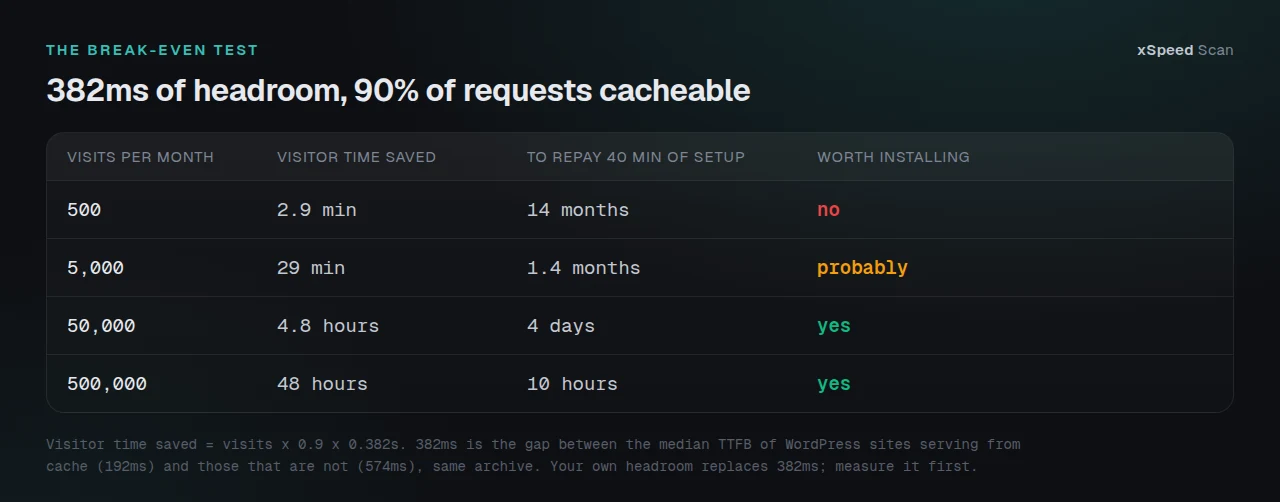
At 382ms of headroom, the gap between our cached and uncached medians, a site with 500 visits a month saves its visitors under three minutes a month in total. A site with 50,000 visits saves nearly five hours a month and repays the same setup in four days. The plugin did not change. The traffic did.
What 886 WordPress Sites Have Left to Win
The harvest: every report in the public scan archive as listed by its sitemap on 22 September 2026, 1,650 reports across 1,650 distinct hosts scanned between 30 August and 22 September. 911 are WordPress, 886 of those carry a server probe. Ten threads, about three minutes, zero fetch errors. The same method produced the 958-site study in September, and the archive has grown 72% since, so the figures below are not the figures that run would have given.
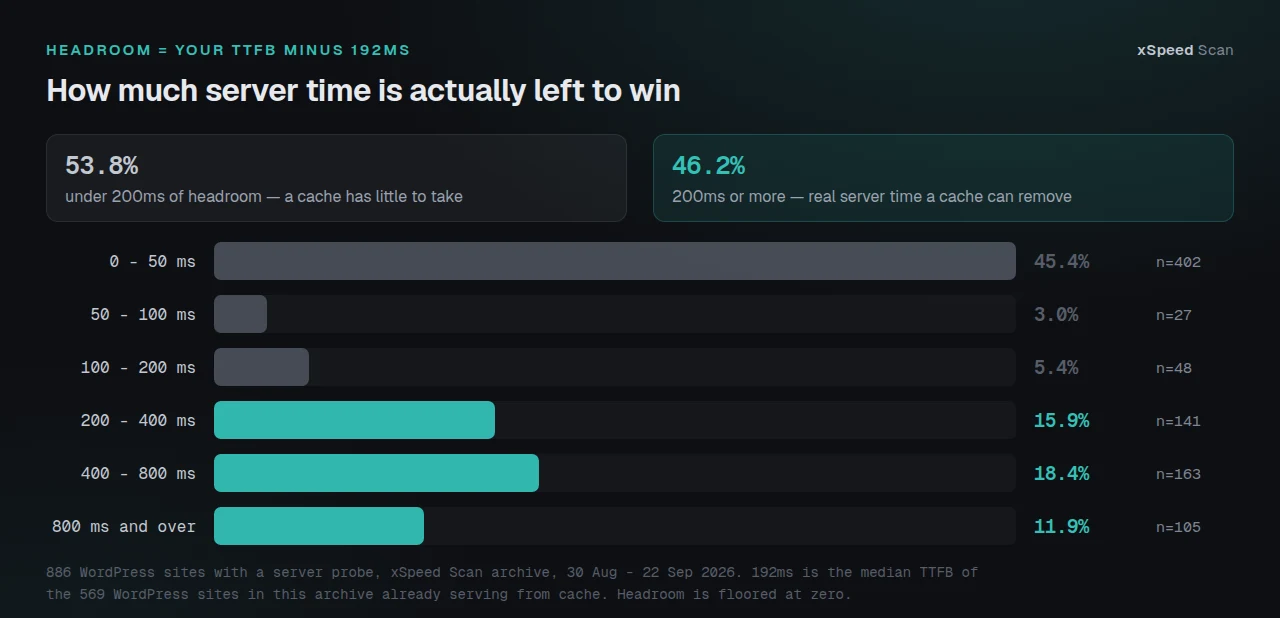
| Headroom band | Sites | Share | What a page cache can do |
|---|---|---|---|
| 0 to 50ms | 402 | 45.4% | Nothing measurable |
| 50 to 100ms | 27 | 3.0% | Under a tenth of a second |
| 100 to 200ms | 48 | 5.4% | Visible on a fast connection only |
| 200 to 400ms | 141 | 15.9% | A real improvement |
| 400 to 800ms | 163 | 18.4% | A large improvement |
| 800ms and over | 105 | 11.9% | The case caching was built for |
53.8% of these sites have under 200ms to win. 46.2% have 200ms or more, and for that group a page cache is the correct first move rather than the wrong one. Both halves are true and the article that reported only the first would be as misleading as the marketing page that reports only the second.
The Two Ends of the Archive Land in the Same Place
Split the WordPress sites into the 429 with under 100ms of headroom and the 268 with 400ms or more, and the delivery numbers separate cleanly. Median delivery score is 81 out of 100 against 48. Median TTFB is 125ms against 886ms.
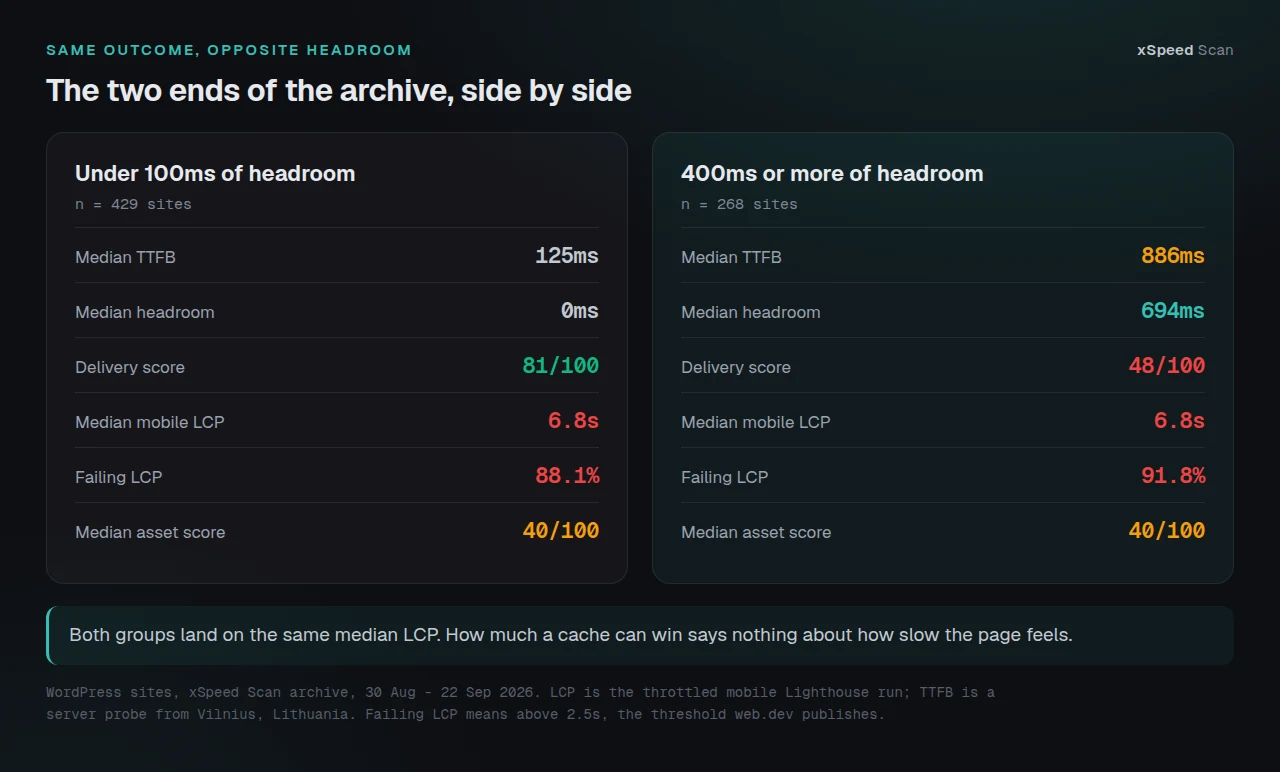
Then the two groups arrive at exactly the same median mobile LCP: 6.8 seconds in both. 88.1% of the fast-origin group fails LCP and 91.8% of the slow-origin group fails it. Both carry a median asset score of 40 out of 100.
The delivery layer is where a cache works and it is measurably better in the first group. The number a visitor feels is the same in both. That is the case for measuring headroom before buying anything, and it is also the reason this site’s own scanner grades delivery separately from Core Web Vitals rather than averaging them into one figure.
Five Cases Where the Answer Is No
Your pages are already being served from cache
569 of the 886 WordPress sites here already return cache-hit evidence in their response headers, and 295 of those answer in under 200ms. A second page cache on top of a working one does not compound. It gives you two purge mechanisms that disagree about when content is stale. Check yours first: the four checks that prove caching is actually working take about a minute.
Everything that matters is per-user
Membership sites, learning platforms, client portals and any store where the visitor is logged in the whole time. The cacheable surface is the marketing pages, which may be a small fraction of the traffic. LiteSpeed Cache ships private caching for logged-in users as a server-exclusive feature, per its own readme on wordpress.org, which tells you how far outside ordinary page caching that problem sits. The work that pays on these sites is object caching for repeated database queries, covered in our object cache documentation, plus the checkout-specific work in our WooCommerce checkout guide and on the WooCommerce store use-case page.
You already sit behind a full-page edge cache
265 WordPress sites in this archive report a CDN, and 192 of them are getting a cache hit at a median TTFB of 159ms. A page cache behind a working edge cache is a fallback for the requests the edge misses, which is worth something on a large site and close to nothing on a small one.
The origin is slow even when the cache hits
199 sites, 22.5% of the WordPress sample, hold a cache hit and still take over 400ms, at a median of 642ms. Caching is already doing its job and the remaining time is the server and the distance to it. That is a hosting decision. We recommend xCloud for it, and xCloud is ours: WPDeveloper, which builds xSpeed Cache, and xCloud are both Startise companies. Our scan reports carry the same recommendation on every report page.
There are not enough visitors yet
This is the case nobody publishes, because it argues against every performance product including ours. At 500 visits a month, 40 minutes of setup takes over a year to repay in visitor time. Write another article instead.
What This Archive Cannot See
Three limits, stated plainly, because a study that hides them is worth less than no study.
The archive holds one scan of one URL per host, almost always the home page. A home page is the single most cacheable page on most sites, so the share of per-user traffic, the thing that decides the second case above, is invisible here. We can count the sites that cannot benefit from more caching. We cannot count the ones whose traffic is mostly logged in, and that is the case this article had to argue from first principles and vendor documentation rather than from data.
Sites arrive in this archive because somebody chose to scan them, which is not a random sample of WordPress. It over-represents sites whose owners suspect a speed problem, and it over-represents ours: 525 of the 886 carry xSpeed Cache.
Both directions of our own number
That last number cuts both ways and both directions are printed here. Sites running our plugin serve from cache 76.6% of the time against 46.3% for those that do not, with a median delivery score of 70 against 54. The same rows show their median mobile LCP is 7.2 seconds against 5.9 seconds for sites without it, and 91.4% of them fail LCP against 85.0%. People install a cache because the site is already slow, and this dataset cannot separate that selection effect from anything else. Both numbers stand under the same caveat.
Doing This Across a Fleet Without Opening Every Dashboard
An agency cannot run a two-minute curl check by hand on every site every month, which is where the measurement stops being free. xSpeed Hub exists for that shape of problem: it reads the same delivery and Core Web Vitals split across a fleet from one connection, so the sites with real headroom separate from the ones already at their floor without anyone opening twenty-five dashboards.
xSpeed Cache is ours and it is the plugin this data was gathered with. It is free for page caching, minification, browser caching and the migration importer, with the intelligence layer in Pro. The honest version of the pitch is the one this whole article has been making: the free tier is where a site with 300ms of headroom should start, and Free vs Pro draws the line. The plugin reports 6,000+ active installs and a 5.0 rating from 10 reviews, per a direct wordpress.org Plugin API query on 22 September 2026, which is small against WP Rocket and LiteSpeed Cache and is the reason we publish measurements rather than testimonials.
Run the free scan on your own site and read the delivery score: xspeedcache.com/scan/
Common Mistakes Site Owners Make Here
| Mistake | What it looks like | What to do instead |
|---|---|---|
| Installing a second cache plugin | Two purge buttons, stale pages, arguments about which one won | Check for cache-hit evidence first, keep one |
| Judging the cache on a Lighthouse score | Score moves 10 points between runs and nobody knows why | Judge it on TTFB, which is stable, and read the noise floor first |
| Caching the cart | Someone else’s basket appears in a logged-out browser | Exclude Cart, My Account and Checkout, as WooCommerce instructs |
| Buying Pro to fix an LCP problem | Paid features change nothing the visitor can see | Measure the ceiling, then work on images and render-blocking assets |
| Measuring before and after on one run | Two numbers that differ by more than the change did | Take the better of several runs, or the median of many |
Three of those five are ways of spending money on a problem the money cannot reach. The fourth is a correctness bug, and it is the only one on the list that can cost you a customer.
Frequently Asked Questions
I installed a caching plugin and my PageSpeed score did not move. What went wrong?
Probably nothing. If your TTFB was already under 200ms, the cache had almost nothing to remove, and the mobile score is dominated by render-blocking assets and image weight. The median site in this archive with no headroom still fails LCP 88.1% of the time.
My TTFB is 900ms. Is a caching plugin the right fix?
Yes, this is the case it exists for. 268 sites here are in your position with 400ms or more to recover. Install one, verify the cache hit, and re-measure before deciding anything else is needed.
I run a membership site and the cache seems to do nothing. Is it broken?
It is working as designed. A page cache refuses responses that differ per visitor, so a site where almost every page is personalised has very little cacheable surface. Object caching and a faster origin are the work that pays there.
We are already on Cloudflare. Do we still need a plugin cache?
Check whether you are getting a full-page hit at the edge first. 192 WordPress sites here get one, and for them the plugin cache only serves the requests the edge misses. That is worth having at scale and rarely worth an afternoon on a small site.
I turned caching on and a logged-out visitor saw another customer’s name. What happened?
Your cache stored a personalised response and replayed it. This is a correctness problem, not a performance one, and it needs the exclusions fixed before anything else. It is the single failure that makes caching actively worse than not caching.
How do I know my headroom without running a scan?
Two curl requests to your own home page, taking the faster result, then subtract 192ms. The command is in the method section above. The scan gives you the same TTFB plus the asset and Core Web Vitals grades, which is what you need next.
My host says caching is handled at the server level. Should I trust that?
Verify it rather than trusting it. Look for cache-hit evidence in the response headers. Server-level caching is common and often real, and it is also the most common reason a plugin cache changes nothing.
Is there any harm in caching a site that does not need it?
Usually not much, and the costs are real: a purge step in every publishing workflow, one more thing to debug when a page looks stale, and the exclusion rules to maintain. On a low-traffic site those costs can exceed the benefit.
I have 800 visits a month. Should I bother?
By the break-even arithmetic, no. Your visitors would collectively save under five minutes a month. Spend that hour compressing your images.
Does this mean xSpeed Cache is not worth installing?
It means it is worth installing on the 46.2% of sites in this archive with 200ms or more of headroom, and on any site where the origin is slow on a miss. On a site already answering in 120ms from cache, it will not be the thing that helps. We would rather say that than have you find out.
Which competitor should I look at if we do need a cache?
For sites on LiteSpeed servers, LiteSpeed Cache is free and excellent and its page caching runs at the server level. WP Rocket is the most polished paid option. Our 80-capability comparison lays out where each one lands, including where we lose.
How often does this dataset change?
Fast enough to matter. The archive held 958 reports on 8 September and 1,650 on 22 September. Any figure in this article is a measurement of a moving population, and it will be re-cut rather than re-quoted.
Conclusion: Measure the Headroom, Then Decide
| Your situation | Best move | Why |
|---|---|---|
| Under 100ms of headroom | Work on images and render-blocking CSS | 88.1% of this group still fails LCP |
| 200ms or more of headroom | Install a page cache, free tier first | The one case where caching is the largest available win |
| Mostly logged-in traffic | Object cache and a faster origin | Page caching has almost no surface to work on |
| Slow even on a cache hit | Change hosting or region | 199 sites here are in this state |
| Under a thousand visits a month | Do nothing yet | The setup costs more time than it returns |
What to do this week:
- Run two curl requests against your own home page and write down the faster TTFB.
- Subtract 192ms. That is your headroom.
- Multiply it by your monthly pageviews to get the visitor time on offer.
- If the answer is under a couple of minutes a month, close the tab and go optimise an image.
- If it is 200ms or more per request, run the free scan to see what else is on the table, then start with the free tier of xSpeed Cache. Pro is $29 a year at the founding price with a 14-day money-back guarantee, and the free tier is a complete page cache rather than a trial.
If your result surprises you, post the number. The sites with no headroom and a six-second LCP are the interesting ones, and they are the majority.