Two Caches, One Response: 20 of 37 Sites Where the Host and the Plugin Disagree
 M Asif Rahman 18 min read

Updated November 2026
On 16 November 2026 we pulled 3,500 scan reports from our own public archive, resolved 2,628 of their domains to a nameserver, and then asked 150 of those sites for their homepage twice and read what came back. Of the 37 responses that carried both a host-level cache header and a plugin cache header, 20 disagreed about whether the page had been cached. In the archive cohort, 352 of 419 sites running a caching plugin showed cache evidence, against 11 of 42 running none, per rubric check D2.
The question people ask is whether the host or the plugin should do the caching. The more useful question is which one is doing it right now, because both answer and they do not always agree.
Quick Summary: Read the Header of a GET, Twice
| If you want to… | Do this | Why |
|---|---|---|
| Know whether your host caches your pages | Request your homepage twice with a GET and read the cache header | 22 of the 150 sites we probed answered a HEAD request differently from a GET |
| Decide whether to remove your caching plugin | Check what the host’s own header says before you remove anything | Sites with no plugin showed cache evidence 26% of the time, against 84% with one |
| Find out what your host permits | Read your host’s own documentation, not a forum post | The seven hosts here document four genuinely different answers |
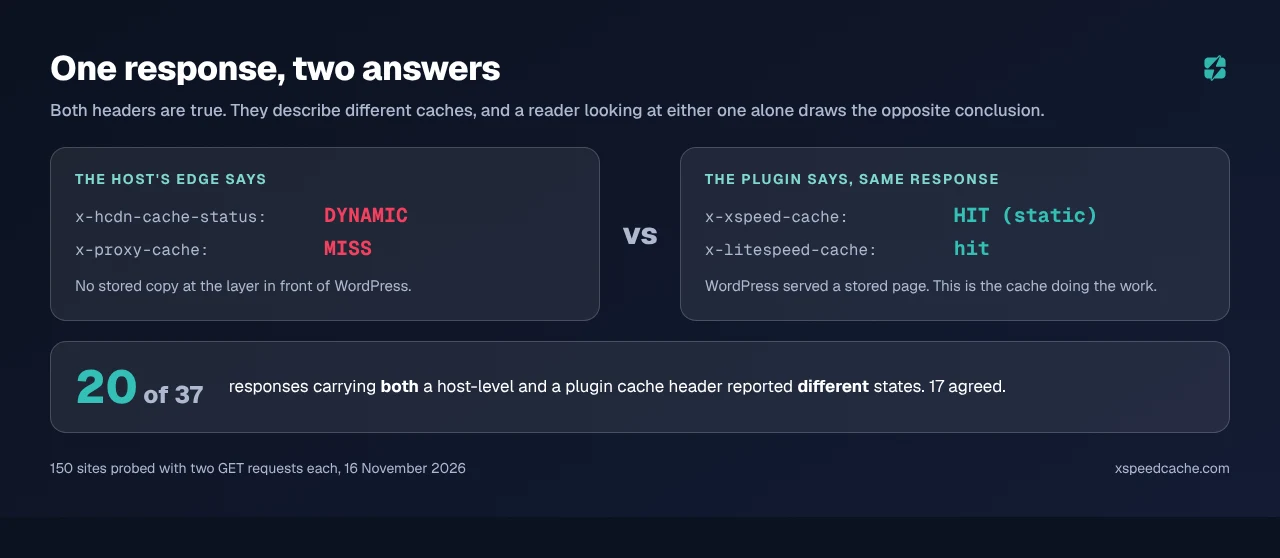
| Work out which cache answered | Look for two headers, not one | 20 of 37 responses carrying both disagreed |
| Check a page you cannot reproduce | Run the free xSpeed Scan and read check D2 | It records cache evidence per report, with the date |
How We Measured This, and What It Cannot Tell You
Three instruments, all read on 16 November 2026. The limitations come first because two of them are severe.
Instrument one: the scan archive. /api/scan-list returned 3,500 distinct reports covering 5 September to 16 November 2026, of which 2,780 are WordPress. Each report carries rubric check D2, which records whether cache evidence appeared in the response headers or the HTML.
Instrument two: host attribution by DNS. We resolved each registrable domain’s NS records over DNS-over-HTTPS, the method established in our object-cache census, and verified each nameserver brand against its SOA record rather than assuming it. dns-parking.com returns dns.hostinger.com, and domaincontrol.com returns dns.jomax.net.
Instrument three: a header probe we ran today. Two sequential GET requests to the homepage of 150 sites drawn from the attributed cohort, with a browser user agent, reading every cache-status header in the response.
Now the limitations.
- Only 538 of 2,780 WordPress sites, 19.4%, could be attributed to a named host at all. Cloudflare’s nameservers account for 978 of them, 35.2% of the corpus, and Cloudflare DNS tells you nothing about who runs the origin. Every per-host figure below is a floor computed on a small, visible slice.
- The archive is self-selected toward our own users. xSpeed Cache is detected on 73% to 90% of sites per host in this cohort, SiteGround excepted at 40%. These are sites whose owner chose to run a speed test, and most already run our plugin. That is a population, not a sample of WordPress.
- A cache header proves one URL answered from a cache at one moment. It does not prove the host’s cache is on by default, and it cannot prove a negative for a site that simply had not been requested recently.
- The cohort spans five rubric versions. 192 of the 461 reports were graded on
2026.10.1and the rest on a September rubric, so D2’s definition is not perfectly constant across the set. - Two hosts’ documentation could not be read. Bluehost and HostGator both returned HTTP 403 to our requests, so no policy of theirs is quoted here. Their headers are reported; their published position is not.
We also excluded two hosts the attribution found whose documentation is not published in English: Xserver, with 46 sites, and o2switch, with 20. A policy quote in translation is not a policy quote, and together they are larger than four of the hosts we did include.
What Seven Hosts Document About Caching Plugins
Every policy below was read on 16 November 2026 and is quoted from the host’s own documentation.
| Host | Its documented position on caching plugins | Sites in cohort |
|---|---|---|
| Hostinger | A plugin and the server cache coexist: “If you use a WordPress caching plugin (LiteSpeed Cache, W3 Total Cache), it runs alongside the server-side cache. Clear both after changes.” The server cache is a toggle in hPanel’s Cache Manager, and with it on “the cache clears itself every 30 minutes” | 370 |
| SiteGround | Its own cache runs without asking: “Our Dynamic caching is a full-page caching mechanism powered by NGINX that’s enabled and running by default on all SiteGround servers.” Default retention 12 hours, with its Speed Optimizer plugin as the control surface | 5 |
| Namecheap | Use the LiteSpeed plugin: “LSCache is a native LiteSpeed plugin and is considered to be the most efficient solution for WordPress websites running on LiteSpeed.” Enabled per site from cPanel’s LiteSpeed Web Cache Manager | 30 |
| GreenGeeks | Use the LiteSpeed plugin, pre-installed: “GreenGeeks websites run on LiteSpeed servers, so you can take full advantage of the LiteSpeed Cache website acceleration plugin.” and “The LiteSpeed Cache plugin is pre-installed on new WordPress installations at GreenGeeks.” | 10 |
| DreamHost | Use a named third-party plugin on shared hosting: it “recommends WP Super Cache (included and activated on new installs; recommended on Shared Hosting) and the Docket Cache object-cache plugin”, while “DreamPress needs neither, as it uses a built-in server cache” | 11 |
| Bluehost | Not quoted. HTTP 403 to our requests on 16 November 2026 | 17 |
| HostGator | Not quoted. HTTP 403 to our requests on 16 November 2026 | 18 |
Four of the five readable hosts do not claim to cache your pages for you. Three tell you to install a plugin, Hostinger says its cache sits alongside one, and only SiteGround states that its cache is on by default. The familiar line about hosts handling caching so you do not need a plugin is not, on this evidence, what these hosts say. It is what people say about them.
What Their Responses Actually Sent Today
| Host | Server on 150 probed sites | Cache headers observed, second GET | Host-level cache said HIT |
|---|---|---|---|
| Hostinger (n=59) | hcdn 48, LiteSpeed 6, nginx 4 | x-hcdn-cache-status 46, x-litespeed-cache 20, x-xspeed-cache 12 | 9 of 59 |
| Namecheap (n=30) | LiteSpeed 30 | x-litespeed-cache 12, x-xspeed-cache 9 | no host header at all |
| HostGator (n=18) | nginx 7, Apache 7, openresty 4 | x-server-cache 7, x-proxy-cache 7, x-xspeed-cache 11 | 7 of 18 |
| Bluehost (n=17) | Apache 7, nginx 7, cloudflare 3 | x-server-cache 7, x-proxy-cache 7, cf-cache-status 2 | 8 of 17 |
| DreamHost (n=11) | Apache 7, nginx 2, BunnyCDN 1 | x-cache-status 2, x-cache 1, x-xspeed-cache 7 | 3 of 11 |
| GreenGeeks (n=10) | none sent on any site | x-xspeed-cache 8, x-litespeed-cache 1 | no host header at all |
| SiteGround (n=5) | nginx 4, cloudflare 1 | x-proxy-cache 4, x-cache-enabled 2 | 2 of 5 |
Two of these rows match their documentation exactly. Namecheap and GreenGeeks both tell you to run the LiteSpeed plugin, and neither sent a host-level cache header on a single site, which is the correct observable consequence of a policy that puts the cache in the plugin. SiteGround’s x-proxy-cache was present on 4 of its 5 sites, as its documentation says it should be.
Hostinger’s row is worth sitting with. Its edge header was present on 46 of 59 sites, reading DYNAMIC 26 times, MISS 9, HIT 9 and BYPASS 2. On the 33 sites with no plugin header, its cache reported a hit once. That contradicts nothing Hostinger documents, which is the point: the cache is a toggle in a control panel, and on most of these sites nobody has flipped it.
GreenGeeks sends no Server header on any of its ten sites, so the first thing a troubleshooting guide tells you to look at is not there.
The Split: 84% With a Plugin, 26% Without
| Host | Sites | Plugin detected | Cache evidence with a plugin | Cache evidence without one |
|---|---|---|---|---|
| Hostinger | 370 | 341 (92%) | 283 of 341 (83%) | 5 of 29 |
| Namecheap | 30 | 27 (90%) | 23 of 27 (85%) | 0 of 3 |
| HostGator | 18 | 16 (89%) | 15 of 16 (94%) | 0 of 2 |
| Bluehost | 17 | 13 (76%) | 10 of 13 (77%) | 2 of 4 |
| DreamHost | 11 | 10 (91%) | 10 of 10 (100%) | 1 of 1 |
| GreenGeeks | 10 | 10 (100%) | 9 of 10 (90%) | — |
| SiteGround | 5 | 2 (40%) | 2 of 2 (100%) | 3 of 3 |
| All seven | 461 | 419 (91%) | 352 of 419 (84.0%) | 11 of 42 (26.2%) |
The no-plugin column is thin everywhere except Hostinger, and SiteGround’s 3 of 3 is the only row where the host’s cache carried every plugin-free site. Read the bottom row as what it is: in a population that overwhelmingly runs a caching plugin, the sites without one mostly show no cache.
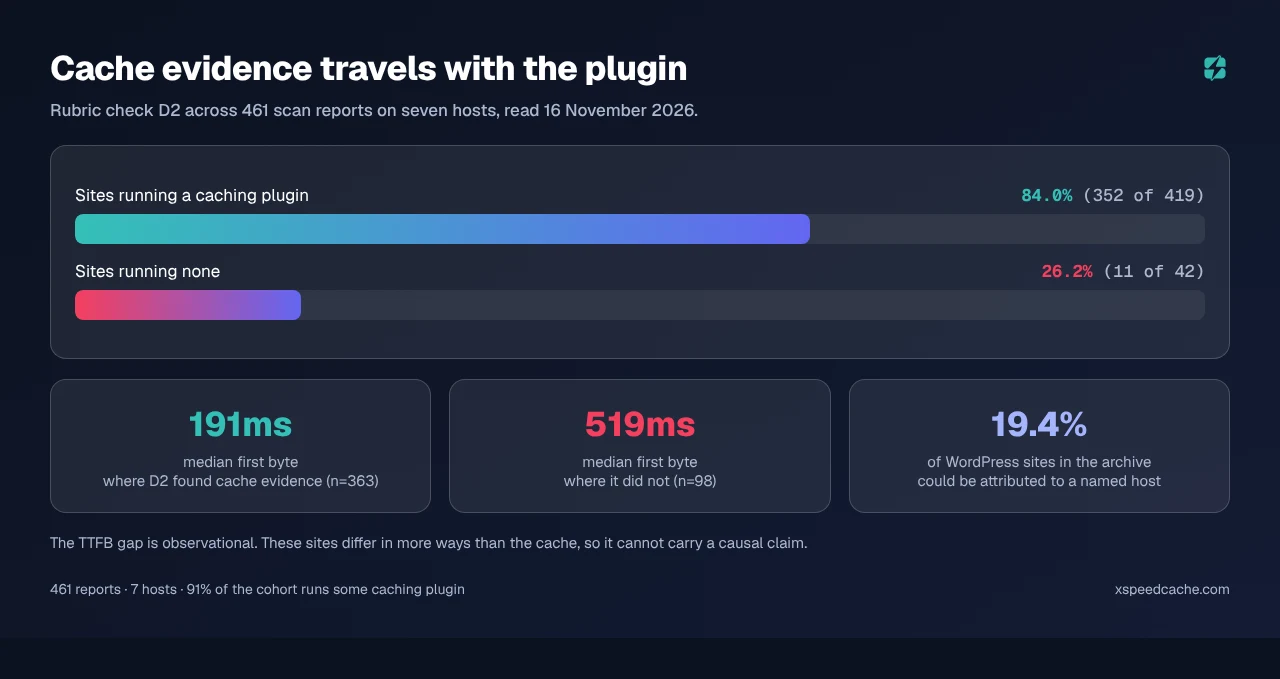
Median first byte in the cohort was 191ms where D2 recorded cache evidence and 519ms where it did not, across 363 and 98 reports. That gap is observational and cannot carry a causal claim, for the same reason our 958-site study gave for refusing one: the sites differ in more ways than the cache.
The Policy-Versus-Evidence Matrix, and Where It Breaks
Here is the framework, and it is not the one we expected to publish. We expected to find hosts whose documentation disagreed with their headers. Mostly the documentation holds up. What does not hold up is the reader’s ability to check it, and that failure has three distinct causes, each measured.
One: 20 of 37 responses carrying two cache headers disagree. Where both a host-level header and a plugin header appeared in the same response, they contradicted each other more often than they agreed. x-hcdn-cache-status: DYNAMIC beside x-xspeed-cache: HIT (php). x-proxy-cache: MISS beside x-xspeed-cache: HIT (static). Both are true: the plugin served a stored page and the host edge had none. A reader checking either header alone draws the opposite conclusion from one checking the other.
Two: 33 of 150 responses carried no cache-status header at all. Namecheap accounted for 11 of those, Hostinger 7, Bluehost 6, HostGator 5. For those sites the header method returns nothing, and absence of a cache header is not evidence that nothing was cached.
Three: the header set changes with the request method. On 22 of 150 sites, a HEAD request and a GET request returned different cache headers. x-proxy-cache appeared only on the GET on 17 sites and x-server-cache on 14. We found this by auditing our own first pass, which used HEAD, and it had produced a wrong finding we were about to publish: that SiteGround documents a header its servers no longer send. SiteGround’s documentation is correct. Our request method was wrong. Every number in this article comes from the GET re-run.
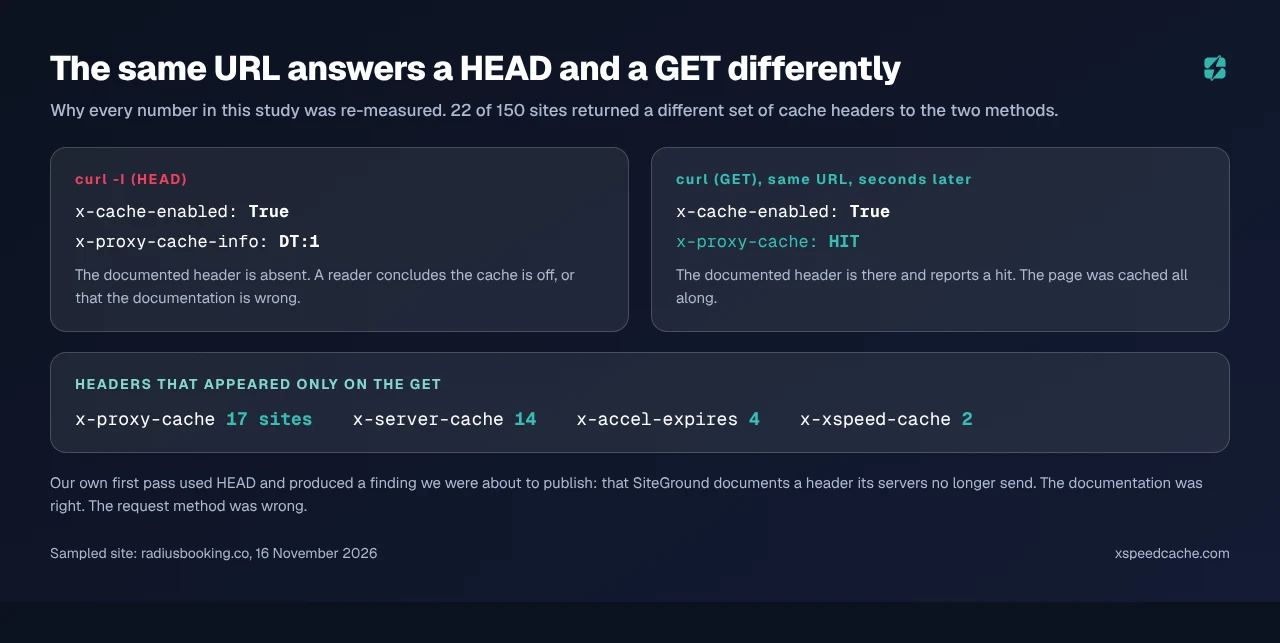
That last one deserves stating plainly, because curl -I is the command in nearly every guide to checking whether a cache is working, ours included. On these stacks it can tell you the opposite of the truth.
A Header With a Host’s Name In It Does Not Prove the Host
One more trap, and it is the reason the per-host attribution above leans on DNS rather than on headers.
x-endurance-cache-level carries the name of a stack associated with Bluehost and HostGator. It appeared on 3 Bluehost sites and 3 HostGator sites, which is tidy. It also appeared on a Hostinger site and a GreenGeeks site, which is not. x-nginx-cache: WordPress is spread across four of the seven hosts the same way.
The explanation that fits is that these headers travel with the site rather than the server: a page cache installed while the site lived on one host keeps emitting its header after a migration. On a site you did not build, a brand-named cache header is a clue about its history, not proof of where it runs now, which is one reason a site can get slower after a host change.
The Two-Request Check You Can Run in a Minute
The protocol is four steps and it takes longer to read than to run.
- Request your homepage twice with a GET, not a HEAD, in a session with no login cookie. The first request may fill the cache; the second is the one that tells you anything.
- List every cache-status header in the second response. Expect zero, one or two. Two is normal and means you have two caches.
- Name each one. A header matching your plugin is your plugin.
x-hcdn-cache-status,x-proxy-cache,x-cache-statusandcf-cache-statusare layers in front of it. A brand-named header may be neither, per the section above. - Decide from the host-level header, not the plugin’s. If the host layer says
MISS,DYNAMICorBYPASSwhile your plugin says hit, your pages are being served from the plugin and the host’s cache is not involved. Removing the plugin in that state removes the only cache you have.
The limitation: it describes one URL at one moment for a logged-out visitor, and says nothing about a cart page or a logged-in session. For what should never be cached, the case for not running a page cache at all is a better guide than a header.
On what the headers themselves mean, MDN’s HTTP caching guide is the reference for Cache-Control and Age, and nginx’s proxy module documentation describes the HIT, MISS and BYPASS states that most of the host-level headers above are reporting.
Reading Two Headers on Twenty-Five Sites at Once
One site is a minute of work. A client list after a host migration is an afternoon, and it is the kind of work our own tooling exists for.
xSpeed Cache emits x-xspeed-cache with a value that distinguishes a static hit from a PHP hit, which is what let us separate our own cache from the host’s in all 150 responses above. Our scan records check D2 per report with a date, so the archive this study used is the same instrument a reader can run on one site, free and with no account, and its MCP server answers the same question from an agent. For a fleet, xSpeed Hub reads the same state across every site at once. Which cache layers are available to you at all depends on the plan, and Free vs Pro lists them, as does the 80-capability comparison.
Two honest notes on our own position in this data:
- 📊 Our plugin is most of the plugin column. 285 of 370 Hostinger sites and 9 of 10 GreenGeeks sites. An 84% figure computed on a population that is mostly our own users is a statement about our users, and we have said so twice because it is the most important caveat on the page.
- 🧪 Our own header changed with the request method.
x-xspeed-cachereadBYPASSon many homepages in the first HEAD pass andHITon the GET re-run, so the trap in this article is one our own plugin participates in.
If your conclusion is that the server behind a miss is the thing to fix rather than the cache, that is often right, and it is a hosting decision. We recommend xCloud for it, and it is ours: xCloud and WPDeveloper are both Startise companies. For sites where the cache hits and the page is still slow, distance rather than the host is usually the answer.
Common Mistakes People Make With Host Caching
- 🔁 Removing the plugin because the host “handles caching”. On the five hosts whose documentation we could read, four do not say that. Check the host-level header first.
- 🧪 Testing with
curl -I. It changed the answer on 22 of 150 sites in this study. - 1️⃣ Reading one header and stopping. 37 responses carried two, and 20 of those disagreed.
- 🏷️ Trusting a brand name in a header.
x-endurance-cache-levelshowed up on hosts it does not belong to. - 🔌 Stacking two page caches deliberately. Hostinger documents its cache running alongside a plugin and tells you to clear both. Namecheap advises one caching plugin per site. Coexisting is not the same as doubling up inside WordPress.
- 📅 Quoting a host policy without a date. Host documentation drifts, which is why every quote here carries 16 November 2026.
- 🧭 Assuming the host from the nameserver. It works for
dns-parking.com. It fails for Cloudflare, which is 35.2% of the corpus.
Frequently Asked Questions
I removed my caching plugin because my host said it caches for me, and the site got slower. What happened?
Most likely the host’s cache was not on, or was not covering your pages. Request the homepage twice with a GET and read the host-level header. If it reads DYNAMIC, MISS or BYPASS on the second request, nothing cached your page and the plugin was doing that job. On Hostinger specifically, the server cache is a toggle in Cache Manager under Advanced, so it is off until somebody turns it on.
I ran curl -I on my site and saw no cache header, so I assumed caching was broken. Was I wrong?
Possibly. On 22 of the 150 sites we probed, a HEAD request returned a different set of cache headers from a GET, and x-proxy-cache appeared only on the GET on 17 of them. Re-run it as a GET, discarding the body, and read the headers from the second request.
My response has two cache headers that say different things. Which one is right?
Both. They describe different layers. The plugin header tells you whether WordPress served a stored page; the host-level header tells you whether the layer in front of WordPress had its own copy. In our probe, 20 of the 37 responses carrying both reported different states, which is normal rather than a fault.
Is a caching plugin pointless on a host that caches at the server?
Not on this evidence, and the answer depends on the host. SiteGround documents its NGINX cache as on by default, and its three plugin-free sites all showed cache evidence. Namecheap and GreenGeeks document the opposite arrangement and sent no host-level cache header at all, so on those the plugin is the cache.
I migrated hosts and my old host’s cache header is still showing. Should I worry?
It is worth cleaning up but rarely breaks anything. A page cache installed under the old host can keep emitting its header on the new one, which is how x-endurance-cache-level turned up on a Hostinger site in our data. Find the plugin or drop-in emitting it and decide deliberately whether you want it.
Why can I not find my host in your table?
Because we could not prove it. Only 19.4% of the WordPress sites in the archive could be attributed to a named host, and Cloudflare’s nameservers alone hide 35.2% of them. If your DNS is at Cloudflare, this method cannot see your host, and neither can anyone else using it.
My host’s documentation says one thing and a support agent told me another. Which do I follow?
Follow what your site’s headers do, then raise the gap with your host. Documentation is what a host has committed to in public and is the right thing to quote back, which is why every policy in this article is quoted and dated rather than paraphrased.
Does the plan I am on change this?
Yes, and that is the part a header cannot tell you. Object caching in particular stops one plan above the one most people buy on five of seven hosts we audited in October. The plan page is the source for that, not the response headers.
How do I check this on twenty sites without doing it twenty times?
Run the scan on each and read check D2, which records cache evidence per report with a date. The manual two-request method is better for one site you are actively debugging, because you see the raw headers.
Is 84% a measure of how well caching plugins work?
No, and it would be wrong to read it that way. It is the share of sites in a self-selected archive, mostly running our own plugin, where one rubric check found cache evidence on one URL. It says that on these hosts cache evidence travels with the plugin. It does not rank plugins, and it is not a field measurement of WordPress.
What would change these numbers?
A host turning its cache on by default. A rubric change to D2, which has happened twice in this corpus already. Or a different slice of the archive: our cohort is 461 of 2,780 WordPress reports, and the unattributed 80.6% could look nothing like it.
Conclusion: Your Host’s Cache Is Probably a Toggle
| If you are… | Do this first | Then |
|---|---|---|
| About to remove a caching plugin | Read the host-level header on a second GET | Only remove it if that header reports a hit |
| Debugging a slow page that “has caching” | Check whether two caches are reporting different states | Fix the layer that says MISS |
| Auditing a site you inherited | Treat brand-named cache headers as history | Confirm the host by DNS, not by header |
| On Namecheap or GreenGeeks | Assume the plugin is your only page cache | Both document it that way and sent no host header |
| On SiteGround | Expect x-proxy-cache to be doing the work | Use Speed Optimizer as the control surface |
What to do this week: request your homepage twice with a GET and write down every cache header you get back. Name each one. If the host-level layer says anything other than a hit, your plugin is the cache and removing it is a downgrade. Check what your plan actually includes before you buy a fix for a toggle you have not flipped. Then run the free scan and read check D2 against what you found by hand, and if the two disagree, the headers win. xSpeed Cache is free on the directory and $29 a year at the founding price, with a 14-day money-back guarantee, and its x-xspeed-cache header is the one that let us separate our own cache from seven hosts’ in this study. If you would rather read the troubleshooting path than the headers, common problems and server compatibility cover the usual causes.
If you run this on your own host and get a result that contradicts the table above, we would rather know. Our figures are a floor on a visible slice, and the 80.6% we could not attribute is where the interesting counter-examples are.