WP Rocket vs SiteGround Optimizer in 2026: One Checks Your Filesystem, the Other Checks Its Licence Server
Updated October 2026
SiteGround’s performance plugin lists 1,000,000+ active installs and shipped v7.8.3 on 23 September 2026, per a direct wordpress.org Plugin API query on 2 October 2026. WP Rocket charges $59.95 a year for the same job, verified on its own pricing page the same day, and has no install count at all because it is not in the plugin directory. The comparison people expect is free against paid. The more useful comparison is what each plugin quietly stops doing when its surroundings change: one of them reads two files on your server to decide, the other asks its vendor’s licence server. Both answers are in shipped source and vendor documentation, and this article reads them.
Quick Summary: Which One Survives a Move
| If you want… | Do this | Why |
|---|---|---|
| The fastest cache SiteGround can give you | Speed Optimizer, on SiteGround | Dynamic caching, Memcached and image compression are all documented as SiteGround-only |
| The same features after you leave SiteGround | Not Speed Optimizer | Three features are gated on the server underneath, not on a setting you can carry |
| Unused-CSS removal without a licence check | Neither | WP Rocket generates it on its own cloud and requires a valid licence |
| Optimization that keeps working offline or on an intranet | Speed Optimizer, or xSpeed Cache free | WP Rocket disables Used CSS where WP_ENVIRONMENT_TYPE is local |
| Image compression at zero cost | Speed Optimizer, on SiteGround only | Ours is Pro, and WP Rocket compresses no files at all |
| A track record measured in years | WP Rocket or Speed Optimizer | In the directory since 25 November 2014; we arrived 27 May 2026 |
| To stop renewing | A lifetime licence | WP Rocket renews annually; SiteGround’s plugin is free but the hosting renews |
Neither plugin is portable, and that is the finding. The question is not whether you accept a dependency. It is which dependency you would rather be exposed to: the filesystem under your site, or a server your vendor operates.
The Three Sentences SiteGround Publishes, and the Code Underneath Them
The plugin’s own readme on wordpress.org, read on 2 October 2026, says it will “dramatically improve your WordPress website performance on any hosting platform.” Further down the same file it carries three qualifications, quoted exactly:
- Dynamic caching: “This default feature is available exclusively for SiteGround servers, ensuring optimal performance.”
- Memcached: “This powerful feature is exclusively available in the SiteGround environment.”
- Image compression: “Please note that image compression feature is exclusive to the SiteGround Environment.”
Counting every entry the readme sets off as its own heading or bold bullet, and excluding the five section banners, the plugin names 25 features. Three of them carry an exclusivity sentence, and those three are the fastest ones it has.
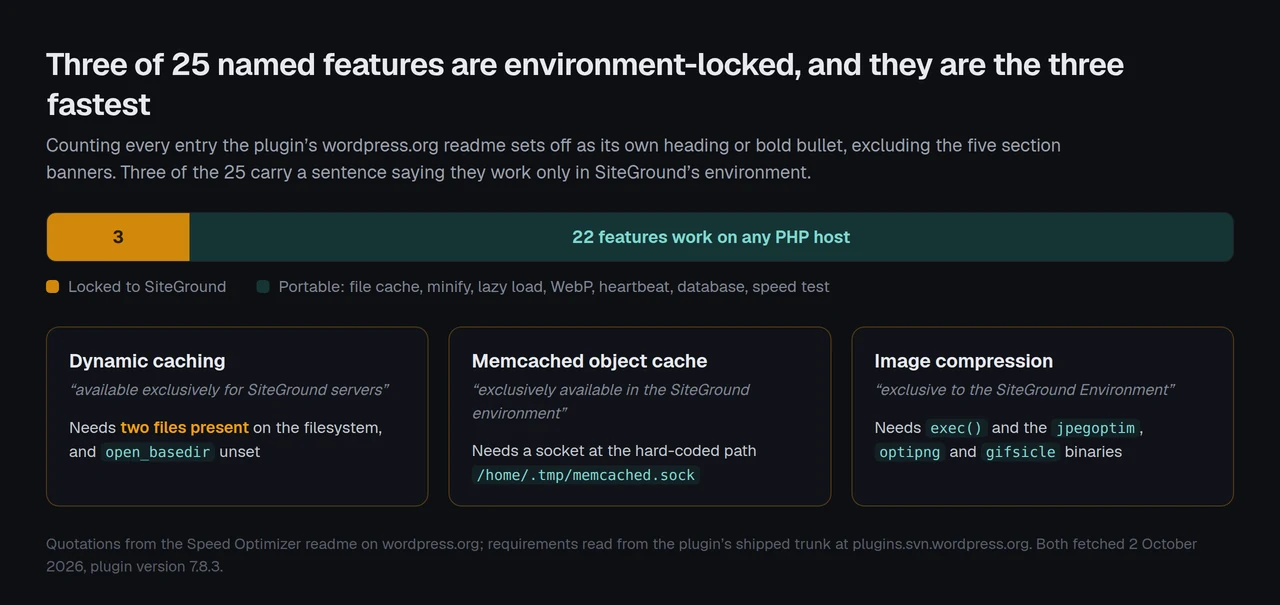
Those three sentences have been quoted before, including in our own roundup of free WordPress caching plugins. What nobody publishes is the mechanism, which is sitting in the plugin’s shipped trunk and is shorter than the sentences describing it.
In vendor/siteground/siteground-helper/src/Helper_Service.php, the whole environment test is one function:
public static function is_siteground() {
    // Bail if open_basedir restrictions are set, and we are not able to check certain directories.
    if ( ! empty( ini_get( 'open_basedir' ) ) ) {
        return 0;
    }

    return (int) ( @file_exists( '/etc/yum.repos.d/baseos.repo' ) && @file_exists( '/Z' ) );
}
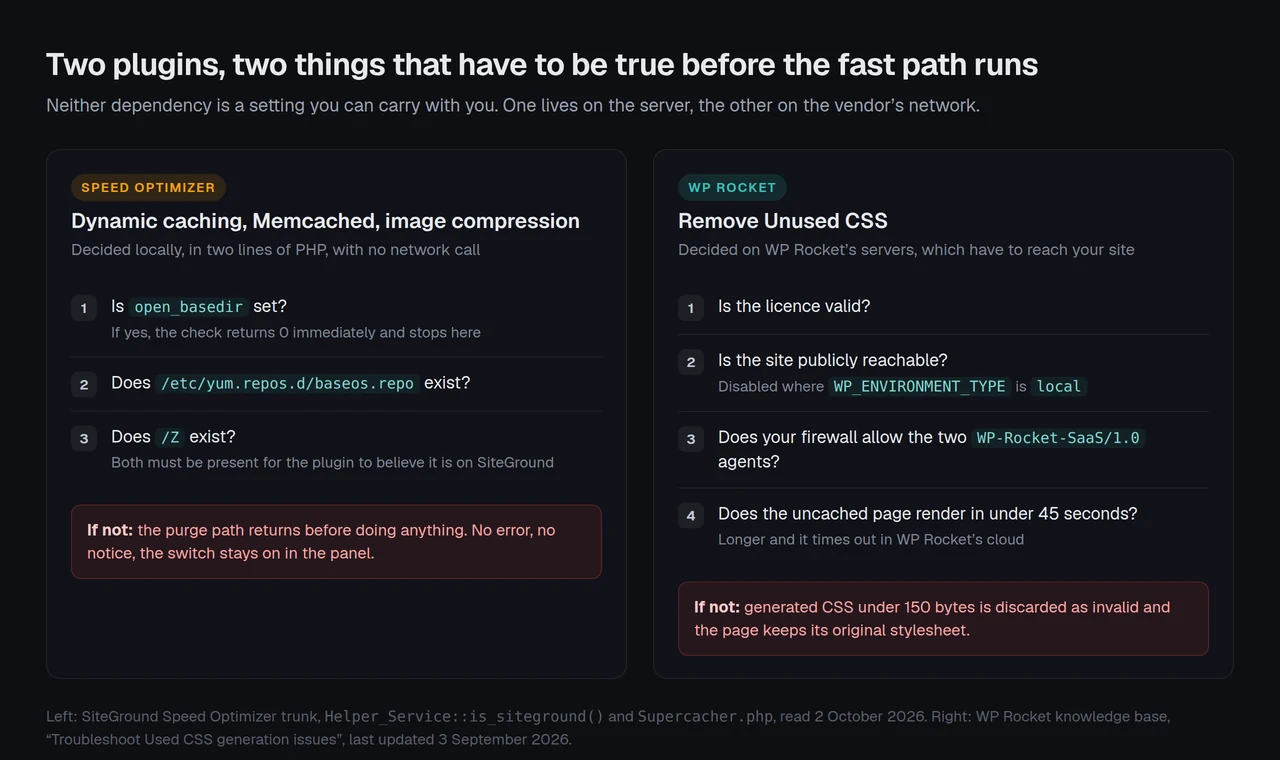
Read on 2 October 2026 from the plugin’s trunk. Two files decide it: a CentOS-family package repository definition, and a directory called /Z at the filesystem root. If both are present, the plugin believes it is on SiteGround. core/Supercacher/Supercacher.php calls that function four times, and the cache-purge path opens with if ( ! Helper_Service::is_siteground() ) { return true; }, which returns before doing anything.
Three features, three different locks, none of them a licence
The readme’s three “exclusively” sentences read as one policy. In code they are three unrelated environment dependencies, and the difference matters because they fail in three different ways.
| Feature | What it actually requires | How it fails elsewhere |
|---|---|---|
| Dynamic caching | is_siteground() returning true: two files present, open_basedir empty | Purge path returns early; no error shown |
| Memcached object cache | A socket at the hard-coded path /home/.tmp/memcached.sock | Healthcheck disables the option and raises an admin notice |
| Image compression | exec() access to the jpegoptim, optipng and gifsicle binaries | Compression call returns a non-zero status per file |
| File-based caching | Nothing beyond PHP and a writable directory | Works anywhere |
| Minify, lazy load, WebP, heartbeat | Nothing beyond PHP | Work anywhere |
The memcached path is a constant in core/Memcache/Memcache.php: const UNIX_SOCK_FILE = '/home/.tmp/memcached.sock', present since version 7.2.2. Image compression shells out through exec() in core/Images_Optimizer/Images_Optimizer.php, using command templates for gifsicle, jpegoptim and optipng, with PNGs above a size ceiling skipped under the comment that larger ones “hit the limits”.
That reading is fairer to SiteGround than “crippled off-platform” would be. There is no licence key, no phone-home and no deliberate downgrade. They shipped a plugin whose three fastest paths assume the filesystem they built, and they said so in the readme rather than hiding it. The honest complaint is narrower: the first line of the same readme promises any hosting platform, and a reader who takes that line at face value installs a plugin that will quietly do less.
The branch that catches sites nobody warned
One line of that function deserves its own paragraph, because it misfires in the opposite direction. is_siteground() returns 0 whenever open_basedir is set to anything at all, before it looks at the filesystem. open_basedir is an ordinary PHP hardening directive, and plenty of shared hosts set it by default. On such a host the detector reports “not SiteGround” as a safety measure, which is correct behaviour and also means the answer is a property of your PHP configuration rather than your hosting company.
The practical consequence is a support conversation nobody enjoys. A site hosted on SiteGround, with open_basedir set in a custom PHP configuration, gets the off-platform feature set while sitting on the platform it paid for, and the panel reports nothing unusual because returning 0 is the documented safe path rather than an error. Anyone debugging that from the WordPress admin alone will not find it.
WP Rocket Has a Dependency Too, and It Is Not the Web Server
A comparison that names only one side’s constraint is an advertisement. WP Rocket’s constraint is documented just as plainly, in its own knowledge base, and it is bigger than the .htaccess preference we covered in the WP Rocket and LiteSpeed Cache comparison.
Remove Unused CSS, the feature WP Rocket’s marketing leads with, does not run on your server. Its documentation on handling a private intranet states that “the generation of CSS for these features is done externally in WP Rocket’s servers, which has to be able to access your site to generate the CSS.” The troubleshooting article, last updated 3 September 2026, lists the conditions:
- “You must have a valid WP Rocket license.”
- Your site must be publicly reachable, and the feature “is automatically disabled in environments where the
WP_ENVIRONMENT_TYPEconstant is set to local.” - Pages are fetched with a query string appended, and “the non-cached page shouldn’t take more than 45 seconds to load, or it will time out in WP Rocket’s Cloud servers.”
- Your firewall or security plugin must allow-list two named
WP-Rocket-SaaS/1.0user agents, or their published IP list.
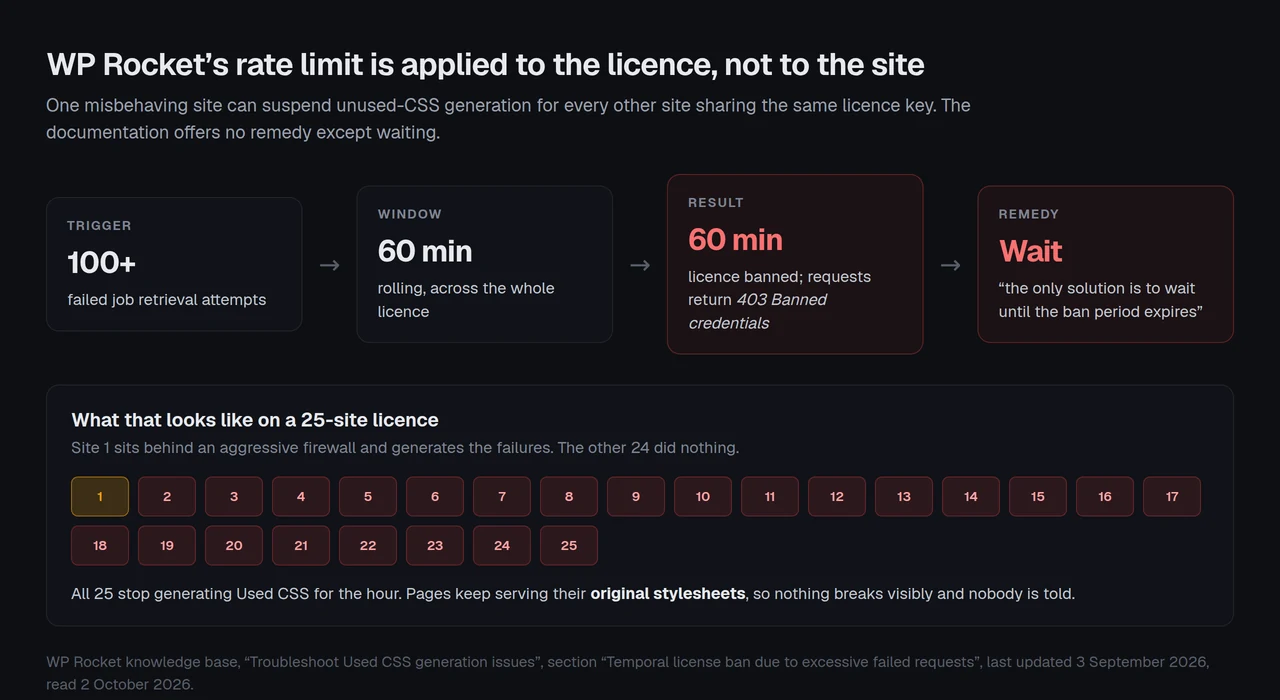
Two further details in the same article are worth more than the list. Used CSS smaller than 150 bytes is treated as invalid and discarded, so a blocked request degrades to the original stylesheet rather than to an error. And the rate limit is applied to the licence rather than the site: more than 100 failed job retrievals within 60 minutes bans the licence for 60 minutes, “for all the websites using the same license, and not to a specific website.”
One claim worth stating precisely, because it is easy to get wrong in either direction: WP Rocket does not compress image files. Its features page, read on 2 October 2026, describes Critical Image Optimization as detecting and prioritising the Largest Contentful Paint element and excluding above-the-fold images from lazyload, and says that “if your site uses WebP images, WP Rocket can also create a separate cache file to serve those.” It serves and prioritises; it does not re-encode. Speed Optimizer does re-encode, free, on SiteGround’s hardware only.
The two products in this comparison block each other, and the documentation says so
Buried in WP Rocket’s list of services that interfere with Used CSS generation is this: “Siteground’s Antibot AI System may require their support to allow our IP addresses.”
That is WP Rocket’s own documentation naming SiteGround as a host whose bot protection can stop WP Rocket’s cloud from reaching the site it is paid to optimize. It is a documented interaction between the exact two products on this page, and it means the combination most readers assume is safe (SiteGround hosting plus a WP Rocket licence) can need a support ticket before the headline feature works.
We ran into the same system from the other side while writing this. Three requests to siteground.com on 2 October 2026, including the WordPress hosting page and a knowledge-base article, each returned HTTP 202 with a redirect to /.well-known/sgcaptcha/ instead of a page. That is why no SiteGround hosting price appears anywhere in this article: their published rates could not be read on the day, and quoting a remembered figure would be worse than leaving it out.
| Keeps working without… | Speed Optimizer | WP Rocket |
|---|---|---|
| A valid licence | ✅ yes | ❌ Used CSS needs one |
| The vendor’s servers being reachable | ✅ yes | ❌ needed in both directions |
| Your firewall allow-listing a bot | ✅ yes | ❌ two agents or an IP list |
| A particular filesystem | ❌ three features gated | ✅ yes |
A shell binary reachable by exec() | ❌ image compression gated | ✅ yes |
| A public internet connection | ✅ yes | ❌ Used CSS disabled locally |
Three ticks each, in different places. That is the honest summary of this comparison, and it is why a feature grid cannot settle it.
The table says what each one needs. The order of the checks, and what each plugin does when one fails, is the part that decides whether you ever find out.
The Dependency Audit: Four Steps, Run It on Whatever You Already Have
Feature grids compare what two plugins claim on a good day. This protocol compares what they keep doing on a bad one, and it takes about twenty minutes on a staging copy.
- List what you actually enabled. Not what the plugin offers. Open the settings and write down the switches that are on. Most sites have six to ten.
- Classify each switch by what it would lose. Three buckets: the server underneath (a path, a binary, a socket), the vendor’s infrastructure (a licence check, an outbound call, an inbound crawl), or nothing at all.
- Break one dependency on purpose. Set
open_basedirin a stagingphp.iniand reload the plugin’s panel. Or block the vendor’s user agent at the firewall for an hour. The features that go quiet without telling you are the ones to worry about. - Count the two migration numbers. How many enabled features would survive a host change, and how many would survive a lapsed licence. Those two counts are the comparison.
What this protocol cannot tell you. We read SiteGround’s detection logic in source rather than observing it on a live SiteGround account, so the behaviour described is what the code specifies, not a measurement. WP Rocket’s cloud conditions come from its own documentation, which can change without a changelog entry. Install counts from the plugin directory are buckets, never measurements, and the 1,000,000+ figure cannot be turned into a percentage of anything. We did not benchmark either plugin, because a dependency audit and a speed test answer different questions and mixing them is how comparisons end up proving nothing.
Running This Across Twenty-Five Sites You Did Not Choose the Hosting For
Agencies hit both dependencies at once, and the licence-level rate limit is the one that turns a single site’s problem into everyone’s. One client site behind an aggressive firewall can generate enough failed job retrievals to ban the shared licence for an hour, and during that hour the other twenty-four sites get their original stylesheets back without anyone being told.
The host-locked side fails differently and more predictably. A fleet spread across four hosting companies gets three features on the SiteGround subset and file-based caching everywhere else, which is a supportable position as long as the page cache is doing the heavy lifting. It is also easier to document for a client, because the boundary is the hosting account rather than a rate limit that moved an hour ago.
Throughput is the other number worth knowing before a fleet migration. WP Rocket’s documentation puts Used CSS generation at up to 100 new URLs per batch every 60 seconds, with a ceiling of 300 URLs scheduled at any one time, and notes the figure can be customised. A 5,000-page catalogue therefore takes roughly an hour of clean runs to work through, and every failed batch inside that window counts toward the 100 that trigger the licence ban. The feature is not slow by accident: it is a queue with a rate limit on one end and a cron dependency on the other.
Where our own plugin sits in the same audit
Our own plugin belongs in the same audit, and it is ours: xSpeed Cache is built by WPDeveloper, a Startise company, and so is the hosting we recommend. The page cache serves cached pages as static files before PHP starts, so it does not depend on the web server or on us. The object cache is in the free tier and takes a configurable Redis or Memcached host and port (defaulting to 127.0.0.1:6379 and 127.0.0.1:11211) rather than a fixed socket path, which is the one row in this audit where the design difference is clearly in our favour. Per a wordpress.org Plugin API query on 2 October 2026, we are at 9,000+ installs, 5.0 stars from 16 ratings, v1.3.7, in the directory since 27 May 2026.
Where we have the same exposure, stated plainly. Critical CSS and unused-CSS removal are Pro features, not free ones, which is a straight loss against SiteGround giving image compression away. And our server-side Critical CSS route is brokered by xSpeed Hub, which is a cloud dependency of exactly the class this article has spent two sections describing. The difference is that it is not the only route: the panel can capture the fold in your own browser, you can point it at your own rendering service, or you can push CSS in from a build pipeline through the REST endpoint. One of three paths calls home, rather than the only path.
Run the free scan on your own site: xspeedcache.com/scan/
If you are weighing hosting at the same time, we recommend xCloud, and it is ours: xCloud and WPDeveloper are both Startise companies. The reason it belongs in this particular article is that a dependency you control is better than one you discover, and bring-your-own-server hosting means the filesystem under your site is a decision rather than a surprise.
What a Year Costs, and What Each Price Buys You
| Cost line | Speed Optimizer | WP Rocket | xSpeed Cache |
|---|---|---|---|
| Plugin licence | $0 | $59.95/yr, 1 site | $0 free, $29/yr or $79 once |
| 3 sites | $0 | $119.95/yr | $49/yr or $149 once, 5 sites |
| 25 sites | $0 | $299.95/yr covers 50 | $99/yr or $249 once |
| Renews forever | No licence to renew | Yes, automatically | Yearly, or never on lifetime |
| Refund window | — | 14 days | 14 days |
| Free trial of the paid tier | — | “We don’t offer a trial version” | The free plugin is the trial |
| Install base | 1,000,000+ | Not in the directory | 9,000+ |
| In the directory since | 25 November 2014 | Never | 27 May 2026 |
WP Rocket’s figures and our own were read from each vendor’s pricing page on 2 October 2026. WP Rocket also lists 100-site and 500-site tiers whose prices do not render on the page, so none is quoted here. The free column has a cost that does not appear in it, and the article cannot put a number on it today: Speed Optimizer’s three best features require SiteGround hosting, and SiteGround’s published rates were unreadable behind their own bot challenge when this was written.
A naming detail that will cost you five minutes
The plugin is listed in the directory as Speed Optimizer, under the slug sg-cachepress, and the readme title drops the company name entirely. Its own installation instructions still tell you to search for “SiteGround Optimizer”. Most published comparisons, including our earlier ones, still use the old name. A related wrinkle for anyone citing figures: the readme claims the plugin is “trusted by more than 2 million website owners” while the directory’s bucket reads 1,000,000+. Both are SiteGround-adjacent sources, the bucket is coarse by design, and neither number should be presented as precise.
Common Mistakes Buyers Make Between a Bundled Tool and a Licence
- Reading “any hosting platform” as a feature guarantee. It is true of the plugin and false of three of its features. Check the three “exclusively” sentences before you plan a migration around them.
- Assuming free means no dependency. The dependency moved rather than disappearing: it is now your hosting contract.
- Assuming paid means no dependency either. A licence is a dependency with a renewal date and a rate limit attached.
- Testing on a box that is not representative. A staging server with
open_basedirset reports “not SiteGround” even on SiteGround, so a test there tells you nothing about production. - Buying a 50-site licence for 25 sites without checking the shared-fate rule. The Used CSS rate limit applies to the licence, so sites share each other’s failures.
- Comparing feature counts at all. Both plugins cache, minify, lazy load and handle WebP. The grid is nearly a tie and the dependencies are not.
Frequently Asked Questions
I moved my site off SiteGround and it got slower, but all my plugin settings came across. What happened?
Dynamic caching stopped. The switch is still on in the panel, and is_siteground() now returns 0, so the purge path returns before doing anything. Enable file-based caching, which works anywhere, and expect a different time to first byte because the old cache sat in front of PHP at the server level. Our write-up on a site that got slower after a host change covers the measurement side.
I enabled Memcached in Speed Optimizer on my own VPS and it switches itself off. Why?
The plugin looks for a socket at /home/.tmp/memcached.sock, which is a hard-coded constant in its source rather than a setting. If your memcached listens on a TCP port or a different socket path, the healthcheck finds no working connection, disables the option and writes an admin notice. There is no field to point it elsewhere.
I turned on image compression and none of my images changed size. Is it broken?
It needs exec() access to jpegoptim, optipng and gifsicle on the server, and the readme marks the feature as exclusive to SiteGround’s environment. On most other hosts one or more of those binaries is missing or exec() is disabled, and each file returns a non-zero status. PNGs over the plugin’s size ceiling are skipped by design even where it does work.
My WP Rocket unused-CSS removal has been “pending” for days and the pages are still loading the full stylesheet. What do I check?
Three things, in order: that the licence is valid, that your firewall or security plugin allows WP Rocket’s two WP-Rocket-SaaS/1.0 user agents or their IP list, and that the uncached page renders in under 45 seconds. Their cloud fetches the page to generate the CSS, so anything that blocks the fetch produces a quiet no-op rather than an error.
I am on SiteGround and I bought WP Rocket. Why does one of them keep breaking the other?
WP Rocket’s own documentation names SiteGround’s Antibot AI System among the services that may block its Used CSS generation, and says their support may need to allow-list WP Rocket’s IP addresses. That is the documented path: ask SiteGround to allow the IPs from WP Rocket’s published list.
One of our client sites broke and now none of the others are optimized. How is that possible?
WP Rocket’s rate limit is applied at the licence level. More than 100 failed job retrievals within 60 minutes bans the licence for an hour across every site using it. The only remedy their documentation offers is waiting for the ban to expire, so the fix is to find the site generating the failures.
Does Speed Optimizer work at all off SiteGround, or should I not bother?
It works, and reasonably well. File-based caching, CSS and JavaScript minification, lazy loading, WebP generation, heartbeat control, database maintenance and the maximum-image-width tool have no environment dependency. You lose three features, and they happen to be three of the fastest.
Which one keeps working on a site that has no internet access?
Speed Optimizer, or our free tier. WP Rocket’s Used CSS feature is disabled automatically where WP_ENVIRONMENT_TYPE is set to local, because the generation happens on WP Rocket’s servers and they cannot reach a machine that is not published.
How many sites does WP Rocket have installed?
Nobody outside WP Media can say. WP Rocket is not in the wordpress.org plugin directory, so no install count exists for it and any figure quoted elsewhere is an estimate. The same is true of FlyingPress and Perfmatters, which we noted in the WP Rocket alternatives ranking.
Is xSpeed Cache free of all of this?
No, and pretending otherwise would fail this article’s own test. Our page cache has no dependency beyond PHP and our object cache takes a host and port you set. Critical CSS and unused-CSS removal are Pro, and the server-side generation route is brokered by xSpeed Hub, which is a cloud dependency. What differs is that it is one of three routes rather than the only one: capture in the browser, your own rendering service, or a REST upload from a build pipeline. The details are in our Critical CSS documentation and the free versus Pro breakdown.
What is the single fastest check on whether my cache is working at all?
Run the free xSpeed Scan against the URL and read the delivery checks. It probes from outside, so it sees what a visitor sees rather than what the plugin panel claims, and it needs no account. If you would rather check by hand, request the page twice and compare the cache header, which is the method in our server compatibility documentation.
Can I run both plugins together?
Do not. Both write page caches and both touch CSS and JavaScript delivery, so you get double minification and two purge mechanisms disagreeing about freshness. Pick one, and if you are leaving SiteGround our migration documentation covers importing settings from an existing cache plugin.
Conclusion: Which Dependency Do You Want
Speed Optimizer is the right answer on SiteGround hosting, and genuinely good value there: three server-level features for nothing, from a plugin that has been in the directory since November 2014 and carries 1,000,000+ installs. Off SiteGround it becomes a competent file-based cache with a minifier, which is a worse deal than it looks because the three features you read about are the ones you cannot have.
WP Rocket is the right answer when you want the strongest CSS tooling and you can meet its conditions: a valid licence, a reachable site and a firewall that lets its crawler through. At $59.95 a year for one site it is not expensive, and its 14-day refund is the trial it does not otherwise offer.
What to do this week:
- Open your performance plugin and write down the switches that are on. Six to ten is normal.
- Classify each one as depending on the server, the vendor, or nothing, using the 80-capability comparison to check what is actually in each tier.
- Set
open_basediron a staging copy and reload the panel. Note which features go quiet without an error. - Measure before and after, so the migration has numbers rather than impressions. Request the page twice and compare the cache header, per our server compatibility documentation.
- If the audit says you want the page cache to depend on nothing, start with xSpeed Cache free, and upgrade at $29/yr or $79 once with a 14-day money-back guarantee. We are newer than both plugins here (in the directory since 27 May 2026) and that is a real reason to test before you commit.
If after that audit the answer is WP Rocket, buy WP Rocket. It is a good plugin with a decade behind it, and a licence you renew knowingly is a better position than a free feature you lose by accident.
Tell us what your audit found. The two migration counts are the interesting part, and almost nobody publishes theirs.