The Theme Looks Unstyled and Minify Is the Only Thing You Changed
Updated September 2026
LiteSpeed Cache shipped a fix in version 7.9, dated 5 August 2026, for “CSS Combine serving unstyled pages”. Our own 1.1.6 of 13 August 2026 fixed combining that left a site completely unstyled, with no missing files and no errors. Both describe the page you are staring at, and neither was a minifier mangling CSS.
Hold on to that. Minification breaks a layout far more often by changing the page around a file than by changing what is inside it. The four features hidden behind one Optimization toggle each change something different, so the breakage tells you which switch to reach for.
Quick Summary: Which Switch Broke It
Confirm it · Four changes · The bisect · Shipped fixes · FAQ
| What you see | What actually changed | Turn off first |
|---|---|---|
| Whole site unstyled, no errors | A combined sheet was dropped | Combine CSS |
| One banner unstyled, rest fine | A deferred sheet got deferred twice | Async CSS |
| Layout right, buttons dead | A script ran before its config | Combine JS |
| One component broken, rest fine | That file’s syntax did not survive | Minify, minus it |
| Breaks only after a purge | Pages point at a deleted file | Combine CSS and JS |
| Broken only in the page builder | Optimization ran on an editor | Minify, minus the builder |
First, Confirm Minification Is Actually the Cause
Turn every optimization feature off, purge the page cache, and load the page in a private window.
The private window matters. Our 1.1.7 of 17 August 2026 fixed cache cleanup deleting a combined stylesheet live pages still pointed at, a failure the changelog calls “invisible to the owner, whose own browser still held the old copy”.
If the layout returns, minification owns it. If not, the purge that did nothing is the likelier story.
The Four Things a Minifier Changes, and Only One Is the File
Minification is really four operations, and they fail differently because they change different things.
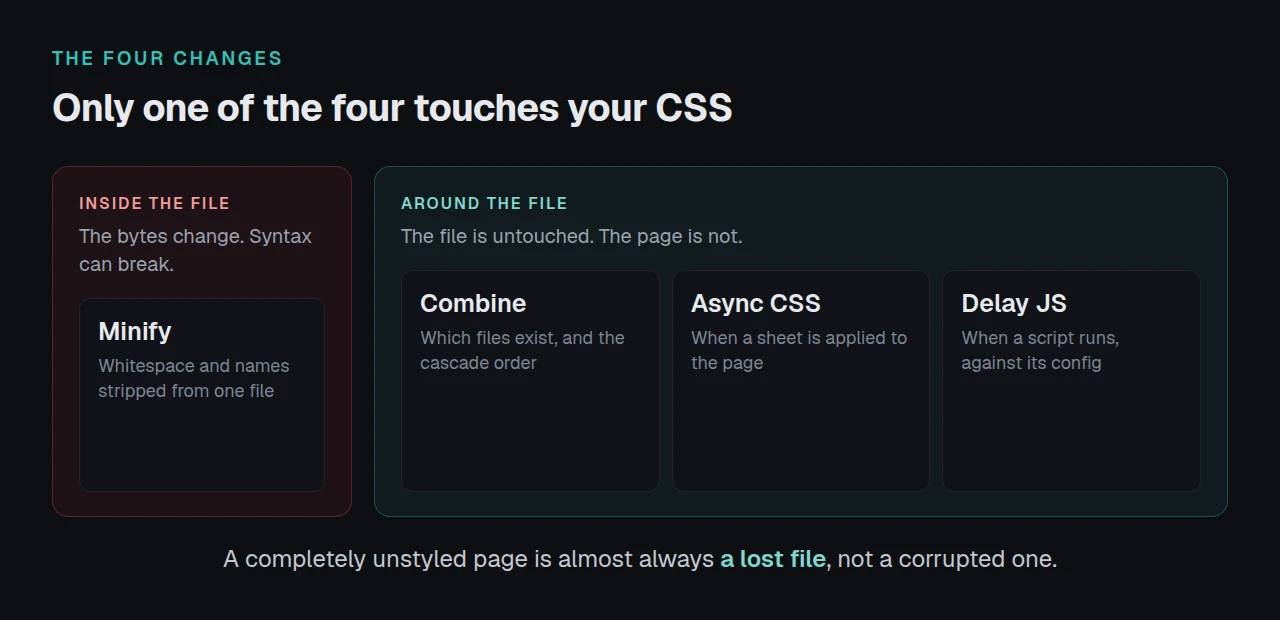
| Operation | What it changes | Typical failure |
|---|---|---|
| Minify | The bytes inside one file | Valid syntax the minifier rejects |
| Combine | Which files exist, and cascade order | The whole page loses its styling |
| Async or defer CSS | When a sheet applies | One region renders unstyled |
| Delay JS | When a script runs | Interactive parts never start |
Only the first row touches file contents, which is why “the minifier corrupted my CSS” is usually the wrong guess. Autoptimize 3.1.4 added a filter to skip minifying calc formulas because, per its own readme, “the CSS minifier on rare occasions breaks those”. That row-one failure is the exception; almost every entry below is a row two, three or four.
The Four-Pass Bisect, in Blast-Radius Order
W3 Total Cache’s readme reports the method and almost nobody follows it: “start with combine only mode (the safest optimization) and increase the optimization to the point just before functionality (JavaScript) or user interface / layout (CSS) breaks in your site.”
Run these in order, purging and checking in a private window after each.
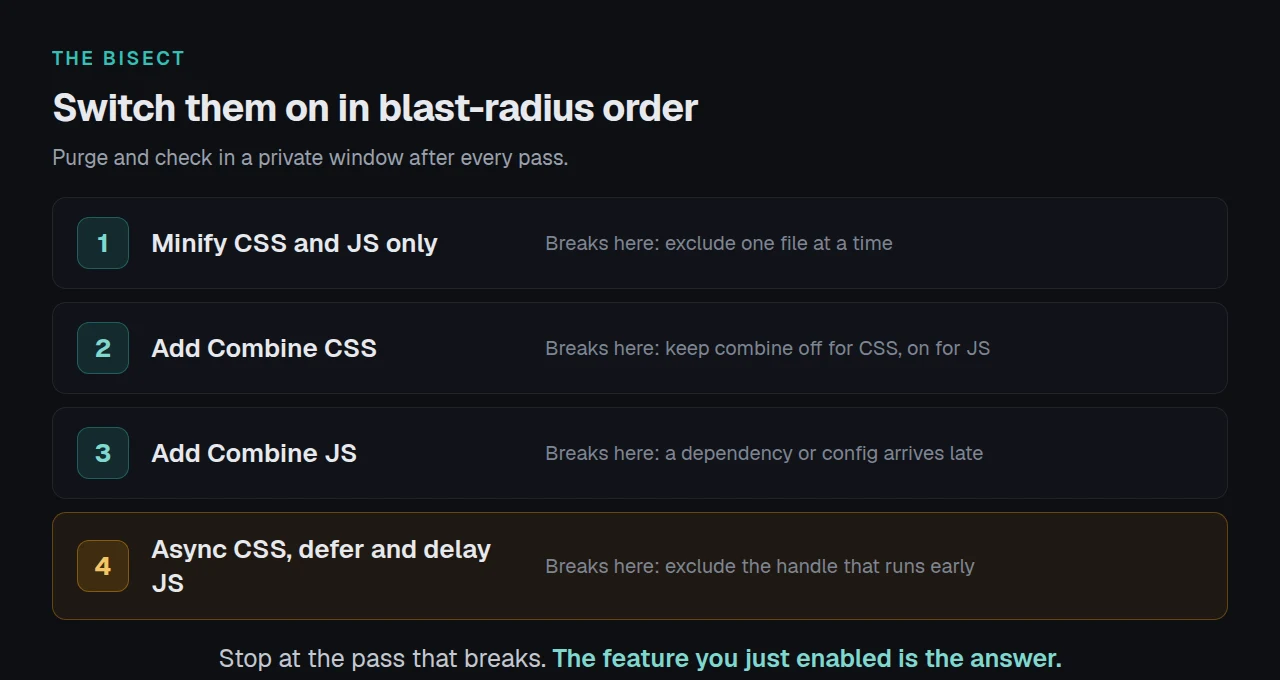
| Pass | Switch on | If it breaks here |
|---|---|---|
| 1 | Minify CSS and JS only | Exclude one file at a time |
| 2 | Add Combine CSS | Keep it off for CSS, on for JS |
| 3 | Add Combine JS | A dependency or config arrives late |
| 4 | Add async CSS, defer and delay JS | Exclude the handle that runs early |
Stop at the pass that breaks: the feature you just enabled is your answer. Hummingbird’s readme reports the same method, recommending “incremental changes and testing your site as you go so you can undo the changes if something breaks”.
Before giving up on pass 3, WP-Optimize’s readme reports that its “Contain each included file in its own block” setting can catch an error before it takes the bundle down.
Pass 4 needs a warning. According to Google’s web.dev guide to deferring non-critical CSS, the technique “may lead to bugs if not implemented properly”. Switch async CSS on last and off first.
Five Fixes Shipped for This Exact Symptom
Fetched from plugins.svn.wordpress.org on 21 September 2026. Every row is a vendor fixing a layout break caused by its own optimizer, and three are ours.
| Version | What broke |
|---|---|
| xSpeed 1.1.6, 13 Aug 2026 | WordPress inlined a small stylesheet, dropping the combined file the others were folded into |
| xSpeed 1.1.7, 17 Aug 2026 | Async CSS broke a sheet another plugin had already made non-render-blocking, leaving a consent banner unstyled |
| xSpeed 1.2.3, 2 Sep 2026 | Sheets deferred by Critical CSS were taken for print-only styles and stripped of the swap that applies them |
| LiteSpeed Cache 7.9, 5 Aug 2026 | CSS Combine served unstyled pages when the link tag used default WordPress whitespace |
| Breeze 2.5.14 | Minified CSS and JS returned 404 intermittently after a cache clear |
The pattern: combining produces the frightening symptom, a completely unstyled page, by losing a file rather than corrupting one. Timing features produce the narrow one, a single component wrong while the rest is perfect.
Exclusions have a pattern of their own. Our 1.3.3 and 1.3.4, of 16 and 20 September 2026, both fix scripts marked data-no-optimize or data-no-minify being optimized anyway, in 1.3.4 because a consent manager such as Borlabs Cookie stamps the marker late. If you excluded a file and it still breaks, check when the exclusion applies, not how it is spelled.
Bisecting Once and Shipping It Everywhere
Bisecting by hand is fine for one site and does not survive a fleet.
xSpeed Cache, which we build at WPDeveloper, keeps every optimization behind its own toggle for this reason. Safe-minify skips files already minified and falls back to the original when output looks wrong, and the xspeed_skip_minify filter excludes a file in code rather than a settings box. Both are free; Free vs Pro shows the line.
Two habits beat any setting:
- Change one switch at a time.
- Check from outside your own browser.
Run the free scan on your own site: xspeedcache.com/scan/
For agencies, xSpeed Hub pushes one preset across a fleet, so a bisect done once on staging becomes the configuration everywhere. Migrate Cache Settings to xSpeed covers moving settings across, and Common Problems and Troubleshooting has the per-symptom list.
Frequently Asked Questions
My site looks fine to me but customers say it is broken. What is happening?
Your browser holds a working copy of a combined file that has since been deleted. Our 1.1.7 changelog describes this exactly, which is why every check here uses a private window.
I excluded the file and it is still being minified. Why?
The exclusion is probably arriving after the optimizer has run. Our 1.3.4 fixed this for consent managers that stamp data-no-minify late. Exclude by URL in the settings rather than trusting an attribute another plugin adds.
My layout broke when I cleared the cache, not when I enabled minify. Is that related?
Yes. Combined files are regenerated on purge, and pages cached beforehand point at the old filename. Breeze 2.5.14 fixed the same 404 pattern. Purge the page cache and the combined assets together.
I turned everything off and the page is still unstyled. What now?
Then minification is not the problem. Check whether anything is cached at all with the four header checks, and if the page is slow rather than broken, caching stops helping at a measurable ceiling.
Do I even need combining in 2026?
Less than you did. Over HTTP/2 the request-count saving is small and the risk is everything described here. Minify without combine is what most sites should keep, and a dedicated optimizer beside a cache plugin duplicates it.
Close This Out Today
What to do this week:
- Turn every optimization feature off and confirm in a private window the layout returns.
- Run the four passes above, purging between each, and stop where it breaks.
- Exclude the file or handle that failed, rather than leaving a feature off.
- Re-check from outside your browser with the free xSpeed Scan, then read the features list for what stayed off.
If a bisect keeps landing on the same file across several sites, that file is the bug and its author wants to hear about it. W3 Total Cache’s readme asks for exactly that, and it is how the fixes above came to exist. xSpeed Cache starts free, with paid plans from $29 a year and a 14-day money-back guarantee on the pricing page.