WP-Optimize vs WP Rocket 2026: Only One Compresses an Image, and It Sends the File Somewhere Else
Updated September 2026
WP-Optimize compresses your images for free, and its shipped source sets the ceiling at 5,242,880 bytes per file before handing each one to api.resmush.it, read from the plugin’s trunk on 29 September 2026. WP Rocket, $59.95 a year on its own pricing page the same day, does not compress an image at all. Both plugins cache, minify and clean the database, so the feature grid people expect to be decisive is nearly a tie. The comparison that actually decides anything is narrower: which of the four jobs each one finishes without a second account, a second invoice or a file leaving your server. This is that comparison, priced and sourced on the day.
Quick Summary: Which One Fits Your Site
| If you want… | Do this | Why |
|---|---|---|
| Four performance jobs at zero cost | WP-Optimize free | Cache, minify, database cleanup and image compression are all in the free tier |
| Images compressed without leaving your server | Neither, at their free tiers | WP-Optimize uploads to reSmush.it; WP Rocket does no compression |
| The least configuration for the most defaults | WP Rocket Single, $59.95/yr | Its own pricing page claims 80% of best practices apply on activation |
| Lazy loading without paying | xSpeed Cache free | WP-Optimize marks Lazy Load [Premium]; WP Rocket has no free tier |
| A trial before you commit | Neither | WP Rocket answers “we don’t offer a trial version”; WP-Optimize has no paid trial |
| To stop paying every year | WP Fastest Cache or a lifetime licence | Both WP Rocket and WP-Optimize Premium renew annually |
Neither plugin is the obvious answer, and the reason is that their free and paid lines cross. WP-Optimize gives away the one thing WP Rocket never sells. WP Rocket ships in its base licence the one thing WP-Optimize holds behind a paywall.
The Four Jobs a Performance Plugin Is Asked to Do
WP-Optimize states its scope in its own directory title: “WP-Optimize – Cache, Compress images, Minify & Clean database to boost page speed & performance”. The readme is more explicit still. It says the plugin works “in four clever ways: 1. It caches your site 2. It compresses images 3. It cleans the database 4. It minifies”.
What WP Rocket’s settings screen actually contains
WP Rocket does not publish a four-job claim, but its settings screen is a list of the same work. Its features page names the tabs: Cache, File optimization, Media, Preloading, Database, CDN and Add-ons. Database cleanup is in there, described as cleaning “comments, posts, and transients, optimize your database tables, or schedule automatic cleanups”.
So the common assumption that WP Rocket is a page cache leaning on helper plugins for everything else is wrong, and it was worth checking before writing a word. Its three add-ons are Varnish Cache, Cloudflare integration and Sucuri integration, and all three are switches inside the plugin rather than separate downloads.
One job is genuinely missing from it.
The Master Comparison: Five Jobs, Three Plugins, One Gap Each
Tiers below are what each vendor’s own pages said on 29 September 2026. No cell is an estimate.
| Job | WP-Optimize | WP Rocket | xSpeed Cache |
|---|---|---|---|
| Page cache | Free | $59.95/yr | Free |
| Minify and combine CSS, JS, HTML | Free | $59.95/yr | Free |
| Lazy load images, video, iframes | $49/yr | $59.95/yr | Free |
| Clean and optimize the database | Free | $59.95/yr | Free |
| Compress or convert images | Free, off-site | Not offered | $29/yr |
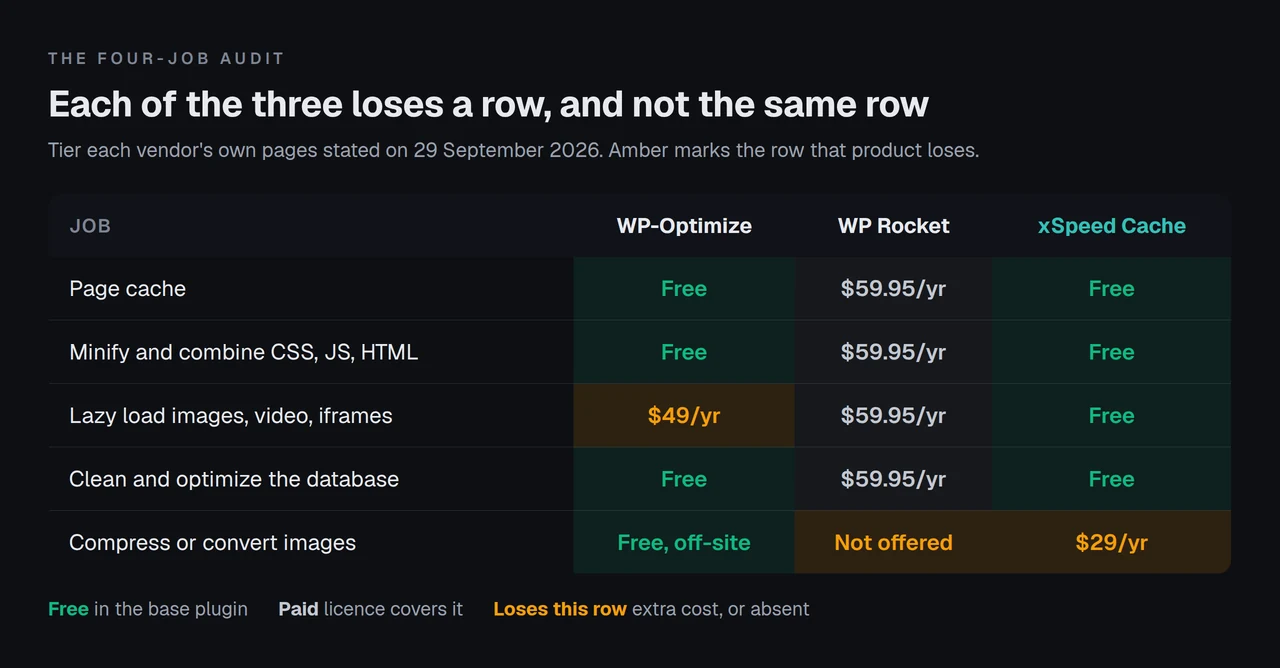
Each of the three loses a row, and not the same row. WP-Optimize loses lazy loading. WP Rocket and we both lose image compression, for different reasons and at different prices. That is the whole finding, and it is why “which is better” has no answer that survives contact with a real site.
Where each one is weak
WP-Optimize’s weak cell is lazy loading. Its readme marks Lazy Load with [Premium], alongside nine other features carrying the same tag: preload key requests, user-per-role cache, user-specific cache, cache purging permissions, delete orphaned images, delete unused image sizes, flexible clean-up schedules, and two “power tweaks” for WooCommerce and the postmeta table. Ten gated features in total, counted from the readme on the day.
WP Rocket’s weak cell is image compression, and it is not a tier problem. There is no tier. The Media tab lazy loads, and on WebP the features page is precise about what it does: “If your site uses WebP images, WP Rocket can also create a separate cache file to serve those, if needed.” It serves a WebP you already made. Making one is Imagify’s job, and Imagify is a separate product with a separate account and a separate bill.
Where the Image Work Actually Happens
This is the column no comparison publishes, and it is the one that changes what you are agreeing to.
| Question | WP-Optimize | WP Rocket + Imagify | xSpeed Cache Pro |
|---|---|---|---|
| Does the plugin compress? | Yes, in the free tier | No, Imagify does | Yes, in Pro |
| Where does the file go? | api.resmush.it | Imagify’s servers | Not stated publicly |
| Per-file ceiling | 5,242,880 bytes | 2 MB on the free plan | Not stated publicly |
| Monthly quota | None published | 20 MB free, 500 MB at $4.99/mo | None published |
| Second account needed | No | Yes | No |
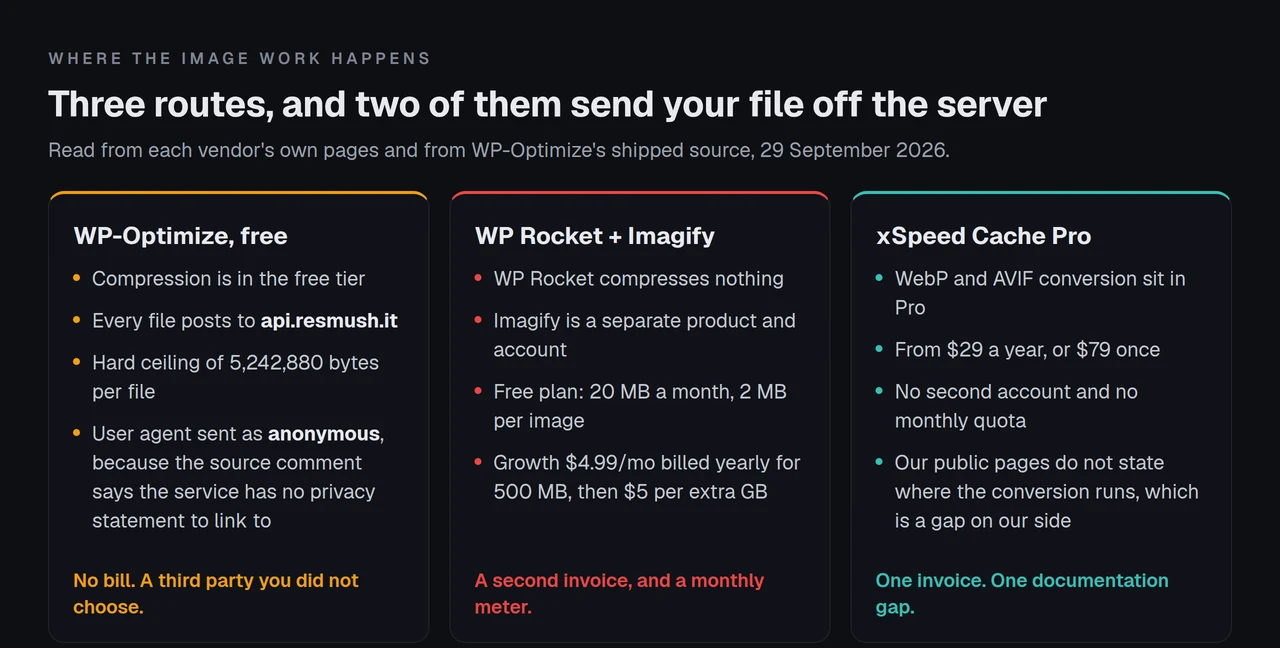
WP-Optimize’s compression runs through reSmush.it, a third-party service, and the plugin’s own source is unusually candid about the arrangement. includes/class-re-smush-it-task.php in trunk carries two constants, MAX_FILESIZE = 5242880 and API_URL = 'https://api.resmush.it/', and the request it builds sets a user agent ending in the word anonymous. The comment beside it explains why:
// Anonymous until Resmushit has a clear privacy statement that we can link to
That line is a developer being honest in a place almost nobody reads. It does not make the feature bad. It does mean that “free image compression” involves posting every image on your media library to a service whose privacy statement the plugin’s own authors could not find something to link to, and the 5 MB constant is a hard stop rather than a suggestion: a changelog entry records a bug where “compressing an image larger than the reSmush.it service limit freezes the popup in the Media Library”.
Imagify is the opposite trade. Its pricing page on 29 September 2026 lists a free plan at 20 MB a month with a 2 MB per-image upload limit, Growth at $5.99 a month or $4.99 billed yearly for 500 MB, and Infinite at $11.99 a month or $9.99 billed yearly for unlimited. You know the terms because you are the customer. You also have a meter.
There is a third option nobody markets, and it is worth naming because it often wins: resize the image before you upload it. We measured twelve photographs and found that converting them to WebP saved a median 38.4% while resizing the same files saved 92.8%. Format is the smaller lever. Pixels are the bigger one, and nothing has to leave your server to pull it.
What a Year Actually Costs, for One Site
Licence prices verified against each vendor’s own page on 29 September 2026.
| Setup | Licence | Image compression | Year one |
|---|---|---|---|
| WP-Optimize free | $0 | Included, via reSmush.it | $0 |
| WP-Optimize Starter (2 sites) | $49 | Included, via reSmush.it | $49 |
| WP Rocket Single + Imagify free | $59.95 | $0, capped at 20 MB/month | $59.95 |
| WP Rocket Single + Imagify Growth | $59.95 | $59.88 | $119.83 |
| WP Rocket Single + Imagify Infinite | $59.95 | $119.88 | $179.83 |
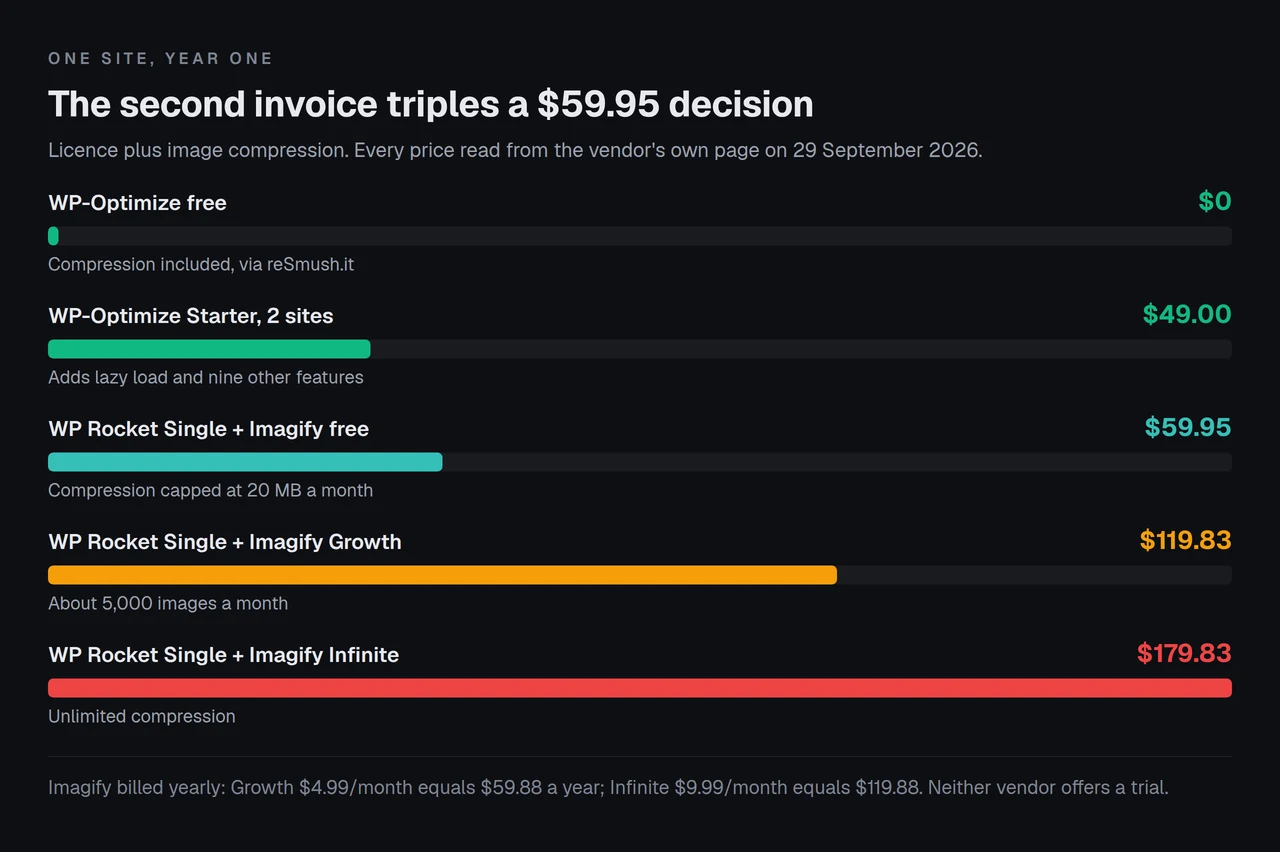
The Imagify free tier is roughly 200 images a month by its own estimate, which covers a blog that publishes weekly and covers nothing on a store with a catalogue. Growth is quoted at approximately 5,000 images a month with overage at $5 per additional gigabyte.
The ladders, and the gap in one of them
WP Rocket’s ladder has a gap worth knowing before you buy: Single covers one site, Plus covers three at $119.95, and the next rung is Multi at $299.95 for fifty. We broke that down in full in our read of WP Rocket’s 2026 pricing, including what the setup nobody invoices is worth. WP-Optimize Premium runs $49 for up to two sites, $99 for up to five and $194 for unlimited, each annual with a 14-day money-back guarantee.
Neither vendor offers a trial. WP Rocket’s own FAQ states it plainly: “We don’t offer a trial version, but we do have a 14 day refund policy.”
The Minify Row Is Not a Tie Either, and Two Operations Only One Ships
The table above puts “minify and combine” in both columns, which is true and slightly generous. Both plugins minify HTML, CSS and JavaScript, and both will merge files rather than only stripping whitespace. What sits either side of that is not the same work.
WP-Optimize’s readme describes a third option beside minify and merge: asynchronous loading, choosing “non-critical CSS and JavaScript files to load in the background and independently of other resources e.g. analytics or pixel scripts”. That is deferral by file, decided by you.
The two operations with no WP-Optimize equivalent
WP Rocket goes further along the same axis and names the extra operations on its own pricing page, which lists “Caching, LazyLoad, Preload, Delay JS, Remove Unused CSS” as the headline features. Two of those five have no WP-Optimize equivalent. Delay JS holds script execution until a user interacts with the page rather than deferring it to the end of load, and Remove Unused CSS strips rules the page never applies.
Both are powerful and both have sharp edges, which is why they belong in a comparison rather than a feature grid. A delayed script runs in a document that has already fired the event it was written to wait for, which is why delaying JavaScript breaks navigation menus more often than it breaks anything else. And unused-CSS removal has a floor most people never see: Lighthouse skips any stylesheet with 10,240 bytes or less of unused CSS, so the audit that sent you looking may be silent about most of your sheets.
| Operation | WP-Optimize | WP Rocket |
|---|---|---|
| Minify HTML, CSS, JS | Free | Included |
| Combine or merge files | Free | Included |
| Async load chosen files | Free | Included |
| Delay JS until interaction | Not offered | Included |
| Remove unused CSS | Not offered | Included |
| GZIP compression | Free | Included |
The compression row is the one to distrust
That last row is the one worth a second look, because both vendors sell it on a saving and neither measures one. WP-Optimize’s readme says it “delivers HTML, CSS and JS files to the user’s browser as smaller, compressed files, reducing the size of pages and style sheets by up to 90%” when the server is not configured to do it. WP Rocket’s features page lists GZIP Compression among the options that apply on activation, described as “compress web pages on the server and decompress them in the browser”.
Whichever route you take, do not read the header and assume a saving. We fetched 159 WordPress homepages twice this week and decompressed both copies to prove the documents were byte-identical: the server’s brotli was larger than its own gzip on 31.4% of them, because dynamic brotli ships at a low quality level to hold CPU down. A compression row that says “on” is not a row that says “smaller”.
The Four-Job, Two-Invoice Audit
Here is the method behind the tables above, written out so you can run it on any two plugins rather than taking ours.
For each job you actually need, write down four things:
- 🔹 Which product does it. Not which product mentions it. Read the settings tabs or the readme.
- 🔹 Which tier. Free, paid, or a second product entirely.
- 🔹 Where the work happens. On your server, or on someone else’s. This is the column that decides both privacy and whether a meter exists.
- 🔹 What the second invoice is. Annual, monthly, metered, or none.
Then add the invoices, not the features. A plugin with forty features and two bills costs more than a plugin with twenty features and one, and the feature grid will tell you the opposite.
What this method cannot tell you. It prices capability, not quality: it says WP-Optimize compresses and says nothing about how good the output looks at a given setting. It assumes you want all four jobs, which many sites do not. It ignores support quality, which is the thing paid users most often say they are actually buying. And it treats a metered plan as a cost rather than a risk, which understates what happens when a meter runs out mid-month.
Run it anyway. It takes twenty minutes and it catches the second invoice, which is the failure mode that turns a $59.95 decision into a $179.83 one.
Running This Across Client Sites, Where the Second Invoice Multiplies
One site with two bills is an annoyance. Twenty-five sites with two bills each is a procurement problem, and it is where the arithmetic above stops being academic.
We build xSpeed Cache, so treat this section as ours and read the table above rather than this paragraph if you want the unflattering version. Our free tier covers page caching, minify and combine, lazy loading of images, iframes and video, and database cleanup with scheduled auto-clean, per our own free versus Pro breakdown, which lists 157 features across 10 areas with 100 in the free plugin. WebP and AVIF conversion sit in Pro, which starts at $29 a year or $79 once. WP-Optimize gives that away and we do not, and anyone choosing on image compression alone at zero budget should take WP-Optimize.
| The four jobs | xSpeed Cache Free | xSpeed Cache Pro |
|---|---|---|
| Page cache | Included | Included |
| Minify and combine | Included | Included |
| Lazy load media | Included | Included |
| Database cleanup and schedule | Included | Included |
| WebP and AVIF conversion | Not included | Included |
Two gaps on our side
Two honest gaps on our side, since this is our blog and a reader deserves them stated rather than buried. WP-Optimize has been in the plugin directory since 21 January 2009 and reports 1,000,000+ active installs with 2,614 ratings; xSpeed Cache joined on 27 May 2026 and reports 8,000+ installs with 15 ratings, both figures queried from the wordpress.org API on 29 September 2026. Seventeen years of production incidents is a real thing to buy and we have not got it. And our public pages do not currently state where our WebP conversion runs, which is exactly the column this article just argued matters most. That is a documentation gap and it is ours to close.
Run the free scan on your own site before you buy anything: xspeedcache.com/scan/
For WooCommerce stores the image question gets sharper, because a catalogue is where a monthly megabyte quota meets a bulk upload. We read twelve caching plugins from source and found only three stop a shopper with a full basket writing your public cache without being configured to.
Preloading and Logged-In Pages: Two Settings That Behave Differently
Cache preloading decides whether your first visitor after a purge waits for the page to be built. Both plugins do it, and both put a different part of it behind a different line.
WP-Optimize preloads in the free tier, described in its readme as a feature that “emulates a visit to your site, meaning cached files are served straight away, speeding up your site from the very first visit”. What it charges for is narrower: Preload key requests, which pushes critical resources such as font files ahead of everything else, carries the [Premium] tag.
WP Rocket preloads automatically whenever content changes, and adds a route WP-Optimize does not document: its features page says “the sitemap-based cache preloading option automatically detects and preloads the sitemaps generated by popular WordPress SEO plugins”. On a large site that is the difference between preloading what changed and preloading what exists.
The toggle that turns a page cache into a disclosure
The setting worth reading carefully on either plugin is the one about signed-in visitors. WP-Optimize ships a Serve cached content to logged in users toggle, and its readme describes the safe way to use it: “Turn this on if content stays the same for logged in users (or turn on and exclude URLs where content does change e.g. my account areas).”
That parenthesis is the whole warning, and it is easy to read past. A page cache that stores a signed-in response can serve it to the next person who asks, which is how a logged-out visitor ends up seeing someone else’s name. The toggle is not a defect and the documentation is honest about the condition. Sites turn it on for the speed and skip the exclusion list.
Where WP-Optimize ships the safer default
Credit where it is owed on the same subject: when we read twelve caching plugins from source for the WooCommerce comparison linked above, three of the twelve stopped a shopper with a full basket writing the public cache without being configured to. WP-Optimize was one, Hummingbird another, ours the third. On the harder half of this problem WP-Optimize ships the safer default and eight other plugins do not.
Common Mistakes People Make Choosing Between These Two
Buying WP Rocket expecting image optimization. It is the single most common surprise, and it follows from a features page that talks about images in the Media tab without ever saying the plugin does not create them. Budget for Imagify or for resizing before upload.
Turning on WP-Optimize’s compression without reading where the files go. Every image posts to a third-party API. For most sites that is a fine trade. For a site under a data-processing agreement it is a question for someone else to answer first.
Running both plugins at once. Ten of fourteen free caching plugins write the same wp-content/advanced-cache.php, which is why two page caches on one site produce symptoms nobody can diagnose. Pick one, and if you are switching, read what an importer can and cannot carry across before you delete anything.
Treating the free tiers as equivalent. They cover different jobs. WP-Optimize free does four things; WP Rocket has no free tier at all.
Comparing them on speed. Both are page caches writing static HTML. On the same host with the same theme the gap between them sits inside the noise of a single benchmark run, which is why we scored eleven cache plugins on capability rather than a stopwatch and published the sensitivity analysis alongside.
Forgetting browser caching entirely. Both plugins set it, most people never check it, and it is free. The browser cache settings documentation covers what the headers should say.
Frequently Asked Questions
I turned on WP-Optimize image compression and nothing happened to my largest images. Why?
The plugin stops at 5,242,880 bytes per file, a constant in class-re-smush-it-task.php. Anything above roughly 5 MB is skipped by design. Resize the original and try again.
I bought WP Rocket and cannot find the image compression settings. Where are they?
There are none. WP Rocket lazy loads images and can serve a WebP you already have, but it does not create compressed files. Imagify is the separate product that does, starting at a free 20 MB a month.
Does WP Rocket clean the database, or do I need a second plugin for that?
It cleans the database. Its features page names a dedicated Database tab covering comments, posts, transients, table optimization and scheduled cleanups.
I want lazy loading and I do not want to pay. Which of the two?
WP Rocket has it in the base licence, which costs $59.95, so “not paying” rules it out. WP-Optimize marks Lazy Load [Premium], which starts at $49. xSpeed Cache includes lazy loading for images, iframes and video in its free tier, which is the answer if the constraint is genuinely zero budget.
My images went to reSmush.it and I did not realise. Can I undo it?
The compression itself is reversible inside WP-Optimize, which offers a “Restore original” option in one click. The upload is not reversible, because it already happened. Turn auto-compress off first if that matters to you.
How many active installs does WP Rocket have?
No public figure exists. WP Rocket is sold from its own site and is not in the wordpress.org plugin directory, so any install count quoted for it anywhere is an estimate. WP-Optimize reports 1,000,000+ in the directory bucket, queried on 29 September 2026.
I am switching from one to the other. Will my settings come across?
Partly, and never completely. Cache exclusion rules and advanced rules are the ones that routinely do not travel. Export what you can read, screenshot the rest, and expect to rebuild the exclusions by hand.
Can I use WP-Optimize free and add a separate image plugin instead of reSmush.it?
Yes. Turn WP-Optimize’s compression off and run whichever image optimizer you prefer. The four jobs are separable, which is the whole point of auditing them separately.
Is there a version of either that does not renew annually?
Not from these two. Both WP Rocket and WP-Optimize Premium are annual subscriptions that auto-renew. WP Fastest Cache Premium is a one-time fee, and xSpeed Cache sells lifetime tiers from $79. Our pricing page lists them, and ours is one of the few caching plugins offering a lifetime licence.
Which one should an agency with twenty-five sites buy?
Price both at your real site count before deciding. WP-Optimize Enterprise is $194 a year for unlimited sites, which is the cheapest unlimited line here. WP Rocket Multi is $299.95 for fifty. Add Imagify if the WP Rocket route needs compression, and add nothing to the WP-Optimize route.
Does either plugin work on a LiteSpeed server?
Both run on LiteSpeed. Whether they are the right choice there is a different question, because LiteSpeed’s own cache module does the page-caching work at the server level. Our 80-capability comparison covers how nine products divide that work.
What single check tells me whether any of this is working?
Fetch a page twice and read the response, then confirm the second request served from storage rather than rebuilding. The free xSpeed Scan does it from outside your network in about a minute, with no account, and reports the cache evidence alongside compression and server response.
Conclusion: Which One, and On What Basis
Both plugins cache well. Both minify. Both clean the database. If the decision rested on those three rows it would be a coin toss, and most comparisons of these two products stop right there.
It rests on the fourth row, and the fourth row is not a tie.
| Your situation | Pick | Why |
|---|---|---|
| Zero budget, images need compressing | WP-Optimize free | The only free compression of the three, off-site caveat and all |
| Data-processing constraints on uploads | Neither, at their free tiers | Resize before upload; both routes post files to a third party |
| One site, wants defaults that work untouched | WP Rocket Single | Its 80%-on-activation claim is the product’s actual proposition |
| Lazy loading without a licence | xSpeed Cache free | Included, along with the other three jobs |
| Twenty-five sites, one invoice | WP-Optimize Enterprise | $194 a year unlimited, with compression included |
| Done with annual renewals | A lifetime licence | From $79 with us, or a one-time fee from WP Fastest Cache |
What to do this week:
- Open your media library and sort by file size. If your largest images are over 5 MB, WP-Optimize’s free compression will skip them and the whole comparison changes.
- Count the sites on the licence you are actually buying, then price both ladders at that number rather than at one.
- Decide the off-site question before the price question. If images may not leave your server, neither free tier solves the image job and you are resizing before upload.
- Run a scan on the site as it stands, so you have a before number rather than an impression.
- If the shortlist comes down to feature coverage at zero cost, take WP-Optimize. If it comes down to lazy loading plus caching plus database cleanup at zero cost, ours is free, and xSpeed Cache is ours: WPDeveloper builds it and WPDeveloper is a Startise company. Pro starts at $29 a year or $79 once, with a 14-day money-back guarantee.
WP-Optimize has been shipping since January 2009 and gives away more of the four jobs than anything else in this comparison, which is a good reason to choose it and it needs no permission from us. We build xSpeed Cache for the person who wants all four jobs on one invoice and wants the fourth one to stay on their own server, and the free tier is where to start.