Delay JavaScript Broke the Menu: The Script Ran After the Event It Was Waiting For
Updated September 2026
Fifteen of the 46 changelog entries across our last four xSpeed Cache releases, 16 to 28 September 2026, repair delaying or deferring JavaScript, counted from our readme on wordpress.org. WP-Optimize shipped Delay JavaScript execution in 4.0.0 on 10 February 2025 and fixed “Page builders not working with Delay JS option enabled” 23 days later in 4.1.1, per its own changelog.
The question people ask is which plugin delays JavaScript most safely. The more useful one is what a delayed script does differently, because in most dead-menu reports the script ran exactly as written, in a document that had moved on. Here is how to confirm the fault is real, name its cause, and write the narrowest exclusion that fixes it.
Quick Summary
| If you see… | Do this | Why |
|---|---|---|
| Dead until you move the mouse, then fine | Nothing | Delay is working as designed |
| Dead after you interact, console clean | Exclude the file binding the handler | It ran after its event fired |
| An error naming something undefined | Exclude what it waited for, not what threw | Half the chain is delayed |
A Delayed Script Is Not a Slower Script. It Runs in a Different Document
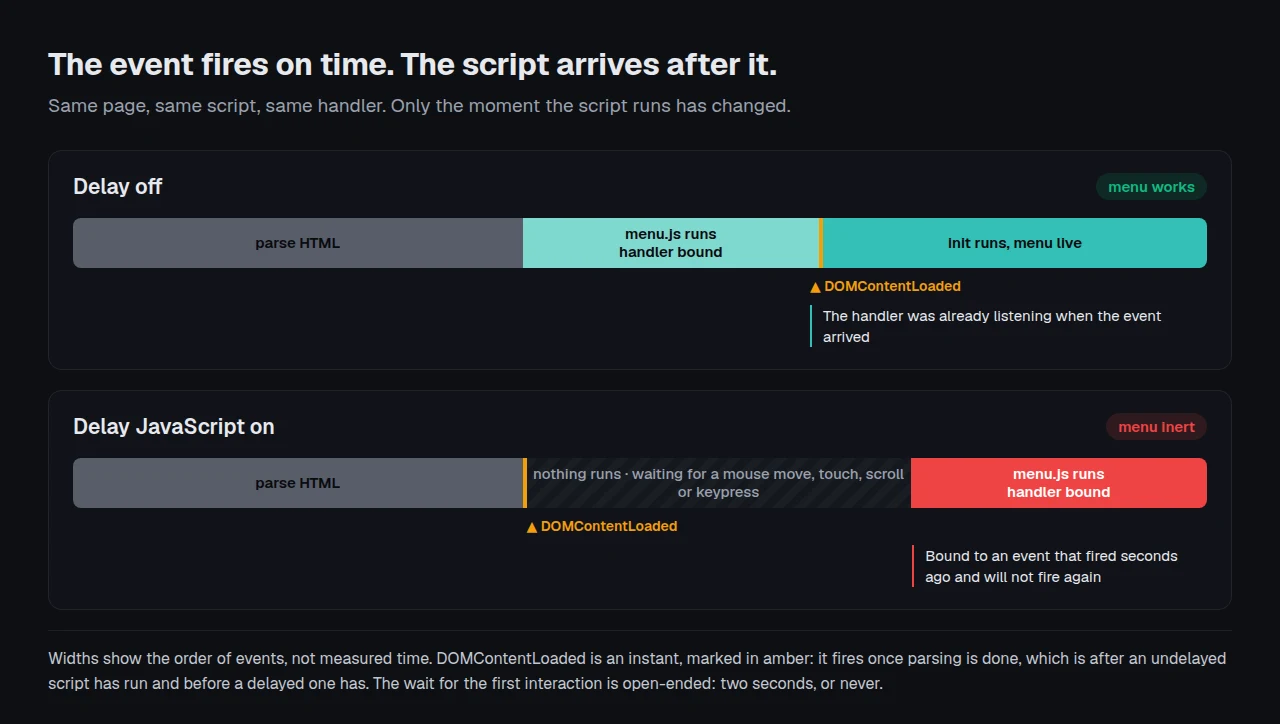
Delay holds every <script> in the page HTML until the visitor acts. WP Rocket’s documentation lists the triggers: a mouse move, touch, scroll or keypress.
According to MDN, DOMContentLoaded “fires when the HTML document has been completely parsed, and all deferred scripts have downloaded and executed”. Parsing finishes within a few hundred milliseconds. The first mouse move arrives seconds later, so a menu script wrapped in a DOMContentLoaded listener binds a handler for something that will never happen again.
WP Rocket treats this as a known hazard: its defer documentation skips inline scripts containing DOMContentLoaded. Our 1.3.6 release of 28 September 2026 replays delayed scripts in page order instead, with readyState moving normally.
Three Loads Tell You Whether Anything Is Broken At All
Purge the page cache first, or you test markup written before the setting changed. Then load the URL three times.
- Load it and touch nothing. Dead is correct here, not a bug.
- Load it, move the mouse once, then click. If it opens, nothing is broken. This is the most common false report, and it costs an afternoon of needless exclusions.
- Load it, move the mouse, count to two, then click. Still dead means the fault is real. Open the console first.
A phone produces no mouse move, so scroll for step two. If the page is not cached at all, check whether caching is working first.
Which of Three Causes You Have, Read From the Console
| Console after interaction | Cause | The fix |
|---|---|---|
| Clean, script visible in Network | Handler bound to an event that already fired | Exclude it, or replay readyState |
$ is not defined | Its dependency is still delayed | Exclude the library, not the file that threw |
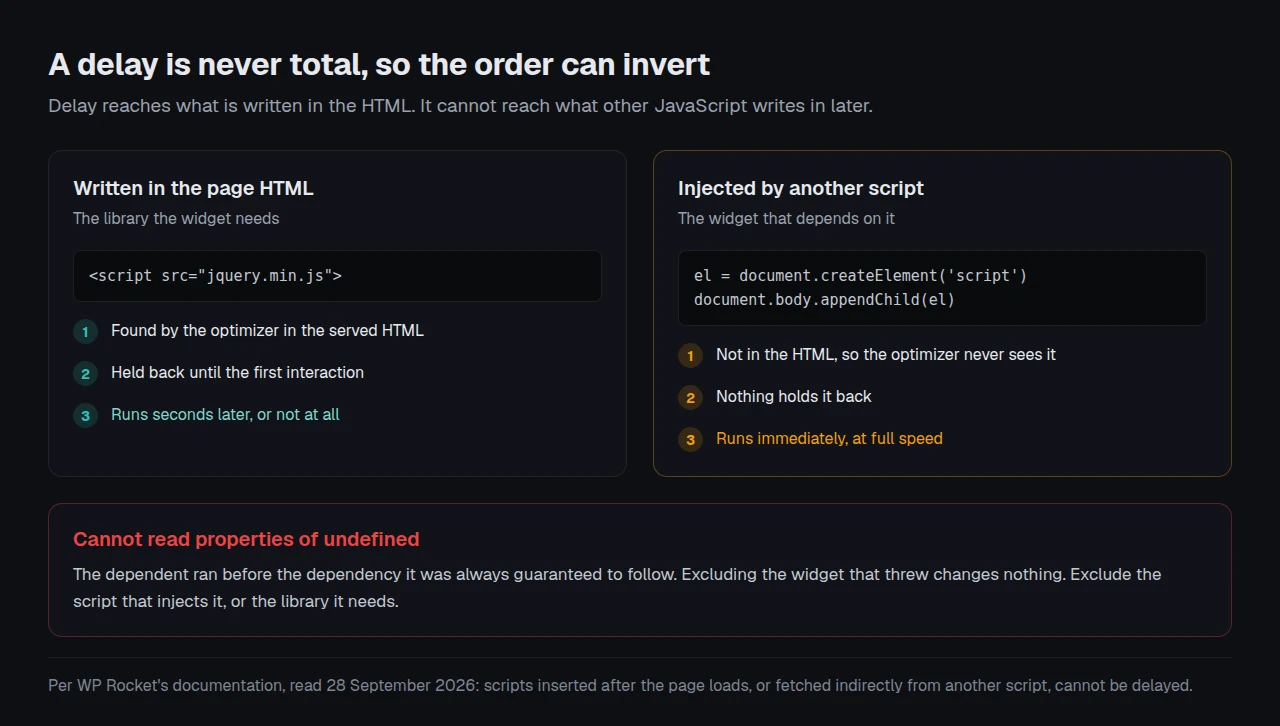
Cannot read properties of undefined | An injected script ran before the delayed one it needs | Exclude the injector |
The third row is rarely found alone, and WP Rocket documents it: “Any scripts which are inserted after the page loads, or fetched indirectly from another script, cannot be delayed.” A delay is never total, so anything other JavaScript writes into the page runs at full speed, ahead of the dependency it should follow.
The Exclusion Is a Scalpel, and a Keyword Is Not One
Every plugin here accepts the same three exclusion shapes: a full file URL, a keyword from it, or a wildcard. The keyword is where sites get hurt. WP Rocket’s exclusion guide requires a unique one, because “if the same word is used in other scripts then all the scripts in which it is used will be excluded”. Type slider and you may quietly stop delaying nine files. The same guide records that excluding any jQuery library stops it deferring inline JavaScript at all.
| Vendor | Shipped evidence that delay breaks things | Dated |
|---|---|---|
| xSpeed Cache (ours) | Smart Delay, because delaying every script “used to quietly skip any script that inline code depends on” | 1.3.6, 28 Sep |
| WP-Optimize | ”Page builders not working with Delay JS option enabled” | 4.1.1, 5 Mar 2025 |
| LiteSpeed Cache | ”Fixed blob execution in JS Delay” | 7.9, 5 Aug 2026 |
Attribute opt-outs are precise instead, because they sit on the tag rather than in a text box: nowprocket for WP Rocket, data-no-optimize for ours. Our 1.3.5 release of 22 September 2026 fixed a defect here, where the marker was matched anywhere in the tag instead of read as an attribute. WP Rocket’s Safe Mode releases /wp-content/, /wp-includes/ and jQuery at once, which its own documentation calls temporary, as do our troubleshooting docs.
Running This Across Sites You Did Not Build
xSpeed Cache is ours, built by WPDeveloper, a Startise company. Two of its decisions exist because of this failure. Consent banners from thirteen named vendors are never delayed, though an entry you add yourself overrides that. Smart Delay, new in 1.3.6 and off by default, postpones the scripts other modes had to leave running.
On a fleet the exclusion list is what does not travel: a handle needing one on a single site is usually on four others. xSpeed Hub reads settings across every connected site, so the list is compared rather than rediscovered. A cart drawer restoring state belongs on it permanently, the same reasoning behind WooCommerce cache exclusions on every WooCommerce store.
Run the free xSpeed Scan on your own site: xspeedcache.com/scan/
Common Mistakes People Make With This Setting
- ⚠️ Turning delay off after one broken widget, giving back the whole Total Blocking Time win for one file
- 🔁 Testing without purging, so the browser gets pre-change HTML
- 🎯 Excluding the script that threw instead of the dependency it waited for
Frequently Asked Questions
I enabled Delay JS, my slider is dead, and the console is completely clean. What now?
A clean console points at the first cause: the script ran, found nothing to attach to, threw nothing. Exclude it by full URL.
I excluded the file that threw the error and it still throws. Why?
The file that throws is rarely the one to exclude. $ is not defined means the library is still delayed while the code using it is not, so exclude jQuery.
I added a keyword and now half the page is slow again. Did I break something?
Over-matched rather than broken. A keyword excludes every script whose URL contains it, so slider releases dozens. Use a full URL.
My menu works on desktop and is dead on mobile. Is this the same problem?
It can be. Mouse movement is a delay trigger and a phone produces none, so a visitor tapping without scrolling is the first interaction.
I turned on delay and my consent banner stopped appearing. Is that allowed?
No, and good plugins treat it as a defect. Ours names thirteen banner vendors that are never delayed. Exclude yours at once: a banner that appears only after interaction has missed the moment it exists for.
Conclusion: Exclude One File, Not the Feature
| If your goal is… | Do this |
|---|---|
| The menu back in five minutes | Exclude that one file by full URL |
| The score and the function | An attribute opt-out, not a keyword |
| To stop rediscovering it per client | Compare lists centrally |
What to do this week: purge the cache and run the three loads before changing a setting. Read the console after interacting, not before. Exclude by full file URL first, narrow to an attribute later, and check the xSpeed Cache changelog before assuming a delay bug is yours. xSpeed Cache is free to start, and Pro is $29 a year at the founding price with a 14-day money-back guarantee: Free vs Pro and pricing.
If a script defeats all three causes, the fault is earlier than delay. A theme that looks unstyled after minification and CSS Lighthouse refuses to report start in the same place: find the operation that changed, then exclude the file it touched. Post the handle in the support forum, then scan the page again.