wp cache flush Does Not Clear Your Page Cache: What Each Plugin Puts on the Command Line
 M Asif Rahman 10 min read
Updated November 2026
Every one of the 13 subcommands in WordPress core’s wp cache family is defined against the object cache, according to the WP-CLI command reference read on 20 November 2026. We then read the source of nine caching plugins the same day, at the release tag each one currently ships: seven register a WP-CLI command, six can clear a page cache, and not one of them adds a subcommand to wp cache. They each invent a top-level namespace instead.
So the command your deploy script probably ends with clears a cache your visitors never touched. The article people expect lists cache-clearing commands. The useful one tells you which of your three caches each command reaches, and what your plugin calls the one you want.
Quick Summary: Which Command Reaches Which Store
| If you want to clear | Run this | Why |
|---|---|---|
| WP-CLI’s own downloads | wp cli cache clear | Nothing to do with your site. It runs before WordPress loads |
| The object cache | wp cache flush | Core’s command, and it needs a drop-in to outlive the request |
| Your page cache | your plugin’s own namespace | Core ships no page-cache command at all |
| The server’s cache | wp nginx-helper purge-all | Lives in front of PHP, so no plugin file sweep reaches it |
Three Different Stores Answer to the Word Cache
The names collide, and the collision is why correct advice looks wrong when you run it.
wp cli cache clear is not about your website at all. Its parent command is documented as managing “the internal WP-CLI cache”, and the same page records that these commands “run on the before_wp_load hook, just before the WP load process begins”. A command that finishes before WordPress starts cannot have touched anything WordPress stores.
wp cache flush is about your website, and it is narrower than it sounds. Core’s reference page for the family states it plainly: “By default, the WP Object Cache exists in PHP memory for the length of the request (and is emptied at the end).” Without a persistent drop-in, the flush subcommand empties an array that was about to be discarded anyway. With Redis or Memcached behind a drop-in it empties a real server, which is the case worth having and the reason setting up a Redis object cache changes what every other instruction on this page means.
| Behaviour | wp cli cache clear | wp cache flush | your plugin’s purge |
|---|---|---|---|
| Needs WordPress loaded | ❌ | ✅ | ✅ |
| Clears HTML your visitors get | ❌ | ❌ | ✅ |
| Shipped with core | ✅ | ✅ | ❌ |
| Does nothing without a drop-in | — | ✅ | ❌ |
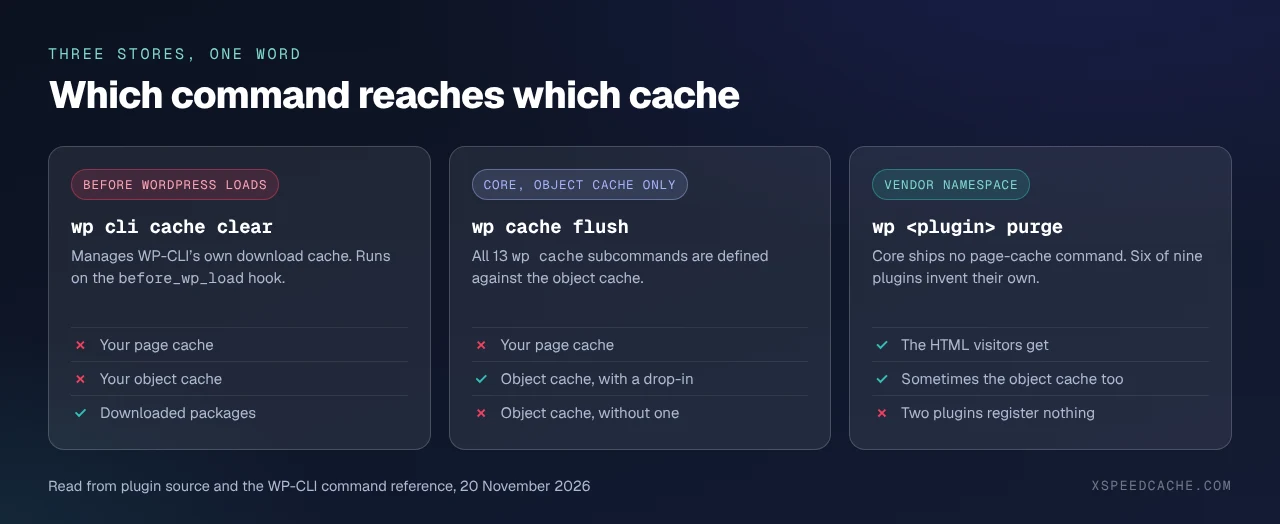
The third store is the one the reader came for, and core has no command for it. That gap is filled nine different ways.
What Nine Caching Plugins Actually Register
Read from each plugin’s own source on 20 November 2026, at the release tag on plugins.svn.wordpress.org, not from a vendor blog. Versions are from the wordpress.org Plugin API the same day.
| Plugin | Version | Clears the page cache | Clears the object cache | Read from |
|---|---|---|---|---|
| LiteSpeed Cache | 7.9.3 | wp litespeed-purge all | — | cli/purge.cls.php |
| W3 Total Cache | 2.11.0 | wp w3-total-cache flush post | wp w3-total-cache flush object | Cli.php |
| WP Fastest Cache | 1.5.5 | wp fastest-cache clear all | — | inc/cli.php |
| Cache Enabler | 1.8.17 | wp cache-enabler clear | — | inc/cache_enabler_cli.class.php |
| xSpeed Cache | 1.4.9 | wp xspeed purge --type=page | wp xspeed purge --type=object | modules/Cache/CacheModule.php |
| Nginx Helper | 2.4.1 | wp nginx-helper purge-all | — | class-nginx-helper-wp-cli-command.php |
| Redis Object Cache | 3.0.1 | — | wp cache flush | includes/cli/class-commands.php |
| WP Super Cache | 3.1.5 | none registered | — | trunk and readme, no CLI file |
| WP-Optimize | 4.7.1 | Premium only | — | readme, Premium feature list |
Seven namespaces, no two alike, and none of them is cache. Guessing is therefore hopeless: WP Fastest Cache answers to fastest-cache and not wpfc, and W3 Total Cache registers three aliases for the same class, w3-total-cache, total-cache and w3tc, all three verified in Cli.php at tag 2.11.0.
Only W3 Total Cache gives the two stores separate words. Its flush subcommand documents post as “Flush the page cache” and object as “Flush the object cache”, alongside all, posts, database and minify. Ours splits them with a flag, --type=page against --type=object, read from CacheModule.php at tag 1.4.9 and shipped in the free plugin. xSpeed Cache is ours, built by WPDeveloper, and the surface is listed in our WP-CLI Commands reference.
Everyone else gives you one purge and no way to narrow it, so on four of these nine plugins the only honest answer to “clear just the object cache” is wp cache flush.
Two of the Nine Give You Nothing to Type
WP Super Cache has a million active installs and registers no WP-CLI command. Its readme does not contain the string WP-CLI, and neither trunk nor inc/ nor src/ holds a CLI file. A direct read of the official WP-CLI package index the same day returned 54 community packages, of which two are cache-related and neither is WP Super Cache’s.
WP-Optimize is subtler. Its readme does advertise “WP-CLI support”, under the heading PREMIUM FEATURES AT A GLANCE. The free plugin registers no command, so a script written against it has nothing to call. For both, the route is the dashboard’s own: purge over HTTP, or delete the directory, which a cache folder growing without limit covers along with why expiry and deletion differ.
The Order a Deploy Script Needs
Run the stores inside out. A page rebuilt while the object cache still holds yesterday’s query results is a fresh file full of stale content, and that is the failure that looks like a cache that will not clear.
| Pass | Command | Why it sits here |
|---|---|---|
| 1 | wp transient delete --all | database rows the rest copied from |
| 2 | wp cache flush | the object cache, if a drop-in makes it real |
| 3 | your plugin’s purge | rebuilds HTML from clean inputs |
| 4 | wp nginx-helper purge-all | the server cache, which answers before PHP |
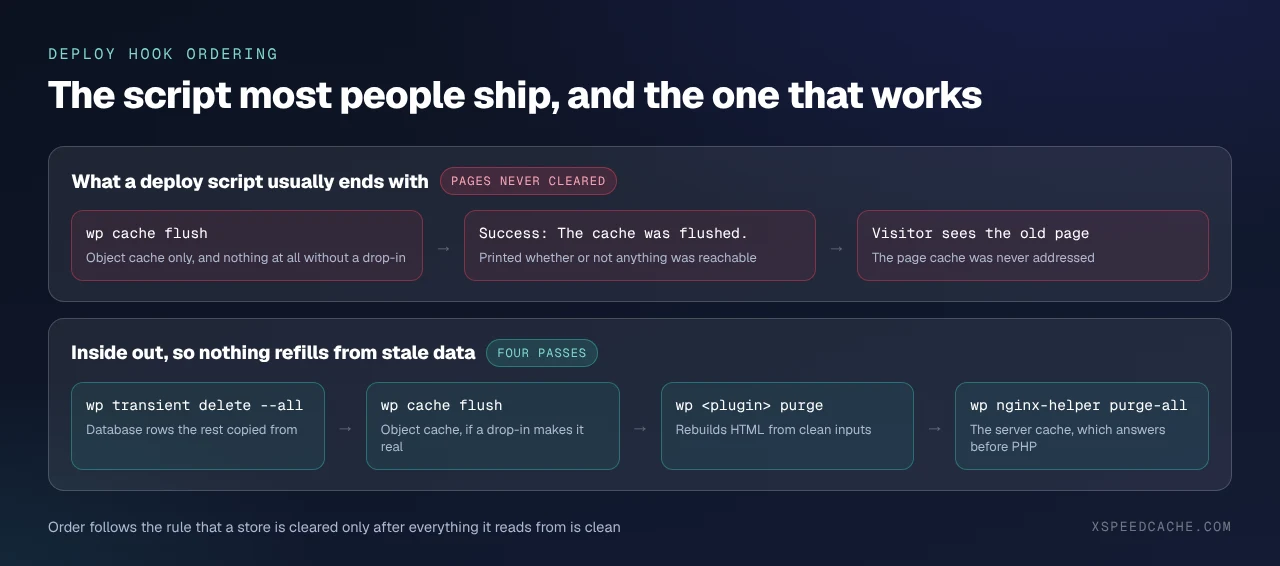
One detail decides whether the script can be trusted. Most purge commands print success whether or not a store was reachable. Ours exits non-zero when a store that is configured refuses to purge, documented in CacheModule.php, which is the difference between a hook that reports its own failure and one that always looks fine. Check the exit code, not the words.
Scripting This Across a Fleet of Client Sites
Twenty-five sites with four caching plugins between them cannot share one deploy hook unless something normalises the namespace. Two approaches work: detect the active plugin and branch, which means maintaining the table above yourself as vendors rename things, or standardise the plugin so one command works everywhere.
xSpeed Cache is ours, from WPDeveloper, and it is the recommendation here for a reason you can check rather than take on trust: one namespace covers page, object, REST, minified assets and the configured edge, --type narrows it, --format=json makes the report machine-readable, and the exit code means something. For agencies the licence that covers 25 sites is on our pricing page, and the command surface sits in the free tier, which Free vs Pro sets out row by row. LiteSpeed Cache is the stronger choice on LiteSpeed or OpenLiteSpeed servers, where its purge talks to the web server directly rather than to PHP, and W3 Total Cache remains the only one of the nine with separate words for the two stores.
Then confirm it from outside. Run the free xSpeed Scan on a page you just purged, at xspeedcache.com/scan/: it fetches the URL as a stranger would, reports whether the response came from a cache and how old that copy is, and needs no account. If you would rather check by hand, request the page twice and compare the cache header rather than the HTML, which proving a cache is answering covers header by header, and our Cache Hits and Misses reference decodes each status value.
Common Mistakes in a Cache-Clearing Deploy Hook
- 🔴 Ending the script with
wp cache flush. It is the object cache, and on a site with no drop-in it clears an array that was about to be thrown away. - 🟠 Reading success as proof. Most of these commands print success as soon as the purge is sent, whether or not a store was there to receive it.
- 🟠 Guessing the namespace. It is
fastest-cache, notwpfc, andlitespeed-purge, notlitespeed. - 🔵 Forgetting the server. A host’s own nginx cache keeps answering whatever the plugin deleted, which is why a purge that appears to do nothing is a layer question.
Frequently Asked Questions
I ran wp cache flush after deploying and visitors still see the old page. What went wrong?
Nothing went wrong. You cleared the object cache, which is what that command does. Your page cache needs your plugin’s own command from the table above.
I ran wp cli cache clear and nothing on my site changed. Why?
That command manages WP-CLI’s own download cache and runs before WordPress loads. It cannot reach anything on your site.
My script prints “Success: The cache was flushed” and the site is still stale. Is the command broken?
No. That is core’s own success message for an object-cache flush, printed whether or not a drop-in made the flush meaningful. Check whether you have a persistent object cache with wp cache type first.
wp cache type says Default and I have a caching plugin installed. Is that wrong?
It is accurate. Page caching needs no drop-in, so a working page cache reports Default here. Whether your host supports an object cache covers what that command recognises and what it misses.
I cannot find a WP-CLI command for my caching plugin anywhere in its docs. Does one exist?
On WP Super Cache and the free WP-Optimize, no. Purge over HTTP from the dashboard, or delete the cache directory.
Which command clears only the object cache and leaves my pages warm?
On W3 Total Cache, wp w3-total-cache flush object. On ours, wp xspeed purge --type=object. On the rest, wp cache flush, because they offer no narrower option.
Does flushing the object cache slow the site down afterwards?
Briefly, yes. The reference page for the flush subcommand warns in its own words about “the performance impact when flushing the object cache in production”, and on multisite with a persistent cache it typically flushes every site at once.
Should my deploy hook clear the edge as well?
Only for the URLs that changed. Most CDNs do not cache HTML by default, so a full edge purge usually buys nothing.
How do I know which plugin is holding my page cache in the first place?
Clear one store at a time and check the response header between each. Clearing every WordPress cache by hand walks the six stores in order and is the right place to start before scripting any of it.
Do these commands work over SSH against a remote site?
Yes. Every command in the table accepts WP-CLI’s global --ssh= parameter, so a deploy runner can purge a production site without logging in first.
Conclusion: Find Your Namespace Before the Next Deploy
| Your situation | Do this |
|---|---|
| One site, one plugin | Look your namespace up in the table and fix the script |
| LiteSpeed or OpenLiteSpeed host | wp litespeed-purge all and let the web server do it |
| A fleet on mixed plugins | Standardise the plugin so one command works everywhere |
| No CLI command at all | Purge over HTTP, or delete the directory |
What to do this week:
- Run
wp cache typeon your site and write down what it says. - Find your plugin’s namespace in the census table and correct your deploy hook.
- Reorder the hook: transients, object cache, pages, server.
- Purge a page, then check it from outside with the free scan.
- If the fleet is mixed, xSpeed Cache gives every site the same namespace, with
--typeto narrow it and an exit code you can trust. It is ours, the CLI is in the free tier, and paid plans start at $29 a year with a 14-day money-back guarantee.
If your plugin registers a command this census missed, send the file it lives in and the table gets corrected.