Checking Whether Your Host Supports Object Caching in 2026: WordPress Never Opens the Connection

Updated September 2026
WordPress answers the question “can this host run a persistent object cache” by calling extension_loaded() against five names, and the list has not changed since 6.1, read from the 7.1.2 tag on 29 September 2026. The directory drop-in for one of those five, Memcached, reports 10 active installs and last shipped on 8 November 2022.
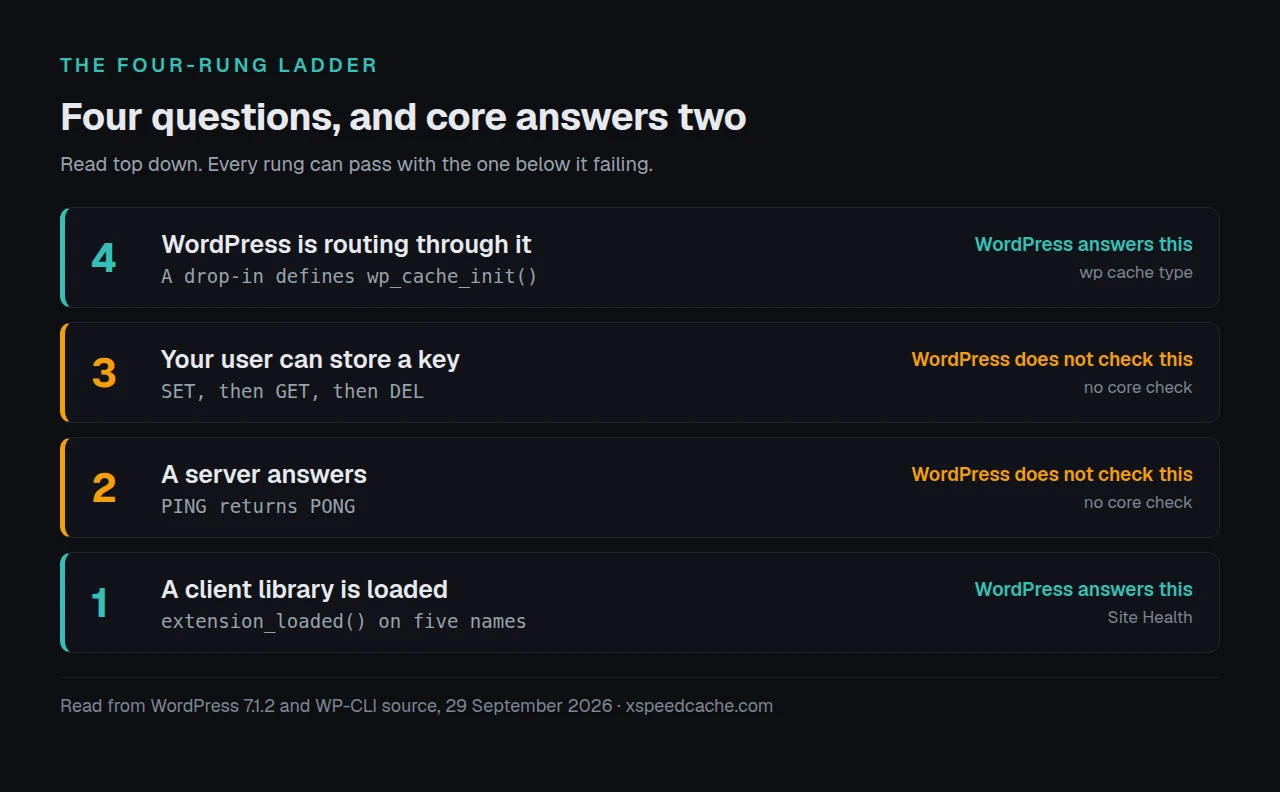
The question people expect to answer is “is Redis installed”. The more useful question is which of four separate things your host gives you, because a loaded extension, a server that answers, a server that accepts a write, and a WordPress install routing through it are four different facts. Three can be true while the fourth is false, and the site looks identical either way. This guide checks all four from the dashboard, from the shell, and across a fleet you do not log into.
Quick Summary: Four Questions Hiding Inside One
| If you want to know… | Do this | Why it is the right check |
|---|---|---|
| Is a client library installed? | Site Health, or wp eval 'var_dump(extension_loaded("redis"));' | This is the only thing core tests |
| Does a server answer? | redis-cli ping or telnet 127.0.0.1 11211 | Nothing in WordPress opens this connection |
| Can your user store a key? | A real SET, then GET, then DEL | Auth can pass while writes are denied |
| Is WordPress using one? | wp cache type | Reports the drop-in, not the server |
Call it the four-rung ladder. Its limitation, stated up front: clearing all four proves the plumbing works, and says nothing about whether an object cache will make your site faster. A saturated shared-host Redis can answer slower than the MySQL query it replaces, which is the measurement in Redis against Memcached.
Rung One: What Site Health Is Really Testing
WordPress core holds one function for this, WP_Site_Health::available_object_cache_services(), and its whole body is a map of five names passed to extension_loaded:
$extensions = array_map(
    'extension_loaded',
    array(
        'APCu'      => 'apcu',
        'Redis'     => 'redis',
        'Relay'     => 'relay',
        'Memcache'  => 'memcache',
        'Memcached' => 'memcached',
    )
);
Fetched from core SVN on 29 September 2026 and compared across six tagged releases: 6.1, 6.4, 6.8, 6.9.9, 7.0 and 7.1.2 carry the same five, byte-identical. The sentence Site Health prints from it reads “Your host appears to support the following object caching services”, and the word doing the work is appears. No socket is opened.
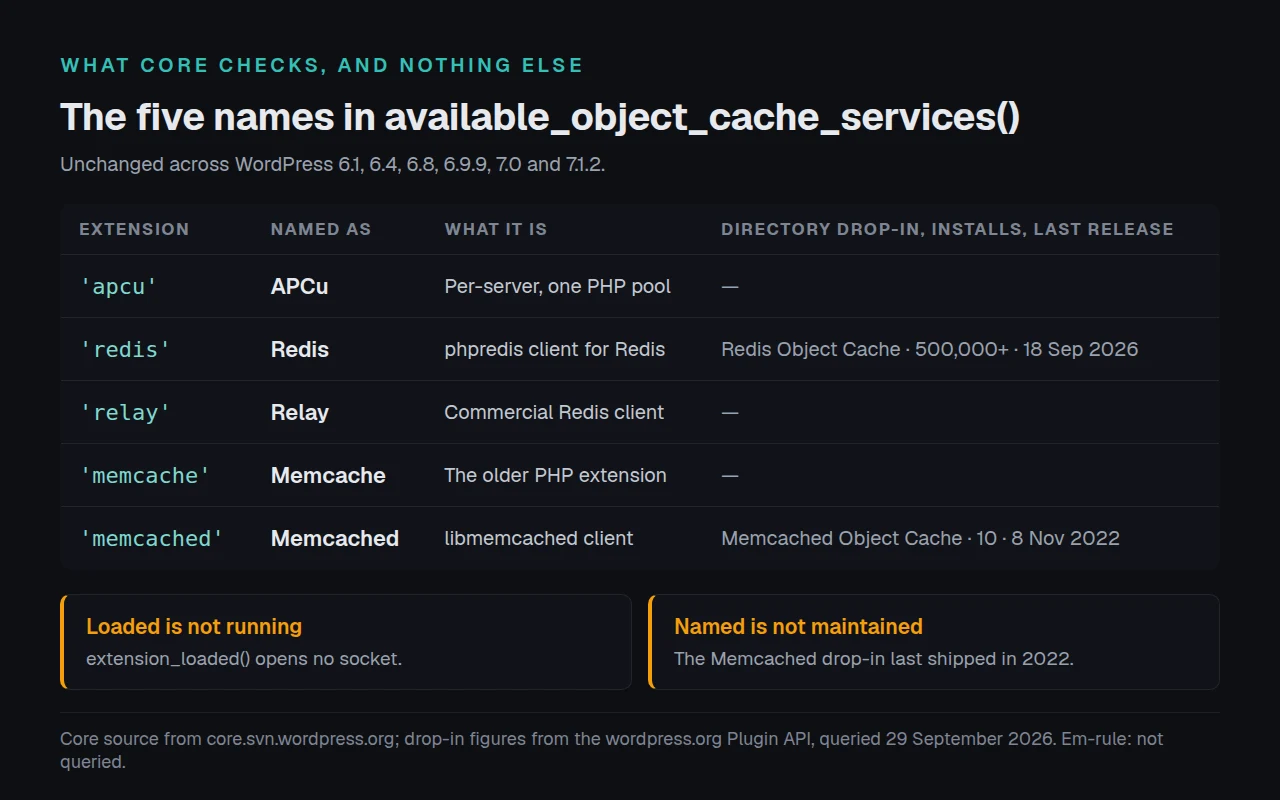
Core is honest about the gap in the same string. The sentence immediately before the service list reads “Your hosting provider can tell you if a persistent object cache can be enabled on your site.” Core tells you to go and ask, then lists what it found loaded.
A second trap sits on the same screen. The service list prints only when should_suggest_persistent_object_cache() returns true, and on a small site it returns false, so Site Health says “A persistent object cache is not required” and names nothing. A fresh install is nowhere near those thresholds, counted in the signed-in slowdown guide. Silence there is not an answer.
Rungs Two and Three: Answering Is Not the Same as Accepting a Write
Between the extension and a working cache sit two facts nothing in core checks.
A PING proves the server is up and your credentials were accepted. It does not prove your user may store anything there. Redis 6 and later restrict a user to key patterns with the ~<pattern> ACL rule, which Redis’s own ACL documentation defines as “a pattern of keys that can be mentioned as part of commands”. Managed hosts use this to give each site its own namespace. Write outside it and the command is refused, and most drop-ins silence that error.
| Rung | What passes it | What still fails afterwards |
|---|---|---|
| Extension loaded | extension_loaded('redis') | The server may not exist |
| Server answers | PING returns PONG | Your user may be read-only |
| Write accepted | SET then GET round-trip | WordPress may still ignore it |
| WordPress routing | A drop-in defining wp_cache_init() | It may be failing over silently |
The fourth row is the one the Redis setup guide documents in detail: a graceful drop-in that cannot reach its server falls back to the non-persistent cache and keeps rendering, which is an outage you cannot see.
Reading the Answer From the Shell, and Which PHP You Asked
Run these from the site root over SSH, in this order. Each one answers a different rung.
wp eval 'var_dump( array_filter( array_map( "extension_loaded",
  ["apcu","redis","relay","memcache","memcached"] ) ) );'
redis-cli ping
redis-cli set xspeed:probe 1 EX 5 && redis-cli get xspeed:probe
wp cache type
Why the first line is not php -m. That is the command most guides reach for, and it reports the CLI build of PHP, frequently not the build serving your pages. wp eval asks in the context WordPress runs in, which is why the line above is longer than it looks.
The last one carries a caveat the WP-CLI source states plainly. wp cache type calls wp_get_cache_type(), whose docblock in the shipped helper reads: “Note that the guesses made by this function are based on the WP_Object_Cache classes that define the 3rd party object cache extension.” Fetched 29 September 2026, it pattern-matches eleven known drop-ins on properties and method names. Match none and it prints Unknown: with a class name. Default means no drop-in loaded at all.
We build xSpeed Cache, a WordPress performance plugin, and its free object cache module tests rungs two and three together. The connection test in the shipped source runs connect, authenticates, then does a real SET, GET and DEL on a probe key built with your key prefix. The comment above it states why: “PING only proves auth, not that the user can STORE data.” xSpeed installs no drop-in of its own by design, so it reads your existing setup rather than replacing it.
When the Host Offers Nothing at All
Shared hosting frequently has neither server. That is not the end of the task.
Docket Cache stores the object cache as plain PHP files. Its own readme describes it as “an alternative for sites that do not have access to Redis or Memcached”, noting those two “are rarely available on low-cost or shared hosting plans”. The wordpress.org Plugin API returned 20,000 active installs and a release dated 27 September 2026. It costs nothing and needs no extension.
| Backend | Plugin | Active installs | Needs an extension |
|---|---|---|---|
| Redis | Redis Object Cache | 500,000+ | ✅ |
| Memcached | Memcached Object Cache | 10 | ✅ |
| Files | Docket Cache | 20,000+ | ❌ |
All three figures come from a direct wordpress.org Plugin API query on 29 September 2026. The middle row is worth reading twice: core names Memcached among its five services, and the directory plugin consuming it has ten installs and has not shipped since 2022. Availability and a maintained path to using it are separate questions.
If you would rather change the host than work around it, we recommend xCloud, and it is ours, since xCloud and the team behind xSpeed are both Startise companies. Redis comes provisioned per site there. Either route finishes the task.
Checking Twenty-Five Client Sites Without Logging Into Any of Them
Doing this by hand is fine once. Across an agency fleet it is the job nobody finishes, because the answer differs per site and changes when a host moves a plan.
xSpeed Hub, which is ours, reads the same detection output from every connected site in one place, so the question becomes a column rather than twenty-five SSH sessions. A WooCommerce store benefits most, because its signed-in traffic never touches the page cache. Confirming the effect afterwards belongs to an outside probe, and ours reports no object cache state at all, because that is a server-side fact nothing external can see.
Run the free xSpeed Scan on your own site, no account needed: xspeedcache.com/scan/
Four Ways This Check Goes Wrong
- Trusting a green Site Health row. A loaded extension with no server behind it looks exactly the same.
- Reading
php -mand stopping. That is the CLI build. Your pages run under FPM, which frequently loads a different set. - Assuming
memcacheandmemcachedare one thing. Two separate PHP extensions with different APIs, and core lists both because hosts ship either. - Testing with
PINGalone. On a namespaced host auth succeeds and writes are refused, which the troubleshooting docs cover under silent failures.
Frequently Asked Questions
Site Health says my host supports Redis, but the plugin cannot connect. Which one is wrong?
Neither. Site Health reported that the redis extension is loaded, which is rung one. The plugin failed at rung two or three. Ask the host for the address, port and credentials, then test with redis-cli ping.
php -m lists redis but Site Health does not mention it. Which process is each describing?
php -m describes the command-line build. Site Health runs inside the web request, under PHP-FPM or mod_php, which frequently loads a different extension set. The web one is the answer that matters, and the Redis setup guide hits the same trap during installation.
wp cache type prints Default and I installed a plugin. What happened?
Default means no object-cache.php drop-in is active in wp-content. Several object cache plugins write the drop-in only after you enable them on their settings screen, so installing and activating is not enough.
It prints Unknown: and a class name. Is that broken?
No. WP-CLI recognises eleven drop-ins by shape and yours is not among them. The class name it prints identifies yours.
My host says Memcached is available and only memcache appears. Are those the same?
They are separate extensions. memcached is built on libmemcached and is the one most drop-ins want. Ask the host which they mean before choosing a plugin.
I have no Redis, no Memcached and no shell. Is there anything left?
Yes. A file-based object cache like Docket Cache needs neither a server nor an extension, and installs from the plugin screen.
Is object cache support behind a paid tier in your plugin?
No. Detection, the connection test and the flush control are in the free release, per Free vs Pro.
Does a page cache remove the need for an object cache?
For signed-out visitors, largely. Signed-in requests skip the page cache and rebuild every query, measured in the signed-in slowdown guide.
I turned an object cache on and nothing got faster. What did I miss?
Usually one of two things: the drop-in is failing over silently, or the site was never database-bound. When not to use a caching plugin measures the second case.
Which of the five does WordPress prefer?
None. Core names what is loaded, in a fixed array order, and takes no position. The choice between the two common ones is in Redis against Memcached.
Does APCu count as a persistent object cache?
Core lists it, and it persists only within one PHP process pool on one server. Enough for a single-server site, wrong for anything load-balanced.
Can I check any of this without shell access?
Partly. Site Health gives you rung one. Rungs two and three need either a plugin that opens the connection for you or the host’s own dashboard, and the object cache docs list what to ask for.
Start at Rung One and Stop Where It Fails
What to do this week, working the ladder in order:
- Read the persistent object cache row in Site Health, remembering that silence on a small site means the test was skipped.
- Run the
wp evalextension check from the site root, notphp -m. PINGthe server, then do a realSETandGETbefore believing the connection.- Run
wp cache typeto confirm WordPress is routing through it. - Install xSpeed Cache free to work all four rungs from the dashboard. Pro is $29 a year at the founding price with a 14-day money-back guarantee, and nothing above needs it.
Stuck at rung two is a conversation with your host, not a WordPress problem. Tell them which extension is loaded and ask for the address, port and credentials.