Six Form Plugins, Read From Source: Which Ones Check Anything, and Which Say Thank You Anyway
 M Asif Rahman 18 min read

Updated November 2026
On 9 November 2026 we read the shipped source of the six most-installed form plugins in the WordPress plugin directory, a combined install floor of 17.4 million by the directory’s own buckets. Three of the six print nothing into a page a cache could serve stale. Two of the six answer a failed check by telling the visitor the form went through. The comparison people expect here is which form plugin is most secure. The more useful comparison is narrower and answerable from source: what each one verifies before it accepts a submission from a logged-out visitor, whether that proof survives inside stored HTML, and what the visitor sees when the check fails. This is a caching-compatibility and observability study, not a security audit.
Quick Summary: Read the Plugin Before You Exclude the Page
| If you want to… | Do this | Why |
|---|---|---|
| Know whether your cache can break the form | Find which of the six you run, then read its row below | Three of the six cannot be staled by a cached page at all |
| Stop guessing from the symptom | Read the failure mode before the cause | Two plugins report a dropped submission as success |
| Fix a form on Forminator or MetForm | Bring the page cache lifetime under 12 hours before excluding anything | Both require a WordPress nonce carried in the markup |
| Audit a form you did not build | Check whether the anti-spam setting is even on | Fluent Forms ships both of its checks switched off |
| Check whether a cache answered at all | Run the free xSpeed Scan and read check D2 | It names the cache that answered, or says none did |
Three findings, in the order they should change what you do. Contact Form 7, on a default install, verifies one thing about a logged-out submission: that the User-Agent string is at least two characters long. WPForms accepts its own anti-spam token for 1,825 days after the day it was minted, a window its code builds deliberately and its docblock records as two days. And Forminator’s honeypot answers a caught submission with success: true and the message “Form entry saved”, having saved nothing. That is the behaviour our own fix guide attributed to Contact Form 7, which does not do it.
The Method, and the Four Things It Cannot Tell You
The method comes first here, because every row below is only as good as it.
We took the six most-installed general-purpose form builders in the directory, fetched from api.wordpress.org the version each listing reported on 9 November 2026, then read that exact version tag. No file was read from trunk, because trunk is whatever a developer last committed rather than what anybody runs.
| Plugin | Version read | Install floor | Released | Files read |
|---|---|---|---|---|
| Contact Form 7 | 6.2.4.1 | 10,000,000+ | 29 Oct 2026 | submission.php, contact-form.php, contact-form-template.php, rest-api.php |
| WPForms Lite | 2.0.4 | 5,000,000+ | 5 Nov 2026 | Token.php, AntiSpam.php, Honeypot.php, class-process.php |
| Fluent Forms | 6.2.17 | 800,000+ | 2 Nov 2026 | TokenBasedSpamProtection.php, HoneyPot.php |
| Forminator | 1.58.4 | 600,000+ | 2 Nov 2026 | front-action.php, front-render.php, abstract-class-front-action.php |
| Ninja Forms | 3.16.0 | 500,000+ | 2 Nov 2026 | AJAX/Controllers/Submission.php, Display/Render.php |
| MetForm | 4.3.4 | 500,000+ | 2 Nov 2026 | core/entries/action.php, core/entries/api.php, base/api.php |
Four limitations, and the first two bound every number on this page.
- Source reading tells you a default, not a deployment. Every check below sits behind at least one filter, and a security plugin, a theme or one line in a child theme can switch any of them on or off.
- This counts nothing. No figure here measures how often a submission actually fails. The census says what the code does when a check fails.
- Install counts are directory buckets. A bucket is a floor, so the 17.4 million above is a floor and no percentage should be computed from it.
- The directory is the whole sample frame. Gravity Forms is not in it, so a commercially distributed plugin with real share is absent by construction. MC4WP at 1,000,000+ installs was excluded because a newsletter signup box is not a general form builder, and Formidable Forms at 300,000+ sits below the cut. Ninja Forms and MetForm share the 500,000+ bucket, so rather than invent a tie-break we read both.
The route into the source is one host, plugins.svn.wordpress.org, which answers a plain or named client. Every file path below resolves under it with the version tag from the second column.
What Each One Verifies Before It Accepts a Logged-Out Submission
This is the first of the three columns that make up the pre-accept ledger, the framework this study publishes. One row per plugin, read from the version in the method table, naming the function the check lives in.
| Plugin | Verified for a logged-out submission, default install | Where it lives |
|---|---|---|
| Contact Form 7 | User-Agent string of two characters or more. Nothing else | includes/submission.php, spam() |
| WPForms Lite | A date-derived token and a signed render time, both only when the anti-spam setting is on, plus a honeypot | src/Forms/Token.php, validate() |
| Fluent Forms | A honeypot that must be present and empty, and an encrypted timestamped token. Both ship off | app/Modules/Form/HoneyPot.php, TokenBasedSpamProtection.php |
| Forminator | A WordPress nonce, forminator_submit_form{id}, always. A honeypot when switched on | front-action.php, validate_ajax() and is_honeypot() |
| Ninja Forms | A WordPress nonce, ninja_forms_display_nonce, always | includes/AJAX/Controllers/Submission.php, submit() |
| MetForm | Two nonces: its own form_nonce, and WordPress’s REST cookie nonce | core/entries/action.php plus WordPress REST authentication |
Contact Form 7’s row is worth reading twice, because it carries 10 million installs and because it is the opposite of what support threads assume. The plugin’s main file defines WPCF7_VERIFY_NONCE as false. nonce_is_active() returns that constant, so the _wpnonce hidden field is printed only when the constant is true and the visitor is signed in, and verify_nonce() returns true early for anyone who is not. Our fix guide on a form that stopped submitting after you enabled caching used that mechanism to demote the stale nonce to the rarest of three causes, and the reasoning holds. What the census adds is the cross-plugin picture: three of the six require a nonce a cached page carries, and the biggest one requires none.
The other half of spam() is the User-Agent length test, which rejects an agent string shorter than two characters with the logged reason “User-Agent string is unnaturally short.” A cache cannot affect it, because that string arrives on the request.
Which Proofs Can a Page Cache Serve Stale?
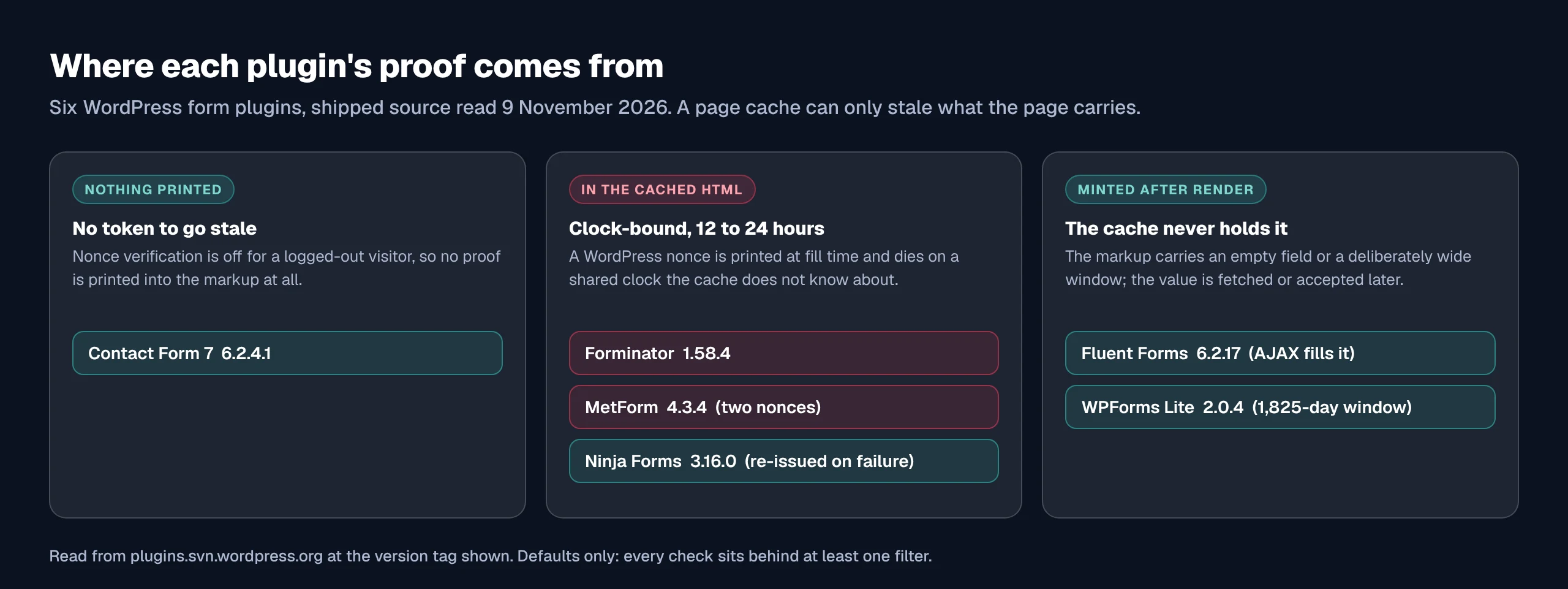
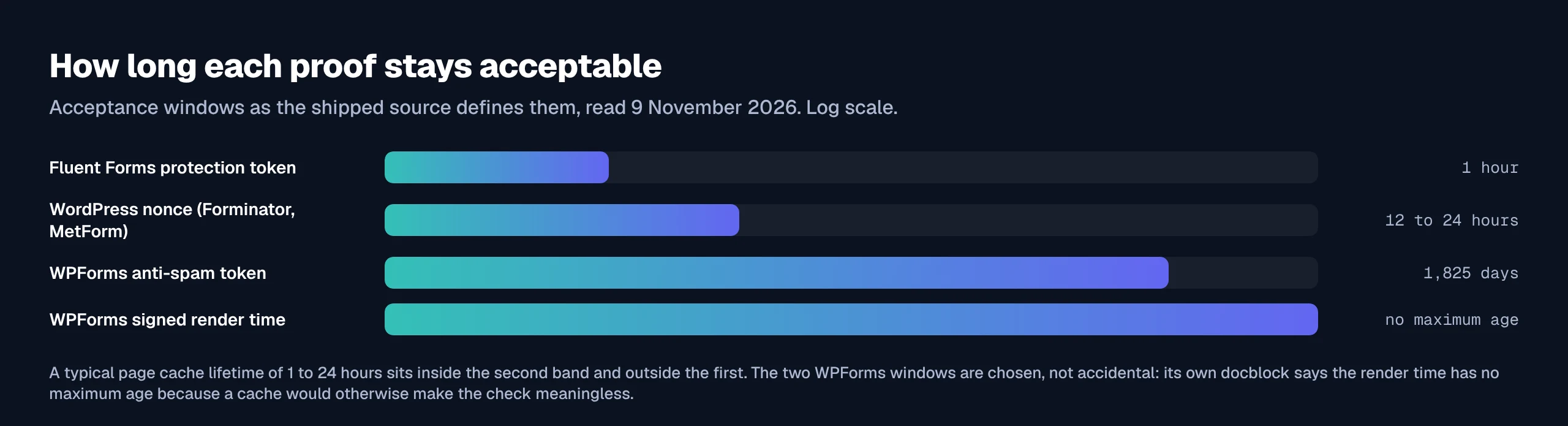
A page cache stores the HTML your server produced at fill time and hands the same bytes to everyone until it expires, so anything printed into that HTML is as old as the cache entry. The only question is whether the plugin cares. wp_verify_nonce() accepts the current tick and the one before it, giving a WordPress nonce a life of between 12 and 24 hours depending on where in the half-day it was minted. The arithmetic, and the shared UTC boundary it falls on, belong to the fix guide linked above.
| Plugin | Where the proof comes from | Stale-safe behind a long cache | Class |
|---|---|---|---|
| Contact Form 7 | Nothing printed | ✅ | No token to stale |
| WPForms Lite | data-token and data-token-time in the form tag, plus an AJAX refresh | ✅ | Tolerant by design |
| Fluent Forms | An empty hidden input filled by a nonce-gated AJAX call | ✅ | Minted after render |
| Ninja Forms | A nonce localised inline, re-issued when it fails | ✅ | Self-healing |
| Forminator | A nonce in the cached markup, unless AJAX load is on | ❌ | Clock-bound |
| MetForm | Two nonces travelling with the cached page | ❌ | Clock-bound |
Four plugins reached stale-safe by four different routes, which no single-plugin article can show.
WPForms made its token insensitive to age on purpose, and the window is wider than its own comment says. Token::get() derives the token from gmdate('dmYzW', $time), so it changes once a day. get_valid_tokens() then builds the list of tokens the server will accept, and the loop runs $days_in_5_years = 5 * 365, giving 1,825 daily tokens before today, today’s, and one 45 minutes ahead to cover midnight. The docblock above that loop states the list includes “two days before the current date to account for long cache times”. The code builds five years. The gap matters in one direction only: the real behaviour is more cache-tolerant than the documentation promises.
WPForms also writes down why a second check cannot help a cached page. Version 2.0.2 added a signed render-time token for a minimum-time-to-submit test, and the docblock on verify_time_token() states the limit in plain terms:
The token has no maximum age, and that is a deliberate limit on what this check can do. A page cache serves the markup it stored, so the render time inside it is the cache fill time rather than the moment this visitor received the form, and the minimum time to submit check therefore has no effect on a cached page older than its own duration.
That is a vendor documenting, in its own source, a check that page caching makes inert.
Fluent Forms solved the same problem by printing no token at all. renderTokenField() emits a hidden input with a name and no value; the value arrives later from wp_ajax_nopriv_fluentform_generate_protection_token, and validateToken() gives it 3,600 seconds from minting. A cached page cannot carry a stale token, because it carries none. One dependency survives in the markup: the AJAX call is gated by a nonce, fluentform_generate_token_nonce, passed to the front end through fluentform/global_form_vars, so on a site cached for longer than a day that nonce dies rather than the token.
Ninja Forms lets the nonce fail and then fixes it. submit() calls check_ajax_referer() with $die = false, and when the check fails it mints a fresh nonce, returns it with a timestamp, and the front end resubmits. The comment records the case it was written for:
“Just in Time Nonce”. If the nonce fails, then send back a new nonce for the form to resubmit. This supports the edge-case of 11:59:59 form submissions, while avoiding the form load nonce request.
A page cache manufactures that edge case all day rather than once at midnight, so the repair covers more than it was aimed at.
Forminator and MetForm are the two a long cache can break. Forminator prints forminator_submit_form{id} through nonce_field() in get_submit() and refuses a submission without it. MetForm wants two: action.php requires a form_nonce in the submitted data, and WordPress’s REST cookie authentication rejects a stale X-WP-Nonce before MetForm’s code runs. Forminator ships the only way out of the six: with AJAX load enabled the cached page holds a placeholder and the markup, nonce included, arrives after render. Its render file records the comment “load later via ajax to avoid cache” seven times.
The Part Nobody Documents: What the Visitor Sees When the Check Fails
A check that rejects a submission and tells the visitor it worked is worse than no check, because it removes the signal that would have brought somebody to look. This third column of the ledger is the one that inverted this study’s starting assumption.
| Plugin | Failed check | What the visitor gets | Record left behind |
|---|---|---|---|
| Contact Form 7 | Spam, from either test | “There was an error trying to send your message. Please try again later.” | In-request spam log, nothing written to the database |
| WPForms Lite | Honeypot | Nothing. The code comment reads “Fail silently” | A logged spam entry |
| WPForms Lite | Token | A visible error header on the form | A logged spam entry |
| Fluent Forms | Honeypot or token | HTTP 422 with the plugin’s own message | The fluentform/spam_attempt_caught action fires |
| Forminator | Nonce | “Invalid nonce. Please refresh your browser.” | — |
| Forminator | Honeypot | success: true, message “Form entry saved” | — |
| Ninja Forms | Nonce | A retry the visitor does not see, then the real result | — |
| MetForm | Either nonce | “Unauthorized submission.”, or a REST 403 | metform_submission_failed fires with a typed reason |
The premise this study started from was wrong, and the correction is worth more than the premise was. We expected Contact Form 7 to be the plugin that thanks a visitor and drops the mail, and our own fix guide says so in those words. At version 6.2.4.1 it does not. When spam() returns true, submission.php sets the status to spam and the response to message('spam'), which contact-form-template.php states as “There was an error trying to send your message. Please try again later.” The mail is not sent and the visitor is told something went wrong. That is a refusal, and the sentence in our fix guide needs correcting rather than repeating.
The plugin that actually does it is Forminator, and the source says so in a comment. is_honeypot() returns false when the honeypot field is filled, and the caller’s next three lines read:
$passed = self::is_honeypot();
if ( ! $passed ) {
    // show success but dont save form.
    return self::return_success();
}
return_success() is in abstract-class-front-action.php and builds 'success' => true with the default message “Form entry saved”. Nothing is saved. WPForms does the same thing for its honeypot and is more explicit about it: class-process.php logs the entry as spam and returns with the comment “Fail silently”, so the confirmation the visitor sees is whatever the form was configured to show on success.
Both are honeypot paths, and a honeypot is cache-safe, so neither silence is caused by caching.
Two Groups, and They Do Not Overlap
The plugins whose proof a cache can stale are not the plugins that can hide a failure. Forminator is the only one in both groups, and it is in each for a different reason: its nonce is clock-bound, and its honeypot is silent.
- Clock-bound behind a page cache: Forminator, MetForm. Both fail visibly, so a reader who complains is giving you accurate information.
- Can report a failure as success: WPForms Lite, Forminator. Both only on the honeypot path, which no cache affects.
- Neither: Contact Form 7, Fluent Forms, Ninja Forms.
So the absence of complaints means different things on different stacks. On MetForm a working inbox is decent evidence that nonces arrive fresh. On WPForms or Forminator it is evidence of nothing, because a caught submission leaves the visitor with no reason to write to you, and the plugin’s own spam log is the only reliable instrument.
Fixing a Cached Form Without Losing the Cache
xSpeed Cache is ours, and it is the tool for this job. The setting that decides whether a nonce-dependent form survives is cache expiry, which xSpeed takes in hours from 1 to 720, and the Free vs Pro split puts page caching and exclusions in the free tier, so nothing below needs a licence.
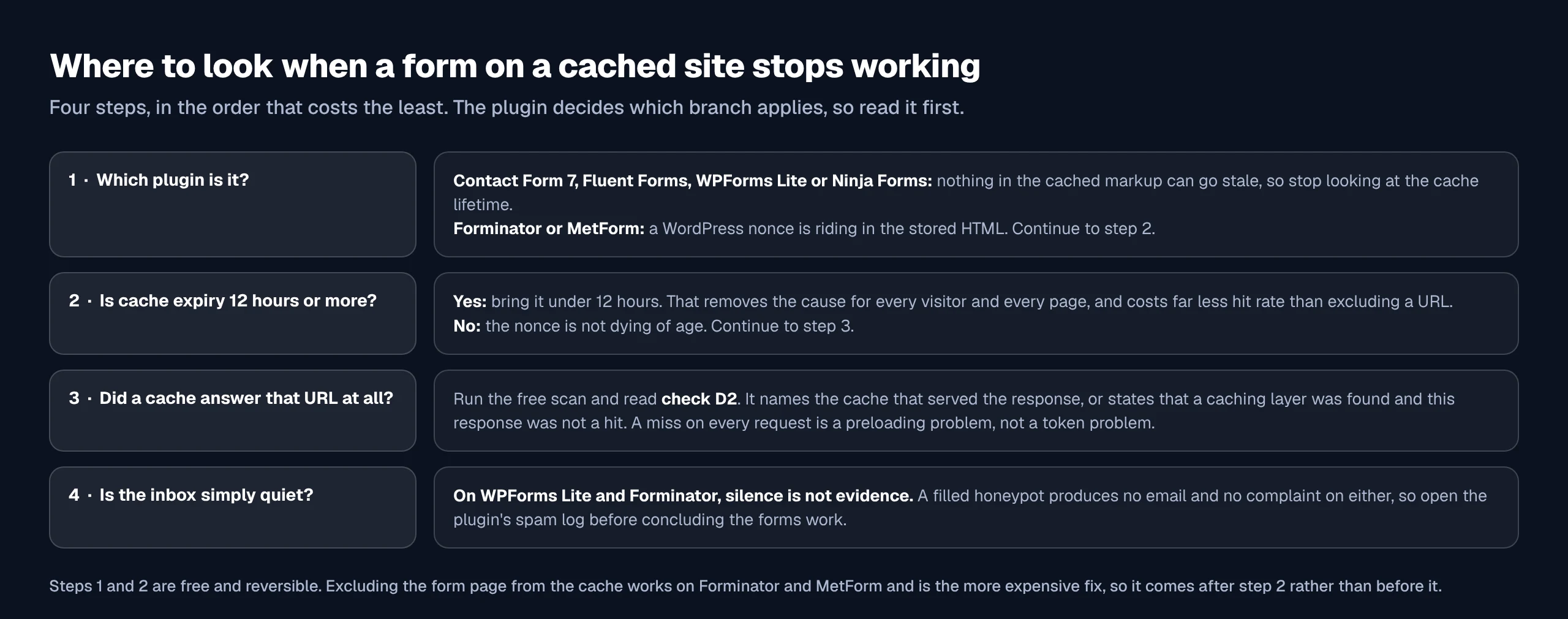
For a Forminator or MetForm site the order is cache lifetime first, exclusions second. Expiry under 12 hours removes the cause for every visitor instead of carving one URL out of the cache, at a fraction of the hit-rate cost. Our guide to setting up cache exclusions covers what to work through when that is not enough, and caching a WooCommerce store without breaking checkout covers the same question with a cart involved. On WooCommerce stores MetForm is a special case: action.php skips its own nonce check when WooCommerce is present, so a store running both sees one nonce layer rather than two.
Establish that a cache is answering the URL before you change anything. Check D2 in our scan rubric names the cache that served the response, or states that a caching layer was detected and this response was not a hit, which is a different problem from a stale token. The post on checking whether WordPress caching is working is the hub for that question, hits and misses documents the headers, and common problems and troubleshooting carries the rest.
Run the free scan on your own site: xspeedcache.com/scan/
Two of the six submit through the REST API rather than admin-ajax.php. Contact Form 7 posts to /contact-forms/{id}/feedback, registered with permission_callback set to __return_true, and MetForm posts to /metform/v1/entries/insert/{id}, registered the same way. A cached REST response would break both, which is why REST API caching is a separate setting from page caching and why those endpoints are excluded by default.
Common Mistakes People Make Chasing a Cached Form
- Excluding the page before reading the plugin. On three of the six there is nothing in the page to stale, so the exclusion costs hit rate and fixes nothing.
- Treating an empty inbox as a caching symptom. On WPForms and Forminator a filled honeypot produces no email and no complaint.
- Trusting a docblock over the code under it. WPForms’ comment says two days where its loop builds 1,825.
- Assuming the nonce is the cause because the symptom arrives suddenly. It arrives suddenly on Forminator and MetForm. On Ninja Forms the nonce repairs itself, and on Contact Form 7 a default install never checks one.
- Excluding the page and forgetting the endpoint. A cached REST or AJAX response breaks a form with no token problem at all.
Frequently Asked Questions
My contact form says there was an error trying to send my message. Is that my cache?
On Contact Form 7 that string is the shipped default for the spam status, and on a default install the only test that can produce it for a logged-out visitor is the User-Agent length check. A cache cannot cause it. Look at an Akismet integration or anything hooked to the wpcf7_spam filter.
I get the thank-you message but no email. Where did the submission go?
If you are on WPForms or Forminator, read the plugin’s spam log first. Both treat a filled honeypot as a reason to show the success path and store nothing, and Forminator’s comment on that branch reads “show success but dont save form”. A honeypot gets filled by bots, and also by a password manager or autofill extension writing into a hidden field.
I excluded my whole contact page from the cache and nothing changed. Why?
Either the plugin never depended on the cached markup, which is true for three of the six, or the stale thing is not on that page. Fluent Forms and Ninja Forms both depend on a nonce delivered through a localised script variable, which a cached page other than the form’s own can serve.
My Forminator form shows success and saves no entry. What should I look at?
The honeypot. is_honeypot() checks a field named input_{n} where n is one past the real field count, so editing the form changes the field name, and anything replaying an old submission puts a value in a field that is now real. The nonce path is not a candidate, because a nonce failure returns “Invalid nonce. Please refresh your browser.” instead.
I run MetForm on a WooCommerce store and never see nonce errors. Is that expected?
Yes. core/entries/action.php wraps its form_nonce check in a test for WooCommerce and skips it when WooCommerce is present, so a store sees only WordPress’s REST cookie nonce rather than both layers. The REST layer still applies, and MetForm’s own source notes that an expired REST nonce on a page served from a full-page cache is the commonest reason a submission is rejected before the plugin runs.
Does a longer cache lifetime break WPForms?
Not through the anti-spam token. The server accepts tokens from 1,825 days back, and the render-time token has no maximum age by design. A lifetime past 24 hours can still strand the nonce on any other feature of the page that uses one, which is a separate question from the form.
Which of these six is safest behind a long page cache?
Four of them, by four mechanisms: nothing printed, a token minted after render, a wide acceptance window, and a nonce that re-issues itself. Safest against staleness is not strictest, and three of those four verify less than Forminator does.
I switched from Contact Form 7 to Ninja Forms and submissions fail once a day. What changed?
Not the nonce, which Ninja Forms repairs by itself. Look at what the retry depends on: the re-issue arrives in a response the front end must act on, so anything blocking admin-ajax.php for part of the day, a cached POST response included, breaks the repair rather than the check.
Does excluding the form page from the cache fix a stale nonce?
On Forminator and MetForm it does, because the markup is then generated per request. It is the more expensive of the two fixes. Bringing cache expiry under 12 hours fixes it for every page at once and keeps the page cached.
Do I need to exclude the AJAX or REST endpoint as well as the page?
The endpoint must not be cached, and in xSpeed the REST and AJAX paths are handled separately from page caching. A cached endpoint returns the first visitor’s response to the second, which looks like a token failure and is not one.
Conclusion: Read the Plugin, Then the Cache
| If your goal is… | Do this | Instrument |
|---|---|---|
| Keep forms working behind a long cache | Prefer a plugin that mints or repairs its proof after render | This census, column two |
| Keep failures visible | Avoid relying on a honeypot as the only check | The plugin’s spam log |
| Diagnose a live failure | Establish that a cache answered before changing a setting | Scan check D2 |
| Keep the cache and the form | Cache expiry under 12 hours, exclusions second | xSpeed cache settings |
What to do this week: find out which of the six you run and read its three rows above. If it is Forminator or MetForm, set cache expiry under 12 hours before you exclude a single URL. If it is WPForms or Forminator, open the spam log and see what has been caught while nobody was told. Then run the free scan and read check D2, so the next form report starts from evidence rather than the famous cause. xSpeed Cache does the expiry and exclusion work in the free tier; Pro is $29 a year at the founding price with a 14-day money-back guarantee, and the 80-capability comparison shows what that adds.
If your reading of one of these six differs from ours, the version tag is in the method table and every file path is named. Tell us what you find: a census nobody checks is an assertion with a table in it.