W3 Total Cache vs WP Super Cache in 2026: 510 Configuration Keys Against One Click That Sets Four
Updated September 2026
W3 Total Cache carries 510 configuration keys in the source it ships, counted on 26 September 2026. WP Super Cache opens on a tab holding two radio buttons. Both plugins cache nothing the moment you activate them: W3 Total Cache defaults 20 of its 21 master switches to false, and WP Super Cache’s own config file starts with caching disabled. The comparison people expect is which one is faster. On a cache hit both write a static HTML file and serve it before most of WordPress loads, so that answer is close to a rounding error. The more useful comparison is how many decisions stand between activating the plugin and serving that file, and which of those decisions fail quietly when you answer them wrong.
Quick Summary / TL;DR
Every figure below was read from each plugin’s shipped source or its publisher’s own page on 26 September 2026.
| If you want… | Do this | Why |
|---|---|---|
| A page cache working in under a minute, free forever | WP Super Cache, Easy tab, Caching On | One control sets the four things the plugin recommends, including the safe answer for logged-in visitors |
| Object cache, database cache, fragment cache and a CDN from one plugin | W3 Total Cache | 510 keys across 23 prefixes, with nine storage-engine choices |
| A paid tier with support on a free-directory plugin | W3 Total Cache Pro, $99/yr for one site | WP Super Cache has no paid tier and no upsell in its readme |
| Proof in the response headers that a hit was served | WP Super Cache, then enable its served header | Four header values, each naming the path that served the page |
| Someone else to configure it | W3 Total Cache 5-site licence, $350/yr | BoldGrid bundles a Plugin Configuration it prices at $125 |
| Adaptive expiry and one connection for a whole fleet | xSpeed Cache, which is ours | Expiry is adaptive rather than a number you pick, and one MCP connection covers every site |
Both Plugins Cache Nothing the Moment You Activate Them
This is the fact that reframes the whole comparison, and neither vendor hides it.
W3 Total Cache’s ConfigKeys.php declares 21 keys ending in .enabled. Twenty of them default to false, including pgcache.enabled, dbcache.enabled, objectcache.enabled, minify.enabled and cdn.enabled. The single exception is browsercache.enabled, which sets expiry and compression headers and caches no HTML at all. Activate the plugin, change nothing, and every page still runs the full WordPress request.
WP Super Cache’s shipped wp-cache-config-sample.php is 105 lines and assigns 62 variables. The second of them is $cache_enabled = false. The third, $super_cache_enabled = true, decides what happens once caching is on, not whether it is.
The same starting line for both
So the honest starting line for both products is the same: an inert plugin and a site that is exactly as fast as it was yesterday. We covered the wider version of this in when a caching plugin is the wrong tool, where 48% of the WordPress sites in our own scan archive had under 100ms of server time for a page cache to take. The question that follows is what each plugin asks you for next.
Master Table: Eleven Rows, All Read on the Day
| Question | W3 Total Cache 2.10.6 | WP Super Cache 3.1.3 |
|---|---|---|
| Publisher | BoldGrid | Automattic |
| In the directory since | 29 July 2009 | 5 November 2007 |
| Active installs | 900,000+ | 1,000,000+ |
| Rating | 4.4 from 5,420 ratings | 4.3 from 1,346 ratings |
| Last updated | 4 September 2026 | 26 August 2026 |
| Minimum WordPress | 6.0 | 6.8 |
| Config keys in shipped source | 510 | 62 |
| Admin screens | 16 pages under its own Performance menu | 7 tabs under Settings |
| Paid tier | $99 · $350 · $500 per year for 1, 5, 10 sites | None |
| Cache-status header | X-Powered-By: W3 Total Cache, off by default | X-WP-Super-Cache, off by default |
| Setup wizard | Setup Guide, shipped | Easy tab, two radio buttons |
Install counts come from a direct wordpress.org Plugin API query on 26 September 2026, which returns the same bucketed figures the directory pages for W3 Total Cache and WP Super Cache show. WP Super Cache is the larger install base by one bucket. W3 Total Cache holds four times the ratings, which measures how many people have had enough of an opinion to file one.
One row deserves a note before the feature argument starts. WP Super Cache requires WordPress 6.8; W3 Total Cache requires 6.0. The plugin with the smaller surface is the one that will refuse to install on an older site.
Counting the Config Surface From the Shipped Source
Reputation says W3 Total Cache is complicated. That is a feeling, and a feeling cannot be checked. The count can be.
ConfigKeys.php in W3 Total Cache 2.10.6 declares every setting the plugin persists, with a type and a default. Parsing it on 26 September 2026 returns 510 keys across 23 prefixes, typed as 207 booleans, 178 strings, 68 arrays and 57 integers, with 23 of them flagged in the source as secrets.
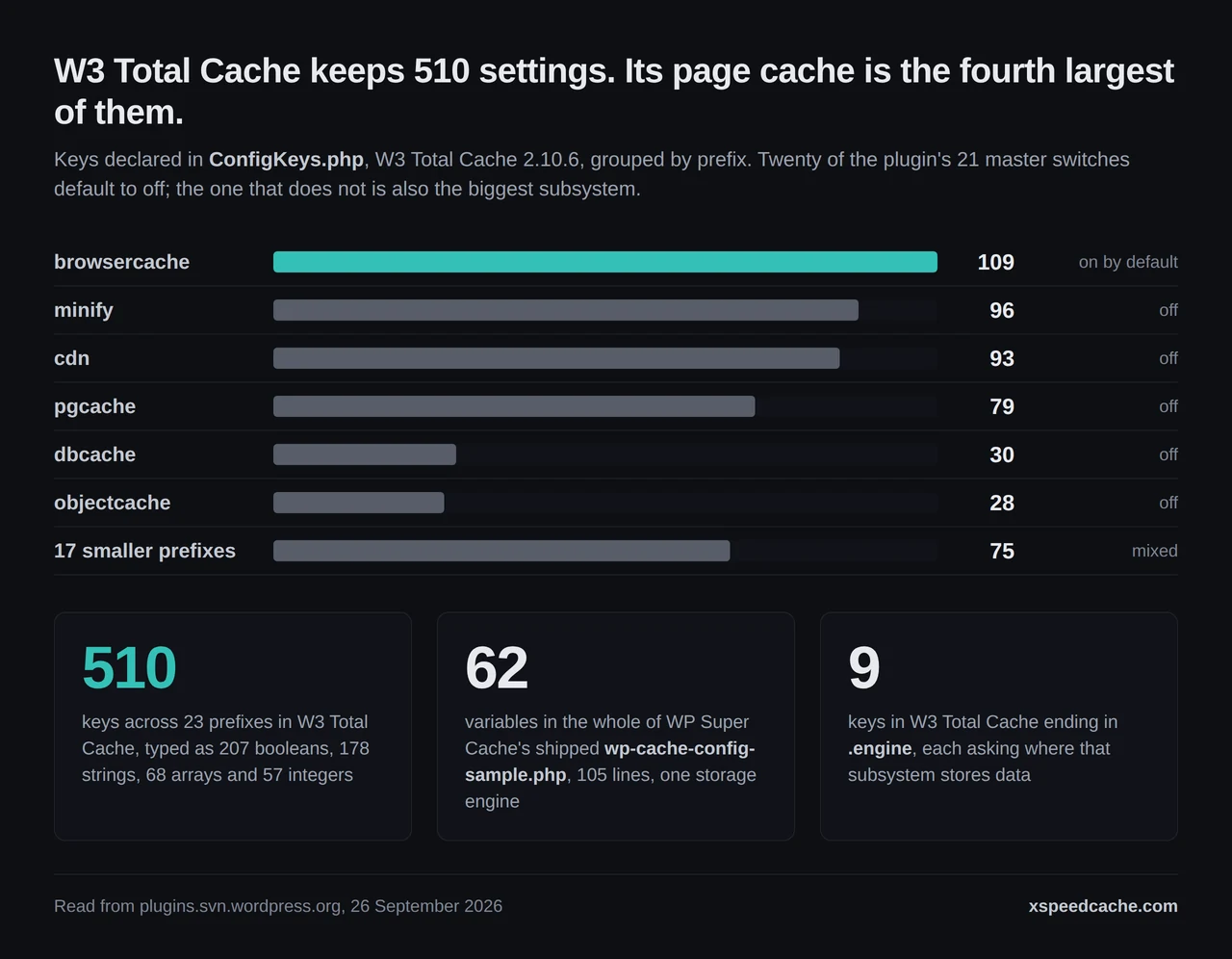
The distribution matters more than the total:
- 🗂️ browsercache, 109 keys. The one subsystem that is on by default is also the largest.
- ⚙️ minify, 96 keys, with a master switch that defaults to off and separate HTML, CSS and JS engines underneath it.
- 🌐 cdn, 93 keys, behind twelve CDN engine classes in the shipped source, from CloudFront and S3 to BunnyCDN, Azure and Google Drive.
- 📄 pgcache, 79 keys. The page cache, the thing most people install a caching plugin for, is the fourth largest surface.
- 🧠 dbcache 30 and objectcache 28, each with its own engine choice.
Nine keys end in .engine, and each one asks you to choose where that subsystem stores data: disk, APCu, Memcached, Redis, WinCache or a few others depending on the subsystem. The defaults are conservative, file_generic for the page cache and file for the rest, which works on any host and is the one family of options that does not use memory.
WP Super Cache asks none of this. Its 62 variables include the debug log path, the mobile user-agent string and the semaphore ID, so the comparable number is smaller again. There is one storage engine, the filesystem, and no choice to get wrong.
The Easy Tab Is One Control, and the Plugin Lists What It Sets
partials/easy.php renders one table row with two radio inputs: Caching On (Recommended) and Caching Off. Underneath it the plugin lists, in its own words, what switching on will enable:
- Caching disabled for logged in visitors.
- Simple caching.
- Cache Rebuild.
- Interval garbage collection every 10 minutes with a cache lifetime of 30 minutes.
The handler in inc/admin-ui.php is more specific than the list. Choosing Caching On posts wp_cache_enabled = 1, super_cache_enabled = 1, cache_rebuild_files = 1 and wp_cache_not_logged_in = 2, then schedules garbage collection on a 600-second interval with a 1,800-second cache lifetime if nothing is scheduled already.
The shipped defaults are not what a user gets
That last assignment is the interesting one, because wp-cache-config-sample.php ships $wp_cache_not_logged_in = 0. The Easy switch overrides it with the value its own interface describes as caching disabled for logged in visitors. Anyone who reads the sample config and concludes that WP Super Cache serves cached pages to logged-in visitors has read a file that the supported path rewrites on the way past.
W3 Total Cache reaches the same destination differently. pgcache.reject.logged defaults to true, so logged-in requests are excluded before you touch anything. The difference is not the policy. It is that one plugin decided for you and the other decided for you only if you used its wizard.
What Each One Does About a Visitor Who Has Left a Comment
A cache that treats every visitor as anonymous is fast and occasionally shows one person’s name to another. Both plugins have a documented answer, and the answers have different shapes.
WP Super Cache calls anyone logged in, holding a comment cookie, or holding a post-password cookie a known user, and its readme describes three serving paths ranked by speed. Expert mode uses Apache mod_rewrite to serve a static file without starting PHP. Simple mode, the recommended one and the shipped default, lets PHP serve the same static file. WP-Cache mode handles known users, URLs with query strings and feeds by writing a separate cached file per cookie signature.
That signature is built in wp_cache_get_cookies_values(), which concatenates the matching auth cookie values and hashes them with MD5. The function’s own docblock in wp-cache-phase2.php states the failure mode plainly: returning an empty string for a visitor who is in fact logged in “collapses their cache key onto the anonymous one, and the personalised page they were served is written to the supercache file every anonymous visitor then gets.”
Two different ways to be safe
That is the exact bug we traced in a logged-out visitor seeing someone else’s name, described here by the code that has to avoid it. WP Super Cache’s answer is per-user cache files, which is flexible and multiplies what the cache directory holds. W3 Total Cache’s answer is to refuse the request, plus an opt-in cookie-groups subsystem for anyone who wants variants.
Neither is wrong. They cost different things. Per-user files cost disk and hit ratio; refusing to cache costs a slow page for every signed-in visitor, which matters on a membership site and not at all on a brochure site.
The Receipt: One Header Names the Plugin, the Other Names the Path
Our earlier survey in free WordPress caching plugins left one row open. It records W3 Total Cache as “the one row this audit could not settle” and WP Super Cache’s evidence as debug comments in the page footer. Reading both plugins again on 26 September 2026 settles it, and both answers are better than that note suggested.
WP Super Cache emits X-WP-Super-Cache with one of four values, and each value names the path that answered:
| Header value | What served the page |
|---|---|
Served supercache file from PHP | Simple mode, static file, PHP started |
Served supercache gzip file from PHP | Simple mode, compressed copy |
Served supercache 304 file from PHP | Static file, conditional request |
Served WPCache cache file | WP-Cache path, per-cookie file |
It is gated on $wpsc_served_header, which ships as false. W3 Total Cache’s header is X-Powered-By: W3 Total Cache, and it requires two switches: browsercache.enabled, which defaults on, and browsercache.html.w3tc, which defaults off. Its other receipt is a footer comment reading “Page Caching using” plus the engine name, produced by w3tc_footer_comment.
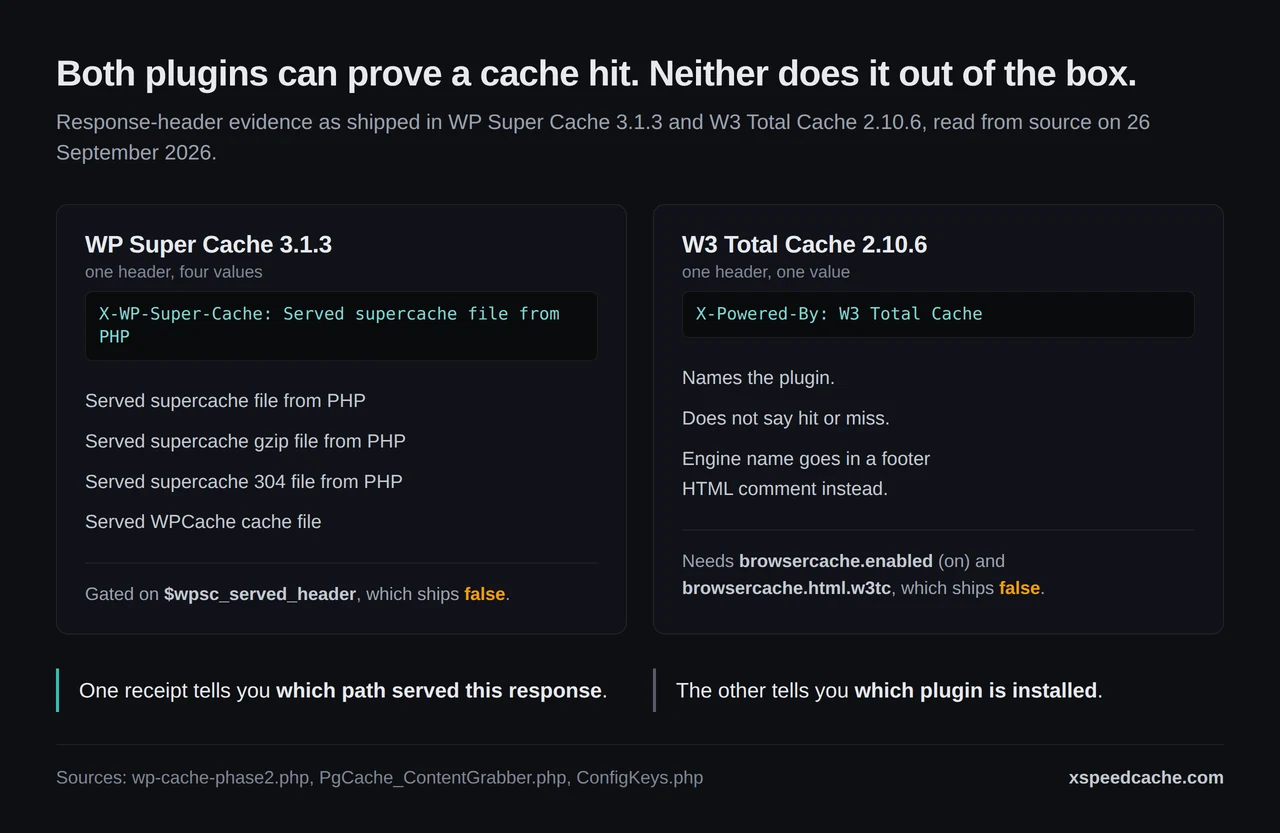
So the receipts are not equivalent. WP Super Cache’s header tells you whether this response was a hit and how it was served. W3 Total Cache’s tells you the plugin is installed. A footer comment is invisible to anything that reads headers, and any HTML minifier in front of the site can remove it, which is the trap we set out in how to check whether caching is working.
The Decision Count Test
Comparison articles in this field score features. Features are not what goes wrong. What goes wrong is a decision somebody answered once, six months ago, in a dialog they have not opened since. Run this instead.
- Activate and change nothing. Request a page twice as a logged-out visitor and look for any cache evidence. Both of these plugins should give you none. If yours does, something else on the site is already caching, which is the conflict we mapped in ten of fourteen plugins writing the same file.
- Take the shortest supported path to a cache hit and write down every decision it asks for. Not the best path. The shortest one the plugin itself recommends.
- Label each decision by how it fails. Three labels are enough: loud (the site breaks and you know), quiet (the site works and serves something wrong), or inert (nothing caches and nothing breaks).
- Turn on the plugin’s own receipt and confirm a hit from outside the server. Inside the dashboard every cache looks healthy.
- Record three numbers: total decisions, quiet-failure decisions, and minutes elapsed.
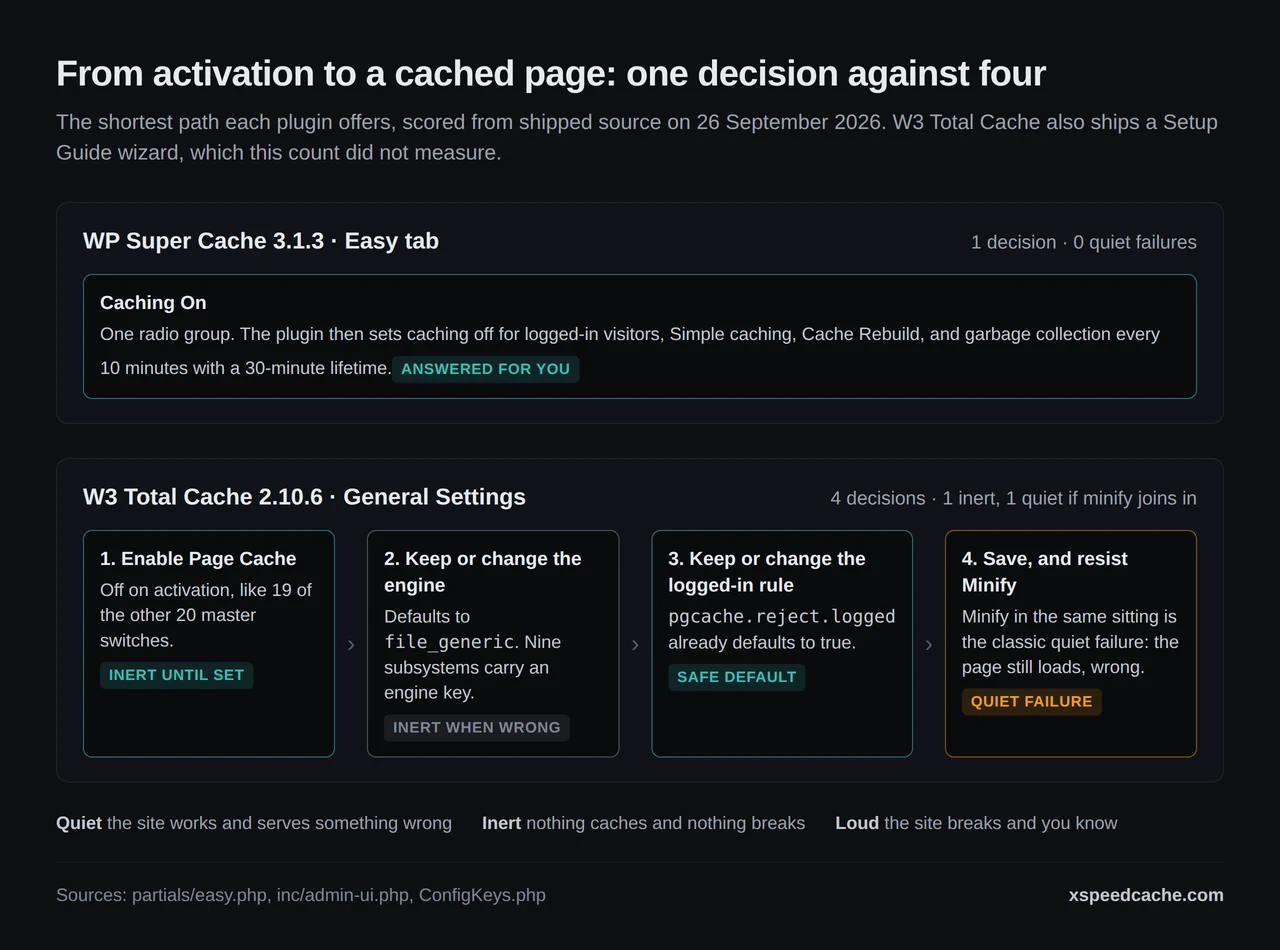
Scored from source on 26 September 2026, WP Super Cache’s Easy tab is one decision, and it has no quiet failure mode, because the plugin answers the known-user question for you. The equivalent path through W3 Total Cache’s General Settings is four: enable page cache, keep or change the engine, keep or change the logged-in rule, then save and let it write its rules. The engine choice is inert when wrong. Its minify subsystem, switched on in the same sitting, is the classic quiet one.
Four things this test cannot tell you
- It did not score W3 Total Cache’s own wizard. The plugin ships a Setup Guide, and that is the shortest path its publisher recommends. Counting its steps needs a live install, which this comparison did not have, so the four above is the General Settings route and not the plugin’s best case.
- It measures the shortest path, not the best outcome. A plugin with more decisions can finish faster once configured.
- It counts decisions, not their quality. One good question beats three trivial ones.
- It says nothing about steady-state hit ratio, which depends on your traffic shape and your purge rules, not on setup.
Where W3 Total Cache Earns Its 510 Keys
A comparison that only names one product’s constraint is an advertisement. Here is the case in the other direction, and it is strong.
WP Super Cache caches pages. That is the product. There is no object cache, no database cache, no fragment cache and no minifier. If your slow page is slow because of uncached WP_Query calls on a logged-in dashboard, WP Super Cache has nothing to offer and W3 Total Cache has three subsystems for it. Our own notes on object caching with Redis and Memcached cover why that layer is usually where a heavy site’s remaining time sits.
W3 Total Cache also ships a Setup Guide wizard of its own, so the picture of a wall of 510 settings with no guidance is out of date. And BoldGrid publishes a paid tier at $99 a year for one site, $350 for five and $500 for ten, all with a 30-day money-back guarantee, verified on its own pricing page on 26 September 2026. A plugin with support behind it is worth something on a site that earns money.
The publisher put a price on the config surface
One more line from that page is worth quoting because the publisher put a price on the thing everyone complains about. The five-site licence “Includes 1 Free Plugin Configuration ($125 value)”, and the ten-site licence includes two, at $250. BoldGrid sells configuring W3 Total Cache as a service and values one instance of it at $125. No feature grid carries that number, and it is the clearest evidence available that the config surface is a real cost rather than a matter of taste.
Automattic Ships a Migration Route Off Its Own Plugin
inc/boost.php in WP Super Cache 3.1.3 opens with a one-line description: “Code to handle migration from WP Super Cache to Jetpack Boost.” It renders a dismissible admin notice on the plugin’s own settings page headed Migrate to Jetpack Boost, with a Migrate now button, and the Easy tab carries a Try Jetpack Boost button beside Update Status.
Read that carefully before drawing a conclusion from it. WP Super Cache was updated on 26 August 2026 and sits at version 3.1.3, so this is not an abandoned plugin. Automattic is maintaining it and offering a route to a different Automattic product at the same time.
The gate on that offer is the useful part. wpsc_is_boost_compatible() returns false, and the notice stays hidden, when any of fifteen conditions hold, among them mobile theme switching, preload mode, late init, dynamic mfunc fragments, rejected cookies, saved headers, clear-on-post-edit, any non-default rejected URI or user agent, and any per-page-type caching rule. That list reads as WP Super Cache’s own account of what Boost does not cover, which makes it the most precise feature inventory either plugin publishes.
Keeping One Cache Policy Across Twenty Sites
The decision count is per site. Multiply it and the arithmetic changes.
- 🔁 Twenty sites on W3 Total Cache is twenty copies of four decisions and nine engine choices, held consistent by memory, across sixteen admin screens per site.
- 🖱️ Twenty sites on WP Super Cache is twenty clicks, and then no way to confirm from one place that all twenty are still serving from cache, because the receipt is per response and the settings are per install.
This is the problem we built xSpeed Cache and xSpeed Hub for, and both are ours: WPDeveloper builds them, and WPDeveloper is a Startise company. Cache expiry is adaptive rather than a number you pick, the importer reads a competing plugin’s settings instead of asking you to retype them, and every site answers to one MCP connection, so an agent can read hit ratios and purge across a fleet without a dashboard. The 80-capability comparison has the row-by-row version against eight competitors, including these two. For stores, the WooCommerce use-case page covers the cart and checkout exclusions those sites need.
Run the free scan on your own site: xspeedcache.com/scan/
Where we lose
Being honest about where we sit: a direct wordpress.org Plugin API query on 26 September 2026 returned 7,000+ active installs for xSpeed Cache and 5.0 from 14 ratings. Against 900,000 and 1,000,000 installs, and 5,420 ratings, that is a young plugin with a short public record, and WP Super Cache will be free forever while our Pro tier is not.
Common Mistakes Site Owners Make Choosing Between These Two
- 🧾 Reading the sample config as the default state.
wp-cache-config-sample.phpis the file the plugin copies and then rewrites. Three of the values the Easy tab sets differ from what ships in it. - 🔌 Enabling several W3 Total Cache subsystems in one sitting. Turn on page cache, verify a hit, then move to the next one. Four switches at once and a broken layout gives you four suspects.
- 🧱 Choosing Expert mode because the readme calls it fastest. It is fastest, and it edits your
.htaccess, which the same readme calls risky. Simple mode is what the plugin recommends. - 🕵️ Trusting a dashboard that says caching is on. Both plugins will report enabled while serving nothing. The header, fetched from outside, is the only evidence that counts.
- 💸 Pricing W3 Total Cache Pro without the configuration line. Its publisher prices that work at $125 per site. If you were not going to do it yourself, that belongs in the total.
- 🧩 Assuming a free plugin cannot conflict. Both write
wp-content/advanced-cache.php, and only one of them can own it.
Frequently Asked Questions
I enabled W3 Total Cache and my PageSpeed score did not move. Why?
Because activating it enables nothing that caches HTML. Twenty of its 21 master switches default to off, page cache among them. Open Performance, General Settings, enable Page Cache, save, then confirm a hit from outside the server.
Which one is actually faster on a cache hit?
On a hit they are close enough that hosting and page weight decide the result. Both write static HTML. WP Super Cache’s Expert mode uses mod_rewrite to serve that file without starting PHP, which its readme calls the fastest of its three modes and also the riskiest to set up.
My host runs Nginx. Does that rule either of them out?
No, but it changes WP Super Cache’s options: Expert mode depends on mod_rewrite, so Nginx users take Simple mode, which the plugin recommends anyway. W3 Total Cache generates Nginx rules and ships a sample config for it.
Is WP Super Cache being discontinued in favour of Jetpack Boost?
Nothing published says so. It was updated on 26 August 2026, and Automattic ships a migration notice to Boost alongside that maintenance. The migration offer hides itself when any of fifteen WP Super Cache features are in use.
I turned on minify and my theme lost its styling. Which plugin did that?
Either can, and the fix is the same: turn minify off, confirm the layout returns, then re-enable one sub-option at a time. We wrote the bisect procedure up in the minification guide.
Can I run both at once?
No. Both install wp-content/advanced-cache.php, and the last one to write it wins. Deactivate one fully, confirm the file is gone, then activate the other.
My cache directory grew to several gigabytes on WP Super Cache. What happened?
Most likely caching for known users with garbage collection effectively off. WP-Cache mode writes one file per cookie signature. Set a cache timeout and a garbage collection interval on the Advanced tab.
Does either plugin prove a hit in the response headers by default?
Neither does. WP Super Cache’s X-WP-Super-Cache is gated on a setting that ships off, and W3 Total Cache’s X-Powered-By needs browsercache.html.w3tc, which also ships off. Turn one on before you trust anything.
Which should I pick for a WooCommerce store?
Start with whichever you can verify, then check cart and checkout behaviour before traffic does. Exclusions decide what gets stored rather than what gets served, and the WooCommerce caching comparison has the per-plugin detail.
I need an object cache. Does WP Super Cache have one?
It does not. WP Super Cache is a page cache. W3 Total Cache ships object, database and fragment caching with engine choices, and our browser cache reference explains where the browser layer fits alongside them.
Why does WP Super Cache require a newer WordPress than W3 Total Cache?
Its readme sets the floor at WordPress 6.8 against W3 Total Cache’s 6.0. Both require PHP 7.4. On an older install the simpler plugin is the one that will not install.
Is 510 configuration keys a fair way to describe W3 Total Cache?
It is accurate and incomplete. The number counts keys the plugin persists, not screens a user must visit, and the shipped Setup Guide walks the main ones. The count is a measure of surface area, not of difficulty.
Conclusion: Count the Decisions, Then Pick
| Your situation | Pick | Why |
|---|---|---|
| Blog or brochure site, one install, no budget | WP Super Cache | One control, no paid tier, 1,000,000+ installs behind it |
| Heavy site with slow logged-in queries | W3 Total Cache | Object, database and fragment caching in one plugin |
| Older WordPress that will not take 6.8 | W3 Total Cache | Its floor is 6.0 |
| You want someone to configure it | W3 Total Cache Pro, 5 sites | A Plugin Configuration the publisher values at $125 |
| Nginx, and you want the plugin to write the rules | W3 Total Cache | It generates Nginx config; Expert mode needs mod_rewrite |
| A fleet under one control plane, with agent access | xSpeed Cache and xSpeed Hub, which are ours | One MCP connection reads and purges every site |
What to do this week:
- Fetch one page of your site twice from outside the server and read the headers. If nothing names a cache, nothing is caching.
- Turn on your plugin’s cache-status header before you change any other setting.
- Run the decision count test above on the install you trust least, and write the three numbers down.
- If the answer is a page cache and nothing else, install WP Super Cache and click Caching On. That is a complete answer and it costs nothing.
- If you want adaptive expiry, a competitor importer and fleet-wide agent control, xSpeed Cache is $29 a year or $79 once at the founding price, with a 14-day money-back guarantee.
If you run this test on either plugin and get a different decision count, the interesting part is which step disagreed. That is the number worth arguing about.