Speed Up WordPress Before the Caching Plugin: Core 7.1 Already Prefetches and Lazy-Loads, and Two Gates Switch It Off
Updated October 2026
WordPress 7.1.2 ships four loading optimisations that used to need a plugin, read from the tagged core source on 4 October 2026. Two of them switch themselves off silently, and a direct query to WordPress’s own serve-happy API the same day returns is_supported: false for PHP 8.1. The guide you expect starts by installing a caching plugin. The more useful order starts with the work your site has already paid for and is probably not getting, because every item below is a setting rather than a purchase.
Quick Summary: Which Job Is Yours Today
| If you want… | Do this first | Why |
|---|---|---|
| To know whether a cache helps at all | Measure your headroom first | Nearly half the WordPress sites in our archive have under 100ms for a cache to take |
| Lazy loading and priority hints, free | Put width and height on every image | Core adds neither when either is missing |
| Near-instant second page views | Turn on pretty permalinks | Core’s speculative loading is null without them |
| A faster origin on every MISS | Move PHP to 8.3 | WordPress’s own API calls 8.1 and 8.2 no longer supported |
The short version. Four of the jobs a caching plugin advertises already run in core. Check the gates first, then decide whether you still have a cache-shaped problem.
The Four Jobs Core Already Does, and the Gate on Each
This is the audit, and no plugin comparison runs it. Every version and default below was read from the tagged 7.1.2 source on 4 October 2026, not from release notes.
| Job core does | Arrived in | What switches it off | Proof it is on |
|---|---|---|---|
decoding="async" on content images | 6.1 | Nothing, it is unconditional | decoding="async" in the HTML |
loading="lazy" past the first few images | 5.5 | A missing width or height | loading="lazy" from image four |
fetchpriority="high" on the first large image | 6.3 | A missing width or height | It appears once |
| Prefetch of the next link you press | 6.8 | Plain permalinks, or being logged in | A speculationrules tag |
Three of those four are automatic. The fourth is a permalink setting. None of them appears in a plugin’s feature list, because none of them is a plugin’s work any more.
Step One: Find Out Whether a Cache Has Anything Left to Take
Do this first, because it decides what the rest is worth. Our own headroom study measured 886 WordPress sites and found that 48% have under 100ms of cache headroom, against a cached floor of 192ms. Run its two-request Break-Even Test, take the faster result, subtract that floor. The study carries the arithmetic and the four things it gets wrong, so do not re-derive it here.
The ordering holds for a measured reason rather than a stylistic one. Subtract every site’s entire server response from its Largest Contentful Paint and 93.4% of the failures still fail, across 413 WordPress sites, with the server accounting for 5.9% of the wait. Our measured priority ladder, published this week from 1,270 mobile runs, puts a page cache at rung five and bytes at rung one.
Step Two: Core Will Not Optimise an Image Without Both Dimensions
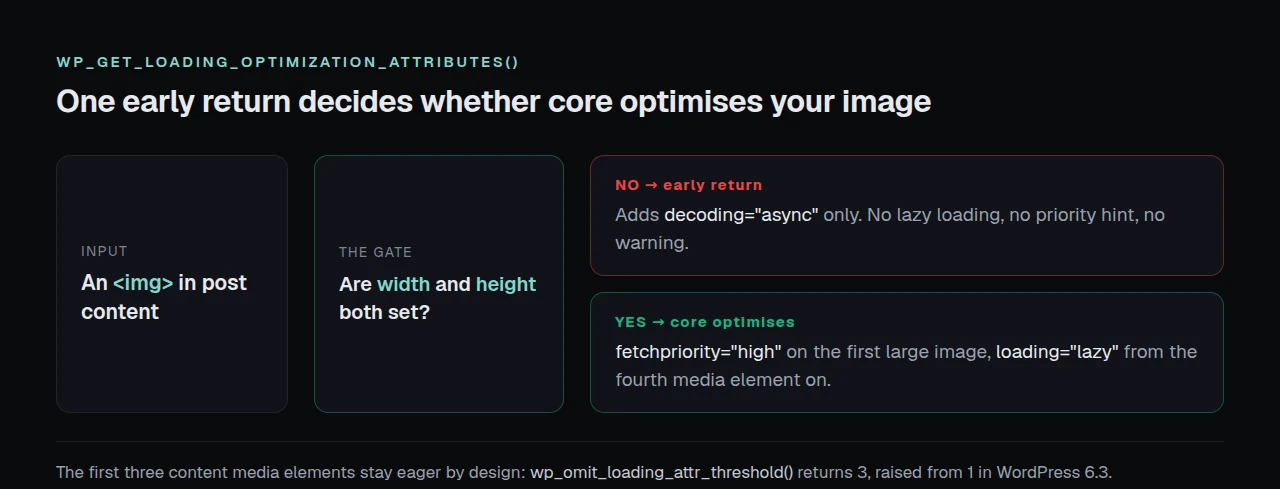
This gate is worth the most and almost nothing documents it. Inside wp_get_loading_optimization_attributes(), after core has decided on decoding, sits a single early return with the comment “For any resources, width and height must be provided, to avoid layout shifts”. The function reference documents the same behaviour. wp_img_tag_add_loading_optimization_attrs() repeats the test on the rendered tag 3,900 lines earlier in the same file, so an <img> missing either attribute is checked twice and skipped twice.
What that costs you, in order:
- No
loading="lazy"anywhere on the page. Every image downloads eagerly, including those below the fold. - No
fetchpriority="high"on the hero. The browser finds your Largest Contentful Paint candidate at normal priority, the delay web.dev’s LCP guidance spends most of its length on. - No warning anywhere. Site Health does not test for it and the page still validates.
Page builders and hand-written theme templates are where dimensions go missing. Our fix guide on images that stay heavy after a WebP conversion found the same attribute pair doing the real work, which is why converting the format alone so often moves nothing.
One number before you file a bug: core deliberately leaves the first three content media elements eager. wp_omit_loading_attr_threshold() returns 3, raised from 1 in 6.3, so eager images at the top of a post are correct.
Step Three: Pretty Permalinks Are What Turns On Prefetching
Core 6.8 added speculative loading and 7.1 added constants to tune it. The configuration function opens with one condition, before any filter runs:
if ( ! is_user_logged_in() && get_option( 'permalink_structure' ) ) {
    $config = array( 'mode' => 'auto', 'eagerness' => 'auto' );
} else {
    $config = null;
}
A site on plain ?p=123 permalinks therefore emits no speculation rules, and neither does any page you view while logged in. null means the feature never starts. Resolved, the defaults are prefetch and conservative, per the configuration reference and the defaults function in the shipped file, and Chrome’s prerender documentation defines conservative as speculating “on pointer or touch down”, the cautious end of the API.
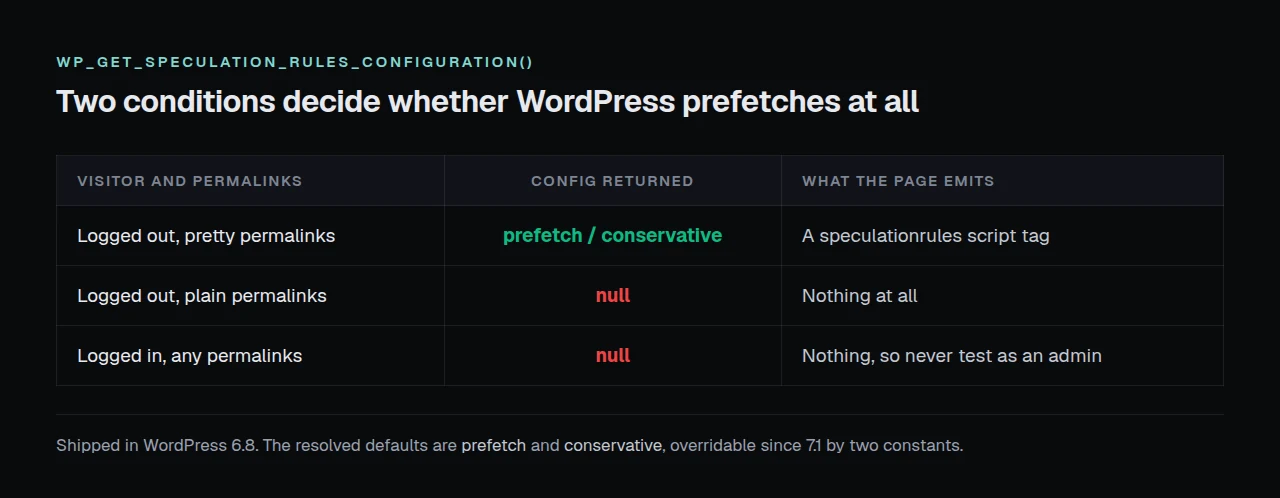
Settings, Permalinks, pick anything other than Plain, Save. Verify as a visitor rather than as an administrator, because your own session suppresses it:
curl -s https://example.com/ | grep -c 'speculationrules'Paid plugins still sell this, and one entry in our comparison of 80 capabilities lists speculative loading on hover as a licensed feature. Hover is the moderate setting, one step above core’s default, so what you buy is the eagerness rather than the capability.
Confirming What Is Actually On, Without Guessing
Start with the free xSpeed Scan, which needs no account. A mobile report grades A6, “LCP image discoverable early”, the check that notices when your largest image is not prioritised, while D1 and D2 report whether a cache is answering at all. A report run on 4 October 2026 carries rubricVersion 2026.10.1, so those IDs are today’s rather than a remembered set.
If you would rather check by hand, one request does both image attributes at once, from a logged-out shell:
curl -s https://example.com/ | grep -o 'loading="[a-z]*"\|fetchpriority="[a-z]*"' | sort | uniq -cA page full of images with zero loading matches has the gate closed.
Step Four: Put PHP on a Version WordPress Still Supports
Every uncached request runs PHP, so this moves the number a cache cannot reach. WordPress publishes its own verdict at api.wordpress.org/core/serve-happy/1.0/, and a direct query on 4 October 2026 returned this:
| PHP queried | is_secure | is_acceptable | is_supported |
|---|---|---|---|
| 7.4 | ❌ | ❌ | ❌ |
| 8.0 | ❌ | ❌ | ❌ |
| 8.1 | ✅ | ✅ | ❌ |
| 8.2 | ✅ | ✅ | ❌ |
| 8.3 | ✅ | ✅ | ✅ |
recommended_version is 8.3 in every response. The tension sits in core’s own packaging: the current version-check offer for 7.1.2 still states a php_version requirement of 7.4, which the same service marks neither secure nor acceptable. WordPress will install and run on it.
Your host’s panel does this in one click and a rollback in one more. Check our server compatibility notes first, then repeat the step-one measurement so the change is attributable.
Checking Four Gates Without Opening Twenty-Five Dashboards
Four checks take two minutes on one site and an afternoon on a client fleet, which is where free stops being free. We build xSpeed Hub at WPDeveloper for that shape of work: it reads the delivery and Core Web Vitals split for every connected site from one place, so the sites whose gates are closed separate from those already at their floor.
Run the free scan on your own site: xspeedcache.com/scan/
Hosting is the other half of step four and no plugin reaches it. We recommend xCloud, and it is ours: xCloud and WPDeveloper are both Startise companies, and an origin tuned for a cache is what makes a MISS cheap rather than merely rare.
Common Mistakes People Make Before Installing a Cache
- Testing while logged in. Both gated features behave differently for an administrator. Use
curlor a private window. - Adding a lazy-loading plugin to a site whose images carry no dimensions. The plugin works, core still adds nothing, and you own two systems.
- Treating the first three eager images as a defect. That is
wp_omit_loading_attr_threshold()doing its job. - Changing PHP and the cache in the same hour. Two changes, one measurement, no attribution.
- Buying a plugin for prefetching. Core 6.8 does it once the permalinks allow it.
Frequently Asked Questions
My images have no loading attribute at all. Did core break?
No. Check for width and height on those tags. The early return skips both loading and fetchpriority when either is missing, and logs nothing.
I turned on pretty permalinks and still see no speculation rules. What did I miss?
You are almost certainly still logged in. is_user_logged_in() is the first half of the condition, so the script tag is absent for you and present for a visitor.
I set fetchpriority="high" by hand and core dropped loading="lazy" from another image. Why?
Core tracks a content media count and will not mark one element both high priority and lazy. Supplying the attribute changes what core infers about the rest of the page.
Do I still need a caching plugin after all this?
Often yes, and now you will know by how much. Above roughly 200ms of headroom a page cache earns its place, and a slow origin on a MISS earns one regardless.
My PHP is 8.1 and the site is stable. Is upgrading urgent?
It is secure and acceptable but no longer supported, per the response above. Treat it as scheduled work rather than an incident, and do it before adding anything new.
Which free plugin should I use when I get there?
LiteSpeed Cache on LiteSpeed, WP Super Cache for a simple file cache, and our own free tier for page caching and minification. Free vs Pro draws our line, and xSpeed Cache reports 10,000+ installs against LiteSpeed Cache’s seven million, per a wordpress.org Plugin API query on 4 October 2026.
Does any of this help a WooCommerce store?
The image and PHP work does, fully. Prefetching is narrower, because cart and checkout pages belong outside it, and our notes for WooCommerce stores list the paths that stay uncached.
I have 40 plugins. Is that the real problem?
Possibly, and core gives you a threshold rather than a feeling. Our guide to reducing time to first byte covers the autoloaded options limit Site Health applies.
Can I force speculative loading for logged-in users?
Yes, through the wp_speculation_rules_configuration filter, and you should not. Logged-in traffic is the likeliest to change state when a link is prefetched.
Will any of this move my mobile score?
Rarely on its own. Weight is rung one of the priority ladder; these four checks remove waste the browser was told to accept.
My host already runs a server cache. Does step one still apply?
Yes, and it matters more: your headroom is already small, so what a plugin adds is smaller still.
Conclusion: Spend the Settings Before You Spend the Licence
| Your situation | Start here |
|---|---|
| Under 100ms of headroom | Steps two and three, then stop |
| 200ms or more of headroom | All four, then a page cache |
| Images with no dimensions | Step two, first |
| Still on PHP 8.0 or lower | Step four, today |
What to do this week: measure your headroom with two requests. Grep one page for loading and fetchpriority. Switch the permalinks off Plain and confirm the rules appear to a logged-out visitor. Move PHP to 8.3 and re-measure. Then, if the headroom is real, install the free tier of xSpeed Cache, free for page caching, minification and the migration importer, with Pro at $29 a year at the founding price and a 14-day money-back guarantee.
Four settings, no licence, a number at the end of each. Tell us in the comments which gate was closed on your site.