Only 8% of WordPress Pages Lazy-Load Their Hero. 21% Send the Priority Hint More Than Once.
Updated October 2026
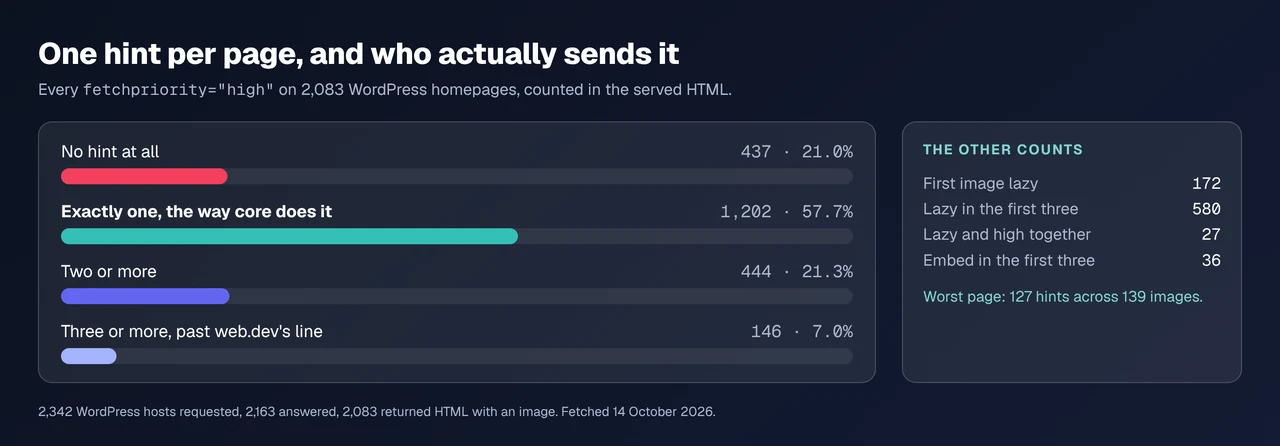
Across 2,083 WordPress homepages fetched on 14 October 2026, 172 (8.3%) put loading="lazy" on the first image in the document. That is the mistake every guide warns about, and it is the rarer of the two. On 444 pages (21.3%) two or more images claim fetchpriority="high", which core never does, and on 146 of those (7.0%) three or more do. web.dev’s Optimize Largest Contentful Paint guidance (last updated 31 March 2025) states that a high priority “on more than one or two images makes priority setting unhelpful in reducing LCP”.
The advice people expect is “exclude your hero from lazy loading”. The more useful instruction is “spend your page’s one priority hint once, on the right image”. This covers both, for images, iframes and video, with what WordPress ships.
Quick Summary: Which of the Two Mistakes Is Yours
| If your own HTML shows… | Do this | Why it matters |
|---|---|---|
loading="lazy" on the top image | Make it eager plus fetchpriority="high" | Never lazy-load the LCP element |
Two or more fetchpriority="high" | Keep one, delete the rest | Core adds one; the rest are yours |
No fetchpriority anywhere | Add it to the hero | The hero loads at default priority |
| An embed in the first three media | Move it below the hero | An iframe spends an eager slot |
Core Leaves Three Media Elements Eager, and an Embed Can Take One
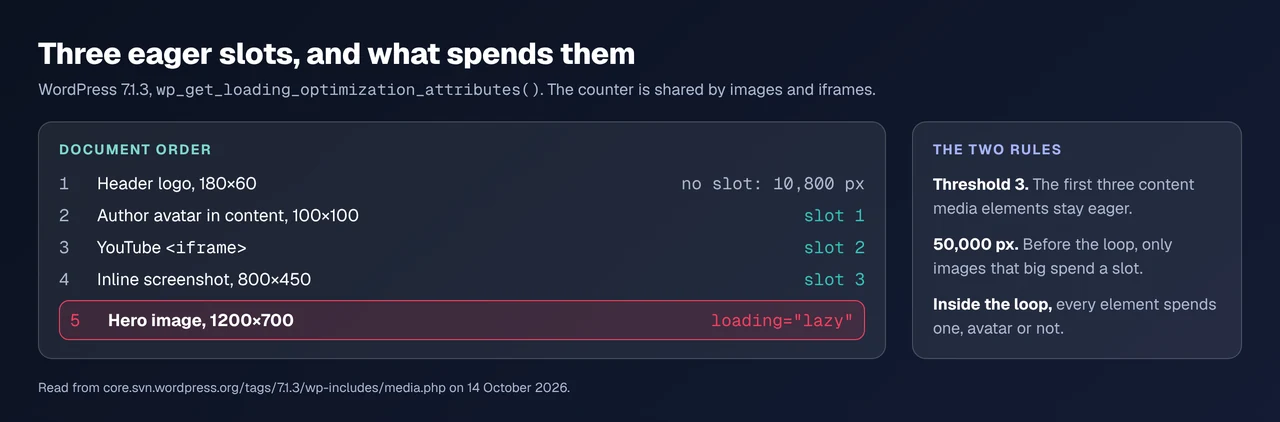
WordPress does not lazy-load everything. wp_omit_loading_attr_threshold() in wp-includes/media.php returns 3, raised from 1 in 6.3, so the first three content media elements stay eager deliberately, as its function reference documents. Two things about that counter decide whether your hero is one of them, both read from the 7.1.3 source.
The counter is shared with iframes. wp_increase_content_media_count() is called from the image and iframe paths alike, and wp_iframe_tag_add_loading_attr() carries the comment “This must occur before the conditional check below so that even iframes that are ineligible for being lazy-loaded are considered.” An embed above your hero takes a slot even when it cannot be lazy-loaded itself.
Inside the loop, size does not matter. In the main-query branch the count rises for every media element. Before the loop and in the header it rises only when width × height reaches wp_min_priority_img_pixels, default 50,000. A 100×100 avatar in post content costs a slot; in your header it does not.
One Priority Hint Per Page, and auto Can Spend It Unused
wp_high_priority_element_flag() starts true and is set false by the first image that qualifies, so core adds fetchpriority="high" at most once per page, and only from 50,000 square pixels up.
One branch spends the flag and marks nothing. Since 7.0 core honours fetchpriority="auto", which the editor’s visibility support adds to an image shown only at some viewport widths. In wp_maybe_add_fetchpriority_high_attr() a large enough auto image skips the attribute and still calls wp_high_priority_element_flag( false ). No image after it can receive the hint.
Core refuses the opposite contradiction out loud. Ask for loading="lazy" and fetchpriority="high" together and wp_get_loading_optimization_attributes() fires _doing_it_wrong(): “An image should not be lazy-loaded and marked as high priority at the same time.” The warning reaches debug.log, never the page.
The One-Hero Count: Four Questions Your Own HTML Answers
Four counts, one right answer each, nothing beyond curl:
UA='Mozilla/5.0 (Macintosh) AppleWebKit/537.36 Chrome/129 Safari/537.36'
curl -s -A "$UA" https://example.com/ > page.html
grep -o 'fetchpriority="[a-z]*"' page.html | sort | uniq -c
grep -o '<img[^>]*>' page.html | head -3
grep -o '<\(img\|iframe\)[^>]*>' page.html | head -3
grep -o '<video[^>]*>' page.html| Count | Correct answer | What a wrong answer costs |
|---|---|---|
fetchpriority="high" | exactly 1 | 0 means no hint, 2+ cancels it |
loading on the hero | eager, or absent | lazy delays the measured element |
| First three media | hero inside them | a hero outside them is lazy |
<video preload> | none with a poster | a video nobody plays downloads |
Its limit: document order is not viewport order. These counts find pages that cannot be right; only an LCP measurement names what paints last.
What 2,083 WordPress Homepages Declare
Our own public scan index listed 2,342 unique WordPress hosts. One browser-agent GET each on 14 October 2026 returned 2,163 responses, of which 2,083 were HTML with at least one <img>, holding 73,706 images. Scripts, styles and <noscript> were stripped first.
| Measured on 2,083 pages | Pages | Share |
|---|---|---|
No fetchpriority="high" at all | 437 | 21.0% |
| Exactly one | 1,202 | 57.7% |
| Two or more | 444 | 21.3% |
| Three or more | 146 | 7.0% |
First image carries loading="lazy" | 172 | 8.3% |
A loading="lazy" inside the first three media | 580 | 27.8% |
One image with both lazy and high | 27 | 1.3% |
| An iframe inside the first three media | 36 | 1.7% |
The worst page sends 127 hints across 139 images, confirmed on two fetches. rtcamp.com sends nine, verified the same way, on WordPress 7.1.3 with mobile Lighthouse 43 and lab LCP 15.8 seconds.
One number argues against reading this as carelessness: on 819 of the 1,202 single-hint pages (68.1%) the hint sits past the first image, the 50,000-pixel rule skipping a logo.
Fixing It: Make the Hero Eager, Not Merely Not-Lazy
web.dev’s instruction is absolute: “Never lazy-load your LCP image, as that will always lead to unnecessary resource load delay.” Skipping a lazy pass is not enough to obey it: core writes loading="lazy" on content images itself, so an image a plugin merely leaves alone keeps the attribute. All three routes below act instead.
- Render the hero where core can see it. Images in a header template part, or printed through
get_header_image_tag(), are treated as in-viewport by name:wp_loading_optimization_force_header_contextslists both. No code. - Write the attributes yourself. The hero gets
loading="eager" fetchpriority="high" width="…" height="…", and nothing else getsfetchpriority. Core honours an author’shighand spends the flag on it. - Filter it when a builder owns the markup. The documented hook receives what core computed:
add_filter( 'wp_get_loading_optimization_attributes', function ( $attrs, $tag, $attr ) {
    if ( 'img' === $tag && str_contains( $attr['class'] ?? '', 'hero-image' ) ) {
        unset( $attrs['loading'] );          // stop the lazy attribute
        $attrs['fetchpriority'] = 'high';    // and claim the one hint
    }
    return $attrs;
}, 10, 3 );
Match one class, never a template: a selector matching six images gives a page six hints.
There Is No Lazy-Load for Video, Only preload and a Poster
wp_lazy_loading_enabled() defaults to true for exactly two tag names, img and iframe, which is all the HTML specification defines loading for. Self-hosted <video> has no equivalent, so the dials are preload and poster. The HTML Living Standard says that attribute’s “missing value default and invalid value default are both implementation-defined”, with the Metadata state suggested as a compromise, so leaving it off hands the decision to the browser. Core’s [video] shortcode sets preload="metadata"; [audio] sets none.
Of 462 <video> tags on 236 pages | Count |
|---|---|
No preload attribute at all | 243 |
preload="none" | 109 |
preload="metadata" | 100 |
preload="auto" | 10 |
Carrying a poster | 85 |
Set preload="none" and a poster on everything that does not autoplay. An autoplaying hero needs its bytes, and its poster can become the element LCP measures, the one case for leaving preload alone.
Confirming the Hero Loads First, Starting With the Scan
Run the free xSpeed Scan on the page you changed. It needs no account, and the check to read is A6, “LCP image discoverable early”, in the assets dimension, whose fix line reads Resource Hints (preload) + Lazy Load exclusions at the free tier.
Read its limit too. On the rtcamp.com report run for this article A6 came back info, evidence “Audit not reported for this page”, because Lighthouse did not return that audit. When A6 is silent the One-Hero Count is the fallback, and PageSpeed Insights reports name the LCP element directly.
If you would rather check by hand: open DevTools, Network, sort by priority, and confirm the hero is High in the first wave. A hero starting after the stylesheets is late.
Thirty Client Sites, Audited From Their Own HTML
Four grep calls scale badly past a dozen sites, the problem we build for. We make xSpeed Cache, and its Lazy Loading tab is free: Eager-load First N Images defaults to 1, Excluded Images takes substring patterns, and tags opt out with data-skip-lazy. It sets loading="eager" on an excluded image rather than only skipping it, and claims the hint once per page.
Our lazy-loading documentation has the settings and media optimization the tab beside it; every row in that group is ticked in both columns of Free vs Pro, checked on 14 October 2026. Alternatives read the same signal: Autoptimize 3.1.16’s changelog records it excluding images from lazy-loading when they carry fetchpriority="high", “as done by WordPress core since 6.3”, and LiteSpeed Cache 7.9.1 lists lazy-load URI rules (Plugin API, 14 October 2026). On page-builder sites a pattern beats a filter. Across a fleet, xSpeed Hub reads the setting on every site at once.
Common Mistakes People Make With Lazy Loading
- Turning lazy loading off entirely. The hero was the problem; 73,706 images are not all above the fold.
- Raising the eager count to 10. Ten images then compete with the CSS, and first paint is already contested.
- Adding
fetchpriority="high"in a loop. The 444-page failure above.
Frequently Asked Questions
Why did my LCP get worse after I turned on lazy loading?
The hero was deferred with the rest. Make it loading="eager" with fetchpriority="high", or set the eager count to 1.
I removed loading="lazy" from my theme and the attribute is still there. Why?
WordPress adds it: the content filter writes loading="lazy" past the third content image, so the hero needs an explicit eager or a filter.
My page has no fetchpriority at all. What stopped it?
Usually a missing width or height, which makes core return early, or a hero under 50,000 square pixels. Both sit in what core does before a cache plugin.
Is more than one fetchpriority="high" actually harmful?
Past two it is documented as counterproductive: web.dev puts the line at “more than one or two images”. Core adds one, so a second came from elsewhere.
I set both lazy and high on my hero. Which wins?
Neither usefully. Core logs _doing_it_wrong() and keeps the high, while the browser waits for layout to confirm visibility.
How do I keep an embed from taking an eager slot?
Move it below the hero, or load it behind a click-to-play poster. The counter is shared with images.
My video downloads before anyone plays it. How do I stop that?
Set preload="none" and give it a poster. No browser supports loading="lazy" on <video>.
Can I raise wp_omit_loading_attr_threshold and move on?
It changes how many media elements stay eager, not which. If an avatar or embed pushed the hero past the third, fix the order.
How many images carry the hint on a two-slide hero slider?
One. Give it to the first slide and mark the rest fetchpriority="low", which core keeps and never lazy-loads.
Is any of this different on a block theme?
The overall template context short-circuits core’s optimization, with the comment that it “is handled more granularly”. Your block markup and visibility settings decide.
Conclusion: One Eager Hero, One Hint, Everything Else Lazy
The lazy-loading warning is correct and incomplete. Deferring the hero hurts 172 of these 2,083 pages; 444 send a hint core never sent them, 146 of those past the documented tolerance, and 437 send none at all. Every one of those states is visible in four lines of curl, and fixed with attributes rather than plugins.
What to do this week:
- Run the One-Hero Count on your three most-visited pages.
- Give one image
loading="eager"plusfetchpriority="high". - Set
preload="none"and a poster on every video that does not autoplay. - Re-scan, read A6, then check the hero is
Highin DevTools. - Across several sites, our feature list and pricing start at $29 a year with a 14-day money-back guarantee, and these controls are in the free plugin.
Reading the attributes is the habit worth keeping: a fast first byte with a slow page usually ends in a discovery problem.