Fast Signed Out, Slow Signed In: Every Request You Make Runs the Whole of WordPress
Updated September 2026
WordPress 7.1.2, returned as the current release by a direct query to the core version-check API on 26 September 2026, recommends a persistent object cache once a site autoloads more than 500 options or 100,000 bytes. A fresh install starts at 95, counted from that release’s installer.
A visitor’s page and your page are two code paths, and only one was ever cached.
Quick Summary
| If you want… | Do this | Why |
|---|---|---|
| To know whether signing in is the problem | Time one URL signed out, cache-busted, and signed in | The gaps separate a slow site from a slow session |
| To cut the authenticated wait | Add a persistent object cache | Repeated lookups otherwise hit the database every request |
| To find why the first query is slow | Audit what autoloads out of wp_options | One oversized row loads before anything renders |
Prove It Is the Signed-In Path Before You Change Anything
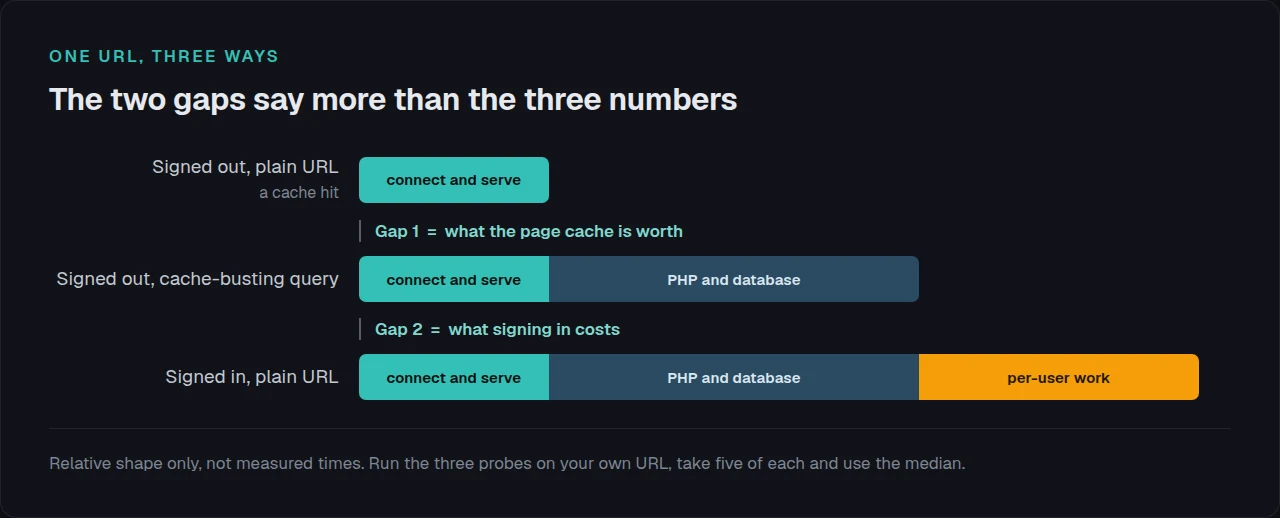
Our own scan cannot answer this one: no external test is ever signed in. So, three timings of one URL: the second forces a miss with a query string the cache has not seen, the third carries your session cookie.
| Probe | What it measures | What the gap above it tells you |
|---|---|---|
| Signed out, plain URL | A cache hit: a static file, no PHP | The floor this site can reach |
Signed out, plus a random ?x= | A miss: full PHP, no session | Subtract probe one for the cache’s worth |
| Signed in, plain URL | Full PHP plus per-user work | Subtract probe two for the cost of signing in |
Read the gaps, not the numbers. A large first gap with a small second means the cache works and PHP is slow, a cost every visitor pays on a miss. The reverse means the cost is your session.
The limitation. One probe of each is noise: take five, use the median. Confirm first that your cache does not strip unknown query strings, because one that does turns probe two into another cache hit.
No Page Cache Covers You, and Four Plugins Say So Out Loud
| Plugin | Its own documented position on signed-in requests |
|---|---|
| xSpeed Cache (ours) | The cache “bypasses logged-in users, admin pages, AJAX and REST requests automatically” |
| WP Super Cache | Its fastest mode serves “Users who are not logged in”; a second mode caches known users and is “slightly slower” |
| WP-Optimize | ”Serve cached content to logged in users: Turn this on if content stays the same for logged in users” |
| LiteSpeed Cache | Lists “private cache for logged-in users” among its server-exclusive features, so Apache and Nginx need QUIC.cloud |
Every line is from that plugin’s own readme, fetched on 26 September 2026. Ours is the plainest, on our directory listing: the bypass is deliberate, because a cached page carrying one session becomes a logged-out visitor seeing someone else’s name.
Core is blunter. wp-admin/admin.php calls nocache_headers() on line 37 and admin-ajax.php on line 42, sending Cache-Control: no-cache, must-revalidate, max-age=0, no-store, private and an Expires date of 11 January 1984. The admin is not accidentally uncached: it refuses.
What Loads on Every Signed-In Request
With nothing cached for you, every request rebuilds the page, starting with wp_load_alloptions(): one SELECT across every wp_options row marked for autoload. A visitor on a cache hit never runs it. You run it every click.
The 7.1.2 installer writes 100 options and autoloads 95, excluding five by name in a variable core calls $fat_options: moderation_keys, recently_edited, disallowed_keys, uninstall_plugins and auto_plugin_theme_update_emails. Those five are too big for every request.
Then the polling. Per the shipped heartbeat.js, the interval defaults to 60 seconds, is clamped between 1 and 3,600, slows to 120 seconds on an unfocused tab, and can drop to 5 seconds for 30 ticks.
- Each tick is a POST to
admin-ajax.php, uncached PHP by the rule above. - One editor tab left open is a full WordPress boot a minute, indefinitely.
- Autosave polls separately, on an interval core defaults to 60 seconds.
Core Ships the Numbers That Tell You When to Add an Object Cache
WP_Site_Health::should_suggest_persistent_object_cache() holds the first-party answer, and its thresholds are filterable defaults in the source.
| What core measures | Threshold | Note |
|---|---|---|
| Autoloaded options, count | 500 | A fresh install starts at 95 |
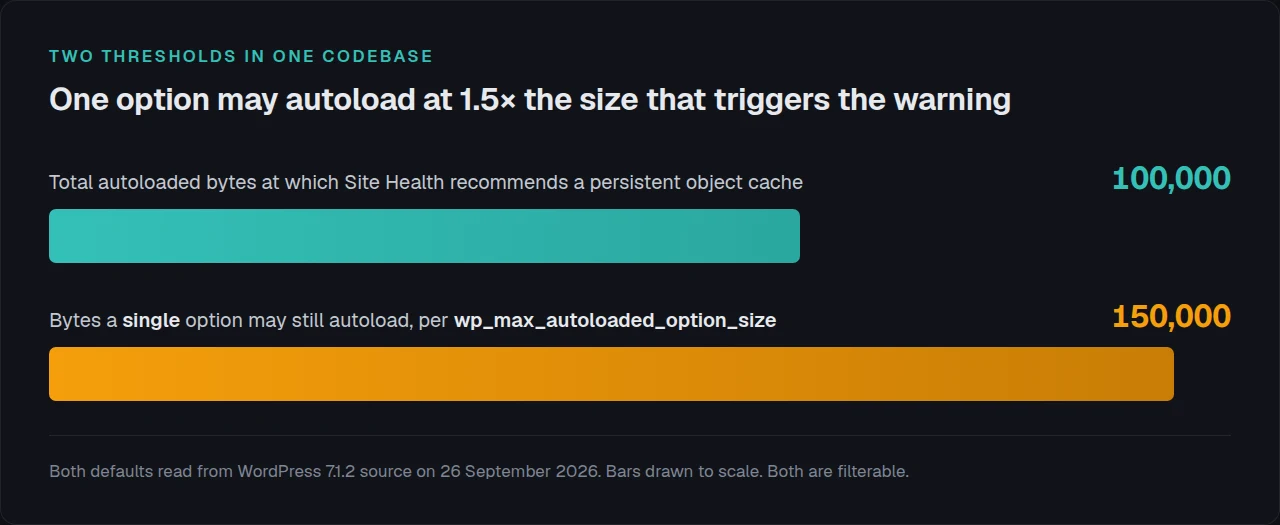
| Autoloaded options, serialized bytes | 100,000 | Across the whole set |
Posts, comments, wp_options rows, terms or users | 1,000 | Any single one is enough |
| A single option’s own autoload ceiling | 150,000 | Higher than the total above |
Read the last two rows together. The wp_max_autoloaded_option_size filter defaults to 150,000 bytes, where core stops autoloading a new option, while Site Health’s threshold for the entire set is 100,000. One option may be half again the total that triggers the warning.
Both point one way: add the object cache, then fix what autoloads. Our drop-in exists so that, per our readme, “object cache WordPress lookups are not repeated on every page load”. Setup is in the object cache docs, the engine choice in Redis against Memcached, the shipped defaults in the Redis setup guide, and it is free, per Free vs Pro.
Spotting This on Twenty-Five Sites You Do Not Log Into
One site is a session and a stopwatch. Twenty-five is a reporting problem: the tool that grades them is signed out. xSpeed Hub reads object-cache status and hit ratio across a fleet from one place. The same path has another limit, measured in why caching did not fix a slow site.
Run the free xSpeed Scan on any site you own: xspeedcache.com/scan/
Four Ways This Gets Misdiagnosed
- Caching the signed-in path. It holds until two people share a page. Confirm whether caching is working per URL instead, reading the response, not the setting.
- Purging to fix it. A purge empties the store that was helping; clearing every WordPress cache covers what each holds.
- Adding an object cache and stopping. A persistent cache makes an oversized autoload row cheaper to fetch, never smaller.
- Blaming the theme. A WooCommerce store with a slow admin usually has an autoload and a polling problem, neither visual.
Frequently Asked Questions
The site is quick for visitors but my dashboard takes four seconds. Is my cache broken?
Almost certainly not. The dashboard is uncached on core’s own instruction, so it shows raw PHP and database time with nothing in front. Run the three probes: if probe two is slow too, the server is the slow part, not your session.
I turned on caching for logged-in users and now people see each other’s names. What did I do?
Served one session’s page to everyone. Turn it off, purge, and treat that setting as safe only where the page is identical for every signed-in user, which on a store it is not.
My host says an object cache is included. How do I check it is really running?
Look for an object-cache.php drop-in in wp-content, then check Site Health, which reports a persistent cache as in use or absent. Redis installed but unreachable leaves it idle.
Does raising the heartbeat interval break autosave?
No. Autosave runs on its own 60-second constant. Raising the interval only reduces post-lock and notification polling; core permits 3,600 seconds.
I have 40 plugins and a slow dashboard. Is the count the cause?
What each one autoloads is. One plugin storing a large array in one autoloaded option costs more per request than thirty well-behaved ones, so an audit beats a cull. Our troubleshooting docs list the checks.
Start With These Five, in This Order
What to do this week:
- Run the three probes and write down both gaps.
- Check Site Health for the persistent object cache notice.
- List autoloaded options by size and move the large ones off.
- Raise the heartbeat interval, or restrict it to the editor.
- Re-run probe three and confirm the gap moved.
If probe two is the slow one, the origin is the constraint and no cache setting reaches it. Our hosting recommendation is xCloud, and it is ours: xCloud and WPDeveloper are both Startise companies. xSpeed Cache is free for page and object caching, with paid tiers from $29 a year. On LiteSpeed, LiteSpeed Cache is the honest alternative.
Signed out is the number you show a client. Signed in is the number you live with. Measure both.