Only 1 of 15 Caching Plugins Needs a Particular Web Server: Shared Hosting Takes Capabilities, Not Plugins
 M Asif Rahman 21 min read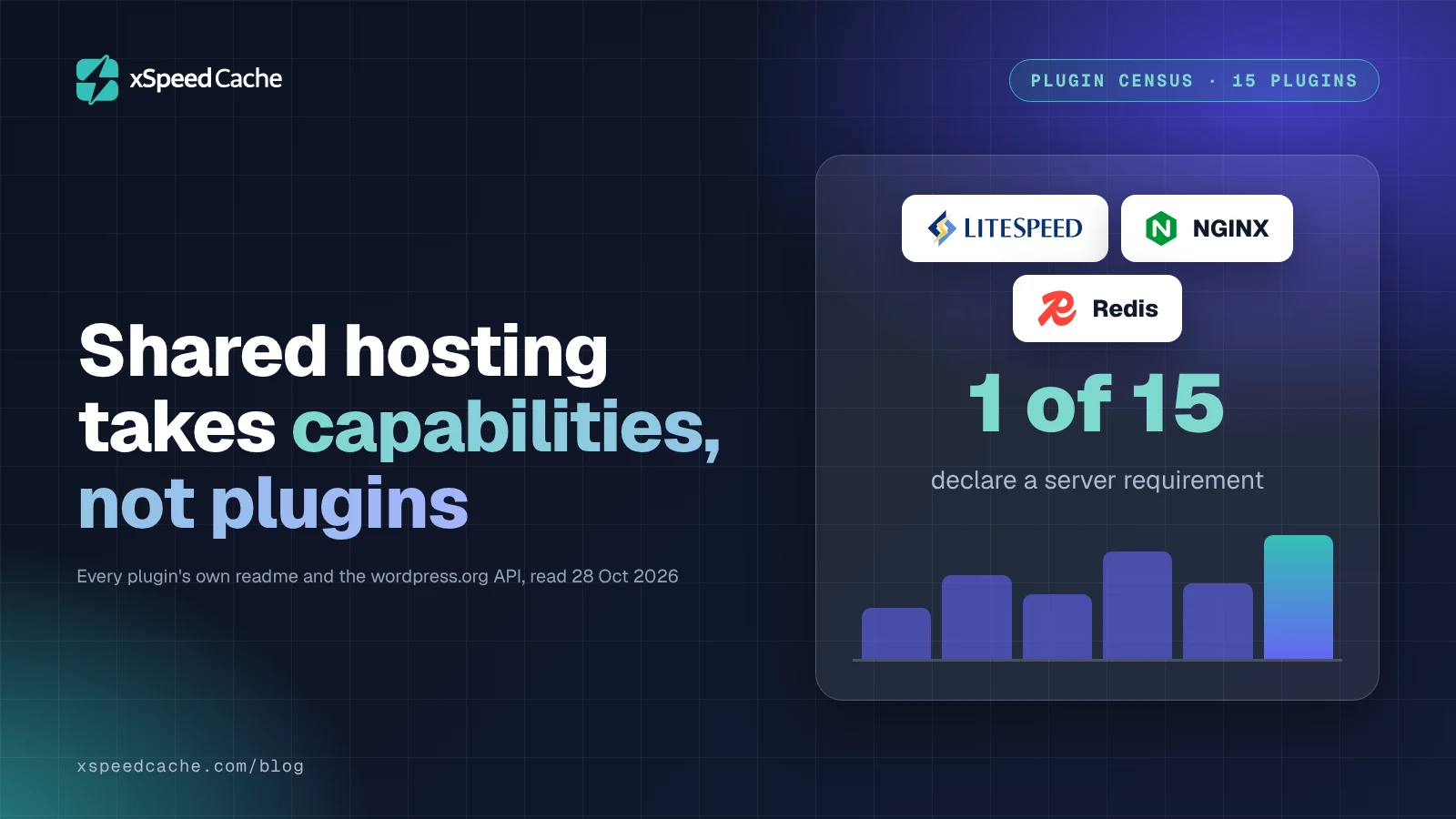
Updated October 2026
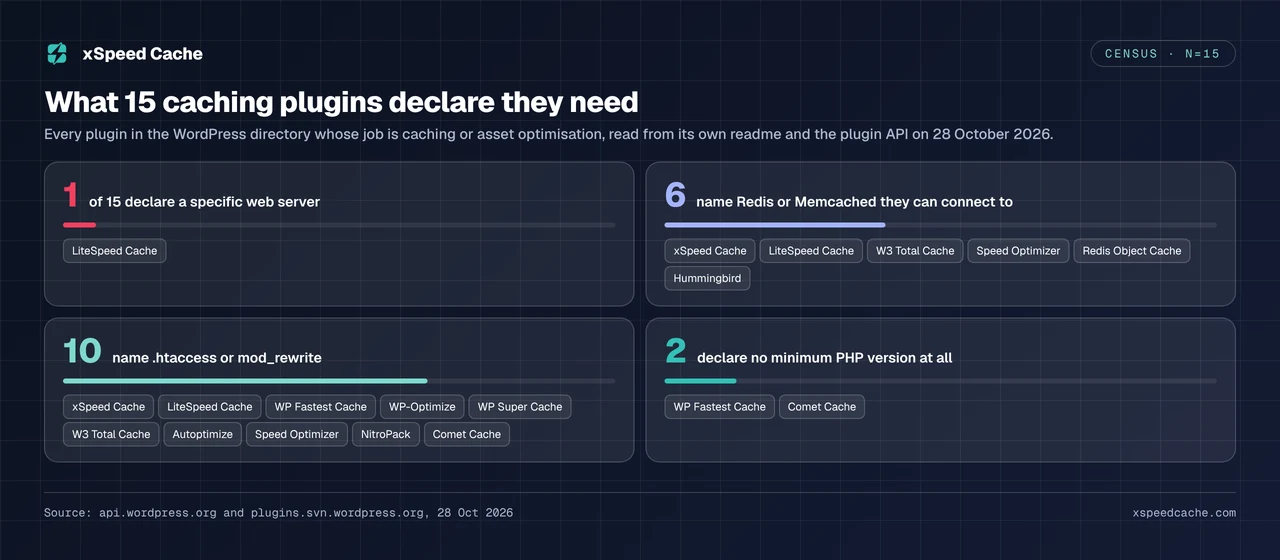
Exactly one of the 15 caching plugins in the WordPress plugin directory declares that it needs a particular web server, verified against each plugin’s own readme on 28 October 2026. Six of the 15 name Redis or Memcached in their own requirements, and that is the capability a cheap shared plan really removes, according to the seven-host audit we published this month. The comparison people expect here is a ranking of plugins for shared hosting. The more useful comparison is a ranking of capabilities, because the plugin you install is almost never the thing your host blocks. This article scores every capability by who has to grant it, then names the plugin that fits each case.
Quick Summary: What You Can Still Run on a Cheap Shared Plan
| If your situation is… | Do this | Why |
|---|---|---|
| Standard Apache shared host | Any directory page-cache plugin, then measure | .htaccess is writable, so rewrite rules and cache headers both work |
| Shared host running LiteSpeed or OpenLiteSpeed | Install LiteSpeed Cache | It drives the server’s own cache module, which no PHP plugin can replicate |
| Shared host on nginx with no panel control | A page cache that runs in PHP, not in server config | nginx has no per-directory config file for you to edit |
| Host documents no Redis or Memcached | Stop shopping for an object cache | Six plugins can connect one. None can create the service |
| Old PHP you cannot change | WP Fastest Cache | It is the one plugin in the sample declaring no PHP minimum at all |
| Already fast on a MISS, still slow overall | Check headroom before buying anything | A cache cannot fix a server with nothing left to give |
| Twenty-five client sites you do not log into | Read the capability, not the plan name | Entry plans differ inside one host, as the host audit found |
The Question That Decides Everything: Who Has to Say Yes?
Every speed feature in WordPress needs permission from exactly one of four parties, and knowing which one tells you in advance whether a cheap plan can run it.
Gatekeeper one is nobody. The feature runs inside PHP, in code WordPress already executes on every request. Minifying CSS, combining JavaScript, deferring scripts, lazy-loading images, cleaning database tables, throttling the Heartbeat API and warming a cache through WP-Cron all fall here. No permission is required because nothing outside WordPress is involved.
Gatekeeper two is the web server configuration. Serving a cached HTML file before PHP starts, setting far-future Cache-Control headers on static assets and turning on compression are all directives read by Apache or nginx, not by WordPress. On Apache you get a limited veto of your own through .htaccess. Apache’s own documentation on .htaccess files describes that file as the mechanism for exactly this case: they “should be used in a case where the content providers need to make configuration changes to the server on a per-directory basis, but do not have root access on the server system”. That sentence describes shared hosting.
Gatekeeper three is a system service or a PHP extension. A persistent object cache needs a Redis or Memcached daemon running on the machine and the matching PHP extension compiled in. Flushing the opcode cache needs OPcache present and writable. Brotli needs a server module. None of these can be installed from inside WordPress, and no plugin setting conjures them.
Gatekeeper four is a third party, and this is the one people get backwards. A CDN, an edge HTML cache and a hosted critical-CSS service are granted by whoever you pay for them, which is you. Your host has no say at all.
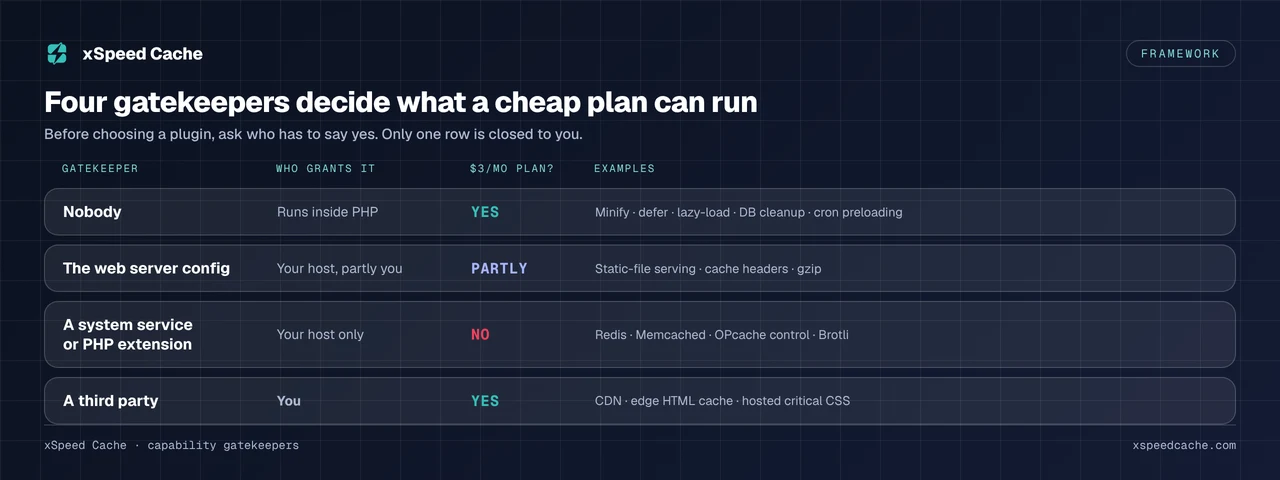
Read down that third column and the shape of the problem changes. One row is closed to you. One row is partly open. Two rows are wide open, and one of those two is the row most people assume is out of reach.
What We Read, and What It Cannot Tell You
The sample is the 15 plugins in the WordPress plugin directory whose primary job is page caching, object caching or asset optimisation. For each we queried api.wordpress.org for the structured fields that cannot be spun, and read the plugin’s own readme.txt from plugins.svn.wordpress.org for the dependencies it declares. Both were fetched on 28 October 2026.
Three limitations, stated before the table rather than after it.
- A readme is a claim, not a measurement. It reports what a vendor says the plugin needs. A plugin that silently degrades on a host without Redis will not say so in its requirements.
requires_phpis a floor, not a dependency list. It tells you the oldest PHP the plugin runs on. It says nothing about which extensions must be present.- Keyword presence is not a requirement. Counting readmes that mention nginx tells you how many acknowledge the server, not how many demand it. Where the distinction matters below, the plugin’s own sentence is quoted rather than counted.
What the method is good for is the question a shared-hosting reader actually has: whether the plugin is the constraint. On that it is decisive.
The Census: 15 Plugins and What Each One Declares It Needs
Every figure below comes from a direct api.wordpress.org query and the plugin’s own readme, both read on 28 October 2026. Install counts are the directory’s own buckets, not measurements, and must never be turned into a percentage of WordPress.
| Plugin | Installs | Min PHP | Last updated | Names Redis or Memcached | Names .htaccess | Requires a specific server |
|---|---|---|---|---|---|---|
| LiteSpeed Cache | 7,000,000+ | 7.4 | 20 Oct 2026 | ✅ | ✅ | ✅ |
| WP Fastest Cache | 1,000,000+ | none declared | 10 Oct 2026 | ❌ | ✅ | ❌ |
| WP-Optimize | 1,000,000+ | 7.2 | 21 Sep 2026 | ❌ | ✅ | ❌ |
| WP Super Cache | 1,000,000+ | 7.4 | 30 Sep 2026 | ❌ | ✅ | ❌ |
| Speed Optimizer (SiteGround) | 1,000,000+ | 7.0 | 20 Oct 2026 | ✅ | ✅ | ❌ |
| W3 Total Cache | 900,000+ | 7.4 | 20 Oct 2026 | ✅ | ✅ | ❌ |
| Autoptimize | 800,000+ | 7.4 | 25 Oct 2026 | ❌ | ✅ | ❌ |
| Redis Object Cache | 500,000+ | 7.2 | 18 Sep 2026 | ✅ | ❌ | ❌ |
| Breeze | 300,000+ | 7.4 | 20 Oct 2026 | ❌ | ❌ | ❌ |
| Cache Enabler | 100,000+ | 5.6 | 27 Sep 2026 | ❌ | ❌ | ❌ |
| NitroPack | 90,000+ | 7.4 | 25 Sep 2026 | ❌ | ✅ | ❌ |
| Hummingbird | 70,000+ | 7.4 | 1 Sep 2026 | ✅ | ❌ | ❌ |
| Comet Cache | 20,000+ | none declared | 2 Jul 2025 | ❌ | ✅ | ❌ |
| xSpeed Cache | 10,000+ | 7.4 | 27 Oct 2026 | ✅ | ✅ | ❌ |
| Surge | 4,000+ | 7.3 | 6 May 2026 | ❌ | ❌ | ❌ |
Four readings worth taking from that table before any of them becomes advice:
- One row has a tick in the last column. Fourteen of the fifteen state no web-server requirement at all. If you have been choosing between cache plugins on the theory that a cheap plan rules most of them out, the directory disagrees with you.
- Six plugins name an object-cache backend, and all six name something they connect to rather than something they provide. Redis Object Cache, at 500,000 or more installs, exists only to connect WordPress to a Redis server. On a plan with no Redis it installs cleanly and does nothing.
- Two plugins declare no minimum PHP version at all, WP Fastest Cache and Comet Cache, which matters on exactly the hosts this article is about.
- Two have gone quiet. Comet Cache was last updated on 2 July 2025, nearly sixteen months before this was written, and Surge on 6 May 2026. An unmaintained cache plugin is a security decision rather than a performance one.
Only One Plugin in the Directory Gates Its Cache Behind a Server
LiteSpeed Cache is the exception, and it is honest about it in the second paragraph of its own readme on its directory listing, read on 28 October 2026:
“LiteSpeed Exclusive Features require one of the following: OpenLiteSpeed, commercial LiteSpeed products, LiteSpeed-powered hosting, or QUIC.cloud CDN.”
Its installation instructions are split into two separate procedures, headed “For Optimization Without a LiteSpeed Web Server” and “For Caching and Optimization With a LiteSpeed Web Server”. The same plugin is two products depending on what is answering port 443.
This matters far more on cheap hosting than its one tick suggests. W3Techs puts LiteSpeed at 13.9% of web servers in a reading its own page dates 23 October 2026, and that share is concentrated in budget hosting rather than spread evenly across it. If your plan is one of them, you have a server-level page cache available at no cost, driven by a plugin with 7,000,000 or more installs, and that is the best answer available to you. No plugin running inside PHP can match a cache that answers before PHP is reached.
One Command Tells You Which Case You Are In
So the first question is not which plugin is best. It is which server you are on, and you can answer it in one line from any shell:
curl -sI https://example.com/ | grep -i '^server:'A response naming LiteSpeed settles your decision. Anything else leaves it open, and the rest of this article is about the open case.
The Capability You Actually Lose Is the Persistent Object Cache
A page cache stores finished HTML. An object cache stores database query results so the next request does not repeat them, which is what helps logged-in sessions, carts, admin screens and any page too personal to cache as HTML. WordPress ships an object cache that holds its contents for one request and then discards them. Making it persistent requires a service your host runs.
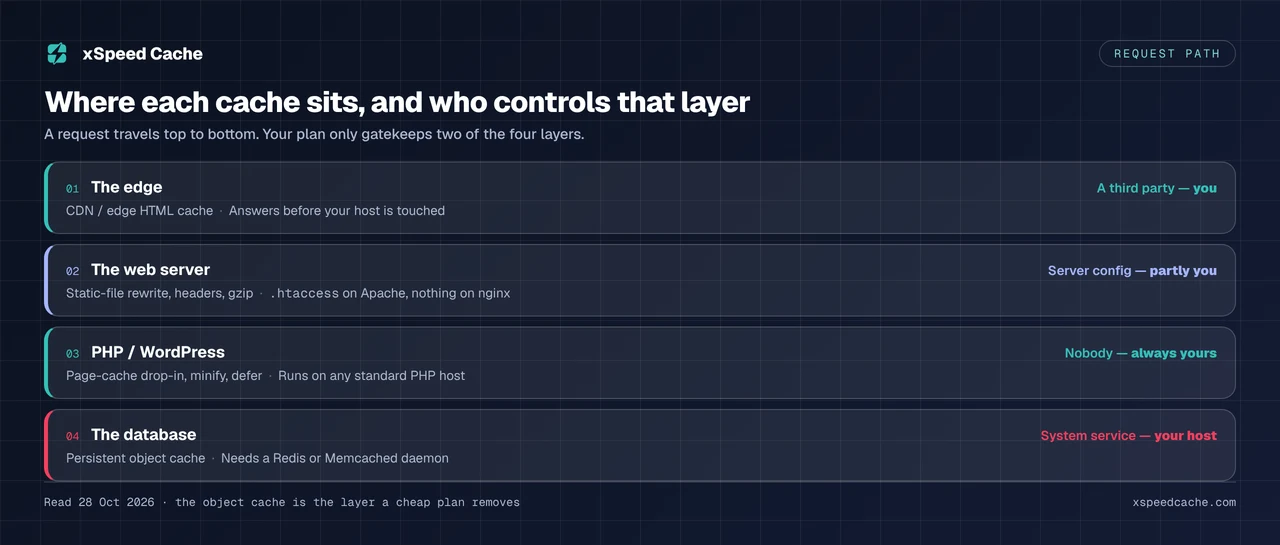
WordPress states the boundary plainly in its own Advanced Administration documentation on wp-config.php, read on 28 October 2026: “WP_CACHE does not automatically enable Redis or Memcached.” Defining a constant does not create a daemon, and the same page notes that WP_CACHE “does not enable caching by itself” either.
What Seven Hosts Document About Their Cheapest Plan
Our own audit of seven hosts, read at each one’s cheapest plan, found that five of the seven document no entry-plan object cache, and that 519 of the 539 sites in that census were on hosts in that group. That study is the evidence for this section and is not re-derived here. Its practical conclusion is the one to carry: on a cheap plan the object cache is usually absent, and the absence is documented by the host if you read the entry tier rather than the feature page.
Two consequences follow, and they point in opposite directions:
- A brochure site or a blog barely notices. Where almost every visitor sees the same HTML, the page cache does the work and the database is hardly consulted.
- A store or a membership notices badly. Where a large share of requests are logged in and uncacheable as HTML, the missing object cache is the main thing between you and a fast site, and no plugin choice changes it.
Which backend you would use if you had one is a decision for after your host gives you the option. To find out what you actually have, there is a four-rung check that does not require logging into the server.
Gatekeeper Two: The Configuration File You Cannot Edit
The second gatekeeper is the one that produces the most confusing results, because it is partly open. On Apache, .htaccess lets you write rewrite rules and response headers without root, which is why ten of the fifteen plugins in the census name that file. On nginx there is no equivalent. nginx reads its own configuration file, and its documentation is explicit that “the way nginx and its modules work is determined in the configuration file” and that “changes made in the configuration file will not be applied until the command to reload configuration is sent to nginx or it is restarted”.
Both halves of that are closed to a shared-hosting customer. You cannot edit nginx.conf and you cannot reload the server. Where a managed host papers over this with a control-panel toggle you are fine, and four of the six managed hosts we scored answer the caching question with a plugin anyway. Where a cheap nginx plan gives you neither, every feature in gatekeeper two is gone, and the plugin will usually fail quietly rather than tell you.
This is where a page cache that runs in PHP earns its place. Rather than asking the server to serve a file, it intercepts the request early inside WordPress and returns stored HTML before the theme, the query and most plugins load. It is slower than a true static-file hit because PHP still starts, and it works on any standard PHP host, which is the point. Two plugins in the census, WP Super Cache and Cache Enabler, ship that drop-in in the plugin itself rather than generating it, and the published split of which free tiers page-cache on any standard host and which cache only where you host is the fastest way to tell the two groups apart.
The Snippet We Hand You for a File You Cannot Open
We build one of these plugins, so the fair thing is to show where our own product runs into the same wall.
xSpeed Cache is ours. It is from WPDeveloper, a Startise company, and its own readme describes its compression behaviour like this: it “auto-configures GZIP on Apache and LiteSpeed” and “shows a ready-to-paste config snippet for nginx and IIS”. Read that second clause as a shared-hosting customer on nginx. We hand you a snippet for a file you have no way to open. The feature is not available to you, and a panel that prints instructions you cannot follow is a worse experience than one that says the capability is unavailable on this server.
The same readme is equally direct about the LiteSpeed case: “If the LiteSpeed Cache plugin is active, xSpeed Cache will not turn on its own page cache or the other features that overlap, so the two never run at once”, and in its own FAQ, “xSpeed Cache detects the LiteSpeed Cache server module and steps back to avoid conflicts”. That is deliberate and we would not change it, but the plain reading is worth stating: on a LiteSpeed shared host where you want the server-level cache, our plugin’s job is to get out of the way.
Where We Are the Weaker Choice
Our honest disadvantage on this page is track record. The directory records 10,000 or more active installs for us and 7,000,000 or more for LiteSpeed Cache, and 21 ratings against WP Fastest Cache’s 4,228, all read on 28 October 2026. We are also absent from the HTTP Archive technology census altogether, so where a reader can check a decade of field data for the incumbents, for us there is nothing to check. On a cheap plan where you get one attempt and no support budget, choosing the plugin a million people have already debugged is a defensible decision, and it is not ours.
What we do claim, with the mechanism stated so you can test it rather than trust it, is in the next section.
What Nothing Can Take Away From You
Set aside the two gatekeeper rows your host controls and look at what is left. Every item below runs inside PHP on any standard host, with no server configuration, no extension and no account.
| Capability | What it fixes | Needs from your host |
|---|---|---|
| Minify and combine CSS and JS | Request count, transfer size | Nothing |
| Defer and delay JavaScript | Render blocking, interaction delay | Nothing |
| Critical CSS, generated locally | First paint on the hero | Nothing |
| Lazy-load below-fold images | Initial payload | Nothing |
| PHP-level page cache drop-in | Repeat PHP and query work | A writable wp-content |
| Cache preloading via WP-Cron | Cold-cache first visits | Nothing |
| Database and transient cleanup | Query time, table bloat | Nothing |
| Heartbeat throttling | Admin-Ajax load | Nothing |
That list holds most of what moves a Core Web Vitals score on a small site. Render-blocking resources, oversized images and unnecessary JavaScript are page-weight problems, and page weight is yours to fix whoever hosts you. Measuring is the step people skip: the free xSpeed Scan reads a URL from outside and reports what is being served, which beats any plugin setting as a starting point.
Our free tier serves cached pages as static files through a rewrite path before PHP loads on Apache, nginx and LiteSpeed, and includes object-cache connection, CDN support and database cleanup rather than reserving them for a paid plan. The full tier-by-tier split is on Free vs Pro, and the mechanism is documented in the server compatibility notes so you can verify it instead of taking our word.
The Edge Is the One Thing Your Host Cannot Block
Here is the inversion worth leaving with. Gatekeeper four is granted by you and nobody else. A CDN in front of your site never asks your host for permission, because it sits upstream of it. An edge HTML cache answers requests before they reach your server at all, so the capability your cheap plan most obviously lacks, a cache that responds without touching PHP, is available on terms your host does not control.
This is why the gatekeeper framework is worth more than a plugin ranking. A reader who concluded “I am on shared hosting, so a server-level cache is impossible” drew the right conclusion about gatekeeper two and the wrong one overall. Our own measurements on that point are published with the Cloudflare Enterprise add-on, which we sell at $5 per domain per month on top of a paid licence: across 1,748 WordPress sites measured between 30 August and 28 September 2026, median TTFB was 415ms with no CDN against 117.5ms where the edge answered. The add-on requires a Pro licence, so treat it as the price of two things rather than one.
If your server is genuinely out of headroom, no amount of caching repairs it, and there is a case for not reaching for a cache plugin at all until the host question is settled. That is also the honest moment to mention xCloud, the managed hosting built by the Startise team alongside us, where Redis and the server-level configuration this article keeps running into are yours rather than your host’s.
Running This Across Twenty-Five Client Sites
The procedure above takes about four minutes per site, which is tolerable once and unworkable across a portfolio. At that scale the expensive discovery is not which plugin to install, but which clients sit on plans that quietly lack the capability their plugin is configured to use.
Group the fleet by the Server response header first: that one value splits the portfolio into the LiteSpeed group, where the decision is already made, and everything else. Then check the object cache by capability rather than by plan name, because entry tiers differ inside a single host. Only then look at plugins.
For fleets, xSpeed Hub reads cache state across every connected site from one place, and the 80-capability comparison is the reference for which of these features each plugin actually ships. For a store, where the uncacheable logged-in share is the whole problem, the WooCommerce notes cover which pages must stay out of the page cache whatever your host provides.
Common Mistakes People Make Picking a Cache Plugin for a Cheap Plan
Shopping for an object cache before checking whether one exists. Six plugins in the census will happily connect to Redis. The connection is not the scarce thing.
Reading the feature page instead of the entry plan. Hosts list capabilities their cheapest tier does not include. The host audit found this on five of seven.
Treating a silent feature as a working one. A plugin that cannot write server configuration often reports success and changes nothing. Check the response headers from outside rather than trusting the toggle.
Assuming the plugin is the constraint. Fourteen of fifteen plugins declare no server requirement. The constraint is almost always a capability, not a product.
Installing a second cache plugin to cover the gap. Two page caches on one site produce stale HTML and purge conflicts, and the overlap is why our plugin steps back when LiteSpeed Cache is active.
Ignoring the last-updated date. Two plugins in this sample have gone more than five months without a release, and one of those two has gone nearly sixteen.
Frequently Asked Questions
I installed Redis Object Cache on my shared plan and nothing happened. What did I do wrong?
Nothing. That plugin connects WordPress to a Redis server; it does not provide one. If your host runs no Redis daemon, the plugin has nothing to connect to. WordPress’s own documentation makes the same point, that WP_CACHE “does not automatically enable Redis or Memcached”.
My host says it includes caching. Do I still need a plugin?
Check what kind. A host-level cache in front of your site covers page caching but usually nothing in the asset layer, so minification, deferral and lazy-loading remain yours to do. Four of the six managed hosts we scored answer the plugin question with a plugin of their own.
I pasted the nginx snippet my plugin gave me into a file in my web root and it did nothing. Why?
nginx does not read per-directory configuration files the way Apache reads .htaccess. Its documentation states that behaviour is set in the configuration file and that changes need a reload or restart, and on shared hosting you can do neither. The snippet is for whoever administers the server.
Is LiteSpeed Cache worth installing if I am not on a LiteSpeed server?
It still works as an asset optimiser, and its readme has a separate installation procedure for exactly that case. You lose the server-level page cache, which is the reason most people choose it.
I turned on every optimisation setting and my score barely moved. What am I missing?
Usually headroom rather than configuration. If the server has nothing left to give, caching a slow origin produces a fast cached page and a slow everything-else. Measure the uncached response before adding more settings.
Which single plugin should I install on a $3 a month Apache plan?
On track record, WP Fastest Cache or WP Super Cache, both at 1,000,000 or more installs and both working with nothing but .htaccess. Ours is a reasonable alternative and includes the object-cache connection and CDN support in the free tier, which matters later if you move hosts.
I moved to a cheaper host and my site got slower even though the cache plugin is identical. Why?
The plugin is identical and the capabilities underneath it are not. The likely losses are a persistent object cache, a server-level page cache and control over compression, in that order.
Does a CDN need my host’s cooperation?
No, and this is the useful asymmetry. A CDN sits in front of your host, so it is granted by whoever you buy it from. It is the one capability on this page your hosting plan cannot withhold.
My plugin’s cache directory is empty and the plugin reports caching is on. What is happening?
Most often wp-content is not writable by the web server user, which is the one host-side requirement a PHP-level page cache does have. Check directory permissions before changing plugin settings.
Can I just upgrade PHP myself to meet a plugin’s requirement?
On most shared panels you can select a PHP version, which is why requires_php is rarely the blocker. Extensions are different, and a version selector does not add Redis support.
Should I pay for a premium cache plugin on a cheap plan?
Only once you know which gatekeeper is in your way. Paying for a plugin does not buy you a Redis daemon or a config reload, and both of the two rows your host controls are immune to your licence.
How often should I re-check any of this?
When you change hosts or plans, and otherwise annually. Every plugin figure here carries its fetch date for that reason: counts, versions and requirements all move, and ours moved the day before publication.
Conclusion: Pick for the Server You Have, Not the Plugin You Read About
The question “which caching plugin is best for shared hosting” has a boring answer: almost any of them will do, because fourteen of the fifteen ask nothing of your server. The useful question is which capabilities your plan withholds, and that has a precise answer you can check in two commands.
| Your goal | Pick | Why |
|---|---|---|
| Best possible cache on a LiteSpeed shared host | LiteSpeed Cache | Drives the server’s cache module, which PHP cannot reach |
| Longest track record, Apache plan | WP Fastest Cache or WP Super Cache | 1,000,000+ installs each, .htaccess is all they need |
| Oldest PHP stack | WP Fastest Cache | The only plugin in the sample declaring no PHP minimum |
| Lightest possible footprint | Cache Enabler or Surge | Small, drop-in based, few settings |
| Object cache the day your host adds one | Redis Object Cache | Does one job and does it properly |
| Free tier that already includes object cache and CDN | xSpeed Cache | Ours, and the connection is in the free tier |
| Nothing works because the server is saturated | Change hosts | A cache cannot create headroom |
What to do this week:
- Run
curl -sI https://yoursite.com/ | grep -i '^server:'and write down the answer. If it says LiteSpeed, install LiteSpeed Cache and stop. - Read your host’s documentation for your exact plan, not its feature page, and find out whether a persistent object cache is included.
- Run the free scan at xspeedcache.com/scan/ and fix what it finds in the asset layer, since none of that depends on your host.
- If the uncached response is slow, treat it as a hosting decision rather than a plugin decision.
- If you want the object-cache connection, CDN support and database cleanup in one free plugin, xSpeed Cache is ours and the free tier includes all three. Paid plans start at $29 a year or $79 once, with a full refund inside 14 days, no questions asked.
If your server header said LiteSpeed, the honest recommendation on this page is a competitor’s plugin, and that is the one piece of advice here worth acting on today.