Five of Seven Hosts Document No Entry-Plan Object Cache, and 519 of the 539 Sites in Our 2026 Census Are on Them
Updated October 2026
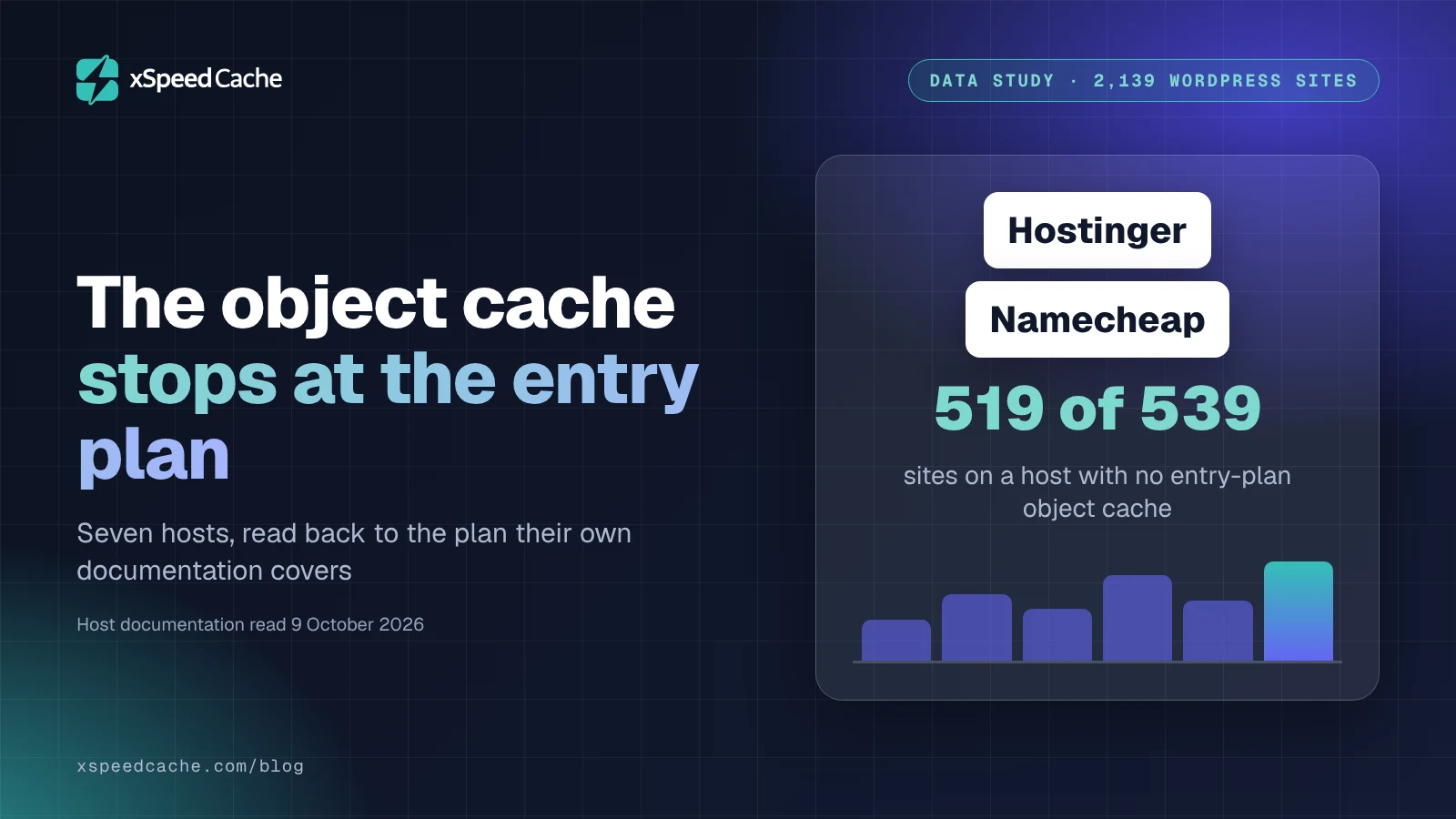
On 9 October 2026 we resolved every WordPress site in our scan archive to its hosting provider and read what each provider documents: 519 of the 539 sites we could both name and audit sit on a host that offers no persistent object cache on its entry plan. Namecheap’s own PHP module table lists memcached as “Disabled, restricted by our policies” on all twelve PHP versions it covers. The comparison people expect is Redis against Memcached. The more useful comparison is your host’s feature page against your host’s help centre, because they disagree. This is a documentation audit joined to a host census, across seven providers.
Quick Summary: What to Do With the Plan You Are Already Paying For
| If you want to know… | Do this | Why it is the right move |
|---|---|---|
| Whether an object cache is possible at all | Find your host’s object-cache help article, not its feature page | Feature pages advertise the product line. Help articles name the plan |
| Why Redis “works” and nothing is cached | Check whether a server answers, not whether the extension loaded | The PHP extension is a client. A client with nothing to talk to fails silently |
| What to do when the answer is no | Take the filesystem route or fix the database queries instead | Both work on any plan, and one of them your host may already recommend |
| Whether upgrading is worth it | Price the upgrade against what the object cache actually moves | An object cache helps database-heavy sites. It does nothing for a static brochure page |
| Which host to move to | Read the entry plan’s documentation before the marketing page | Two of the seven hosts here document it on the cheapest plan they sell |
A persistent object cache keeps WordPress database results between requests instead of rebuilding them every time. It is the biggest win available to a query-heavy site, and the one optimisation a plugin cannot install for you, because it needs a server your host either runs or does not.
Two Instruments, and the Four Things Neither of Them Can Tell You
Two instruments, both run on 9 October 2026.
The host census. The xSpeed Scan archive held 3,257 scanned sites and 7,672 scans that morning, 2,218 of them WordPress, which reduce to 2,139 unique registrable domains once the newest scan per domain is kept. Each domain’s nameservers were resolved over DNS and matched against a pattern map of hosting providers. Nameservers are the most reliable host fingerprint available from outside: ns1.dns-parking.com is Hostinger, and that attribution is not a guess, because the SOA record for dns-parking.com names dns.hostinger.com as its responsible party.
The documentation audit. For each provider with a meaningful share of that census, we read the provider’s own help centre and recorded the highest of four rungs its documentation reaches for the cheapest plan it sells.
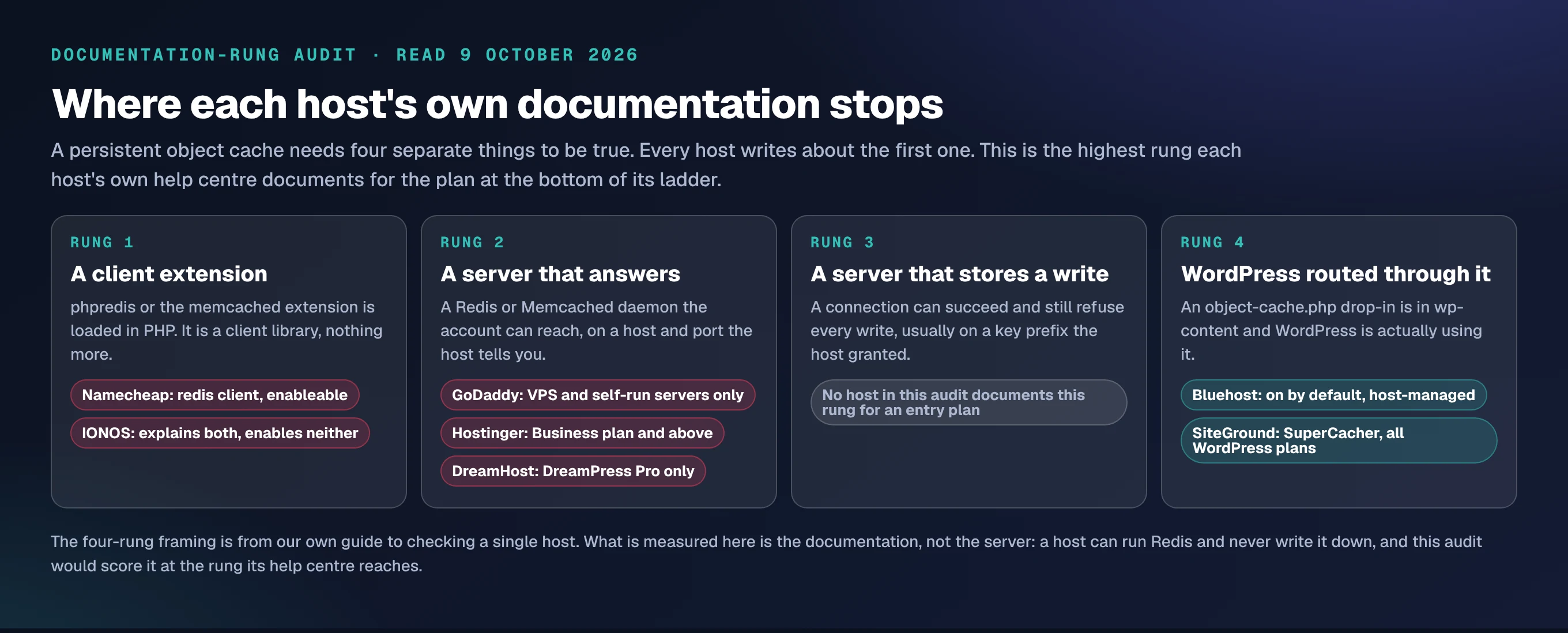
The four rungs are not ours originally. They come from our own guide to checking whether a host supports object caching, which showed that a loaded extension, a server that answers, a server that accepts a write, and WordPress actually routing through it are four separate facts, and that three can be true while the fourth is false. What is new here is applying that ladder to the documentation rather than to one site, and then weighting the result by how many real sites sit on each host.
Four things this method cannot tell you, and all four matter more than the headline:
- It reads documentation, not servers. A host can run Redis on every shared account and never write it down. This audit would score that host at the rung its help centre reaches, which is the wrong answer about the server and the right answer about what a customer can find out.
- It names the host, never the plan. DNS says a site is on Hostinger. It cannot say whether that site is on Premium or on Business, so “519 sites on a host that gates the object cache” is not the same claim as “519 sites without one”.
- It names the host on barely a third of the census. 711 domains (33.2%) answer from Cloudflare nameservers, which hide the origin completely, and another 660 (30.9%) matched no pattern. That is 1,371 domains, 64.1% of the census, where the host is unknown.
- The archive is a convenience sample. These are sites somebody chose to scan, not a random draw of WordPress. Skew is guaranteed and its direction is not knowable from inside the data.
Why No Scanner Can Measure This, Including Ours
Before any of the numbers, the honest constraint. Our scan rubric at version 2026.10.1 runs twenty checks on a page, and we read all twenty back out of the live API while writing this. Five are Lighthouse metrics, six cover delivery (first byte, cache hit, compression, static cache policy, CDN edge, redirect chain), five cover assets, four identify the platform. Not one of them is about the object cache, and none can be.
A persistent object cache leaves no fingerprint on an HTTP response. It changes how long PHP takes to build a page, which shows up inside time to first byte along with the host’s CPU, the theme, the plugin count and the distance to the probe. There is no header for it, no marker in the HTML, no artifact at the edge. Any figure you have ever read for “percentage of WordPress sites running an object cache” was either measured from inside those sites or estimated, and an outside-in scanner cannot produce it.
That is why this study measures documentation. Documentation is the one part of the question that is public.
The Audit: Seven Hosts, Each Read at Its Cheapest Plan
| Host | Census domains | Verdict at the entry plan | What its own documentation says |
|---|---|---|---|
| Hostinger | 331 | Gated one plan up | ”This feature is available for Web Business hosting plans or greater” |
| GoDaddy | 117 | Servers you administer only | Memcached articles are scoped to VPS, and to Plesk or WHM servers you install it on |
| IONOS | 36 | No enablement path published | Explainers on Memcached and Redis in its DigitalGuide, no help article turning either on |
| Namecheap | 28 | Client yes, server unpublished | memcached disabled by policy on 12 of 12 PHP versions; redis client “can be enabled” |
| Bluehost | 20 | Included, host-managed | ”Object Cache is available by default to WordPress sites on WordPress Shared Hosting” |
| DreamHost | 7 | Gated to the top tier | ”Redis Object Cache is available on DreamPress Pro plans” |
| SiteGround | 0 | Included, self-serve | Memcached in SuperCacher, “Included FREE in all hosting plans for WordPress” |
All seven read on 9 October 2026. Those 539 domains are 25.2% of the census, and they split 519 against 20: five of the seven hosts document nothing usable on the plan at the bottom of their ladder, and the sites on those five outnumber the sites on the two that do by 25.9 to 1. SiteGround carries a documented entry-plan object cache and zero domains in our archive, a small finding about who gets scanned.
Namecheap Publishes the Clearest Answer in the Study, in a Table About PHP Extensions
Most hosts answer this question by not answering it. Namecheap answers in a grid.
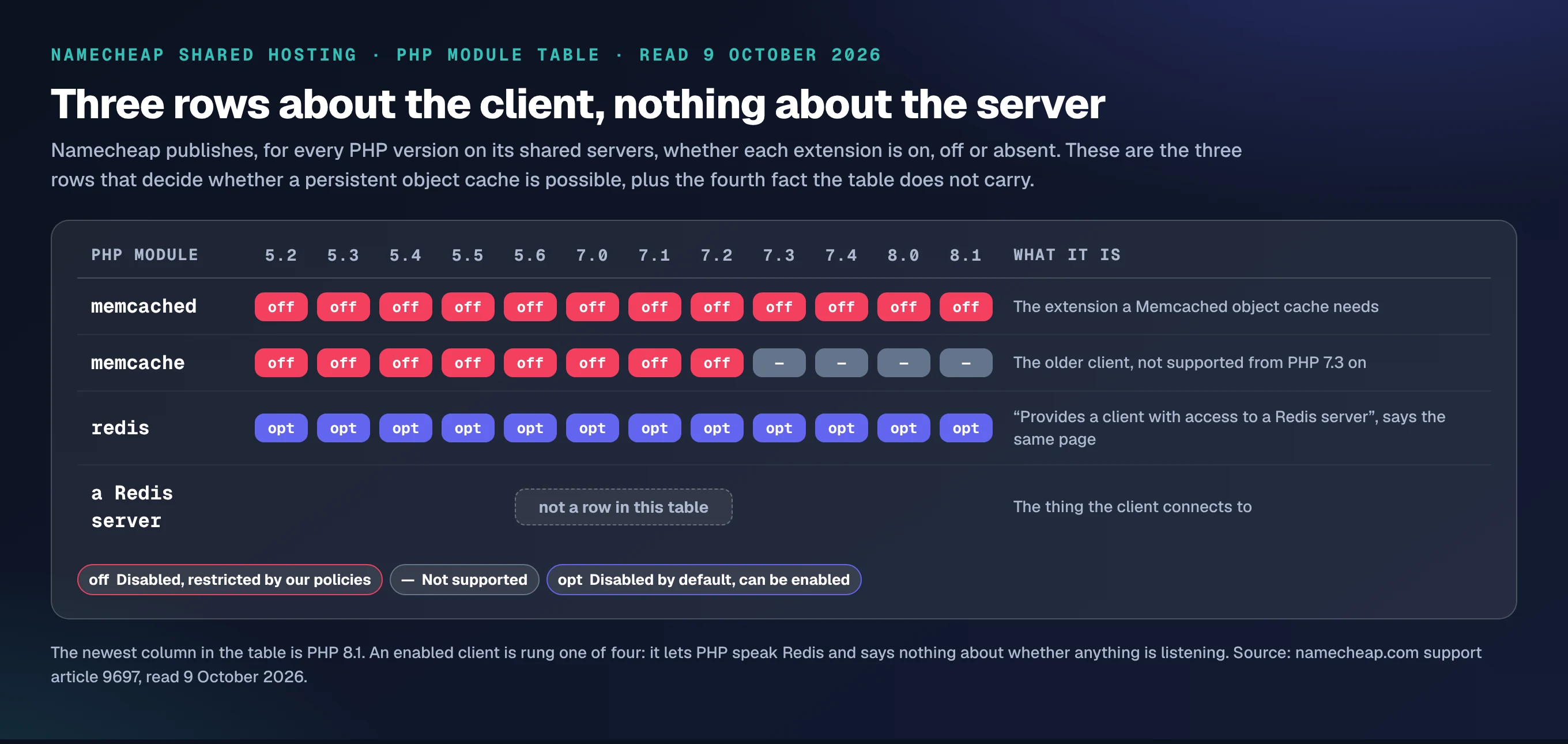
Support article 9697 lists every PHP module on Namecheap’s shared servers against every PHP version from 5.2 to 8.1. The memcached row reads “Disabled, restricted by our policies” in all twelve columns. The older memcache row reads the same in eight and “Not supported” in four. The redis row reads “Disabled by default, can be enabled” in all twelve, which looks like a yes.
It is not a yes, and the same page says why. Its glossary defines the module as one that “provides a client with access to a Redis server”. A client. The table has no row for the server, and a search of Namecheap’s knowledge base on 9 October surfaced no article enabling one on a shared plan. So a customer can switch on redis in cPanel, install the Redis Object Cache plugin that 500,000 sites run, point it at 127.0.0.1:6379, and get a connection refused from a port with nothing behind it. Rung one of four, reached cleanly, with nothing above it.
This is the failure our guide to reading a host’s object-cache support was written for, and Namecheap’s table is the clearest public evidence we have found that the gap is real rather than theoretical.
Hostinger Is 331 of the Sites, and the Cache Starts One Plan Up
Hostinger is the largest named host in the census by a factor of nearly three. Its support article on managing Object Cache is unambiguous about the gate: “This feature is available for Web Business hosting plans or greater.” Premium, the plan most people land on, is below that line. The article closes by suggesting an upgrade, which is at least honest about what it is.
Two details worth having. First, this is not a free-standing Redis service you configure: Hostinger’s own documentation says the feature “is enabled by default once you install the LiteSpeed Cache plugin”, and its developer docs add that it “requires LiteSpeed to be enabled first”. A toggle on a stack, not a server with credentials. Second, Hostinger’s 331 sites post the best median first byte of any named host in the census at 186ms, against 283ms across the archive. Gating the object cache has not made these sites slow, which corrects the easy version of this story.
The easy version takes another hit from Bluehost. It is the one host here that hands every shared WordPress customer a managed Redis cache, and its 20 domains post a median first byte of 552ms, three times Hostinger’s. An object cache is one input among many, and the host that gives you one is not automatically the faster host. Where first byte comes from is a longer story, and we took it apart in reducing WordPress TTFB.
When the Documented Answer Is a Server You Run Yourself
GoDaddy and IONOS fail the audit in the same way, and it is not the way you would predict.
GoDaddy has Memcached documentation, aimed somewhere else. One article is titled for VPS hosting; another explains how to install Memcached on a Plesk Linux or WHM server, which describes a machine the customer administers. Both are competent. Neither applies to somebody on a shared cPanel plan, and no shared-plan article exists alongside them.
IONOS goes further in one direction and nowhere in the other. Its DigitalGuide carries explainers on what Memcached is, how to install and use Redis, and how the two compare. That is more editorial writing about object caching than Bluehost publishes. What is missing is any help-centre article that turns either on for a web hosting package. A reader who follows that explainer to its end and goes looking for the switch does not find one.
Both sit at rung two in the ladder above, documented for a server that answers, where the server is one you went out and rented.
The Filesystem Answer, and Why DreamHost Recommends It
DreamHost is the only host in this audit that publishes a plan B, and it is the most practically useful thing we found.
Its knowledge base states plainly that “Redis Object Cache is available on DreamPress Pro plans”, which is the top of its managed WordPress range. For everybody below that line, DreamHost’s own WordPress caching article points at Docket Cache, describing it as “a filesystem-level Object Cache used as an alternative to services like Redis or Memcache”. It writes the serialised objects to disk instead of to a daemon, so it needs no server, no extension and no upgrade.
The install counts are the interesting part. Redis Object Cache reports 500,000 active installs, Docket Cache 20,000, and the core-listed Memcached drop-in 10, on a release last shipped on 8 November 2022. The plugin that needs a server most people cannot have outsells the plugin that needs nothing by twenty-five to one.
A filesystem object cache is slower than Redis and it is not nothing. On shared hosting with a cold OPcache and a disk you share with strangers, measure it rather than assuming: the protocol in our caching benchmark guide is built for exactly this kind of before-and-after. If the queries are the real problem, a site that is fast signed out and slow signed in will tell you so long before an object cache does.
The Census Itself: Three Sites in 2,139 Are on Managed WordPress
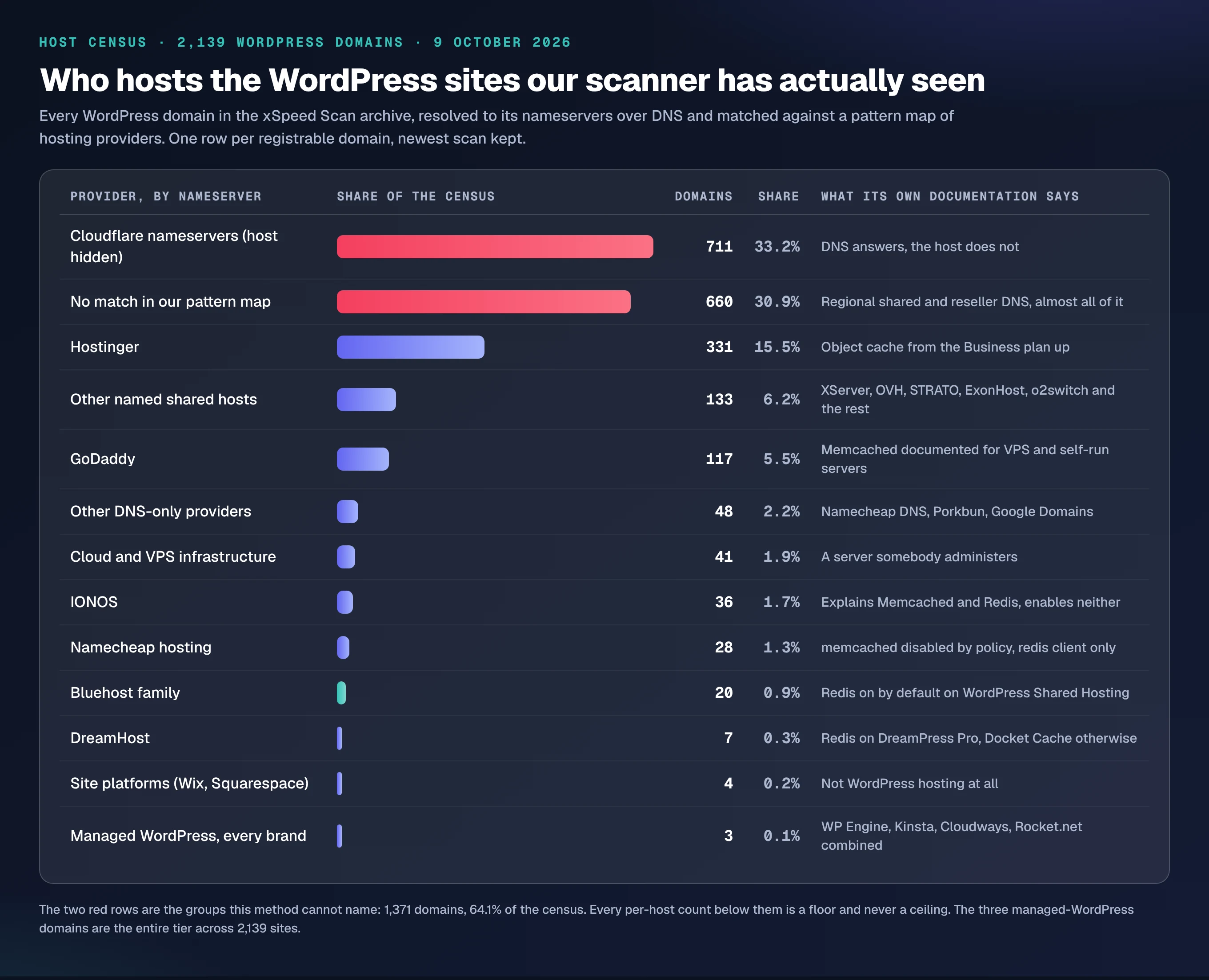
Across 2,139 WordPress domains, three resolve to the nameservers of a managed WordPress host. Not three per cent. Three domains, 0.14%. WP Engine, Kinsta, Cloudways, Rocket.net, Pressable and Flywheel contribute zero between them; the three are a WordPress.com pair and one Liquid Web property.
Hold that against the caveat that matters: 33.2% of the census answers from Cloudflare nameservers, and a managed host behind Cloudflare is invisible here. The true share is higher than 0.14% and it is not plausibly high. The named remainder is shared hosting almost without exception, including the 660 unmatched domains, whose nameservers resolve to regional and reseller operations like stackdns.com, home.pl, jagoanhosting.com and n0c.com.
So the population that most needs a persistent object cache is also the population least likely to be sold one, and the advice written for the other tier does not reach it. That is the finding, and it is why the entry plan is the right unit of analysis rather than the hosting brand.
Running This Across a Fleet You Do Not Log Into
An agency with twenty-five client sites has twenty-five versions of this question and no appetite for twenty-five cPanel logins. The answer is to ask each site rather than each host.
xSpeed Cache, which is ours (we build it at WPDeveloper, a Startise company), exposes an Object Cache panel that reports what the server actually supports and, more usefully, carries a Test connection button that opens the socket before anything is written. Over MCP the same read is available to an agent across a whole fleet from one connection, which is what xSpeed Hub exists for, and the setup is in our object cache documentation. Nothing on that panel is gated: reading whether your host supports an object cache is free, in the free plugin, and the difference between free and Pro is elsewhere.
Run the free scan on your own site first: xspeedcache.com/scan/.
Hosting is the lever when the answer is no everywhere. Our standing recommendation is xCloud, ours too, a Startise company alongside WPDeveloper: it provisions Redis per site with credentials you can read, which is rung two documented and rung four scripted. xcloud.host is bring-your-own-server, so you are renting the automation rather than the box.
For a WooCommerce store the stakes are higher than for a blog, because cart and account pages cannot be page-cached at all and every one of them runs the full query load.
Our Own Panel Reads the Client, Not the Server
One finding points at us, and it belongs in the same table as the rest.
Our object cache documentation says a “Redis ready” badge means the native phpredis extension was detected, and then tells the reader that without that badge “your host doesn’t have a cache server available”. Those are two different tests. Namecheap’s table is the proof: the extension can be enabled on every PHP version on a plan with no server at all, and a badge that reads the extension would show ready on exactly the sites this article is about.
The product already has the correct instrument, which is the Test connection button that opens the socket. The documentation around it overstates what the badge proves, and it is logged against the docs rather than quietly corrected here, because a reader trusting that badge today reaches rung one believing it is rung two.
Common Mistakes People Make Reading a Host’s Object-Cache Promise
- Reading the feature page instead of the help centre. Feature pages describe a product line. The gate lives in a support article, in one sentence near the bottom.
- Treating an enableable extension as an available cache. This is the whole Namecheap row, and it is the most expensive mistake on the list because everything appears to work.
- Believing Site Health. WordPress decides whether a persistent object cache is possible by calling
extension_loaded()against a handful of names and never opens a connection, which our host support guide traced through core. - Buying the upgrade before measuring the queries. An object cache moves database-heavy pages. On a brochure site with a warm page cache it moves close to nothing.
- Choosing the engine before checking availability. Redis against Memcached is a real decision and it is the second one, not the first.
- Assuming “managed WordPress” means it is included. DreamHost’s managed range starts below the line, and the object cache sits at the top of it.
Frequently Asked Questions
I enabled the redis extension in cPanel and the Redis Object Cache plugin still says it cannot connect. What did I miss?
The extension is the client. It lets PHP speak the protocol, and it says nothing about whether a Redis server is listening on your account. If your host documents no server, there is nothing to connect to and no setting will change that. Ask support directly for a host, a port and a key prefix.
My host’s feature page lists Redis but my plan does not have it. Is that a bug?
It is a scope problem rather than a bug. Feature pages cover the product line, and the plan gate lives in a support article. Hostinger’s object-cache article names its line in one sentence: the feature is available on Web Business plans or greater.
I am on shared hosting with no Redis. What is the best thing I can actually do?
Take the filesystem route. A disk-backed object cache needs no server, no extension and no upgrade, and DreamHost’s own knowledge base recommends exactly that for everybody below its Pro tier. Measure before and after rather than trusting the category.
Does a page cache make an object cache unnecessary?
For logged-out traffic on cacheable pages, largely yes. The object cache earns its place on everything a page cache must skip: the admin, the cart, the account area, search, and any endpoint carrying a session.
My scan score did not move after I enabled an object cache. Why not?
Because no outside-in scan can see one, ours included. Our rubric runs twenty checks and none of them is about the object cache, because a persistent cache leaves no trace on an HTTP response. Measure it with admin page timings and query counts instead.
How did you decide which host each site is on?
Nameserver patterns, resolved over DNS on 9 October 2026 and matched to providers. That names a host on 720 of 2,139 domains. A third of the census answers from Cloudflare, which hides the origin, so every per-host count is a floor.
Why is managed WordPress almost absent from your numbers?
Partly because managed hosts are genuinely a small slice of WordPress, and partly because our archive is sites somebody chose to scan rather than a random sample. Three domains in 2,139 is the measured figure and it is a floor, not an estimate of the market.
Can I run Redis on a shared plan if I install it myself?
No. Running a Redis daemon needs shell access and a process that survives, which is precisely what a shared plan does not sell. A managed plan, a VPS or a host that provisions it for you are the three real routes.
Is Memcached dead, then?
As a WordPress drop-in, close to it. The core-listed Memcached Object Cache plugin reports 10 active installs and last shipped on 8 November 2022. Hosts offering Memcached, SiteGround among them, wire it up through their own plugin instead.
Does xSpeed Cache give me an object cache if my host does not have one?
It does not, and no plugin can. What it does is tell you the truth quickly: the panel tests the connection rather than guessing from the extension, and it writes the drop-in and the constants once a server is actually reachable.
My host says not to install a caching plugin at all. Should I listen?
Partly. Bluehost manages page, object, CDN and browser caching and asks customers to remove third-party caching plugins, and on that stack the advice is sound for the layers it names. What stays unmanaged is asset work, preloading and measurement, which is where a plugin still earns its place.
Conclusion: Read the Entry Plan, Not the Feature Page
The question “can my host run an object cache” has a public answer and almost nobody checks it before buying the plugin. Seven hosts, read on one day at the cheapest plan each sells, give two clean yeses and five ways of saying no, and the archive lands on the no side 519 times out of 539.
| If you are… | Do this first | Then |
|---|---|---|
| On a shared plan, unsure | Find your host’s object-cache support article and read the plan line | Test the connection rather than the extension |
| Told the extension is available | Ask support for a host, a port and a prefix | No answer means no server |
| Running a query-heavy site with no server | Install a filesystem object cache and measure | Price the plan upgrade against what you measured |
| Managing a fleet | Read every site from one connection | Move the hosting, not the plugins, where the answer is no everywhere |
What to do this week:
- Open your host’s help centre and search for “object cache”. Read the sentence that names a plan.
- Test the connection from WordPress rather than trusting the extension list.
- If there is no server, install a filesystem object cache and measure the admin before and after.
- Run the free xSpeed Scan for the half of the picture a scan can see, which is first byte, cache hit, compression and the edge.
- Install xSpeed Cache from the plugin directory for the Object Cache panel and its connection test. Pro starts at $29 a year at the founding price, with a 14-day money-back guarantee, and the full comparison and pricing are public.
If your host documents an object cache on its entry plan and is not Bluehost or SiteGround, tell us which and we will add the row. Host documentation drifts, which is why every row above carries the date it was read.