Four of Six Managed Hosts Answer the Caching-Plugin Question With a Caching Plugin

Updated October 2026
WP Engine’s disallowed-plugins list runs to 64 entries, and when we read it on 13 October 2026, exactly 10 were caching plugins. Kinsta’s documentation, read the same morning, prices a persistent object cache at $100 per month per site. Both hosts tell you a caching plugin is unnecessary. Four of the six managed hosts in this study hand you one anyway.
The comparison people expect is host caching against a caching plugin. The more useful comparison is which layer each one owns, because the two overlap far less than either side’s marketing suggests. This study reads six hosts’ own documentation, scores eight caching operations per host, and prints the cells nobody fills.
Quick Summary: What Your Host Has Already Done For You
| If your host is… | Do this | Why |
|---|---|---|
| WP Engine | Check whether NitroPack is on your plan before buying anything | The platform covers page, edge, object and browser caching; its own docs hand the asset layer to a paid NitroPack extension |
| Kinsta | Price the Redis add-on against a plugin before enabling it | Kinsta’s documentation lists object cache among four automatic caches and then charges $100 per month per site for a persistent one |
| WordPress.com | Stop shopping, and check the image and script layer by hand | Thirteen caching plugins cannot be activated at all, and the platform does not document minification |
| Cloudways | Configure Breeze properly instead of replacing it | Cloudways’ own answer to this question is two caching plugins, which it calls built-in |
| SiteGround | Keep Speed Optimizer, and know the dynamic cache does not travel | SiteGround’s plugin is the host’s caching product, and its best feature is server-exclusive |
| Rocket.net | Install the free WP Rocket licence on your plan | Rocket.net bundles the premium plugin and recommends running its page cache behind Cloudflare’s |
| Anywhere, and already under 100ms of server time | Measure the headroom first, then skip the page cache | 48.4% of 886 WordPress sites we scanned in September had under 100ms for a page cache to win |
Every figure above was read from the named vendor’s own page on 13 October 2026, apart from the headroom number, which comes from our September scan archive. The method and its limits are below.
Eight Operations, Before Any Vendor Is Named
A caching plugin is not one product. It is a bundle of operations that ship together, and a managed host covers some and not others. Scoring the question honestly means naming the operations first, then asking each host’s documentation about each one. They split into two groups of four.
The delivery layer moves a built response to the visitor faster:
- Full-page HTML cache. Store the finished page and serve it without running PHP.
- Persistent object cache. Keep database query results in memory between requests.
- Static-asset CDN. Serve images, stylesheets and scripts from somewhere near the visitor.
- Browser-cache headers. Tell the visitor’s browser how long it may keep a file.
The asset layer makes the response itself smaller and cheaper to render:
- Minification. Strip whitespace and comments from HTML, CSS and JavaScript.
- Combining and unused-CSS removal. Fewer requests, smaller stylesheets.
- JavaScript deferral and critical CSS. Decide what blocks the first paint.
- Image conversion and lazy-loading. WebP or AVIF, and loading only what is visible.
The two groups answer to different owners. The delivery layer lives on infrastructure a host controls. The asset layer lives inside the HTML WordPress generates, which a host does not write.
The Census: Six Hosts, Eight Operations, 48 Cells
Each cell records how that host’s own documentation says the job gets done. Platform means the host does it at the server or edge. Plugin means the host ships, bundles or resells one to do it. Add-on means it costs extra. Blocked means the plugins that would do it cannot be activated. Not documented means we read the host’s caching pages and found no claim either way.
| Operation | WP Engine | Kinsta | WordPress.com | Cloudways | SiteGround | Rocket.net |
|---|---|---|---|---|---|---|
| Page cache | Platform | Platform | Platform | Platform | Plugin | Platform |
| Object cache | Platform | Add-on | Blocked | Plugin | Plugin | Platform |
| Static CDN | Platform | Platform | Platform | Plugin | Platform | Platform |
| Browser headers | Platform | Platform | Platform | Plugin | Plugin | Platform |
| Minification | Plugin | Not documented | Not documented | Plugin | Plugin | Plugin |
| Combine / unused CSS | Plugin | Not documented | Not documented | Plugin | Plugin | Plugin |
| JS defer / critical CSS | Plugin | Not documented | Not documented | Plugin | Plugin | Plugin |
| Images / lazy-load | Plugin | Not documented | Platform | Plugin | Plugin | Plugin |
Counted rather than skimmed, the table says two things.
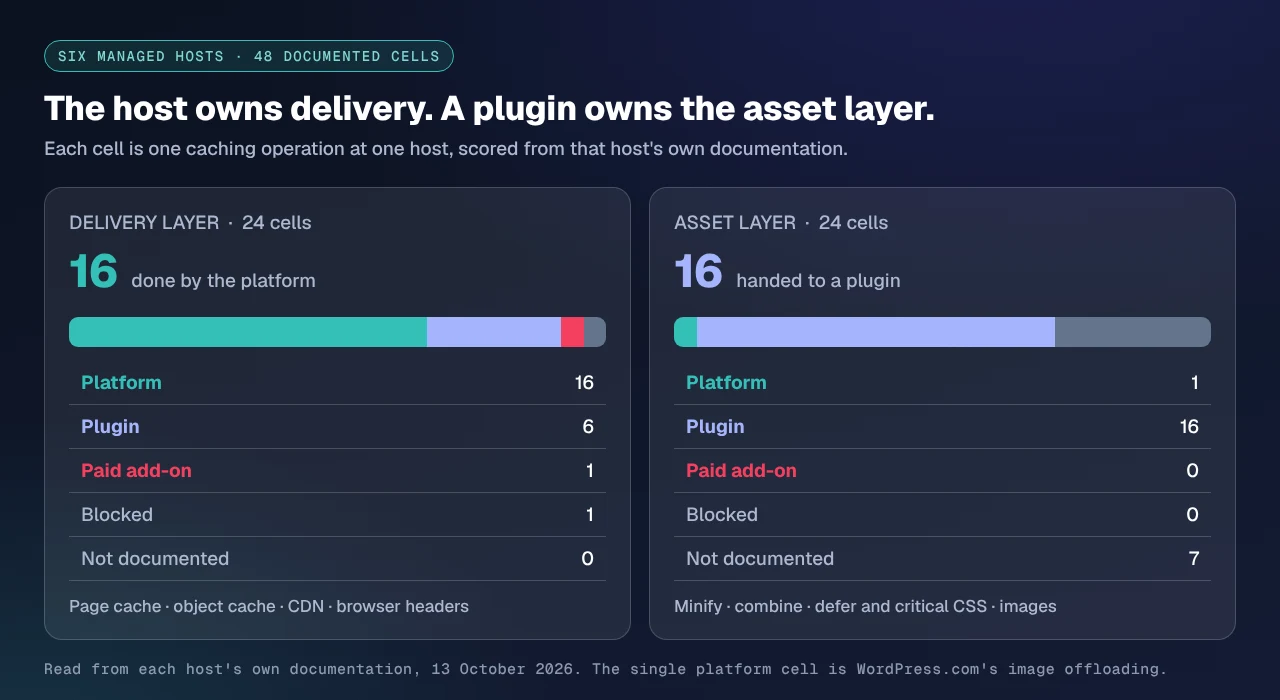
On the delivery layer, 16 of the 24 cells are platform work. That part of the pitch holds up: a managed host really does own page caching, the edge and browser headers, with nothing for you to install.
On the asset layer, 16 of the 24 cells are filled by a caching plugin the host ships, bundles or resells. Seven are not documented at all. Exactly one is platform work, and it is WordPress.com’s image offloading. Not one of these six hosts documents minifying a stylesheet, deferring a script or building critical CSS as something its platform does for you.
Four of Six Ship You a Plugin, and Two of Them Say You Do Not Need One
Cloudways states both positions in one paragraph. Its caching-plugin guide, last modified 10 October 2025, says “If your site is hosted on Cloudways, you don’t need to install caching plugins” and then, two sentences later, “It has built-in caching plugins (Breeze and Object Cache Pro), which provides layers of caching to all your site.” Breeze is a caching plugin by the directory’s definition too: a Plugin API query on 13 October 2026 returned 300,000+ active installs, version 2.6.1 of 5 October 2026, and 3.6 stars from 126 ratings, author Cloudways.
SiteGround does not claim you need no plugin, because its caching product is one. Speed Optimizer returned 1,000,000+ installs, version 7.8.4 of 7 October 2026 and 4.2 stars from 640 ratings in the same query, and its readme invites readers to “Install our caching plugin now to dramatically improve your WordPress website performance on any hosting platform.” It is equally plain about the catch: Dynamic Caching, which does the page-cache work, is “available exclusively for SiteGround servers.” We put it against the premium incumbent in WP Rocket versus Speed Optimizer.
Rocket.net goes furthest the other way. Its feature page is titled “Join Rocket.net And Get WP Rocket For Free” and describes “the world’s leading caching plugin WP Rocket” as part of the hosting. It then publishes a section called Dual Page Caching, arguing that running Cloudflare’s full-page cache at the edge and “WP Rocket’s page cache at the origin” together means “cache misses are accelerated up to 10x by avoiding PHP.” Two page caches on one site is what most vendors here call a conflict. The offer applies to Starter, Pro and Enterprise plans only, per the same page’s FAQ.
WP Engine is the sharpest case, because it does both things at once. Its disallowed-plugins page says “Caching plugins can conflict with our platform’s built-in caching structure” and names two, WP File Cache and W3 Total Cache, as plugins that “would ultimately impact your site’s ability to load if used.” Its separate NitroPack support article then documents an “optional product extension” whose own optimization levels add “image lazing loading” at Medium and, at Ludicrous, “deferred JS and advanced resource loading.” Those are asset-layer operations, bought from a third party, on a platform that disallows a caching plugin for conflicting with caching.
The Numbers Behind the Pitch, From WP Engine’s Own Cache Page
The clearest documentation of the six belongs to WP Engine, which publishes expiry times per layer. Read on 13 October 2026, its cache article lists a page cache with a 10 minute cache expiration, network caching through Cloudflare with a 365 day static asset cache expiration on all plan levels, Edge Full Page Cache on Advanced Network and Global Edge Security only at a 10-minute default, an object cache that is “an optional feature” with no cache expiration and a 1MB buffer size, and browser caching at 365 days by default.
That is a complete delivery stack with its numbers printed, which is more than most of the field publishes. It also has a visible hole where minification and image handling would go, and NitroPack is where WP Engine itself puts them.
The Object Cache Is the Row That Moves Most
One operation behaves differently at every host, and it is the one that costs money. Which plan it starts on is a separate question, measured across seven shared hosts in the object-cache availability census.
| Host | Persistent object cache | What the vendor’s page says |
|---|---|---|
| Rocket.net | Included | ”Free Redis, Object Cache Pro, and Relay expertly configured” |
| WP Engine | Included, opt-in | ”Object cache an optional feature”, no expiration, 1MB buffer |
| Cloudways | Via plugin | Object Cache Pro, through a published partnership |
| SiteGround | Via plugin | Memcached, in Speed Optimizer |
| Kinsta | $100 per month per site | ”The Redis caching add-on costs $100 per month per site” |
| WordPress.com | Cannot be installed | Redis Object Cache and Object Cache Pro are both on the blocked list |
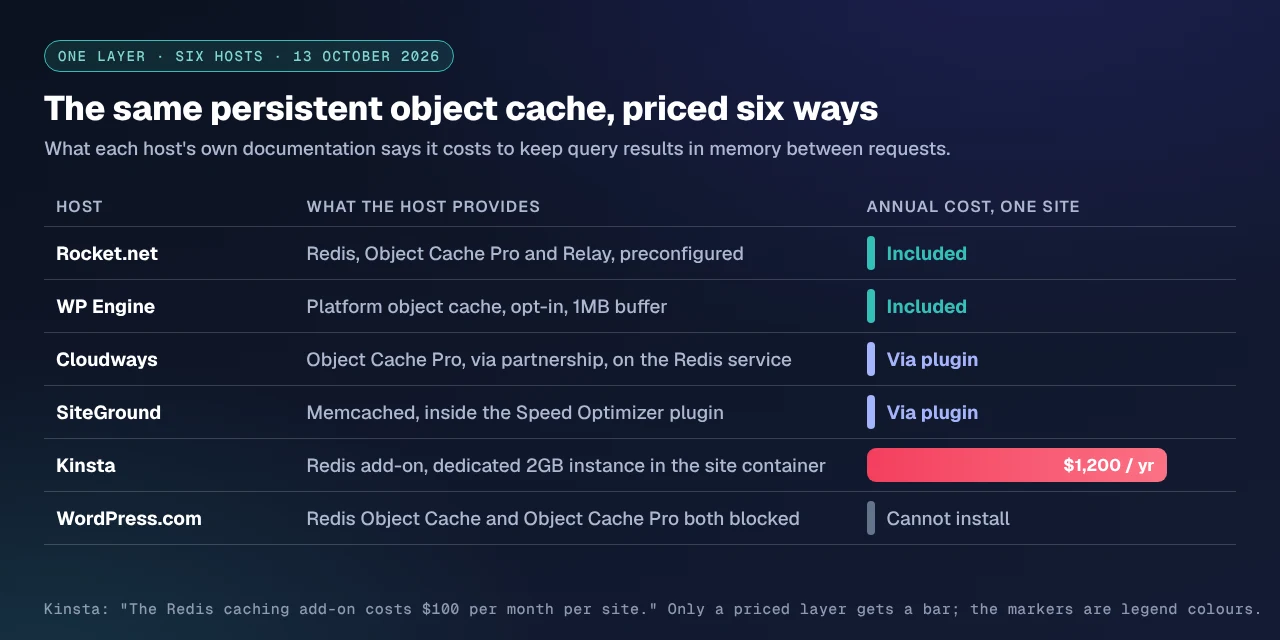
Kinsta’s row deserves reading twice. Its caching article lists “four types of cache” as “Bytecode cache, Object cache, Page cache, CDN cache”, all “automatically done at the software or server-level.” The same article then explains that WordPress’s built-in object cache “only stores objects for a single page load”, and that persisting it means dropping in an external solution. So the automatic object cache in that list of four is the per-request one WordPress already ships. A persistent one is the $100 add-on: a dedicated 2GB instance inside the same container as the site, avoiding “external network calls”, which Kinsta recommends particularly for WooCommerce stores and membership sites.
The same layer ranges from free and preconfigured to $1,200 a year per site to unavailable, across six hosts selling the same category of product. Anyone comparing managed plans on price without reading this row is comparing the wrong number. What a paid object cache actually buys, we counted option by option in Redis Object Cache against Object Cache Pro: failure handling rather than speed.
What Is Actually Banned, and What Everyone Assumes Is
“Managed hosts ban caching plugins” is the belief this question rests on. It is close enough to true to be repeated and wrong enough to cost money. Two of the six publish a list. We took 19 caching and optimization plugins, among them all nine products in our own 80-capability comparison, and checked each against both lists on 13 October 2026.
| Plugin | On WP Engine’s list | On WordPress.com’s list |
|---|---|---|
| W3 Total Cache | ✅ | ✅ |
| WP Super Cache | ✅ | ✅ |
| WP Fastest Cache | — | ✅ |
| Cache Enabler | — | ✅ |
| Comet Cache | — | ✅ |
| Breeze | — | ✅ |
| Speed Optimizer | — | ✅ |
| Redis Object Cache | — | ✅ |
| Object Cache Pro | — | ✅ |
| LiteSpeed Cache | — | — |
| WP Rocket | — | — |
| WP-Optimize | — | — |
| FlyingPress | — | — |
| Perfmatters | — | — |
| Autoptimize | — | — |
| Hummingbird | — | — |
| NitroPack | — | — |
| Surge | — | — |
| xSpeed Cache | — | — |
A tick means the plugin appears on that host’s published list and cannot be used. WP Engine’s list names 2 of the 19. WordPress.com’s names 9. Ten of the 19 appear on neither list, including every premium plugin in the field and ours.
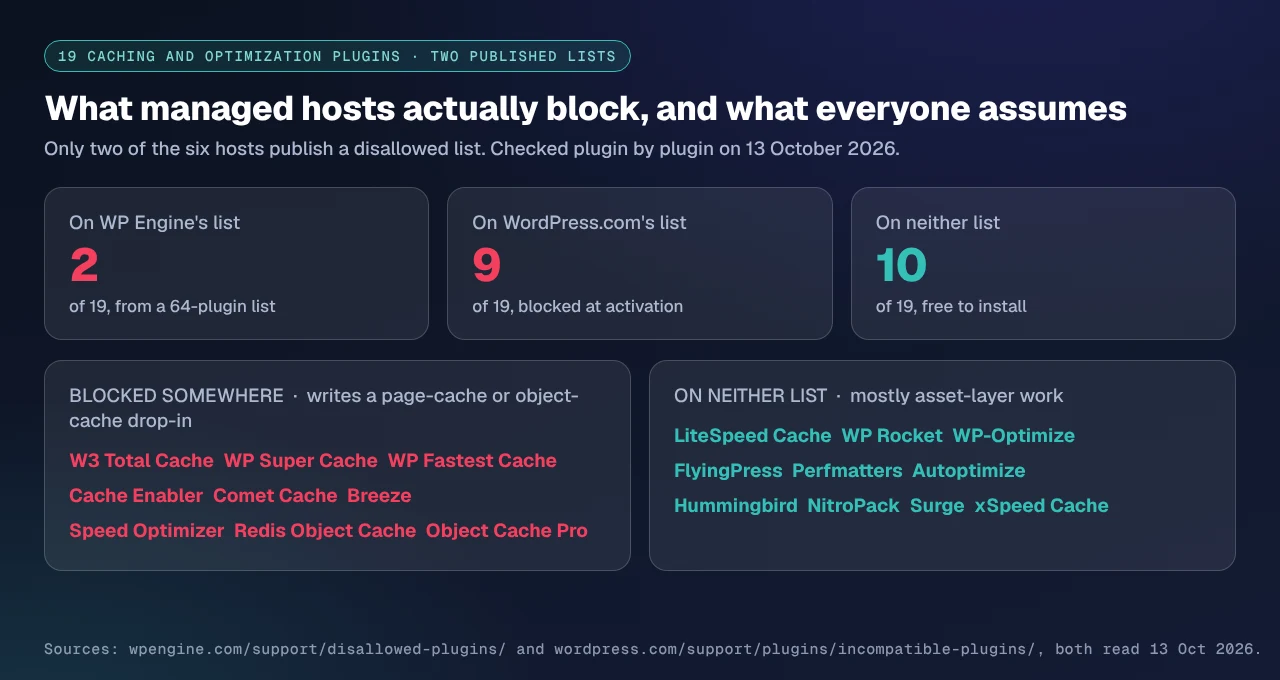
The pattern is not “caching plugins are banned.” A host blocks the plugins that write their own advanced-cache.php or object-cache drop-in, because those files collide with the platform’s. Plugins that only touch the asset layer are left alone, which is exactly the layer the census found empty. Two details are worth flagging: WordPress.com’s list of 13 includes WP-SCSS, a Sass compiler rather than a cache, and WP Engine’s complete list disagrees with itself twice, naming Quick Cache Pro only as a slug and Nginx Cache Controller only as a display name.
Enforcement differs too. WP Engine says that with a disallowed plugin “you’ll be notified and the plugin will eventually be removed from your site.” WordPress.com does it in code: the plugin installs, cannot be activated, and reports “The use of [plugin name] can interfere with caching, which is automatically provided for this site.” One is a policy. The other is a switch.
The Layer Audit: Five Questions, Asked of Documentation Rather Than Support
This is the framework the census produced. It takes about fifteen minutes on any host.
- Find the host’s caching page and list the layers it names. Not the sales page. The support article, where the expiry times live. If the list has four items and they are page, object, CDN and browser, you have found the delivery layer and nothing else.
- Search that page for minify, defer, critical and WebP. Four of our six caching pages make no such claim, and on two of them the only time the word minify appears is in the name of a plugin they disallow. The two pages that do claim it are describing plugins.
- Ask what the object cache costs and whether it persists. A host listing “object cache” as automatic may mean the per-request cache WordPress already ships. Ask whether Redis or Memcached is included, extra or absent; our guide to checking a host’s object-cache support walks the check.
- Read the disallowed list before you buy a licence. Two of six publish one. If the plugin you intend to use is on it, the licence is wasted; if it is not on it, the host has told you in writing that it will not be removed.
- Measure your own headroom first. Our September archive of 886 WordPress sites found 402 with under 50ms of cache headroom and 27 more between 50ms and 100ms, so 48.4% had under a tenth of a second for a page cache to recover. The full distribution is in the study of when a caching plugin is the wrong answer.
What this audit cannot tell you. It reads documentation, not servers. A host may well minify at the edge and never write it down, and a page silent about images is evidence about the page rather than the platform. It covers six hosts, chosen because their documentation was readable to an ordinary HTTP client on the day: Pressable’s knowledge base returned a rate-limit page and Flywheel’s support URLs 404ed, so neither is scored rather than guessed at. The expiry times are defaults and a cache-control header can change any of them. A documented feature is also not a measured one, and the only instrument that reports what your own site does is a request to it.
Headers Answer This Faster Than Documentation Does
Reading six documentation sets takes an afternoon. Across forty client sites on nine hosts, stop reading pages and start reading responses. Each delivery layer announces itself:
X-Kinsta-Cache, reportingMISSthenHIT, on Kinsta- Varnish’s own
AgeandX-Cacheon WP Engine and Cloudways X-XSpeed-Cacheon sites running ours
For the asset layer there is no header, because minification is visible in the bytes rather than announced. The free xSpeed Scan reads both halves on any public URL, with no account: it probes the server for compression, cache evidence and first-byte time, then runs Lighthouse for the asset side. It is the fastest way we know to answer “what is this host already doing” for a site you did not build. xSpeed Scan is ours, as is xSpeed Cache, and both are WPDeveloper products.
Run the free scan on your own site: xspeedcache.com/scan/
Where hosting is the constraint rather than the cache, move the origin. We recommend xCloud for that, and it is ours: xCloud and WPDeveloper are both Startise companies. It belongs here because of the census. A host that gives you the delivery layer and leaves the asset layer to a plugin of your choosing is the arrangement that works, and it is the one xCloud sells.
Where We Fit, and Where We Do Not
On four of these six hosts you already have a caching plugin, and on one of them it is WP Rocket with a licence you did not pay for. On Rocket.net’s Starter plan or above, the right move is to install the plugin Rocket.net already bought for you rather than buy ours. On SiteGround, Speed Optimizer is free, maintained by your host and works on any platform by its own readme. On Cloudways, Breeze is preconfigured for the Varnish layer underneath it in a way a third-party plugin is not.
Our own weak rows, from the same instruments used above. A wordpress.org Plugin API query on 13 October 2026 returned 10,000+ active installs for xSpeed Cache against LiteSpeed Cache’s 7,000,000+, which is the comparison that matters to anyone choosing on track record. No host in this census bundles us, resells us or preconfigures us, and four of the six bundle somebody. We are also absent from the HTTP Archive technology census entirely, so there is no third-party deployment figure for us at all, while WP Rocket is detected on 354,098 crawled origins.
Where the census says a plugin like ours earns its place is the asset layer, on a host that leaves it empty. Our Optimization dimension, read from Free vs Pro on 13 October 2026, carries 43 features in the free plugin and 23 more in Pro, with minify, combine and defer all in the free column. On Kinsta or WordPress.com, where the census found no documented minification, that is the entire gap. It is also why the page-cache question is the wrong one to ask on managed hosting: your host has that layer, and the plugin you want does the other four jobs without fighting it. Ours steps back when it detects a LiteSpeed server module, and applies the same logic to a platform page cache, per server compatibility.
Common Mistakes Managed-Host Customers Make Here
- Reading the sales page instead of the support article. The sales page says “caching included”. The support article says which layers, with expiry times. Only one of those is a specification.
- Treating “object cache” in a feature list as persistent. WordPress has shipped a per-request object cache for years. If the host does not name Redis or Memcached, assume the list means the one you already had, and read the object-cache documentation for what persistence actually requires.
- Buying a plugin licence before checking the disallowed list. Two of six hosts publish one, it takes a minute to read, and W3 Total Cache is on both.
- Stacking a second page cache without checking for a hit. Rocket.net recommends this and documents why it works there, on a host whose edge is Cloudflare Enterprise and whose plugin is configured for it. It is not general advice. Our study of sites that moved hosts and got slower found page-cache artifacts left by the previous host as a recurring cause.
- Assuming a WooCommerce store inherits the same answer. Checkout and cart pages are excluded from page caching by design, which moves the question to the object cache and the asset layer. Our WooCommerce use case covers the split.
- Comparing managed plans without pricing the object cache. Free at two of these hosts, $1,200 a year per site at one, unavailable at another.
Frequently Asked Questions
Do I still need a caching plugin on managed WordPress hosting?
For page caching, usually not: five of the six hosts here do it at the platform. For minification, script deferral, critical CSS and image conversion, the census found 16 of 24 cells handled by a plugin and 7 undocumented, so there the answer is usually yes. Check your headroom first: 48.4% of the 886 sites in our September archive had under 100ms for any page cache to win.
I installed a caching plugin on WP Engine and nothing happened. Did I break something?
Probably not. The plugin may be doing nothing visible because the platform answers first. WP Engine disallows two caching plugins by name, W3 Total Cache and WP File Cache, and says a disallowed plugin is removed after a notification. If yours is not one of the 10 cache-related entries on that 64-plugin list, it is allowed, and it is probably overlapping a layer the platform already covers.
I enabled Redis on Kinsta and my bill went up by more than I expected. Why?
Kinsta’s Redis documentation prices the add-on at $100 per month per site, which is $1,200 a year for one site. The cost is per site rather than per account, so a portfolio multiplies it. What it buys is a dedicated 2GB instance in the same container as the site, a genuinely better architecture than a remote managed Redis, and also the most expensive version of this layer in the study.
I tried to activate Redis Object Cache on WordPress.com and it deactivated itself. Is my site broken?
No, that is the platform working as documented. WordPress.com blocks 13 plugins that interfere with its caching, Redis Object Cache and Object Cache Pro among them, and the block is enforced at activation rather than by policy. There is no setting to override it.
My host says caching is built in, so why does PageSpeed still flag render-blocking CSS?
Different layers. A page cache stores the finished HTML; it does not change what that HTML asks the browser to download. Render-blocking CSS is an asset-layer problem, and not one of the six hosts documents critical CSS as platform work.
Which managed host needs a caching plugin least?
On this census, Rocket.net: it covers all four delivery operations at the platform and bundles WP Rocket for the asset layer on Starter plans and above. That is the most complete answer in the field, and it is a competitor’s rather than ours.
Can I run two page caches at once?
Generally it causes purge bugs, and most vendors warn against it. Rocket.net is the documented exception and calls it Dual Page Caching, pairing Cloudflare’s edge cache with WP Rocket’s origin cache so a miss at the edge still avoids PHP. Treat it as a configuration that host supports, not a pattern to copy.
Does SiteGround’s Speed Optimizer work if I leave SiteGround?
Partly. Its readme says the plugin works “on any hosting platform” and it carries 1,000,000+ installs, but Dynamic Caching is “available exclusively for SiteGround servers.” Minification, image compression and lazy-loading travel. The page cache does not, which is the same server-exclusive pattern LiteSpeed Cache has.
Will a caching plugin conflict with my host’s cache?
It depends which file it writes. Plugins that install an advanced-cache.php or object-cache drop-in are the ones hosts block, because those files sit where the platform’s own do. Asset-layer work does not touch them, which is why 10 of the 19 we checked appear on neither published list.
How do I tell whether my page is being served from the host’s cache?
Read the response headers. Kinsta adds X-Kinsta-Cache with MISS on a first request and HIT on the second, and most platform caches announce themselves the same way. A scan reports the same thing alongside the asset layer, which headers cannot tell you.
My host does not publish a disallowed-plugins list at all. What should I assume?
Assume nothing is blocked and verify on staging. Four of the six publish no list, and two of those four ship a caching plugin themselves, which says more about their position than silence does. Moving a cache between hosts is covered in our migration documentation.
Is the asset layer worth doing if my server is already fast?
That is where it is worth most. A fast server with no asset optimization is the common profile among sites with little cache headroom: there is no server time left to recover, so the remaining wins are page weight and render order. The scan’s Lighthouse half shows which of them your site has left.
Conclusion: Platform or Plugin?
The question in the title has a cleaner answer than it looks. Your managed host owns the delivery layer, and on 16 of 24 cells here it owns it properly, with documented expiry times and nothing to configure. The asset layer is a different product: across six hosts it was handed to a plugin 16 times, left undocumented 7 times and done by the platform once.
The real decision is not whether you need a caching plugin. It is whether you get to choose which one, and what it costs when you do not.
| If your goal is… | Pick | Why |
|---|---|---|
| The least work for a decent result | Whatever your host bundles | Rocket.net’s free WP Rocket, SiteGround’s Speed Optimizer and Cloudways’ Breeze are all preconfigured for the stack under them |
| Lowest total cost on one site | A free asset-layer plugin plus the host’s page cache | The page cache is already paid for; only the asset layer is missing |
| An object cache without a per-site monthly fee | A host that includes it, or the free Redis drop-in | $100 per month per site is the high end of a range that starts at zero |
| Control over the asset layer on a host that documents none | A full optimization plugin, ours among several | 43 free Optimization features in our case, with minify, combine and defer in the free column |
| A faster origin rather than a faster cache | Move the host | A cache cannot remove time the server is not spending |
What to do this week:
- Open your host’s caching support article and write down the layers it names, with their expiry times.
- Search that page for minify, defer, critical and WebP. Whatever returns nothing is your plugin’s job.
- Check the disallowed list if your host has one, before you spend anything on a licence.
- Scan your own URL and compare the result with what the documentation claimed.
- If the asset layer is the gap, fill it. xSpeed Cache does minify, combine and defer in the free plugin, and Pro is $29 a year at the founding price with a 14-day money-back guarantee. If your host bundles WP Rocket or Speed Optimizer, use that and spend the money on hosting.
If you run this audit on a host outside these six, the five questions travel. We would rather see the census extended than cited.