Perfmatters vs a Caching Plugin in 2026: Only One Feature Does Not Overlap
Updated September 2026
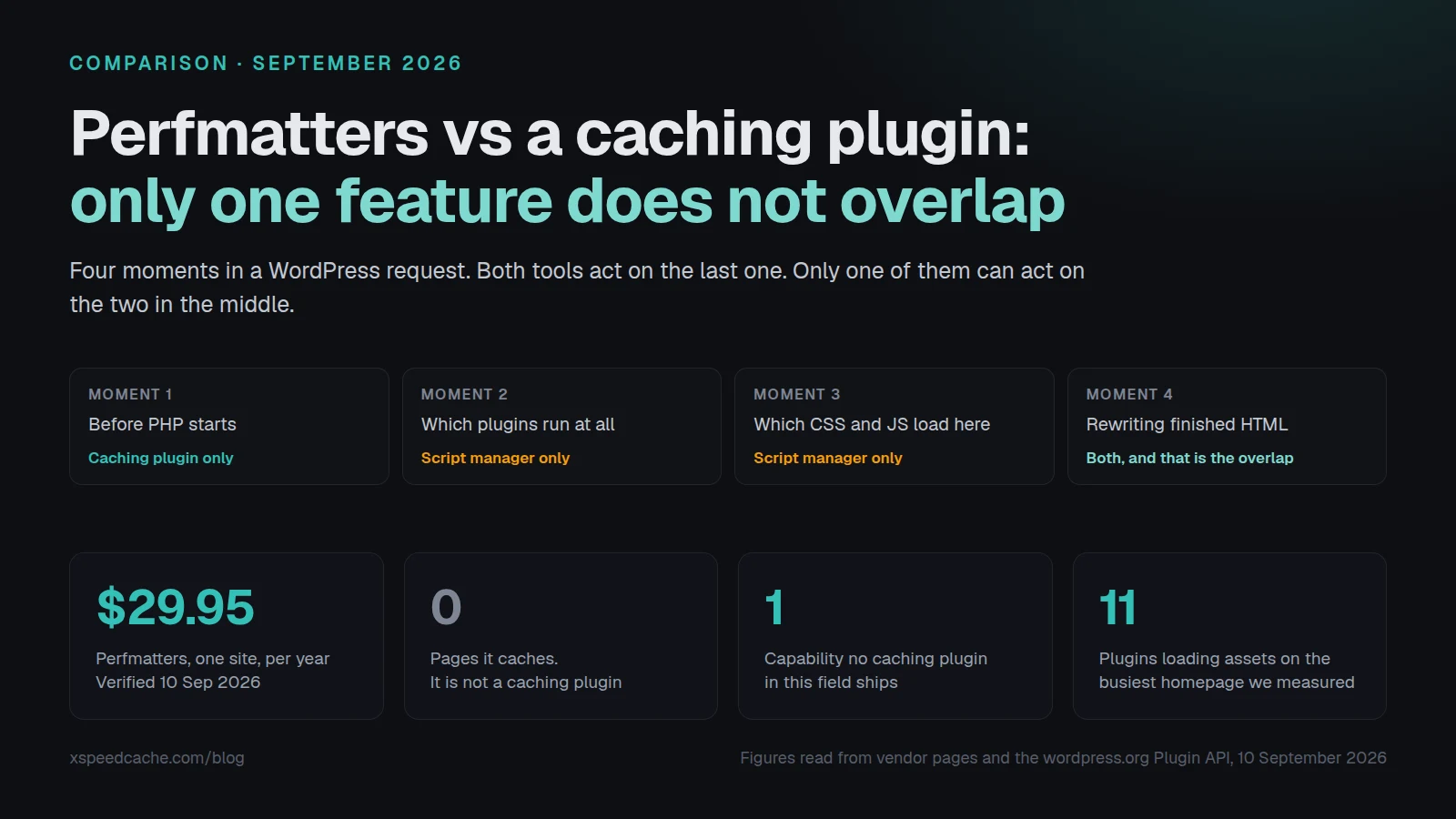
Perfmatters costs $29.95 a year for one site, confirmed against its own pricing page on 10 September 2026, and it does not cache a single page. LiteSpeed Cache is free, reports 7,000,000+ active installs through the wordpress.org Plugin API on the same day, and has no way to turn one plugin’s JavaScript off on a single URL. The comparison people expect is which of the two makes a WordPress site faster. The more useful comparison is which moment of the request each one acts on, because that is what decides whether you need one, the other, or both. This article maps those moments, measures how much of the feature list genuinely overlaps, and gives you a census you can run on your own site before you spend anything.
Quick Summary: What to Do Before You Spend Anything
Work down this table until a row describes your site. The criteria come first on purpose. A product name only means something once you know which question you are asking.
| Your situation right now | Start here | Why this and not the other thing |
|---|---|---|
| No page cache running, or you cannot prove one is | A free page cache: WP Fastest Cache, W3 Total Cache, or whatever your host already ships | Nothing you do to the front end pays back as reliably as the first cached response |
| Cache confirmed, but the page still paints slowly | The asset optimizer your caching plugin already includes: minify, defer, delay, lazy load | Most caching plugins ship these, and you have already paid for them |
| Minify, defer and lazy load are all on, and PageSpeed still reports unused JavaScript | A per-page script manager: Perfmatters at $29.95/yr, or Asset CleanUp Lite for free | No caching plugin decides that a plugin should not load on this URL at all |
| You want the per-page unloading without a second licence | Asset CleanUp Lite, free, 100,000+ installs | Same capability class, no purchase, and it is in the plugin directory |
| One site on LiteSpeed hosting | LiteSpeed Cache, free | Its server-level cache is the strongest free architecture available on that server |
| Several sites, and you want caching, optimization and agent control from one connection | xSpeed Cache, which is ours | The free tier caches and optimizes, and the MCP server is free where WP Rocket charges for it |
Two things are true at once and most articles about this pick only one of them. Perfmatters duplicates a large part of what a modern caching plugin already does. And it holds one capability that no caching plugin in this field ships at all.
Four Moments in a WordPress Request, and What Acts at Each
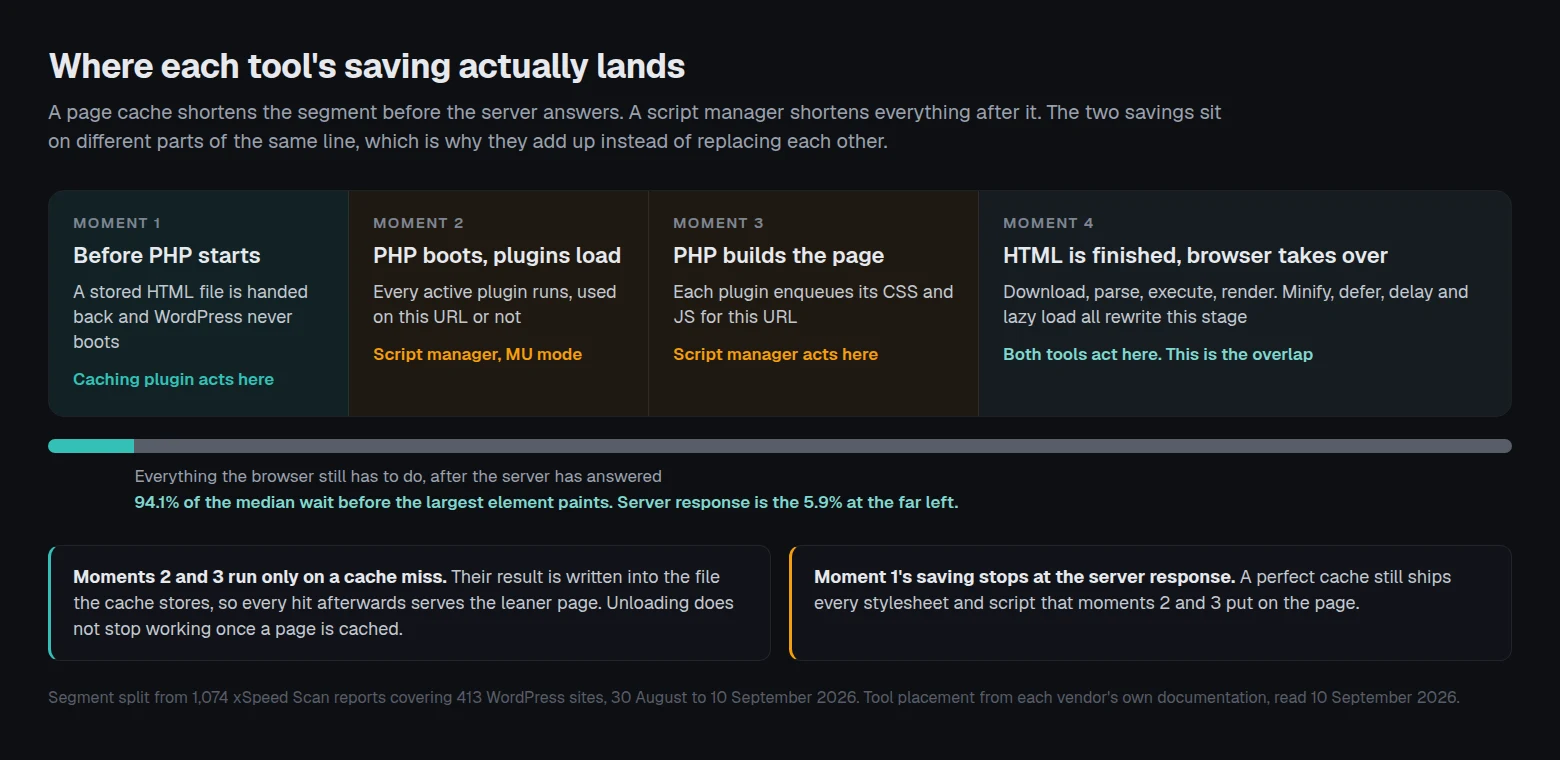
A WordPress page request has four points where software can intervene. Every performance plugin you have ever installed acts on at least one of them, and almost none acts on all four. Sorting the tools by moment is what turns a feature grid into a decision.
Moment one, before PHP starts. A page cache has already written this URL’s HTML to a file. The web server hands that file back and PHP never boots. This is where the response time saving lives, and it is the only moment where a saving is measured in server milliseconds.
Moment two, PHP boots and plugins load. WordPress reads the active plugin list and includes every one of them. A plugin that runs here costs PHP execution and database queries whether or not this URL uses it. Very few tools can intervene at this moment, because doing so means changing what WordPress loads before WordPress has finished loading.
Moment three, PHP builds the page. Themes and plugins enqueue stylesheets and scripts. A contact form plugin adds its JavaScript to every page, not only the contact page. This is the moment a script manager acts on, and it is the moment that decides how many files the browser will be asked to fetch.
Moment four, the HTML is finished. Now the markup can be rewritten: minified, scripts deferred or delayed, images lazy-loaded, unused CSS stripped. Both categories of tool act here, which is exactly where the duplication comes from.
| Moment | What is decided | Perfmatters | A typical caching plugin |
|---|---|---|---|
| 1. Before PHP starts | Is a stored HTML file served instead of running WordPress | ❌ | ✅ |
| 2. PHP boots, plugins load | Does this plugin run at all on this URL | ✅ MU mode | ❌ |
| 3. PHP builds the page | Is this CSS or JS enqueued on this URL | ✅ Script Manager | ❌ |
| 4. HTML is finished | Minify, defer, delay, lazy load, remove unused CSS | ✅ | ✅ |
There is a detail here that changes the whole argument, and it is the reason these two tools compose rather than compete. Moments two and three only execute on a cache miss. But their result is baked into the HTML file the cache then stores, so every cache hit afterwards serves the leaner page. Unloading a script does not stop working because the page is cached. It gets frozen into the cached copy.
The reverse is not true. Moment one’s saving stops at the server response. When we pulled our own scan archive on 10 September 2026, across 413 WordPress sites the median server response accounted for 5.9% of the wait before the largest element painted. A perfect cache still leaves the browser downloading and parsing everything moments three and four put on the page.
The Overlap Is Most of the Feature List
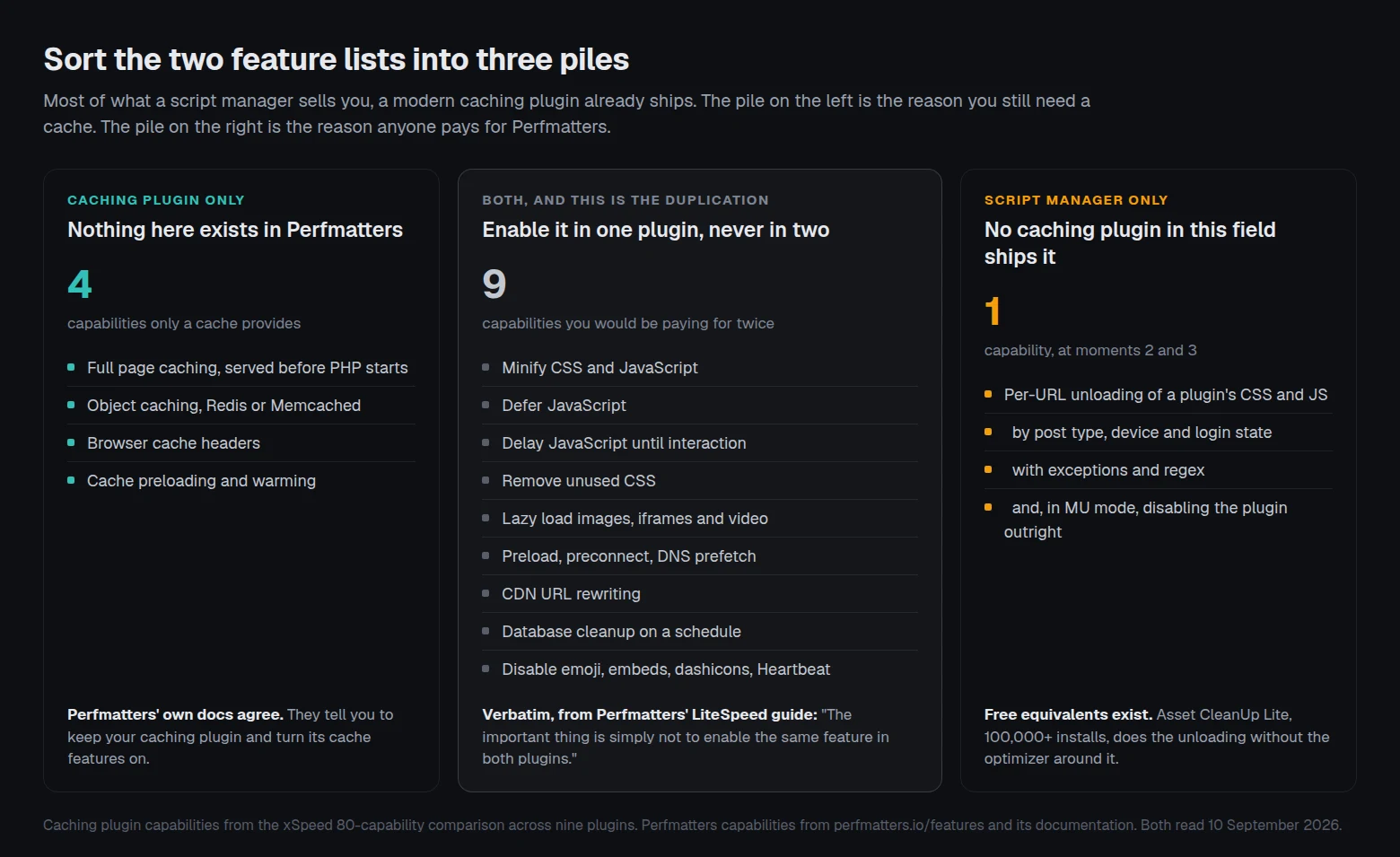
Read Perfmatters’ feature page next to any modern caching plugin’s and the duplication is not subtle. Minify JavaScript and CSS. Defer JavaScript. Delay JavaScript until interaction. Remove unused CSS. Lazy load images, iframes and video, with a facade for YouTube. Preload, preconnect, DNS prefetch, fetch priority. CDN URL rewriting. Database cleanup with scheduling. Heartbeat control. Disabling emoji, embeds, dashicons and XML-RPC. Every one of those appears in both product categories.
You do not have to take our word for the overlap, because Perfmatters documents it themselves and tells you how to resolve it. Their guide to running alongside LiteSpeed Cache states: “we usually recommend turning everything off in LiteSpeed Cache except for the cache features and letting Perfmatters handle all the front-end code optimizations.” The same page adds the general rule: “The important thing is simply not to enable the same feature in both plugins.” Their WP Fastest Cache guide does the same job for a different plugin, listing which cache settings to leave on and which to hand over.
That is a vendor being honest about its own scope, and it is the most useful sentence either company has published on this question. It also frames the purchase accurately. Buying Perfmatters and running it as intended means switching off most of your caching plugin’s optimization panel and running a second implementation of it instead.
| Capability | Perfmatters | LiteSpeed Cache | WP Rocket | xSpeed Cache |
|---|---|---|---|---|
| Full page caching | ❌ | ✅ | 💰 | ✅ |
| Object caching, Redis or Memcached | ❌ | ✅ | ❌ | ✅ |
| Browser cache headers | ❌ | ✅ | 💰 | ✅ |
| Cache preloading | ❌ | ✅ | 💰 | ✅ |
| Minify CSS and JavaScript | ✅ | ✅ | 💰 | ✅ |
| Defer and delay JavaScript | ✅ | ✅ | 💰 | ✅ |
| Remove unused CSS | ✅ | ✅ | 💰 | 💰 |
| Lazy load images and video | ✅ | ✅ | 💰 | ✅ |
| Database cleanup | ✅ | ✅ | 💰 | ✅ |
| Per-URL script and style unloading | ✅ | ❌ | ❌ | ❌ |
| Host Google Analytics locally | ✅ | ❌ | ❌ | ❌ |
| Free tier | ❌ | ✅ | ❌ | ✅ |
Legend: ✅ included, 💰 paid tier only, ❌ not available. Caching plugin marks are taken from our own 80-capability comparison, which records the tier a feature ships in rather than only whether it exists. Perfmatters marks are from its feature and documentation pages, read on 10 September 2026.
The Script Manager: The One Thing No Caching Plugin Ships
Strip out everything that overlaps and one row is left standing. Perfmatters’ Script Manager lists every stylesheet and script loading on the page you are looking at, grouped by the plugin or theme that enqueued it, and lets you switch each one off. Not globally, which any exclusion field can do, but per URL, per post type, per device, and per logged-in state, with exceptions layered on top and regular expressions available for the awkward cases.
The canonical example is in Perfmatters’ own documentation: a contact form plugin loads its CSS and JavaScript on every page of the site, including the ones with no form on them. Disable it everywhere, add an exception for the contact page, and the rest of the site stops fetching it. Their docs claim that on their own sites this “instantly decreased our HTTP requests on our homepage by over 10.”
MU Mode Reaches Past Assets Into Plugin Execution
MU mode goes further and reaches moment two. Perfmatters describes it as being able to “control every aspect of a plugin, from its front-end scripts, inline code, and MySQL queries (disable plugins entirely).” That is no longer asset management. That is deciding which plugins WordPress boots on a given URL, which is a different and considerably more powerful thing, and also a considerably easier thing to break a site with.
A caching plugin cannot do either of these things, and the reason is structural rather than a gap in anyone’s roadmap. A page cache’s job is to store whatever WordPress produced and hand it back unchanged. Deciding that WordPress should have produced something different is a job for code that runs inside the request, before the output exists.
Who Else Unloads Assets Per Page, and What They Charge
Perfmatters is the best known tool in this category. It is not the only one, and it is the only one here that costs money. All four figures below were read from the wordpress.org Plugin API on 10 September 2026.
| Tool | Price | Directory listing | Granularity | Notes |
|---|---|---|---|---|
| Perfmatters | $29.95/yr, 1 site · $59.95/yr, 3 · $124.95/yr, unlimited | Not in the directory | Asset, plugin, device, user state, regex | Adds a full asset optimizer alongside |
| Asset CleanUp Lite | Free, Pro sold separately | 100,000+ installs, 4.9★ from 1,562 | Asset, per post type, with a test mode | Closest free equivalent for unloading |
| Plugin Organizer | Free | 10,000+ installs, 4.7★ from 227 | Whole plugins, by post type or URL | Also controls plugin load order |
| Freesoul Deactivate Plugins | Free | 8,000+ installs, 4.8★ from 104 | Whole plugins, per page, front and back end | Reaches admin pages too |
Asset CleanUp’s readme draws the same category line Perfmatters’ docs do, in one sentence: “Asset CleanUp is not a page-caching plugin. It controls what WordPress outputs; a page cache, server cache, or CDN can then store and deliver the optimized result.” Two independent vendors describing the boundary the same way is about as close to a settled answer as this field gets.
The free options are not free of cost, and Plugin Organizer says so on its own listing in capital letters: “WARNING: Reordering or disabling plugins can have catastrophic affects on your site.” Turning plugins off selectively is the highest-risk performance work available to a site owner, and the tools that make it easiest to do also make it easiest to do badly. Perfmatters’ Testing Mode, which applies your configuration only to logged-in administrators until you are satisfied, is a real and underrated part of what the $29.95 buys.
Neither is Perfmatters merely a script manager with extras. Its price also covers a code snippet manager with a conditions builder, local hosting for Google Analytics and Google Fonts, a login URL change, and speculative loading on hover. Whether those are worth paying for depends entirely on how many of them you already have.
The Per-URL Asset Census: Decide Before You Buy
Here is a method for answering the question with evidence from your own site rather than from anyone’s feature grid. It takes about ten minutes and needs no plugin, no account and no purchase. We have not seen it published anywhere, so treat the name as ours and the technique as yours.
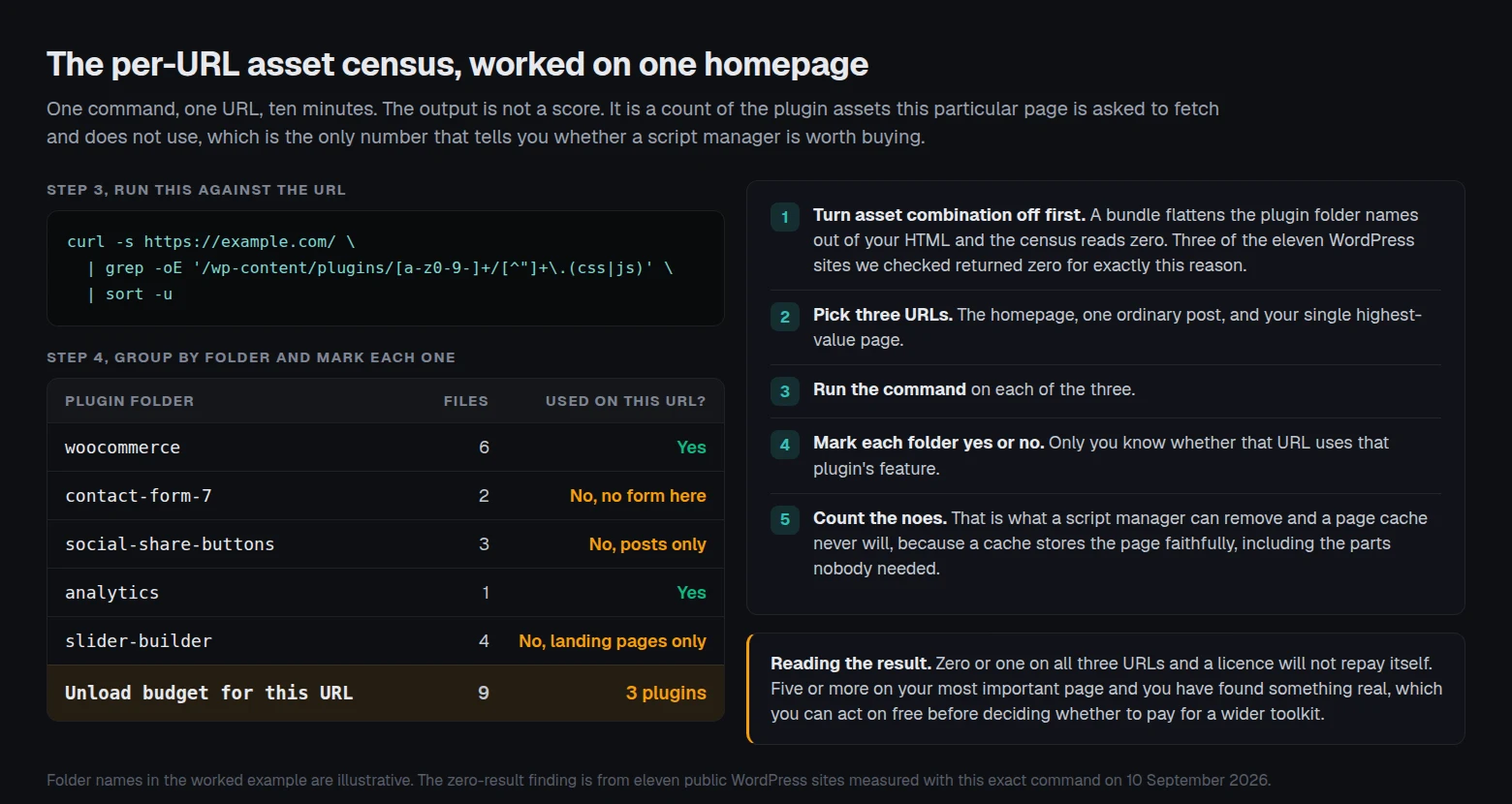
Step 1. Turn combination off first. If your caching plugin is combining CSS and JavaScript into bundles, the census cannot see which plugin owns what, because the ownership was flattened away during the combine. Switch combine off, clear the cache, and run the census before you switch it back on. This sequencing is the step people skip, and skipping it produces a reassuring zero that means nothing.
Step 2. Choose three URLs that represent your site. The homepage, one ordinary post or page, and the single highest-value page you have. For a shop that is the product page. For a consultancy it is the contact page. Three is enough to see a pattern and few enough to finish.
Step 3. List the plugin assets on each URL. One command per URL, from any terminal:
curl -s https://example.com/ | grep -oE '/wp-content/plugins/[a-z0-9-]+/[^"]+\.(css|js)' | sort -uStep 4. Group by the folder name and mark each one. The folder immediately after plugins/ is the plugin slug. For each slug, answer one question: does this URL use that plugin’s feature? A form plugin on a page with no form is a no. An analytics plugin is usually a yes everywhere.
Step 5. Count the noes. That number is your unload budget. It is what a script manager can remove from this URL and what no page cache will ever remove, because the cache’s job is to store the page faithfully, including the parts of it nobody needed.
If the count is zero or one on all three URLs, a script manager will not repay a licence and your remaining time is elsewhere. If it is five or more on your most important page, you have found something real, and you can act on it free with Asset CleanUp before deciding whether Perfmatters’ wider toolkit is worth the annual fee.
The Limitations of This Census
Stating these plainly matters more than the method itself, because the census is easy to over-read.
- 📏 It counts files, not bytes or execution time. Ten small stylesheets can matter far less than one large script that blocks rendering.
- 🙈 It only sees assets that appear in the HTML with a URL. Inline scripts, assets injected later by JavaScript, and anything served from a bundle are invisible to it.
- 🧩 A site that already combines assets scores near zero. That is an artifact of the combine step, not evidence of a lean site, which is why step one exists.
- 🤷 It cannot tell you whether an asset is needed. Only the person who built the page knows that, and getting it wrong breaks things.
- 🕐 It reads one moment in time. A plugin may enqueue conditionally, so a URL that looks clean today can load differently for a logged-in visitor or on mobile.
What the Census Found on Twelve Public WordPress Sites
We ran the census against twelve public sites on 10 September 2026 to show the spread, not to grade anyone. Eleven were detectably WordPress. Every number below is reproducible with the command above, and a high count is not a fault: it usually means the site does more things.
| Site | Plugins enqueuing front-end assets | Distinct CSS and JS files |
|---|---|---|
| wpbeginner.com | 11 | 25 |
| gravityforms.com | 7 | 23 |
| wp-rocket.me | 7 | 10 |
| wptavern.com | 4 | 45 |
| perfmatters.io | 3 | 4 |
| techcrunch.com | 2 | 3 |
| kinsta.com/blog/ | 1 | 1 |
| wordpress.org/news/ | 1 | 1 |
| ma.tt | 0 | 0 |
| yoast.com | 0 | 0 |
| wpfastestcache.com | 0 | 0 |
Three readings, and the third is the one that matters most. First, the two axes come apart: wptavern.com loads assets from only four plugins but 45 separate files, and 34 of those 45 come from a single plugin, the Gutenberg block editor. Counting plugins and counting files answer different questions, and a site can look busy on one axis and lean on the other.
Second, wpbeginner.com sits at the top of the table and its own asset list includes Perfmatters. A site that runs the tool still enqueues front-end assets from eleven plugins on its homepage, which is the honest shape of this work. A script manager does not empty the page. It removes what a given URL does not need, and a large busy homepage genuinely needs a lot.
Third, the three zeros are the finding. Those sites are not loading nothing. They have combined their assets, so the plugin folder names no longer appear in their markup and the census has nothing to read. If you run this on your own site and get a zero, that is the most likely explanation, and step one of the method is how you get a real answer.
Running This Across Twenty-Five Client Sites
Everything above assumes one site and one person deciding. The arithmetic changes when the same decision has to be made twenty-five times, because per-page unloading is per-page work. A configuration built for one client’s homepage tells you nothing about another client’s, and the tool that makes each decision faster does not reduce the number of decisions.
We build xSpeed Cache, which is a caching plugin, so we sit on the left-hand column of every table in this article. Our free tier covers moments one and four: static file caching that answers before PHP starts, object caching, browser cache headers, preloading, minify, defer, delay, lazy load and database cleanup. Free versus Pro lists which side of the line each of the 46 modules falls on, and server compatibility covers what changes on nginx, and browser cache settings covers the headers themselves. Pricing starts at $29/yr for Personal with a 14-day money-back guarantee, and every tier is also sold as a one-time lifetime licence alongside the annual one.
Where fleets are concerned, the part we would point an agency at is not the cache. It is xSpeed Hub and the MCP server, which is free in our plugin where WP Rocket puts it behind a paid tier. One connection reaches every site you manage, so an assistant can read cache status, purge, run a scan and adjust settings across the fleet without you opening twenty-five dashboards. For WooCommerce stores specifically, checkout is never cached and logged-in customers are never served a cached page.
Where Our Own Argument Is Weak
Four counts against us, and the first one is the whole subject of this article.
- 🚫 We do not ship per-page conditional unloading. Neither does any of the eight competitors in our comparison matrix, LiteSpeed Cache and WP Rocket included. If that is the capability you came here for, we do not have it and Perfmatters or Asset CleanUp does. Nothing in our free tier or our Pro tier changes that answer.
- 📉 We are small. 2,000+ active installs and a 5.0 rating from 13 ratings, read from the Plugin API on 10 September 2026, against LiteSpeed Cache’s 7,000,000+ and Perfmatters’ claim of 175,000+ websites. We are also too new to appear in the field datasets that third-party roundups rank plugins on, and you should weigh that.
- 🛠️ Perfmatters’ Testing Mode has no equivalent on our side. Previewing a risky configuration as an administrator before it reaches visitors is good engineering and we do not offer it for asset changes.
- 👥 Their support is the two developers who wrote the plugin. For a single site owner making a sensitive change, that is a real advantage over any larger team, and it is worth money.
Common Mistakes People Make Pairing These Two Tools
- ⚠️ Running both minifiers. Enabling minification in the caching plugin and in Perfmatters is the failure their own documentation warns about. Pick one implementation per feature and turn the other off completely.
- ⚠️ Running the census after switching combine on. The bundle hides the plugin folder names and you get a zero that reads like good news. Census first, combine second.
- ⚠️ Unloading everywhere with no exception. Disabling a form plugin site-wide and forgetting the exception for the one page with the form is the single most common way this goes wrong, and it fails silently because the page still renders.
- ⚠️ Expecting a script manager to fix a slow server. Unloading assets does not move your response time. If your problem is a 900ms server response, the fix is caching, a better host, or both, and our free scan will tell you which number is actually large.
- ⚠️ Buying an optimizer before confirming the cache works. More sites than you would expect have a caching plugin installed and not caching. There is a four-check method for proving it, and it takes two minutes.
- ⚠️ Using MU mode on a site you cannot roll back. Disabling plugin execution is the deepest change in this category. Take a backup you have actually restored once, and change one thing at a time.
Frequently Asked Questions
I bought Perfmatters and my PageSpeed score did not move. What went wrong?
Most likely you enabled features you already had. If your caching plugin was already minifying, deferring and lazy loading, adding a second implementation of the same three things changes nothing. The part of Perfmatters with no equivalent is the Script Manager, and it does nothing until you open it and unload something. Run the census in this article and see whether there is anything to unload.
Do I still need a caching plugin if I have Perfmatters?
Yes. Perfmatters does not do page caching, object caching, browser cache headers or cache preloading, and its documentation does not claim otherwise. It is designed to sit alongside a cache, not to replace one.
I turned on Perfmatters’ minify and my site broke. Why?
Check whether your caching plugin is also minifying. Two tools rewriting the same JavaScript is the classic cause, and Perfmatters’ own guidance is not to enable the same feature in both plugins. Turn minification off in one of them, clear both caches, and test again.
Is Perfmatters in the WordPress plugin directory?
No. A query to the wordpress.org Plugin API for the slug on 10 September 2026 returns Plugin not found, the same result WP Rocket returns. There is therefore no public active-install count for it, and any number you see quoted is the vendor’s own. Their site says 175,000+ websites.
I disabled a plugin’s scripts everywhere and my contact form stopped working. How do I fix it?
Reopen the Script Manager, find the plugin you disabled, and add an exception for the URL or post type that needs it. Perfmatters supports exceptions layered on top of an everywhere-disable for exactly this case. It is the intended workflow rather than a workaround.
Can I get per-page script unloading for free?
Yes. Asset CleanUp Lite has 100,000+ active installs and a 4.9 rating from 1,562 ratings, and it unloads assets per page. Plugin Organizer and Freesoul Deactivate Plugins go further and disable whole plugins per URL. None of them includes the asset optimizer Perfmatters bundles alongside, so the comparison is capability against capability, not product against product.
My census shows zero plugin files. Is my site already perfect?
Probably not. Zero almost always means your assets are being combined into bundles, so the plugin folder names no longer appear in your HTML. Three of the eleven WordPress sites we checked returned zero for this reason. Turn combination off, clear the cache, and run it again.
Does the Script Manager affect the WordPress admin?
No. Perfmatters’ documentation states plainly that it works on the front end of the site. If your admin is slow, look at the Heartbeat API, object caching and your database rather than at front-end assets.
We manage 25 client sites. Does per-page unloading scale?
The tool scales. The decisions do not. Each site needs its own configuration because each site runs different plugins on different templates, and no export from one client helps another. Budget the time per site rather than per licence, and start with the two or three sites where the census count is highest.
Will unloading scripts break my page builder?
It can, and page builders are the most common casualty because their assets often load under generic names. Use a testing mode if your tool has one, unload one item at a time, and check the page while logged out as well as logged in. Builders frequently behave differently for administrators.
How much does Perfmatters cost in 2026?
$29.95 a year for one site, $59.95 for three, and $124.95 for unlimited sites with multisite support, verified against their pricing page on 10 September 2026. Every tier carries a 30-day money-back guarantee, and their FAQ states renewals carry an automatic 15% discount.
Does xSpeed Cache work alongside Perfmatters or Asset CleanUp?
Yes, and the same rule applies as with any other pairing. Let one tool own each feature. If you want Perfmatters handling front-end assets, use our caching, object cache and preloading and turn our overlapping optimization modules off. Our migration module imports settings from competing cache plugins, which is a different job from asset management and does not conflict with it.
Conclusion: Which One Do You Actually Need?
The honest answer for most sites is that these are not alternatives. One acts before PHP runs and the other acts while PHP is running, and a site with a real problem at both moments needs both. A site with a problem at only one of them is paying twice if it buys both.
| If your goal is | The pick | Why it wins this row |
|---|---|---|
| A faster server response | Any page cache, free ones included | This is the only moment a cache acts on, and it acts on it well |
| Fewer files on one specific URL | Asset CleanUp Lite | Free, in the directory, and it does the one job |
| Per-page unloading plus a full optimizer in one panel | Perfmatters | The widest toolkit in this category, and the reason it costs money |
| Turning whole plugins off per URL | Freesoul Deactivate Plugins or Plugin Organizer | Both reach moment two, free, with the risk that implies |
| The best free cache on LiteSpeed hosting | LiteSpeed Cache | Its exclusive server-level cache is genuinely better on that server |
| Caching plus optimization plus fleet and agent control | xSpeed Cache and xSpeed Hub | One connection across every site, with the MCP server in the free tier |
What to do this week:
- Prove your cache is running before you change anything else. Two commands and four checks settle it.
- Run the per-URL asset census on three pages, with combination switched off first. Write the numbers down.
- If the count is high, install Asset CleanUp Lite free and unload one thing. If the workflow suits you and you want the wider toolkit, Perfmatters at $29.95/yr is the mature product in this space and we would not argue against it.
- If the count is low, your remaining time is in caching and hosting instead. Run the free xSpeed Scan on the URL, which needs no account, and read the server response number first.
- If your server response is the large number, a faster origin is the fix. We recommend xCloud, and it is ours: xCloud and xSpeed Cache are both Startise companies, and it gives a cache an origin tuned for it.
- If you manage more than five sites, our free tier and the fleet tools are where we would start you, and the 80-capability comparison shows which tier every feature ships in.
We build a caching plugin, so we sat out the one row this article is really about, and we said so rather than blurring it. That is deliberate. These tools are not competing for the same job, and a reader who knows which moment their problem lives at spends less and gets more. What we build is the other half of that answer: a cache and an optimizer for people running more than one WordPress site who want the whole fleet reachable from one connection, on a free tier that does not expire and never becomes a trial. Run the free scan on your slowest URL and start with whichever number comes back largest.