What Happens When You Stop Paying: Ten Caching Licences, Four Different Exits in 2026

Updated November 2026
Stopping payment on a WordPress caching licence does one of four things, and the vendor decides which. Object Cache Pro’s pricing FAQ, read on 4 November 2026, gives a 14-day grace period and then states that the object cache will stop working. WP Rocket’s licence documentation, read the same morning, says the plugin will continue to operate normally. Same category, opposite consequence. Every comparison prices the licence; this one reads what the licence is holding.
Quick Summary: Which Exit You Are Buying
| If you want… | Buy this shape | Why, in one line |
|---|---|---|
| To never think about it again | A one-time licence that publishes an updates promise | Two of the ten rows below promise updates with no renewal, in writing |
| A cache that survives a lapsed card | An annual plugin licence, not a subscription service | Four rows keep serving pages after expiry and stop improving |
| The cheapest permanent answer | WP Fastest Cache Premium Bronze, $49 one time | Its FAQ states you can update the premium version forever |
| Managed optimization with no server work | A metered service, accepting that it stops | Three rows switch optimization off when payment stops |
| A written answer before you pay | Any vendor except one | One of the ten publishes no lapse answer at all |
Every figure and quotation here was read from the vendor’s own page on 4 November 2026. Prices in this field move, and the terms move faster than the prices.
What We Read, Where We Read It, and What It Misses
Nine paid WordPress performance products, ten licence rows, because one vendor sells two shapes of licence that behave differently at the exit. For each row we looked for a published answer to four questions: does the page cache keep serving, do plugin updates continue, do security fixes continue, and what does the vendor say in its own words.
The source had to be the vendor’s own property: a pricing page, a knowledge-base article, a terms-of-use document. A support-forum reply or a third-party review did not count. Where a vendor answers on two pages, both readings are recorded.
Three limitations, stated before the table rather than after it:
- 📄 This reads terms, not behaviour. A vendor whose page says the plugin stops may be kinder in practice. The published term is what you can hold them to, and it is the only thing you can check before paying.
- 🕐 A reading is a snapshot. Our own seven-reading study of these same nine pricing pages found ten changes in six weeks, and not one of them was a new list price. Terms are the volatile field.
- 🔍 Silence is recorded as silence. Where a vendor publishes no answer, the cell says so rather than inferring the friendly reading. That turned out to be a finding rather than a gap.
A five-question version of this test already exists, applied to two products, in our WP Fastest Cache against WP Rocket comparison, and our eleven-plugin scorecard asks it as one criterion among seven. Two products cannot show the shape of a field, and one criterion cannot carry it. Ten rows can.
The Exit Census: Ten Licences, Four Outcomes
| Licence | Cache keeps serving | Updates continue | Security fixes | Exit class |
|---|---|---|---|---|
| WP Fastest Cache Premium, $49 one time | ✅ | ✅ | ✅ | Nothing happens |
| xSpeed Cache Lifetime, $79 once | ✅ | ✅ | ✅ | Nothing happens |
| WP Rocket, $5 a month list, billed yearly | ✅ | ❌ | ❌ | Degrades |
| WP-Optimize Premium, $49.00 a year | ✅ | ❌ | ❌ | Degrades |
| Perfmatters, $29.95 a year | Not stated | ❌ | ❌ | Degrades |
| xSpeed Cache Yearly, $29 a year | ✅ | ❌ | ❌ | Degrades |
| FlyingPress, $59 a year | ❌ | ❌ | ❌ | Dead switch |
| Object Cache Pro, $95 a month | ❌ after 14 days | ❌ | ❌ | Dead switch |
| NitroPack, from $8.00 a month metered | ❌ | — | — | Dead switch |
| W3 Total Cache Pro, $99 a year | Not published | Not published | Not published | No answer |
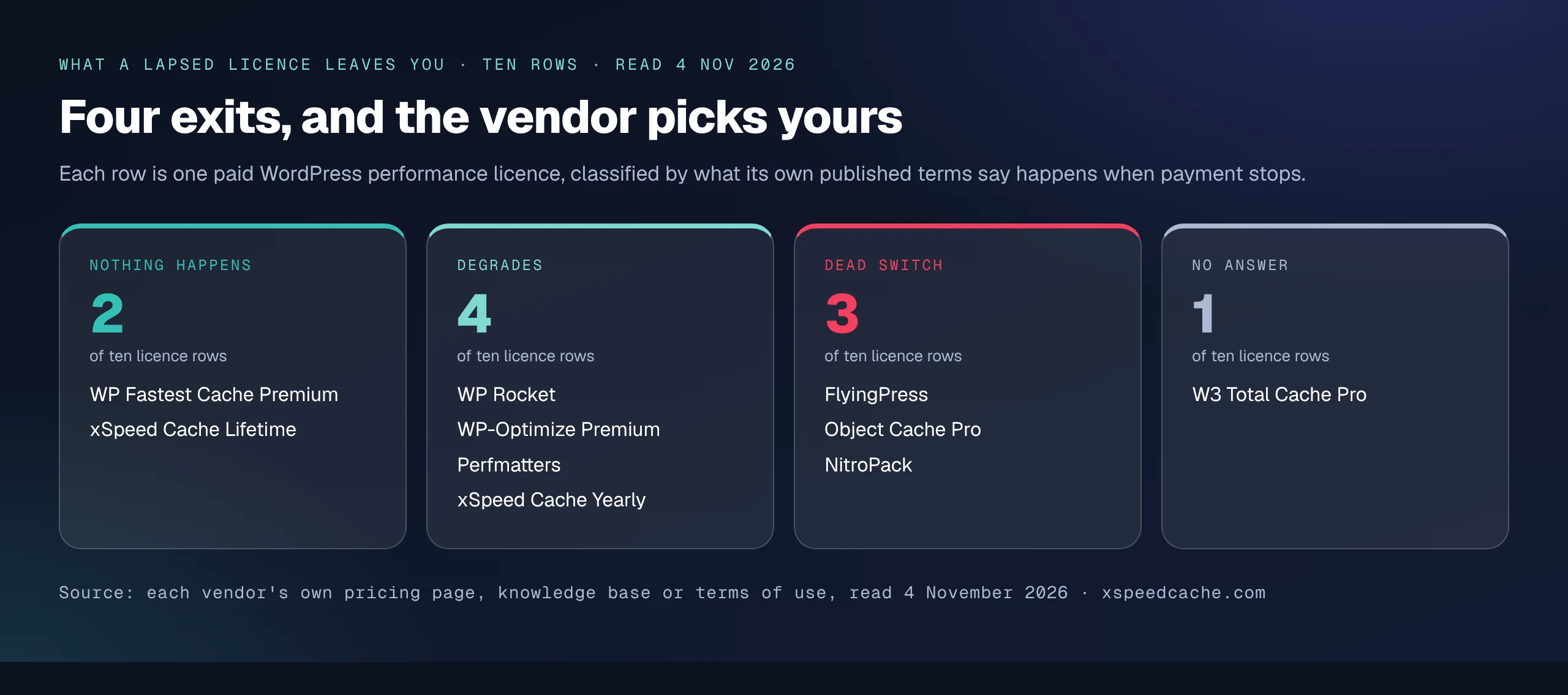
Two rows keep everything. Four keep the cache and stop improving. Three switch the optimization off. One vendor publishes nothing on the subject. The dash in the NitroPack row is not an omission: the product is a hosted service rather than a plugin you hold a copy of, so plugin updates are not the unit that matters.
The four classes are not price tiers in disguise. The cheapest row sits in the first class and the most expensive in the third, and the $29.95 annual licence and the $95 monthly subscription land in different classes for reasons unrelated to what they cost.
Exit One: Nothing Happens, and Two Rows Promise It in Writing
Two licence shapes in this field carry a published promise that payment stops and nothing else does.
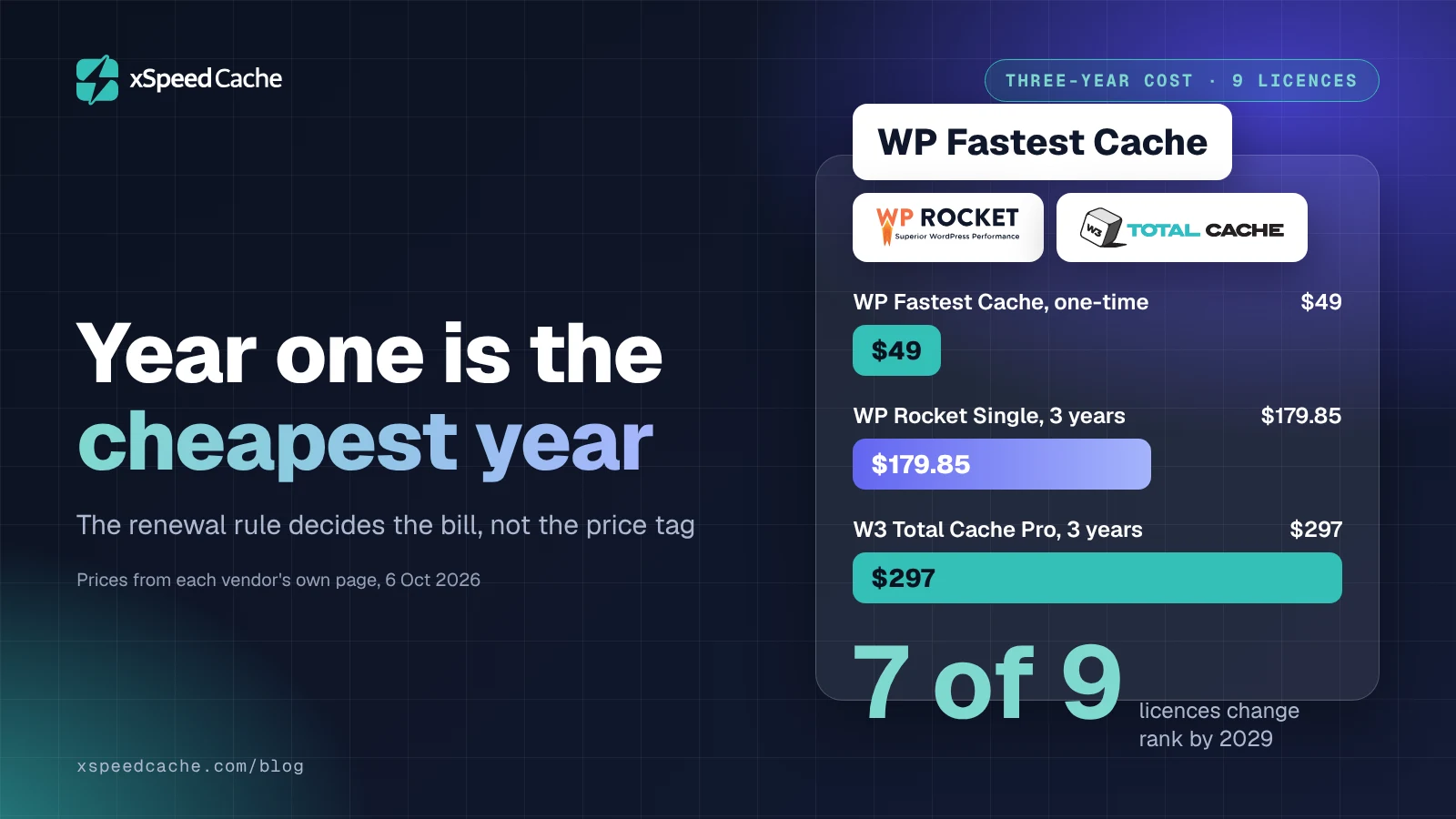
WP Fastest Cache sells what its own page calls a One-Time Fee, labelled per lifetime on each of its four tiers, from Bronze at $49 for one site to Platinum at $300 for ten. Its FAQ answers the updates question directly, under the heading asking whether there is any limitation about updates: “No, you can update the premium version forever.” That is the strongest lapse term published by any vendor in this census, because there is no lapse to have. Verified on 4 November 2026 against its own FAQ.
There is one consumable inside it, and a buyer should price it. Each licence includes 10,000 image credits, and the licence transfer page says the window for moving a licence to a different URL “remains open for 1 year, starting from the date when you assign the premium license to any URL”, after which the option is gone. A permanent licence with a twelve-month portability window is permanent for the site, not for you.
The second row is our own lifetime tier, and it is covered further down under the same columns as everyone else.
Exit Three Comes Next Because It Is the Shortest: The Dead Switch
Three products in the census stop doing their job when payment stops, and all three publish it.
Object Cache Pro has written the most explicit sentence in the field. Its pricing FAQ, under a question about what happens if the subscription lapses, reads: “You must have an active subscription to run Object Cache Pro. After a 14-day grace period, the object cache will stop working and you won’t receive updates or bug fixes.” The product is $95 a month or $950 yearly, with Enterprise from $1,950 a month billed annually, and the price does not include the Redis instance it caches into. Our comparison against the free Redis Object Cache drop-in covers what that subscription buys in failure handling.
FlyingPress states it in its terms of use rather than on its pricing page, and the sentence is unambiguous: “You won’t be able to use FlyingPress when the license expires.” The same document asks the reader to consider the product a service rather than a plugin, because some optimizations run on the vendor’s servers. Our FlyingPress pricing breakdown published this behaviour for FlyingPress alone in October; the census is where it stops looking like an outlier and starts looking like a class.
NitroPack is the honest case of a service that never pretended otherwise. Its pricing page prices pageviews, describes each plan’s allowance as the traffic you can generate before optimizations stop, and answers the overage question with: “If you exceed your plan’s limits, NitroPack will stop optimizing your site until the next billing cycle.” It also declines to sell a permanent licence, in its own words, because site optimization is not a one-time task. Both halves of the overage sentence belong together: the page also offers Resource Overages, a budget you can set so optimization continues.
Two Grace Periods, Fourteen Days and Fifteen, Opposite Meanings
The two most specific numbers in this census are almost the same length and mean close to the opposite thing. Object Cache Pro gives 14 days, after which the object cache stops. WP Rocket gives 15 days, after which three cloud features stop and the plugin carries on caching. A buyer comparing the two on length alone would call them equivalent.
| Vendor | Published window | What the window ends | What survives it |
|---|---|---|---|
| Object Cache Pro | 14-day grace period | The object cache itself | Nothing the subscription provided |
| WP Rocket | 15 days after expiry | Three cloud features | Page caching and the local optimizations |
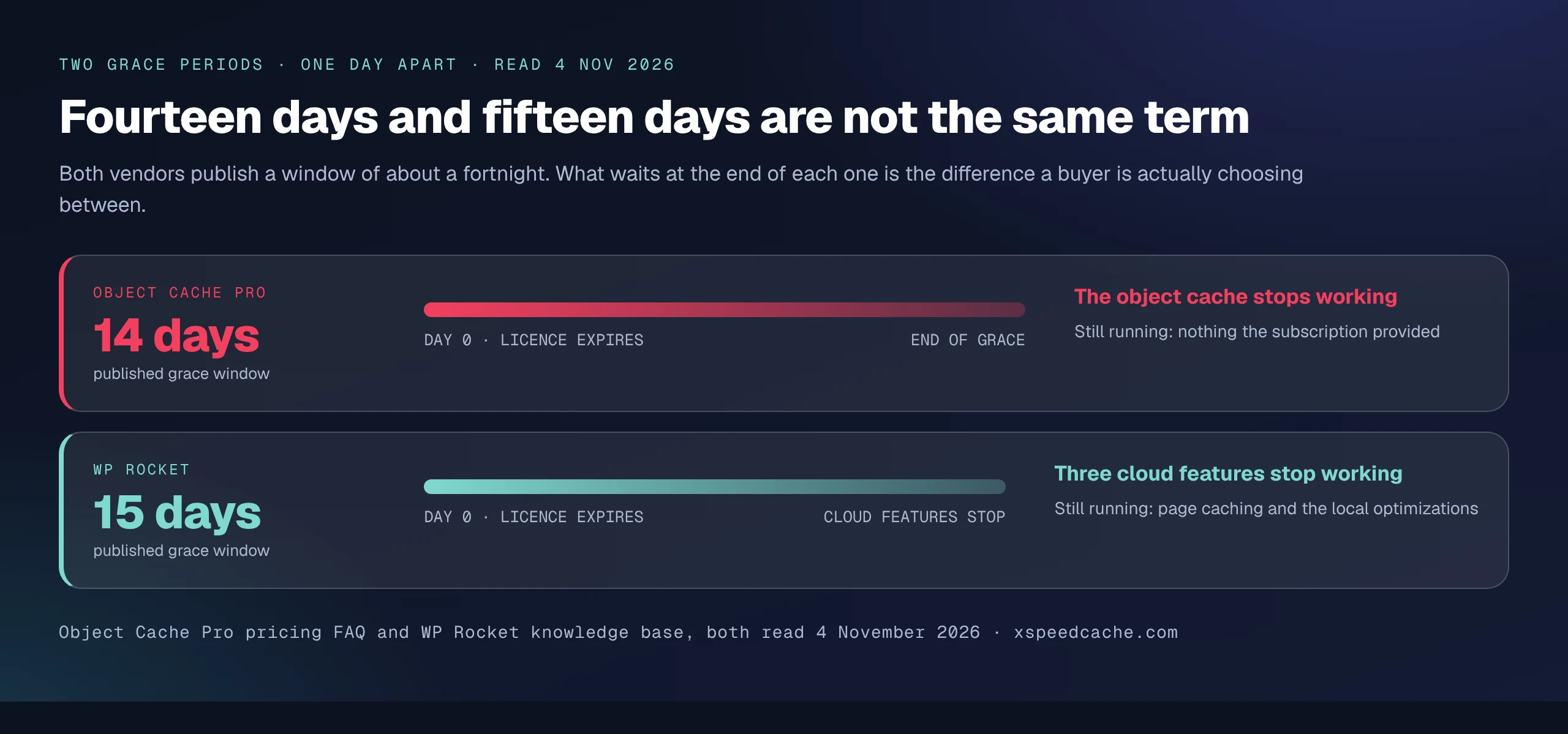
This is the single clearest reason to read the sentence rather than the number. Two weeks is not a term; it is a unit of time attached to a term, and the term is where the money is.
Exit Two: The Cache Keeps Serving and the Plugin Stops Improving
Four of the ten rows degrade. The page cache keeps answering requests and something else goes away, and the vendors differ in how precisely they say what.
WP Rocket’s knowledge-base article on licence expiry, last updated 12 June 2026, is the most detailed disclosure in the field. Six things go at the moment of expiry and three more follow a fortnight later, and the article itself draws the line in one sentence: “After the license expires, the WP Rocket will continue to operate normally, except for the cloud features that will stop working 15 days after license expiration.”
| What the article says goes | When |
|---|---|
| Support | At expiry |
| Plugin updates | At expiry |
| Dynamic exclusions and inclusions, updating of | At expiry |
| RocketCDN add-on, free plan | At expiry |
| Priority Elements pre-warmup, with real visits still triggering it | At expiry |
| Remove Unused CSS | 15 days later |
| Load CSS Asynchronously | 15 days later |
| Rocket Insights | 15 days later |
The reason the article gives is a cost one, and it is a fair one, because those three features run on servers somebody has to pay for.
WP-Optimize answers it on the pricing page itself, under a question about cancelling: “You’ll still have access to WP-Optimize Premium after the 12-month term is over, however you won’t be entitled to premium support and you won’t get any new premium features, fixes or tweaks that are released.” Read the second half of that sentence slowly. Fixes are in the list of things that stop. A plugin frozen at the version you last paid for is a decision about keeping a WordPress install hardened, not a decision about speed.
Perfmatters is the partial case. Its pricing FAQ states that to continue receiving support and updates the licence needs renewing yearly, and a troubleshooting article explains the unauthorized download error a lapsed licence produces, confirming that “All of our licenses include 1 year of updates & support.” Nothing on either page says whether the optimizations keep running, so the cache cell in the census reads “Not stated” rather than a tick. Perfmatters is also the one vendor in the field whose renewal gets cheaper, with a 15% discount automatically applied to all renewals, which is worth more over three years than most of the launch discounts in this category.
Our own yearly licence is in this class, and the way it degrades is harsher than WP Rocket’s. The licence panel documentation for xSpeed Cache Pro states it plainly: “When a licence lapses you don’t lose your site or your settings, but you stop receiving updates, and Pro modules stop being entitled.” Pro modules stop being entitled. WP Rocket’s core keeps every local optimization it had the day before expiry; ours keeps the site and the configuration and withdraws the Pro modules. That is the weaker term of the two, it is ours, and a buyer comparing the two annual licences on this axis alone should prefer theirs.
Exit Four: One Vendor Publishes No Answer at All
W3 Total Cache Pro sells an annual subscription at $99 for one site, $350 for five and $500 for ten, with a 30-day money-back guarantee stated on the product page. Its billing FAQ is thorough about the mechanics of renewal. It explains that the subscription renews automatically, that a renewal email goes out one week before the charge with a cancellation link in it, and that “The license will not be extended if the renewal is unsuccessful, meaning if the card is no longer valid, or not enough funds on PayPal.”
It also answers how to reactivate an expired subscription: remove the licence key from the general settings, re-enter it and verify. So the vendor knows an expired state exists, documents how to leave it, and publishes nothing about what the plugin does while you are in it.
That is a finding rather than a complaint. A buyer can read every page this vendor publishes about billing and still not know whether the page cache keeps serving after the card fails. In a field where three competitors publish an explicit dead switch and three publish an explicit survival, silence reads as the weakest of the four positions.
FlyingPress Answers This on Two Pages, and Only One of Them Is the Pricing Page
A buyer who reads only the page with the prices on it gets a different impression of FlyingPress than one who opens the terms.
The pricing page FAQ, read on 4 November 2026, answers a question about automatic renewal: “Cancelling stops future charges; your paid license stays active until the end of the term.” Every word of that is true and reassuring, and it answers a different question from the one a lapse raises. It describes what cancelling does during the term.
The terms of use, last updated 19 April 2026, answer what happens after the term: “An active license is required to download the plugin, get support and get updates. You won’t be able to use FlyingPress when the license expires.” Both sentences are the vendor’s own. Only the second one tells you the exit class, and it lives on the document nobody reads before clicking buy.
| Page a buyer opens | Question it answers | What it tells you about the exit |
|---|---|---|
| Pricing page FAQ | What cancelling does during the term | The licence runs to the end of the term |
| Terms of use | What expiry does after the term | The plugin cannot be used |
This is not a contradiction and it should not be reported as one. The lapse answer is frequently not on the page where the money is, and two of the four classes in this census were only identifiable by opening a terms or knowledge-base document.
WP Rocket’s Page Stopped Saying What Year Two Costs
One change is worth recording, because it happened between our last reading and this one and it removed exactly the sentence a lapse-minded buyer wants.
| On the page | 31 October 2026 | 4 November 2026 |
|---|---|---|
| Countdown timer | Present, valid until 3 November 2026 | Absent |
| Three-year discount | Up to 40% off | 30% off |
| Three-year rates per month | $2.97 · $5.94 · $14.87 | $3.49 · $6.99 · $17.49 |
| List prices per month, billed yearly | $5 · $10 · $25 | $5 · $10 · $25 |
| The word “renew” anywhere on the page | In an FAQ ruling out a recurring discount | Does not appear |
The list prices did not move, the Multi tier still carries its 50, 100 and 500-site selector with sales contact above that, and the trial and refund language is unchanged. What went is the sentence about year two.
So the renewal rule that was published four days ago is not published today. The rule itself has not necessarily changed, and the knowledge-base article on expiry is still live and still detailed. What changed is where a buyer can read year two off a vendor page, which is the practical half of the question. Our three-year cost model across nine caching licences prices the renewal rule rather than the rung for this reason, and the WP Rocket ladder breakdown covers what the tiers contain.
Where Our Own Yearly Licence Is the Weaker Buy
We build xSpeed Cache, and it goes in the census under the same four columns as everything else, with two rows because we sell two shapes.
| Our licence | Price | Cache keeps serving | Updates continue | Published term |
|---|---|---|---|---|
| Yearly, Personal | $29 a year | ✅ | ❌ | Pro modules stop being entitled |
| Lifetime, Personal | $79 once | ✅ | ✅ | No renewal, no second invoice, ever |
The lifetime row is the strong one and it is the reason to buy from us on this axis. The pricing page states it as one payment with no yearly renewal and no second invoice, and the launch price of $79 for one site is half the $158 list. Site limits match the yearly tiers. Only one other product here sells a permanent licence, and theirs is cheaper at $49.
The yearly row is the weak one and it has already been printed above: Pro modules stop being entitled when it lapses, which is a harder landing than WP Rocket’s. If the thing you are optimizing for is the day you stop paying, and you want an annual licence rather than a permanent one, WP Rocket’s term is better than ours and the honest advice is to read both documents before choosing. Our Free versus Pro table shows which modules are in the free tier and therefore which ones survive regardless, and the 80-capability comparison covers the rest.
Two further disclosures. Our install base is 10,000 or more in the directory bucket against LiteSpeed Cache’s 7,000,000, per the wordpress.org Plugin API on 4 November 2026, so the track-record column is not one we win. And our launch pricing is temporary by its own description, so the $79 figure above is a reading with a date on it, exactly like everybody else’s.
Running Thirty Client Licences That Expire on Thirty Different Dates
The census becomes an operational problem the moment you manage sites you did not buy the licences for.
An agency inheriting thirty WordPress sites inherits thirty renewal dates, several vendors and, on the evidence above, up to four different exit classes. A card that fails on a FlyingPress licence takes a site’s optimization offline. The same failure on a WP Rocket licence takes three cloud features offline fifteen days later and leaves the page cache running, which means nobody notices and the site quietly stops receiving updates. The second failure mode is the more expensive one precisely because it is invisible.
The practical answer has two parts:
- Record the exit class next to every licence in whatever inventory you keep, because the class decides whether a failed renewal is an incident or a ticket.
- Measure, rather than assume, what a lapse already did to the sites you look after.
Run the free scan on your own site: xspeedcache.com/scan/
For a fleet, xSpeed Hub is where we put the multi-site view, and it is ours. If you are consolidating several caching plugins onto one licence to cut the number of renewal dates, the migration documentation covers importing settings from a competing plugin, and the way WordPress applies plugin updates is worth reading before you let any licence lapse on a live site.
The Other End: What You Can Undo in the First Fortnight
Reversibility has two ends, and the entry end is better documented across the field than the exit end.
| Product | Trial | Refund, verbatim where it is conditional |
|---|---|---|
| WP Rocket | 14 days, auto-charges at the end | Full refund, no questions asked |
| FlyingPress | 14 days, cancel before it ends | 100% within 24 hours, 80% up to 7 days, none after 7 |
| NitroPack | Free tier rather than a trial | 14-day money-back |
| Object Cache Pro | None, for licensing reasons | 14-day full refund |
| Perfmatters | None | 30-day money-back |
| W3 Total Cache Pro | None | 30-day money-back |
| WP Fastest Cache | None | 30-day money-back |
| WP-Optimize | None | 14 days, and conditional: offered if something goes wrong and the vendor cannot fix it |
| xSpeed Cache | None | 14-day money-back, no questions |
Two of the nine refund terms are not flat guarantees. FlyingPress publishes a sliding scale measured in hours at the top end. WP-Optimize publishes a remedy rather than a promise, offered if something is wrong and support cannot fix it, which reads very differently beside a flat 30-day guarantee. Both were different sentences six weeks ago, which is the volatility our weekly reading of these pages tracks.
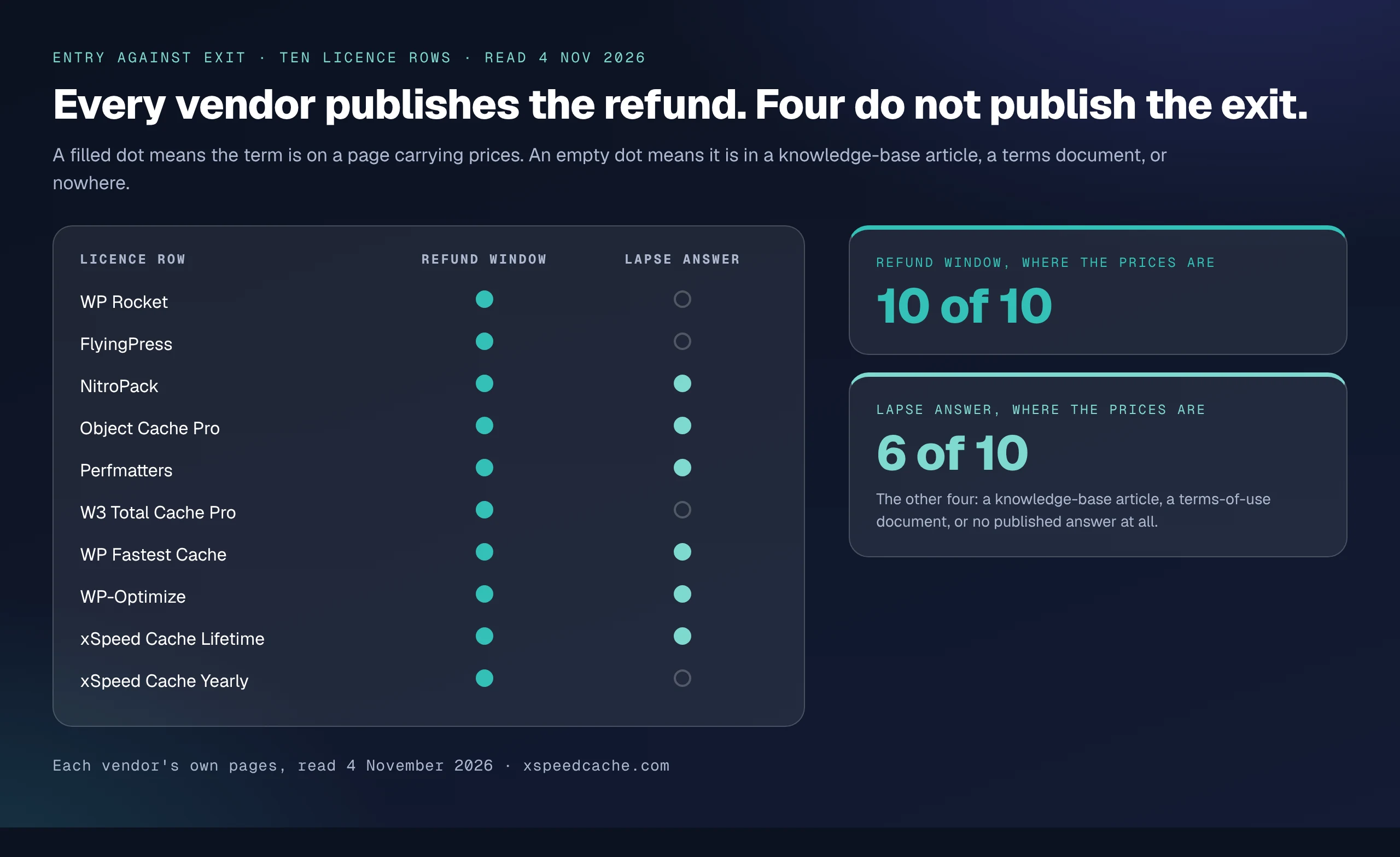
The asymmetry is the point. All ten rows publish a refund window on a page carrying prices. Six publish the lapse answer there too. For the other four, one of them ours, it sits in a knowledge-base article, a terms document, or nowhere. The reversible end is advertised and the irreversible end is filed.
Common Mistakes Buyers Make About the Day They Stop Paying
- 💳 Reading the pricing page and stopping. Two of the four exit classes here were only visible in a terms document or a knowledge-base article. A pricing page is a sales asset, and the lapse answer is not a selling point.
- ⏳ Treating two grace periods of similar length as similar terms. Fourteen days and fifteen days bracket the two most different outcomes in the whole table.
- 🔁 Assuming a one-time licence has no recurring element. A permanent licence can still contain a metered consumable or a portability window that expires, and both exist in this field today.
- 🧾 Buying the entry terms because those are the ones published clearly. A refund window is worth nothing after day 30. The exit class costs something every year.
- 🛡️ Treating frozen updates as a performance decision. Where a vendor’s own wording puts fixes in the list of things that stop, the lapse has become a maintenance question, and hardening guidance for WordPress treats current plugin versions as part of the baseline.
- 📆 Letting a fleet renew on thirty separate dates. The invisible failures cost more than the loud ones, because nobody opens a ticket about a cache that is still serving.
Frequently Asked Questions
My WP Rocket licence expired last month and my site still seems fast. Did anything actually stop?
Yes, and the vendor lists it. Support, plugin updates, updating of the dynamic exclusions and inclusions and the free RocketCDN plan stop at expiry, and three cloud features stop fifteen days later. The page cache keeps serving, which is why nothing looks wrong.
I let my FlyingPress subscription lapse and the plugin stopped working. Is that a bug?
It is the published term. The FlyingPress terms of use state that an active licence is required and that you will not be able to use FlyingPress when the licence expires, so the plugin behaving that way is the documented design rather than a fault.
My card failed on Object Cache Pro and the cache carried on for a fortnight. Why?
The subscription carries a 14-day grace period by the vendor’s own wording, after which the object cache stops working and updates stop arriving. The fortnight was the grace period rather than a reprieve.
Does a lapsed caching licence make my site insecure?
Not by itself. The risk is indirect: where a vendor’s wording puts fixes and updates in the list of things that stop, the plugin stays at the version you last paid for while WordPress, PHP and your other plugins move on, and that version drift is the exposure rather than the caching itself.
I bought a lifetime licence. Can the vendor stop shipping updates anyway?
A lifetime licence is a commitment by a company, so check what the company says it contains. WP Fastest Cache states that the premium version can be updated forever, and our own lifetime tier states no renewal and no second invoice, ever. Neither promise survives the company disappearing, which is true of every software licence.
Is the free tier affected when the Pro licence lapses?
On a plugin that ships a free version in the WordPress directory, the free modules keep working, because they are not licence-gated. That is the floor underneath every “degrades” row in the census, and it is why the free tier is worth reading before you buy the paid one.
My agency inherited sites with four different caching plugins. Which renewal do I watch first?
Watch the dead-switch licences first, because a failed renewal there takes optimization offline within a fortnight. Put a longer reminder on the degrading ones, since nothing visible happens and the cost accrues as missed updates.
Can I downgrade instead of cancelling to keep something running?
Sometimes, and one vendor rules it out explicitly: NitroPack states that downgrades are not available, so the choice there is the current plan or cancellation. On annual plugin licences a lower tier generally means fewer sites rather than fewer features, so downgrading is a site-count decision.
I moved a site to a new domain and my one-time licence stopped activating. What happened?
Check the transfer window. WP Fastest Cache grants a licence transfer right that its own page says remains open for one year from the date the licence was assigned to a URL, after which the transfer option is no longer available. A permanent licence is not automatically a portable one.
Why does the article count ten licences across nine products?
Because one vendor, us, sells both a yearly and a lifetime licence and the two land in different exit classes. Counting products would have hidden the fact that the same vendor can offer you two different exits at two different prices.
Does any vendor publish what happens to the cache files themselves?
None of the ten publishes that detail. Files already written presumably stay on disk until something clears them, but no vendor commits to it in writing, so this article will not make the claim on their behalf.
Conclusion: Buy the Exit, Not the Entry
| If you are… | The exit class to buy | The honest pick on this axis |
|---|---|---|
| A single-site owner who hates renewals | Nothing happens | WP Fastest Cache Premium Bronze, $49 one time |
| Willing to pay once but wanting the AI and MCP features | Nothing happens | Our Lifetime tier, $79 once at launch pricing |
| Choosing between annual plugin licences | Degrades | WP Rocket, whose expiry article is the clearest in the field |
| Buying managed optimization as a service | Dead switch | NitroPack, which never pretended to be a licence |
| Unable to find a published answer | No answer | Ask the vendor in writing before paying |
What to do this week:
- Open the terms-of-use document for every paid performance licence you hold and search it for the word expires. The answer is there or it is nowhere.
- Write the exit class next to each licence in your inventory, then set the loudest reminder on the dead-switch rows.
- Measure what a past lapse already did, rather than assuming it did nothing.
- If you want the renewal question to go away permanently, a one-time licence is the only shape that answers it. WP Fastest Cache Premium is the cheapest at $49, and our own Lifetime tier is $79 at launch pricing with a 14-day money-back guarantee.
If you have read your own terms and found something this census got wrong, the four questions are in the method section and every vendor page is linked. Run them on whatever you are paying for, and check the answer before the renewal date checks it for you.