WP Rocket vs LiteSpeed Cache: The Comparison That Depends on Your Server
Updated September 2026.
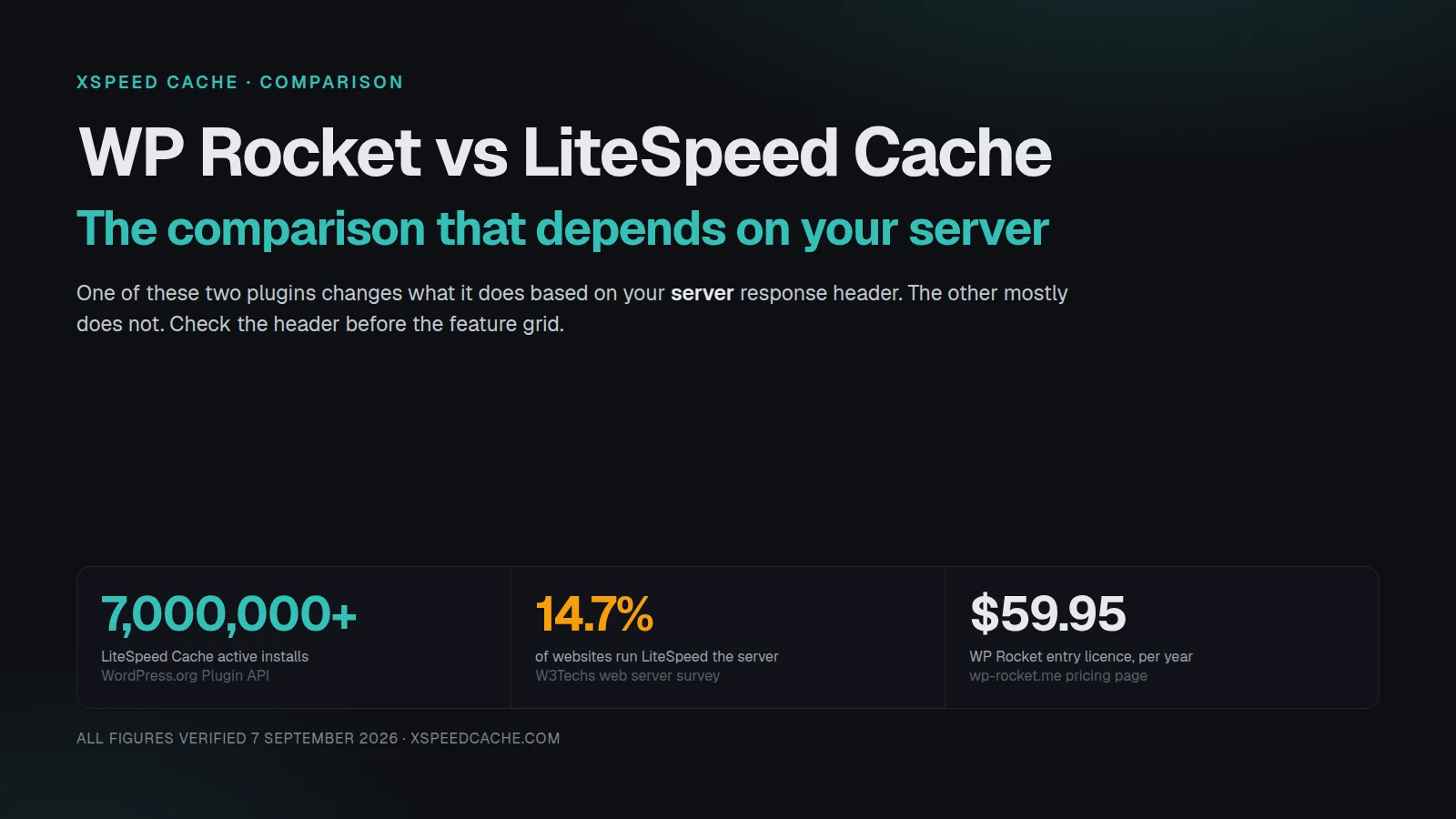
WP Rocket sells three licences and no free version, priced at $59.95, $119.95 and $299.95 a year, verified on its own pricing page on 7 September 2026. LiteSpeed Cache costs nothing and reports 7,000,000+ active installs, fetched from the WordPress.org plugin listing the same day. Price is the comparison everyone runs first, and it is the wrong one to start with.
The comparison people expect is paid plugin against free plugin. The more useful comparison is what each one does on the server you are actually running, because one of these two plugins changes behaviour depending on that answer and the other mostly does not. This guide sorts the decision by your server’s response header first, then compares features, then prices the outcome on each branch.
Quick Summary / TL;DR
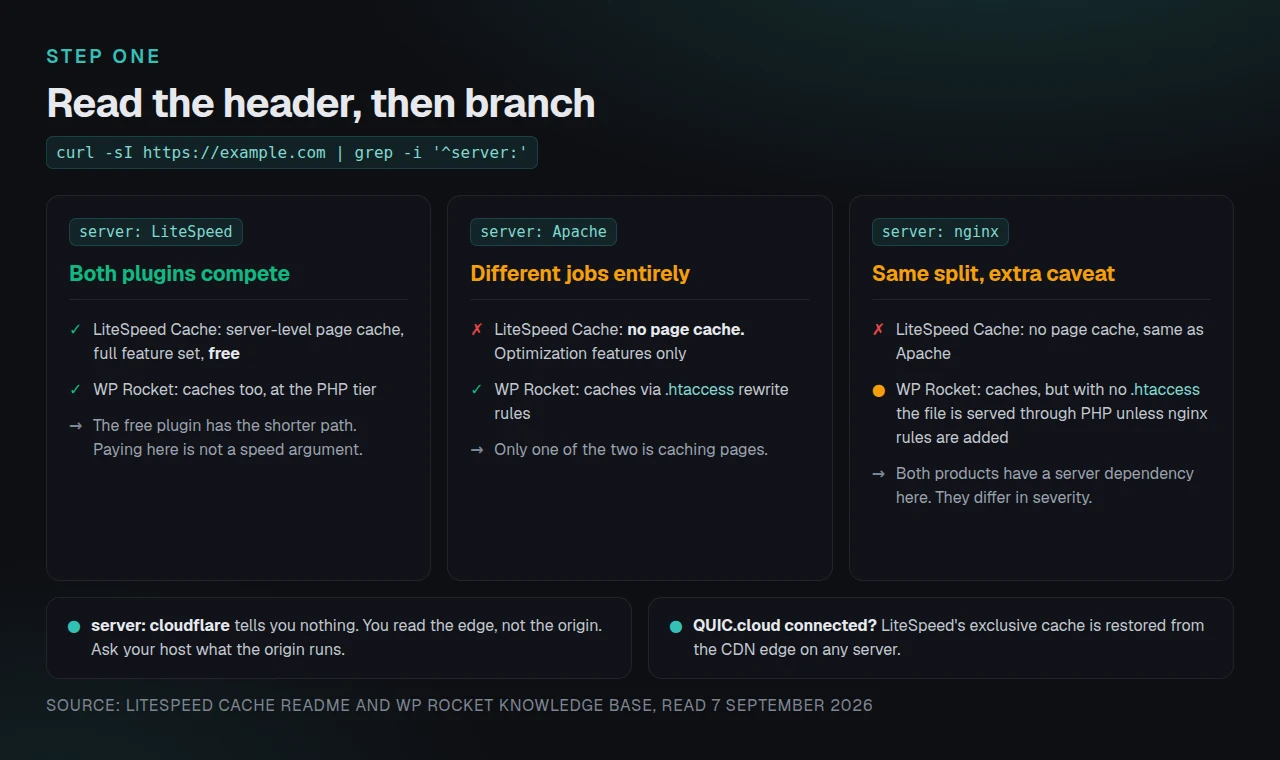
If your server header says… | The honest head-to-head | Why |
|---|---|---|
| LiteSpeed or OpenLiteSpeed | LiteSpeed Cache, free, wins on merit | You get server-level page caching plus the whole optimization set at no cost. Paying for a PHP-level cache here buys you less. |
| Apache | WP Rocket caches; LiteSpeed Cache optimizes | LiteSpeed’s page cache is off by design. The two plugins are not doing the same job on this server. |
| nginx | WP Rocket caches, with one configuration caveat below | Same as Apache for LiteSpeed. WP Rocket needs extra work to serve cache files without PHP. |
| cloudflare in front of Apache or nginx | Check the origin, not the edge | Cloudflare’s header hides what your origin runs. The origin decides which branch you are on. |
| Any non-LiteSpeed server, with QUIC.cloud connected | LiteSpeed Cache becomes a real comparison again | QUIC.cloud restores the exclusive cache from the edge. The cache now lives at a third party. |
| You do not know | Run the four checks in the protocol section | Nobody should compare feature grids before answering this. |
One-line version: on a LiteSpeed server, the free plugin is the better product. On Apache or nginx without QUIC.cloud, LiteSpeed Cache is not competing with WP Rocket, because it is not caching pages at all.
The question underneath the question: is your server LiteSpeed?
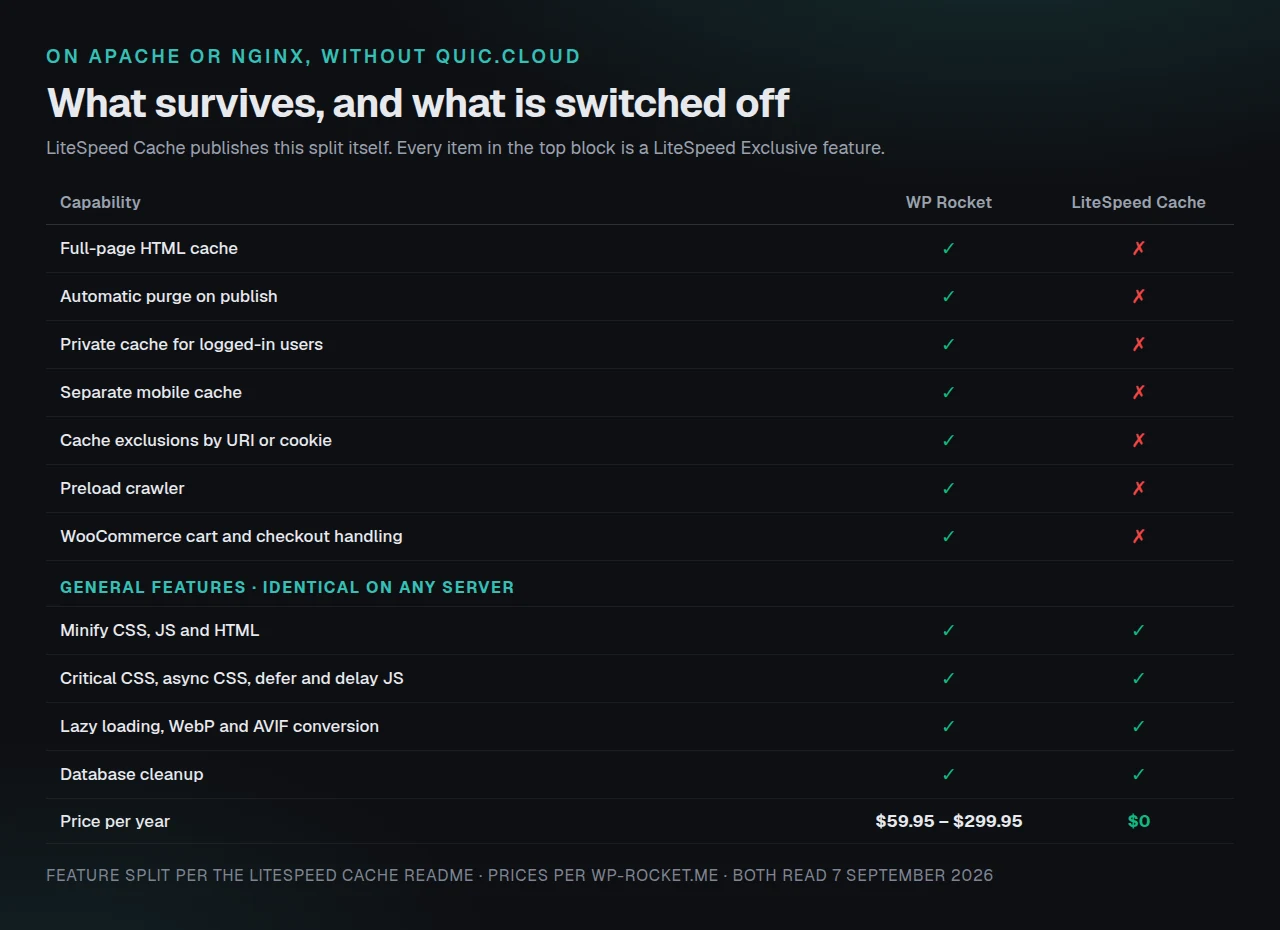
LiteSpeed Cache splits its own feature set in two, and it publishes the split in plain language. From the plugin’s requirements section on wordpress.org, fetched 7 September 2026:
“General Features may be used by anyone with any web server (LiteSpeed, Apache, NGINX, etc.). LiteSpeed Exclusive Features require one of the following: OpenLiteSpeed, commercial LiteSpeed products, LiteSpeed-powered hosting, or QUIC.cloud CDN.”
The installation instructions on the same page make the consequence unmistakable. There are two of them, and they are titled “For Optimization Without a LiteSpeed Web Server” and “For Caching and Optimization With a LiteSpeed Web Server.” The vendor draws the line between optimization and caching, by server, in its own setup guide.
Everything a caching plugin is normally bought for sits on the exclusive side. Reading the two lists as published: automatic page caching, automatic purge on publish, private cache for logged-in users, caching of REST API calls, separate desktop and mobile cache, scheduled purge, exclusions by URI, category, tag, cookie and user agent, the smart preload crawler, WooCommerce and bbPress support, WP-CLI commands, ESI blocks, and HTTP/3 with QUIC. The general side holds minification, combination, critical CSS, asynchronous CSS, deferred and delayed JavaScript, lazy loading, image optimization with WebP and AVIF, the database cleaner, DNS prefetch, the Cloudflare API and heartbeat control.
That second list is genuinely valuable. It is also not a page cache. A site running only the general features regenerates its HTML through PHP on every uncached request, exactly as it did before the plugin was installed.
The scale of the mismatch is the part worth sitting with. W3Techs’ web server survey, read on 7 September 2026, puts nginx at 31.3% of websites whose server is known, Cloudflare Server at 30.0%, Apache at 22.4% and LiteSpeed at 14.7%. Those percentages count websites, not WordPress installs, and wordpress.org publishes install counts in buckets rather than exact figures. No public dataset joins the two, so any “N million sites affected” number is an estimate and this guide does not publish one. The direction is still clear enough to act on: most web servers are not LiteSpeed, and the most-installed caching plugin in the directory reserves its cache for the ones that are. The full breakdown of which features survive on each server is in our companion piece on LiteSpeed Cache on Nginx or Apache.
What each plugin does when the server is not LiteSpeed
WP Rocket writes static HTML files to disk and serves them ahead of PHP, and it does that on any server that runs WordPress. There is no server-tier requirement in the way LiteSpeed defines one. This is the substantive difference between the two products, and it only appears once you leave a LiteSpeed stack.
The mechanism is worth understanding, because it explains why the two products cannot simply be swapped. LiteSpeed’s cache is a module compiled into the web server. A request for a cached page is answered by the server process itself, before PHP is invoked, before WordPress loads, and before a single database query runs. A plugin cannot install a server module, which is why the feature is gated on the server rather than on a licence key. WP Rocket takes the other available route: it stores the rendered HTML as a file and adds rewrite rules so that the web server hands back that file directly. On Apache those rules live in .htaccess, which WordPress hosts almost universally allow a plugin to write.
On a LiteSpeed server the picture inverts. LiteSpeed Cache’s page cache is handled by the server module itself rather than by PHP, which is a shorter path than any plugin-level cache can take, and it costs nothing. Paying for a PHP-level cache on a LiteSpeed server is a defensible choice for other reasons, such as a specific feature you prefer, an existing multi-site licence, or a team that already knows one interface, but it is not a performance argument and it should not be sold as one.
There is a second consequence that rarely appears in comparisons. Because LiteSpeed’s cache lives in the server, moving hosts can silently remove it. A site that migrates from LiteSpeed-powered hosting to a general Apache or nginx host keeps the plugin, keeps the settings, keeps the interface, and quietly stops caching pages. Nothing in WordPress announces the change. The first signal is usually a slower site and a support ticket that blames the migration in general terms.
So the honest summary is that neither plugin is better in general. One of them is conditional on your stack and the other is close to unconditional, and which of those you want depends entirely on a header you can read in about ten seconds.
Master comparison table: same features, different conditions
Feature presence is not the useful axis here. Feature presence given your server is. This table reads the two products against a non-LiteSpeed server, since that is the branch where they actually differ.
| Capability | WP Rocket on Apache or nginx | LiteSpeed Cache on Apache or nginx | LiteSpeed Cache on a LiteSpeed server |
|---|---|---|---|
| Full-page HTML cache | ✅ Included | ❌ Exclusive feature, unavailable | ✅ Server-level |
| Automatic purge on publish | ✅ | ❌ | ✅ |
| Private cache for logged-in users | ✅ User Cache option | ❌ | ✅ |
| Separate mobile cache | ✅ | ❌ | ✅ |
| Cache exclusions by URI or cookie | ✅ | ❌ | ✅ |
| Preload crawler | ✅ | ❌ | ✅ |
| WooCommerce cart and checkout handling | ✅ Excluded by default | ❌ No page cache to exclude from | ✅ |
| Minify CSS, JS, HTML | ✅ | ✅ General feature | ✅ |
| Critical CSS | ✅ | ✅ General feature | ✅ |
| Defer and delay JavaScript | ✅ | ✅ General feature | ✅ |
| Lazy loading | ✅ | ✅ General feature | ✅ |
| WebP and AVIF conversion | ✅ | ✅ General feature | ✅ |
| Database cleanup | ✅ | ✅ General feature | ✅ |
| Object cache integration | Add-on territory | ✅ Where the host provides it | ✅ |
| Price | $59.95 to $299.95 per year | $0 | $0 |
| Listed in the plugin directory | ❌ Not listed | ✅ 7,000,000+ installs | ✅ |
Both price and install figures were verified against each vendor’s own surface on 7 September 2026. WP Rocket is not in the WordPress.org plugin directory at all, so no active-install count exists for it and none should be quoted. Anyone publishing one has estimated it.
WP Rocket has a server dependency too, and it is smaller
A comparison that only names one product’s constraint is an advertisement. WP Rocket has a server-shaped caveat of its own, and its own documentation states it.
WP Rocket’s knowledge base article on reducing server response time says that “serving the cache file via our rewrite rules in the .htaccess file is the most optimal method,” and then adds a note for nginx: a site running on standalone nginx has no .htaccess file, so the recommended path is a separate nginx configuration maintained in a third-party repository. Without that configuration, WP Rocket still caches, but delivery of the cached file routes through PHP rather than being handled by the web server before PHP starts.
That is a real difference in kind from LiteSpeed’s. WP Rocket on nginx caches and serves a slower path. LiteSpeed Cache on nginx does not cache. But it is a difference in degree that matters if you are on nginx and expecting identical behaviour to an Apache install, and a fair comparison says so out loud. The same article also lists what WP Rocket does not cache by default: logged-in users unless User Cache is enabled, URLs with query strings, and cart, checkout and account pages from supported ecommerce plugins.
The server-response protocol: four checks before you compare a single feature
This is the framework this article contributes, and it takes about two minutes. Run it before reading anyone’s feature grid, including the one above.
Check 1. Read the server header. From a terminal:
curl -sI https://example.com | grep -i '^server:'A response of server: LiteSpeed or server: openlitespeed puts you on the branch where LiteSpeed Cache is complete. server: Apache or server: nginx puts you on the branch where it is not.
Check 2. Resolve a Cloudflare answer. If the header says server: cloudflare, you have read the edge and learned nothing about your origin. Ask your host what the origin runs, or check your hosting control panel. Cloudflare in front of a LiteSpeed origin is still the LiteSpeed branch.
Check 3. Look for cache evidence, not cache settings. A settings page showing caching enabled is not proof that caching happens. Request the same public URL twice and compare:
curl -sI https://example.com | grep -iE 'x-litespeed-cache|x-cache|cf-cache-status|age'x-litespeed-cache: hit is real page caching. No cache header at all, on a page that should be cacheable, usually means PHP built the response.
Check 4. Time the second request. Compare time to first byte across two identical requests:
curl -so /dev/null -w 'ttfb: %{time_starttransfer}s\n' https://example.comA cached HTML response typically lands in the low tens of milliseconds. A response in the hundreds of milliseconds on a repeat request means something is regenerating the page.
The limitation, stated plainly: these four checks describe one URL at one moment from one network location. They do not measure a logged-in session, a cart page, or performance for a visitor on another continent. They are a triage tool for answering which branch you are on, not a benchmark. If you would rather not run them by hand, the free xSpeed Scan performs the server probe, the cache-evidence read and the TTFB comparison on any public URL and returns them as a graded report.
What it costs on each branch
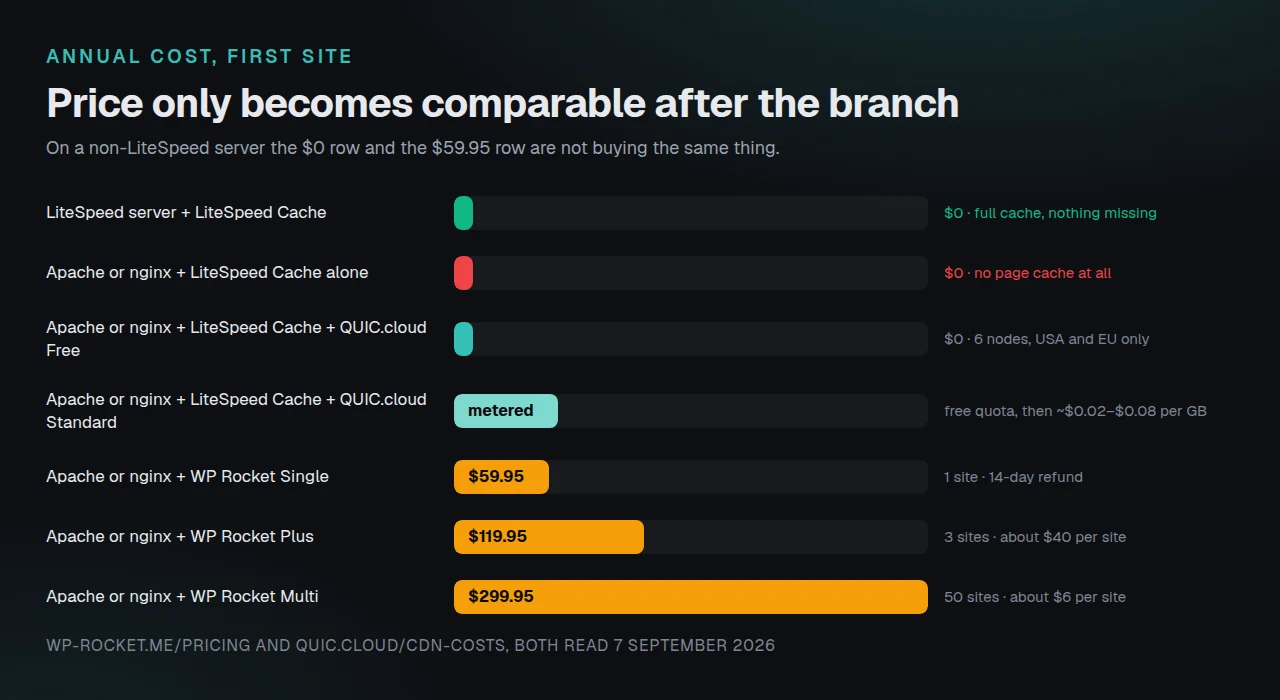
Cost only becomes comparable once you know which branch you are on, because on one branch the two products do different jobs.
| Scenario | Annual cost | What you get | The catch |
|---|---|---|---|
| LiteSpeed server + LiteSpeed Cache | $0 | Server-level cache and full optimization set | You are tied to LiteSpeed hosting for the cache |
| Apache or nginx + LiteSpeed Cache alone | $0 | Optimization only | No page cache |
| Apache or nginx + LiteSpeed Cache + QUIC.cloud Free | $0 | Exclusive features from 6 CDN nodes in the USA and EU | Small node footprint, and your HTML is cached at a third party |
| Apache or nginx + LiteSpeed Cache + QUIC.cloud Standard | Monthly free quota, then roughly $0.02 to $0.08 per GB by region | 78 global nodes, advanced security | Bandwidth-metered, so cost scales with traffic |
| Apache or nginx + WP Rocket Single | $59.95 | Page cache plus optimization on one site | One site only, no free tier to test on |
| Apache or nginx + WP Rocket Plus | $119.95 | Same, three sites | Roughly $40 per site |
| Apache or nginx + WP Rocket Multi | $299.95 | Same, 50 sites | About $6 per site, if you have 50 |
QUIC.cloud figures were read from its CDN pricing page on 7 September 2026, and WP Rocket’s from its pricing page the same day. WP Rocket’s refund window is 14 days, per that page.
The QUIC.cloud row deserves more attention than it usually gets. It is the branch that makes LiteSpeed Cache a genuine competitor on any server, and most comparisons skip it entirely. It also changes what you are buying: your cached HTML is served from an external network rather than from your own machine, which is a different operational and trust posture from a plugin writing files into your own filesystem.
Three practical questions follow from that, and they are worth answering before you enable it rather than after. First, DNS. Routing traffic through a CDN means pointing records at it, so the change affects the whole domain rather than one plugin’s behaviour. Second, cost predictability. A bandwidth-metered plan prices a traffic spike as a bill, where a self-hosted cache prices the same spike as server load. Neither is automatically better, and which one you prefer usually depends on whether your traffic is steady. Third, exit. Turning off a plugin is instant. Unwinding a CDN means a DNS change and waiting for propagation, and any edge configuration you built along the way does not travel with you.
None of that is an argument against QUIC.cloud, which is a capable network and, on the free tier, genuinely free. It is an argument for reading the pricing page before treating it as a drop-in fix for a missing page cache.
Choosing when you cannot change the server
Plenty of readers cannot pick a server. You inherited a host, a client controls the account, or the stack is fixed for reasons that have nothing to do with performance. On that branch the question narrows to which page cache runs on the server you have, and there are more than two answers.
WP Rocket is the most widely recommended paid option and it earns that on setup speed and support. Among free server-agnostic caches, WP Fastest Cache reports 1,000,000+ installs at 4.9 stars from 4,224 ratings, W3 Total Cache 900,000+ at 4.4 stars from 5,420, and WP Super Cache 1,000,000+ at 4.3 stars from 1,345, all fetched from the WordPress.org Plugin API on 7 September 2026. Our ranked roundup of WP Rocket alternatives covers that field in more depth than this head-to-head can.
xSpeed Cache belongs in this section because it was built for exactly this branch: it writes static files and serves them before PHP starts, so it does not depend on the web server tier. The 80-capability comparison records which tier each feature ships in rather than only whether it exists, which is the axis that matters when one product in the field has no free version at all. Its free tier includes page caching rather than optimization alone, and Free vs Pro sets out where that line falls.
The honest counterweight, and it is not small. xSpeed Cache reports 2,000+ active installs with a 5.0 rating from 10 ratings, fetched from the same Plugin API on 7 September 2026. LiteSpeed Cache reports 7,000,000+. That is a ratio of roughly 3,500 to one, and install count is a reasonable proxy for how many edge cases a plugin has already met in the wild. WP Rocket has a decade of hosting-compatibility work behind it that no plugin released this year can claim. If your priority is the largest possible pool of people who have hit your exact bug before you did, that is an argument for the incumbents, and it is a good argument.
Run the free scan on your own site: xspeedcache.com/scan/
For agencies where the answer differs per client, the practical problem is auditing thirty sites rather than one, which is what xSpeed Hub and the fleet-wide MCP approach in our MCP head-to-head address. If the origin server itself is the constraint, changing hosts is the larger fix, and xCloud is where that conversation starts.
Common mistakes people make in this comparison
Reading a settings screen instead of a response header. LiteSpeed Cache’s cache settings page renders on any server. The toggles are there. On Apache and nginx they do not produce a cached page, and nothing on the screen says so as bluntly as the readme does.
Assuming free means less capable. On a LiteSpeed server, the free plugin has the shorter path to the visitor. Price is not the ranking signal here; the server is.
Comparing PageSpeed scores across different hosts. A score gathered on a LiteSpeed host and a score gathered on shared Apache measure two stacks, not two plugins. Change one variable.
Stacking two page caches. Running WP Rocket and a second page cache together produces stale pages and purge conflicts rather than double the speed. If you are moving between plugins, remove the old one properly first; our migration guide covers the leftover files and configuration that deactivation leaves behind.
Caching a cart. Every plugin in this comparison excludes cart, checkout and account pages by default, and every one of them can be misconfigured into caching them. If you run WooCommerce, verify the exclusions after any plugin change, and read our guide on optimizing the WooCommerce checkout page before you touch cache rules on a store.
Quoting an install count for WP Rocket. It is not in the plugin directory. Any figure you see for it was inferred, and it should not be repeated as data.
Frequently Asked Questions
I installed LiteSpeed Cache and my TTFB did not change at all. What went wrong?
Probably nothing went wrong. Check the server header. If it returns Apache or nginx, the page cache is an exclusive feature and it is not running. The optimization features you enabled affect asset delivery rather than the time your server takes to produce the HTML, so TTFB is the one metric they would not be expected to move.
I am on nginx and WP Rocket caches, but my TTFB is still around 300ms. Is that normal?
It is common. Without the nginx configuration that WP Rocket’s documentation points to, the cached file is delivered through PHP rather than by nginx directly. That is still much faster than regenerating the page, and slower than the .htaccess path on Apache. Ask your host whether they can apply the nginx rules.
I turned on QUIC.cloud and now my cache headers look different. Did I break something?
That is the expected behaviour. With QUIC.cloud connected, the exclusive cache is served from the CDN edge rather than from your server, so cache-status headers come from QUIC.cloud. Verify by requesting the same URL twice and confirming the second response reports a hit.
My host says the server is LiteSpeed, but I get no x-litespeed-cache header. Why?
The likely causes are that the LiteSpeed cache module is not enabled at server level, the licence does not include the LSCache module, or the cache root is not configured. LiteSpeed’s own installation notes say the server must be configured with caching enabled and that this may require the server administrator. It is a hosting question rather than a plugin question.
I bought WP Rocket for a LiteSpeed host and now I am told I did not need it. Is that right?
On that stack the free LiteSpeed Cache plugin covers page caching at the server tier, which a PHP-level cache cannot match on path length. WP Rocket may still be worth keeping for its interface, its support, or a specific optimization you prefer. WP Rocket’s pricing page states a 14-day refund window if the purchase was recent.
Can I run LiteSpeed Cache and WP Rocket together?
Not as page caches. Two page caches on one site produce stale content and purge conflicts. Some people run one plugin for caching and disable the other’s cache while keeping its optimization features, but that is a configuration with sharp edges and it is rarely worth the maintenance.
Which one handles WooCommerce better?
On a LiteSpeed server, LiteSpeed Cache has ESI support for cart fragments, which is the more capable approach. On Apache or nginx it has no page cache, so the question does not arise and WP Rocket wins by default. Both exclude cart and checkout pages out of the box.
Does Cloudflare replace either plugin?
No. Cloudflare’s default behaviour caches static assets rather than HTML. Full-page HTML caching at the edge is separate configuration, and it does not handle purge-on-publish, logged-in variation or exclusions the way a WordPress-aware cache does.
Is free QUIC.cloud enough for a production site?
It depends on where your visitors are. The free plan runs 6 nodes across the USA and EU, per QUIC.cloud’s pricing page on 7 September 2026. For an audience concentrated in those regions it is workable. For a global audience, the Standard plan’s 78 nodes are the relevant comparison, and that plan is bandwidth-metered.
What should I check before switching plugins at all?
Confirm that caching is genuinely the bottleneck. A page dominated by uncacheable database work, a slow external API call, or an oversized image payload will not be fixed by changing which cache plugin is installed. Measure first, then change one thing.
Does the server matter for the optimization features?
No. Minification, critical CSS, lazy loading and image conversion in LiteSpeed Cache are general features and they work identically on any server, which is why a site on Apache running only that half can still see meaningful improvements in rendering metrics.
How do I check all of this across twenty client sites?
By hand, the four checks above, twenty times. The server compatibility documentation covers what to look for per stack, and running the scan against each URL is faster than reading twenty control panels.
Conclusion: pick the server first, then the plugin
The comparison this article set out to run is real, and it resolves differently on each branch.
| Your situation | The pick | Why |
|---|---|---|
| LiteSpeed or OpenLiteSpeed server | LiteSpeed Cache, free | Server-level cache, full feature set, no licence |
| Apache or nginx, one site, want it solved today | WP Rocket, $59.95/yr | Caches on any server, mature compatibility work, 14-day refund |
| Apache or nginx, want to keep LiteSpeed Cache | LiteSpeed Cache + QUIC.cloud | Restores the exclusive features from the edge, free tier available |
| Apache or nginx, budget of zero, no CDN | A server-agnostic free cache | WP Fastest Cache, W3 Total Cache and xSpeed Cache all cache without a server requirement |
| Many client sites on mixed stacks | Audit before standardising | The right answer differs per site, and assuming otherwise is the expensive mistake |
What to do this week:
- Run
curl -sIagainst your own domain and read the server header. Write the answer down. - Request a public page twice and check for a cache-status header on the second response.
- If you are on Apache or nginx with LiteSpeed Cache installed, decide between adding QUIC.cloud, adding a server-agnostic page cache, or moving to a LiteSpeed host.
- If you are on a LiteSpeed server paying for a second cache plugin, check whether you still need it.
- If you want the checks done for you, run the free xSpeed Scan on the URL, then compare the result against xSpeed Cache pricing if a plugin change is on the table. Personal is $29 a year at the founding price with a 14-day money-back guarantee, and it is one of several products that will do this job.
To be clear about where we stand: if you are on a LiteSpeed server, install the free LiteSpeed Cache plugin and stop reading. If you are on Apache or nginx and want the most-tested paid option with the longest compatibility record, WP Rocket is a legitimate choice and $59.95 is a reasonable price for it. xSpeed Cache is worth a look on that same branch, particularly if a complete free tier or a lifetime licence matters to you, and its 2,000 installs against WP Rocket’s decade is a fair reason to be cautious.
Whichever way you go, verify the outcome rather than trusting the settings page. The header tells the truth.