Cloudflare APO vs a Page Cache on Your Origin in 2026: $5 a Month to Cache HTML, $200 to Add One Cookie
Updated October 2026
Cloudflare’s Automatic Platform Optimization will cache your WordPress HTML at its edge for $5 a month on the free plan, a figure its own plans page and its plugin readme both carried on 3 October 2026. Across 1,748 WordPress sites we measured on 28 September 2026, getting a CDN to answer from its own cache rather than forward moved the median first byte by 298ms, against 29ms for merely putting one in front. The comparison people expect is which of the two is faster. The more useful comparison is which of them lets you decide what counts as the same page. This article is about that second question, for a WordPress site choosing between edge HTML caching and a page cache running on its own server.
Quick Summary: Which Layer Should Hold Your HTML
| If you want… | Do this | Why |
|---|---|---|
| Readers on other continents to stop waiting for your server | Turn APO on | It is the only one of the two that removes the trip to your origin |
| To cache a page carrying a query string your site invented | Keep the cache on your origin | APO’s allow-list holds 26 names and yours is not one of them |
| To exclude one more cookie from caching | Keep the cache on your origin, or budget $200 a month | Bypass Cache on Cookie starts at Cloudflare’s Business plan |
| Minification, asset handling and an object cache | A plugin, either way | APO does not do these, and says so |
| The cheapest real improvement on a slow origin | A page cache first, then APO | One removes PHP from the response, the other removes the distance |
| Both, which is the common answer | Run them together | They act on different parts of the same wait |
Two Caches, One Job, Two Addresses
A page cache on your origin stores the finished HTML of a page and serves it on the next request without running PHP, loading plugins or touching the database. APO stores the same finished HTML, in the same shape, at whichever Cloudflare data centre your reader happens to be near. The job is identical. The address is not, and almost every real difference follows from that one fact.
The reason APO exists as a named product rather than a checkbox is that Cloudflare does not cache HTML by default. Its cache covers a fixed list of 56 static file extensions, and as we found when we connected a WordPress zone to Cloudflare, none of those 56 is an HTML document. Turning on a CDN therefore speeds up your images and your stylesheets while every page request still travels to your server and back. Our own 1,748-site CDN study found three of every five WordPress sites behind Cloudflare sitting in exactly that state. APO closes that gap using Cloudflare Workers to cache dynamic content, in Cloudflare’s own description. It needs the Cloudflare WordPress plugin installed, because the plugin is what emits the cf-edge-cache response header that tells the edge the HTML is safe to keep, and what tells Cloudflare to drop a page when you edit it. Cloudflare’s documentation is direct about the dependency: you must use the plugin to begin using APO.
Two consequences are worth stating before any feature grid:
- APO is not an optimizer in the sense the word usually carries on a WordPress site. It does not minify, combine, defer JavaScript, compress an image or give you an object cache. It caches HTML and proxies Google Fonts onto your own hostname, and everything else in the performance stack stays wherever it already was.
- An origin page cache is still working after APO is on. Somebody has to render the page the first time and after every purge, and that first render is the one your reader waits on.
The Criterion Nobody Compares On: Who Writes the Cache Key
A cache key is the rule that decides whether two requests are the same page. Get it too narrow and you store a separate copy for every visitor, which is no cache at all. Get it too wide and you serve one shopper’s basket to another, which is the failure behind a logged-out visitor seeing someone else’s name. Every caching product has to take a position on this, and the position is usually buried.
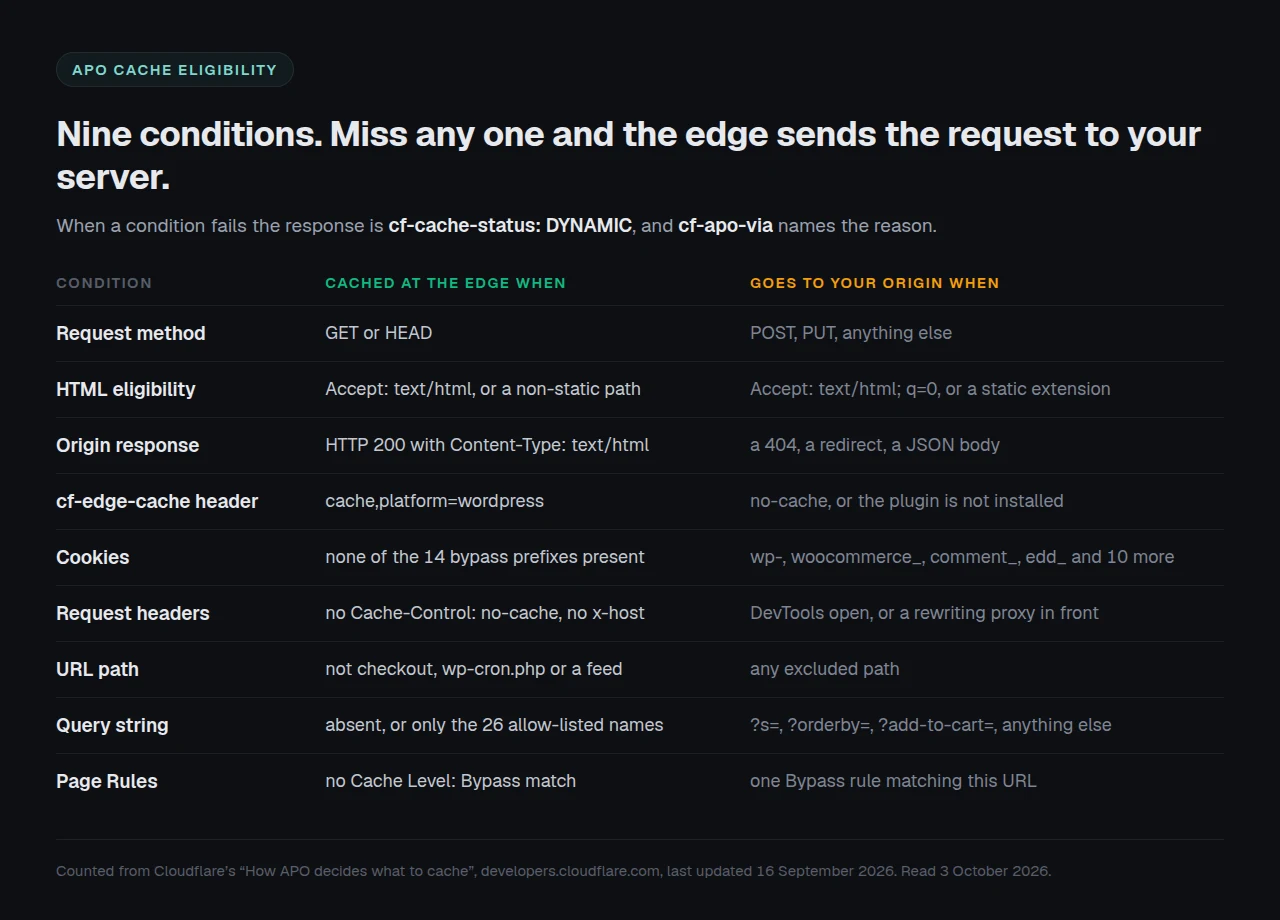
APO’s position is published, which is to its credit, and it is strict. Per Cloudflare’s About page, last updated 16 September 2026, a request is cached as HTML only when all nine of these hold at once:
- The method is
GETorHEAD. - The request is HTML-eligible, by its
Acceptheader or, failing that, by its path. - The origin answers 200 with
Content-Type: text/html. - The plugin’s
cf-edge-cacheheader permits caching. - No bypass cookie is present.
- No cache-bypassing or rewriting request header is present.
- The path is not an excluded one such as checkout,
wp-cron.phpor a feed. - The query string is empty or carries only allow-listed names.
- No Page Rule with
Cache Level: Bypassmatches.
Miss any one and the response comes back cf-cache-status: DYNAMIC, served from your origin, with cf-apo-via naming the reason. That last part is genuinely good engineering: the product tells you why it declined, on every request, in a header. Few caches do.
What it does not tell you is that two of those nine conditions are lists, and that the lists are Cloudflare’s rather than yours.
Twenty-Six Query Names, and WordPress Core Writes None of Them
Cloudflare’s query-parameter reference publishes the full allow-list. We counted it on 3 October 2026 and it holds 26 names: the five utm_ parameters plus utm_expid, ref, four Facebook parameters, two Mailchimp ones, gclid, dclid, _ga, campaignid, adgroupid, _ke, cn-reloaded, age-verified, ao_noptimize, usqp, mkt_tok, epik and ck_subscriber_id. A URL carrying any of those is served the cached page. Anything else bypasses the cache and goes to your origin.
Read it for what is on it and it is a well-chosen set of advertising and analytics attribution tags, which is the traffic most WordPress marketing sites actually buy. Read it for what is absent and the picture changes. Three entries come from WordPress plugins, and not one parameter WordPress core itself writes into a URL appears at all. Internal search is ?s=. A post can be addressed as ?p=. Pagination uses ?paged=, a draft link uses ?preview=, a comment reply link uses ?replytocom=, a media page uses ?attachment_id=. WooCommerce adds ?orderby=, ?add-to-cart= and every price and attribute filter a shop front applies. All of them are absent from the published list, which is a fact anyone can check in thirty seconds against the same page.
Newer advertising parameters are missing too: msclkid, ttclid, li_fat_id, twclid and Google’s own wbraid and gbraid all return nothing against that reference.
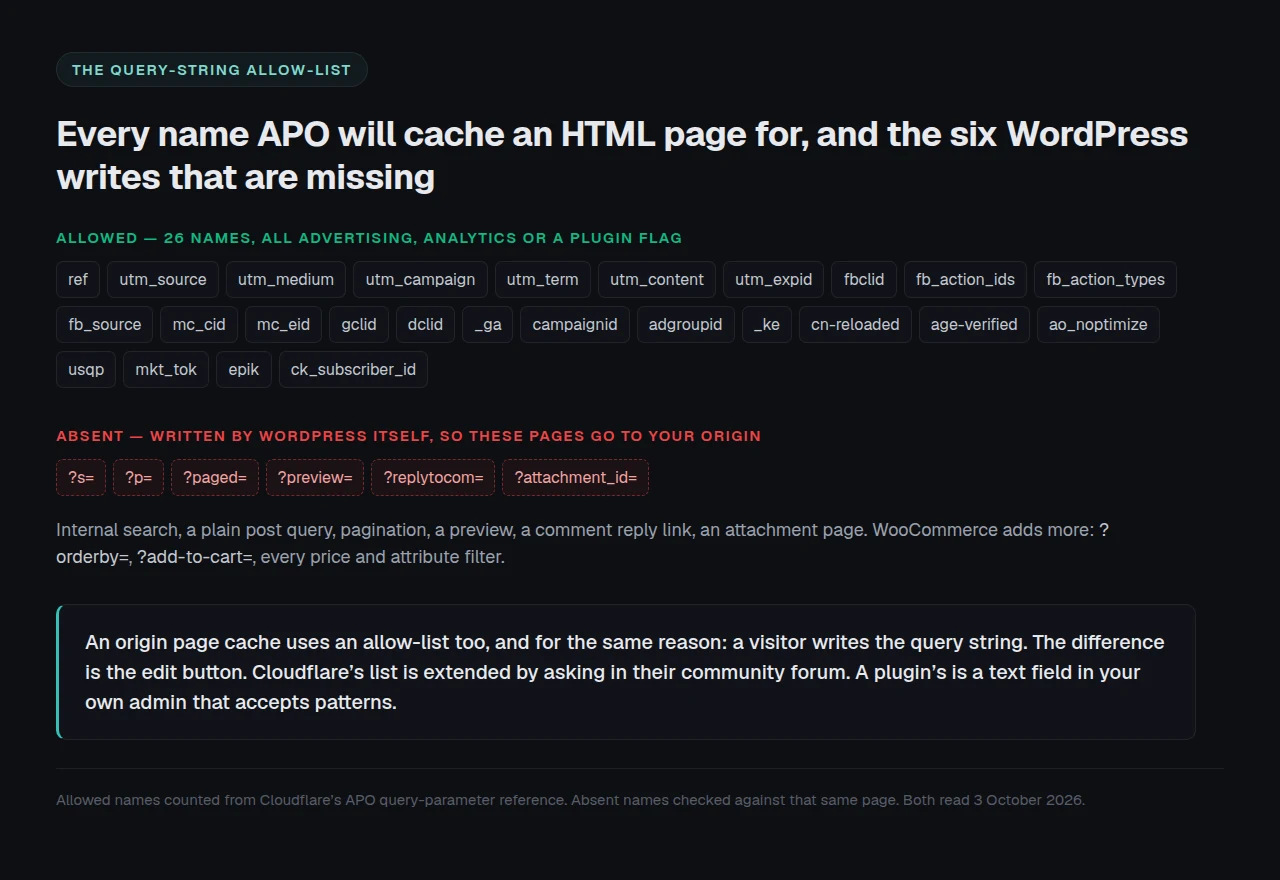
The honest framing is not that the list is wrong, but that there is one way to change it: Cloudflare’s own instruction on that page is to create a post in their community forum for consideration. No setting, no API field and no plan adds a name.
Our Own Allow-List Works the Same Way, and That Matters to This Comparison
An argument that criticised Cloudflare for allow-listing query strings would be dishonest, because we do it too, and for the same reason. We build xSpeed Cache, and reading our own Cache::should_cache() in the shipped source on 3 October 2026 shows the identical architecture: an ignored_query_params allow-list, with any parameter not on it producing a query-param bypass. We covered that behaviour in how cache exclusions actually match, including the part that surprises people: the query gate runs before the URL gate.
The reason both products arrive at an allow-list is sound and worth stating plainly: the visitor writes the query string. A cache that trusts an arbitrary parameter can be talked into storing an attacker-chosen variant of a page under the clean URL’s key. Our source comments name that as issue #241 and resolve it by serving an allow-listed request from the cache while refusing to let it author a cache entry.
Five differences survive that symmetry:
| Property of the cache key | Cloudflare APO | A page cache on your origin |
|---|---|---|
| Query allow-list is published | ✅ | ✅ |
| Query allow-list can be edited by you | ❌ | ✅ |
| Entries can be patterns, not just names | ❌ | ✅ |
| Internal search results can be cached | ❌ | ✅ when you switch it on |
| Cookie bypass list can be extended | ❌ below Business | ✅ |
| Caches HTML near your reader | ✅ | ❌ |
Read that table honestly and it is not a scoreboard. We win four rows, one is a tie, and APO wins the last. That last row is the only one that moves a number, and on an audience spread across continents it outweighs the four we win, which the next section measures.
Internal search is a concrete example rather than a hypothetical. Our source lets s through when search caching is enabled, and feed, withcomments and withoutcomments through when feed caching is. Those are decisions a site owner makes. On APO they are not decisions at all.
One question here we could not settle and will not guess at. Our plugin serves an allow-listed request from cache without letting it write one. Whether APO’s Worker authors a cache entry from such a request is stated on none of the fourteen pages its documentation index lists, and the code runs where nobody outside Cloudflare can read it. Treat it as open.
Fourteen Cookie Prefixes, and the Switch That Adds a Fifteenth
The same reference page lists the cookie prefixes that always bypass the cache. There are fourteen, covering WordPress logins and comments, WooCommerce, Easy Digital Downloads, two YITH extensions, Ecwid, Bookly and XenForo:
wp-·wordpress·comment_·woocommerce_·xf_·edd_·jetpack·yith_wcwl_session_·yith_wrvp_·wpsc_·ecwid·ec_·bookly_·bookly
For a plain publishing site that list is comfortably enough. It stops being enough the moment a membership plugin, a course platform, a translation layer or a custom login flow sets a cookie starting with none of those fourteen strings. The page itself then looks public to APO while being personal to the reader, which is the exact shape of the bug that makes people distrust caching.
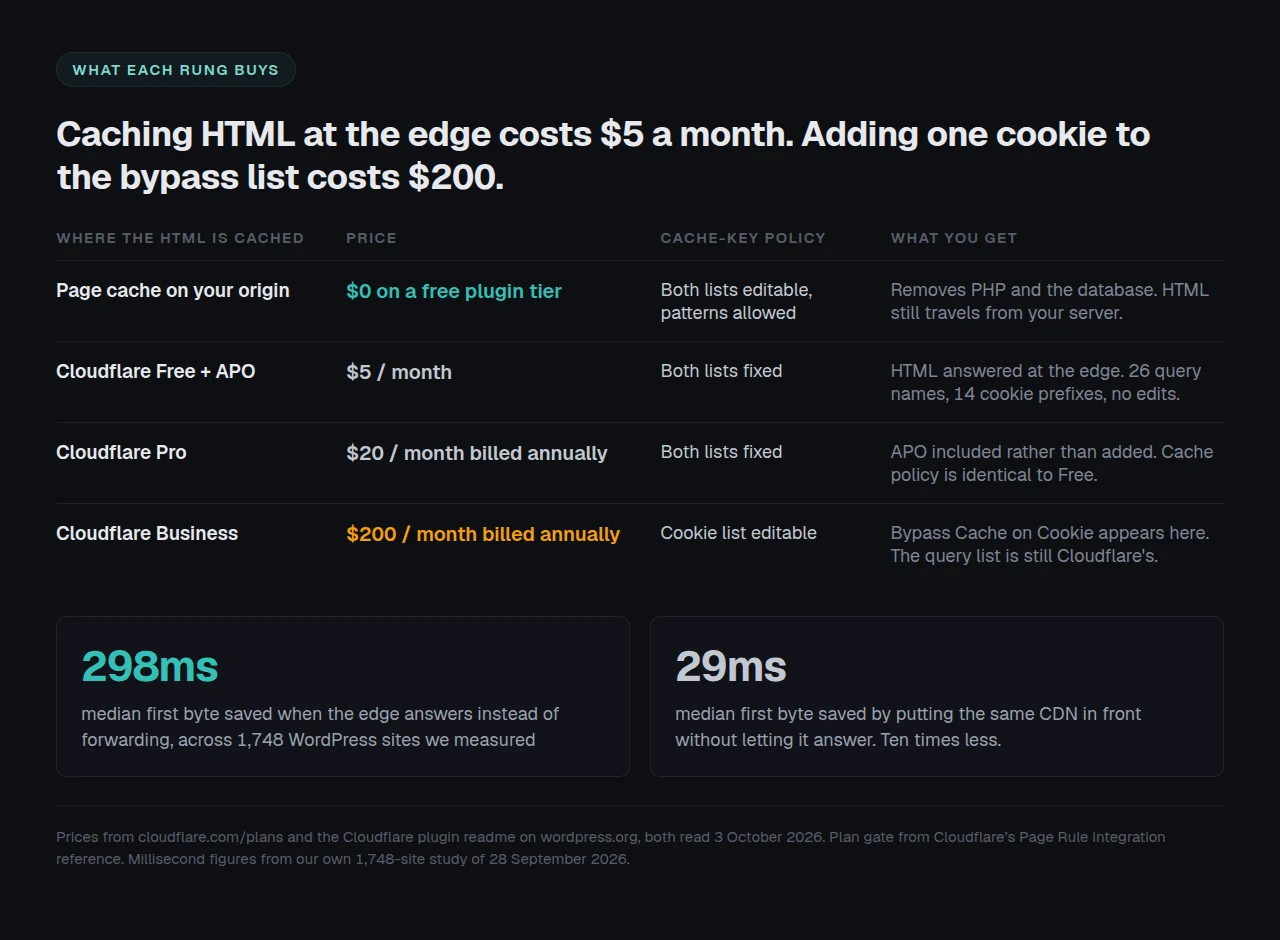
Adding a cookie of your own requires the Bypass Cache on Cookie page rule. Cloudflare’s Page Rule integration reference marks it, in parentheses, as Business and Enterprise plans only. Business is $200 a month billed annually, or $250 billed monthly, on the plans page we read today. APO itself is $5 a month on the free plan and included from Pro upward, where Pro is $20 a month billed annually.
So the arithmetic a site owner faces is this. Caching your HTML at the edge costs $5 a month. Adding one line to the rule deciding which visitors are excluded from that cache costs $200 a month, a forty-fold step, and it still buys no way to add a query parameter.
The Escape Hatch, and the Warning Cloudflare Attaches to It
There is a documented way around the query-string restriction, and Cloudflare documents the cost of it in the same breath, which deserves credit. A Page Rule set to Cache Level: Cache Everything makes APO cache pages with all query strings.
The caution beneath it reads, verbatim: “Automatic page purge via the WordPress plugin won’t clean all cached pages, only pages without query strings. Cached responses will be returned even with request header cache-control: no-cache.”
That is the sharpest trade in this comparison. The feature that makes APO safe on a content site is that editing a post clears the edge copy within about 30 seconds, against a default cache lifetime of 30 days. Turn on Cache Everything to rescue your filtered shop archive, and every URL with a query string drops out of that guarantee. A stale filtered product page can then sit at the edge for the rest of its TTL, and a browser refresh will not shift it. Cloudflare’s own advice on that page is to prefer Cache Rules over Page Rules, which is reasonable and still leaves the purge question where it was.
What the Edge Buys That No Origin Plugin Can
A comparison that only catalogued APO’s constraints would be a worse recommendation than no comparison, because the thing APO does is the thing a plugin structurally cannot do. We measured 1,748 WordPress sites to 28 September 2026 and sorted them by CDN state. Sites with a CDN forwarding every page request to the origin had a median first byte 29ms better than sites with no CDN at all. Sites whose edge actually answered sat at a median 117.5ms, a 298ms improvement, with 84.5% of them under the threshold we treat as good. Ten times the return, from the same vendor, on the same DNS change. That gap is not something a page cache can close. A page cache makes your server fast; it cannot make your server closer, and distance is most of what a reader in another country is waiting for, as we traced in detail when a site was fast locally and slow abroad.
The honest statement of our own position is that we cannot do this either. Our CDN panel rewrites asset URLs across 19 file extensions, and the HTML document is not one of them, exactly as Cloudflare’s default 56 do not include it. Enabling our CDN integration does not move the first byte a distant reader waits for. That is a real gap in our product, it is the gap APO was built to fill, and the correct recommendation for a site with an international audience is to turn APO on.
Three smaller things ship with it and are easy to miss:
- Google Fonts are proxied onto your own hostname, removing a third-party connection, reported as
cf-apo-via: proxy. stale-if-errorbehaviour is built in, so a reader gets the last good copy while your origin is down.- The cached copy is answered by Cloudflare rather than your host, so your origin survives a spike it otherwise would not.
The Cache-Key Audit: Five Minutes, Your Own Site, Before You Choose
Every comparison of these two argues from benchmarks. The useful question is not how fast either is on a test page, it is what share of your own URLs either is allowed to cache, and that is countable without installing anything.
- List the query strings your site actually serves. Open your analytics or your access log and pull every distinct parameter name that appears on an HTML page request. Most sites find between three and twelve.
- Check each against the 26. Open Cloudflare’s query-parameter reference and mark each of your names present or absent. Every absent name is a URL shape APO sends to your origin.
- List the cookies your site sets. Membership, course, translation, consent, cart and custom login plugins all set them. Mark each against the 14 prefixes. An unmatched cookie on a page that should be private is a correctness problem, not a speed one.
- Count the URL shapes, not the pages. Report two numbers: how many of your distinct URL shapes APO can cache as HTML, and how many your origin cache can be configured to cache.
- Do it again after a plugin install. Both lists change when your site does, and only one of the two lists is yours to adjust.
State the limitation out loud. This counts URL shapes, not traffic. A site where 90% of visits land on a plain permalink is well served by APO even if half its URL shapes carry a parameter, and nothing above weights for that. The audit is a floor on how much control you need, not a forecast of how much speed you will get.
Two Headers Per Site Is the Whole Fleet Report
The audit takes five minutes once, and does not scale, because the answer differs per site and moves whenever a client installs something. On a fleet, read two response headers per site on a schedule and treat the pair as a state rather than a score: cf-cache-status says whether the edge answered, cf-apo-via says why not when it did not. We built that reading into xSpeed Hub, which is ours, and we found when we read nine client sites through one agent connection that every cache flag can report healthy while one site serves nothing from cache at all.
Hosting is the other half of this, and we recommend xCloud, which is also ours: xCloud and the team behind xSpeed are both Startise companies. An origin that answers quickly is what makes an edge MISS survivable, and on APO a MISS is exactly what every logged-in visitor and every filtered URL gets.
Run the free scan on your own site to see which state you are in: xspeedcache.com/scan/
Common Mistakes People Make Choosing Between These Two
-
Treating them as alternatives. They occupy different addresses and solve different halves of the wait. The common correct answer is both, and the order is origin cache first because it is free and it governs the render APO’s misses still depend on.
-
Testing with the wrong tool and concluding APO is broken. A request with no
Acceptheader is judged on its URL path instead, and Chrome sendsCache-Control: no-cachewhenever DevTools is open, which forces aBYPASS. Cloudflare’s verification page tells you to pass-H 'accept: text/html'for a deterministic result, and that advice is correct. -
Assuming the plugin list is current. Cloudflare’s plugin compatibility page, updated 1 October 2026, names 22 compatible plugins including WooCommerce, WP Rocket from 3.8.6, FlyingPress, NitroPack, Perfmatters and Redis Object Cache. It also opens by saying Cloudflare maintains a list of plugins known to cause problems, and no such list appears on the page. The troubleshooting page still tells you to install plugin version 4.4.0, while the directory ships 4.14.4.
-
Forgetting multisite and split zones. Cloudflare states plainly that the APO plugin does not support a multisite installation, and that APO is incompatible with an Enterprise subdomain setup where a subdomain sits in a different zone from the apex.
-
Judging the plugin by the brand. The Cloudflare plugin is on 200,000+ active installs with a rating of 3.5 out of 5 from 181 reviews, version 4.14.4, last updated 13 July 2026, per a direct wordpress.org Plugin API query on 3 October 2026. The same API on the same day returned 4.8 for LiteSpeed Cache, 4.3 for NitroPack and 5.0 for xSpeed Cache. It is a data point about the plugin rather than about the edge network, and it belongs in the decision either way.
Frequently Asked Questions
I enabled APO and cf-cache-status still says DYNAMIC on every page. What did I miss?
Work the nine conditions in order. The two that catch most sites are a query string that is not on the 26-name allow-list and a cookie matching one of the 14 bypass prefixes, which includes anything starting wp-. Read cf-apo-via on the same response: it names the reason.
I tested with curl and got DYNAMIC, then the browser showed HIT. Which one is lying?
Neither. APO decides HTML eligibility from the Accept header, and falls back to the URL path when the header does not mention text/html. Pass -H 'accept: text/html' and the test becomes deterministic.
Do I still need a caching plugin if APO is on?
Yes, for two reasons. APO does not minify, combine, defer, compress or provide an object cache. And every request it declines, which includes every logged-in visitor, is rendered by your origin, so the origin cache is what those people get.
My shop’s filtered product pages are never cached. Is that a bug?
No, it is the allow-list. ?orderby= and WooCommerce’s attribute and price filters are not among the 26, so those URLs go to your origin by design. An origin page cache can be configured to cache them; APO cannot.
I turned on Cache Everything to fix that and now a page is stuck showing old content.
That is the documented trade. Cloudflare’s own caution says the plugin’s automatic purge cleans only pages without query strings once Cache Everything is on, and that cached responses are returned even when the request sends cache-control: no-cache. Purge from the Cloudflare dashboard, and decide whether the filtered URLs were worth it.
What does APO actually cost?
$5 a month as an add-on to Cloudflare’s free plan, and included with Pro, Business and Enterprise. Pro is $20 a month billed annually. Both figures came off cloudflare.com/plans on 3 October 2026.
I want one extra cookie excluded from the cache. How much is that?
The Bypass Cache on Cookie page rule starts at the Business plan, $200 a month billed annually. There is no cheaper route to it inside Cloudflare, and no route at any price to adding a query parameter.
Does APO replace my CDN?
It is part of the same Cloudflare zone, not a separate product. If Cloudflare is already in front of your site, APO changes what that zone will cache: the 56 static file types, plus your HTML.
My site is only read by people in one city. Is APO worth it?
Probably less than the headline suggests. The 298ms figure is a median across a mixed audience, and the edge wins most where the distance is longest. On a single-metro audience, spend the effort on the origin cache first.
We run WordPress multisite. Can we use this?
Not with the plugin, which Cloudflare states does not support a multisite installation. Since APO’s documentation also says the plugin is required to begin using APO, treat multisite as out of scope.
Does the Cloudflare plugin conflict with my existing cache plugin?
Cloudflare’s compatibility list names WP Rocket from version 3.8.6, FlyingPress, NitroPack, Perfmatters and Hummingbird as compatible, so running both layers is expected rather than exotic. What does conflict is two layers purging on different schedules, which is a sequencing problem we covered in why a purge can appear to do nothing.
Is xSpeed Cache free of all of this?
No. Our query handling is an allow-list with the same failure mode, and our CDN integration does not cache HTML at the edge at all, so on the one thing APO uniquely does we have nothing to offer. What we have is that both of our lists are editable, with patterns, in the free tier.
Conclusion: Which One Should Hold Your HTML?
| Your situation | Pick | Why |
|---|---|---|
| Readers spread across continents | Cloudflare APO | 298ms of median first byte in our data, and nothing on your origin can match it |
| A shop or membership site with unusual cookies | An origin page cache | The 14 prefixes will not cover you and the fix starts at $200 a month |
| Lots of filtered, sorted or searched URLs | An origin page cache | 26 allow-listed names, none of them written by WordPress core |
| A plain content site on Cloudflare already | Both, APO first | $5 a month, or nothing if you are on Pro |
| Minification, asset handling, object cache | A plugin | APO does none of these and does not claim to |
| You want one bill and one vendor | Cloudflare Pro | $20 a month billed annually, APO included |
What to do this week:
- Run the five-minute cache-key audit above on your own site and write down the two counts. The decision falls out of them.
- Read
cf-cache-statusandcf-apo-viaon your homepage with-H 'accept: text/html'. If you are already on Cloudflare and the answer isDYNAMIC, your edge is forwarding and APO is the $5 fix. - If your URLs carry parameters WordPress wrote, put the page cache on your origin and keep the edge for what it is good at. Cloudflare APO is the right call for distance, and LiteSpeed Cache with QUIC.cloud is a real free alternative if you run LiteSpeed hardware.
- If you want both lists editable in the free tier, xSpeed Cache is ours and does that: $0 to start, $29 a year or $79 once for the Pro tier at the current founding price, with a 14-day money-back guarantee. We are 9,000+ installs old against Cloudflare’s 200,000 and LiteSpeed’s seven million, and that track record is a fair thing to hold against us. The 80-capability comparison and Free vs Pro lay out exactly what each tier does.
- Check the result rather than trusting the switch: run the free xSpeed Scan and read what the edge actually returned.
If you run the audit and land somewhere this article does not predict, especially a parameter you expected on Cloudflare’s list, we would like to hear which one. The 26 names are a published list, and the interesting cases are the sites they were not written for.