Prove the Edge Is Answering in 2026: One Response Can Report a Cache Hit and DYNAMIC at the Same Time

Updated October 2026
Cloudflare’s default cache behavior documentation, fetched 4 October 2026, lists 56 file extensions it caches without being asked, and states HTML is not one of them. Our own probe of 556 Cloudflare-fronted WordPress sites found 330 returning cf-cache-status: DYNAMIC, meaning no cache lookup happened. The check most people run is a single curl -I, and what they read is a single header. One header cannot settle this. A response can report a cache hit and DYNAMIC in the same breath, because the two words describe two different caches, and two managed WordPress hosts do exactly that. Here is how to read the receipt.
Quick Summary: What the Status Word Tells You to Do Next
| If you see this on your HTML | Do this | Why |
|---|---|---|
HIT with an Age | Nothing | It came out of edge storage |
DYNAMIC | Add a cache rule marking the document eligible | Nothing looked in the cache |
BYPASS | Fix the origin response, not the rule | It was eligible and the origin refused |
A host HIT beside DYNAMIC | Treat both as true | Your origin cached it, the edge did not |
The Document Is the Only Response That Counts
Cloudflare’s default cache behavior documentation states that it “only caches based on file extension and not by MIME type”, and that “the Cloudflare CDN does not cache HTML or JSON by default”. Counted from that page on 4 October 2026, the list holds 56 extensions, JPG, CSS and MP4 among them. A WordPress pretty permalink ends in a slash and carries no extension, so it cannot land on that list by accident.
A report can therefore show a CDN in front while every page still comes from your server. The images are at the edge. The document is not. That gap is what our CDN adoption study measured, and it is the half of the wait behind a page that is fast for you and slow abroad.
Two Hosts, One Response, Two Verdicts
A GET with a browser user agent on 4 October 2026 returned this from kinsta.com/blog/:
cf-cache-status: DYNAMIC
x-kinsta-cache: HIT
And this from wpengine.com/blog/:
cf-cache-status: DYNAMIC
x-cache: HIT: 5
x-cacheable: SHORT
Both are telling the truth. The page is cached at the host’s own layer, and Cloudflare proxied it without a cache lookup. Read only the vendor status and nothing is cached; read only the host header and the edge answers. Neither survives the other, which is why the test is a pair.
The vocabulary differs per vendor, and every value below was read live that day:
| Front end | Header to read | Value measured 4 October 2026 |
|---|---|---|
| Cloudflare | cf-cache-status, cf-ray | HIT, ray suffix IAD |
| Fastly | x-cache, x-cache-hits, x-served-by | MISS, HIT and 0, 4 |
| CloudFront | X-Cache, X-Amz-Cf-Pop | Hit from cloudfront, IAD61-P11 |
| BunnyCDN | cdn-cache, cdn-requestcountrycode | HIT, US |
Those came from wpbeginner.com, python.org, docs.aws.amazon.com and bunny.net; KeyCDN and Sucuri answer x-cache and x-sucuri-cache the same way. Fastly prints one value per node in the chain, so MISS, HIT is two caches in one string, not a contradiction. None of it is standardised.
DYNAMIC and BYPASS Name Two Different Culprits
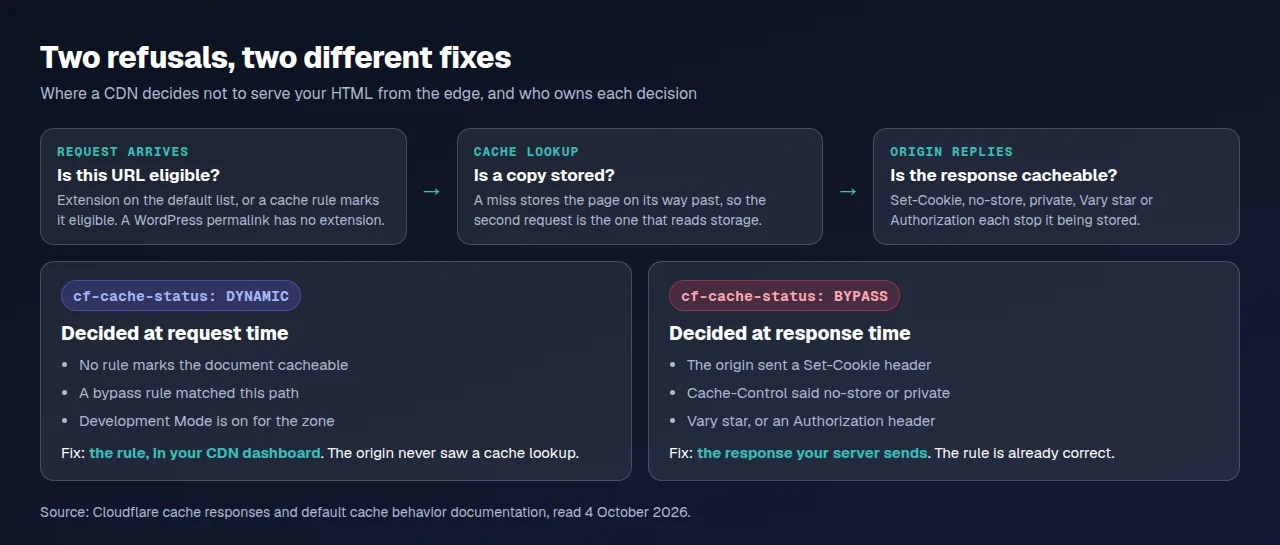
These two carry the diagnosis and are read as synonyms. Cloudflare’s documentation is explicit: DYNAMIC “is only returned when Cloudflare determines the asset is not eligible for cache at request time”, while a rule marking HTML eligible plus an origin returning a non-cacheable directive produces “CF-Cache-Status: BYPASS — not DYNAMIC”.
| Status | Decided at | Cause on a WordPress site | What to change |
|---|---|---|---|
DYNAMIC | Request time | No rule marks the document cacheable, a bypass rule matched, or Development Mode is on | The rule, in your dashboard |
BYPASS | Response time | A Set-Cookie, Cache-Control: no-store or private, a Vary: *, or an Authorization header | The response your server sends |
The Set-Cookie row bites WordPress hardest: a comment form, a session notice or a cart on a WooCommerce store can attach one to an anonymous page view. The rule is then perfect and the page still uncached.
The Age Header Settles Nothing, in Either Direction
Age looks like the clean answer and is the most misread header here. Both halves of the problem are written down. RFC 9111 section 5.1 says the presence of an Age field “implies that the response was not generated or validated by the origin server for this request”, then adds the sentence nobody quotes: “lack of an Age header field does not imply the origin was contacted”. A missing Age is evidence of nothing.
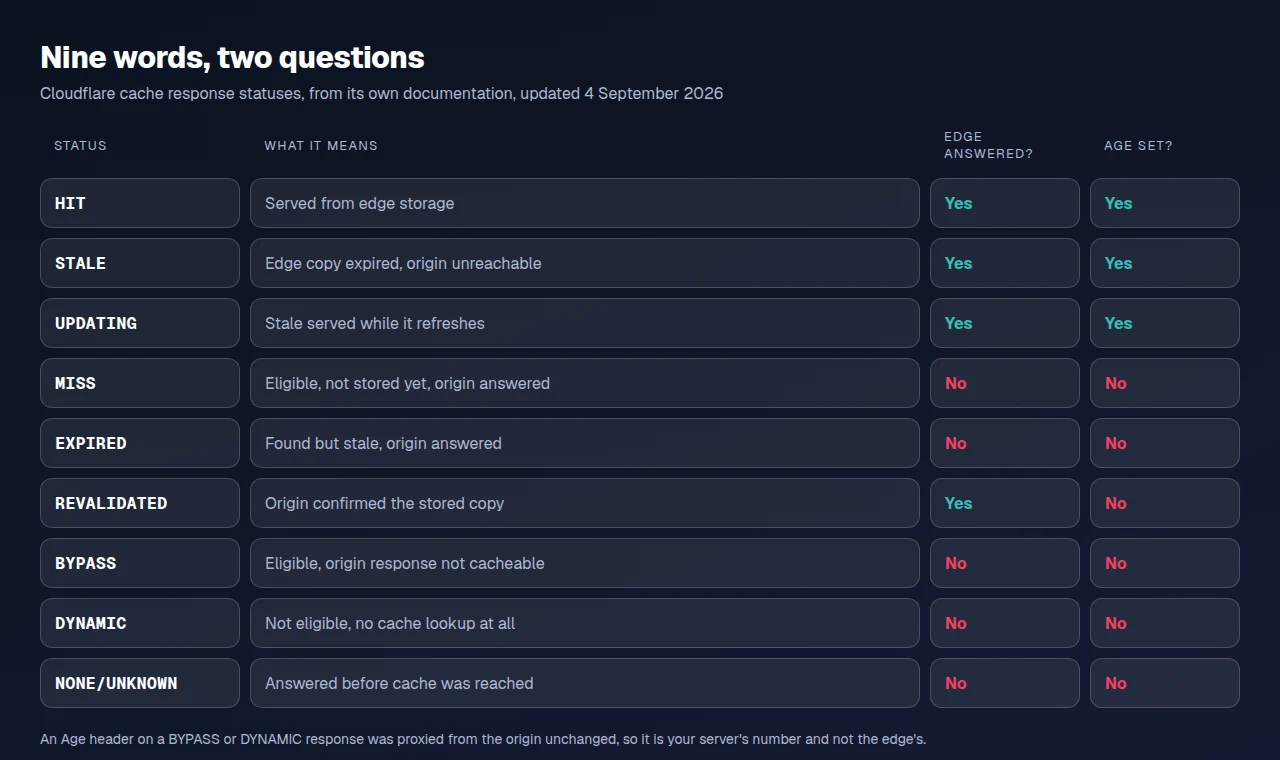
Cloudflare’s cache responses documentation, updated 4 September 2026, closes the other half. It sets Age on HIT, STALE and UPDATING, and not on MISS, DYNAMIC, BYPASS or NONE/UNKNOWN. But “if the origin sets Age on an uncacheable response, that value is proxied to the client unchanged”. An Age beside DYNAMIC came from your server. Under Tiered Cache it can also be inherited from an upper tier, so it can be older than the local copy.
Read the status word first, and use Age only on a copy already confirmed.
Send a GET, Not a HEAD, and Send It Twice
curl -I sends a HEAD request. Cloudflare’s default behavior page lists “the HTTP request method is anything other than a GET” among the conditions under which it does not cache a resource, and an origin cache can refuse a HEAD too.
Send a GET and throw the body away instead:
curl -s -D - -o /dev/null -A 'Mozilla/5.0' https://example.com/your-page/Then send it again. A first request can store the page on its way past, which is what MISS means, so only a second shows storage being read. One request can disprove a cache. It can never prove one.
The origin layer refuses a HEAD for its own reasons, and ours says so out loud. Our cache HITs and MISSes guide documents X-XSpeed-Reason: non-get as a gate producing a BYPASS, and names the HEAD request curl -I sends as a case of it. xSpeed Cache is ours, built by WPDeveloper, and that header exists to make the second verdict a read instead of a guess.
The Edge Receipt: Four Questions, One Header Each
Run these on one real post URL, never the home page, which is the URL a misconfigured rule most often gets right.
- Is a CDN in front at all? Read
serverandvia. No vendor name in either means you are reading your origin. - Did the edge look in its cache for this document? Read the vendor status.
DYNAMICorNONE/UNKNOWNmeans no lookup. - Did this response come out of storage? Read the status on a second GET.
HIT,STALEandUPDATINGqualify.MISStwice does not. - Which edge answered? Read the
cf-raysuffix,X-Amz-Cf-Popor thex-served-bycolo code, and compare it with where your audience is.
What it cannot tell you. It reads one URL, from one place, at one moment, logged out. Each data centre caches separately, so it says nothing about another continent, and a signed-in request is a different cache key.
Start With the Scan, and Check by Hand Second
Check D5, “CDN edge serves the page”, answers this for any URL in one pass. It carries 3 points of the delivery dimension, and a scan run on 4 October 2026 returned a pass with the evidence Cloudflare answered this page from its edge (cf-cache-status: HIT). It is free and needs no account.
Run the free scan on your own site: xspeedcache.com/scan/
By hand, the two-request GET above is the method. Connecting Cloudflare to WordPress covers the setup it checks, our Cloudflare guide says which parts of that panel are free and which are Pro, and Free vs Pro is the full split.
Reading the Receipt Across Twenty-Five Client Sites
Four headers per page is fine for one site and unworkable for fifty, where the question becomes which site stopped being cached. That is monitoring rather than a curl job, and xSpeed Hub is our own fleet console for xSpeed Cache sites: cache state and hit ratio per site in one view. The origin half is worth standardising too, since a page cache that names its layer makes the second verdict a read. Checking whether WordPress caching works covers it.
Common Mistakes People Make Proving a CDN Works
- Reading an asset and reporting on the document. A
HITonstyle.cssis the default and proves nothing about a page. - Testing with one request. A
MISSstores the page. The second request is the measurement. - Trusting
Agealone. Absence proves nothing and presence can be your origin’s own value.
Frequently Asked Questions
I turned on Cloudflare and cf-cache-status still says DYNAMIC on every page. What did I miss?
Nothing. This is the documented default: HTML is not on the extension list, so the document is not eligible until a cache rule says so. Cloudflare APO against an origin page cache compares the two routes.
I added a cache rule for HTML and now I see BYPASS instead. Is that progress?
Yes, and a different problem. DYNAMIC meant nothing looked. BYPASS means the lookup happened and your origin refused it, usually with a Set-Cookie or a no-store.
My curl -I says BYPASS but the page looks cached in a browser. Which one is right?
The browser, probably. curl -I sends a HEAD, and both Cloudflare’s rules and an origin cache can treat a non-GET as uncacheable. Re-run as a GET with the body discarded.
I get MISS every single time I check. What am I doing wrong?
Check whether the URL carries a query parameter, and whether you are signed in. Both change the cache key, so every request is a first one. Our cache exclusions guide covers the fields involved.
Do I still need a page cache on the origin if the edge is serving?
Yes, for every request the edge cannot serve: the first visitor in each region, signed-in sessions, anything excluded. xSpeed Cache, WP Rocket and LiteSpeed Cache all do it, and ours is free.
My scan says a CDN was detected but the edge is not serving. Is it contradicting itself?
No. Detection and delivery are separate findings, and separate lines in the report.
The Age on my page is 400,000 seconds. Should I purge?
Only if the content changed. A large Age on a HIT means the edge held a good copy for a long time, which is the point.
I cannot prove the edge is answering for a logged-in user.
Read the headers on a signed-in request and you will usually find a BYPASS. That is correct, and cached pages showing logged-in content is the failure you would rather not have.
My two probes disagree, one HIT and one MISS, within a minute.
Two data centres answered, each with its own copy. Compare the cf-ray suffix or x-served-by colo code and read them as two edges, not one flapping one.
I fixed the edge and my Largest Contentful Paint did not move.
Expected. This moves the first byte, a share of Largest Contentful Paint and not the whole of it. The split is in our CDN adoption study above.
Conclusion: Two Headers, Two Requests, One Real URL
| If you want to | Read this | On |
|---|---|---|
| Know whether an edge answered | The vendor status word | A second GET to a real URL |
| Know whose fault an uncached page is | DYNAMIC against BYPASS | The same response |
| Know which edge answered | cf-ray, X-Amz-Cf-Pop or x-served-by | Both probes, compared |
What to do this week: run the two-request GET on one real post URL, not the home page. Write down the status word and whether an Age came with it. On DYNAMIC, add a cache rule for your document. On BYPASS, find the Set-Cookie. Then scan the same URL and check that D5 agrees. If the origin half is what you cannot read, xSpeed Cache is free on wordpress.org and prints a layer-named receipt header; Pro is $29 a year at the founding price with a 14-day money-back guarantee, and the pricing page has the tiers.
If your two headers disagree in a way this does not cover, write it up. The vocabularies keep diverging.