What Counts as One Site? Nine Caching Licences, and Two Vendors Answer It Backwards

Updated November 2026
WP Rocket’s documentation lists 60 domain endings that do not count against a licence, read on 11 November 2026. FlyingPress publishes its own list of 20, and only 11 of them appear on both. Every caching plugin comparison in this field, including our own three, prices the rungs: one site, three sites, twenty-five. None of them says what a site is. That is the number that decides your invoice, because a licence sold “per site” is sold per top-level domain at one vendor, per WordPress installation at another, and per legal entity at a third. This article reads the licence unit off nine vendors’ own pages and asks five questions of each.
Quick Summary: What the Unit Changes
| If you run… | Do this | Why |
|---|---|---|
| One site, one domain | Ignore the unit entirely | Every vendor in the field counts this the same way |
| Several WordPress installs on one domain | Read WP Rocket’s definition first | It counts them as one site; W3 Total Cache counts each install separately |
| A multisite network | Price W3 Total Cache and Perfmatters | One charges once for the network, the other gates networks to its top tier |
| Staging copies you keep online | Check the vendor’s allowlist by exact suffix | Two vendors publish lists, and the lists disagree |
| Client sites you may hand back | Check the transfer term before buying | One vendor’s transfer right expires a year after assignment |
| A fleet that might shrink | Assume you cannot go down a rung | Eight of nine publish an upgrade path; one publishes a refusal |
Every figure below was read from the vendor’s own pricing page, licence page or knowledge base on 11 November 2026. Where a vendor publishes no answer the table says so, because silence on a licence term is itself the finding.
The Question Every Pricing Page Skips
Search for the cost of running a caching plugin across a network and the answer arrives as advice, not arithmetic. A WordPress multisite cost guide published by Gigapress states the position plainly: “Check vendor terms carefully: many require a separate license per domain or subsite regardless of the underlying WordPress architecture.” Kinsta’s multisite comparison notes that “even if the plugin is compatible, you might need to purchase a more expensive license to use it on multisite.”
Both are correct, and neither names a vendor. The one article in that result set that does put a number on it, a multisite hosting guide from Fatlab, prints a cost table whose plugin row reads “1 network license” for a 20-site network against “20 individual licenses” for separate installs. For W3 Total Cache that is exactly right. For Perfmatters it is wrong, because a network needs the top tier. For WP Rocket it depends on whether the sub-sites use mapped domains. One generic answer cannot be right for all three, and the specific answers sit in FAQ rows and knowledge-base articles no roundup reads.
So this is a census. Five questions, nine licences, each cell quoted from the vendor and dated.
The Unit Census: What Nine Vendors Actually Count
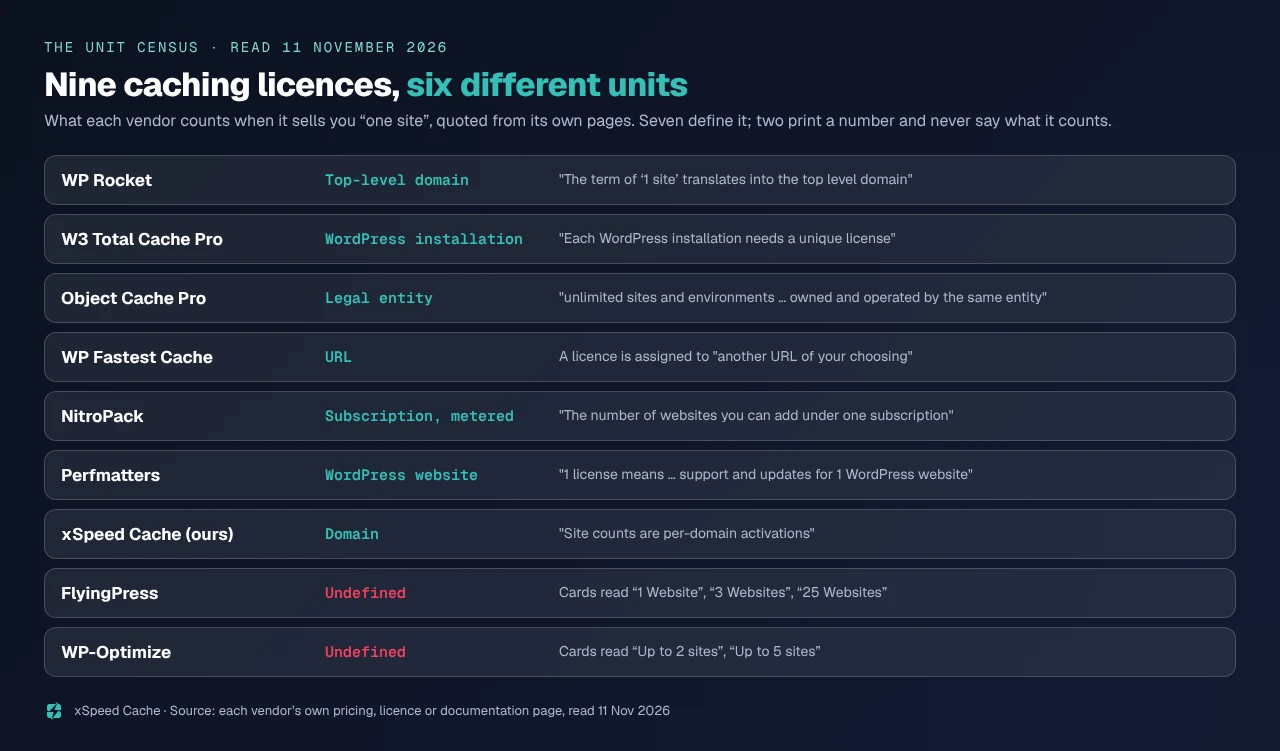
| Vendor | The unit, in its own words | Published 11 Nov 2026 |
|---|---|---|
| xSpeed Cache (ours) | “Site counts are per-domain activations you manage from your dashboard” | Per domain |
| WP Rocket | “The term of ‘1 site’ translates into the top level domain used in your WordPress Site URL” | Per top-level domain |
| W3 Total Cache Pro | “Each WordPress installation needs a unique W3 Total Cache license” | Per installation |
| Perfmatters | “1 license means you get support and updates for 1 WordPress website” | Per website |
| Object Cache Pro | “valid for unlimited sites and environments, under the condition that each site is owned and operated by the same entity” | Per entity |
| WP Fastest Cache | Tiers are labelled “Number of Licenses”; a licence is assigned to “another URL of your choosing” | Per URL |
| NitroPack | “The number of websites you can add under one subscription”, with pageviews as the metered limit | Per subscription, metered |
| FlyingPress | Cards read “1 Website”, “3 Websites”, “25 Websites”, “Unlimited Websites” | Website, undefined |
| WP-Optimize | Cards read “Up to 2 sites”, “Up to 5 sites”, “Unlimited sites” | Site, undefined |
Seven of the nine define the unit somewhere on their own properties. Two, FlyingPress and WP-Optimize, print a site count and never say what a site is, which does not make them worse licences, only harder to budget. The seven definitions are not variations on one idea. A domain, an installation, a website, an entity, a URL and a subscription are six different objects, and the same fleet lands on different numbers depending on which one your vendor means.
Two Vendors, One Scenario, Opposite Answers
The clearest way to see what a unit costs is to take one setup and price it twice.
Say you run three WordPress installations on one domain: a marketing site at example.com, a documentation install at example.com/docs, and a help centre at example.com/help.
WP Rocket’s knowledge base answers this with an example of its own. Where several installs share a top level domain, its documentation states, “they all count as 1 site, even though they are multiple WordPress installations.” One licence. W3 Total Cache answers the same question from the other end, in its own FAQ: “Each WordPress installation needs a unique W3 Total Cache license.” Three licences, which at its published $99 a year for a single site licence is $297.
Now reverse it. Run a multisite network of twenty sub-sites on one domain. W3 Total Cache’s FAQ continues: “Since Multisite is a single install, you’ll only need one license for your network of subdomains.” One licence, $99. WP Rocket cannot be network-activated at all, per the same article, and “will have to be activated on each sub-site”, though one key covers them all while they share the network’s top level domain.
| Scenario | WP Rocket’s answer | W3 Total Cache’s answer |
|---|---|---|
| 3 installs, 1 domain | 1 licence | 3 licences |
| 1 network, 20 sub-sites, 1 domain | 1 key, activated 20 times | 1 licence |
| 1 network, 20 mapped top-level domains | 20 separate keys | 1 licence |
| 3 installs, 3 domains | 3 licences | 3 licences |
The third row catches agencies. WP Rocket is explicit that mapped domains break the rule: “On a WordPress Multisite install, top level domains for your sub-sites will require multiple separate license keys, one for each of your sub-sites.” Its stated reason is honest and worth reading, because it explains the whole design: sub-sites on mapped domains “could, in fact, provide content totally unrelated to each other, and not even their domain would indicate they were part of a Multisite network.”
Two vendors, four scenarios, and the answers invert on two of them. Neither is evasive. They chose different units, and no comparison table with a “sites” column can show that.
Staging: 60 Endings, 20 Endings, 11 in Common
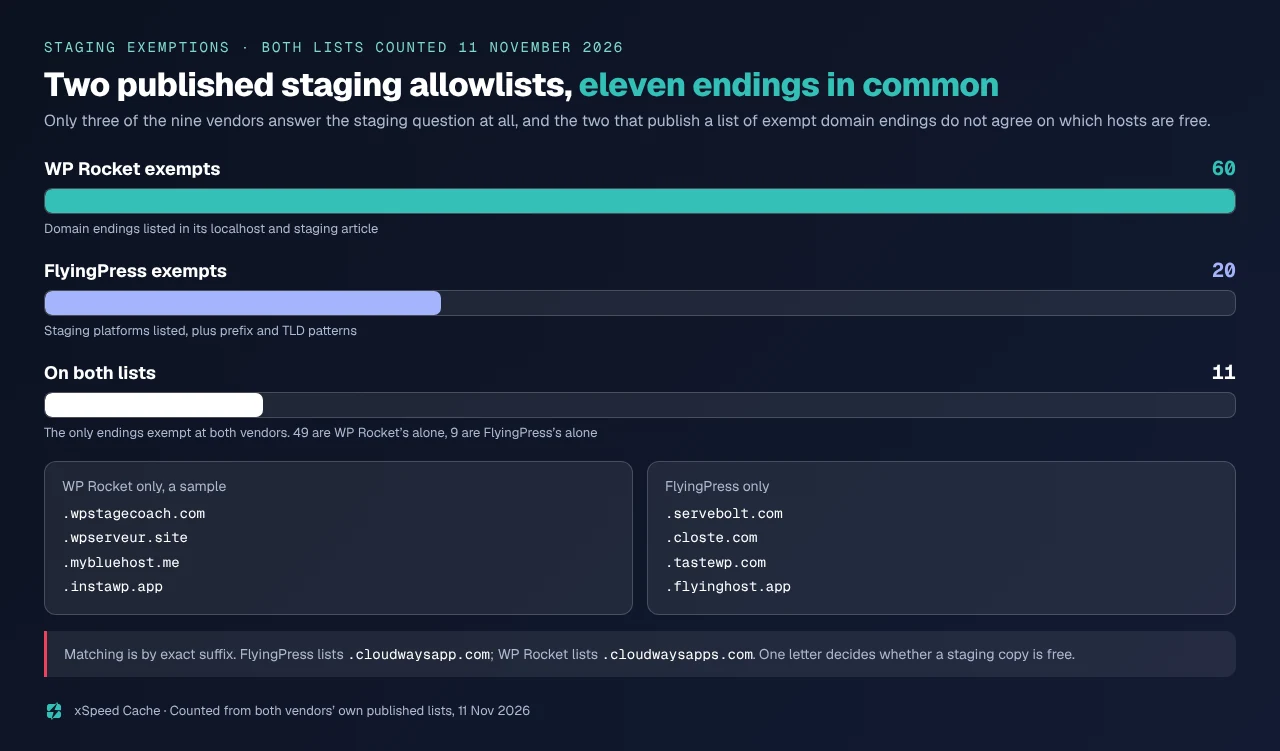
Two vendors in this field publish a list of domain endings that do not consume a licence. We counted both on 11 November 2026.
WP Rocket’s article on localhost and staging domains lists 60 endings and states that “local installations don’t count as sites for licensing purposes, although they might show up in your website list on your WP Rocket account page.” FlyingPress’s documentation, dated 23 June 2026 on the page itself, lists 20 staging platforms plus pattern rules: the TLDs .dev, .local and .test, and any domain starting dev., staging., stage., test. or testing.. Its pricing page carries the policy in one line: “Recognized staging domains do not use a license slot.”
Eleven endings appear on both lists.
| Measured on both published lists, 11 Nov 2026 | Count |
|---|---|
| Endings WP Rocket exempts | 60 |
| Endings FlyingPress exempts | 20 |
| On both lists | 11 |
| WP Rocket only | 49 |
| FlyingPress only | 9 |
The nine FlyingPress alone exempts include Servebolt, Closte, TasteWP and its own Flyinghost. The forty-nine only WP Rocket exempts include WP Stagecoach, WPServeur, Infomaniak, Bluehost, Liquid Web and three separate InstaWP endings. One discrepancy deserves a reader’s own eyes: FlyingPress lists .cloudwaysapp.com while WP Rocket lists .cloudwayssites.com and .cloudwaysapps.com, with an extra s. These exemptions match on exact suffix, so a Cloudways staging URL ending one way and not the other is the difference between a free copy and a consumed slot. Compare your own staging hostname character by character.
The other seven publish nothing on staging, with one exception that answers it by inclusion. Object Cache Pro’s licence covers “unlimited sites and environments”, and an environment is a staging copy. It is the only licence here where a staging site cannot cost anything, because counting stopped being the model.
The $29.95 Licence That Cannot Run a Network
Perfmatters answers the multisite question through its pricing table rather than its FAQ, and the answer is a price. Its three cards, read today, are 1 Site at $29.95 a year, 3 Sites at $59.95, and Unlimited Sites at $124.95. Only the Unlimited card carries the line “Multisite support”.
So the multisite answer for Perfmatters is $124.95, whatever the size of the network. A network of three sub-sites costs 4.2 times the single-site licence, not because of the count but because the architecture is gated to the top tier. Network compatibility is real engineering, so that is defensible, and it is invisible to anyone reading the site counts alone.
Put the three multisite answers side by side and the spread is the finding.
| A multisite network, 20 sub-sites, one domain | Published answer, 11 Nov 2026 | Published price |
|---|---|---|
| W3 Total Cache Pro | One licence for the whole network | $99 a year |
| WP Rocket | One key, activated on each sub-site | Single licence, $5 a month list, billed yearly |
| Perfmatters | Requires the tier that lists Multisite support | $124.95 a year |
| Object Cache Pro | Unlimited sites and environments, one entity | $950 a year |
| FlyingPress, WP-Optimize, WP Fastest Cache, NitroPack, xSpeed Cache | No published answer | Read the site count and ask |
Five of the nine, ours among them, publish nothing about what a network counts as. That is the row we are on, and the next section says what we are doing about it.
The Transfer Window That Closes While the Licence Lives On
WP Fastest Cache sells a one-time fee. Read today, its four packages are Bronze at $49 for 1 licence, Silver at $125 for 3, Gold at $175 for 5 and Platinum at $300 for 10, each marked “/lifetime”, each carrying ”∞ Support and Updates”, 10,000 image credits per licence, a 30-day money-back guarantee and a “1 year license transfer right”.
That last line is the only published transfer window in the census, and a licence that never expires is paired with a right to move it that does. Its transfer page states the window: “The window for transferring your premium license remains open for 1 year, starting from the date when you assign the premium license to any URL. After the one-year period passes, the option for transfer will no longer be available.”
A separate page on the same site, read in the same minute, says something different. The Multi License page states: “You can only transfer the premium license with image credits once. The opportunity of transferring has a deadline which ends after 1 year you bought the premium license.”
| WP Fastest Cache transfer terms, both read 11 Nov 2026 | Transfer page | Multi License page |
|---|---|---|
| How many transfers | Not stated | “only… once” |
| When the clock starts | When you assign the licence to a URL | When you bought the licence |
| Window | 1 year | 1 year |
Those two clocks are not the same clock. Buy a Platinum package of ten licences, assign four this month and six next year, and the assignment clock gives the late six a window that the purchase clock has already closed. Nothing is being hidden. Two pages were written at different times and nobody re-read them together, which is what our own vendor term volatility study found across this field: the pages a vendor uses least carry its oldest terms.
The practical reading is the conservative one. Buying a one-time licence to move later means assigning it the day you buy it, moving it inside twelve months, and asking support in writing which clock governs you.
Eight Ladders Go Up, One Says You Cannot Come Down
Every vendor in this census documents how to pay more. WP Rocket’s FAQ: “if you would like to add more sites to your account you can upgrade and you’ll just pay the difference in cost.” Perfmatters: “You can easily upgrade your license at any time from within your account. The new amount will automatically be prorated.” Our own pricing page: “Move up a tier at any time and pay only the difference.”
One vendor documents the other direction, and the answer is no. NitroPack’s FAQ, read today, ends its upgrade answer with four words: “Downgrades are not available.”
That makes NitroPack the only vendor here that says what happens when a fleet shrinks. The other eight are silent, and silence is not a prohibition. It means the answer lives in a support conversation rather than on a page, which is fine on a $29 licence and expensive on a fleet. An agency that loses four of twenty-five clients finds out at renewal.
Its unit is not a site at all. Two more NitroPack terms belong in a unit census for that reason. Its plan cards, read today, cover 1 website on Starter at $7 a month billed annually, 1 on Plus at $18, 3 on Pro at $83, and a custom count on Agency. Three of its four paid tiers cover exactly one website across a twelve-fold price range, because what the money buys is pageviews: 8,000 a month on Starter, 40,000 on Plus, 540,000 on Pro. The limit that bites is stated plainly: “If you exceed your plan’s limits, NitroPack will stop optimizing your site until the next billing cycle.” The same answer continues, and the two halves must always travel together: its Resource Overages feature “allows you to set a budget for additional resources.” With no overage budget set, running out is a silent performance cliff. With one, performance holds and the invoice moves instead.
The Unit Test: Five Questions Before You Pick a Rung
This is the framework the census produces, and it takes about ten minutes against any vendor’s site. Ask five questions, in this order, and write down whether the vendor answers or is silent.
- What is the unit? A domain, an installation, a website, a URL or an entity. If the page only prints a number, the unit is undefined and everything below is a support conversation.
- Does a staging copy consume one? Look for a published list of endings, then match your own staging hostname against it by exact suffix.
- Does a network count once or per sub-site? Then ask the follow-up that changes the answer: do any sub-sites use mapped top-level domains?
- Can the licence move? When a client leaves, does the seat release, and is there a deadline on moving it.
- Can the tier go down? If the page documents only upgrades, assume no and price accordingly.
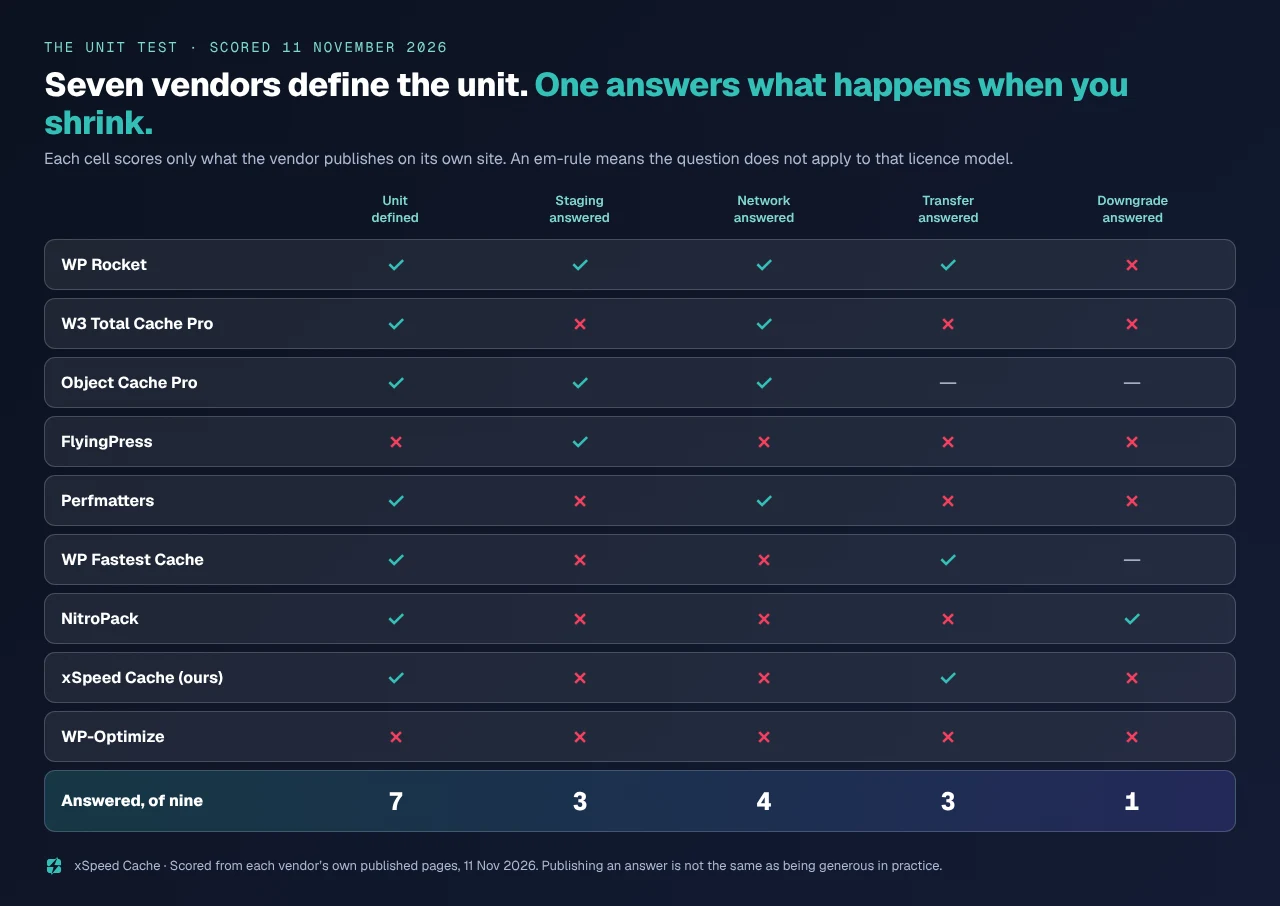
Here is the census scored on those five, counting only what each vendor publishes.
| Vendor | Unit defined | Staging answered | Network answered | Transfer answered | Downgrade answered |
|---|---|---|---|---|---|
| WP Rocket | ✅ | ✅ | ✅ | ✅ | ❌ |
| W3 Total Cache Pro | ✅ | ❌ | ✅ | ❌ | ❌ |
| Object Cache Pro | ✅ | ✅ | ✅ | — | — |
| FlyingPress | ❌ | ✅ | ❌ | ❌ | ❌ |
| Perfmatters | ✅ | ❌ | ✅ | ❌ | ❌ |
| WP Fastest Cache | ✅ | ❌ | ❌ | ✅ | — |
| NitroPack | ✅ | ❌ | ❌ | ❌ | ✅ |
| xSpeed Cache (ours) | ✅ | ❌ | ❌ | ✅ | ❌ |
| WP-Optimize | ❌ | ❌ | ❌ | ❌ | ❌ |
| Answered, of nine | 7 | 3 | 4 | 3 | 1 |
An em-rule means the question does not apply: Object Cache Pro counts entities rather than seats, so transfer and downgrade have nothing to move or lower, and WP Fastest Cache’s one-time fee has no tier to come down from.
What this framework does not measure, and it matters. It scores what a vendor publishes, not what support will agree to. A silent answer is often a generous one in practice, and several of these vendors will move a seat or waive a staging copy if asked. It scores clarity rather than value, so a licence with five published answers can still be the wrong purchase. And it is one day’s reading: our own study of this field found commercial terms changing inside four days, so re-read the two or three pages that decide your invoice rather than trusting any table, this one included.
Where Our Own Licence Page Is Silent, and What It Costs a Fleet
We build one of these, so here is our own row read the same way, from our own pages, with nothing softened.
Our pricing page defines the unit, and it is the only one of the five questions it answers: “Site counts are per-domain activations you manage from your dashboard.” The tiers are 1 site on Personal, 5 on Business, 25 on Agency and unlimited on Enterprise. Transfer is answered, though not where a buyer would look for it. Our licence activation documentation states that Deactivate “releases the licence from this site”, and that “most licences are seat-limited, so the old site must release it before the new one can claim it”, which is the clean answer to handing a client site back.
Then the gaps, and there are three.
| Question | What our pages say today | The honest reading |
|---|---|---|
| Staging | No policy published; the licence doc warns only that “a cloned site carrying an active licence can confuse seat counting” | A staging copy on a separate domain consumes an activation |
| Multisite | A network panel that aggregates caching across a network, and no licence answer | Unknown from our pages; ask before you buy for a network |
| Downgrade | Moving up a tier is documented; moving down is not mentioned | Assume a support request, not a self-serve change |
Two of five, which is better than WP-Optimize and worse than WP Rocket. WP Rocket’s 60-entry staging allowlist is a straightforwardly better piece of documentation than anything we have shipped on this axis, and saying otherwise would make the rest of this article worth less.
One more thing a buyer should see. Our pricing page carries “50% off all paid plans for the first 6 months” beside “launch lifetime pricing, for a limited time”, and the yearly cards are labelled “50% off for 6 months” while being billed annually. A six-month discount on a twelve-month invoice is not a term anyone can act on, our three-year cost comparison flagged it in October, and it is still live today.
What our tiers do suit is the shape of the problem rather than the clarity of the page: Agency covers 25 per-domain activations, the MCP server and xSpeed Hub ship in every plan including the free one, and agencies and freelancers is the use case that tier was built around. The 80-capability comparison sets each tier against the field, and Free vs Pro says which capabilities need a licence at all.
Run the free scan on your own site: xspeedcache.com/scan/
Common Mistakes Agencies Make Reading a Licence Page
- Reading the site count and stopping. The count is the rung. The unit is the price.
- Assuming a subdomain is free. It is at WP Rocket, where the unit is the top-level domain. Our page counts per-domain activations, and a subdomain is a different hostname.
- Assuming a multisite network is one licence. It is for W3 Total Cache, not for Perfmatters below its top tier, and not for WP Rocket’s mapped-domain sub-sites.
- Trusting a staging exemption without matching the suffix. An extra
sis the whole exemption. - Buying a one-time licence as a transferable asset. WP Fastest Cache’s transfer right expires; the licence does not.
- Planning to downsize later. Eight of nine publish no downgrade path, and the one that mentions it refuses.
- Taking a rival’s comparison page as a source for its price. Vendors update those pages last.
Frequently Asked Questions
My agency runs 25 client sites on 25 domains. How many licences do I need?
Twenty-five, at every vendor here, because each counts a separate domain as a separate unit however it words the rule. The unit only changes the answer when sites share a domain, share an installation, or are not production sites. For what those 25 cost over three years, our three-year cost comparison prices the field and does the arithmetic this article does not repeat.
I have three WordPress installs on one domain. Am I paying once or three times?
It depends entirely on the vendor, and this is the clearest case in the census. WP Rocket’s documentation counts them as one site because they share a top-level domain. W3 Total Cache’s FAQ says each WordPress installation needs its own licence. Same setup, one licence or three, so read the definition before the price.
My staging site is on a subdomain of my live site. Does it use a licence slot?
Check two things in this order. First, whether your vendor publishes a staging allowlist at all, since only three of the nine answer the question. Second, whether your staging hostname ends with an exact suffix on that list, because a subdomain of your own live domain usually does not, while a host-provided staging URL usually does.
I bought a lifetime licence two years ago and now want to move it to a new site. Can I?
At WP Fastest Cache, no. Its transfer right runs for one year, and its two pages disagree on whether the clock starts at purchase or at assignment, so a two-year-old assignment is outside the window on either reading. At most seat-based licences, including ours, deactivating on the old site releases the seat for a new one with no deadline published, but confirm with the vendor rather than with this table.
I need to drop from 25 sites to 10 at renewal. What happens?
NitroPack states that downgrades are not available. The other eight publish nothing, which usually means it is a support request rather than a self-serve change. Ask before renewal rather than after, because a renewal processed at the old tier is a refund conversation.
My multisite network uses a different domain for each sub-site. Does that change anything?
At WP Rocket it changes everything: mapped top-level domains require one key per sub-site, per its own documentation, which turns a single network into as many licences as it has mapped domains. At W3 Total Cache the network is still one installation and still one licence. If you are planning domain mapping, price it before you build it. The WordPress multisite documentation explains why the two are architecturally the same network and commercially are not.
I only run one site. Does any of this matter to me?
Almost none of it. One site on one domain with no staging copy is counted identically by all nine vendors, so pick on features, support and renewal cost instead. Our free caching plugin roundup is the better starting point, and six of the eleven plugins in that field have no paid tier at all.
Which vendor defines its licence most clearly?
WP Rocket, on this axis, and it is not close. It answers four of the five questions, publishes a 60-entry staging allowlist, documents the multisite and mapped-domain cases separately, and defines “1 site” in a sentence. We answer two of five. If published licence clarity is what decides your purchase, that is the honest recommendation, and it is a competitor.
Does an expired licence still count against my site total?
That is a different question with a different shape, and the answers split four ways across the field rather than along the unit. Our census of what stops when you stop paying reads every lapse term in this same group of vendors: two keep everything working, four degrade, three switch off, and one publishes no answer at all.
Where does the object cache fit in all this?
Object Cache Pro is the one licence in the census that stopped counting sites. Its FAQ says the standard licence is valid for unlimited sites and environments provided each is owned and operated by the same entity, and that it “does not allow redistribution”, which rules out agency use on the standard plan. At $95 a month, or $950 a year, that is a different market from a $49 plugin licence, and our free Redis drop-in against Object Cache Pro covers that pair properly.
Our site is on a host with its own caching. Do I need any of these licences?
Possibly not, and that is worth settling before pricing a unit. Managed hosts ship page and object caching, sometimes as a paid line item. Our comparison of caching plugins against managed hosting works through where a plugin still earns its licence and where it duplicates what you already pay for.
Conclusion: Count Your Sites the Way Your Vendor Counts Them
Nine licences, five questions, and the scoreboard reads seven, three, four, three, one. The unit itself is defined more often than not. Everything downstream of it, the staging copy, the network, the handover and the shrink, is published by a minority and assumed by almost everyone.
The decision this census points to is small and it is not about price. Before picking a rung, count your sites the way your vendor counts them, and write the count next to the quoted sentence that produced it. Then check what else recurs beside the licence: our monthly-bill census counts fifteen recurring lines across seven billing units, and the licence is rarely the largest of them. Nine fleets of twenty-five sites can need nine different licence counts, and the count is never on the pricing page.
What to do this week:
- List every WordPress install you run with its hostname, and mark which share a domain and which are staging copies.
- Find the sentence on your vendor’s site that defines a site. If there is none, email support and keep the reply.
- Match every staging hostname against your vendor’s allowlist by exact suffix, including the final
s. - If you use domain mapping on a network, price it separately before your next renewal.
- If licence clarity is what you are buying, WP Rocket documents this axis best of the nine, and FlyingPress is the one to read if staging copies are most of your fleet. If what you want is 25 per-domain activations, a lifetime option and an MCP server in every tier, xSpeed Cache Agency is $99 a year at the launch price or $249 once, with a 14-day money-back guarantee, and our row on this scorecard has three gaps we have now written down.
Run the scan, count your hostnames, then read one page per vendor. The unit costs ten minutes of reading, and it is the only number on a pricing page that is not printed on it.