The First Byte Is Fast and the Page Still Is Not: LCP Has Four Parts and You Fixed One
Updated September 2026
Google’s Largest Contentful Paint guide, fetched on 23 September 2026, puts time to first byte at roughly 40% of a well-optimised LCP. Our own scan archive of 413 WordPress sites, published on 10 September 2026, found that subtracting each site’s entire server response left 93.4% of failing pages still failing. A fast first byte is a smaller share of the wait than it feels like.
The question people ask is which cache setting is still wrong. The more useful question is which of the other three parts of the wait belongs to this page, because a good TTFB settles one of four. This covers a WordPress page whose server answers quickly and whose visitors still watch an empty screen.
Quick summary: which part of the wait is still yours
| If the LCP breakdown shows… | Do this | Why |
|---|---|---|
| Resource load delay over 10% | Put the hero image in the HTML source | The browser cannot fetch what the preload scanner never saw |
| Element render delay over 10% | Shrink or inline the render-blocking CSS | The image finished and the paint is still blocked |
| Load duration taking most of it | Serve a smaller hero from your own origin | The only part that is genuinely bytes on the wire |
Jump to: confirm the server · the four parts · discovery · render delay · FAQ
Confirm the server is genuinely not the problem
Read the server half once, from outside, before changing an optimization setting.
curl -s -o /dev/null -w 'dns %{time_namelookup} tls %{time_appconnect} ttfb %{time_starttransfer}\n' https://example.com/Per web.dev’s Time to First Byte guide, fetched on 23 September 2026, good values are 0.8 seconds or less and poor values are greater than 1.8 seconds. Under 0.8 with a page that still feels slow, the server is answered for; which phase of that number moved is covered in what silently changes when you move hosts.
Then get what TTFB cannot show you. PageSpeed Insights and the Chrome DevTools performance panel both name the LCP element and the four timings behind it. Our own free xSpeed Scan grades the same page from outside and needs no account.
LCP has four parts and TTFB is only the first
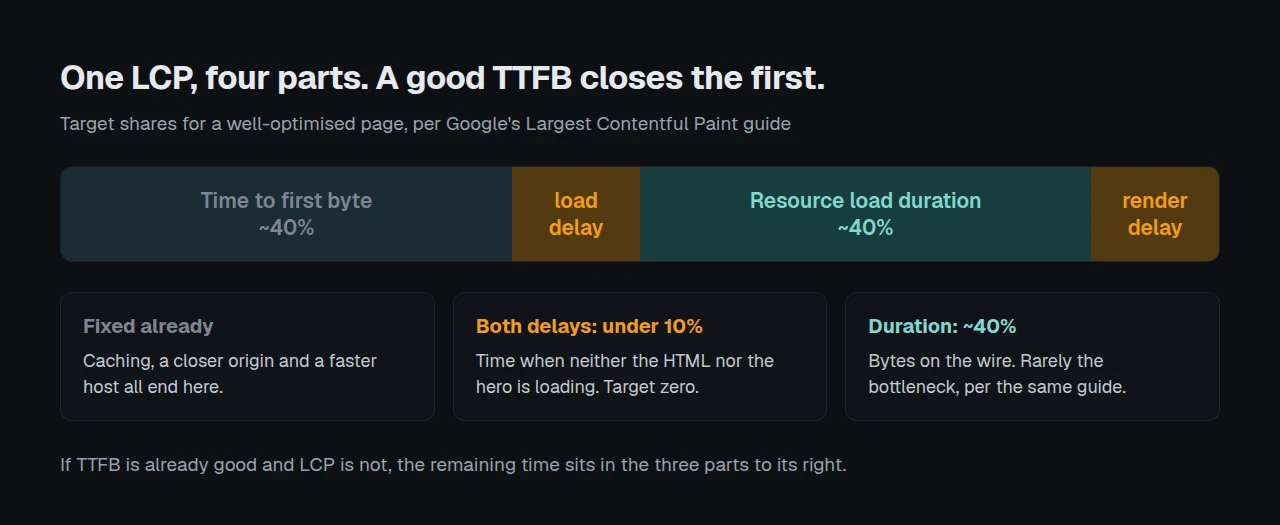
According to Google’s LCP guide, a well-optimised page splits its Largest Contentful Paint roughly like this.
| Subpart | Share | What it means when TTFB is fine |
|---|---|---|
| Time to first byte | ~40% | Settled. Nothing left to win here |
| Resource load delay | under 10% | The browser found the hero late |
| Resource load duration | ~40% | The hero is large, distant or competing |
| Element render delay | under 10% | Something else is holding the paint |
Two of the four carry the word “delay”, and the guide is explicit that both belong near zero. If either is large, more server work cannot help, because the server already finished. The same guide reports that load duration “tends not to be a significant bottleneck for most sites”, which puts resource load delay first in most WordPress cases.
Discovery: the browser cannot fetch what it has not found
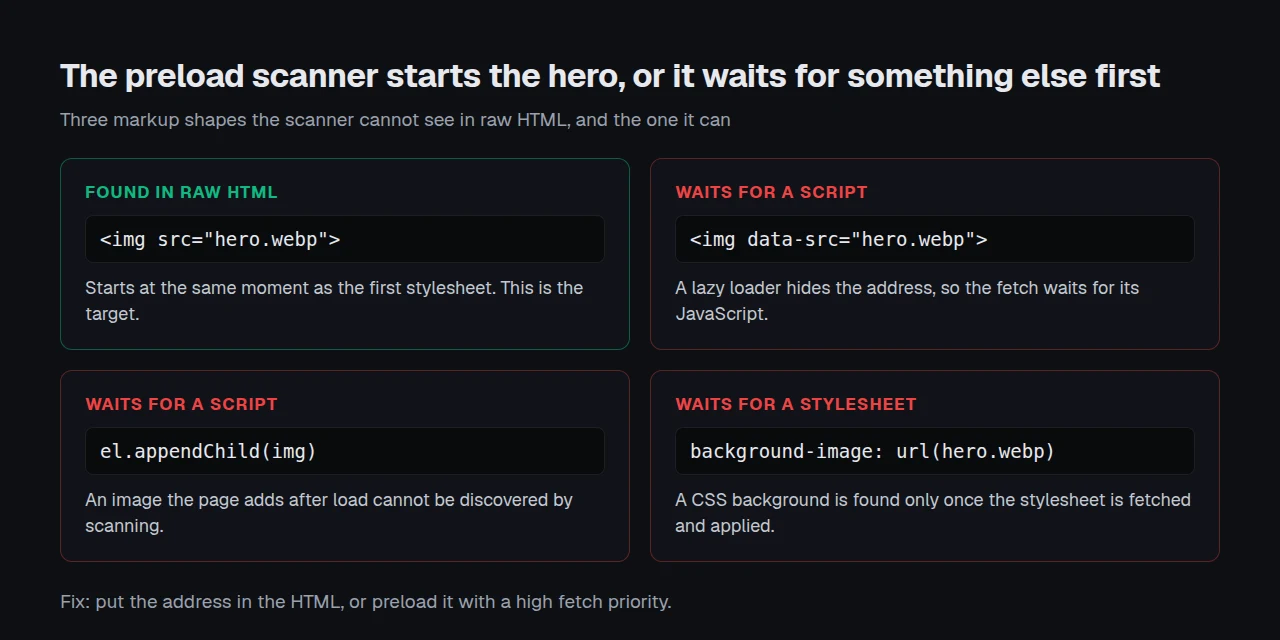
The preload scanner reads raw HTML before anything executes, so it starts the hero the moment a src appears there. The LCP guide names three shapes it cannot see: an <img> JavaScript adds later, a lazy loader hiding the address in data-src, and a CSS background image. Each forces the browser to fetch and run a stylesheet or a script before it can discover what your visitor is waiting for.
This is where xSpeed Cache has been wrong, repeatedly and on the record.
| What went wrong | Release |
|---|---|
| The LCP preload picked the first image on the page instead of the largest, so it competed with the real hero | our 1.1.4, 9 August 2026 |
| An image the theme had already marked as most important was still lazy-loaded | our 1.2.1, 27 August 2026 |
| The preload picked a brand logo over the page’s real hero image | our 1.3.0, 13 September 2026 |
Each shipped inside a feature sold as an LCP optimization, and each made a page slower while the server numbers stayed good. Check what yours preloaded rather than trusting the label. For an image no detector can see, use a manual preload list, which our 1.3.0 notes added. For a lazy-loaded hero, stop: the guide says lazy-loading that image always adds load delay.
Render delay: the resource is ready and nothing paints
The hero can finish downloading and still sit invisible. Google’s guide gives four causes: stylesheets or synchronous scripts in the <head> still loading, an element JavaScript has not added yet, code hiding it, and long tasks on the main thread. The last one surprises people, and the guide states why: all browsers today render images on the main thread.
On WordPress the common version is a web font. Our own xSpeed Cache 1.0.2 notes, dated 2 June 2026, added font-display: swap to enqueued fonts so visible text does not wait on a slow Google Fonts response, and 1.3.0 moved font stylesheets out of the render path. If your LCP element is a heading, that font file is the resource.
Deferring a stylesheet can also break the layout depending on it, which the theme that looks unstyled after a minify change and common problems and troubleshooting both cover.
One page, or every page you publish
A single slow page is usually a wrong image in one template. The same reading across twenty sites is a setting, and if a version bump moved it everywhere, no per-site fix moves it back. xSpeed Hub reads those numbers across a fleet from one place. It is ours, built by WPDeveloper, a Startise company.
Run the free scan on your own site: xspeedcache.com/scan/
Common mistakes after a clean TTFB reading
- Adding more caching. The cache ends at the first byte, and 93% of slow sites stay slow with the server removed.
- Compressing the hero again. Load duration is rarely the bottleneck, and 48% of sites have under 100ms of cache headroom to spend anywhere.
Frequently Asked Questions
My TTFB is 180ms and PageSpeed still reports a four-second LCP. Where is the time going?
Into the three subparts after the first byte. Open the Largest Contentful Paint element diagnostic, read the two delays first, and treat anything over 10% of the total as your answer.
I set fetchpriority="high" on my hero and nothing changed. What did I miss?
Priority only helps a resource the browser has already found. If the hero arrives through JavaScript, a data-src lazy loader or a CSS background, the scanner never saw it and the attribute never applied. Put the address in the HTML, or preload it.
My LCP element is a heading, not an image. Does any of this still apply?
It does, with the font as the resource. Per our 1.0.2 release notes, font-display: swap stops visible text waiting on the font response, and preloading the file that heading needs removes the discovery delay the same way a hero preload does.
I turned lazy loading on for every image and my LCP got worse. Why?
Because it included the hero. Google’s guide is unambiguous that lazy-loading the LCP image always adds unnecessary load delay, and our 1.2.1 notes record us shipping that mistake ourselves.
I moved my images to a CDN and the delay did not move. What now?
A CDN shortens load duration, which was probably not the problem. A third-party host also adds a connection to a new origin before the image’s first byte, so the guide recommends serving critical images from the same origin as the HTML.
Conclusion: the server stopped being the answer a while ago
A good TTFB proves one thing and is routinely read as proving four. The rest of the wait is discovery, blocking and bytes, and the breakdown names which one you have.
What to do this week:
- Open the LCP element diagnostic on your slowest page and write down all four timings.
- View source and check the hero address is in the HTML, not in a script, a
data-srcattribute or a stylesheet. - If you would rather this were handled than audited, xSpeed Cache preloads the LCP candidate, defers fonts out of the render path and keeps the first viewport out of lazy loading. Free to start, Pro $29 a year at the founding price with a 14-day money-back guarantee. Free vs Pro shows where the line falls and pricing has the rest.